Table of Contents
Expandi vs Reply.io is a comparison between a dedicated LinkedIn automation tool and an AI sales engagement platform. Expandi costs $99 per LinkedIn account a month with every feature on one plan. Reply.io starts from $59 per user a month for email, sells LinkedIn automation as a $69 add-on, and starts Multichannel from $99 per user.
Last checked: October 2026. Prices and features taken from the official Expandi pricing page, FAQ, and Terms (checked October 2026) and the Reply.io pricing page (checked October 2, 2026). Prices change, so confirm them on each vendor site before buying.
Want LinkedIn automation running during the trial itself? Test Expandi on one account for seven days.
Start Your 7-Day Expandi Trial →Seven-day trial on the first subscription · dedicated country-based IP for each account · cancel anytime
Expandi vs Reply.io: Which Fits a LinkedIn-Led Sales Team?
Expandi vs Reply.io is a choice between a dedicated LinkedIn automation tool and an AI sales engagement platform. Expandi suits sales teams that prospect mainly on LinkedIn at $99 per account, while Reply.io suits teams that want email, LinkedIn, calls, and SMS in one platform, or an AI SDR that runs sequences.
The two products overlap on a single channel and diverge everywhere else. Expandi spends its whole feature set on LinkedIn: campaign formats, a sequence builder with conditions, warm-up pacing, and a fixed IP address for each connected profile. Reply.io treats LinkedIn as one step among several, alongside unlimited email mailboxes, a dialer, SMS, and an AI agent tier priced separately.
The short answer turns on scope, because one product goes deep on a single network and the other spreads across channels and adds an AI agent on top.
What Is the Core Difference Between Expandi and Reply.io?
The core difference is specialization. Expandi is a cloud tool whose single plan is built around LinkedIn campaigns and account safety. Reply.io is a sales engagement platform with an email plan, a multichannel plan, and Jason AI SDR, where LinkedIn automation is either a paid add-on or part of a higher plan.
That framing matches how the category is usually described. A sales engagement platform coordinates every buyer-facing touch in one place, while a channel specialist accepts a narrower scope in exchange for depth. Five differences follow from that choice.
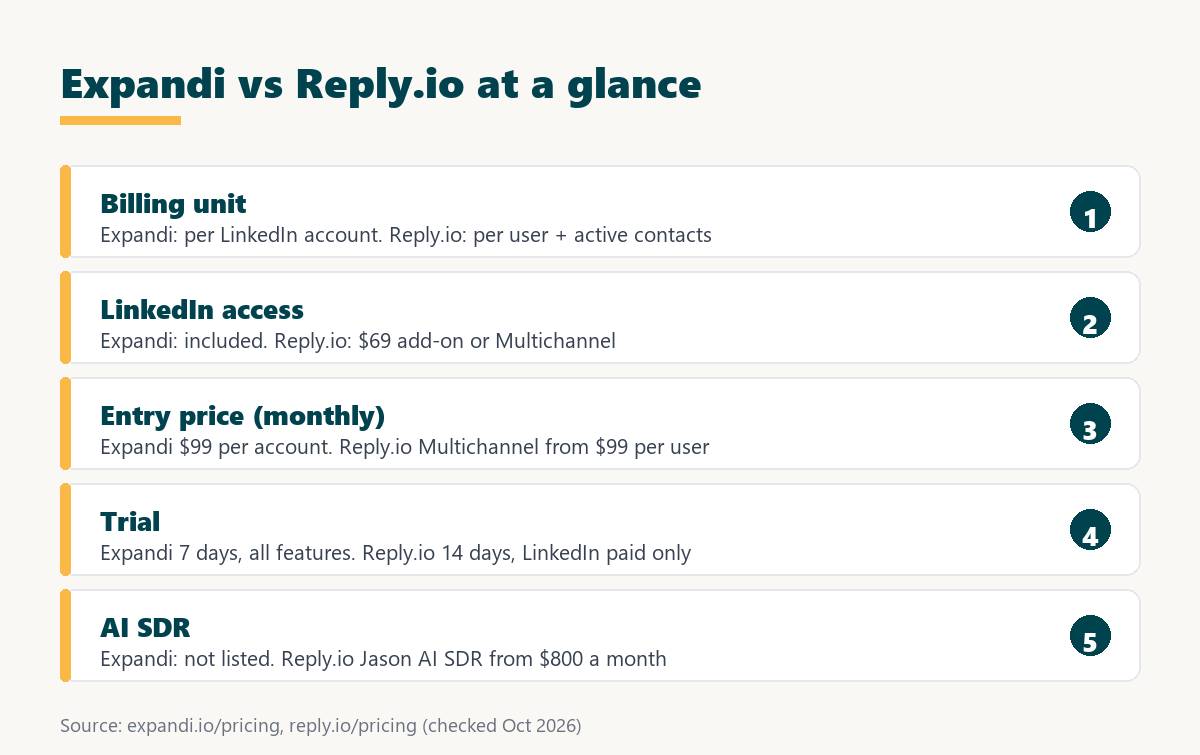
- Product focus: Expandi concentrates on LinkedIn campaigns and safety controls, while Reply.io covers email, LinkedIn, calls, and SMS and adds an AI SDR product on top.
- Billing unit: Expandi bills each connected LinkedIn account, while Reply.io bills each user and scales its starting prices with the number of active contacts reached monthly.
- LinkedIn access: LinkedIn automation is the Expandi product itself, whereas Reply.io unlocks it through a $69 add-on on Email Volume or through the Multichannel plan.
- Plan structure: Expandi sells one Business plan plus a quoted Agency tier, while Reply.io splits its range into Email Volume, Multichannel, and Jason AI SDR products.
- Trial scope: The Expandi seven-day trial includes all features, while the Reply.io fourteen-day trial excludes LinkedIn automation, which requires a paid subscription.
Both products ultimately serve the job Wikipedia assigns to sales development teams:
“setting up qualified meetings between a salesperson and a potential buyer”
Wikipedia, Sales development
Both tools exist to set up meetings for sellers, yet one does it through a single channel in depth and the other through a broader platform with more moving parts.
How Much Does Expandi Cost per LinkedIn Account?
Expandi costs $99 per LinkedIn account a month, or $79 per account a month when billed annually, which is a 20% saving. LinkedIn automation is the product itself, so nothing has to be added to unlock it, and the seven-day trial covers the full Business feature set.
Expandi’s own FAQ states the figure in one line: “Expandi costs 99 USD per account per month” (Expandi FAQ). The Agency tier starts at ten LinkedIn accounts and is quoted by sales, with a dedicated Customer Success Manager. Two personalization add-ons, image and GIF personalization and video personalization through Sendspark, are paid extras with no published price, and taxes are added by billing country.
Two contract terms shape the real cost. The Terms limit the seven-day trial to the first subscription on a user account, and they state that subscription fees are nonrefundable unless required by law. Cancellation is open at any time, so monthly billing is the lower-risk way to begin.
Expandi has no add-on step for LinkedIn, so the published per-account rate is the complete cost of automating that channel before tax and optional personalization extras.
How Does Reply.io Price Its Plans?
Reply.io pricing is a starting rate that rises with active contacts. Email Volume starts from $59 per user a month, Multichannel starts from $99 per user a month, and Jason AI SDR starts from $800 a month, all on monthly billing, with lower effective rates when billed annually.
The Reply.io pricing page shows two tabs, Sales Outreach and AI SDR, each with a monthly and an annual toggle. Annual billing on Sales Outreach is labeled “save up to 17%”: Email Volume drops to $49 and Multichannel to $89 per user a month, billed annually. The five pricing components below define what each route buys.
- Email Volume plan: pricing starts from $59 per user a month at 1,000 active contacts and includes unlimited mailboxes under a fair usage policy, plus warmup on every mailbox.
- LinkedIn Automation add-on: Reply.io sells LinkedIn steps on Email Volume as an add-on priced at $69 a month for each LinkedIn account connected to the platform.
- Calls and SMS add-on: Calls and SMS Automation is a separate add-on at $29 a month per account, which keeps phone and text outreach out of the base email price.
- Multichannel plan: Multichannel starts from $99 per user a month and bundles email, LinkedIn, calls and SMS, semi-automated WhatsApp, and a Zapier step with unlimited active contacts.
- Jason AI SDR: The AI SDR product starts from $800 a month at 1,000 active contacts on monthly billing and lists unlimited users with autopilot and copilot modes.
Reply.io summarizes the Multichannel pitch on the same page:
“All-Inclusive outreach via Email, LinkedIn, SMS, and Phones at one fixed price.”
Reply.io pricing page
Reply.io lists every price as a starting point, so the real quote depends on how many active contacts a team plans to reach each month.
How Do Expandi and Reply.io Prices Compare Side by Side?
The two price lists meet at the same number and differ in what it buys. Expandi charges $99 per LinkedIn account a month, and Reply.io Multichannel starts from $99 per user a month with email, calls, and SMS included, while its AI SDR product starts far higher.
Source: expandi.io/pricing and expandi.io/faq (checked October 2026); reply.io/pricing (checked October 2, 2026). Reply.io prices are “starts from” figures at the lowest active contacts tier.
Expandi and Reply.io Multichannel both show $99 a month, but Expandi bills per LinkedIn account on one plan and Reply.io bills per user from a starting rate that scales with active contacts.
That distinction is the whole story of the SaaS pricing model behind each tool. A per-account fee tracks how many LinkedIn profiles send; a per-user fee with contact tiers tracks headcount and audience size.
Matching headline prices hide different units, so a manager should count LinkedIn accounts for one vendor and users plus contact volume for the other.
What Does LinkedIn Automation Cost in Each Tool?
LinkedIn automation cost is the monthly amount needed before a tool can send connection requests and messages. Expandi includes it at $99 per account, while Reply.io offers two routes: the $69 per account add-on on top of Email Volume, or the Multichannel plan that starts from $99 per user.
Source: expandi.io/pricing (checked October 2026) and reply.io/pricing (checked October 2, 2026). The $128 figure is calculated from two listed prices for one user and one LinkedIn account at 1,000 active contacts; it is not a listed bundle.
Expandi is the only route here where LinkedIn automation runs during the trial, while Reply.io reserves its LinkedIn automation for paid subscriptions on both the add-on and Multichannel routes.
The trial rule matters as much as the price, because a team cannot judge LinkedIn results in Reply.io until the first invoice has been paid.
What Does Dedicated LinkedIn Automation Mean in Expandi?
Dedicated LinkedIn automation is software whose whole feature set serves one network. Expandi runs from the cloud for each connected account and lists eight campaign types, an if and action sequence builder, dynamic placeholders, step-by-step campaign statistics, a dedicated country-based IP address, and automatic profile warm-up.
- Campaign types: eight LinkedIn formats, including Connector, Messenger, Group, and Event Invite, give one account several ways to open a conversation with a prospect.
- Dedicated country-based IP: each connected account sends from a fixed IP address in its own country, which the Expandi help center says every user receives.
- Profile auto warm-up: the help center describes a ramp that starts at 5 actions a day and rises by 3 every two days until it reaches 21.
- Sequence builder: an if and action builder branches each sequence on events such as an accepted connection, adding messages, email steps, and engagement actions.
- Campaign statistics: step-by-step statistics show where each sequence loses prospects, so the weak message can be rewritten without rebuilding the whole campaign.
The help center also sets working limits: up to 5,000 leads in one campaign and 15 active campaigns at a time on an account. A new campaign can take up to 45 minutes to begin sending after activation.
Specialization shows up in the details a seller meets daily, from warm-up pacing to campaign formats that exist only because the product targets one network.
What Does AI Sales Engagement Mean in Reply.io?
AI sales engagement is a platform approach where software plans and sends touches across several channels. Reply.io lists email, LinkedIn, calls, SMS, and semi-automated WhatsApp on Multichannel, and its Jason AI SDR product adds autopilot and copilot modes, AI personalization, and intent signals with unlimited users.
The AI layer is where the two products separate most. An AI SDR drafts and sends outreach with less human input, which Reply.io prices as its own product rather than as a feature of Multichannel. Reply.io also advertises a contact database it describes as “1+ billion B2B contacts” and includes 50 Live data credits a month on Email Volume and Multichannel. Expandi does not list calls, SMS, WhatsApp, or an AI agent on its pricing page.
HubSpot’s guide to the category quotes Firmable’s head of sales on what a platform can and cannot fix:
“If the targeting is weak or the messaging is generic, the platform just helps you scale that faster.”
Chester Thompson, quoted by HubSpot
Reply.io aims to replace several point tools with one platform, which appeals to managers who want fewer logins and are willing to pay for the AI layer.
How Does Each Tool Handle LinkedIn Account Safety?
LinkedIn account safety is the set of controls that keep automated activity inside limits LinkedIn tolerates. Expandi documents a dedicated country-based IP for each account and a warm-up that starts at five actions a day, while the Reply.io pricing page does not say how its LinkedIn automation runs or which IP it uses.
Neither vendor can promise immunity. LinkedIn’s own help page states that members who use third-party automation tools “risk having their accounts restricted or shut down” (LinkedIn Help). Expandi’s help center adds that LinkedIn enforces a weekly cap of 100 connection requests and recommends staying within that range.
Safety is a question of pacing and infrastructure, not a switch. Expandi publishes its pacing rules; for Reply.io, those details sit outside the pricing page.
A team whose pipeline rests on a few LinkedIn profiles should ask both vendors how sessions and IP addresses are handled before connecting any account.
Want to see the dedicated country-based IP and warm-up on a real profile? Connect one LinkedIn account and run the seven-day trial.
Try Expandi for 7 Days →Checkout asks for card details · no charge until the seven days are up · cancel anytime
Which Teams Fit Expandi Best?
Expandi fits teams that treat LinkedIn as the main prospecting channel and want to test it before paying. Sellers get every campaign type on one plan, managers get a predictable per-account bill, and the full LinkedIn workflow can be judged inside the seven-day trial.
- LinkedIn-first SDR teams: sellers who open most conversations with connection requests get the widest set of LinkedIn campaign formats on one plan without extra modules.
- Managers who test before buying: LinkedIn campaigns run inside the seven-day trial, so reply quality can be judged on a real profile before the first invoice.
- Teams with an existing email tool: a separate email platform keeps working alongside Expandi, so the budget does not pay twice for mailboxes and warmup.
- Safety-conscious teams: a dedicated country-based IP and a documented warm-up ramp give owners of valuable profiles clear rules for how volume grows.
- Small teams with fixed budgets: the monthly bill equals the number of LinkedIn accounts multiplied by $99, which is simple to forecast and approve.
These teams want depth and proof on one channel, and they value seeing real LinkedIn replies in a trial more than owning a wider platform.
When Is Reply.io the Better Pick?
Reply.io is the better pick when a team wants one platform for email, LinkedIn, calls, and SMS, or wants an AI agent to run outreach. Email-heavy teams get unlimited mailboxes with warmup, and managers with larger budgets can hand sequences to Jason AI SDR.
- Multichannel teams: sellers who mix email, LinkedIn, calls, and SMS get all four channels on the Multichannel plan from one vendor and one inbox.
- Email-heavy senders: Email Volume includes unlimited mailboxes under a fair usage policy and warmup on every mailbox, which suits high-volume cold email programs.
- Teams wanting an AI SDR: Jason AI SDR offers autopilot and copilot modes, AI personalization, and intent signals for managers who want software to run sequences.
- Managers consolidating tools: one platform covering several channels reduces logins, integrations, and separate invoices compared with stitching specialist tools together.
- Larger contact volumes: higher active contacts tiers come with unlimited users, which favors teams with many sellers sharing one large prospect audience.
Stating where Reply.io wins keeps the comparison honest, since a team that needs four channels and an AI agent would find a LinkedIn-only tool too narrow.
What Trial and Add-On Limits Should a Manager Check?
Trial and add-on limits are the conditions that change what a listed price delivers. Expandi limits its seven-day trial to the first subscription and does not refund fees, while Reply.io keeps LinkedIn automation and calls out of its trial and scales prices with active contacts.
- Trial scope: the Reply.io fourteen-day trial excludes LinkedIn automation and calls, which the pricing page marks as only available with a paid subscription.
- Active contacts tiers: Reply.io starting prices apply at 1,000 active contacts, and each higher tier raises the monthly figure for the same plan.
- Per-account add-ons: the LinkedIn add-on at $69 and Calls and SMS at $29 are priced per account, so costs grow with connected profiles.
- First-subscription trial: the Expandi seven-day trial applies only to the first subscription on a user account, so a second workspace starts billing immediately.
- Nonrefundable fees: Expandi’s Terms make paid fees nonrefundable unless required by law, while the Reply.io pricing page does not describe a refund policy.
Reply.io defines the unit that drives its tiers precisely: “Active contacts is the number of unique contacts you can send 1 first-step email and an unlimited number of follow-ups per month” (Reply.io pricing page). The general trade-offs of short evaluations are covered in this guide to the SaaS free trial.
Reading these conditions first prevents the most common surprise, which is paying before the one channel a team cares about has been tested.
How Should a Team Evaluate Both Tools?
An evaluation is a short, structured check of fit before a contract. A team should count its LinkedIn accounts and active contacts, run the seven-day Expandi trial on one account, run the Reply.io trial for its email features, and price the paid route to LinkedIn automation on each side.
- Count the units: writing down LinkedIn accounts, users, and monthly active contacts shows which billing model each vendor will apply to the team.
- Run the Expandi trial on one account: connecting a single profile for seven days tests LinkedIn campaigns, warm-up pacing, and reply quality before any charge is made.
- Run the Reply.io trial for email: the fourteen-day trial shows mailbox setup, warmup, and sequencing, while LinkedIn steps remain locked until a paid subscription starts.
- Price the paid LinkedIn route: comparing the $69 add-on on Email Volume with the Multichannel starting price shows the cheapest Reply.io path to LinkedIn automation.
- Compare totals against replies: setting the monthly cost beside reply quality from each test usually settles the decision faster than any feature comparison.
Reply rate is the right yardstick for the last step; this explainer on email reply rate covers how to calculate it consistently across channels.
Writing the units and the monthly total side by side usually settles the choice faster than a feature tour, especially for a manager with a fixed budget.
Which Related Tools Compare With Reply.io on Cold Email?
Related tools are the cold email platforms a team would compare with Reply.io once LinkedIn is covered by a dedicated tool. Smartlead focuses on email sending at published prices, and its direct comparison with Reply.io covers mailbox limits, warm-up, and plan costs in detail.
- Smartlead vs Reply.io: a head-to-head of the two email platforms on deliverability, mailboxes, and pricing, in the Smartlead vs Reply.io comparison.
- Smartlead review: a full look at the cold email platform that many teams pair with a LinkedIn specialist, in the Smartlead review.
A dedicated LinkedIn tool plus a dedicated email sender is the main alternative to one broad platform, and that comparison helps choose the email half.
Verdict: Dedicated LinkedIn Tool or AI Sales Engagement?
The verdict is that Expandi suits teams that win on LinkedIn and want to prove it in a trial, and Reply.io suits teams that want several channels or an AI SDR on one platform. At the shared $99 price point, the deciding factor is channel focus.
Growth Hack Suite’s guide to multichannel outreach makes the case for coordination over volume:
“A coordinated mix of touches consistently outperforms any single channel used alone.”
Growth Hack Suite, What Is Multichannel Outreach?
Coordination can come from one platform or from two specialists working the same list. A team that already runs email well and needs LinkedIn depth gets more from Expandi; a team starting from scratch across channels, or one ready to pay for an AI agent, gets more from Reply.io.
Channel focus decides this comparison, and the Expandi trial is the quicker test because LinkedIn automation runs from the first day before any payment is taken.
Expandi vs Reply.io: Frequently Asked Questions
The 12 most-asked questions about Expandi vs Reply.io.
Is Expandi cheaper than Reply.io?
It depends on the route. Expandi costs $99 per LinkedIn account a month. Reply.io Multichannel starts from $99 per user a month, and the Email Volume plan plus the LinkedIn add-on starts from $128 a month on monthly billing.
How much does Reply.io cost?
Reply.io lists starting prices on monthly billing: Email Volume from $59 per user, Multichannel from $99 per user, and Jason AI SDR from $800 a month, each rising with active contacts.
How much does Expandi cost per account?
Expandi costs $99 per connected LinkedIn account a month, or $79 per account a month when billed annually, a 20% reduction.
Does Reply.io include LinkedIn automation?
Yes, through two routes: a LinkedIn Automation add-on at $69 a month per account on the Email Volume plan, or the Multichannel plan, which includes it.
Can LinkedIn automation be tested in the Reply.io trial?
No. The Reply.io pricing page marks LinkedIn Automation and Calls and SMS Automation as only available with a paid subscription.
Does Expandi have a trial?
Yes. Expandi offers a seven-day trial with all features on the first subscription. Checkout asks for card details, and no charge is made until the seven days are up.
What is Jason AI SDR?
Jason AI SDR is the Reply.io AI agent product. It lists autopilot and copilot modes, AI personalization, intent signals, and unlimited users, starting from $800 a month on monthly billing.
What is an active contact in Reply.io?
Reply.io defines active contacts as the number of unique contacts a team can send one first-step email and unlimited follow-ups to each month.
Does Expandi have an AI SDR?
An AI SDR product is not listed on the Expandi pricing page. Expandi sells LinkedIn automation with email steps on one Business plan.
Does Reply.io assign a fixed IP address for LinkedIn?
The Reply.io pricing page does not say how its LinkedIn automation runs or which IP address it uses, so this should be confirmed with Reply.io before connecting an account.
Can Expandi fees be refunded?
No. Expandi’s Terms state that subscription fees are nonrefundable unless required by law, although a subscription can be cancelled at any time.
Can a team use Expandi and Reply.io together?
Yes. Some teams run LinkedIn campaigns in Expandi and email sequences in a separate platform, but each LinkedIn profile should be automated by only one tool to avoid duplicate touches.
Need to see LinkedIn replies before paying anything? Start the seven-day Expandi trial on one account.
Start Your 7-Day Expandi Trial →Seven-day trial on the first subscription · cancel anytime · paid fees are nonrefundable
Growth Hack Suite Editorial, Outbound Sales Team
How we compared: both pricing pages were read on the same basis, Expandi from expandi.io pricing, FAQ, and Terms and Conditions, and Reply.io from reply.io/pricing in both the Monthly and Annually views across the Sales Outreach and AI SDR tabs. Reply.io figures are the published starting prices at 1,000 active contacts. Taxes are excluded. The $128 combined figure is calculated, not listed.
Last checked: October 2026. When either vendor changes its prices, this page is updated.
Affiliate disclosure: this page contains affiliate links to Expandi. If a subscription is purchased through them, Growth Hack Suite may earn a commission at no extra cost to the buyer. Reply.io links are not affiliate links. It does not change the assessment.