Table of Contents
Expandi vs Skylead is a comparison of two ways to make LinkedIn outreach feel personal at scale. Skylead builds Smart sequences that branch with if/else conditions across LinkedIn and email, with image and GIF personalization included. Expandi relies on default and dynamic placeholders filled from CSV data, with image personalization sold as a paid add-on. This page compares both for SDRs.
Last checked: October 2026. Feature details taken from skylead.io (pricing, Smart sequences, image and GIF personalization, Terms) and from expandi.io pricing plus the Expandi help center articles on placeholders, campaigns, and Hyperise, all read on the same day.
Prefer CSV-driven placeholders with a dedicated IP behind every message? Test Expandi for seven days on one LinkedIn account.
Start Your 7-Day Expandi Trial →Seven days on the first subscription · dedicated country-based IP · cancel anytime
Expandi vs Skylead: Which Fits an SDR Sequence Workflow?
Expandi vs Skylead splits on where personalization lives. Skylead puts it inside branching Smart sequences that mix LinkedIn steps, email steps, and personalized images, while Expandi puts it inside the message through default and CSV-driven dynamic placeholders, backed by a dedicated country-based IP for each LinkedIn account. Price is nearly identical.
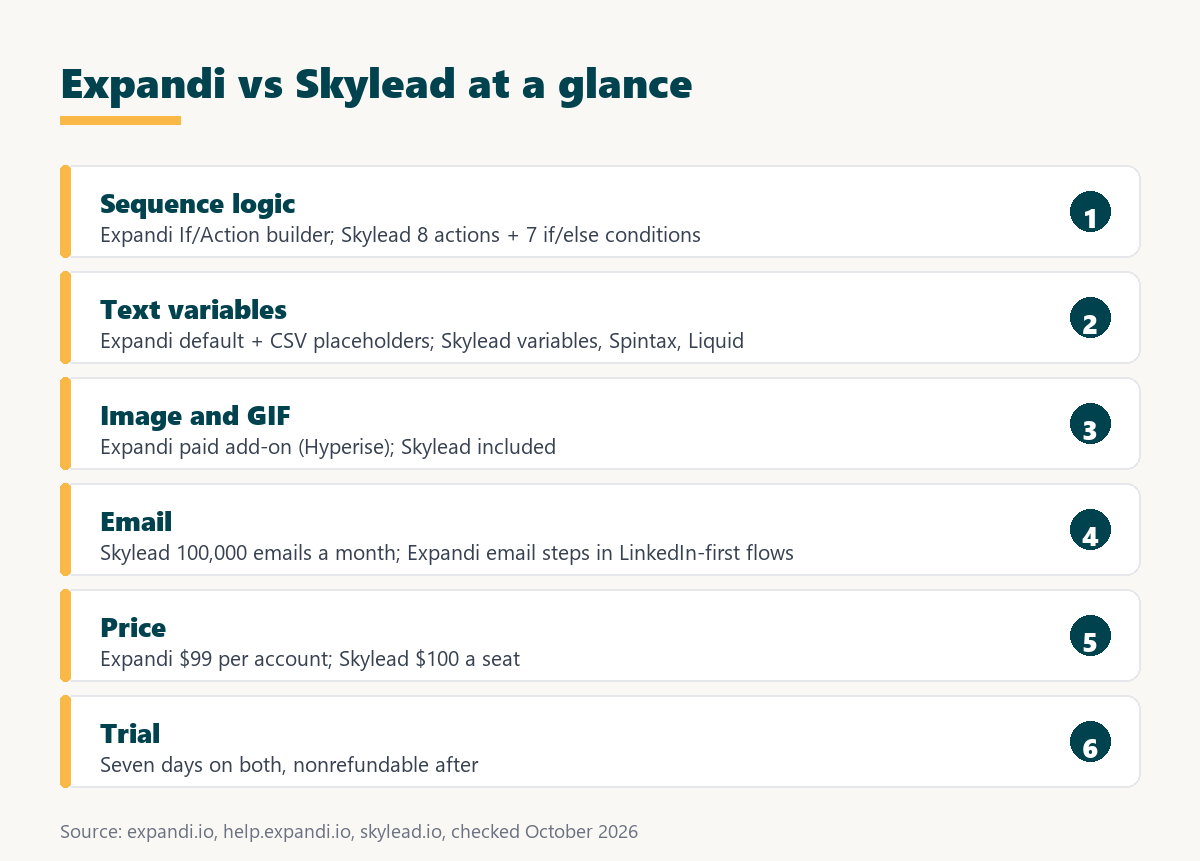
Both tools run in the cloud, both combine LinkedIn and email, and both start at roughly one hundred dollars a month for one LinkedIn profile. What differs is the mechanism an SDR spends the week inside: a visual branching flow on one side, and a spreadsheet of lead-level values feeding message templates on the other.
An SDR who writes branching email-plus-LinkedIn flows leans toward Skylead, while an SDR who enriches lists in a spreadsheet and wants LinkedIn-first sending leans toward Expandi.
What Is a Smart Sequence in Skylead?
A Smart sequence is a Skylead campaign that combines LinkedIn actions, email actions, and if/else conditions in one flow. Skylead documents eight actions and seven conditions, so a sequence can switch channel when a lead has not accepted an invite, or route a lead to email once the built-in finder returns an address.
“Use 8 actions and 7 if/else conditions to create your own sequence”
Skylead, Smart Sequences
Skylead’s Smart sequences page describes the combination as if/else conditions joined with LinkedIn and email actions, the email finder and verifier, and image and GIF personalization inside one sequence. Skylead treats the sequence itself as the personalization engine, routing each lead down a different path based on behavior and available contact data rather than only changing words. The structure of a multi-step flow is explained in this guide to the cold email sequence.
How Does the Expandi Sequence Builder Work?
The Expandi sequence builder is a campaign editor where steps and conditions such as If connected decide what happens next. Campaigns start from a type such as Connector or Messenger, and the builder adds actions, delays, and engaging steps between follow-ups across LinkedIn and email, all sent from the account’s dedicated IP.
- If/Action builder: conditions such as If connected decide whether a lead receives a message, a profile action, or a longer delay before the next step in the campaign.
- Campaign types: Connector, Mobile Connector, Messenger, Open InMail, Group, Event Invite, Company Follow Invite, and Inbound campaigns each start from a different lead situation.
- Engaging actions: profile visits, follows, post likes, and skill endorsements sit between follow-ups so a lead sees activity before the next message arrives.
- Campaign prioritization: operators choose low, medium, or high priority so the most important campaign uses the daily allowance first on that LinkedIn account.
- Integrations and webhooks: builder steps can push leads to HubSpot, Pipedrive, Salesforce, or Smartlead, or fire a webhook, according to the Expandi help center.
The help center also lists Email, Webhook, Add tag, and Transfer to campaign among the builder actions, so a lead who replies can move to a different campaign automatically. Expandi keeps branching focused on LinkedIn behavior, with email as a channel inside the same campaign, which suits SDRs whose first touch almost always happens on LinkedIn.
What Are Dynamic Placeholders in Expandi?
Dynamic placeholders are custom message variables in Expandi that hold any value mapped to a single lead. They are imported from a CSV file or created by hand, sit alongside default placeholders such as first name and company name, and let one template carry a unique line for every prospect in the campaign.
The four default placeholders are {first_name}, {last_name}, {job_title}, and {company_name}. Expandi’s help center says dynamic placeholders “can be used in your messages to personalize them and make them unique for every lead” (Expandi help center, dynamic placeholders). Each CSV value must stay on one line and cannot exceed 300 characters, and placeholder values count toward the message character limit. When a value is missing, Expandi sends the alternative message if one exists; without one, the message fails.
Dynamic placeholders move the research into the spreadsheet, so personalization quality depends on how well the SDR or an enrichment tool fills each column before launch. The broader practice is covered in this guide to email personalization.
How Does Skylead Personalize Messages?
Skylead personalizes messages with custom variables, Spintax, Liquid syntax, and generated images or GIFs tailored to each lead. Its image editor can place the lead’s picture, company logo, and variable text into one visual, and the pricing page lists image and GIF personalization as unlimited on the All-in-one plan.
- Custom variables: lead-level fields inserted into LinkedIn and email copy, playing the same role that placeholder values play inside an Expandi message template.
- Spintax: alternative phrasings written into one template so that consecutive messages read differently, a technique explained in the Growth Hack Suite Spintax guide.
- Liquid syntax: conditional logic inside the copy itself, so one template can change a sentence depending on the data available for each lead.
- Image and GIF personalization: visuals that combine the lead’s picture, company logo, and variable text, created in Skylead without a third-party tool or extra charge.
- Sendspark partnership: personalized video through a partnership with Sendspark, listed in Skylead’s personalization comparison alongside variables and images.
Skylead’s image page says the editor lets users “Add your lead’s picture, company logo, text with variables, and any other picture to your image or GIF” (Skylead, image and GIF personalization). For the rotation technique itself, see what Spintax is and how it varies copy. Skylead layers several personalization methods on top of variables, which gives more creative range but also more places for a template to break if data is missing.
How Do Sequences and Personalization Compare Side by Side?
Sequences and personalization compare most clearly across six axes: branching logic, channels inside one flow, text variables, visual personalization, video, and what happens when lead data is missing. The table lines up each tool on those axes using only details published in its own documentation, without filling gaps by assumption.
Source: expandi.io/pricing, help.expandi.io, skylead.io/pricing and skylead.io/smart-sequences, checked October 2026.
Skylead offers more personalization formats inside its base plan, while Expandi documents stricter data rules for placeholders, including failed sends when a value is missing and no fallback exists.
HubSpot’s sequence guide puts the stakes of that choice plainly:
“Personalization is what separates sequences that convert from those that get deleted.”
HubSpot, Sales sequences best practices
The comparison favors Skylead on built-in visual personalization and Expandi on transparent placeholder rules, so the deciding factor is the format an SDR team actually uses every week.
Which Tool Handles Image and GIF Personalization Better?
Image and GIF personalization is the practice of inserting lead-specific visuals into outreach messages. Skylead includes it without extra charge on All-in-one, with an in-app editor, while Expandi offers it as a paid add-on through Hyperise whose price is not published on the Expandi pricing page.
Expandi’s help center describes Hyperise as a tool that “allows you to send personalized GIFs and images together with your campaign messages,” and adds a limit worth knowing: images cannot go into a connection request, because LinkedIn does not allow attachments there (Expandi help center, Hyperise integration). For a primer on the technique, see dynamic image personalization.
For teams that send personalized images on most campaigns, Skylead removes a second subscription, while teams that rarely use visuals lose little by choosing Expandi without the add-on.
How Does Email Fit Into Each Sequence?
Email in a LinkedIn sequence is the fallback channel used when a connection request stalls or a reply needs a second touch. Skylead bundles unlimited email accounts, email warm-up, and 100,000 emails a month into All-in-one, while Expandi lists email as one step type inside its multichannel campaigns.
Skylead’s pricing page also lists the email finder and verifier inside the plan, which matters when leads come from LinkedIn without a known address. Expandi’s help center documents integrations with Smartlead and CRMs for teams that run email volume elsewhere. The coordination principle behind both approaches is laid out in this guide to multichannel outreach.
Skylead is closer to a combined LinkedIn and cold email platform, whereas Expandi stays LinkedIn-first with email as a supporting step, which changes how much separate email tooling an SDR still needs.
What Do Expandi and Skylead Cost Per Seat?
Expandi costs $99 per LinkedIn account per month and Skylead costs $100 a seat per month, so entry pricing is almost identical. Expandi offers $79 a month per account when billed annually, while Skylead’s annual plan is quoted by sales under the offer to pay ten months and get two months free.
Source: expandi.io/pricing and skylead.io/pricing, checked October 2026. Skylead’s Agency prices are first-year promotional rates; prices after the first year are not published.
With a one-dollar difference at monthly list price, price rarely decides between Expandi and Skylead for a single SDR, so the sequence and personalization mechanics should carry the decision.
Price parity pushes the comparison back to workflow fit, and the annual and agency options only matter once a team commits for a year or manages many seats.
How Do the Trials and Refund Terms Compare?
A trial is a short paid-plan test before billing starts. Both tools offer seven days, Expandi only on the first subscription and Skylead only on the first account added to a plan, and both sets of terms state that payments are not refunded once a subscription begins.
Expandi’s checkout asks for card details and its FAQ says no charge is made until the seven days are up; its Terms state that “the subscription fees are nonrefundable” unless the law requires otherwise. Skylead’s Terms and Conditions say “All payments are final,” and adding a second account during the trial ends the trial and starts billing. Skylead’s pricing page does not say whether its trial needs a card. Identical trial lengths and strict refund terms mean the test week has to answer the sequence question, so both tools should get the same audience and message during that window.
Want to test dynamic placeholders on a real list? Import a CSV into Expandi and run the seven-day trial.
Try Expandi for 7 Days →Seven-day trial on the first subscription · cancel anytime
Which Tool Fits an SDR Running One LinkedIn Account?
Expandi fits an SDR running one LinkedIn account when the list is enriched in a spreadsheet and LinkedIn is the main channel. The dedicated country-based IP, profile warm-up, and placeholder fallback rules suit a rep who sends daily from a single profile that cannot afford a restriction.
- Spreadsheet-led research: SDRs who prepare one custom line per lead in a CSV get the most from placeholder values that drop straight into connection notes and follow-ups.
- LinkedIn-first outreach: reps whose first and most important touch is the connection request benefit from campaign types built around LinkedIn behavior rather than email.
- Single-profile safety: a dedicated country-based IP and a 14-day gradual warm-up from 5 to 21 actions a day protect a profile the rep personally depends on.
- Sales Navigator lists: Expandi imports Sales Navigator search URLs into lead lists of up to 2,500 people at a time, which suits reps prospecting from saved searches.
- Manager reporting: step-by-step campaign statistics let a sales manager see where in the sequence acceptance and replies drop without exporting the data.
Expandi’s own platform data supports keeping sequences short: according to Expandi, campaigns with three messages reply at 9.8%, while five or more messages drop to 5.0%. For a single-account SDR the safety layer and the CSV workflow usually outweigh built-in images, especially when the profile belongs to the rep personally. The role itself is described in this guide to the SDR function.
When Is Skylead the Better Pick?
Skylead is the better pick when an SDR team runs LinkedIn and cold email from one tool, relies on personalized images in most campaigns, and builds sequences with several if/else branches. In that case the All-in-one plan can replace a separate email sender and an image tool at about the same monthly price.
- Email-heavy sequences: teams sending large email volumes alongside LinkedIn benefit from 100,000 emails a month and unlimited email accounts inside the same plan.
- Image-led campaigns: SDRs who send a personalized image or GIF in most sequences avoid paying for a separate add-on because visuals are included on All-in-one.
- Branch-heavy flows: sequences with several decision points use Skylead’s seven documented if/else conditions to route leads between LinkedIn and email automatically.
- Spintax and Liquid copy: copywriters who want rotating phrasing and conditional sentences inside one template get both written into the message editor.
- Built-in email finder: lists that arrive without email addresses get them found and verified inside the sequence rather than through a separate data tool.
Naming where Skylead wins keeps this comparison credible, because SDR teams that live in email and visuals would otherwise pay for an add-on and a second sender.
What Mistakes Break Personalized Sequences?
Personalized sequences break when data is missing, messages exceed character limits, or branches send the wrong copy to a lead. Expandi documents that a missing placeholder value without an alternative message makes the send fail, which is why fallback copy matters in both tools before a campaign goes live.
- Empty placeholder fields: a lead with no value for a placeholder triggers a failed message unless alternative copy has been added to that step of the campaign.
- Over-limit messages: placeholder values count toward the character limit, so a long company name or custom line can push a connection note over the edge.
- Multi-line CSV values: a CSV value with a line break or more than 300 characters does not import cleanly into Expandi, so the column has to be cleaned first.
- Untested branches: every if/else path in a branching flow needs a test lead, because a rarely triggered branch can send unreviewed copy for weeks.
- Generic image templates: a personalized image with generic copy reads as automated, so the visual should reference something specific to the lead’s company.
All of this is one-to-one marketing in practice, a concept Wikipedia names directly:
“Personalized marketing, also known as one-to-one marketing or individual marketing”
Wikipedia, Personalized marketing
Expandi’s platform data adds a length signal: messages of 151 to 200 characters reached a peak reply rate of 8.5% in a smaller sample of 57 campaigns, according to Expandi. Most personalization failures are data failures, so a pre-launch check of every variable column protects reply rates more than adding another branch or image.
Verdict: Smart Sequences or Dynamic Placeholders?
Smart sequences suit SDR teams running branching LinkedIn and email flows with images, and dynamic placeholders suit SDRs who research in spreadsheets and send LinkedIn-first from one protected profile. Price is nearly identical at $99 and $100 a month, so the weekly workflow should make the decision rather than the invoice.
Growth Hack Suite’s personalization guide sums up the rule both tools depend on:
“Clean, complete data is essential, since a wrong value undoes the personalization.”
Growth Hack Suite, What Is Email Personalization?
Running the same list through both trials for one week answers the question with reply data, which is more reliable than any feature table.
Expandi vs Skylead: Frequently Asked Questions
The 12 most-asked questions about Expandi vs Skylead.
Is Expandi better than Skylead?
It depends on the workflow. Expandi suits LinkedIn-first SDRs using CSV placeholders on a protected profile; Skylead suits teams running branching LinkedIn and email flows with images.
What is the main difference between Expandi and Skylead?
Skylead personalizes through branching Smart sequences and built-in images. Expandi personalizes inside messages with default and CSV-driven placeholders.
What is a Smart sequence?
A Skylead campaign combining LinkedIn actions, email actions, and if/else conditions. Skylead documents 8 actions and 7 conditions.
What are dynamic placeholders in Expandi?
Custom variables mapped to each lead, imported from a CSV or created by hand, with values of up to 300 characters on one line.
Does Expandi include image and GIF personalization?
Not in the base fee. It is a paid add-on through Hyperise, and the price is not listed on the pricing page.
Does Skylead charge extra for images?
No. Skylead lists unlimited image and GIF personalization on All-in-one without extra charge.
Which tool sends more email?
Skylead includes 100,000 emails a month and unlimited email accounts. Expandi treats email as a step inside LinkedIn-first campaigns.
How much do Expandi and Skylead cost?
Expandi costs $99 per LinkedIn account per month, or $79 billed annually. Skylead costs $100 a seat per month.
How long are the trials?
Both offer seven days: Expandi on the first subscription and Skylead on the first account added to a plan.
Can fees be refunded on either tool?
No. Expandi’s Terms call fees nonrefundable, and Skylead’s Terms say all payments are final.
Which tool suits a single SDR?
Expandi suits a single SDR sending LinkedIn-first from one profile with spreadsheet research. Skylead suits a single SDR who leans on email and images.
Can Expandi import Sales Navigator lists?
Yes. Expandi imports Sales Navigator search URLs into lead lists of up to 2,500 people at a time, which requires Sales Navigator and LinkedIn 2FA.
Researching leads in a spreadsheet and sending LinkedIn-first? Start the seven-day Expandi trial and load the first placeholder CSV.
Start Your 7-Day Expandi Trial →Seven-day trial on the first subscription · cancel anytime · paid fees are nonrefundable
Growth Hack Suite Editorial, Outbound Sales Team
How we compared the two builders: Skylead details come from skylead.io pricing, Smart sequences, image and GIF personalization, and Terms pages; Expandi details from expandi.io pricing and Terms and from Expandi help center articles on placeholders, campaigns, and Hyperise. Only documented features are compared, and marketing performance claims from either vendor are left out. Expandi benchmark figures are quoted as Expandi’s own platform data.
Last checked: October 2026.
Affiliate disclosure: this page contains affiliate links to Expandi. Growth Hack Suite has no affiliate relationship with Skylead. If an Expandi subscription is purchased through these links, Growth Hack Suite may earn a commission at no extra cost to the buyer.