Table of Contents
Expandi vs Surfe is a comparison between a LinkedIn outreach automation tool and a browser extension that syncs contacts to a CRM. Expandi costs $99 per LinkedIn account per month and sends connection requests, messages, and email steps from the cloud. Surfe has a no-cost tier, costs $49 per user monthly on Essential, and adds contacts to a CRM in one click.
Last checked: October 2026. Expandi pricing, FAQ, and help center articles, plus the Surfe pricing page and homepage, were read on the dates shown under each table. Confirm current prices on each vendor’s site before buying.
Need more conversations started each week? Test Expandi on one LinkedIn account for seven days.
Start Your 7-Day Expandi Trial →Seven-day trial on the first subscription · dedicated country-based IP per account · cancel anytime
Expandi vs Surfe: Which One Does an SDR Team Need?
Expandi vs Surfe is a choice between sending outreach and syncing contact data. Expandi fits SDR teams that want LinkedIn connection requests and follow-ups sent automatically, while Surfe fits teams that prospect by hand and want each contact enriched and saved to the CRM in one click.
Sales managers often shortlist both because both appear near the same daily task: working through prospect profiles in a browser. What happens next is where they part ways. One tool sends a sequence on a schedule, and the other writes a clean record into HubSpot, Salesforce, Pipedrive, or Copper.
The short answer depends on the gap: a team short on outreach volume needs automation, and a team with messy CRM records needs a sync tool.
What Is the Core Difference Between Expandi and Surfe?
The core difference is what each tool does with a prospect: Expandi is a cloud tool that runs outreach sequences for each connected LinkedIn account. Surfe is a Chrome extension and web app that reveals contact details, enriches profiles, and writes those records into a CRM without manual copying between browser tabs.
A CRM is the system of record both tools eventually feed, but only Surfe writes to it directly. The five differences below set up the rest of the comparison.
- Primary job: Expandi sends LinkedIn and email outreach on a schedule, while Surfe captures and enriches contacts and keeps CRM records current for the sales team.
- Billing unit: Expandi charges for each connected LinkedIn account, while Surfe charges for each user and includes a monthly allowance of email and mobile credits.
- Where it runs: Expandi runs campaigns from the cloud even when the laptop is closed, while Surfe works as a Chrome extension beside the page being viewed.
- No-cost tier: Expandi has none and offers a seven-day trial instead, while Surfe lists a Free tier with a small monthly credit allowance.
- Output: Expandi produces sent messages, replies, and campaign statistics, while Surfe produces CRM records plus revealed emails and mobile numbers.
Wikipedia’s definition of the discipline explains why the CRM side matters:
“a strategic process that organizations use to manage, analyze, and improve their interactions”
Wikipedia, Customer relationship management
Both tools sit close to prospecting, yet one produces conversations and the other produces clean records, so they answer different management questions.
What Does Expandi Automate on LinkedIn?
Expandi automates LinkedIn outreach from the cloud for each connected account. The Business plan includes multichannel campaigns across connection requests, messages, and email, an if and action sequence builder, dynamic placeholders, campaign statistics, and safety controls such as a dedicated country-based IP address and profile auto warm-up.
- Multichannel outreach: campaigns combine LinkedIn connection requests, LinkedIn messages, and email steps inside one sequence for every connected account on the plan.
- Sequence builder: the pricing page lists a convenient sequence builder with if and action logic, so follow-ups branch on whether a lead connected or replied.
- Dynamic placeholders: custom fields imported from a CSV file personalize each message, and a fallback message is sent when a lead lacks the value.
- Dedicated country-based IP: each connected account sends from its own fixed IP address in the chosen country instead of a pool shared by unrelated users.
- Profile auto warm-up: the help center describes a gradual ramp that starts at 5 actions a day and rises by 3 every two days to a cap of 21.
The help center caps each campaign at 5,000 leads and allows 15 active campaigns at once on an account, which is ample room for one SDR’s weekly volume.
Expandi handles the sending side of prospecting in depth, which is the repeated daily work that limits how many buyers one SDR can reach.
What Does Surfe Sync to a CRM?
Surfe syncs contact and company records from the browser into a CRM. Its pricing page lists bidirectional sync, one-click add to CRM, email validation, and a business network integration, and it names HubSpot, Salesforce, Pipedrive, and Copper as the supported CRM systems for every paid tier.
- One-click add to CRM: a contact viewed in the browser is created in the connected CRM without manual data entry, a spreadsheet, or a file export.
- Bidirectional sync: the pricing page lists two-way sync, so updates made in the CRM and in the extension stay aligned for the same record.
- Email and mobile credits: each plan includes a monthly allowance of email and mobile credits used to reveal contact details for a prospect.
- Email validation: Surfe lists email validation among its features, which checks an address before it is written into the CRM record.
- CRM coverage: the Surfe pricing page names HubSpot, Salesforce, Pipedrive, and Copper as the CRM systems it connects to.
Surfe’s homepage describes the outcome it aims for:
“Surfe keeps your CRM data up to date, deduplicated, and enriched in real time.”
Surfe homepage
Surfe’s public pages describe the sourcing side as a “Business Network integration” and a Chrome extension rather than naming a specific social network, so buyers should confirm the exact pages it supports during a trial.
Surfe removes the copy and paste step between prospecting and the CRM, which protects data quality but does not send any outreach on its own.
How Much Does Expandi Cost per LinkedIn Account?
Expandi costs $99 per LinkedIn account per month, or $79 per account per month when billed annually, which is a 20 percent saving. Every account receives the same Business feature set, and teams running ten or more accounts can request custom Agency pricing with a dedicated Customer Success Manager.
For an SDR team, the bill is the number of connected LinkedIn profiles multiplied by the rate, so five SDRs on monthly billing cost $495 a month at list price. Annual billing works out to $948 per account for the year, calculated as 79 multiplied by 12. Taxes are added by billing country, and paid fees are nonrefundable under the Terms.
Expandi pricing is simple enough to budget in one line: multiply the number of LinkedIn accounts by the monthly rate, then add tax where it applies.
How Much Does Surfe Cost per User?
Surfe costs $49 per user each month on Essential and $89 per user each month on Pro, with lower effective rates of $39 and $79 on annual billing. A Free tier includes 20 email credits and 5 mobile credits each month, and Enterprise pricing is custom and quoted by sales.
- Free tier: Surfe lists 20 email credits and 5 mobile credits per month at no cost, with CRM sync limited to one contact per day.
- Essential: $49 per user monthly, or $39 on annual billing, with 150 email credits and 50 mobile credits included each month.
- Pro: $89 per user monthly, or $79 on annual billing, with 1,000 email credits, 100 mobile credits, and integrations with Salesloft, Outreach, and Lemlist.
- Enterprise: custom pricing that adds single sign-on, SCIM provisioning, API access for search and waterfall enrichment, and a dedicated CSM.
- Annual billing: the pricing page advertises savings of up to 20 percent for paying yearly, which matches the gap between the monthly and annual rates.
Surfe pricing scales with the number of users and the contact credits each one consumes, so heavy prospectors reach the Pro tier faster than occasional users.
How Do the Two Pricing Models Compare Side by Side?
The two pricing models bill different units. Expandi charges $99 per connected LinkedIn account each month with a seven-day trial and no permanent no-cost tier, while Surfe charges per user from $49 a month, includes monthly contact credits, and keeps a Free tier available for light use.
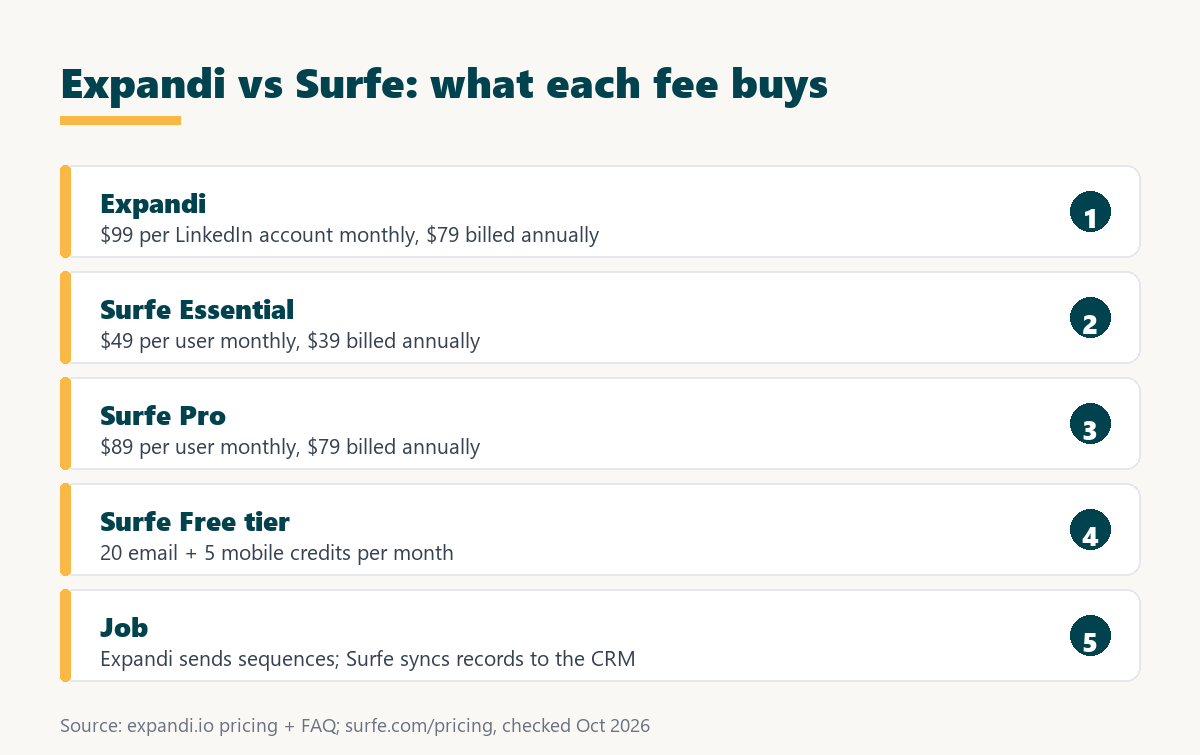
Source: expandi.io/pricing, expandi.io/faq, and surfe.com/pricing, checked October 2026.
Surfe has the lower entry price and a Free tier, while Expandi charges more per unit because each seat runs automated outreach for one LinkedIn account.
The prices are not directly comparable, since one fee buys automated sending capacity and the other buys contact credits plus CRM sync for a single user.
How Do the Feature Sets Compare for an SDR Workflow?
The feature sets split along the SDR workflow. Expandi covers automated LinkedIn connection requests, messages, email steps, and account safety controls, while Surfe covers contact reveal, enrichment, email validation, and two-way CRM sync, with sending left to the tools that Surfe integrates with on its Pro tier.
Source: expandi.io/pricing, Expandi help center, webhooks and integrations, and surfe.com/pricing, checked October 2026.
Expandi fills the sending and safety rows and Surfe fills the data and CRM rows, which leaves almost no task where the two tools duplicate each other.
A manager reading this table can map each row to a current pain, and the rows that hurt most indicate which tool deserves the first budget line.
How Does Each Tool Handle LinkedIn Account Safety?
LinkedIn account safety is the set of controls that keep automated activity inside limits LinkedIn tolerates. Expandi documents a dedicated IP per account and a warm-up that starts at five actions a day, while the Surfe pricing page lists no automated sending and therefore no warm-up or sending limits to compare.
LinkedIn’s help center is direct about third-party tools: it does not permit software, including browser extensions, that scrapes, modifies the appearance of, or automates activity on its website, and members using such tools risk having their accounts restricted. That statement covers automation platforms and extensions alike, so neither category is risk-free. Expandi’s warm-up guidance recommends staying within about 100 actions per week to stay under LinkedIn’s weekly connection request cap.
LinkedIn says it does not permit third-party software or browser extensions that scrape or automate activity, so teams should treat both tools as carrying some account risk.
Want to see the dedicated IP and warm-up on a real profile? Connect one LinkedIn account and run the seven-day trial.
Try Expandi for 7 Days →No charge until the seven days are up · cancel anytime · paid fees are nonrefundable
How Does CRM Data Flow From Each Tool?
CRM data flow is the path a prospect record takes from prospecting activity into the system of record. Surfe writes contacts straight into the CRM with bidirectional sync, while Expandi passes campaign events such as replies, tags, and accepted connection requests outward through webhooks and general integrations.
Expandi’s help center lists webhook events such as a contact replying, a contact being tagged, and a connection request being accepted, and it publishes no-code guides for Zapier and Google Sheets. That makes Expandi a source of activity data rather than a CRM editor; the general mechanics are covered in this guide to CRM integration. Salesforce frames the reason a single record matters:
“Storing all of this information in one accessible location for your entire team helps prevent errors and boosts productivity.”
Salesforce, What Is CRM?
Surfe offers the more direct CRM connection, whereas Expandi relies on webhooks and no-code tools to push outreach activity into a pipeline.
Can a Team Use Surfe and Expandi Together?
A combined setup is a workflow where Surfe owns records and Expandi owns sending. An SDR saves and enriches target contacts with Surfe, lists the same prospects for an Expandi campaign, and routes reply events back toward the CRM through a webhook so the record shows what happened.
- Save target contacts: adding each prospect to the CRM with Surfe creates one clean, enriched record before any outreach is sent to that person.
- Collect the prospect list: the same prospects are gathered into a CSV file or a Google Sheet, which Surfe’s pricing page lists as an integration.
- Build the Expandi campaign: the list becomes an Expandi lead list, and enriched columns map to dynamic placeholders inside the connection and follow-up messages.
- Turn on reply webhooks: Expandi webhooks fire on events such as a reply or an accepted connection request, sending that activity to a no-code tool.
- Update the CRM record: the webhook event updates the matching CRM record, so the account owner sees which prospects engaged on LinkedIn this week.
Running both tools keeps records and outreach aligned, though the team must maintain the handoff because neither vendor lists a direct connection to the other.
Which Teams Fit Expandi Best?
Expandi fits teams whose constraint is outreach volume rather than record keeping. SDRs who spend hours sending connection requests and follow-ups by hand gain the most, because the campaign builder runs those steps for each connected account on a schedule while the SDR handles replies and calls.
- Volume-limited SDRs: sellers who cannot keep up with manual connection requests and follow-ups gain capacity from scheduled sequences running in the cloud.
- Teams running multichannel sequences: SDRs who combine LinkedIn steps with email follow-ups can manage both inside one Expandi sequence for each account.
- Managers needing campaign statistics: step-by-step campaign statistics show acceptance and reply movement per sequence, which helps managers coach on message copy.
- Teams with a simple CRM process: teams that only need reply events in the pipeline can rely on webhooks instead of a dedicated sync product.
- Founder-led sales: a founder can connect one account at the published rate and run outreach while spending the saved hours on calls and delivery.
These teams measure success in conversations started each week, so automated sending moves their numbers far more than cleaner CRM records ever would.
When Is Surfe the Better Pick?
Surfe is the better pick when CRM hygiene and contact data are the weak points. Teams that prospect manually by choice, need mobile numbers and validated emails, or must keep HubSpot, Salesforce, Pipedrive, or Copper current gain more from Surfe, and its Free tier lowers the entry cost.
- CRM-first teams: managers who judge reps on pipeline accuracy need every prospect saved and enriched inside the CRM rather than living in a separate tool.
- Manual, low-volume prospectors: account executives who research a handful of accounts by hand get more from one-click capture than from automated sequences.
- Teams needing mobile numbers: mobile credits on every tier reveal phone numbers for prospects, which matters for teams that book meetings by calling.
- Buyers wanting a no-cost start: the Free tier with 20 email credits and 5 mobile credits lets a team test the workflow before paying for seats.
- Teams already on Salesloft, Outreach, or Lemlist: the Pro tier lists integrations with those three tools, so records flow into an existing sending platform.
Naming where Surfe wins keeps the comparison honest, because automated sending adds little when the real problem is missing or duplicated CRM data.
Which Related Tools Complete the Stack?
Related tools are the products that cover stages outside LinkedIn sending and CRM sync. An email finder such as Hunter.io supplies verified addresses for domain-based lists, and a cold email platform such as Smartlead handles high-volume email sending beside LinkedIn outreach for teams that work two channels.
The Hunter.io email finder review covers finding addresses from a company domain, and the Smartlead review covers the cold email layer that sits beside a LinkedIn sequence.
Small sales teams often pair one data tool, one LinkedIn automation tool, and one cold email platform, choosing each product for a single clear job.
Verdict: Outreach Automation or LinkedIn CRM Sync?
The verdict is that Expandi suits teams that need more outreach sent and Surfe suits teams that need cleaner CRM data. An SDR team short on conversations should start with Expandi, and a team losing prospects between browser research and the CRM should start with Surfe and add sending later.
Growth Hack Suite’s multichannel outreach guide states the principle behind the sending half:
“Spreading touches across channels raises the odds of a response.”
Growth Hack Suite, What Is Multichannel Outreach?
The deciding question is whether sending or syncing is the bottleneck, and the seven-day Expandi trial answers the sending half without a long commitment.
Expandi vs Surfe: Frequently Asked Questions
The 12 most-asked questions about Expandi vs Surfe.
Is Surfe a LinkedIn automation tool?
Surfe’s pricing page lists no automated sending. It is a Chrome extension and web app for contact reveal, enrichment, and CRM sync.
Does Expandi sync to a CRM?
Expandi sends campaign events through webhooks and general integrations, with no-code guides for Zapier and Google Sheets. It does not name specific CRMs on its pricing page.
How much does Surfe cost?
Surfe has a Free tier, Essential at $49 per user monthly, Pro at $89 per user monthly, and custom Enterprise pricing.
How much does Expandi cost per account?
$99 per LinkedIn account per month, or $79 per account per month billed annually.
Does Surfe have a no-cost tier?
Yes. The Free tier includes 20 email credits and 5 mobile credits per month, with CRM sync limited to one contact per day.
Does Expandi have a no-cost tier?
No. Expandi offers a seven-day trial on the first subscription; checkout asks for card details and no charge is made until the seven days are up.
Which CRMs does Surfe support?
The pricing page names HubSpot, Salesforce, Pipedrive, and Copper.
Does Surfe find mobile numbers?
Yes. Every tier includes mobile credits, from 5 per month on the Free tier to 100 per month on Pro.
Does Expandi find email addresses?
Email or phone lookup is not on Expandi’s feature list. It sends to leads supplied by a list, a CSV file, or a Sales Navigator search.
Is Surfe cheaper than Expandi?
Surfe’s entry price is lower, but the units differ: Surfe bills per user for credits and sync, while Expandi bills per LinkedIn account for automated sending.
Can a team use Surfe and Expandi together?
Yes. Surfe can own the CRM records while Expandi runs the LinkedIn sequence, with webhooks passing reply events back.
Which tool should an SDR team buy first?
The one that fixes the bottleneck. Too few conversations points to Expandi; messy or missing CRM data points to Surfe.
Outreach volume is the bottleneck? Start the seven-day Expandi trial on one LinkedIn account and send the first sequence.
Start Your 7-Day Expandi Trial →Seven-day trial on the first subscription · cancel anytime · paid fees are nonrefundable
Growth Hack Suite Editorial, Outbound Sales Team
How we compared: Expandi figures come from expandi.io pricing, FAQ, and Terms and Conditions plus the Expandi help center. Surfe figures come from surfe.com/pricing and the Surfe homepage, and the platform policy from LinkedIn’s help center. Check dates sit under each table, and taxes are not included.
Last checked: October 2026. When either vendor changes its pricing page, this comparison is updated first.
Affiliate disclosure: this page contains affiliate links to Expandi. If a subscription is purchased through them, Growth Hack Suite may earn a commission at no extra cost to the buyer. Surfe is not an affiliate partner, and the commission does not change the assessment.