Table of Contents
Expandi vs Clay is a comparison between a LinkedIn campaign execution tool and a data enrichment platform. Expandi costs $99 per LinkedIn account per month and sends connection requests, messages, and email steps from the cloud. Clay charges for actions and data credits, includes unlimited seats, and combines more than 150 data providers in enrichment waterfalls for agencies.
Last checked: October 2026. Expandi pricing, FAQ, and help center articles, plus the Clay pricing page and Clay University, were read on the dates shown under each table. Usage-based prices move, so confirm the current figures before buying.
Already have a clean lead list? Run it through Expandi on one LinkedIn account for seven days.
Start Your 7-Day Expandi Trial →Seven-day trial on the first subscription · dedicated country-based IP per account · cancel anytime
Expandi vs Clay: Which Layer Does an Agency Need First?
Expandi vs Clay is a choice between an execution layer and an enrichment layer rather than between two rivals. Expandi fits agencies that already hold a lead list and need LinkedIn campaigns sent safely, while Clay fits agencies that must build and enrich that list before any outreach starts.
Most outbound agencies eventually touch both layers, because a campaign needs accurate data and the data needs a channel. The useful question for an agency owner is which stage currently loses the most results, since that stage deserves the first budget line and the first month of attention.
The short answer depends on where the workflow breaks today: weak data points to Clay, and unsent or manual LinkedIn outreach points to Expandi.
What Is the Core Difference Between Expandi and Clay?
The core difference is the job each tool performs: Expandi is a cloud tool that sends LinkedIn connection requests, messages, and email steps for each connected account. Clay is a data platform that finds and enriches records in tables by drawing on many providers and an AI research agent called Claygent.
Clay sits in the email and contact enrichment stage of outbound, and Expandi sits in the sending stage. The five differences below follow from that split.
- Primary job: Expandi executes outreach sequences on LinkedIn and email, while Clay prepares and enriches the lead data those sequences depend on before anything is sent.
- Billing unit: Expandi charges for each connected LinkedIn account, while Clay charges for actions and data credits consumed inside its tables each billing cycle.
- Seats: one Expandi seat equals one LinkedIn account, while Clay lists unlimited seats and tables on every tier, starting with its Free tier.
- Output: Expandi produces sent messages, replies, and step-by-step campaign statistics, while Clay produces enriched table rows ready for export or for other tools.
- LinkedIn sending: Expandi lists LinkedIn connection requests and messages as core features, while the Clay pricing page lists no LinkedIn sending feature at all.
Connecting the two layers is a classic data integration job, which Wikipedia defines as:
“the process of combining, sharing, or synchronizing data from multiple sources”
Wikipedia, Data integration
Both tools serve outbound teams, yet they sit at different stages, so most agencies compare them to decide buying order instead of picking a single winner.
What Is an Enrichment Waterfall in Clay?
An enrichment waterfall is a sequence that queries several data providers in turn until one returns the missing field. Clay lets tables run multi-provider waterfalls across more than 150 providers, charges data credits for the data found, and counts each run as an action against the plan’s allowance.
- Multi-provider waterfalls: a Clay table checks several data providers in order, which raises coverage compared with relying on a single database for every record.
- Data providers: the Clay pricing page says tables can find and enrich data from more than 150 providers through one interface and one bill.
- Data Credits: the pricing FAQ states that data credits start at $0.05 each and become more cost-effective as usage grows on larger plans.
- Actions: each run counts as an action priced from less than one cent, and actions reset each billing cycle instead of rolling over.
- Claygent: Clay describes Claygent as its AI agent with access to web research, used to fill custom columns that no provider returns.
Clay’s own pricing page sums up the idea behind the waterfall:
“Combine multiple data providers for the best coverage”
Clay pricing page
HubSpot describes the same multi-source principle for its own enrichment feature:
“Enrichment data is powered by HubSpot’s commercial dataset, third-party providers, and publicly available information from across the internet.”
HubSpot Knowledge Base, Get started with data enrichment
The waterfall is what separates Clay from a single database, because coverage comes from stacking providers and the bill follows the credits each lookup consumes.
What Does Campaign Execution Mean in Expandi?
Expandi automates LinkedIn outreach from the cloud for each connected account. The Business plan includes multichannel campaigns across connection requests, messages, and email, an if and action sequence builder, dynamic placeholders, campaign statistics, and safety controls such as a dedicated country-based IP address and profile auto warm-up.
- Multichannel outreach: campaigns combine LinkedIn connection requests, LinkedIn messages, and email steps inside one sequence for every connected account on the plan.
- Sequence builder: the pricing page lists a convenient sequence builder with if and action logic, so follow-ups branch on whether a lead connected or replied.
- Dynamic placeholders: custom fields imported from a CSV file personalize each message, which is where enriched Clay columns end up in practice.
- Dedicated country-based IP: each connected account sends from its own fixed IP address in the chosen country instead of a pool shared by unrelated users.
- Profile auto warm-up: the help center describes a gradual ramp that starts at 5 actions a day and rises by 3 every two days to a cap of 21.
The help center also sets the size of each run: up to 5,000 leads per campaign and 15 active campaigns at a time on one account.
Campaign execution is the part of outbound that Expandi owns, which means the tool starts working only after someone supplies the leads and the message copy.
How Much Does Expandi Cost per LinkedIn Account?
Expandi costs $99 per LinkedIn account per month, or $79 per account per month when billed annually, which is a 20 percent saving. Every account receives the same Business feature set, and teams running ten or more accounts can request custom Agency pricing with a dedicated Customer Success Manager.
For an agency, the per-account model maps cleanly to clients: one client profile is one seat, so ten client accounts cost $990 a month at list price before any Agency discount. Paying annually works out to $948 per account for the year, calculated as 79 multiplied by 12. Taxes are added by billing country, and two personalization add-ons carry no published price.
Expandi pricing is simple enough to budget in one line: multiply the number of LinkedIn accounts by the monthly rate, then add tax where it applies.
How Does Clay Price Actions and Data Credits?
Clay pricing is a usage model built from actions and data credits instead of seats. The pricing page lists a Free tier, Launch displayed at $167 per month and Growth at $446 per month with annual billing selected, and an Enterprise tier with custom pricing and single sign-on.
- Free tier: Clay lists 500 actions and 100 data credits per month at no cost, with unlimited seats and tables and 200 rows per table.
- Launch: displayed at $167 per month with annual billing selected, adding phone enrichment, signal tracking, and Clay’s email sequencer or a sequencing integration.
- Growth: displayed at $446 per month with annual billing selected, adding HTTP API integration, webhook automation, CRM auto-sync, and priority support.
- Enterprise: custom pricing that adds single sign-on, role-based access control, and a dedicated growth strategist for larger organizations.
- Credit rollover: data credits roll over up to twice the monthly amount on Launch and Growth, while actions reset every cycle and never carry forward.
The FAQ on the Clay pricing page states that actions do not roll over because they reflect the platform capacity included in the plan. The displayed Launch and Growth figures are the annual-billing view, which the page marks as a 10 percent saving; monthly billing costs more.
Clay costs scale with how much data a team enriches, so two agencies on the same plan can see very different bills depending on table size.
How Do the Two Pricing Models Compare Side by Side?
The two pricing models measure different things. Expandi charges $99 per connected LinkedIn account each month with a seven-day trial, while Clay charges for actions and data credits, includes unlimited seats on every tier, and offers a Free tier plus a fourteen-day trial on its paid plans.
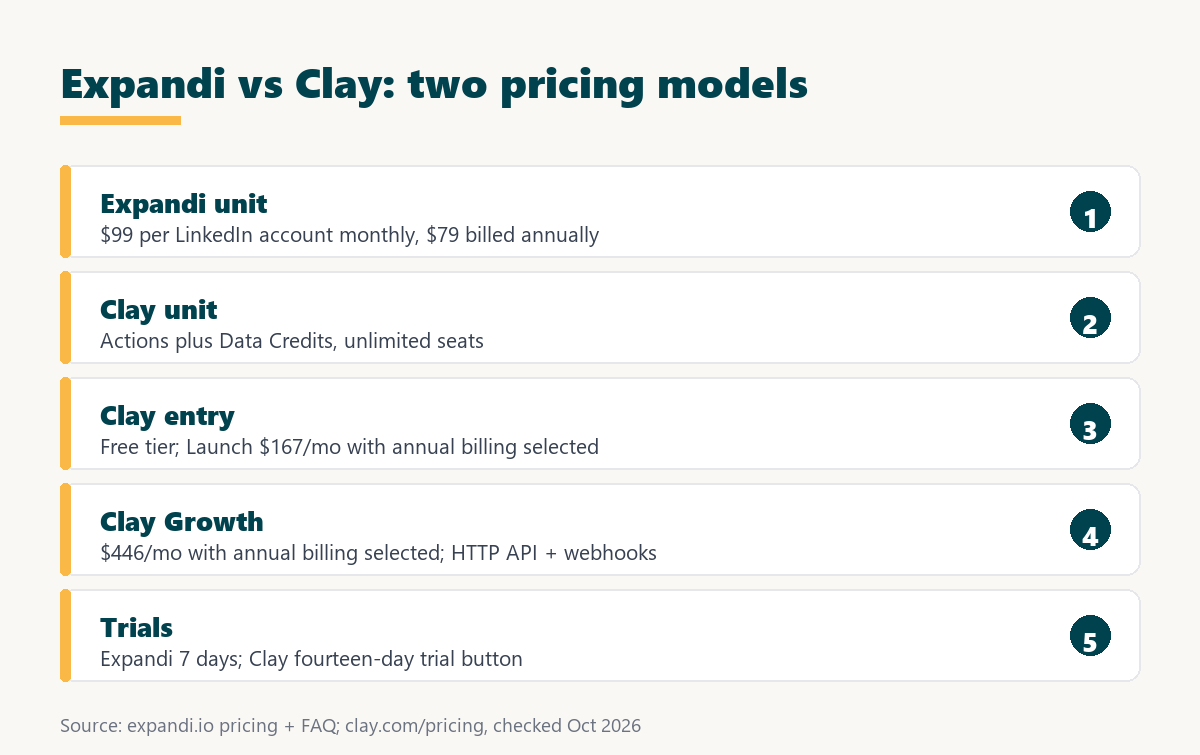
Source: expandi.io/pricing, expandi.io/faq, and clay.com/pricing, checked October 2026. Clay figures are shown with annual billing selected.
Expandi bills a flat rate per LinkedIn account, while Clay bills for usage with unlimited seats, so the totals respond to different drivers: account count versus enrichment volume.
An agency budgeting both tools should forecast them separately, since adding a client account raises the Expandi bill and enriching a larger list raises the Clay bill.
How Do the Feature Sets Compare by Workflow Stage?
The feature sets cover different workflow stages with little overlap. Clay handles finding, enriching, and researching leads and lists an email sequencer from its Launch plan, while Expandi handles LinkedIn connection requests, LinkedIn messages, email steps, and the account safety controls around them.
Source: expandi.io/pricing, Expandi help center, reversed webhooks, and clay.com/pricing, checked October 2026.
Clay owns the data stages and Expandi owns LinkedIn sending and safety, with email sending and automation hooks being the only rows where both tools list a capability.
The thin overlap explains why agencies often run both tools, because neither one covers the full path from a raw company list to a booked meeting.
How Do Agencies Use Clay and Expandi Together?
A combined workflow is a handoff in which Clay prepares the list and Expandi sends the campaign. An agency builds and enriches a table in Clay, moves the finished rows into an Expandi lead list as a CSV file or through a webhook, and maps the enriched columns to dynamic placeholders.
- Build the table: defining the target accounts and people in a Clay table sets the scope before any credits are spent on enrichment lookups.
- Run the waterfall and Claygent: enrichment fills missing fields, and Claygent research writes one custom column per lead that later becomes a personalization line.
- Filter the qualified rows: removing rows with missing LinkedIn URLs or weak fit keeps the campaign list clean and avoids wasting daily sending allowance.
- Move the rows into Expandi: Clay University shows a Download CSV export, and Expandi accepts CSV lead lists; Growth-plan HTTP calls can reach Expandi’s reversed webhook.
- Map placeholders and activate: each enriched column maps to an Expandi dynamic placeholder, and the campaign can take up to 45 minutes to begin sending.
No native integration between the two products is listed by either vendor, so the handoff runs through a file or an HTTP call. The Clay University CSV export lesson covers the file route, and Expandi’s help center says its reversed webhook can “add people to the campaign or pause and resume them.” For the general concept, see this guide to what a webhook is.
The handoff works best when enrichment finishes before sending begins, because placeholders with missing values cause Expandi to fall back to an alternative message.
How Does Each Tool Handle LinkedIn Account Safety?
LinkedIn account safety is the set of controls that keep automated activity inside limits LinkedIn tolerates. Expandi documents a dedicated IP per account and a warm-up that starts at five actions a day, while the Clay pricing page lists no LinkedIn sending feature and therefore no sending safeguards to compare.
Expandi’s warm-up guidance recommends staying within about 100 actions per week, since LinkedIn enforces a weekly cap on connection requests. LinkedIn’s help center states that it does not permit third-party software that automates activity on its website and that members who use such tools risk having their accounts restricted. Expandi’s dedicated IP and gradual ramp reduce exposure but cannot guarantee an account will stay unrestricted.
Safety sits entirely on the execution side of this pairing, so the tool that touches the LinkedIn account is the one whose limits and warm-up matter.
Want to see the dedicated IP and warm-up on a real profile? Connect one LinkedIn account and run the seven-day trial.
Try Expandi for 7 Days →No charge until the seven days are up · cancel anytime · paid fees are nonrefundable
Which Agencies Fit Expandi Best?
Expandi fits agencies whose bottleneck is sending rather than data. Teams that receive lead lists from clients or pull them from Sales Navigator need a safe way to run LinkedIn campaigns for each client account, and the per-account price maps cleanly to client billing and retainers.
- Client-list agencies: agencies that receive prospect lists from clients need execution and reporting more than another data source added to the stack.
- Sales Navigator-led freelancers: freelancers who import a Sales Navigator search straight into Expandi, up to 2,500 people per list, can skip a separate enrichment step.
- Agencies billing per client account: one LinkedIn account per client turns the $99 monthly fee into a line item that passes through each retainer.
- Teams replacing manual LinkedIn outreach: agencies still sending connection requests by hand gain hours back once sequences run from the cloud on a schedule.
- Agencies under ten accounts: smaller agencies pay the published Business rate, while those reaching ten accounts can request a custom Agency quote from sales.
These agencies already know who to contact, so the value lies in sending consistently and keeping each client LinkedIn account inside safe limits.
When Is Clay the Better Pick?
Clay is the better pick when list quality is the constraint. Agencies that must find contacts across many providers, research accounts with an AI agent, or keep a CRM enriched gain more from Clay, and its Launch plan also lists an email sequencer for agencies running email-only outreach.
- Data-first agencies: teams selling list building or enrichment as a service need waterfalls and provider coverage more than a LinkedIn sending tool.
- Email-only outbound teams: Clay’s Launch plan lists its own email sequencer or a sequencing integration, which covers sending when LinkedIn is not a channel.
- RevOps teams syncing a CRM: the Growth plan lists CRM auto-sync and enrichment, which keeps account records current without manual research by the team.
- Agencies needing AI research: Claygent fills custom personalization columns from web research, giving copywriters a specific detail for every lead in the table.
- Teams with many collaborators: unlimited seats on every tier let researchers, copywriters, and clients work in the same tables without adding per-person fees.
Naming where Clay wins keeps the comparison honest, because no amount of sending automation fixes a list with missing or wrong contact data.
What Hidden Costs Should an Agency Check?
Hidden costs are charges that sit outside the headline price. With Expandi they are each added LinkedIn account, paid personalization add-ons, and tax, while with Clay they are data credits consumed by repeated lookups, actions that do not roll over, and plan upgrades needed for webhooks and HTTP integration.
- Per-account growth: every additional client LinkedIn account adds the same Expandi fee, so the bill rises in a straight line with the client roster.
- Paid add-ons: Expandi lists image and GIF personalization and video personalization as paid add-ons, and neither price is published on the pricing page.
- Data credit burn: every Clay lookup that returns data consumes credits, so re-enriching the same table or testing new providers raises the monthly bill.
- Action expiry: Clay actions reset each billing cycle, so unused capacity in a quiet month is lost rather than carried into a busier one.
- Feature gating: HTTP API integration and webhook automation appear only from Clay’s Growth plan, which matters for agencies automating the handoff.
Agencies should model one real client campaign on both tools before quoting a retainer, since usage costs on the data side are harder to predict than seats.
Which Related Tools Complete the Stack?
Related tools are the products that fill the stages neither Expandi nor Clay covers alone. An email finder such as Hunter.io supplies verified addresses for smaller lists, and a cold email platform such as Smartlead handles high-volume email sending beside LinkedIn outreach for agencies running two channels.
The Hunter.io email finder review covers domain-based email lookup for agencies that do not need a full waterfall, and the Smartlead review covers the cold email sending layer that pairs with LinkedIn campaigns.
A lean agency stack often combines one data source, one LinkedIn execution tool, and one cold email platform, with each product chosen for a single stage.
Verdict: Campaign Execution or Enrichment Waterfall?
The verdict is that Expandi and Clay solve different halves of outbound, so the right first purchase follows the weakest stage. Agencies with good lists and manual LinkedIn outreach should start with Expandi, and agencies with poor data should start with Clay and add an execution tool next.
Growth Hack Suite’s multichannel outreach guide puts the execution half in one line:
“Keeping the messaging consistent across channels is what makes the sequence coherent.”
Growth Hack Suite, What Is Multichannel Outreach?
Most agencies end up running both layers, and the seven-day Expandi trial shows quickly whether execution is the stage holding results back.
Expandi vs Clay: Frequently Asked Questions
The 12 most-asked questions about Expandi vs Clay.
Is Clay a competitor to Expandi?
Not directly. Clay enriches lead data and Expandi sends LinkedIn and email campaigns, so many agencies use Clay before Expandi in the same workflow.
Does Clay send LinkedIn messages?
The Clay pricing page lists no LinkedIn sending feature. It lists an email sequencer or sequencing integration from the Launch plan.
Does Expandi enrich leads?
Enrichment is not on Expandi’s feature list. It personalizes messages with dynamic placeholders imported from a CSV file.
How much does Clay cost?
Clay has a Free tier, Launch displayed at $167 per month and Growth at $446 per month with annual billing selected, and custom Enterprise pricing.
How much does Expandi cost per account?
$99 per LinkedIn account per month, or $79 per account per month billed annually. Ten or more accounts can request Agency pricing.
Does Clay have a no-cost tier?
Yes. The Free tier includes 500 actions and 100 data credits per month, unlimited seats, and 200 rows per table.
Does Expandi have a no-cost tier?
No. Expandi offers a seven-day trial on the first subscription; checkout asks for card details and no charge is made until the seven days are up.
Do Clay credits roll over?
Data credits roll over up to twice the monthly amount on Launch and Growth. Actions reset each billing cycle and do not roll over.
Can Clay push leads into Expandi?
Not through a listed native integration. Rows move as a CSV export or through an HTTP call to Expandi’s reversed webhook.
Which tool should an agency buy first?
The one that fixes the weakest stage. Poor data points to Clay first; manual or unsent LinkedIn outreach points to Expandi first.
Does Clay include an email sequencer?
Yes. The pricing page lists Clay’s email sequencer or a sequencing integration from the Launch plan upward.
Can a team use Clay and Expandi together?
Yes. A common pattern is enrichment and research in Clay, then the qualified rows loaded into an Expandi campaign with placeholders mapped.
List already enriched and ready? Start the seven-day Expandi trial on one LinkedIn account and send the first campaign.
Start Your 7-Day Expandi Trial →Seven-day trial on the first subscription · cancel anytime · paid fees are nonrefundable
Growth Hack Suite Editorial, Outbound Sales Team
How we compared: Expandi figures come from expandi.io pricing, FAQ, and Terms and Conditions plus the Expandi help center. Clay figures come from clay.com/pricing with annual billing selected, and the CSV export step from Clay University. Check dates sit under each table, and taxes are not included.
Last checked: October 2026. When either vendor changes its pricing page, this comparison is updated first.
Affiliate disclosure: this page contains affiliate links to Expandi. If a subscription is purchased through them, Growth Hack Suite may earn a commission at no extra cost to the buyer. Clay is not an affiliate partner, and the commission does not change the assessment.