Table of Contents
A webhook is a way for one app to send data to another automatically the moment an event happens, by posting a message to a URL, so outbound events like a reply can trigger an instant action. This guide explains what it is, how it works, how it differs from an API, why it is useful for outbound, how to set one up, and what events can trigger it.
This mechanism pushes event data from one app to another in real time by posting to a URL, powering instant automation.
Best for: teams automating reactions to outbound events.
Caveat: custom handling may need a developer or no-code tool.
Bottom line: this method pushes, APIs pull, and outbound is event-driven.
Put this into practice. Try Smartlead free for 14 days.
Start Smartlead Free Trial →Unlimited mailboxes · no credit card · 14-day trial
What Is a Webhook?
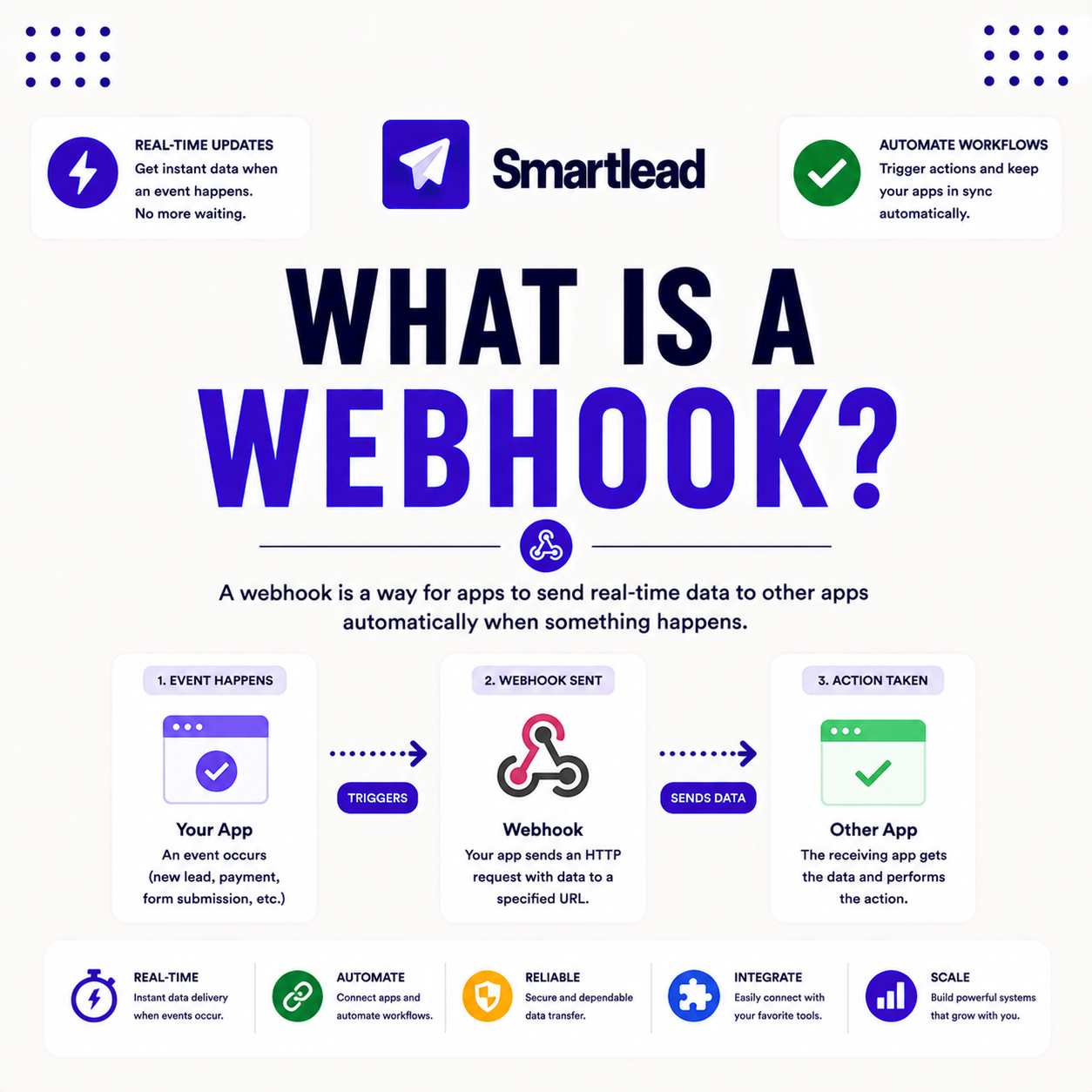
A webhook is a method for one app to send data to another automatically when an event happens, by posting a message to a URL the receiving app exposes. It is event-driven, not requested. The deciding factor is that the data is pushed the moment the event occurs. The list below covers the parts.
- Event-driven: the webhook fires the instant a trigger event happens.
- Posts to a URL: the message goes to the receiver’s endpoint.
- Carries a payload: the message includes data about the event.
- No polling needed: the receiver is notified without asking repeatedly.
- Real-time link: two apps stay in sync as events occur.
“A webhook is what lets an outbound event trigger an instant action in another tool automatically.”
— Growth Hack Suite, on cold email tools
How Does a Webhook Work?
It works by configuring a URL in one app where another app sends data. When the trigger event occurs, such as a reply received, the sending app posts the payload to that URL. The deciding factor is that the receiver acts on the pushed data. The list below covers the flow.
- Configure the URL: the receiver’s endpoint is added in the sending app.
- Pick the trigger: a specific event is chosen to fire it.
- Event occurs: the trigger, like a reply, happens in the sending app.
- Post the payload: the sending app posts event data to the URL.
- Receiver acts: the receiving app processes the data instantly.
“Event-driven automation reacts the instant something happens, rather than waiting for the next check.”
— HubSpot, on automation
How Is a Webhook Different From an API?
An API is request-based, where an app asks for data when it wants it, while this method is event-based, pushing data the moment something happens. APIs pull; it pushes. The deciding factor is who initiates the exchange. The table below draws the distinction.
Source: standard API-versus-push terminology, mid-2026. Directional, not a measured benchmark.
Why Use This for Outbound?
This approach is useful because outbound generates events, like a reply or open, that a team wants to act on immediately. It fires a CRM update or alert the moment it happens. The deciding factor is that real-time reaction beats a delayed sync. The list below covers why.
- Instant CRM updates: a reply syncs to the pipeline the moment it lands.
- Real-time alerts: a hot reply can notify a rep immediately.
- Best for scale: the value grows with the volume of outbound events.
- Caveat: a low-volume sender may not need real-time triggers.
- Connects the stack: events flow into other tools without manual work.
How Do You Set Up a Webhook?
Set it up by providing the receiving app’s URL in the sending app, choosing which events trigger it, then testing with one event. Confirming the receiver gets the payload verifies the link. The ordered steps below make setup repeatable.
- Get the receiver URL: copy the endpoint the receiving app exposes.
- Configure the trigger: paste the URL and choose the trigger event.
- Choose the events: select which outbound events should fire it.
- Send a test event: trigger one event to confirm delivery.
- Verify the payload: check the receiver got the expected data.
Automating outbound events? Test Smartlead free for 14 days.
Start Smartlead Free Trial →No credit card · unlimited mailboxes
What Events Can Trigger One?
In outbound, common triggers are a reply received, an email opened or clicked, a bounce, or a lead status change. Each one can push data to another tool. The deciding factor is that any tracked event can fire it. The list below covers the common ones.
- Reply received: a response fires an update or alert instantly.
- Open or click: engagement events can trigger a follow-up action.
- Bounce: a bounce can flag a bad address for list cleaning.
- Lead status change: a stage update can sync to the CRM.
- Any tracked event: most platform events can be wired this way.
Do You Need a Developer for This?
Simple setups can be connected through no-code tools like Zapier or Make without a developer, while custom handling may need one. The complexity of the reaction, not the mechanism itself, decides. The deciding factor is whether the receiving logic is standard or custom. The table below positions the feature against a typical rival.
Source: vendor sites plus internal review, mid-2026. Verify current features on smartlead.ai.
Does Smartlead Support This?
Yes, Smartlead supports this kind of event push like replies in real time to an endpoint, so a team can trigger CRM updates and alerts. Combined with a deep API, this connects outbound to the wider stack. The deciding factor is that events flow out the moment they happen. The honest read is that it turns Smartlead into an event source other tools can react to.
The practical point is to point this setup at a CRM or no-code tool so outbound events trigger the next action. Verify current features on smartlead.ai.
Who Gets the Most Value From This?
Agencies and scale teams get the most value, since webhooks compound across many events and integrations. A low-volume sender with a simple stack may not need them. The deciding factor is how many events a team wants to react to automatically. The honest read is that the more automated the stack, the more webhooks pay back.
The practical point is that a team running an automated, multi-tool stack gains most, while a simple single-tool sender may not need webhooks.
How Do You Get Started Today?
Start on the 14-day free trial, connect a mailbox, warm it, verify a small list and wire a reply event to a webhook. Testing one trigger on your own stack before committing is the lowest-risk way to begin. The trial needs no card, so the only cost is setup time. By launch, outbound events fire real-time actions in other tools.
Is This Setup Secure?
Webhooks can be secured with secret tokens, signature verification and HTTPS, so the receiver can confirm the data is genuine. Following these practices prevents spoofed or tampered payloads. The deciding factor is that security is added by the implementation, not automatic. The honest read is that a webhook is as secure as the verification the receiver applies to incoming requests.
The practical point is to verify signatures, use HTTPS, and check a secret token so only genuine events are accepted.
What Happens If It Fails?
If a receiver is down, the event may be missed unless the sender retries. Good webhook implementations retry failed deliveries so events are not lost. The deciding factor is whether the sender has a retry policy. The honest read is that reliability depends on retries and logging, so an important integration should confirm the sender retries on failure.
“A webhook is a method of augmenting a web application with custom HTTP callbacks.”
— Wikipedia, Webhook
Webhook: The Final Verdict
The final verdict is that a webhook pushes event data from one app to another in real time by posting to a URL, powering instant automation. Where an API pulls data on request, a webhook pushes it on an event, which fits event-driven outbound perfectly. Wire replies and status changes to a CRM or no-code tool, secure the endpoint, and confirm the sender retries on failure.
Growth Hack Suite Editorial — Outbound Tools Team
This guide explains the concept based on standard integration practice plus hands-on testing of Smartlead. Behavior varies; verify current features on smartlead.ai. We review outbound tools for B2B senders.
Last updated: June 2026. Tool mentions are examples, not endorsements.
Affiliate disclosure: this page contains affiliate links. If you start a plan through them, Growth Hack Suite may earn a commission at no extra cost to you. It does not change our guidance.
Trigger real-time actions from outbound. Start Smartlead free for 14 days.
Start Smartlead Free Trial →Unlimited mailboxes · no credit card · cancel anytime
Related Tools in the Outbound Stack
Two other tools in the Growth Hack Suite stack pair with this kind of setup.
- Hunter Email Verifier: a bounce trigger can flag addresses to re-verify — see verifier accuracy.
- GMass: the Gmail-native option for a solo sender with a simpler stack — read the GMass review.
- Gmail tools comparison: the Gmail-scoped breakdown for senders weighing platform versus extension — compare the Gmail tools.
Webhook FAQ
The 12 most-asked questions about this topic.
What is a webhook?
A webhook is a method for one app to send data to another automatically when an event happens, by posting a message to a URL the receiving app exposes. It is event-driven, not requested.
How does a webhook work?
You configure a URL in one app where another sends data. When the trigger event occurs, such as a reply received, the sending app posts the payload to that URL for the receiver to act on.
How is a webhook different from an API?
An API is request-based, where you ask for data when you want it, while a webhook is event-based, pushing data the moment something happens. APIs pull; webhooks push.
Why are webhooks useful for outbound?
Outbound generates events, like a reply or open, that you want to act on immediately. A webhook fires a CRM update or alert the moment it happens, so nothing waits for a delayed sync.
How do I set up a webhook?
Provide the receiving app’s URL in the sending app, choose which events trigger it, then test with one event. Confirming the receiver gets the payload verifies the link works.
What events can trigger a webhook?
In outbound, common triggers are a reply received, an email opened or clicked, a bounce, or a lead status change. Each event can push data to another tool.
Do webhooks require a developer?
Simple webhooks can be connected through no-code tools like Zapier or Make without a developer, while custom handling may need one. The complexity of the reaction decides, not the webhook itself.
Does Smartlead support webhooks?
Yes, Smartlead supports webhooks that push events like replies in real time to your endpoint, so you can trigger CRM updates and alerts. Combined with a deep API, this connects outbound to the wider stack.
Is a webhook secure?
Webhooks can be secured with secret tokens, signature verification and HTTPS, so the receiver can confirm the data is genuine. Security is added by the implementation, not automatic.
What happens if a webhook fails?
If a receiver is down, the event may be missed unless the sender retries. Good webhook implementations retry failed deliveries so events are not lost, so an important integration should confirm retries.
Can I use webhooks without coding?
Yes, no-code platforms like Zapier, Make and n8n consume webhooks and route the data without coding. This lets non-technical teams build event-driven automations.
What is a webhook URL?
A webhook URL is the endpoint the receiving app exposes for incoming event data. You paste it into the sending app, which posts events to that address whenever a trigger fires.