Table of Contents
A power dialer is software that automatically dials phone numbers from a list one after another, connecting a rep only when someone answers, so time is not wasted on busy tones and voicemails. This guide explains what it is, how it works, why to use one, what local presence dialing is, how it differs from a parallel dialer, and how it pairs with cold email.
This kind of tool auto-dials a list and connects a rep only on answered calls, skipping voicemails and busy tones.
Best for: teams doing meaningful call volume alongside email.
Caveat: occasional callers may not need auto-dialing.
Bottom line: it raises live connections per hour, not per dial.
Put this into practice. Try Smartlead free for 14 days.
Start Smartlead Free Trial →Unlimited mailboxes · no credit card · 14-day trial
What Is a Power Dialer?
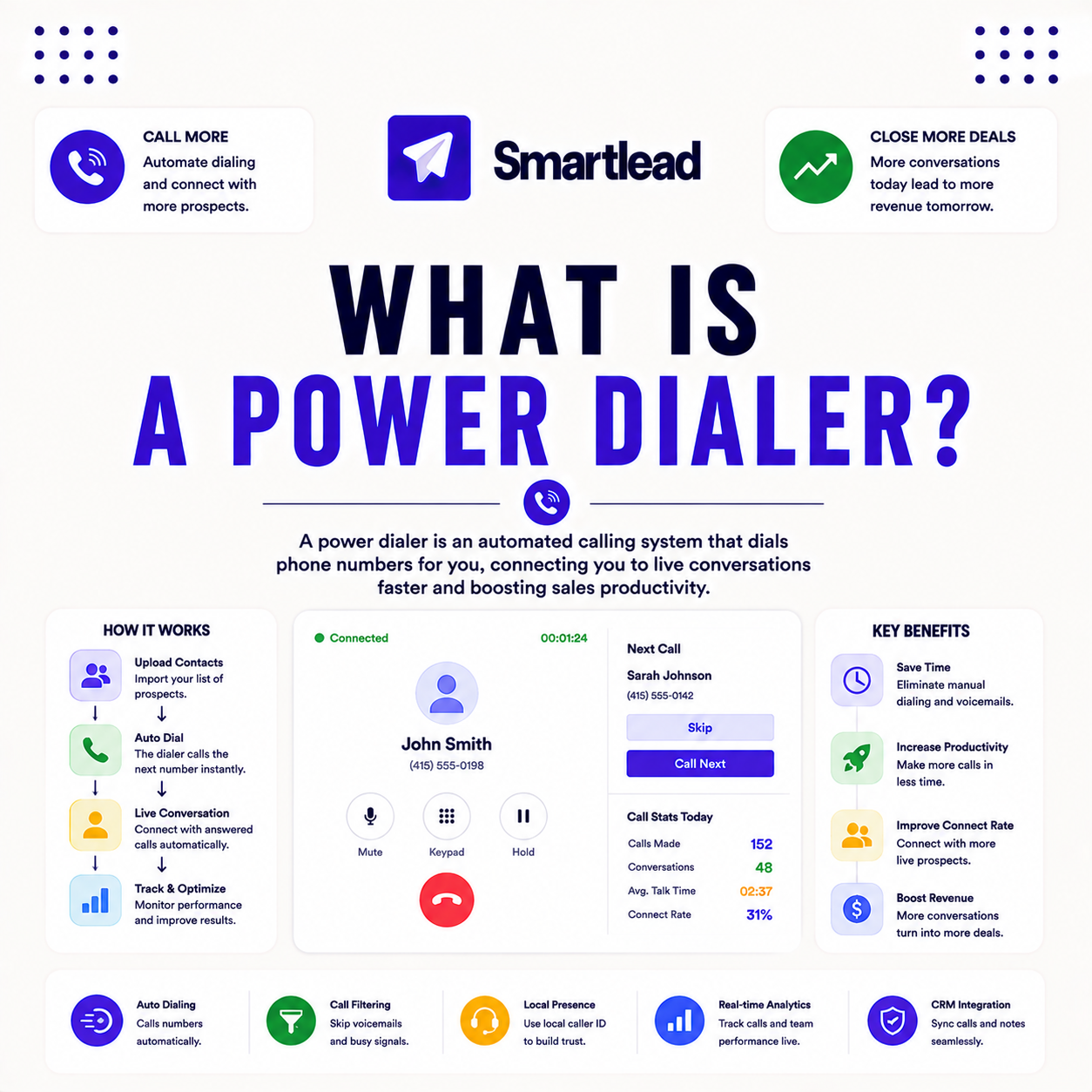
A power dialer is software that automatically dials numbers from a list in sequence, connecting a rep only when someone answers. By skipping busy tones and voicemails, it removes the dead time of manual dialing. The deciding factor is that the rep spends time on live conversations, not dialing. The list below covers the parts.
- Auto-dials a list: numbers are called one after another automatically.
- Connects on answer: a rep is joined only when a person picks up.
- Skips dead calls: busy tones and voicemails are bypassed.
- Raises live time: the rep spends more of the hour talking.
- Pairs with email: calls complement email touches in the same motion.
“Removing the dead time between dials is what lets a rep hold more live conversations per hour.”
— Growth Hack Suite, on cold outreach tools
How Does a Power Dialer Work?
It pulls numbers from a list and dials the next as soon as the rep is free, routing answered calls instantly. Some use parallel dialing to call several numbers at once. The deciding factor is that dialing is continuous and automatic. The list below covers the flow.
- Pull from the list: numbers are queued from the prospect list.
- Dial the next: the next number is called the moment the rep is free.
- Route answered calls: a live pickup connects to the rep instantly.
- Filter dead calls: busy tones and voicemails are skipped automatically.
- Log the outcome: call results are recorded for follow-up and CRM sync.
“Speed to connect and consistent call volume are among the strongest levers in outbound sales.”
— HubSpot, on outbound calling
Why Use a Power Dialer?
It raises call volume and live connections, since manual dialing wastes time on busy tones and voicemails. Reps reach far more prospects per hour, the main lever in outbound calling. The deciding factor is that connect rate per hour rises sharply. The list below covers why.
- More dials per hour: continuous dialing removes the manual delay.
- More live connections: skipping dead calls raises talk time.
- Best for scale: the benefit grows with the size of the call list.
- Caveat: occasional callers gain little from auto-dialing.
- Pairs with email: the call side scales alongside email outreach.
What Is Local Presence Dialing?
Local presence dialing shows a caller ID with the recipient’s area code, which lifts answer rates because people answer familiar numbers. Many of these tools include it as a standard feature. The deciding factor is that a local number reads as less like a cold call. The list below covers how it helps.
- Local area code: the caller ID matches the recipient’s region.
- Higher answer rate: familiar numbers get picked up more often.
- Standard feature: most of these tools offer local presence built in.
- Use responsibly: it should support honest outreach, not deception.
- Pairs with clean lists: a verified list makes local dialing more efficient.
What Is the Difference Between a Power Dialer and a Parallel Dialer?
One calls a single number at a time per rep, while a parallel dialer calls several simultaneously and connects the first answer. Parallel dialing maximizes connections but can create brief dropped calls. The deciding factor is one-at-a-time versus several-at-once. The table below draws the distinction.
Source: standard dialer terminology, mid-2026. Directional, not a measured benchmark.
How Do You Use a Power Dialer Effectively?
Use one effectively by working a clean, verified number list, using local presence, and pairing calls with email touches. Verifying numbers and skipping voicemails keeps the rep on live conversations. The ordered steps below make it repeatable.
- Clean the number list: verify numbers so dials reach real people.
- Use local presence: match the caller ID to the recipient’s region.
- Pair with email: add a call step to the email sequence for the same prospect.
- Follow the rules: respect do-not-call lists, consent and calling hours.
- Log and follow up: record outcomes and route them into the CRM.
Adding calls to your motion? Test Smartlead free for 14 days.
Start Smartlead Free Trial →No credit card · unlimited mailboxes
Does a Power Dialer Pair With Cold Email?
Yes, calls plus email lift connection and reply rates, and this kind of tool makes the call side scalable. Adding a call step to an email sequence reaches prospects on two channels without extra manual work. The deciding factor is that multichannel touches outperform a single channel. The table below positions the feature against a typical rival.
Source: vendor sites plus internal review, mid-2026. Verify current features on smartlead.ai.
Does Smartlead Have a Power Dialer?
Yes, Smartlead’s SmartDialer offers parallel dialing, local presence and AI call insights, integrated with email campaigns. It adds a call channel to the same outreach motion. The deciding factor is that the dialer and email live in one platform. The honest read is that a built-in dialer lets a team run calls and email together without stitching tools.
The practical point is to add a call step to email sequences using SmartDialer rather than running a separate calling tool. Verify current features on smartlead.ai.
Who Gets the Most Value From a Power Dialer?
Agencies and scale teams get the most value, since this kind of tool compounds across many reps and calls. Occasional callers see a smaller benefit. The deciding factor is how much call volume the team actually runs. The honest read is that the higher the call volume, the more it pays back.
The practical point is that a team doing meaningful daily call volume gains most, while a light caller can dial manually.
How Do You Get Started Today?
Start on the 14-day free trial, connect a mailbox, warm it, verify a small list and add a call step alongside email. Testing the call-plus-email motion on your own list before committing is the lowest-risk way to begin. The trial needs no card, so the only cost is setup time. By launch, calls and email run in one motion.
Is a Power Dialer Legal for Cold Calling?
These tools are legal, but cold calling is regulated, with rules on do-not-call lists, consent and calling hours that vary by region. The dialer should be used within those rules. The deciding factor is compliance with the regulations where recipients are. This is general guidance, not legal advice, so check the specific laws for your market before running a calling campaign.
The practical point is to scrub against do-not-call lists, respect calling hours, and confirm the rules for each region before dialing.
How Many More Calls Does a Power Dialer Make?
By removing manual dialing and skipping unanswered calls, this kind of tool can multiply dials per hour several times over, and parallel dialing pushes that higher still. The exact gain depends on list quality and answer rates. The deciding factor is that continuous dialing removes the biggest time sink. The honest read is that the lift is real but varies, so measure it on your own list rather than assuming a fixed multiple.
“A predictive dialer is a system that automatically dials batches of telephone numbers.”
— Wikipedia, Predictive dialer
Power Dialer: The Final Verdict
The final verdict is that this kind of tool auto-dials a list and connects a rep only on answered calls, skipping voicemails and busy tones to raise live connections per hour. It pays off for teams doing real call volume, especially paired with email in one motion. Work a clean, verified list, use local presence responsibly, and always dial within the rules for your region.
Growth Hack Suite Editorial — Outbound Tools Team
This guide explains the concept based on standard outbound practice plus hands-on testing of Smartlead. Behavior varies; verify current features on smartlead.ai. We review outbound tools for B2B senders.
Last updated: June 2026. Calling compliance notes are general guidance, not legal advice.
Affiliate disclosure: this page contains affiliate links. If you start a plan through them, Growth Hack Suite may earn a commission at no extra cost to you. It does not change our guidance.
Run calls and email in one motion. Start Smartlead free for 14 days.
Start Smartlead Free Trial →Unlimited mailboxes · no credit card · cancel anytime
Related Tools in the Outbound Stack
Two other tools in the Growth Hack Suite stack pair with this kind of setup.
- Hunter Email Verifier: verifying the email list keeps the paired email channel clean — see verifier accuracy.
- GMass: the Gmail-native option for the email side of a lighter motion — read the GMass review.
- Gmail tools comparison: the Gmail-scoped breakdown for senders weighing platform versus extension — compare the Gmail tools.
Power Dialer FAQ
The 12 most-asked questions about this topic.
What is a power dialer?
A power dialer is software that automatically dials numbers from a list in sequence, connecting a rep only when someone answers. By skipping busy tones and voicemails, it removes the dead time of manual dialing.
How does a power dialer work?
It pulls numbers from the list and dials the next as soon as the rep is free, routing answered calls instantly. Some use parallel dialing to call several numbers at once and connect the first answer.
Why use a power dialer?
To raise call volume and live connections, since manual dialing wastes time on busy tones and voicemails. Reps reach far more prospects per hour, the main lever in outbound calling.
What is local presence dialing?
Local presence shows a caller ID with the recipient’s area code, which lifts answer rates because people answer familiar numbers. Many power dialers include it as a standard feature.
What is the difference between a power dialer and a parallel dialer?
A power dialer calls one number at a time per rep, while a parallel dialer calls several simultaneously and connects the first answer. Parallel dialing maximizes connections but can create brief dropped calls.
How do I use a power dialer effectively?
Work a clean, verified number list, use local presence, and pair calls with email touches. Verifying numbers and skipping voicemails keeps reps on live conversations rather than dead calls.
Does a power dialer pair with cold email?
Yes, calls plus email lift connection and reply rates, and a power dialer makes the call side scalable. Adding a call step to an email sequence reaches prospects on two channels at once.
Does Smartlead have a power dialer?
Yes, Smartlead’s SmartDialer is a power dialer with parallel dialing, local presence and AI call insights, integrated with email campaigns. It adds a call channel to the same outreach motion.
Is a power dialer legal for cold calling?
Power dialers are legal, but cold calling is regulated, with rules on do-not-call lists, consent and hours by region. This is general guidance, not legal advice, so check the rules for your market.
Does a power dialer verify phone numbers?
Many power dialers filter invalid numbers and skip voicemails, but verifying the list first improves efficiency. Clean number data keeps dials landing on real, reachable prospects.
How many more calls does a power dialer make?
By removing manual dialing and skipping unanswered calls, a power dialer can multiply dials per hour several times over. The exact lift depends on list quality and answer rates, so measure it on your own list.
Is a power dialer worth it for small teams?
For teams doing meaningful call volume, yes, since the time saved compounds quickly. For occasional calling, a manual approach may serve well enough without the added tooling.