Table of Contents
Smartlead vs GMass is not about which tool is better overall, but which fits your setup: GMass wins for Gmail-native, low-volume sending with the simplest setup, while Smartlead wins for SMTP scale, many mailboxes and agencies. This honest router compares deliverability, setup, mailboxes and pricing, then sends you to the tool that matches your volume and channel, since both are strong in their own lane.
No single winner, match the tool to your setup.
Gmail-native, low volume, simple setup: GMass.
SMTP scale, many mailboxes, agencies: Smartlead.
Bottom line: match the tool to your volume and channel, not to a headline ranking.
Scaling outbound across many mailboxes? Try Smartlead free for 14 days.
Start Smartlead Free Trial →Unlimited mailboxes · no credit card · 14-day trial
Smartlead vs GMass: Which One Fits Your Setup?
Smartlead vs GMass depends entirely on your setup. GMass fits Gmail-native senders running lower volume from one or a few accounts, while Smartlead fits SMTP senders scaling across many mailboxes and domains. Neither is universally better, since they are built for different sending models. The right pick follows your channel and volume rather than a single overall score.
The most useful question is not which tool is best, but which architecture matches how you actually send.
What Is the Core Difference Between Smartlead and GMass?
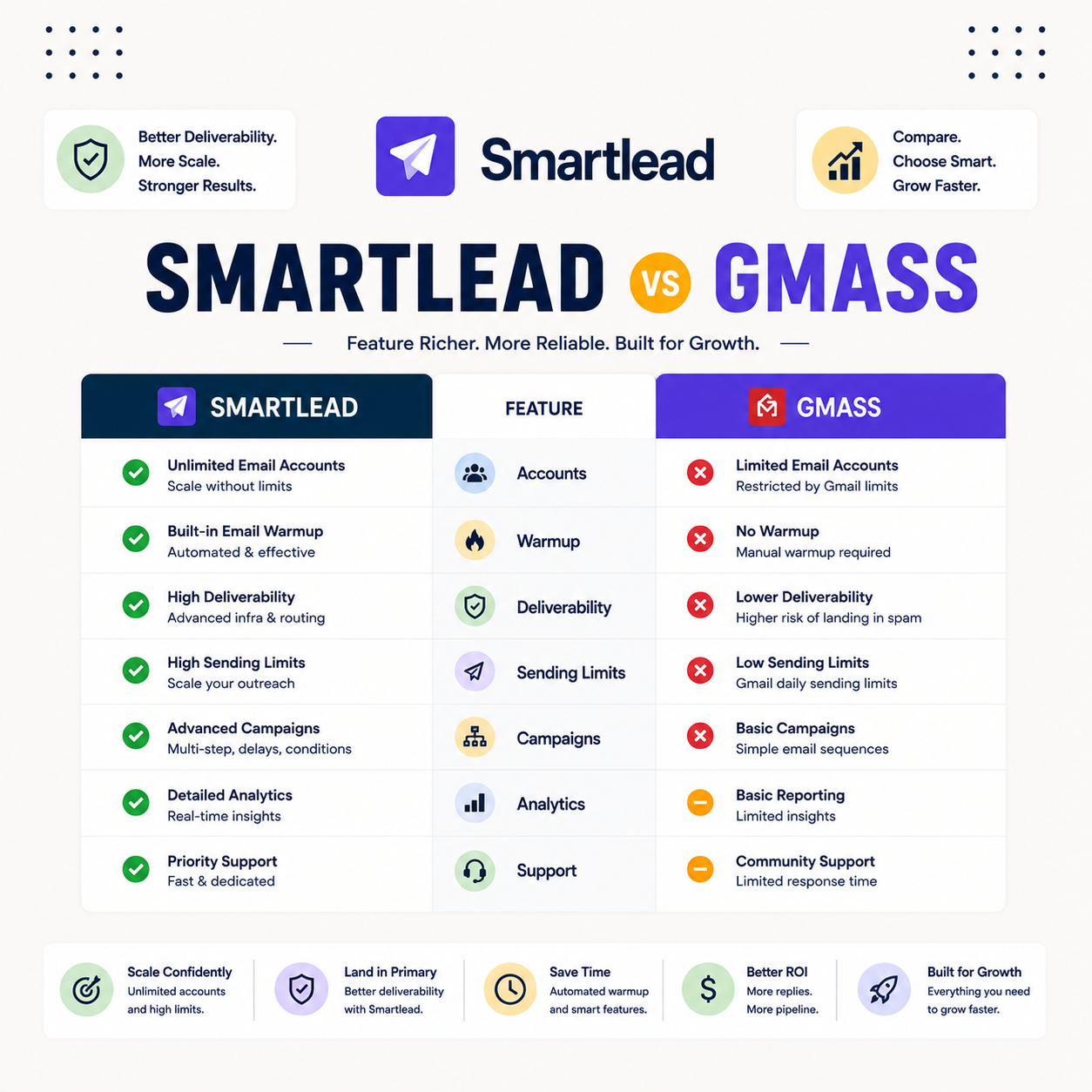
The core difference is architecture. GMass runs inside Gmail as an extension, so it inherits Gmail’s simplicity and its sending limits, while Smartlead is a standalone platform with dedicated infrastructure built for scale. That single distinction explains most of the setup, scale and pricing differences below. The list shows where each tool sits.
- GMass architecture: a Gmail-native extension that sends from inside Gmail, simple to start but bound by Gmail limits.
- Smartlead architecture: a standalone platform with dedicated infrastructure and unlimited mailboxes built for scale.
- GMass strength: speed and simplicity for a solo sender who lives in Gmail and wants to send in minutes.
- Smartlead strength: multi-domain rotation, warmup and white-label for agencies and high-volume outbound.
- Overlap point: both send cold email, which is why they appear on the same shortlist despite different architectures.
How Do Smartlead and GMass Compare on Deliverability?
Smartlead vs gmass deliverability comes down to lane, not raw score. Both deliver well within their lane: GMass leans on Gmail’s reputation and works great for Gmail-native sending at lower volume, while Smartlead leans on dedicated infrastructure and rotation for high volume. The table compares the deliverability-relevant capabilities rather than invented inbox percentages, since published head-to-head test figures are not available for either tool.
Source: vendor feature documentation (smartlead.ai, gmass.co), June 2026. A qualitative capability comparison, not a measured inbox-placement test.
“Deliverability depends more on sender reputation than on the sending platform itself.”
— HubSpot, on email deliverability
How Do They Compare on Setup and Ease of Use?
On smartlead vs gmass setup, GMass wins clearly. It installs in Gmail and sends in minutes, ideal for non-technical solopreneurs who want zero friction. Smartlead takes more setup, since connecting mailboxes, authenticating domains and configuring warmup is the cost of its scale and control. The trade-off is simplicity versus power, and it maps directly to sender type.
For a solo sender who wants to start today, GMass is the faster path; for a team building a scaled system, Smartlead’s setup pays off.
How Do They Compare on Mailboxes and Scale?
Smartlead wins on scale. It supports unlimited mailboxes and multi-domain rotation built for high volume, while GMass is bound by Gmail and Workspace limits on any single account. For senders who need to scale across many inboxes, the architecture difference is decisive. The list below shows how each handles volume.
- GMass scale: sending is bound by Gmail and Workspace daily limits, which caps any single-account volume.
- Smartlead scale: unlimited mailboxes and multi-domain rotation remove the per-account ceiling for high volume.
- Rotation: Smartlead spreads volume across many inboxes, while GMass concentrates it on the connected Gmail account.
- Domain strategy: Smartlead supports many sending domains, while GMass ties sending to the Gmail or Workspace domain.
- Agency fit: Smartlead scales across client domains, while GMass suits a single sender rather than multi-client volume.
How Do Smartlead and GMass Compare on Pricing?
On pricing the models differ. GMass uses simple flat monthly pricing inside Gmail, cheapest for a single account, while Smartlead’s unlimited-mailbox plan is cheaper per mailbox once a sender scales. The table compares entry price, mailbox model and best value, so the cheaper option maps to the real volume rather than the headline number.
Source: vendor pricing pages (smartlead.ai, gmass.co), verified June 2026. Prices change; confirm at signup.
“The cheapest tool is the one that fits your sending model, not the lowest sticker price.”
— Growth Hack Suite, cold email tools comparison
Which Is Better for Gmail-Native Sending?
GMass is better for Gmail-native sending, full stop. If you send from one or a few Gmail or Workspace accounts at low to moderate volume, GMass gives the simplest, fastest setup with pricing that suits a single account. There is no reason to add a platform’s overhead for that motion, which is exactly where GMass shines.
Sending from Gmail at low volume? GMass is the simplest fit.
Try GMass →Installs in Gmail · sends in minutes
Which Is Better for Scale and Agencies?
For smartlead vs gmass for agencies, Smartlead is the clear pick. Unlimited mailboxes, dedicated infrastructure, white-label and multi-domain rotation are exactly what high-volume and multi-client outbound need.
GMass cannot match that scale because it sends from inside Gmail. For any team scaling cold email across domains, Smartlead is the clear fit.
The moment a sender outgrows a single Gmail account, the architecture points to Smartlead rather than a Gmail extension.
What Do Real Users Say About Smartlead vs GMass?
User sentiment matches the split cleanly. GMass users praise simplicity and Gmail-native sending, while Smartlead users praise scale, deliverability and the API. The split is consistent across review platforms, which makes the pattern reliable. The list below summarizes what each tool’s users highlight most.
- GMass praised for: simplicity, Gmail-native sending and a low single-account price come up most across reviews.
- Smartlead praised for: scale, deliverability and a deep API are the standout strengths users cite.
- GMass limitation: Gmail sending limits and single-account scale are the most cited reservations from reviewers.
- Smartlead criticism: a learning curve is the recurring complaint, in line with its depth and feature set.
- Consistent pattern: sentiment matches the tools, simplicity for GMass and scale for Smartlead.
When Should You Choose GMass?
Choose GMass when you send from Gmail or Workspace at low to moderate volume, want the simplest setup, or run a single-account motion. In those cases GMass’s Gmail-native architecture is the right fit, and a platform would only add overhead. The list below shows the situations where GMass is the better pick.
- Gmail-native sending: senders who live in Gmail get the most natural fit from GMass without leaving the inbox.
- Low to moderate volume: single-account senders within Gmail limits do not need a scaled platform.
- Simplest setup: non-technical solopreneurs who want to send in minutes are the ideal GMass user.
- Lowest single-account cost: teams sending from one inbox get the cheapest fit from GMass flat pricing.
- No platform overhead: senders who want zero extra tooling prefer GMass running inside Gmail.
When Should You Choose Smartlead?
Choose Smartlead when you scale across many mailboxes and domains, run an agency, need deliverability infrastructure, or build on the API. In those cases the unlimited-mailbox model and rotation are exactly what the workflow needs, and a Gmail extension cannot keep up. For scaled and multi-client outbound, Smartlead is the clear fit.
If the plan is to grow beyond a single Gmail account, Smartlead is the architecture built to carry that volume.
Smartlead vs GMass: The Verdict by Use Case
The verdict is a clean router by setup. Gmail-native and low volume go to GMass. SMTP scale and agencies go to Smartlead. There is no single winner, only the right fit for a sender’s volume and channel. The list below maps the common use cases to the better tool.
- Gmail-native low volume: GMass is the pick for senders running modest volume from inside Gmail.
- Single-account solopreneur: GMass suits a solo sender who wants the simplest, fastest setup.
- SMTP scale and many mailboxes: Smartlead is the pick for high-volume sending across domains.
- Agency multi-client: Smartlead leads on unlimited mailboxes, white-label and cost per mailbox for agencies.
- Growing past Gmail limits: Smartlead is the move once a sender outgrows a single Gmail account.
How Do You Decide Between Smartlead and GMass Today?
To decide, map your volume and channel: if you send from Gmail at low volume, start GMass today; if you scale across mailboxes or run an agency, start Smartlead. The ordered steps below turn the choice into a quick decision based on how you actually send rather than a feature list.
- Map volume and channel: write down the number of sending mailboxes in use and whether they run on Gmail or SMTP.
- Gmail and low volume: start GMass, since its Gmail-native setup is the simplest fit for that motion.
- Scale or agency: start Smartlead, since unlimited mailboxes and rotation carry high-volume outbound.
- Verify the list first: clean contacts before sending on either tool to protect deliverability from day one.
- Test before committing: run a small send on the chosen tool and check placement before scaling volume.
“Email marketing is the act of sending commercial messages to a group of people.”
— Wikipedia, Email marketing
Growth Hack Suite Editorial — Outbound Tools Team
Comparison based on each tool’s official documentation and pricing, plus hands-on testing. We compare outbound tools for B2B senders.
Last updated: June 2026. Pricing and features change; verify on each vendor’s site.
Affiliate disclosure: this page contains affiliate links to both Smartlead and GMass. If you start a plan through them, Growth Hack Suite may earn a commission at no extra cost to you. It does not change our comparison.
Scaling beyond a single Gmail account? Start Smartlead free for 14 days.
Start Smartlead Free Trial →Unlimited mailboxes · no credit card · cancel anytime
Related Tools in the Outbound Stack
Two other tools in the Growth Hack Suite stack work alongside whichever tool you pick, one before sending and one for the deeper GMass breakdown.
- Hunter Email Verifier: verifying a list before import protects deliverability on either tool — see verifier accuracy.
- GMass review: the full breakdown of the Gmail-native option for low-volume senders — read the GMass review.
- Gmail tools comparison: the Gmail-scoped breakdown for senders weighing platform versus extension — compare the Gmail tools.
Smartlead vs GMass FAQ
The 12 most-asked questions about Smartlead vs GMass.
Is Smartlead better than GMass?
Neither is universally better. Smartlead wins for deliverability, unlimited mailboxes and scale, while GMass wins for Gmail-native simplicity and a low single-account price. The better tool depends on whether you send at scale from SMTP or low volume from Gmail.
What is the difference between Smartlead and GMass?
The core difference is architecture. Smartlead is a standalone platform with dedicated infrastructure and unlimited mailboxes, while GMass is a Gmail extension that sends from inside Gmail. One is built for scale, the other for Gmail-native simplicity.
Smartlead vs GMass: which is better for deliverability?
For deliverability at scale, Smartlead has the edge through dedicated infrastructure, sender rotation and free warmup on its top tiers. GMass delivers well within Gmail’s limits, making it strong for Gmail-native, low-volume sending.
Is Smartlead cheaper than GMass?
GMass is cheaper for a single Gmail account, from around $25 a month, while Smartlead starts at $39. Smartlead is usually cheaper per mailbox once you scale to many inboxes, because its unlimited-mailbox model spreads the fee across every inbox.
When should I choose GMass over Smartlead?
Choose GMass when Gmail-native simplicity drives your results or you fit the low-volume Gmail sender profile. It installs in Gmail, sends in minutes and costs the least for a single sending account.
When should I choose Smartlead over GMass?
Choose Smartlead when you scale across many mailboxes and domains, want deliverability infrastructure and lower cost per mailbox, or run an agency. The unlimited-mailbox model carries volume that a Gmail extension cannot.
Does Smartlead have more mailboxes than GMass?
Yes, Smartlead includes truly unlimited mailboxes with free warmup on its Unlimited tiers, while GMass is bound by Gmail and Workspace sending limits on a single account. For many inboxes across domains, Smartlead scales directly.
Is Smartlead a good GMass alternative?
Smartlead is a strong GMass alternative for senders who scale, want deliverability control or run an agency. If you send Gmail-native at low volume, GMass may stay the better fit, since Smartlead’s power is more than that motion needs.
Smartlead vs GMass: which is better for agencies?
For agencies, Smartlead leads on unlimited mailboxes, white-label and cost per mailbox across client domains. GMass suits a single sender rather than multi-client volume, so agencies almost always choose Smartlead.
What do users say about Smartlead vs GMass?
Users praise Smartlead for deliverability and scale, and GMass for Gmail-native simplicity and price. The sentiment is consistent across reviews and mirrors the tools, with simplicity for GMass and scale for Smartlead.
How do I switch from GMass to Smartlead?
Export campaigns and contacts from GMass, connect and warm new mailboxes in Smartlead, verify the list, then test a small send before scaling. Running both in parallel during the Smartlead trial avoids any gap in outreach.
Smartlead or GMass: which should I pick?
Pick Smartlead for SMTP scale, deliverability and agency use, or GMass for Gmail-native simplicity and the low-volume single-account motion. The choice follows your sending model rather than a single ranking.