Table of Contents
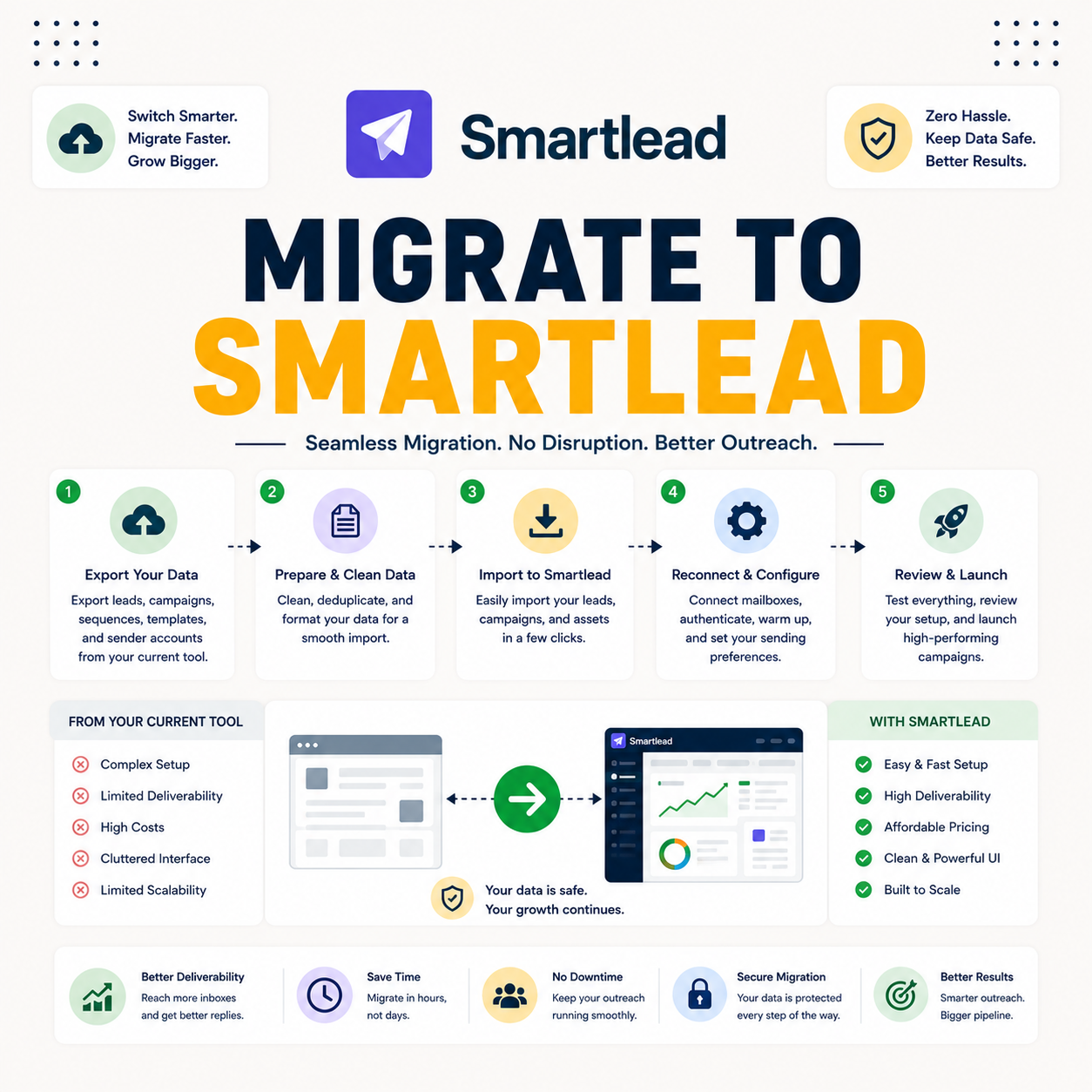
When you migrate to Smartlead from another cold email tool, the risk is breaking deliverability mid-switch, so the safe path is to warm new mailboxes and test before cutover rather than moving volume overnight. This guide walks the six migration steps from Instantly or Lemlist, what to avoid, how long it takes, and how to switch without losing campaigns or deliverability.
Migrate by exporting, warming new mailboxes, verifying lists, then testing before cutover.
Best for: switching tools without downtime or deliverability loss.
Caveat: new mailboxes still need a warmup window before cutover.
Bottom line: a phased switch protects the reputation already built.
Switch without losing campaigns. Try Smartlead free for 14 days.
Start Smartlead Free Trial →Unlimited mailboxes · no credit card · 14-day trial
Why Migrate to Smartlead Carefully?
When you migrate to Smartlead, doing it carefully matters because moving volume to cold new mailboxes lands in spam and undoes the reputation already built. A rushed switch trades a working setup for a broken one. The deciding factor is that the new mailboxes need warming before they carry real volume. The list below covers why a careful migration matters.
- Cold mailboxes risk spam: moving volume to unwarmed mailboxes lands the mail in the spam folder.
- Warm first: warming the new mailboxes protects reputation before they carry real campaigns.
- Phased switch: shifting volume gradually avoids a sudden cutover that breaks deliverability.
- Keep the old tool: running both during the switch means no campaigns stop mid-migration.
- Test before trusting: a small test on the new mailboxes confirms placement before cutover.
Step 1: How Do You Export From Your Current Tool?
Export campaigns, sequences and contact lists from Instantly, Lemlist or whichever tool is in use, keeping the copy and timing intact. The export is the record that lets campaigns be rebuilt without rewriting them. The deciding factor is capturing everything before touching the new setup. The list below covers the export step.
- Export sequences: save the full email copy and timing of every active sequence.
- Export contact lists: download the contact lists so they can be verified before reimport.
- Note the settings: record sending limits and schedules so the rebuild matches the original.
- Keep the old tool live: export without shutting anything down, so campaigns keep running.
- Organize the export: file the exported assets clearly so the rebuild in Smartlead is fast.
Step 2: How Do You Connect and Warm New Mailboxes?
Connect the mailboxes in Smartlead, authenticate the domains, and warm every mailbox for one to two weeks before any real send. The new mailboxes start cold, so warming is what makes them safe to use. The honest read is that this warmup window is the real length of the migration. The table below shows the migration steps and the risk of skipping each.
Source: standard migration sequence from cold email deliverability practice, mid-2026. Warmup timing varies by provider and domain.
Step 3: How Do You Rebuild Campaigns in Smartlead?
Once you migrate to Smartlead, rebuild the sequences using the exported copy and timing, recreating each campaign rather than expecting a one-click import. The export makes this a copy job, not a rewrite. The deciding factor is matching the original timing and personalization so performance carries over. The list below covers the rebuild.
- Recreate sequences: rebuild each sequence in Smartlead from the exported email copy.
- Match the timing: set the same follow-up spacing the original campaigns used.
- Re-add personalization: map merge fields so personalization works as it did before.
- Assign warmed mailboxes: point the rebuilt campaigns at the new, warmed mailboxes only.
- Review before launch: check each rebuilt campaign against the original before it sends.
“Rebuild from the export, because matching the original timing is what carries performance across tools.”
— Growth Hack Suite, on campaign rebuilds
Step 4: How Do You Verify Lists Before Import?
Verify the contact lists before importing them into Smartlead, removing addresses that aged or went invalid since the last send. Lists decay over time, so an old export needs cleaning before reuse. The deciding factor is that a stale list bounces and harms the new mailboxes. The honest read is that migration is the perfect moment to re-verify every list.
The practical step is to run the exported lists through a verifier and import only the addresses that still pass, protecting the freshly warmed mailboxes.
Step 5: How Do You Test Before Cutover?
Run a small test campaign on the warmed Smartlead mailboxes and check placement and replies before shifting real volume. The test confirms the new setup works before anything depends on it. The deciding factor is proving placement, not assuming it. The list below covers the pre-cutover test.
- Small test batch: send to a limited batch on the warmed mailboxes, not the full list.
- Check placement: confirm the test mail lands in the inbox rather than spam.
- Watch replies: confirm reply handling works in the master inbox before scaling.
- Compare to old tool: check the new placement matches or beats the previous setup.
- Fix before scaling: resolve any placement issue before committing real volume to the switch.
“Move volume gradually when switching tools, because a sudden cutover risks deliverability.”
— HubSpot, on tool migration
Planning a switch? Test Smartlead free for 14 days.
Start Smartlead Free Trial →No credit card · unlimited mailboxes
Step 6: How Do You Complete the Cutover?
Complete the cutover by gradually shifting volume to Smartlead while winding down the old tool, rather than switching everything at once. A phased handover keeps campaigns live throughout. The deciding factor is that gradual transfer protects deliverability on both sides. The honest read is that the old tool should stay live until the new setup is fully proven.
The practical guidance is to move volume over in stages, watching placement at each step, and only cancel the old tool once Smartlead carries the full load cleanly.
What Should You Avoid When Migrating?
Avoid moving full volume to cold mailboxes, importing an unverified old list, and cancelling the old tool before the new one is proven. Each turns a safe migration into a deliverability risk. The table below maps the migration mistakes to what to do instead.
Source: common migration mistakes from standard cold email practice, mid-2026.
How Long Does Migration Take?
To migrate to Smartlead takes one to two weeks, mostly the warmup window for the new mailboxes. The exporting, rebuilding and verifying are quick; warming the mailboxes is the real lead time. The deciding factor is to plan around that warmup window. The honest read is that the hands-on work is light, so the timeline is set by warmup, not effort.
The practical point is to start warming the new mailboxes early, so the warmup window finishes by the time the rebuilt campaigns are ready to cut over.
Who Gets the Most Value From Migrating Carefully?
Agencies and scale senders get the most value when they migrate to Smartlead carefully, since it protects many client campaigns at once. A solo sender benefits too, but the cost of a botched switch grows with the number of campaigns at stake. The deciding factor is how much depends on the migration going cleanly. The honest read is that the more campaigns ride on the switch, the more the careful approach pays back.
The practical point is that the same phased steps work at any size, but the downside of a rushed migration is largest for agencies running client volume.
How Do You Get Started Today?
Start on the 14-day free trial, connect a mailbox, warm it, and rebuild one campaign to test the workflow before committing the full switch. Proving the migration on one campaign first is the low-risk way to begin. The trial needs no card, so the old tool can keep running in parallel. By the end of warmup, the first rebuilt campaign is ready to cut over.
Can You Keep Your Old Tool Running During Migration?
Yes, and you should keep the old tool running until the Smartlead setup is proven. Running both in parallel means campaigns never stop and there is a fallback if the cutover hits a problem. The deciding factor is that overlap removes the risk of a gap in sending. The honest read is that paying for both tools briefly is cheap insurance against a broken switch.
“A cold email is an unsolicited message sent to a recipient without prior contact.”
— Wikipedia, Cold email
Migrating to Smartlead: The Final Verdict
The final verdict is that migrating to Smartlead is safe when it is phased: export, warm the new mailboxes, verify lists, rebuild campaigns, test, then cut over gradually while the old tool stays live. The hands-on work is light; the warmup window sets the pace. Do the switch in stages, and campaigns and deliverability carry over intact.
Growth Hack Suite Editorial — Outbound Tools Team
This guide to how you migrate to Smartlead is based on official documentation plus hands-on testing of the migration workflow from tools like Instantly and Lemlist. Export options and warmup timing vary by tool and provider; verify current steps on smartlead.ai and your current tool’s docs. We review outbound tools for B2B senders.
Last updated: June 2026. Confirm current migration and export steps on smartlead.ai.
Affiliate disclosure: this page contains affiliate links. If you start a plan through them, Growth Hack Suite may earn a commission at no extra cost to you. It does not change our guidance.
Switch without losing campaigns. Start Smartlead free for 14 days.
Start Smartlead Free Trial →Unlimited mailboxes · no credit card · cancel anytime
Related Tools in the Outbound Stack
Two other tools in the Growth Hack Suite stack pair with Smartlead during a migration.
- Hunter Email Verifier: re-verifying the exported lists keeps bounce low on the new mailboxes — see verifier accuracy.
- GMass: the Gmail-native option for a sender migrating a small setup from Gmail — read the GMass review.
- Gmail tools comparison: the Gmail-scoped breakdown for senders weighing platform versus extension — compare the Gmail tools.
Migrating to Smartlead FAQ
The 12 most-asked questions about migrating to Smartlead.
How do I migrate to Smartlead from Instantly?
Export your campaigns and contacts, connect and warm new mailboxes in Smartlead, verify the lists, rebuild the sequences, test on a small batch, then cut over gradually while Instantly stays live.
Can I migrate to Smartlead without losing campaigns?
Yes, you can migrate to Smartlead without losing campaigns by exporting your sequences and copy first, then rebuilding them. Because the export preserves the copy and timing, no campaign content is lost in the switch.
Why must I warm new mailboxes before migrating?
Because moving volume to cold mailboxes lands in spam and undoes your reputation. Warming the new mailboxes for one to two weeks first is what makes the switch safe.
How do I move from Lemlist to Smartlead?
Export campaigns and contacts from Lemlist, connect and warm mailboxes in Smartlead, verify the lists, rebuild the sequences, then test before shifting volume gradually. The steps match any tool migration.
Should I verify my list before importing to Smartlead?
Yes, verify before importing to remove addresses that aged or went invalid since the last send. An old list bounces and harms the freshly warmed mailboxes, so re-verify every list.
How do I test before cutting over to Smartlead?
Run a small test campaign on warmed Smartlead mailboxes and check placement and replies before shifting real volume. The test confirms the new setup works before anything depends on it.
Should I switch everything to Smartlead at once?
No, shift volume gradually while winding down the old tool. A phased cutover keeps campaigns live and protects deliverability on both sides, rather than risking a sudden break.
What should I avoid when migrating to Smartlead?
Moving full volume to cold mailboxes, importing an unverified old list, and cancelling the old tool before the new one is proven. Each turns a safe migration into a deliverability risk.
How long does migrating to Smartlead take?
One to two weeks, mostly the warmup window for new mailboxes. Exporting and rebuilding are quick, so the timeline is set by warmup rather than the hands-on work.
Will migrating to Smartlead hurt my deliverability?
Not if done right. Warming new mailboxes, verifying lists and testing before cutover protect deliverability through the switch. A rushed migration to cold mailboxes is what causes problems.
Can I keep my old tool running during migration?
Yes, and you should until the Smartlead setup is proven. Running both in parallel means campaigns never stop and there is a fallback if the cutover hits a problem.
Is there a tool to migrate campaigns to Smartlead?
Migration is mostly export and rebuild rather than a one-click import. You export sequences and contacts from the old tool, then recreate the campaigns in Smartlead using that copy and timing.