Table of Contents
Smartlead integrations connect the platform to your CRM, data and automation stack, including HubSpot, Salesforce, Pipedrive, Clay, Zapier and webhooks. This review explains what integrations Smartlead supports, which ones matter most, how the HubSpot and Clay connections work, how no-code automation fits in, whether reply data syncs to a CRM, and whether the integration depth is a reason to choose the platform for data-driven outbound.
Smartlead integrates natively with major CRMs plus Clay, Zapier, Make and n8n, backed by webhooks and a deep API.
Best for: connecting outbound to a CRM and data stack.
Caveat: deep custom workflows still benefit from API and developer help.
Bottom line: a strong reason to choose Smartlead for RevOps-led outbound.
Connect your stack. Try Smartlead free for 14 days.
Start Smartlead Free Trial →Native CRM sync · no credit card · 14-day trial
What Integrations Does Smartlead Support?
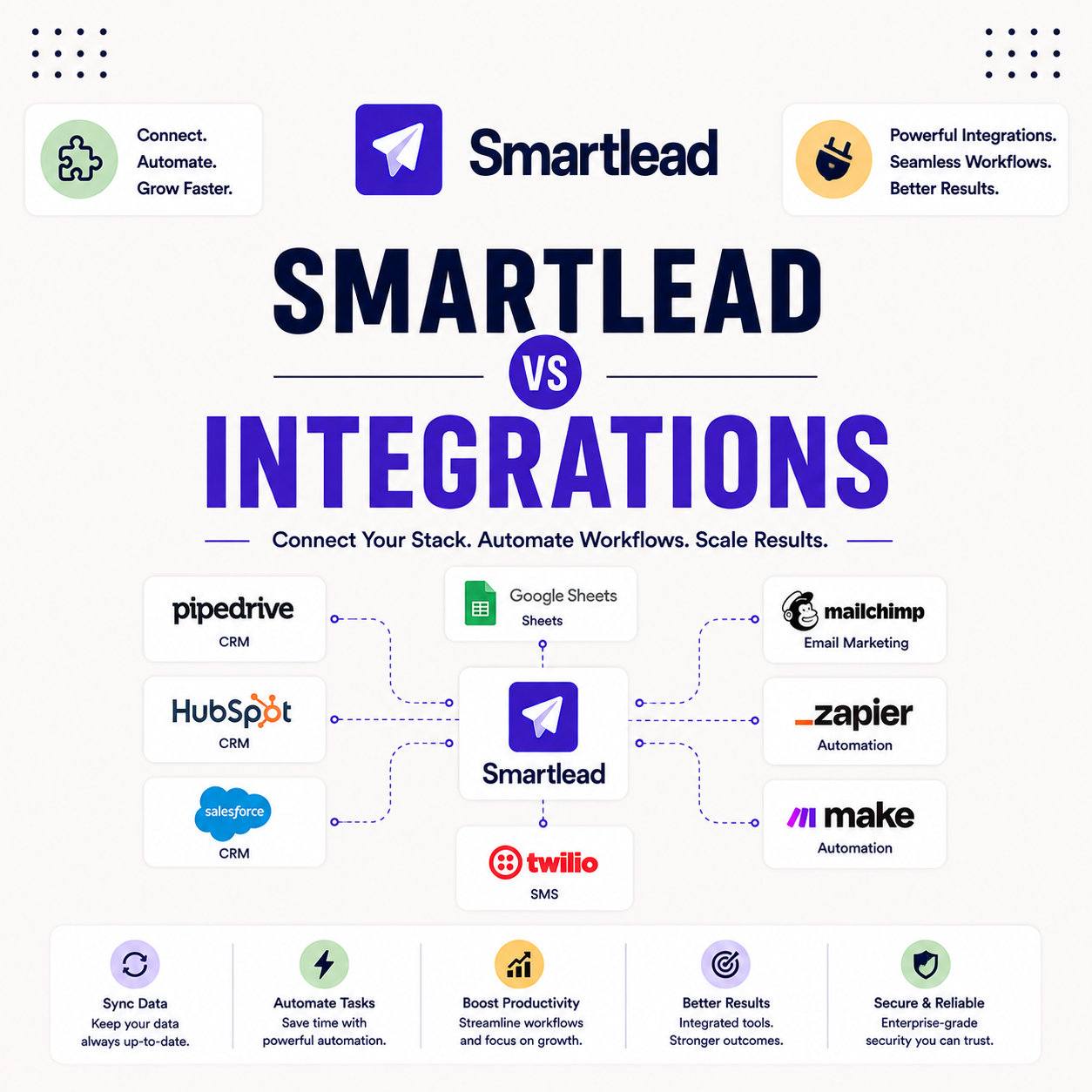
Smartlead integrates with major CRMs like HubSpot, Salesforce and Pipedrive, data tools like Clay, and no-code automation through Zapier, Make and n8n, backed by webhooks and an API. That spread covers the whole outbound data flow. The list below shows the categories of integration available.
- CRM connections: HubSpot, Salesforce and Pipedrive sync leads, reply outcomes and deal stages.
- Data enrichment: Clay pairs with Smartlead to enrich and build lead lists before any send.
- No-code automation: Zapier, Make and n8n connect Smartlead to hundreds of apps without code.
- Webhooks: real-time webhooks push events like replies to any endpoint as they happen.
- API access: a deep API supports custom workflows that go beyond the native connectors.
Which Smartlead Integrations Matter Most?
The integrations that matter most are your CRM, for syncing replies and deals, and a data tool like Clay, for enriching leads before sending. Together they close the loop from list-building to pipeline. The list below ranks the connections by impact for most teams.
- CRM sync: connecting HubSpot or Salesforce turns reply outcomes into tracked pipeline, not lost inbox notes.
- Clay enrichment: enriching leads in Clay before a send powers the personalization that lifts replies.
- Automation glue: Zapier or Make routes events between tools, removing manual data shuffling.
- Webhook triggers: real-time webhooks let a reply instantly start a downstream workflow in another app.
- API for scale: the API matters most for agencies and RevOps teams building repeatable custom flows.
How Does Smartlead Integrate With HubSpot?
Smartlead connects to HubSpot natively and via the API, syncing leads, reply outcomes and activity so the CRM stays the source of truth. A reply in Smartlead can update a HubSpot record without manual copying. For a HubSpot-centric team, that two-way sync is the core benefit.
“A connected CRM turns reply data into pipeline, not just an inbox metric.”
— Growth Hack Suite, on outbound tooling
How Does Smartlead Work With Clay?
Smartlead pairs with Clay so teams enrich and build lead lists in Clay, then push hyper-personalized lists into Smartlead campaigns. Clay handles the data and enrichment, Smartlead handles the sending. The combination is what powers high-personalization outbound at scale. For data-driven teams, it is a popular pairing.
The practical benefit is a clean handoff: leads enriched in Clay arrive in Smartlead ready to personalize, so the two tools cover the full list-to-send workflow.
How Do No-Code Integrations Work?
No-code integrations through Zapier, Make and n8n let teams connect Smartlead to hundreds of apps without writing code, routing events between tools automatically. A reply can trigger a Slack alert or a CRM update through a simple workflow. The table below maps the main integration types and what each is best for.
Source: Smartlead integration documentation (smartlead.ai), June 2026. Categories shown; confirm specific connectors and limits on the integrations page.
How Do Smartlead Integrations Compare to Rivals?
Against rivals, Smartlead is strong on integration depth, with native CRM connections plus webhooks and a documented API that many cold email tools lack. Some competitors offer only basic Zapier support. For a RevOps team that needs real-time CRM sync, that depth is the deciding factor. For a simple solo sender, it matters less.
“Customer relationship management software keeps every interaction in one connected system.”
— Salesforce, on CRM
Do Integrations Sync Reply Data to a CRM?
Yes, integrations and webhooks sync reply outcomes to a CRM in real time, moving deals forward without manual data entry. A positive reply can update a record, create a task or advance a deal stage automatically. That real-time sync is what keeps a CRM accurate during an active campaign.
The honest read is that reply sync turns outbound from a disconnected inbox activity into tracked pipeline, which is the whole point of integrating in the first place.
Do You Need a Developer to Integrate Smartlead?
For native and no-code integrations, no developer is needed; for deep custom workflows, the API and developer help are useful. Most teams get full value from the native connectors and Zapier alone. The list below shows where a developer does and does not matter.
- Native connectors: CRM integrations connect through the interface, so no developer is required to start.
- No-code automation: Zapier and Make workflows are built in a visual editor without any code.
- Custom workflows: bespoke, multi-step logic benefits from API access and developer time.
- High-scale agencies: teams wiring many client accounts often invest in API-based automation.
- Most teams: the majority reach their goals with native and no-code options, no developer needed.
Sync outbound to your CRM. Try Smartlead free for 14 days.
Start Smartlead Free Trial →No credit card · native CRM sync
How Do You Set Up a Smartlead Integration?
Set up an integration by connecting your CRM or automation tool, mapping fields, and enabling reply sync, then testing with one campaign before scaling. Starting with a single connection confirms the data flows correctly. The ordered steps below make integration a repeatable setup.
- Connect the tool: authenticate the CRM or automation app from the Smartlead integrations settings.
- Map fields: match Smartlead fields to CRM properties so data lands in the right place.
- Enable reply sync: turn on reply and event syncing so outcomes flow into the CRM automatically.
- Test one campaign: run a small send and confirm replies and deals appear correctly in the CRM.
- Scale the workflow: roll the integration out across campaigns once the test data flows cleanly.
Are Smartlead Integrations a Reason to Choose It?
For RevOps teams and data-driven outbound, integrations are a strong reason to choose Smartlead, since native CRM sync, Clay enrichment and an API close the loop from list to pipeline. For a simple solo sender, the depth matters less. The deciding factor is whether outbound needs to connect to a wider stack.
The fair verdict is that integration depth is a genuine differentiator for connected, data-led teams, and a smaller factor for senders who work only inside the platform.
Who Gets the Most Value From Integrations?
RevOps teams and data-driven agencies get the most value, since connected CRM sync and enrichment compound across every campaign and client. A wired stack removes manual data work that scales badly. The table below maps fit by team type so the value is clear.
Source: fit assessment from Smartlead integration positioning and standard RevOps practice, June 2026.
How Do You Get Started Today?
Start on the 14-day free trial, connect a mailbox, warm it, then link your CRM and run a test campaign to confirm reply data syncs. Validating one integration before scaling confirms the data flows cleanly. The trial requires no card, so the only commitment is time. Pairing the CRM sync with warmup and verification keeps the whole stack healthy.
Wire up your outbound stack. Try Smartlead free for 14 days.
Start Smartlead Free Trial →No credit card · native CRM sync
Smartlead Integrations: The Final Verdict
The final verdict is that Smartlead integrations are a genuine strength for connected, data-driven outbound, with native CRM sync to HubSpot, Salesforce and Pipedrive, a Clay pairing for enrichment, no-code automation through Zapier, and webhooks plus an API for custom flows. For RevOps teams the depth is a real reason to choose the platform; for solo senders it is a smaller factor.
“Customer relationship management is a process of managing interactions with customers and potential customers.”
— Wikipedia, Customer relationship management
Growth Hack Suite Editorial — Outbound Tools Team
Review based on Smartlead’s official integration documentation plus hands-on testing of CRM sync, Clay and no-code workflows. We review outbound tools for B2B senders.
Last updated: June 2026. Connectors and plan terms change; verify on smartlead.ai.
Affiliate disclosure: this page contains affiliate links. If you start a plan through them, Growth Hack Suite may earn a commission at no extra cost to you. It does not change our review.
Connect outbound to your whole stack. Start Smartlead free for 14 days.
Start Smartlead Free Trial →Native CRM sync · no credit card · cancel anytime
Related Tools in the Outbound Stack
Two other tools in the Growth Hack Suite stack pair with Smartlead’s integrations, one for clean data and one for the Gmail-native route.
- Hunter Email Verifier: verifying lists before they sync to a CRM keeps the connected data clean — see verifier accuracy.
- GMass: the Gmail-native option for low-volume senders with a lighter integration need — read the GMass review.
- Gmail tools comparison: the Gmail-scoped breakdown for senders weighing platform versus extension — compare the Gmail tools.
Smartlead Integrations FAQ
The 12 most-asked questions about Smartlead integrations.
What integrations does Smartlead support?
Smartlead integrates with major CRMs like HubSpot, Salesforce and Pipedrive, data tools like Clay, and no-code automation through Zapier, Make and n8n, backed by webhooks and an API. That spread covers the whole outbound data flow.
Does Smartlead integrate with HubSpot?
Yes, Smartlead connects to HubSpot natively and via the API, syncing leads, reply outcomes and activity so the CRM stays the source of truth. A reply in Smartlead can update a HubSpot record without manual copying.
Does Smartlead work with Clay?
Yes, Smartlead pairs with Clay so teams enrich and build lead lists in Clay, then push hyper-personalized lists into Smartlead campaigns. Clay handles data and enrichment, Smartlead handles sending.
Does Smartlead integrate with Zapier?
Yes, no-code integrations through Zapier, Make and n8n let teams connect Smartlead to hundreds of apps without code. A reply can trigger a Slack alert or a CRM update through a simple workflow.
Which Smartlead integrations matter most?
Your CRM, for syncing replies and deals, and a data tool like Clay, for enriching leads before sending. Together they close the loop from list-building to tracked pipeline.
Do Smartlead integrations sync reply data to a CRM?
Yes, integrations and webhooks sync reply outcomes to a CRM in real time, moving deals forward without manual data entry. A positive reply can update a record, create a task or advance a deal stage automatically.
Do I need a developer to integrate Smartlead?
For native and no-code integrations, no. For deep custom workflows, the API helps and a developer can be useful. Most teams get full value from native connectors and Zapier without code.
How does Smartlead compare on integrations?
It is strong on integration depth, with native CRM connections plus webhooks and a documented API that many cold email tools lack. Some competitors offer only basic Zapier support, which matters for RevOps teams.
How do I set up a Smartlead integration?
Connect your CRM or automation tool, map fields, enable reply sync, then test with one campaign before scaling. Starting with a single connection confirms the data flows correctly.
Does Smartlead integrate with Salesforce and Pipedrive?
Yes, Smartlead supports Salesforce and Pipedrive alongside HubSpot, syncing leads and reply outcomes. The native CRM connections cover the most common B2B sales stacks.
Are Smartlead integrations included in the plan?
Integration access is part of the platform, though some advanced usage may align with higher tiers. Confirm current terms on the pricing page, since connector availability can depend on plan.
Are Smartlead integrations a reason to choose it?
For RevOps teams and data-driven outbound, yes, since a connected stack compounds value across campaigns. Native CRM sync, Clay enrichment and an API close the loop from list to pipeline.