Table of Contents
Expandi vs Dripify is a choice between two ways of running LinkedIn outreach. Expandi bills $99 a month for each connected LinkedIn account and puts every account on a dedicated country-based IP with automatic warm-up, while Dripify bills each user and leans on a lighter entry tier. This comparison covers account protection, billing units, sequences, multichannel steps, agency fit, and migration.
Last compared: October 2026. Both tools were checked against their own pricing, FAQ, and help pages before writing. Dripify shows annual-billing prices by default, so every Dripify figure below names its billing cycle.
Want the safety-first setup? Start the seven-day Expandi trial and run one account before switching anything.
Start Your 7-Day Expandi Trial →Dedicated country-based IP · automatic warm-up · cancel anytime
Expandi vs Dripify: Which Should You Choose?
Expandi suits operators who treat account safety as the first requirement and run several LinkedIn profiles at once, since every account gets a dedicated country-based IP and automatic warm-up. Dripify suits a single user who wants a lower entry price, a trial that needs no credit card, and a quick first campaign built from templates.
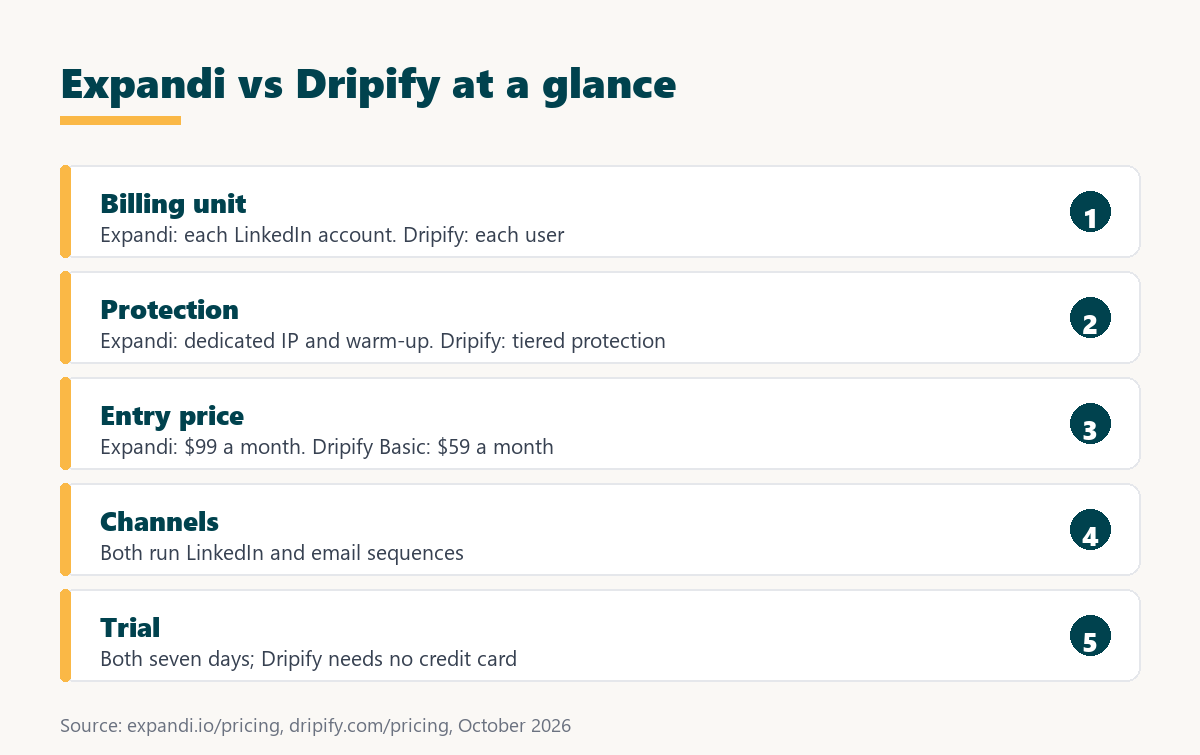
The two tools look alike on a feature page, which is why buyers often compare them on price alone. The deeper split sits in two places: what the fee is attached to, and which protection layers the vendor publishes. Both decisions were made by each vendor long before any individual campaign, so they do not change with the next feature release.
The split is architectural rather than cosmetic, so the right pick follows from how many accounts run at once and how much a restriction on any one of them would cost.
What Does Each Tool Actually Do?
Expandi and Dripify are both cloud LinkedIn automation tools: they send connection requests, follow up with messages, and chain the steps into a sequence. Expandi runs every sequence on a dedicated country-based IP and adds an email step, while Dripify pairs LinkedIn and email sequences with built-in LinkedIn protection on each paid tier.
- Expandi: cloud LinkedIn automation billed for each connected account, with a dedicated country-based IP, automatic profile warm-up, and multichannel steps across connections, messages, and email.
- Dripify: cloud LinkedIn automation billed for each user across Basic, Pro, and Advanced tiers, with LinkedIn and email sequences and 100 email finder credits a month on every paid tier.
- Shared ground: both tools run multi-step LinkedIn sequences, both include email in the workflow, and both offer a seven-day trial before the first charge.
- Key difference: the billing unit and the published protection layer, since Expandi documents a dedicated IP for each account and Dripify documents tiered LinkedIn protection instead.
- Shared risk: LinkedIn’s User Agreement prohibits third-party automation, so restriction remains possible with either tool regardless of the protection layer chosen.
Both products sit inside a long-established software category, which Wikipedia defines as:
“software platforms and technologies designed for marketing departments and organizations to automate repetitive tasks”
Wikipedia, Marketing automation
The overlap is wide enough that a feature list alone will not separate them, which is why the comparison below leads with billing unit and account protection.
How Do Expandi and Dripify Compare at a Glance?
Expandi and Dripify split along four axes: where the tool runs, what the fee is attached to, which account-protection layers ship by default, and what the entry tier allows. Both run in the cloud, so the differences sit in billing, protection, and campaign limits rather than in the basic architecture.
Source: expandi.io/pricing, Expandi Terms and Conditions, and dripify.com/pricing, checked October 2026. Prices before tax.
Read the billing-unit row first: it decides whether a second or third LinkedIn profile multiplies the invoice or fits inside a plan already being paid for.
Nothing in the table settles the decision on its own, but the safety and billing rows are the two that change the cost of being wrong.
How Does Each Tool Protect a LinkedIn Account?
Expandi publishes two protection layers on its plan: a dedicated country-based IP for every account and automatic profile warm-up that ramps activity gradually. Dripify publishes built-in LinkedIn protection on Basic and advanced LinkedIn protection on its Advanced tier, without describing the mechanism on the pricing page.
- Dedicated country-based IP: Expandi assigns a fixed data-center IP to each account from the country chosen at connection, instead of a shared pool rotated across customers.
- Profile auto warm-up: Expandi’s optional gradual ramp starts at 5 actions a day and adds 3 every two days up to 21, beginning once a campaign is active.
- Tiered LinkedIn protection: Dripify lists built-in protection on Basic and advanced protection on Advanced, so the protection layer improves as the plan price rises.
- Operator-set pace: neither vendor removes LinkedIn’s own weekly ceiling on connection requests, so the sending pace still has to stay within platform limits.
- Remaining risk: restriction stays possible with either tool, because LinkedIn prohibits automation software in its User Agreement whatever infrastructure sits underneath.
Expandi’s help center states the IP rule without qualification: “Everyone in Expandi gets their personal dedicated IP address” (Expandi help center, IP address and proxy). Dripify’s pricing page names its protection layers but does not state whether each account sends from its own address, so that detail has to be confirmed with Dripify directly rather than assumed in either direction.
Safety is the axis where the two tools are most often confused, because infrastructure differences are invisible on a feature page and only show up under sustained daily volume.
How Much Does Each Tool Cost?
Expandi charges $99 a month for each LinkedIn account, or $79 a month per account when billed annually, with an Agency tier from ten accounts quoted by sales. Dripify charges each user $59, $79, or $99 a month across Basic, Pro, and Advanced on monthly billing, and $39, $59, or $79 when billed annually.
Source: expandi.io/pricing and dripify.com/pricing, checked October 2026. Dripify also lists a custom Enterprise tier; Expandi lists a custom Agency tier from ten accounts. Taxes vary by country.
Sticker prices in this category rarely compare cleanly, because one tool charges for a connected account while the other charges for a user. The general model behind the second approach is explained in this guide to the SaaS seat license and how per-user billing works.
Expandi’s own FAQ gives the reference figure in a single line:
“Expandi costs 99 USD per account per month.”
Expandi FAQ
Read at equal capability, the gap narrows. Unlimited campaigns cost $99 a month for each account on Expandi and $79 a month for each user on Dripify Pro, and advanced protection sits on Dripify Advanced at $99, the same monthly figure as Expandi’s single plan.
The cost question only resolves after both fees are restated in the same unit, which usually means cost per LinkedIn profile each month at a fixed weekly volume.
Which One Is Faster to Set Up?
Setup speed favors the tool with fewer steps before sending, and Dripify lowers the barrier with a trial that needs no credit card and sequence templates on its Basic tier. Expandi spends part of its first week on warm-up before full volume goes out, a slower start that buys a steadier sending profile.
Expandi’s help center documents the delay plainly: a newly activated campaign “may take up to 45 minutes” to begin sending, and warm-up only starts once a campaign is active. The help center also offers onboarding calls with a tailored setup. None of this is slow in absolute terms, but it means the first few days of an Expandi trial produce deliberately light volume while the profile ramps up.
Time to first campaign and time to safe volume are different measurements, and comparing only the first one flatters whichever tool skips the warm-up step.
How Do the Campaign Sequences Differ?
An Expandi campaign chains connection requests, messages, engagement actions, and email steps in one sequence builder with if-then conditions, while campaign prioritization and recovery decide what sends first and what resumes after an interruption. Dripify builds drip campaigns from LinkedIn and email steps, with campaign count tied to tier.
Limits differ in shape rather than in kind. Expandi’s help center allows up to 5000 leads in one campaign and 15 active campaigns at a time on each account, with unlimited campaigns overall on the plan. Dripify’s Basic tier lists one drip campaign and limited daily quotas, Pro unlocks unlimited drip campaigns and full daily quotas, and Advanced adds step analytics and A/B testing.
Sequence depth decides how much manual follow-up survives after launch, and that workload is what an operator running several accounts feels first.
Which One Handles Multichannel Outreach?
Expandi runs email as a step inside the same campaign as connections and messages, so a silent LinkedIn profile can receive an email follow-up without a second tool. Dripify includes LinkedIn and email sequences on every paid tier, along with 100 email finder credits a month, so both tools cover the two main channels.
Coordinating channels is the point of multichannel outreach across LinkedIn and email. When both channels live in one builder, a sequence can wait for a connection to be accepted before deciding whether to message or email, which prevents two tools from reaching the same prospect on the same morning. The difference between the two products here is small, and buyers should decide on billing and protection instead.
Multichannel inside one platform removes the timing collision that appears when LinkedIn and email run separately and both reach the same prospect at once.
Which Fits an Agency Running Client Accounts?
Expandi maps cleanly onto agency work because the fee follows each connected account, and the Agency tier opens at ten accounts with pricing quoted by sales plus a dedicated Customer Success Manager. Dripify bills each user and lists multi-team management on its Advanced tier, so the comparison depends on how many operators run the client profiles.
- Cost per client profile: a per-account fee turns the platform into a retainer line item that scales with the client list rather than a shared overhead across all clients.
- Account isolation: each client profile on Expandi sends from its own dedicated country-based IP, so one client’s activity never shares an address with another’s.
- Ten-account threshold: Expandi’s Agency tier opens at ten seats, adding flexible roles, client reports, template sharing, and the option to run under the agency’s own brand.
- Team structure: Dripify places multi-team management on its Advanced tier at $99 for each user a month, which suits agencies organized around operators rather than profiles.
- Client handover: when a client leaves, an Expandi seat can be reassigned to a new client profile in the same workspace instead of being cancelled and repurchased.
Agencies rarely switch tools for features; they switch for the billing unit and for the ability to isolate one client account from another.
Which Fits a Solo Founder or Single SDR?
A single operator pays the same $99 for each account on Expandi as an agency does, so the value question narrows to whether one profile produces enough meetings to justify that fee. Dripify’s Basic tier at $59 a month, or $39 billed annually, gives a smaller entry point with tighter campaign limits.
- Single profile economics: a fixed fee suits steady weekly sending and looks expensive in a quiet month, when a lower entry tier wastes less money.
- Learning curve: an entry tier with templates and one drip campaign narrows the choices, while Expandi’s builder offers more conditions and more to configure.
- Risk tolerance: a founder’s personal profile is often the company’s main sales asset, which raises the value of a dedicated IP and a slow warm-up.
- Growth path: a second profile doubles the Expandi bill, while a second person doubles the Dripify bill, so the next hire matters as much as volume.
- Trial friction: Dripify’s trial needs no credit card, while Expandi asks for card details at checkout and charges nothing until the seven days are up.
The right metric for one profile is cost per meeting rather than cost per month, a method laid out in this guide to cost per booked meeting.
For one profile the decision is mostly about consistency, since a flat fee only pays for itself when the sequence actually runs every week.
What Do Reviewers Say About Each Tool?
Expandi holds a 4.3 out of 5 rating on G2 from 162 reviews and 4.4 out of 5 on Trustpilot from 236 reviews, both checked in October 2026. No verified G2 figure for Dripify was collected for this comparison, so its reception is described here without a number rather than with an estimate.
The Trustpilot comments on Expandi split along predictable lines. Praise centers on customer service, onboarding support, and effective LinkedIn outreach, while complaints focus on a steep learning curve, an interface that could be more user-friendly, and setup that is hard without guidance. Those themes line up with the setup-speed trade-off described above, and buyers comparing Dripify should read its recent reviews on the same themes.
HubSpot’s guide to social selling on LinkedIn explains why reviewers keep returning to message quality rather than tooling:
“Social selling on LinkedIn is about two things: connection and context.”
HubSpot, LinkedIn for Social Selling
Ratings this close together say more about review volume than about product quality, so the themes inside the reviews carry more signal than the averages.
Test the safety setup directly. Seven days is enough to warm one account and read the first replies.
Try Expandi for 7 Days →No charge until the seven days are up · first subscription only
When Is Dripify the Better Pick?
Dripify is the better pick for a single user who wants a campaign running quickly with minimal configuration, for anyone whose budget cannot absorb $99 a month for each profile, and for buyers who want to trial a tool without entering card details. Recommending it in those cases keeps the comparison credible.
Three cases stand out. A solo consultant running one profile with a single campaign gets the job done on Dripify Basic for less money. A small team where several people share outreach but not profiles may find per-user pricing easier to budget. And a cautious buyer who refuses to enter a card for a trial has a cleaner first step with Dripify.
Naming the cases where the other tool wins is what separates a comparison from a sales page, and readers who feel steered usually leave before the pricing section.
How Do You Switch From Dripify to Expandi?
Switching works in parallel rather than overnight: export the audience and message copy, pause the running sequences, rebuild them inside Expandi, let warm-up run, then move one account at a time so a single profile carries the risk of the transition while the others keep sending.
- Export the audience: Dripify’s Pro tier lists CSV export, so prospect lists and the best-performing message copy can leave before any campaign is switched off.
- Pause the old sequences: stopping active Dripify campaigns first prevents the same prospect from receiving overlapping invitations or follow-ups from two different tools.
- Rebuild inside Expandi: import the CSV as a lead list, recreate the steps in the builder, and keep one lead list attached to one campaign as the help center recommends.
- Let warm-up run: Expandi’s warm-up begins once a campaign is active, so the first days on the new account stay deliberately light on volume.
- Cut over one account at a time: moving profiles individually keeps client campaigns running while the new sequences prove themselves on a single account.
Moving one account at a time keeps client campaigns running while the new sequences prove themselves, which is the only migration pattern an agency can defend to a customer.
Verdict: Which Tool Wins for Which Buyer?
Expandi wins for agencies, multi-account operators, and anyone whose LinkedIn profile carries real revenue risk, because the fee follows each account and every account sends from its own IP. Dripify wins for a single user optimizing for a lower entry cost and a trial without card details. The split is structural.
- Agency or lead-gen freelancer: Expandi, for billing that follows each client profile and one dedicated country-based IP for every account under management.
- B2B founder testing the channel: Dripify Basic for the lowest entry cost, or Expandi on monthly billing when the founder’s own profile is the main sales asset.
- SDR pairing LinkedIn with email: either tool covers both channels, so the choice follows how the team is billed and how many profiles each SDR runs.
- Solo user optimizing for speed: Dripify, for templates, one drip campaign, and a trial that starts without card details at checkout.
- Team needing unlimited campaigns: compare Expandi with Dripify Pro or Advanced rather than with Basic, since unlimited drip campaigns start on Pro.
Whichever tool wins, both are built for the same coordinated approach that Growth Hack Suite defines this way:
“Multichannel outreach is contacting prospects across more than one channel, such as email, phone and LinkedIn, in a coordinated sequence.”
Growth Hack Suite, What Is Multichannel Outreach?
The verdict holds because it follows the billing unit and the safety architecture, and both of those are decisions each vendor made long before this comparison was written.
What Else Should You Compare Before Deciding?
Two other comparisons belong on the shortlist for this decision: Waalaxy, for anyone drawn to per-user tiers with monthly invitation quotas, and the wider category of LinkedIn automation tools, for buyers who have not yet narrowed the field to two names. Both comparisons work on the same axes used here.
The four axes travel well: billing unit, published account protection, campaign limits on the entry tier, and where the email step unlocks. Applying them to every candidate turns a stack of feature pages into a short table, and it shows quickly which low entry prices depend on a narrow first tier.
Buyers who compare three tools on the same four axes decide faster than buyers who read three separate feature pages, because the axes force the trade-off into view.
Expandi vs Dripify: Frequently Asked Questions
The 12 most-asked questions about Expandi vs Dripify.
Is Expandi better than Dripify?
Neither is better for everyone. Expandi suits agencies and multi-account operators who want a dedicated IP for each account, while Dripify suits a single user who wants a lower entry price.
What is the main difference between Expandi and Dripify?
The billing unit and the published protection layer. Expandi charges for each LinkedIn account and assigns each one a dedicated IP, while Dripify charges for each user and lists tiered LinkedIn protection.
Which is safer for a LinkedIn account?
Expandi publishes a dedicated country-based IP and automatic warm-up for every account. Dripify publishes built-in and advanced LinkedIn protection without describing the mechanism. Neither removes the risk created by LinkedIn’s automation rules.
How much does Expandi cost?
$99 a month for each LinkedIn account on monthly billing, or $79 a month per account billed annually, plus tax for the billing country.
How is Dripify priced?
Each user pays $59, $79, or $99 a month on Basic, Pro, or Advanced with monthly billing, or $39, $59, or $79 a month billed annually.
Which one is easier to set up?
Dripify has the lighter entry point, with templates and a trial that needs no card. Expandi spends its first days on warm-up, which slows initial volume on purpose.
Does either tool send email?
Yes. Expandi includes email steps in its campaigns, and Dripify includes LinkedIn and email sequences on every paid tier.
Which suits agencies?
Expandi usually suits agencies better, because billing follows each client profile and the Agency tier opens at ten accounts with custom pricing.
Can campaigns be moved between them?
Lead lists can move as CSV files, since Dripify lists CSV export on Pro and Expandi accepts CSV lead lists. Sequences have to be rebuilt by hand.
Is there a permanently free tier on Expandi?
No. Expandi offers a seven-day trial on the first subscription of a user account and no permanently free tier after it.
Which has better reviews?
Expandi holds 4.3 out of 5 on G2 from 162 reviews. No verified Dripify rating was collected for this comparison, so the two are not ranked here by score.
Which should a solo founder pick?
Dripify Basic for the lowest entry cost on one profile, or Expandi when the founder’s own profile carries enough revenue to justify a dedicated IP and warm-up.
Ready to run LinkedIn outreach on a dedicated IP? Start the seven-day Expandi trial on one account and compare the results directly.
Start Your 7-Day Expandi Trial →Seven-day trial on the first subscription · cancel anytime · paid fees are nonrefundable
Growth Hack Suite Editorial, Outbound Sales Team
How we compared these tools: Expandi figures come from expandi.io pricing, FAQ, Terms and Conditions, the Expandi help center, G2, and Trustpilot; Dripify figures come from dripify.com/pricing and its pricing FAQ. Both sides were read on the same day, and each Dripify price names its billing cycle because the page defaults to annual figures.
Last compared: October 2026. When either vendor changes its pricing page, this comparison is updated.
Affiliate disclosure: this page contains affiliate links to Expandi only. If a subscription is purchased through them, Growth Hack Suite may earn a commission at no extra cost to the buyer. It does not change the assessment.