Table of Contents
Expandi is a cloud-based LinkedIn automation platform that sends connection requests, messages, and email follow-ups from a dedicated country-based IP, with automatic profile warm-up to protect each account. Pricing is set by LinkedIn account rather than by team member, at $99 per account per month on the Business plan. This Expandi review covers safety limits, agency workflows, the seven-day trial, and how it compares with Dripify, Waalaxy, and PhantomBuster.
Our take: Expandi is the LinkedIn automation platform to pick when account safety matters more than the lowest sticker price.
- Best for: agencies and lead-gen freelancers running several client accounts, plus founders who want a dedicated IP instead of a browser extension.
- Skip if: a permanently free tool is a requirement, or the plan is to send a handful of connection requests a month.
★★★★★ Our editorial rating: 4.2/5
Start Your 7-Day Expandi Trial →Last reviewed: October 2026. Prices, trial terms, and limits were checked against Expandi’s pricing page, FAQ, Terms and Conditions, and help center, plus the public G2 and Trustpilot listings, on the date above. Growth Hack Suite has not run its own campaign test for this review, so no in-house performance figures appear on this page.
Run your first LinkedIn campaign from a dedicated IP instead of a browser tab. Start the seven-day Expandi trial.
Start Your 7-Day Expandi Trial →Seven-day trial on the first subscription · dedicated country-based IP · cancel anytime
What Is Expandi and How Does It Work?
Expandi is a cloud-based LinkedIn automation platform that runs connection requests, messages, and email follow-ups from a dedicated country-based IP, so campaigns keep sending after the browser closes and nothing has to stay open on a laptop. Each connected profile gets its own IP, its own warm-up schedule, and its own campaign queue.
The mechanics are simple to describe. An operator connects a LinkedIn profile, chooses the country the account normally works from, and Expandi assigns an IP address in that country. In the words of the Expandi help center, “Everyone in Expandi gets their personal dedicated IP address,” and the address is provided by a data center rather than drawn from a rotating pool. From there, campaigns are built as sequences of actions: a connection request, a message after acceptance, an engagement step such as a profile visit, and an email when the LinkedIn side goes quiet.
Expandi belongs to a wider software category. Marketing automation tools exist to take repetitive outreach work off a person’s calendar, and Wikipedia describes the category this way:
“software platforms and technologies designed for marketing departments and organizations to automate repetitive tasks”
Wikipedia, Marketing automation
Expandi narrows that idea to a single channel. It does not try to be an email service provider, a CRM, or a data vendor. It schedules and paces LinkedIn activity, adds email as a fallback step, and hands the results to whatever pipeline system the team already uses through integrations and webhooks.
Expandi sits at the outreach layer of the LinkedIn stack, turning one profile into a managed campaign channel that runs on a fixed server IP instead of a browser tab somebody has to keep open all day.
Who Should Use Expandi, and Who Should Not?
Expandi fits teams that sell through LinkedIn at volume: agencies running client accounts, lead-gen freelancers, founders doing their own outbound, and SDRs pairing LinkedIn with email. It fits badly for anyone who wants a permanently free tool or sends only a few connection requests a month, because every connected account carries a fixed monthly fee.
The profiles below are the ones that show up most often in Expandi’s own positioning and in public reviews. The last entry is the honest exception.
- Agencies and lead-gen freelancers: per-account billing maps neatly onto client contracts, and the Agency tier starts at ten accounts with pricing quoted directly by the Expandi sales team.
- B2B founders and solopreneurs: a single profile on the Business plan turns the founder’s own network into a scheduled outbound channel without hiring a sales development rep first.
- SDR and sales teams: reps who already run email sequences add LinkedIn touches inside the same campaign, which keeps timing consistent across both channels for every prospect.
- Recruitment teams: recruiters with Recruiter or Sales Navigator access can run outreach from those searches, since Expandi supports both dashboards when the subscription exists.
- Poor-fit buyers: anyone without a monthly budget for outreach software, or anyone sending a few dozen requests a month, pays a flat fee for capacity that sits unused.
For teams new to outbound roles, the guide to what a sales development representative does explains where LinkedIn automation usually sits inside an SDR workflow.
Expandi earns its seat when LinkedIn is a primary revenue channel and several accounts need to run at once without anyone babysitting a browser.
How Is Cloud LinkedIn Automation Different From a Chrome Extension?
Cloud automation runs campaigns on a remote server tied to one dedicated country-based IP, while a Chrome extension drives the session from a local browser and stops when that browser closes. The split decides uptime, the IP footprint LinkedIn sees, and how many accounts a single operator can manage without juggling laptops and browser profiles.
Expandi is a cloud product. The pricing page lists “Cloud-based software” and a “Dedicated country-based IP-address” as the first two account-safety features, and both apply to every account on the Business plan. A browser extension works differently: it borrows the user’s own session, so the activity comes from whatever network the laptop happens to be on that day.
- Session location: cloud platforms keep the LinkedIn session on a hosted server, so campaigns continue overnight and over weekends without an open laptop or browser window.
- IP footprint: a dedicated country-based IP stays constant for each account, while an extension inherits home, office, and coffee-shop networks that change through the week.
- Uptime: server-side schedules run on their configured active hours, while an extension pauses whenever the computer sleeps, restarts, or loses its network connection.
- Multi-account operations: one operator can hold several client profiles in a single cloud workspace, where an extension usually means one browser profile per connected LinkedIn account.
Expandi does keep a Chrome extension in the picture, but only as one way to connect an account during setup. The help center lists two connection methods: the extension, or the LinkedIn email and password. After that, the campaign work happens in the cloud.
The cloud model is what lets an operator hold several LinkedIn accounts at once, which is exactly the workflow an agency sells and an extension cannot support cleanly.
What Do You Get With Expandi? Full Feature Breakdown
Expandi packages one Business plan rather than a feature ladder, so every account gets cloud sending on a dedicated country-based IP, automatic profile warm-up, unlimited campaigns and templates, multichannel steps across connections, messages, and email, plus campaign prioritization and recovery. Image and video personalization sit outside the plan as paid add-ons with no listed price.
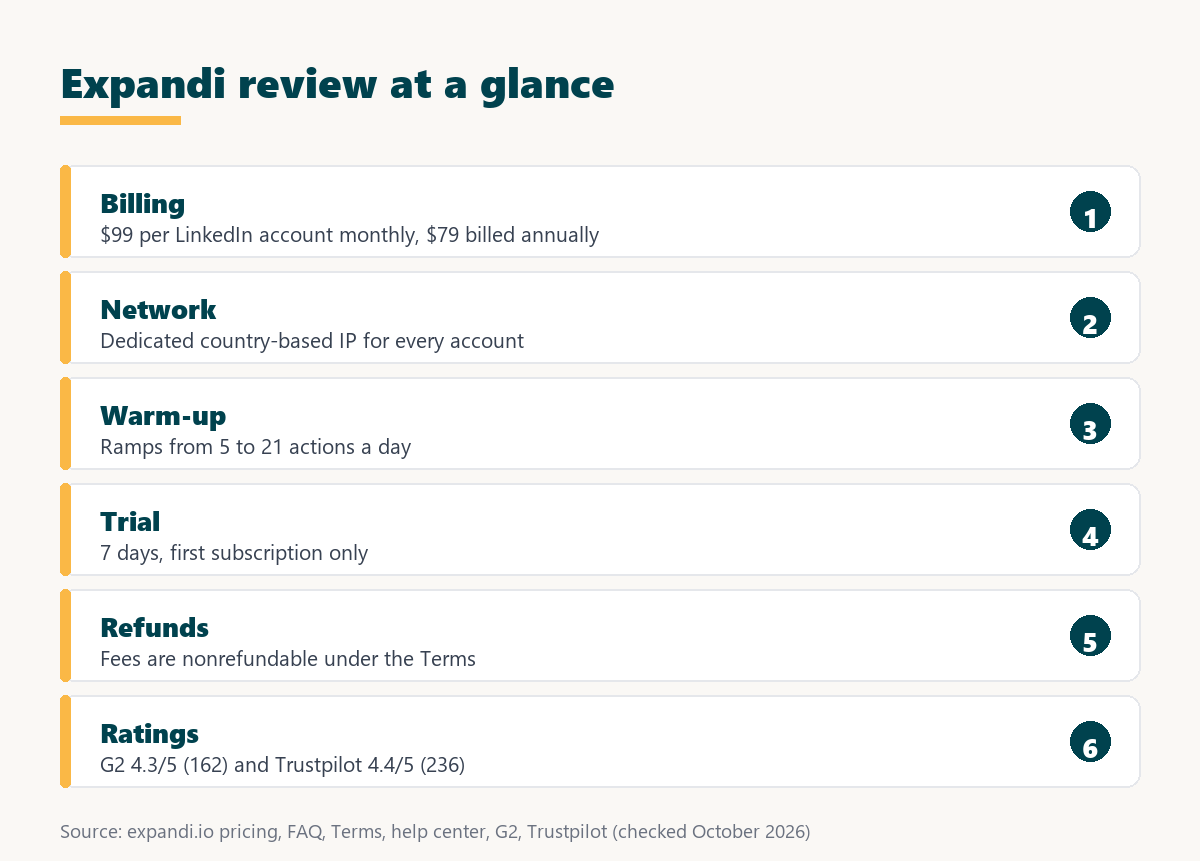
The list below follows the feature set published on the Expandi pricing page. Nothing here is gated behind a higher self-serve tier.
- Dedicated country-based IP: every connected account sends from one fixed IP address in its own country, provided by a data center rather than drawn from a shared rotating pool.
- Profile auto warm-up: new or quiet accounts start with a low daily action count that rises gradually, so activity does not jump from zero to full volume overnight.
- Unlimited campaigns: the pricing page lists an unlimited campaign count on the Business plan, with help-center limits on how many campaigns run actively at the same time.
- Unlimited templates: message and sequence templates have no cap, which matters for agencies that maintain separate copy libraries for every client they manage.
- Multichannel steps: connection requests, LinkedIn messages, engagement actions, and email follow-ups live inside one sequence builder with if-then conditions between the steps.
- Campaign prioritization and recovery: operators set which campaigns send first when daily limits are tight, and interrupted campaigns can resume rather than restart from the beginning.
- Paid add-ons: image and GIF personalization and video personalization are sold separately, and the pricing page does not publish a price for either one.
Smaller features fill out the plan: dynamic placeholders for personalization, a blacklist that keeps chosen contacts out of every campaign, duplication prevention, tags and notes on conversations, and a centralized dashboard with step-by-step campaign statistics.
The feature set is narrow on purpose: Expandi spends its budget on sending infrastructure and account protection rather than on a wide CRM surface.
Expandi Pros and Cons: What Stands Out and What Falls Short?
Expandi’s strengths are infrastructure: a dedicated country-based IP for every account, automatic profile warm-up, unlimited campaigns and templates, and LinkedIn plus email steps inside one sequence. Its weaknesses are commercial: no permanently free tier, non-refundable fees, a cost that climbs with every profile, and two personalization add-ons priced only on request.
Pros
- Dedicated IP per account: each LinkedIn profile sends from one fixed country-based IP, which removes the shifting network footprint that comes with running automation from a laptop browser.
- Automatic profile warm-up: activity ramps up gradually before full volume, which follows the cautious pattern Expandi’s own help center recommends for new or recently quiet accounts.
- Unlimited campaigns and templates: the Business plan places no cap on campaign or template count, so agencies can keep a separate library for every client without upgrading.
- Multichannel in one sequence: connection requests, messages, and email follow-ups run in a single flow, so one prospect never receives two uncoordinated touches on the same morning.
- Per-account billing: an agency maps one connected account to one client line item, which keeps platform cost proportional to the revenue each client contract brings in.
Cons
- No permanent free tier: evaluation is limited to a seven-day trial, and Expandi’s Terms apply that trial only to the first subscription created on a user account.
- Non-refundable fees: the Terms and Conditions state that subscription fees are nonrefundable unless the law requires otherwise, so annual billing is a real commitment.
- Cost scales with accounts: at $99 per account each month, ten connected profiles cost ten times the single-account fee before any negotiated Agency-tier discount applies.
- Add-on pricing not listed: image and GIF personalization and video personalization are paid add-ons, and the pricing page publishes no figure for either of them.
- Learning curve reported: Trustpilot reviewers repeatedly mention a steep learning curve and navigation that takes time, especially for teams setting up campaigns without onboarding help.
The pros cluster around account protection and the cons around price structure, so Expandi reads as a strong fit for teams that treat LinkedIn as a paid outbound channel and a weak fit for anyone hoping to run it for nothing.
How Does Expandi Compare to Dripify, Waalaxy, and PhantomBuster?
Expandi bills by connected LinkedIn account and includes a dedicated IP and warm-up on its plan. Dripify leans on setup simplicity and bills each user, Waalaxy meters activity through monthly invitation quotas per user, and PhantomBuster sells cloud automations metered by slots, execution hours, and credits rather than a managed outreach account.
Source: expandi.io/pricing, dripify.com/pricing, waalaxy.com/pricing, phantombuster.com/pricing. Checked August to October 2026; Waalaxy shows different prices by currency, so no figure is quoted here.
Across the four tools the real split is the billing unit: Expandi charges by LinkedIn account with safety infrastructure included, while per-user and credit models charge by person or by activity and leave the IP question to the buyer.
Coordinating channels is the reason most teams look at these tools in the first place. Growth Hack Suite’s definition puts it plainly:
“Multichannel outreach is contacting prospects across more than one channel, such as email, phone and LinkedIn, in a coordinated sequence.”
Growth Hack Suite, What Is Multichannel Outreach?
For most buyers the decision narrows to Expandi against Dripify on safety architecture, and Expandi against Waalaxy on whether a per-user quota is cheaper than a flat per-account fee at the volume the team actually sends.
Which Tools and CRMs Does Expandi Connect With?
Expandi is built to sit beside a CRM and an email stack rather than replace either, so campaign data leaves the platform through integrations and webhooks and lands where the pipeline already lives. The pricing page lists integrations as a feature, and the help center documents webhooks plus no-code guides for Zapier and Google Sheets.
The webhook layer is the part worth understanding before purchase. A webhook is an automatic message one app sends to another when an event happens, and Expandi fires them on campaign events such as a contact replying, a contact being tagged, or a connection request being accepted. A reversed webhook works in the other direction: “With the reversed webhook, you can either add people to the campaign or pause and resume them,” according to the Expandi help center.
- CRM handoff: webhook events push replies, tags, and accepted connections into a CRM through a connector, so the pipeline record updates without manual copying from the inbox.
- Email layer: email steps run inside the Expandi sequence itself, while address finding and verification stay with the dedicated tools a team already uses upstream.
- Automation layer: Zapier and Google Sheets guides on the help center cover the common no-code routes, and reversed webhooks let outside tools add or pause leads.
- Reporting export: campaign statistics live in the centralized dashboard, and webhook events carry the raw activity outward for teams that report from their own systems.
Specific native CRM integrations are not listed in the sources checked for this review, and Expandi does not document a full public REST API. Buyers with a fixed CRM should confirm the connection path with Expandi before committing to an annual term.
Integrations decide whether Expandi becomes a channel inside an existing pipeline or a second inbox nobody reconciles at the end of the week.
Does Expandi Actually Protect Your LinkedIn Account?
Expandi protects accounts with two published layers: a dedicated country-based IP for every account and automatic profile warm-up that ramps activity gradually. Neither layer removes the underlying risk, because LinkedIn’s own policy prohibits third-party automation and the responsibility for sending volume stays with the person running the campaign.
That second point deserves a direct statement. LinkedIn’s help page on prohibited software says members who use automation tools “risk having their accounts restricted or shut down” (LinkedIn Help). Expandi’s own Terms state that it “is not authorized as an official feature of LinkedIn” and is not liable if an account is restricted because of the user’s activity. Any review that promises a risk-free setup is overselling.
Source: expandi.io/pricing, Expandi Terms and Conditions, Expandi help center: IP address and proxy, LinkedIn Help. Checked October 2026.
The honest read is that Expandi lowers the odds of a restriction through infrastructure, and the remaining risk still tracks how aggressively the operator sets daily volume.
The warm-up schedule is documented in detail. According to the Expandi help center, the gradual option starts at 5 actions per day, adds 3 actions every two days, and caps at 21 actions per day, and it only begins once the account has an active campaign. The same article recommends staying within 100 actions per week, citing LinkedIn’s weekly cap of 100 connection requests.
Account safety is the blocker that decides this purchase, and Expandi answers it with infrastructure and published pacing guidance rather than with a promise that nothing can go wrong.
How Easy Is Expandi to Use? Campaign Builder, Dashboard, and Support
Expandi runs from a web dashboard rather than a browser plugin, and a first campaign follows one path: pick an audience, chain connection, message, and email steps into a sequence, set the daily pace, then read replies in the inbox. Campaign prioritization and recovery decide what sends first and what resumes after an interruption.
The help center walkthrough for creating a campaign shows the order: choose a campaign type such as Connector or a Marketplace template, add a lead source, open the builder to arrange steps, adjust settings such as priority and schedule, then activate. Expandi notes that a newly activated campaign may take up to 45 minutes to begin sending.
- Build the sequence: connection requests, messages, engagement actions, and email steps are arranged in the builder, with if-then conditions such as waiting until a request is accepted.
- Set the trigger between steps: delays control spacing, and Expandi’s help center suggests a longer wait of at least seven days on the if-connected condition for follow-ups.
- Route replies out of the sequence: a reply moves the conversation into the inbox so the remaining automated steps stop instead of messaging a prospect who already answered.
- Prioritize active campaigns: priority settings of low, medium, or high decide which campaign uses the daily action allowance first when several campaigns share one account.
- Recover interrupted runs: campaign recovery lets a paused or disconnected campaign continue from where it stopped rather than resending earlier steps to the same leads.
Support and onboarding matter more than usual here, because reviewers flag the learning curve. The points below summarize what is documented and what users report.
- Dashboard layout: campaigns, the inbox, and step-by-step statistics sit in one centralized dashboard, so an operator can switch between connected accounts inside the same workspace.
- Learning curve: Trustpilot reviewers describe navigation as something that takes time to learn and say setup is harder without guidance from the support team.
- Support channels: the help center covers setup, campaigns, and billing in detail, and Agency customers get a dedicated Customer Success Manager plus specialized support.
- Onboarding resources: the help center offers one-to-one onboarding calls with a tailored setup, which shortens the path to a first live campaign for new teams.
Sequence logic is where a LinkedIn tool either saves the operator time or quietly burns the account, and Expandi keeps the pacing controls inside the campaign rather than inside a browser plugin.
How Does Expandi Combine LinkedIn With Email?
Expandi treats email as a step inside the same campaign as connections and messages, so a prospect who ignores a LinkedIn touch can receive an email follow-up without a second tool orchestrating the timing. Finding and verifying that email address still happens upstream, outside Expandi, in a dedicated finder or data tool.
- Channel order: a connection request usually goes first, a LinkedIn message follows acceptance, and email acts as the fallback when the profile stays silent.
- Timing between channels: delays inside one sequence space the touches across days, so the same prospect does not get a LinkedIn message and an email within an hour.
- Reply routing: a reply on either channel lands in the Expandi inbox and stops the remaining steps, which avoids following up with someone already in conversation.
- Where email addresses come from: Expandi is not an email finder, so addresses arrive through lead lists, CSV imports, or a separate finding and verification step before the campaign.
HubSpot’s sales team frames LinkedIn selling around the same principle that makes a coordinated sequence work:
“Social selling on LinkedIn is about two things: connection and context.”
HubSpot, LinkedIn for Social Selling
This is the core idea behind cold outreach run across more than one channel: the second channel catches the prospect the first one missed, provided the touches are coordinated rather than duplicated.
Multichannel inside one platform removes the timing gap that appears when LinkedIn and email run in separate tools and both touch the same prospect on the same morning.
Can Agencies Run Many Client Accounts in One Place?
Yes. Expandi prices by LinkedIn account rather than by team member, and the Agency tier starts at ten accounts with pricing quoted by sales, which is the shape an agency needs when every client brings another profile. Workspaces let an owner assign roles and permissions so team members manage client accounts under one Expandi account.
The help center describes the workspace as a way “to manage one or multiple LinkedIn accounts by assigning roles and permissions to other Expandi users.” The Agency tier adds features listed on the pricing page under “Everything In Business And.”
- Per-account billing: each client profile carries its own fee, so platform cost maps one to one onto a retainer line item and moves with the client list.
- Ten-account minimum: the Agency tier is labeled for ten or more seats, and the pricing page directs buyers at that size to talk to sales for a quote.
- Dedicated Customer Success Manager: Agency customers get a named success contact, which matters when campaigns for several clients need troubleshooting during the same week.
- Volume pricing: the pricing page states that the more accounts an agency takes, the more it saves, without publishing tiers or percentage figures for the discount.
- Client reporting and white label: the Agency tier lists transparent reports for clients and the option to use Expandi under the agency’s own brand, both confirmed with sales.
Agencies buy this tool for the billing unit as much as the features, because a per-account fee is the only model that scales cleanly when the client list grows.
What Are Expandi’s Real Limits and Trade-Offs?
Expandi has no permanently free tier, its published terms make fees non-refundable, cost climbs with every account added to the workspace, and two personalization add-ons carry a price the site does not list. The platform also has campaign limits of its own, and it cannot remove the account risk that comes with automating LinkedIn at all.
- No permanent free tier: evaluation happens inside a seven-day trial that the Terms apply only to the first subscription on a user account, with no ongoing zero-cost option.
- Non-refundable fees: the Terms state that subscription fees are nonrefundable unless required by law, so a prepaid annual term cannot be recovered after a bad month.
- Campaign limits: the help center caps each account at 15 active campaigns, 500 campaigns in total, and 5,000 leads in a single campaign at one time.
- Add-on pricing not listed: image and GIF personalization and video personalization are paid extras, so a buyer needing them has to request a price before budgeting.
- Platform risk remains: LinkedIn’s User Agreement prohibits automation tools, and Expandi’s Terms leave responsibility for any account restriction with the person running the campaign.
The campaign limits come from the Expandi help center article on campaign limitations. They sit alongside the “unlimited campaigns” line on the pricing page: the total number of campaigns is effectively generous, while the number running at the same moment is capped.
None of these limits disqualify the platform, but each one changes the math for a solo user far more than for an agency spreading the fee across client retainers.
Test the safety setup on one account before committing. The trial runs seven days.
Try Expandi for 7 Days →Trial applies to the first subscription · fees are nonrefundable after billing starts
How Much Does Expandi Cost?
Expandi costs $99 per connected LinkedIn account per month on the Business plan, or $79 per account per month when the subscription is billed annually, a 20% reduction. The Agency tier starts at ten accounts and is quoted by sales. Taxes are added based on the billing country, and two personalization add-ons carry separate charges.
Source: expandi.io/pricing and expandi.io/faq, checked October 2026. Taxes vary by country.
The pricing question is really a counting question: multiply ninety-nine dollars by the number of LinkedIn accounts in play, then take 20% off if the year is paid upfront.
Expandi’s checkout shows the two options side by side, and a monthly subscription run for a full year comes to $1,188 per account, while annual billing works out to $948 per account (79 multiplied by 12, before tax). The full breakdown, including proration when accounts are added mid-cycle, belongs in a dedicated pricing guide; the seat-license model explains why the unit of billing shapes the final invoice.
Per-account pricing stays predictable for agencies and feels heavy for a solo founder running a single profile, which is the honest split in this category.
What Does the 7-Day Expandi Trial Actually Include?
The trial runs seven days, gives access to all Expandi features, and applies only to the first subscription on a user account. That leaves one window to connect a profile, let warm-up begin, and send enough volume to judge reply quality before the first invoice arrives. Checkout asks for card details, and no charge is made until the seven days are up.
“The 7-day free trial applies only to the first subscription”
Expandi Terms and Conditions
Expandi’s FAQ confirms the billing side: “You will not be charged until the 7 days are up” (Expandi FAQ). The help center’s workspace setup flow includes entering card details, so buyers should expect to add a payment method at sign-up even though no charge happens during the trial week.
A second subscription on the same user account does not get a new trial. The Terms state that charges for a second subscription begin on the date the account is activated, which is why the first trial week is worth planning before it starts.
Seven days is enough to test the connection step and the tone of replies, and it is not enough to measure a full pipeline cycle, so the test week deserves a plan before it begins.
Is Expandi Worth $99 per Account?
Expandi pays back when one LinkedIn account produces at least one qualified meeting a month, because the fee is fixed while reply volume scales with the sequence. Below that bar a cheaper tool usually wins. Expandi’s own benchmark data gives a reference point for what a sequence can produce, though results vary widely by audience and copy.
According to Expandi’s platform data, drawn from 13,302 active Expandi accounts, 28.5% of connection requests are accepted, 10.4% of outbound messages get a reply, and 3.0% of connection-request notes get a response (Expandi State of LinkedIn Outreach report). These are one vendor’s numbers from its own customers, not a LinkedIn-wide standard, and they should be read as an upper reference rather than a forecast.
“Cold outreach is contacting prospects who have not interacted with you or opted into your communication.”
Growth Hack Suite, What Is Cold Outreach?
The cleanest way to judge value is to divide the monthly fee by booked meetings. A team that books two meetings a month from one account pays roughly fifty dollars a meeting in platform cost before labor, and the cost-per-booked-meeting method adds the remaining inputs.
Worth-it comes down to cost per booked meeting rather than to the sticker, and that number only appears after one full sequence has run on a warmed account.
What Do Real Users Say About Expandi?
Expandi holds a 4.3 out of 5 rating on G2 from 162 reviews and 4.4 out of 5 on Trustpilot from 236 reviews. Reviewers group around consistent themes, and the recurring praise and the recurring complaints both say more about fit than the average score does on its own.
- Praised: support and onboarding: Trustpilot reviewers repeatedly credit a responsive, knowledgeable support team and onboarding help that gets the first campaigns running correctly.
- Praised: outreach results: reviewers describe Expandi as effective for LinkedIn outreach, which lines up with its focus on sending infrastructure rather than extra modules.
- Watch-out: learning curve: a common complaint is that navigation and setup take time, and that the interface could be more user-friendly for new operators.
- Watch-out: notifications: some reviewers find notification alerts ambiguous, which can make it harder to tell why a campaign paused or an account disconnected.
- Watch-out: uneven support cases: a minority of Trustpilot reviews report a poor support experience, a reminder that service quality varies by case and by region.
Ratings come from the public G2 listing and Trustpilot page, both checked in early October 2026. Growth Hack Suite’s editorial rating of 4.2 out of 5 is a separate judgment and is not derived from either score.
A 4.3 average with a triple-digit review count reads as a mature product with known rough edges rather than a young tool with a handful of enthusiastic early users.
How Do You Set Up Your First Expandi Campaign?
Setup follows a fixed order: start the trial, connect the LinkedIn account and choose its country so Expandi assigns a dedicated IP, let warm-up begin before any volume, build the audience, then launch a short sequence and read the first replies. Getting the order right matters more than getting through it quickly.
- Start the trial: create the workspace, enter card details at checkout, and set the number of seats to match the LinkedIn accounts planned for the first test.
- Connect the account: link the profile through the Chrome extension or LinkedIn login, and select the country so Expandi assigns a dedicated IP there.
- Let warm-up run first: the gradual warm-up begins once a campaign is active, starting at five daily actions and rising slowly toward the daily cap.
- Build the audience: import a lead list or CSV, or use a Sales Navigator search, and add a blacklist first so excluded contacts never enter a campaign.
- Launch a short sequence: start with a connection request, one message, and one email step, then read replies before adding more steps or more volume.
The order matters more than the speed here, because sending volume before warm-up has done its work is the most common way a new account runs into trouble.
How Do You Migrate From Another LinkedIn Tool to Expandi?
Migration works best in parallel: export the audience and message copy from the current tool, pause its sequences, rebuild them inside Expandi, then move one account at a time so a single profile carries the risk of the switch. Running two automation tools on the same profile at once is the mistake to avoid.
- Export the audience and copy: pull lead lists, message templates, and notes on which steps performed, so the rebuilt sequence starts from proven copy rather than a blank page.
- Pause the old sequences: stop every automated action on the profile in the previous tool before connecting it to Expandi, so two schedulers never act on one account.
- Rebuild inside Expandi: recreate the sequence in the builder, import the lead list, and apply a blacklist for contacts already reached during the earlier campaigns.
- Cut over one account at a time: move a single profile first, let warm-up and the first sequence run, then migrate the remaining accounts once results look stable.
Moving one account at a time keeps client work running while the new sequences prove themselves, which is the only migration pattern an agency can defend to a customer.
Final Verdict: Should You Buy Expandi?
Expandi is the right buy for agencies, lead-gen freelancers, and founders who run LinkedIn as a paid outbound channel and want a dedicated IP and warm-up on every account. It is the wrong buy for anyone who needs a free tier, a refund window, or sends only a handful of connection requests a month.
- Buy if several client accounts run at once: per-account billing and an Agency tier from ten accounts map directly onto retainer pricing and keep cost proportional to clients.
- Buy if safety outranks sticker price: a dedicated country-based IP and automatic warm-up on every account address the risk that matters most in LinkedIn automation.
- Buy if LinkedIn and email belong in one sequence: multichannel steps keep both channels on one schedule, which prevents duplicate touches and keeps reply handling in a single inbox.
- Skip if a permanently free tool is required: the only zero-cost window is the seven-day trial on the first subscription, after which every account carries a monthly fee.
- Skip if a refund window matters: the Terms state that subscription fees are nonrefundable, so buyers who need a guaranteed exit should stay on monthly billing or look elsewhere.
Our rating: 4.2/5 (editorial). The score reflects strong safety architecture and clear per-account pricing, held back by the learning curve, unlisted add-on prices, and the absence of any refund path.
The purchase decision is a billing-unit decision: pay by LinkedIn account for protected infrastructure, or pay by user or by credit elsewhere and carry the IP and warm-up risk in-house.
Related Tools in the Outbound Stack
Expandi owns the LinkedIn channel. Pairing it with an email finder and a sending platform lets the same target list run across both channels without duplicating touches.
- Hunter.io: finds and verifies the work email before the LinkedIn touch, see the Hunter.io email finder review.
- Smartlead: runs cold email sequences at volume alongside LinkedIn campaigns, covered in the Smartlead review.
- GMass: sends campaigns straight from Gmail for smaller teams, explained in the GMass review.
Expandi Review: Frequently Asked Questions
The 12 most-asked questions about Expandi.
How much does Expandi cost?
Expandi costs $99 per connected LinkedIn account per month on the Business plan, or $79 per account per month billed annually. The Agency tier for ten or more accounts is quoted by sales, and taxes are added by billing country.
Is there a permanently free tier of Expandi?
No. Expandi offers a seven-day trial with access to all features, and the Terms apply it only to the first subscription on a user account. After the trial, each connected account is billed.
How long is the Expandi trial?
The trial lasts seven days. Checkout asks for card details, and Expandi’s FAQ says no charge is made until the seven days are up.
Can an Expandi subscription be cancelled anytime?
Yes. Expandi’s FAQ says a monthly subscription can be cancelled at any time, and the Terms say subscriptions renew automatically until cancelled. Fees already paid are nonrefundable unless the law requires otherwise.
Does Expandi get LinkedIn accounts restricted?
Expandi lowers the risk with a dedicated IP and warm-up, but it cannot remove it. LinkedIn’s policy prohibits automation tools, and members who use them risk restriction. Conservative daily limits matter as much as the tool.
What is a dedicated IP in Expandi?
Each connected account gets its own IP address in the country selected during setup, provided by a data center. The address stays constant, unlike the changing networks a browser extension inherits from a laptop.
What is profile warm-up?
Warm-up gradually raises daily activity on an account. The gradual option starts at 5 actions a day, adds 3 every two days, and stops at 21, beginning once a campaign is active.
Does Expandi send email too?
Yes. Email is a step inside the same sequence as connection requests and LinkedIn messages. Expandi does not find email addresses, so those come from a lead list or a separate finder tool.
How many accounts can one operator run in Expandi?
There is no fixed per-operator cap in the sources checked. Workspaces let one owner manage several LinkedIn accounts and assign roles to teammates, with each connected account billed separately.
What does the Expandi Agency tier require?
The Agency tier is for ten or more accounts. Pricing is custom and quoted by sales, and it adds a dedicated Customer Success Manager, client reports, roles and permissions, and a white-label option.
Are Expandi add-ons included in the price?
No. Image and GIF personalization and video personalization are paid add-ons, and the pricing page does not list a price for either one.
Can campaigns be moved to Expandi from another tool?
Yes, by rebuilding them. Export lead lists and message copy, pause the old tool on that profile, rebuild the sequence in Expandi, and move one account at a time.
Ready to run LinkedIn outreach from a dedicated IP? Start the seven-day Expandi trial and let the account warm up before the first campaign.
Start Your 7-Day Expandi Trial →Seven-day trial on the first subscription · cancel anytime · paid fees are nonrefundable
Growth Hack Suite Editorial, Outbound Sales Team
How we reviewed Expandi: pricing, trial terms, refund terms, and plan features were read from expandi.io pricing, FAQ, and Terms and Conditions; warm-up, campaign limits, and setup steps from the Expandi help center; ratings from the public G2 and Trustpilot listings; competitor prices from each vendor’s own pricing page. This review is based on documentation and public reviews, not on an in-house campaign test.
Last reviewed: October 2026. Prices and terms change, so confirm the current figures on the Expandi pricing page before buying.
Affiliate disclosure: this page contains affiliate links. If a subscription is purchased through them, Growth Hack Suite may earn a commission at no extra cost to the buyer. It does not change the assessment.