
Table of Contents
Kinsta Agency plans bundle 20, 40 or 60 WordPress installs under one account, at 340, 450 and 675 dollars a month, with per-site isolation, central management, 30-day backups and priority support. This guide explains what Agency plans include, how they are priced, who they suit, and honestly how they compare to both individual plans and the standard WP tiers.
Last updated: August 2026. Agency plan prices and limits were read from kinsta.com and Kinsta’s official documentation at kinsta.com. This page carries affiliate links to Kinsta, and it is candid that Agency pricing is close to the equivalent WP plans, with the difference in support, retention and account handling.
Are Kinsta Agency Plans Worth It?
Kinsta Agency plans are worth it for studios managing many client sites, because bundling 20, 40 or 60 installs costs far less per site than buying that many individual single-site plans, while keeping premium performance, isolation and central management. For a handful of sites, a standard plan is simpler and just as fast.
Verdict: Kinsta Agency plans bundle 20, 40 or 60 installs at 340, 450 and 675 dollars a month, with isolation, central management, 30-day backups and priority support, sold through sales. Two honest points: they cost far less per site than individual single-site plans, but their monthly price matches the equivalent standard WP plans, so the real agency premium is in support, longer backups and account handling rather than a deeper discount.
The clearest way to judge them is to see the bundles, their prices and how they line up against both individual plans and the WP tiers, which the sections below set out.
“WordPress is a web content management system.”
— Wikipedia, WordPress
An agency runs many instances of that content management system, and Agency plans exist to host and manage that whole portfolio from one account rather than many.
What Do Kinsta Agency Plans Include?
Kinsta Agency plans include a bundle of WordPress installs, per-site isolation, central MyKinsta management, staging, backups with 30-day retention, security and priority support. They are designed so an agency can host and manage many client sites on one account with consolidated billing and reporting.
- Bundled installs: Each Agency plan covers 20, 40 or 60 WordPress installs, so a studio hosts its whole roster under a single account.
- Per-site isolation: Every client site runs in its own container, so one busy client cannot consume another client’s resources.
- Central MyKinsta management: One dashboard runs backups, staging and analytics across all client sites, with role-based team access.
- 30-day backup retention: Agency plans keep 30 days of backups, the same as WP 20, WP 40 and the larger Single tiers, and longer than the 14 days on the smaller plans, which helps when a client issue surfaces late.
- Priority support: Agency accounts get priority 24/7 support from WordPress and Linux engineers for faster help when a client site breaks.
The honest qualifier is that these features overlap heavily with the standard WP plans, so the distinctively agency parts are the longer retention, priority support and the sales-led account handling.
How Many Sites Do Agency Plans Cover?
Kinsta Agency plans cover 20, 40 or 60 WordPress installs depending on the tier, with pooled visits and storage across the account: 500,000 visits on Agency 20, 750,000 on Agency 40 and 1.25 million on Agency 60. An agency adds and manages client sites within the bundle rather than paying for each individually.
Because visits are pooled across the account, a quiet client leaves headroom for a busy one, so the bundle absorbs uneven traffic across a portfolio better than a set of separate single-site plans would.
How Much Do Kinsta Agency Plans Cost?
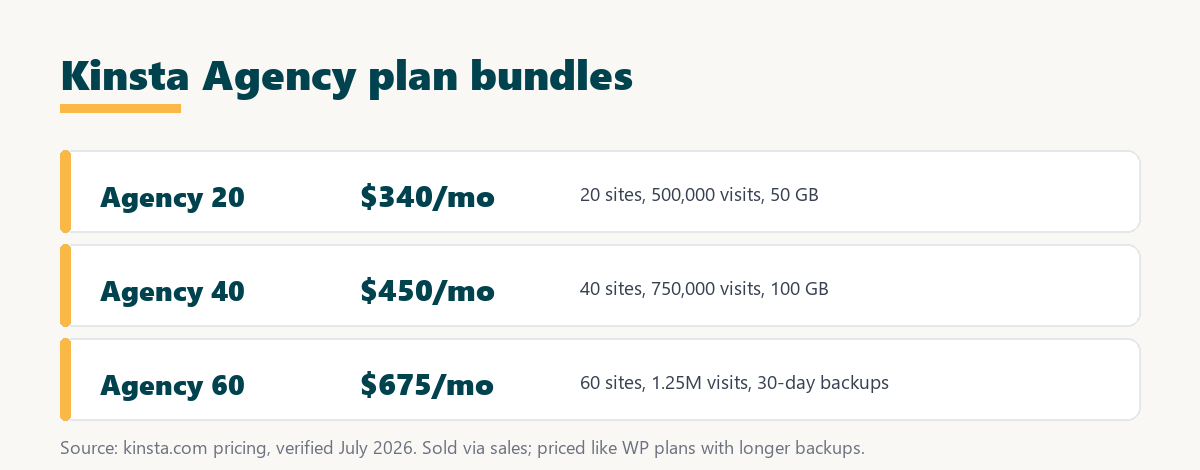
Kinsta Agency plans cost 340 dollars a month for Agency 20, 450 for Agency 40 and 675 for Agency 60, and they are bought through Kinsta sales rather than self-checkout. Paying annually costs ten months instead of twelve, the same two-months-free discount as other tiers.
Source: kinsta.com/plans, verified August 2026. Prices exclude tax; Agency plans are sold through sales and include 30-day backup retention and priority support.
In plain terms, the per-site cost falls as the bundle grows, from 17 dollars a site on Agency 20 to roughly 11 dollars on Agency 60, which is why larger studios save most.
Lower per-site cost as your roster grows
View Kinsta Pricing →Agency 20, 40 and 60 bundles, sold through Kinsta sales.
How Do Agency Plans Compare to Buying Individual Plans?
Compared to buying individual single-site plans, Agency plans are far cheaper per site: hosting 20 sites on separate entry plans would cost 700 dollars a month, while Agency 20 covers all 20 for 340. Bundling also centralises billing and management, which one account handles and twenty separate plans do not.
Source: kinsta.com/plans, verified August 2026. Agency 20 and WP 20 share the same monthly price; Agency adds 30-day backup retention, priority support and sales-led onboarding.
Read across, the bundle roughly halves the per-site cost versus individual plans, but Agency 20 and WP 20 are priced the same, so the choice between them is about support and retention, not price.
Agency Plans or Standard WP Plans: What Is the Difference?
The difference between an Agency plan and the equivalent standard WP plan is not price, since Agency 20 and WP 20 both cost 340 dollars for 20 installs and 500,000 visits. Agency plans add priority support and a sales-led account setup aimed at studios. Backup retention is not the differentiator it is often presented as: Agency plans keep 30 days, but so do WP 20 and WP 40 at the same prices, while 14 days is the figure on the smaller Single and WP tiers.
The honest conclusion is that a studio comfortable self-serving on a WP plan may not need the Agency tier at all, while an agency that values priority support, longer backups and account management gets those extras at the same headline price.
Who Should Use Kinsta Agency Plans?
The teams that should consider Kinsta Agency plans are agencies, studios and freelancers managing many client WordPress sites who want central management and priority support. A business running one or two sites is better served by a single-site or small WP plan.
- Multi-client agencies: A studio hosting 20 or more client sites gets the lowest per-site cost and one account to manage the whole roster.
- Growing freelancers: A freelancer whose client list is expanding can move from a WP plan up to an Agency tier as the roster and support needs grow.
- Teams needing priority support: An agency that cannot afford slow help when a client site breaks values the priority support Agency plans include.
- Studios wanting longer backups: The 30-day retention suits teams that may only learn of a client issue weeks after a change.
- Not for single-site owners: A business with one or two sites gains nothing from the bundle and should stay on a standard plan.
The honest takeaway is that Agency plans reward scale and a need for support, so the more client sites and the higher the support expectations, the stronger the fit.
How Do Agency Plans Perform at Scale?
Kinsta Agency plans keep every client site fast at scale because each runs in its own isolated container on premium Google Cloud servers, so one busy client cannot slow another. Pooled visits across the account absorb uneven traffic, while the isolation keeps each site’s performance independent.
“The first five seconds of page-load time have the highest impact on conversion rates.”
— HubSpot, page load time and conversion rates
For an agency that means each client’s first seconds are protected independently, so one client’s traffic spike does not cost another client conversions, which is exactly the isolation a shared plan cannot promise.
Host your whole client roster on one account
See Kinsta Plans →Isolated client sites and central management, with a 30-day money-back guarantee.
How Do Agencies Manage Client Sites on Kinsta?
Agencies manage client sites on Kinsta through MyKinsta, which centralises backups, staging and analytics across every site, with role-based access to add team members or give a client limited visibility. One dashboard runs the whole portfolio rather than a login per site.
Practically, an agency can run staging for each client, monitor performance with the built-in APM tool, and invite a client to see their own site’s details without touching billing or other clients, which keeps a multi-client account organised and safe.
Does Kinsta Offer White-Label or Reseller Hosting?
Kinsta does not offer traditional white-label reseller hosting where the Kinsta brand is fully hidden and resold as your own. Agency plans give central management, client roles and shareable analytics, so an agency can present results to clients, while the account and infrastructure remain under Kinsta.
The honest distinction is that Kinsta is agency-friendly rather than a white-label reseller platform, so a studio wanting to fully rebrand and resell hosting under its own name should confirm the current options with Kinsta before assuming a white-label model.
Can You Scale an Agency Plan Up or Down?
Yes, an agency can move between the 20, 40 and 60 site bundles as its client roster grows or shrinks, working with Kinsta sales to adjust the plan. This means a studio pays for the capacity it uses and can scale the bundle alongside the agency without changing hosts.
“A tool is only worth its premium when the hours or revenue it protects exceed the invoice.”
— Growth Hack Suite, on tool ROI
For an agency the return is the client time and reputation the bundle protects through isolation, support and central management. Teams weighing platform dependence can read our note on SaaS vendor lock-in before moving a whole roster onto one host.
How Do You Get Started With a Kinsta Agency Plan?
You get started with a Kinsta Agency plan by counting your client sites, choosing the bundle that fits with headroom, and working with Kinsta sales to set it up. The steps below outline moving a portfolio onto an Agency plan.
- Count the client sites: Tally how many WordPress sites the studio manages now, plus a few for growth, to size the bundle.
- Estimate pooled visits: Add the monthly visits across all client sites, since the bundle allowance is shared across the account.
- Contact Kinsta sales: Agency plans are sold through sales, so a short conversation confirms the right bundle and current pricing.
- Migrate the roster: Use the free expert migrations to move existing client sites onto the plan without rebuilding them.
- Set up team and client roles: Add team members and give each client limited access to their own site through MyKinsta.
The honest summary is that onboarding a portfolio is mostly the sales conversation and the migrations, after which the whole roster runs from one MyKinsta account.
Is a Kinsta Agency Plan Right for Your Studio?
A Kinsta Agency plan is right for your studio if you manage enough client sites that bundled pricing beats individual plans and you value priority support, longer backups and central management. A smaller operation with a few sites can start on a WP plan and move to Agency as it grows.
The way to decide is to count your client sites, compare the Agency bundle against both individual plans and the matching WP tier, and choose Agency when the support and retention extras justify the sales-led setup, since the headline price matches WP.
Bundle your client sites and save per site
Try Kinsta Risk-Free →Free migration and a 30-day money-back guarantee.
Kinsta Agency Plans: Frequently Asked Questions
The 12 most-asked questions about Kinsta Agency plans.
Does Kinsta have plans for agencies?
Yes, Kinsta offers Agency plans bundling 20, 40 or 60 WordPress installs under one account, at 340, 450 and 675 dollars a month, with tools built for managing a portfolio rather than a single site.
How much do Kinsta Agency plans cost?
Agency 20 is 340 dollars a month, Agency 40 is 450 and Agency 60 is 675, bought through Kinsta sales. Annual billing costs ten months instead of twelve, the same two-months-free discount as other tiers.
Are Agency plans cheaper than standard WP plans?
No, Agency 20 and WP 20 both cost 340 dollars for 20 installs and 500,000 visits. Agency plans add priority support and sales-led onboarding rather than a lower price, and at 20 and 40 installs they cost exactly the same as WP 20 and WP 40 with the same 30-day retention, so the difference is service rather than specification.
How does Kinsta help agencies manage client sites?
MyKinsta centralises every client site, letting an agency run backups, staging and analytics across all of them, and add team members with role-based access from one dashboard rather than many logins.
Can I give clients limited access in Kinsta?
Yes, Kinsta user management lets you invite clients or team members with specific roles, so a client can see their own site’s details without touching billing or other clients’ environments.
Does Kinsta support white-label for agencies?
Kinsta is agency-friendly with client roles and shareable analytics, but it does not offer traditional white-label reseller hosting where its brand is fully hidden, so confirm current options if full rebranding matters.
How is billing handled for agency client sites?
An agency holds all client sites under one Agency plan and bills clients directly, choosing a bundle whose combined installs and pooled visits cover the whole portfolio from a single account.
Can agencies transfer a site to a client’s own account?
Yes, Kinsta supports moving a site between accounts, so an agency can build on its plan and hand the finished site off to a client’s separate Kinsta account when the project completes.
Do agency plans include free migrations for each client?
Kinsta’s free expert migrations apply as you bring client sites onto the platform, making it practical for an agency to move an entire book of client sites onto an Agency plan.
What resources do agency client sites get?
Each client site runs in its own isolated container with dedicated resources on Google Cloud, so one busy client site cannot slow down another agency client on the same account.
Can an agency use staging for every client?
Yes, staging is available per site, so an agency can test theme, plugin and core updates safely for each client before pushing changes to their live sites.
Which bundle should a growing agency start with?
A growing agency should choose the Agency bundle whose install and pooled visit limits cover its current clients with room to add a few more, moving up to the next bundle as the roster expands.
About this guide
Written by the Growth Hack Suite editorial team. Agency plan prices and limits were read from kinsta.com and Kinsta’s official documentation at kinsta.com. This page carries affiliate links to Kinsta, so the honesty owed to a reader is stated plainly: Kinsta Agency plans bundle 20, 40 or 60 installs at 340, 450 and 675 dollars a month, sold through sales, with 30-day backup retention and priority support. They cost far less per site than individual single-site plans, but their monthly price matches the equivalent standard WP plans, so the agency premium is in support, longer backups and account handling rather than a deeper discount. Kinsta is agency-friendly but does not offer traditional white-label reseller hosting.


