Table of Contents
Kinsta is premium managed hosting that runs each site in an isolated container on Google Cloud, while shared hosting packs many sites onto one server for a few dollars a month. This guide compares Kinsta vs shared hosting on speed, reliability, security and value, and stays honest about the one real trade-off, price, so you can decide whether upgrading from shared hosting is worth it for your site.
Last updated: August 2026. Kinsta specs were read from kinsta.com. This page carries affiliate links to Kinsta, and it describes shared hosting at the category level rather than quoting a single named budget host.
Is Kinsta Better Than Shared Hosting?
Yes, Kinsta is far better than shared hosting for performance, reliability and security, because it runs on isolated premium Google Cloud servers rather than crowded shared machines. The trade-off is price: Kinsta costs more, so shared hosting only wins for tiny, low-traffic sites on a tight budget.
Verdict: Kinsta wins clearly on speed, reliability and security through per-site isolation, premium Google Cloud servers, caching and a firewall, while shared hosting wins only on up-front price. Two honest points: the upgrade is worth it once a site earns money or draws steady traffic, and shared hosting remains a sensible start for a brand-new, no-revenue project.
The clearest way to weigh the two is to see how their architectures differ and what that means for a real site, which the next sections set out.
“WordPress is a web content management system.”
— Wikipedia, WordPress
Both host that content management system, but how they run it, isolated versus shared, is what drives the difference in speed and reliability.
What Is the Difference Between Them?
The core difference is architecture: shared hosting places many websites on one server sharing its resources, while Kinsta gives each site isolated, dedicated resources on premium infrastructure. So shared hosting is cheap but slows under load, while Kinsta stays fast and stable.
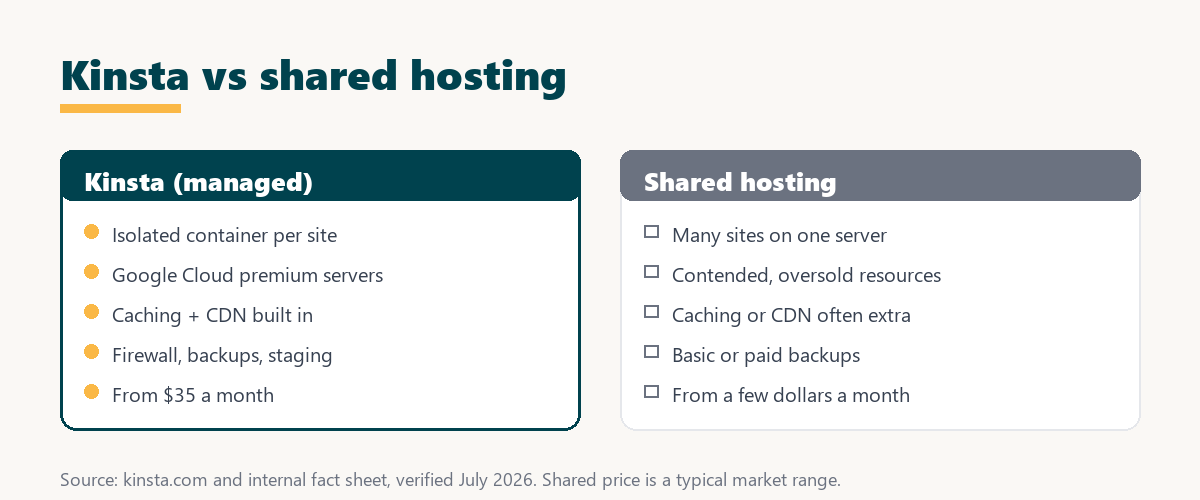
The practical effect of isolation is that a busy or compromised neighbour on a shared server can drag down every site on it, while a Kinsta site is walled off from that risk.
Which Is Faster, Kinsta or Shared Hosting?
Kinsta is faster than shared hosting because isolated premium servers, server-level caching and a CDN keep pages quick, while shared servers slow when neighbouring sites consume resources. The gain is largest under real traffic, where a shared server contends for capacity and Kinsta does not.
The honest framing is that no single speed number fits every case, since it depends on the shared host and the site, but the direction is consistent: moving from a contended shared server to isolated premium infrastructure with caching reduces load times, most visibly under load.
Which Is More Reliable and Secure?
Kinsta is more reliable and secure than shared hosting, because isolation stops one compromised or busy site from affecting yours, and a firewall plus a free malware-removal commitment add protection. Shared hosting’s shared environment carries a higher risk of slowdowns and cross-site security issues.
- Per-site isolation: Each Kinsta site runs in its own container, so a neighbour’s crash or spike cannot consume its resources or take it offline.
- Edge firewall: An enterprise Cloudflare firewall filters malicious traffic before it reaches the origin, which a basic shared plan rarely matches.
- DDoS protection: Always-on DDoS mitigation absorbs attacks on the network, where a shared server would strain under the same load.
- Free malware removal: Kinsta includes a hack-fix commitment, so a compromised hosted site gets help cleaning it rather than a support ticket queue.
- Redundant infrastructure: Google Cloud redundancy underpins an SLA of up to 99.99 percent, stronger than the vague uptime of many shared plans.
The honest pattern is that most of the reliability and security gap comes from isolation, which is the structural weakness shared hosting cannot fully solve at its price.
What Do You Gain by Upgrading to Kinsta?
Upgrading from shared hosting to Kinsta gains speed, reliability, security and real support, all of which protect a site that earns money. The move trades a low monthly price for infrastructure and tools that a growing or revenue site increasingly needs.
- Faster pages: Isolated premium servers with caching and a CDN cut load times, which lifts user experience and conversions.
- Reliable uptime: Redundant infrastructure and an up-to-99.99-percent SLA reduce the downtime that costs a revenue site sales.
- Stronger security: Isolation, a firewall and free malware removal lower the hack and cross-site risk of a shared environment.
- Expert support: Help comes from WordPress and Linux engineers rather than the script-based support common on cheap shared plans.
- Bundled tools: Daily backups, one-click staging, SSL and a CDN are included, where shared hosting often charges extra or omits them.
The honest qualifier is that these gains matter most for a site with revenue, traffic or logins, and least for a static, low-traffic hobby page.
Kinsta vs Shared Hosting: Side by Side
Side by side, Kinsta leads on every factor except up-front price, where shared hosting is cheaper. The table groups the main differences at a glance.
Source: kinsta.com and kinsta.com/plans, verified August 2026. Shared-hosting figures describe the common budget pattern; the price shown is a typical market range, not one named host.
In plain terms, Kinsta wins clearly on speed, reliability and security while shared hosting wins only on price, so the upgrade is worth it once a site matters.
When Is Shared Hosting Good Enough?
Shared hosting is good enough for a brand-new site, a small hobby blog or a very low-traffic project where budget is the priority and speed is not critical. Once a site earns money, handles logins or checkout, or draws steady traffic, the case for upgrading to Kinsta grows quickly.
The honest guidance is not that shared hosting is always wrong, but that it is a starting point, and the point to leave it is when its compromises start costing more than the price difference.
Is Kinsta Worth the Extra Cost Over Shared?
Kinsta is worth the extra cost over shared hosting once a site earns revenue or leads, since the speed, reliability and security protect income that shared hosting’s low price cannot. For a tiny hobby site with no revenue, shared hosting’s savings may still make sense.
“The first five seconds of page-load time have the highest impact on conversion rates.”
— HubSpot, page load time and conversion rates
That link is why the upgrade pays back on a revenue site: the faster first seconds Kinsta protects convert more visitors, and the value of those conversions overtakes the price gap over shared hosting.
Source: analysis of managed versus shared hosting fit by stage, August 2026. The pattern reflects architecture, not a single benchmark.
Put simply, shared hosting suits the earliest stage, but as a site grows and earns, Kinsta’s value quickly overtakes the price difference.
Move up from shared hosting when it counts
See Kinsta Plans →Isolated premium hosting, with a 30-day money-back guarantee.
What Do You Lose Moving Off Shared Hosting?
Moving off shared hosting to Kinsta means losing bundled email, which Kinsta does not host, so a separate email provider is needed. Otherwise the move gains speed, reliability and security, so the main adjustment is arranging email, which a service like Google Workspace handles.
The honest point is that this is the one genuine give-up in the upgrade: many shared plans bundle mailboxes, and a Kinsta site must set up email elsewhere, which is straightforward but worth planning before the move.
How Do You Upgrade From Shared Hosting to Kinsta?
You upgrade by signing up for Kinsta and using its free expert migration, which moves a site from shared hosting with minimal downtime. The old host stays live until the Kinsta copy is verified, and the 30-day guarantee confirms the speed gain before committing.
- Sign up for a plan: Choose the Kinsta tier whose visit allowance covers the site’s traffic with a little headroom.
- Request free migration: Have Kinsta’s team move the files and database from the shared host rather than doing it by hand.
- Verify on staging: Check the migrated copy on Kinsta before switching, so the live site is not disrupted.
- Set up email elsewhere: Arrange a separate email provider, since Kinsta does not host mailboxes.
- Point the domain and test: Switch DNS to Kinsta, then confirm the speed gain within the 30-day guarantee window.
The honest summary is that the migration itself is handled for you, so the main task on the site owner’s side is arranging email and confirming the result.
Will Your Site Rank Better on Kinsta Than Shared Hosting?
Moving from slow shared hosting to Kinsta can indirectly help SEO, because faster, more stable hosting improves Core Web Vitals and reduces downtime, and speed is a ranking factor. The gain is largest when the shared host was genuinely slow or unreliable.
The honest framing is that hosting is one input among many: a fast host helps the server-response and stability side, while content and on-page optimisation still drive most of the ranking outcome.
Free migration off your shared host
View Kinsta Pricing →Kinsta’s team handles the move; the 30-day guarantee confirms the gain.
Should You Upgrade to Kinsta Now?
You should upgrade to Kinsta now if a site earns money, draws steady traffic, or has outgrown shared hosting’s speed and reliability. If it is still a tiny, low-traffic project, waiting and upgrading once performance starts to affect results is a reasonable call.
“A tool is only worth its premium when the hours or revenue it protects exceed the invoice.”
— Growth Hack Suite, on tool ROI
For this comparison, the premium over shared hosting is worth it once the revenue Kinsta’s speed and uptime protect exceeds the price gap. Teams weighing platform dependence can read our note on SaaS vendor lock-in before committing a site to a managed host.
Who Should Stay on Shared Hosting?
The sites that should stay on shared hosting are brand-new, low-traffic and non-revenue projects where budget is the deciding factor and speed is not yet costing anything. For these, shared hosting’s low price is a rational choice until the site grows.
The honest close is that this comparison is not a blanket verdict against shared hosting, but a guide to the crossover point: stay while the site is small and free, and upgrade once its speed, uptime or security start to matter to results.
Try premium hosting risk-free for 30 days
Try Kinsta Risk-Free →Free migration and a 30-day money-back guarantee.
Kinsta vs Shared Hosting: Frequently Asked Questions
The 12 most-asked questions about Kinsta versus shared hosting.
What is the difference between Kinsta and shared hosting?
Kinsta runs each site in an isolated container on Google Cloud premium hardware, while shared hosting packs many sites onto one server, so Kinsta delivers faster, more consistent performance without noisy neighbours.
Why is Kinsta faster than shared hosting?
Kinsta uses compute-optimised Google Cloud machines, server-level caching and a CDN, whereas shared hosts oversell cheap servers, so a busy neighbour on shared hosting can slow every site on it.
Is shared hosting cheaper than Kinsta?
Yes, shared hosting is cheaper up front, but that low price comes from packing many sites per server, which trades away the speed, isolation and support Kinsta provides from 35 dollars a month.
When should I move from shared hosting to Kinsta?
Move to Kinsta when a site earns revenue or leads, gets meaningful traffic, or suffers slow loads and downtime on shared hosting that cost more than the price difference.
Does shared hosting affect my site’s security?
On shared hosting a vulnerability in a neighbouring site can put the whole server at risk, while Kinsta’s container isolation keeps each site separate so one compromise cannot spread across it.
Can shared hosting handle traffic spikes like Kinsta?
Shared hosting typically buckles under spikes because resources are contended, whereas Kinsta’s isolated resources and edge caching absorb surges so a site stays up when traffic climbs.
Do I get real support on shared hosting versus Kinsta?
Shared hosting support is often slow and script-based, while Kinsta provides 24/7 help from WordPress and Linux engineers who can actually diagnose performance and server issues.
Is the migration from shared hosting to Kinsta hard?
No, Kinsta’s team performs the migration from a shared host for free, moving files and database and testing on staging, so the owner avoids the risk of moving the site themselves.
Will my site rank better on Kinsta than shared hosting?
Faster, more stable hosting improves Core Web Vitals and reduces downtime, and since speed is a ranking factor, moving from slow shared hosting to Kinsta can indirectly help SEO.
Does shared hosting include backups and staging like Kinsta?
Shared hosting often charges extra or omits proper backups and staging, whereas Kinsta bundles daily backups, one-click staging, a CDN and SSL into every plan.
Is Kinsta overkill compared with shared hosting for a tiny site?
For a tiny hobby site with almost no traffic, shared hosting may be enough, but any site that earns money or needs reliability outgrows shared hosting’s compromises quickly.
How do I decide between Kinsta and shared hosting?
Weigh the cost of slow pages and downtime on shared hosting against Kinsta’s price; when that risk exceeds the difference, Kinsta’s isolation and performance are the better investment.
About this guide
Written by the Growth Hack Suite editorial team. Kinsta specs were read from kinsta.com. This page carries affiliate links to Kinsta, so the honesty owed to a reader is stated plainly: Kinsta is premium managed hosting on isolated Google Cloud servers from 35 dollars a month, while shared hosting packs many sites onto one server for a few dollars. Kinsta wins on speed, reliability and security; shared hosting wins on up-front price. No speed benchmark is quoted because none is independently verified here, shared-hosting figures describe the common category pattern, and the one real give-up in the upgrade is email, which Kinsta does not host.