

Table of Contents
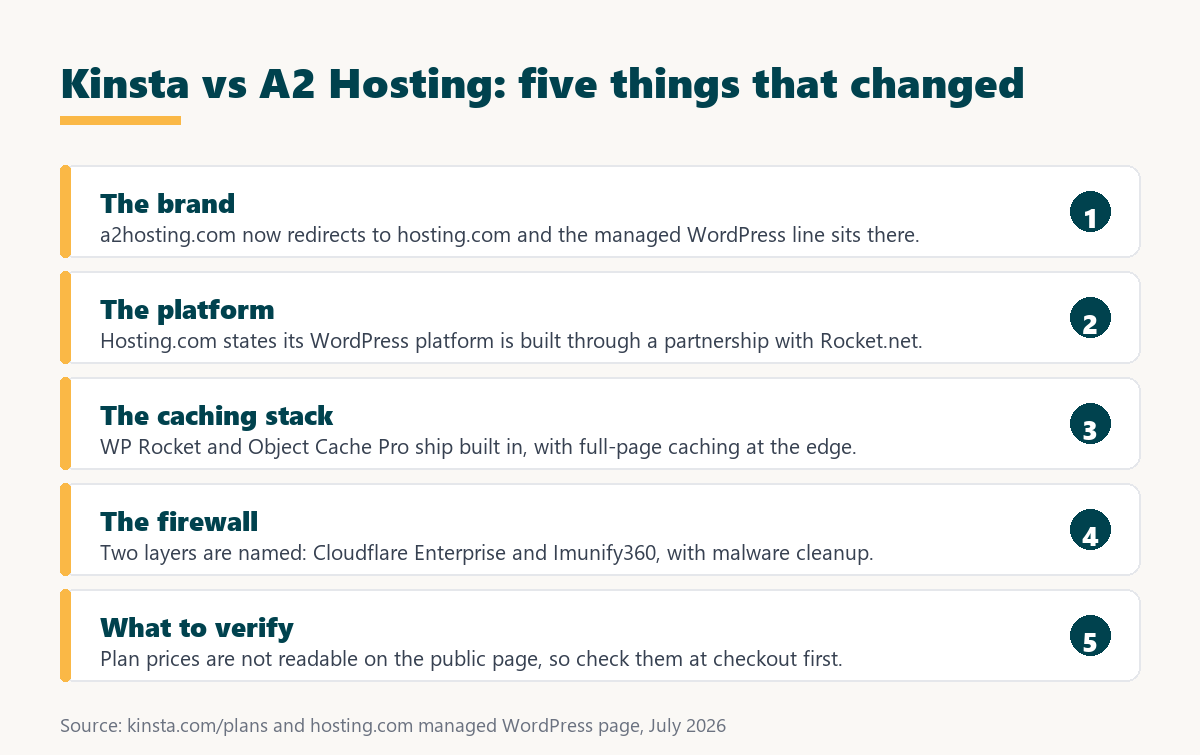
Kinsta vs A2 Hosting is no longer a comparison between two hosts with those names. A2 Hosting has become Hosting.com, and its managed WordPress platform is now described as built through a partnership with Rocket.net. That changes what is actually being compared, so this breakdown covers the rebrand first, then the platform differences that follow from it.
Last updated: August 2026. Everything below was read directly from kinsta.com/plans and the Hosting.com managed WordPress page in the same week. This page carries affiliate links to Kinsta, and where a figure could not be verified it is marked as unverified rather than estimated.
Kinsta vs A2 Hosting: The Short Verdict
The A2 Hosting brand has been retired in favour of Hosting.com, and the WordPress product sold there is a different proposition from the shared and VPS hosting A2 was known for. Both platforms now describe a similar managed WordPress stack, which makes the practical differences narrower than they were a year ago.
Verdict: Anyone researching A2 Hosting today is really researching Hosting.com. Its managed WordPress platform is stated to be built with Rocket.net, so the comparison is closer to Kinsta against Rocket.net than against the old A2 shared hosting. Verify plan prices at checkout, because they are not readable on the public page.
That last point is not a criticism, it is a practical instruction. A comparison built on a price that cannot be confirmed is worth nothing, so this page reports what is verifiable and flags what is not.
What Happened to A2 Hosting?
Visiting a2hosting.com now lands on hosting.com. The managed WordPress line lives under the new domain, while traces of the old identity remain in the footer and customer login links, which is the normal pattern during a brand transition.
Source: hosting.com managed WordPress page and site navigation, read July 2026. Customer and website counts are the vendor’s own published claims.
In plain terms, an old A2 Hosting review describes a product that no longer exists in that form. The WordPress line now competes on managed-platform terms rather than on shared hosting value.
“WordPress is a web content management system.”
: Wikipedia, WordPress
Both platforms now tune their entire stack around that single application, which is exactly why the comparison has narrowed.
The Rocket.net Partnership Changes the Comparison
Hosting.com states that its WordPress platform is built through a partnership with Rocket.net. If the underlying platform is shared, then comparing Kinsta with Hosting.com is closer to comparing Kinsta with Rocket.net than with the shared hosting A2 was known for.
That matters for anyone weighing the two, because Rocket.net’s own commercial terms are unusually strong on traffic and retention. Whether Hosting.com passes those terms through to its own plans is a question to settle at checkout rather than from either marketing page.
What Each Platform Puts in the Stack
Both platforms describe a fully managed WordPress environment with edge caching, a firewall and malware handling included. The named components differ, and those names are the most useful thing either vendor publishes.
Source: kinsta.com/plans and the hosting.com managed WordPress page, read July 2026. Components are listed as each vendor names them.
Reading across the table, the two stacks are more alike than different. Kinsta publishes what the compute is; Hosting.com publishes what the caching and firewall software is.
Want a plan whose price and limits are published up front?
See Kinsta Plans →Free migration by Kinsta engineers, 30-day money-back guarantee.
Which Caching Approach Is Better?
Hosting.com names its caching components, which is unusual and helpful. WP Rocket handles page-level optimisation, Object Cache Pro handles the object cache that WordPress uses for repeated database queries, and full-page caching runs at the edge on Cloudflare Enterprise.
- Edge full-page caching: Cached pages are served from Cloudflare Enterprise locations rather than from the origin, which removes most of the distance penalty for a global audience.
- Object Cache Pro: A commercial object cache reduces repeated database queries, which matters most on dynamic pages that full-page caching deliberately skips.
- WP Rocket included: A page optimisation plugin normally bought separately ships with the platform, removing a recurring licence from the total cost of running the site.
- Kinsta’s server-level caching: Caching is handled at the server rather than through plugins, which avoids plugin conflicts and keeps the WordPress installation lighter.
- Both skip the cart: Cart, checkout and account pages bypass full-page caching on either platform, so raw compute still decides how those pages perform.
Neither approach is inherently better. Naming the components makes the Hosting.com stack easier to reason about; handling caching at the server level makes the Kinsta stack easier to keep clean.
Security and Firewalls Compared
Hosting.com describes dual firewalls, Cloudflare Enterprise at the edge and Imunify360 on the server, with continuous malware monitoring and cleanup and rules written specifically for WordPress and plugin exploits. Kinsta describes a managed firewall with denial-of-service protection and free malware removal.
Both cover the same ground. Hosting.com is more specific about the products involved, which is worth something to anyone who needs to document their security posture rather than simply rely on it.
Which Is Better for Speed?
Neither can be declared faster from published material. Hosting.com claims response times under 100 milliseconds worldwide through Cloudflare Enterprise and backs a performance promise with a year free if global average time to first byte is not improved. Kinsta publishes compute-optimised machines with per-site isolation.
Google’s guidance on Largest Contentful Paint puts the target at 2.5 seconds or less, which is the only vendor-neutral standard worth judging either platform against.
“a B2B site that loads in 1 second has a conversion rate 3x higher than a site that loads in 5 seconds”
: HubSpot, page load time and conversion rates
Because both bundle edge caching, cached pages will be quick on either. The honest test compares an uncached page, such as a cart or a logged-in dashboard, on the same site inside both 30-day windows.
Why This Page Does Not Quote Hosting.com Prices
The Hosting.com managed WordPress page presents plan selection through a widget that did not render readable prices when this comparison was researched. Rather than repeat a figure from an older A2 Hosting review that may no longer apply, this page treats the prices as unverified.
- Old figures are unsafe: Prices published before the rebrand describe a different company structure and a different platform, so repeating them risks stating something that is no longer true.
- Check the renewal rate, not the intro: Introductory pricing across the shared hosting industry frequently differs from the renewal figure, which is the number that matters over a full year.
- Confirm the billing term: Yearly billing is advertised as including two months free, so the headline monthly figure may assume a twelve-month commitment rather than monthly payment.
- Ask what counts as a visit: Managed WordPress plans differ on whether traffic is metered, uncapped or throttled, and that definition changes the real cost more than the headline price.
- Verify the free domain terms: A free domain registration is advertised, and those offers usually apply to the first year only, with standard renewal pricing afterwards.
Kinsta’s position is simpler to state: 35 dollars a month for one install, 35,000 visits, 10 GB of storage and 125 GB of CDN bandwidth, with overage at 50 cents per extra 1,000 visits.
Who Fixes It When WordPress Breaks?
Both platforms answer this the same way, which is a change from the old A2 Hosting comparison. Hosting.com advertises a support team that only handles WordPress, available around the clock. Kinsta staffs 24/7 support with WordPress engineers.
- Application-level coverage on both: Plugin conflicts, failed updates and slow queries fall inside the support boundary on either platform rather than being treated as customer configuration.
- Free migrations on both: Hosting.com advertises free website migrations on every plan and Kinsta includes unlimited engineer-handled migrations, so switching costs time rather than money.
- Malware handled on both: Continuous monitoring and cleanup is advertised by Hosting.com, and Kinsta includes free malware removal, so neither leaves a compromised site to the owner.
- Thirty-day windows on both: Each platform refunds within 30 days, which is long enough to migrate, measure under real traffic and reverse the decision.
- Single-click administration: Hosting.com advertises one-click access to the WordPress dashboard from its panel, matching the convenience managed platforms are expected to provide.
With support, migrations and refunds effectively level, the decision moves onto price, traffic terms and infrastructure, which is where the verification work belongs.
“Tool spend is only defensible when the outcome it protects is measured, not assumed.”
: Growth Hack Suite, ROI on sales tools
Applied here, that means running the same site on both inside the refund windows rather than choosing from two marketing pages that describe similar stacks in different words.
Kinsta vs A2 Hosting for WooCommerce Stores
Stores expose the part of any stack that caching cannot help, because cart, checkout and account pages bypass full-page caching by design. Hosting.com markets a dedicated WooCommerce line alongside its WordPress plans and bundles Object Cache Pro, which is the layer that matters most once full-page caching is skipped.
Kinsta answers the same problem with compute-optimised machines and a private container per site, and marks its multi-site plans as recommended for ecommerce and membership sites. Both approaches are defensible, and neither can be judged without testing a real checkout under load.
What the Rebrand Means for Existing Customers
Anyone already hosting with A2 Hosting is now a Hosting.com customer, and the practical questions are about continuity rather than features. The published material does not answer them, so they are worth asking support directly before renewing.
- Plan mapping after the change: Older plan names may no longer appear in the new catalogue, so it is worth confirming which current product an existing account now corresponds to.
- Renewal price continuity: Legacy pricing sometimes survives a rebrand and sometimes does not, which makes the next renewal invoice the figure to confirm rather than assume.
- Platform placement: Existing sites may remain on the original infrastructure rather than the new WordPress platform, so confirming which one a site runs on avoids false expectations.
- Login and billing paths: Both the old and new customer portals appear in site navigation during a transition, so it helps to establish which one is authoritative for support tickets.
- Support scope after the move: The WordPress-only support team is advertised for the managed WordPress line, which may differ from the support attached to a legacy shared hosting plan.
None of that makes the transition a problem. It simply means a renewal decision taken today deserves a short conversation with support first.
When Is Hosting.com the Better Pick?
Hosting.com is worth serious consideration for anyone who wants a named, documented WordPress stack and a provider that also sells general hosting, VPS and reseller plans under one account.
- Named software components: WP Rocket, Object Cache Pro, Cloudflare Enterprise and Imunify360 are all identified, which makes the stack easy to document and to reason about.
- Bundled premium licences: WP Rocket normally carries its own annual licence, so including it removes a recurring cost from the total price of running the site.
- A broader product range: General web hosting, VPS, virtual dedicated servers, reseller and cPanel plans sit alongside the WordPress line under one provider.
- Free domain registration: A domain is advertised as included, which managed WordPress platforms usually leave as a separate purchase from a registrar.
- A performance promise: The published promise offers a year free if global average time to first byte is not improved, which is an unusually concrete commitment.
Those are real advantages, and none of them depend on a price this page could not verify.
When Is Kinsta the Better Pick?
Kinsta is the better pick when published limits and infrastructure transparency matter, or when the site is part of an environment that needs formal access controls.
- Published plan limits: Visits, storage, server bandwidth and CDN bandwidth are stated for every tier, so the plan can be matched to measured traffic before purchase.
- Named infrastructure: Compute-optimised Google Cloud machines with a private container per site describe where the site actually runs, which the alternative page does not specify.
- Enterprise access controls: Single sign-on, just-in-time provisioning and unlimited user seats support access reviews that a shared login cannot satisfy.
- Built-in monitoring: An application performance monitoring tool ships with the plan, surfacing slow queries and plugin bottlenecks without a third-party subscription.
- Stable brand and platform: No rebrand or platform partnership is in progress, so documentation and support relationships stay where they were.
The last point is genuinely relevant right now. A provider mid-transition is not necessarily worse, but it does require more verification before committing a revenue site to it.
Prefer published limits and a stable platform?
See Kinsta Plans →Engineers handle the migration, and the 30-day guarantee covers the test.
How Do You Compare the Two Properly?
Because both offer free migrations and 30-day refunds, the only sensible method is to run the same site on both and measure. That removes every claim from the decision and replaces it with numbers from the actual site.
- Confirm the current prices first. Take both figures from checkout rather than from any review, including this one, and note the renewal rate as well as the introductory rate.
- Record the baseline. Measure Largest Contentful Paint and server response on the busiest uncached page before anything moves.
- Check how traffic is counted. Ask each provider what a visit means and what happens when the allowance is exceeded, since that defines the real annual cost.
- Request both free migrations. Each platform will build a copy without touching the live site, so a genuine side-by-side test costs nothing but time.
- Test the uncached pages. Compare cart, checkout, search and logged-in pages rather than the cached homepage, which will look fast on either platform.
- Decide inside 30 days. Cancel the losing platform while both refund windows are still open.
That sequence is worth more than any comparison table while one of the two providers is still completing a brand and platform transition.
Ready to run the test on your own site?
Start With Kinsta →Unlimited free migrations, staging included, 30-day money-back guarantee.
Kinsta vs A2 Hosting: Frequently Asked Questions
The 12 most-asked questions about choosing between Kinsta and A2 Hosting.
Does A2 Hosting still exist?
The brand has been replaced by Hosting.com. Visiting a2hosting.com redirects to hosting.com, where the managed WordPress line now lives, with traces of the old identity remaining in footer and login links.
Is Kinsta better than A2 Hosting?
The gap has narrowed considerably. Hosting.com now sells a WordPress-only managed platform with edge caching, dual firewalls and WordPress-specific support, which is far closer to Kinsta than the old shared hosting was.
Who runs the Hosting.com WordPress platform?
Hosting.com states the platform is built through a partnership with Rocket.net. That makes the comparison closer to Kinsta against Rocket.net than against a traditional shared host.
Why does this comparison not list Hosting.com prices?
The plan widget did not render readable prices when this page was researched, and repeating pre-rebrand A2 Hosting figures would risk stating something no longer true. Prices should be taken from checkout.
What caching does Hosting.com include?
WP Rocket and Object Cache Pro are built in, alongside WordPress-aware full-page caching at the edge on a Cloudflare Enterprise CDN. Kinsta handles caching at the server level instead of through plugins.
What security does each platform include?
Hosting.com describes dual firewalls, Cloudflare Enterprise and Imunify360, with continuous malware monitoring and cleanup. Kinsta describes a managed firewall with denial-of-service protection and free malware removal.
Do both offer free migrations?
Yes. Hosting.com advertises free website migrations on every plan and Kinsta includes unlimited engineer-handled migrations, so a side-by-side test costs time rather than money.
Which has the better money-back guarantee?
They match at 30 days each. Hosting.com additionally publishes a performance promise offering a year free if global average time to first byte is not improved after switching.
Which is faster?
Neither can be declared faster from published material. Hosting.com claims sub-100 millisecond response times worldwide through Cloudflare Enterprise; Kinsta publishes compute-optimised machines with per-site isolation.
Does Hosting.com include a free domain?
Free domain registration is advertised with the managed WordPress plans. Offers of this kind normally cover the first year, so the renewal price should be confirmed before it becomes relevant.
Does either publish where sites actually run?
Kinsta does, naming compute-optimised Google Cloud machines with a private container per site. The Hosting.com WordPress page names the caching and firewall software but not the underlying compute.
Should I switch from A2 Hosting to Kinsta?
Check what the account has become after the rebrand first, then compare the current plan against measured traffic. Both platforms migrate free and refund within 30 days, so the test costs nothing.
About this comparison
Written by the Growth Hack Suite editorial team. Platform details were read directly from kinsta.com/plans and the Hosting.com managed WordPress page in August 2026 and are reported as published. Hosting.com plan prices did not render on the public page during research and are therefore not quoted anywhere on this page. This page contains affiliate links to Kinsta, which pay a commission at no extra cost to the reader.


