Table of Contents
Kinsta vs Cloudways for developers is not really a hosting comparison. One sells a finished platform where the server is invisible, the other sells a managed server where the platform is assembled from published components. Both include SSH and staging, so the decision comes down to what gets billed, what gets pre-configured, and whether WordPress is the only thing being deployed.
Last updated: August 2026. Server sizes, prices and included components were read directly from Cloudways’ developer hosting page and Kinsta’s plan and WooCommerce pages in the same week. This page carries affiliate links to Kinsta, and the rows Cloudways wins are stated plainly, including two that involve substantial money.
Kinsta vs Cloudways for Developers: The Short Verdict
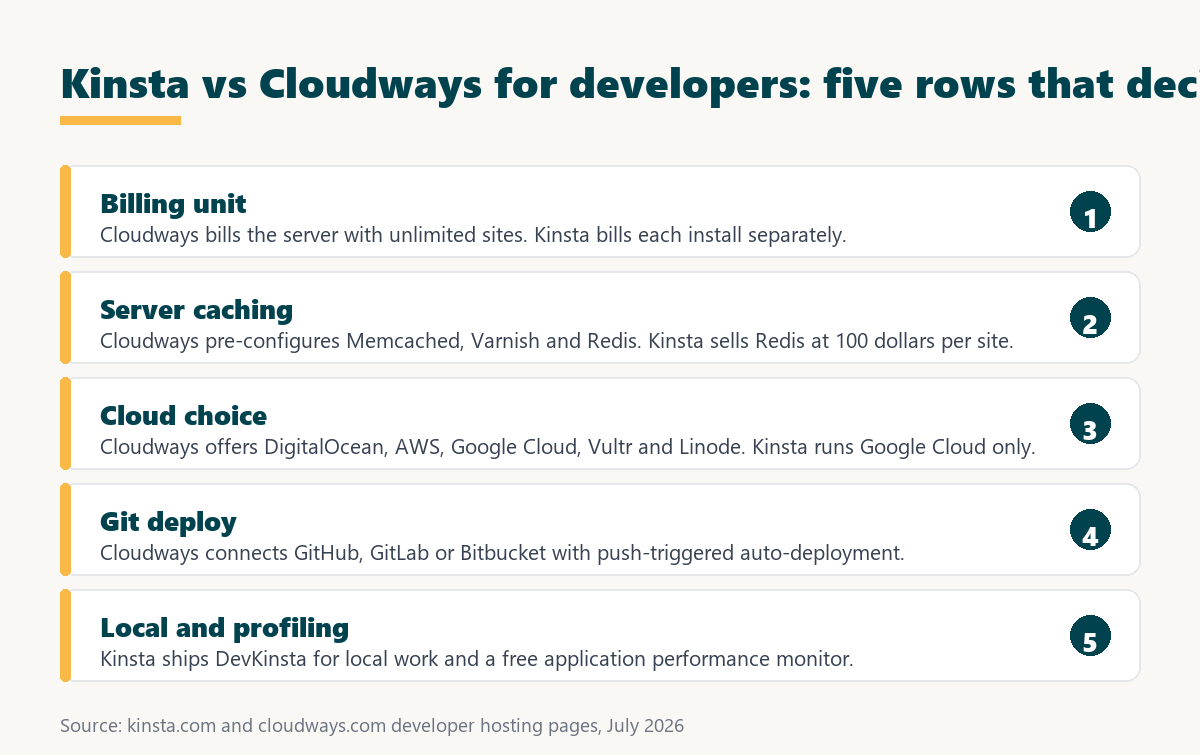
Cloudways bills a server and allows unlimited websites and unlimited visits on it, with Memcached, Varnish and Redis pre-configured at server level. Kinsta bills each install separately, meters usage, and sells Redis as a per-site add-on. For a developer running several projects, that difference is decisive.
Verdict: A Cloudways Medium server costs 54 dollars a month for 4 GB of memory, unlimited sites and unlimited visits, with server-level caching included. Kinsta charges 35 dollars for one install and prices Redis separately at 100 per site. A developer with more than two projects saves money on Cloudways, and this page says so.
Kinsta earns its price back on a different axis, and that axis is worth naming precisely rather than implying: it removes server sizing, capacity planning and tuning from the job entirely.
“WordPress is a web content management system.”
: Wikipedia, WordPress
Kinsta hosts that system exclusively. Cloudways lists Laravel, Symfony, CodeIgniter, Craft CMS, Drupal, Magento and more than a dozen other PHP applications on the same server, which is the clearest signal of who each platform is built for.
What Do Developers Need From Managed Hosting?
A developer evaluating hosting is answering a narrower question than a business owner. The site will be built either way. What matters is how code reaches production, what can be inspected when something is slow, and whether the bill scales with projects or with traffic.
- A deployment path that is not FTP: Code should reach production from version control on a trigger, so the release step is reproducible rather than remembered.
- A staging environment that can be merged selectively: Pushing a whole staging copy over production destroys live data, so file-level and table-level control is the difference between usable and decorative.
- Shell access with the usual tooling: Composer, WP-CLI and a database client turn a hosting account into somewhere work can actually happen rather than a control panel.
- Visibility into slow requests: Profiling that names the slow query or plugin converts a vague complaint about speed into a specific fix within an afternoon.
- Billing that matches how projects arrive: Client work arrives in projects rather than in visitors, so a per-server price behaves very differently from a per-install one.
Both platforms satisfy the first three. They diverge sharply on the last two, and that divergence is the whole comparison.
What Does Cloudways Cost a Developer?
Cloudways prices servers by size rather than by site. The published Lightning Stack tiers run from 14 dollars a month for one gigabyte of memory to 99 for eight, each billed hourly and each carrying unlimited visits and unlimited websites within the resources available.
Source: Cloudways developer hosting page, August 2026. Prices shown are for the Lightning Stack with the default provider selection; other cloud providers and server types carry different rates.
Hourly billing is the detail developers notice first, because it makes a throwaway environment for a two-day experiment cost a few cents rather than a month.
Which Is Cheaper for Several Projects?
Kinsta counts installs and Cloudways counts servers, so the gap widens with every project added. One site is broadly comparable. Ten sites is not close, because a single Cloudways server hosts all of them while Kinsta prices a ten-install plan.
Source: cloudways.com developer hosting page and kinsta.com plan pages, August 2026. Cloudways rows assume all sites share one server, which is how the platform is designed; the right-hand column states the resource ceiling that assumption creates.
The right-hand column matters as much as the price column. Ten WordPress sites on four gigabytes works until two of them get busy simultaneously, which is precisely the risk Kinsta’s per-install container removes.
When shared memory across projects becomes the problem
See Kinsta Plans →Each install runs in its own container, so one busy project cannot starve another.
Which Includes Server-Level Caching?
Cloudways states that Memcached, Varnish and Redis come pre-configured at server level on its developer plans, with no caching plugin required. Kinsta lists Redis caching as an optional add-on at 100 dollars per site each month, nearly three times the price of its entry plan.
For a developer this is the most expensive single line in the comparison, and it points the wrong way for the host this page links to. Any application with heavy queries, logged-in users or a commerce layer wants an object cache, and one platform includes it while the other charges more for it than for the hosting.
- Varnish sits in front of the application: Full-page caching at the reverse proxy handles anonymous traffic before requests ever reach PHP, which removes most catalogue and article load.
- Redis and Memcached hold repeated queries: Object caching stores results in memory so logged-in and dynamic requests avoid repeating identical database work on every page view.
- Server-level caching serves every application: One configured stack covers all sites on the Cloudways server rather than being purchased and enabled site by site.
- Breeze arrives pre-installed: Cloudways ships a lightweight caching plugin designed to work alongside Varnish rather than leaving cache choice to the developer.
- Kinsta prices caching per site: The Redis add-on is billed per site each month, so the cost multiplies across a portfolio rather than being absorbed once.
The counterargument for Kinsta is that its edge caching and per-site container reduce how often an object cache is needed at all. That is genuine, and it is still not a hundred dollars of genuine on a small project.
Which Gives More Infrastructure Choice?
Cloudways lets a developer pick DigitalOcean, Amazon Web Services, Google Cloud, Vultr or Linode at signup, and states that providers can be switched later without rebuilding the stack. Kinsta runs on Google Cloud only, with no equivalent choice at any tier.
Whether this matters depends entirely on whether a client contract, a data residency requirement or an existing cloud relationship makes the underlying provider a constraint. For most WordPress work it is irrelevant. For agencies bidding on regulated projects it can be the only row that counts.
“a B2B site that loads in 1 second has a conversion rate 3x higher than a site that loads in 5 seconds”
: HubSpot, page load time and conversion rates
Neither platform can be compared on measured speed here, because Cloudways performance depends on the server size and provider chosen by the developer, which makes any published benchmark unreproducible by design.
Which Has the Better Git Workflow?
Cloudways names its deployment integration explicitly: connect GitHub, GitLab or Bitbucket, then set push triggers so a commit deploys automatically. Instances arrive pre-loaded with Git, Composer and Let’s Encrypt certificates, so the toolchain exists before the first login.
- Three providers are named: GitHub, GitLab and Bitbucket are listed by name rather than described generically, which removes ambiguity about what will actually connect.
- Push triggers replace manual transfers: Deployment fires on commit, which the page contrasts directly with moving files over SFTP by hand.
- Composer ships on the instance: Dependency management works immediately, which matters for any project beyond a plain WordPress theme.
- The API automates provisioning: Cloudways states that infrastructure can be scaled and automated through its API, so environments can be created from a script.
- Certificates are issued automatically: Let’s Encrypt is pre-loaded, so a new environment gets a working certificate without a manual issuance step.
Kinsta provides SSH and WP-CLI across its range, but does not name an equivalent push-to-deploy integration on the plan pages read for this comparison, which is a gap in published detail rather than proof of absence.
Which Staging Model Suits Developers Better?
Both include staging. Cloudways describes something more specific: clone the live application, test commits and database changes, then push back while selecting exactly which files and which database tables merge. Kinsta includes a staging environment with every install and sells a more powerful premium environment at 20 dollars monthly.
Selective merging is the feature worth noting. Pushing an entire staging database over production destroys orders, comments and user accounts created since the clone, which is why most staging workflows stall at the final step. Choosing tables individually is what makes the environment usable on a live site rather than only before launch.
Which Runs More Than WordPress?
Cloudways lists Laravel, Symfony, CodeIgniter, Yii, Craft CMS, Drupal, Joomla, TYPO3, Magento, OpenCart, MODX, Grav and several others as deployable on the same optimised server, describing itself as framework agnostic with no platform restrictions. Kinsta’s plans compared here are WordPress hosting.
For a developer whose work is entirely WordPress this row is noise. For anyone maintaining a Laravel application alongside client WordPress sites, it means one bill and one control panel instead of two suppliers, which is a real operational saving rather than a feature-list bullet.
Which Has the Better Local and Profiling Story?
This is where Kinsta answers back. It publishes a free integrated local development tool and a free application performance monitor that can be enabled on any site from inside its dashboard to locate slow queries and bottlenecks. Cloudways does not name an equivalent profiler on its developer page.
- Profiling is included rather than purchased: Kinsta states that its application performance monitor costs nothing extra, where equivalent third-party tooling is normally a separate subscription.
- Slow queries get named, not guessed: A profiler identifies the specific query or plugin responsible, which converts a vague speed complaint into a defined piece of work.
- Local development is supplied by the host: A free integrated local tool keeps the development environment aligned with production rather than approximated by a generic stack.
- Server sizing disappears as a task: Kinsta allocates resources per install, so no one has to decide how much memory ten client sites will collectively need next quarter.
- Migrations are performed by engineers: Kinsta lists unlimited free migrations handled by its own team, which removes the move itself from the developer’s workload.
Taken together these describe the actual trade: Cloudways gives more control for less money, Kinsta removes work that a developer would otherwise be doing unpaid.
Free profiling instead of a third-party subscription
Explore Kinsta APM →Enable performance monitoring on any site from the dashboard at no extra cost.
Which Scales Without a Migration?
Cloudways allows memory, processor and NVMe storage to be scaled on demand with no stack migration required, and bills hourly so a temporary upgrade for a launch costs only the hours used. Kinsta moves between published plan tiers instead, with additional installs priced at 30 dollars each monthly.
Hourly billing plus in-place resizing is genuinely useful for launch work. A server can be doubled for the week of a campaign and returned afterwards, which no fixed monthly plan structure can replicate. Cloudways also offers an autoscaling option built on Kubernetes clusters for traffic that cannot be predicted.
Head to Head for a Developer
Setting the developer-relevant rows beside each other produces a clean split rather than a winner. Cloudways supplies control and volume economics. Kinsta supplies removal of operational work and per-project isolation.
Source: cloudways.com developer hosting page and kinsta.com plan, agency and WooCommerce pages, August 2026. Where a cell states a feature is not named, that means the vendor does not publish it on the pages read, not that the feature is absent.
Five rows to Cloudways and three to Kinsta on published detail, which is an honest count rather than a flattering one.
When Is Cloudways the Better Pick?
Cloudways is the better answer for most independent developers, and the situations are specific enough to check against a real workload rather than a preference.
- More than two projects at once: A single 28-dollar server hosts them all, where the equivalent install count on a per-site platform costs several times that figure.
- Anything that is not WordPress: Laravel, Symfony, Craft and Magento run on the same optimised server, so one supplier covers a mixed portfolio.
- Object caching on a budget: Redis and Memcached are pre-configured at server level rather than sold per site, which removes the largest cost difference outright.
- Short-lived environments: Hourly billing makes a two-day test server cost pennies, which no monthly plan structure can match for experimental work.
- Push-to-deploy from version control: GitHub, GitLab and Bitbucket triggers are named and included rather than assembled from scripts.
Kinsta becomes the better answer when the developer is billing for their time. Server sizing, capacity planning, cache tuning and migration work are all absorbed by the platform, and an hour of unpaid infrastructure work costs considerably more than the price gap.
“Tool spend is only defensible when the outcome it protects is measured, not assumed.”
: Growth Hack Suite, ROI on sales tools
For a developer the measurable outcome is billable hours not spent on infrastructure. If the monthly gap is smaller than the time saved, the more managed platform is the cheaper one despite the larger invoice.
Which Should a Developer Choose?
Choose Cloudways for control, mixed frameworks, several projects on one bill and included server-level caching. Choose Kinsta when infrastructure work is displacing paid work, when projects must not share memory, or when profiling and free migrations are worth more than the difference.
- Count the live projects first: Beyond two sites Cloudways wins on price outright, because one server carries unlimited applications within its resource ceiling.
- Check whether anything runs outside WordPress: A Laravel or Craft application in the portfolio settles the question immediately in Cloudways’ favour.
- Decide whether object caching is required: It is included at server level on Cloudways and costs 100 dollars per site each month on Kinsta.
- Price an hour of infrastructure work: Server sizing, tuning and migrations are unpaid time on a self-managed server and absorbed by the platform on Kinsta.
- Test both without commitment: Cloudways offers a free trial and hourly billing, and Kinsta publishes a 30-day money-back guarantee with free engineer-handled migrations.
Only the fourth step requires judgement. The rest are arithmetic against a real project list, which is why this decision rarely needs a trial to settle.
How Do You Move Between Them?
Both migrate at no charge, but the direction changes who does the work. Kinsta lists unlimited migrations performed by its own engineers. Cloudways offers to move a first website free from any host, with additional migrations handled through its migration add-on.
- Inventory the applications first: A mixed portfolio may not move as a single batch, since only WordPress installs are in scope for a WordPress-only platform.
- Note which caching layer is in use: An application tuned for server-level Varnish and Redis behaves differently on a platform where object caching is a separate purchase.
- Recreate the deployment pipeline: Push triggers connected to a Git provider do not travel with the site files and need reconnecting on the destination.
- Verify on a temporary address: Each migrated application should be exercised fully before DNS moves, since staging parity is not guaranteed across platforms.
- Keep the source running until reconciliation: Both platforms leave the original live during migration, so the old environment stays available as a fallback.
Sequenced that way the only irreversible step is DNS, and it happens after every application has already been confirmed working on the destination.
Stop sizing servers and get the hours back
Try Kinsta →Unlimited engineer-handled migrations and a 30-day money-back window.
Kinsta vs Cloudways for Developers: Frequently Asked Questions
The 12 most-asked questions developers have about choosing between Kinsta and Cloudways.
Which is better for developers, Kinsta or Cloudways?
Cloudways for most independent developers, on price, provider choice, framework support and included server-level caching. Kinsta once infrastructure work starts displacing billable work, or once projects must not share memory.
What does Cloudways cost?
Servers run from 14 dollars a month for 1 GB of memory to 99 for 8 GB, billed hourly. Every tier carries unlimited websites and unlimited visits within the resources of the server chosen.
Does Cloudways include Redis?
Yes. Memcached, Varnish and Redis are stated as pre-configured at server level, with no caching plugin required. Kinsta prices Redis caching as an add-on at 100 dollars per site each month.
Which cloud providers can be chosen?
Cloudways offers DigitalOcean, Amazon Web Services, Google Cloud, Vultr and Linode at signup, and states providers can be switched later without rebuilding the stack. Kinsta runs on Google Cloud at every tier.
Can either deploy from Git automatically?
Cloudways names GitHub, GitLab and Bitbucket with push triggers for automatic deployment on every commit. Kinsta provides SSH and WP-CLI but does not name an equivalent integration on the plan pages read here.
Can Cloudways run Laravel or other frameworks?
Yes. Laravel, Symfony, CodeIgniter, Craft CMS, Drupal, Magento, TYPO3 and others are listed as deployable on the same server, described as framework agnostic. Kinsta’s plans compared here are WordPress hosting.
How does staging differ between them?
Both include it. Cloudways describes selecting exactly which files and database tables merge when pushing staging back to production, which is what makes staging usable on a site already taking real data.
Does Kinsta include performance profiling?
Yes, a free application performance monitor can be enabled on any site from the dashboard to find slow queries and bottlenecks. Cloudways does not name an equivalent profiler on its developer page.
Which is cheaper for ten sites?
Cloudways, considerably. A 54-dollar Medium server hosts all ten within 4 GB of memory, against 225 dollars for a ten-install Kinsta plan. The trade is that all ten then share those resources.
Can a server be resized without migrating?
Cloudways states that memory, processor and NVMe storage scale on demand with no stack migration required, billed hourly. Kinsta moves between published plan tiers instead, with extra installs at 30 dollars each monthly.
Is there a free trial?
Cloudways offers a free trial and bills hourly afterwards, so a short evaluation costs very little. Kinsta publishes a 30-day money-back guarantee alongside free engineer-handled migrations.
Should a developer move from Cloudways to Kinsta?
Only once server maintenance is costing more billable time than the price difference, or once projects sharing memory has caused an incident. Below that point the arithmetic clearly favours staying.
About this comparison
Written by the Growth Hack Suite editorial team. Server sizes, hourly rates, included components and deployment features were read directly from Cloudways’ developer hosting page and Kinsta’s plan, agency and WooCommerce pages in August 2026, and are reported as published. Cloudways wins the majority of the developer-relevant rows above, including price at every project count and included server-level caching, and this page says so despite carrying affiliate links to Kinsta.
No speed benchmark appears here, because Cloudways performance depends on the server size and cloud provider a developer selects, which makes any published figure unreproducible by design. Where a cell states a feature is not named, that reflects the pages read rather than proof of absence. This page contains affiliate links to Kinsta, which pay a commission at no extra cost to the reader.