Table of Contents
Kinsta vs Google Cloud is the one comparison in this category where the managed platform is genuinely cheaper, and the reason is arithmetic rather than marketing. Kinsta runs on Google Cloud’s compute-optimised C2 machines. The smallest C2 machine costs 152 dollars a month on demand for compute alone. Kinsta’s entry plan is 35 dollars with caching, CDN, backups and support included.
Last updated: August 2026. Every figure below was read directly from kinsta.com/plans and Google Cloud’s published pricing pages for the Iowa region in the same week. This page carries affiliate links to Kinsta, and the one path where Google Cloud costs less is stated as plainly as the rest.
Kinsta vs Google Cloud: The Short Verdict
Kinsta is cheaper than running the same machine class directly, by a wide margin. Google Cloud is cheaper only if a smaller general-purpose machine is accepted and all the platform work is done in-house. Everything else, including egress, storage, monitoring and support, is billed separately on Google Cloud.
Verdict: A c2-standard-4 machine, the same compute-optimised class Kinsta advertises, costs 152.43 dollars a month on demand and 60.97 even on a three-year commitment. Kinsta sells a managed site on that platform for 35. The only cheaper route is dropping to an e2-medium at 24.46 dollars and building everything else.
That inversion is real and worth understanding. Kinsta buys compute-optimised capacity at scale and divides it across many sites, which no individual customer can replicate at retail prices.
What Are Kinsta and Google Cloud?
Kinsta is a managed WordPress host running each site in an isolated container on Google Cloud’s compute-optimised machines, with caching, a CDN, a managed firewall, backups and 24/7 support from WordPress engineers included. Google Cloud is the enterprise platform underneath, selling compute, storage, networking and hundreds of managed services billed individually by usage.
This is not a comparison between two hosts. It is a comparison between buying a finished product and buying the raw materials from its supplier.
“WordPress is a web content management system.”
: Wikipedia, WordPress
Running it directly on Google Cloud means provisioning a virtual machine and then building the web server, PHP, database, cache, firewall and backup routine that Kinsta ships already assembled.
What Does the Same Machine Class Actually Cost?
C2 is Google Cloud’s compute-bound machine family, the class built for workloads that need consistent processor performance. The entry model, c2-standard-4, provides four virtual CPUs and 16 GiB of memory at 0.208808 dollars an hour, which is 152.43 dollars across a 730-hour month.
Source: cloud.google.com compute pricing, Iowa (us-central1), read July 2026. Monthly figures are the published hourly rate multiplied by 730 hours and exclude storage, egress, load balancing and support. Spot instances are discounted separately by up to 91 percent.
Read the third row against a 35-dollar managed plan and the comparison resolves itself. Buying the same class of machine at retail costs more than four times the price of a fully managed site on it.
Everything Compute Does Not Include
The machine price is only the first line of a Google Cloud bill. Storage, network egress, load balancing, monitoring and support are all metered separately, and each has to be sized before the total can be known.
- Persistent disk: Boot and data volumes are billed by provisioned capacity per month, so storage is a standing charge independent of how much of it the site actually uses.
- Network egress: Standard Tier delivery from Iowa costs 0.085 dollars per gibibyte between 200 GiB and 10 TiB, falling to 0.065 above that, with the first 200 GiB covered by a free allowance.
- Premium Tier networking: Traffic carried over Google’s backbone rather than the public internet is priced higher than Standard Tier, so the faster network path costs more per gibibyte.
- Content delivery: Cloud CDN is a separate product with its own cache-fill and egress charges, unlike the CDN bundled into a managed WordPress plan.
- Technical support: Google Cloud support is sold as paid plans on top of usage, so infrastructure help is an additional subscription rather than an included service.
None of these are unreasonable prices. Together they mean a Google Cloud WordPress bill can only be estimated in advance, never quoted, which is the opposite of what a flat managed plan offers.
Which Is Cheaper Once Everything Is Counted?
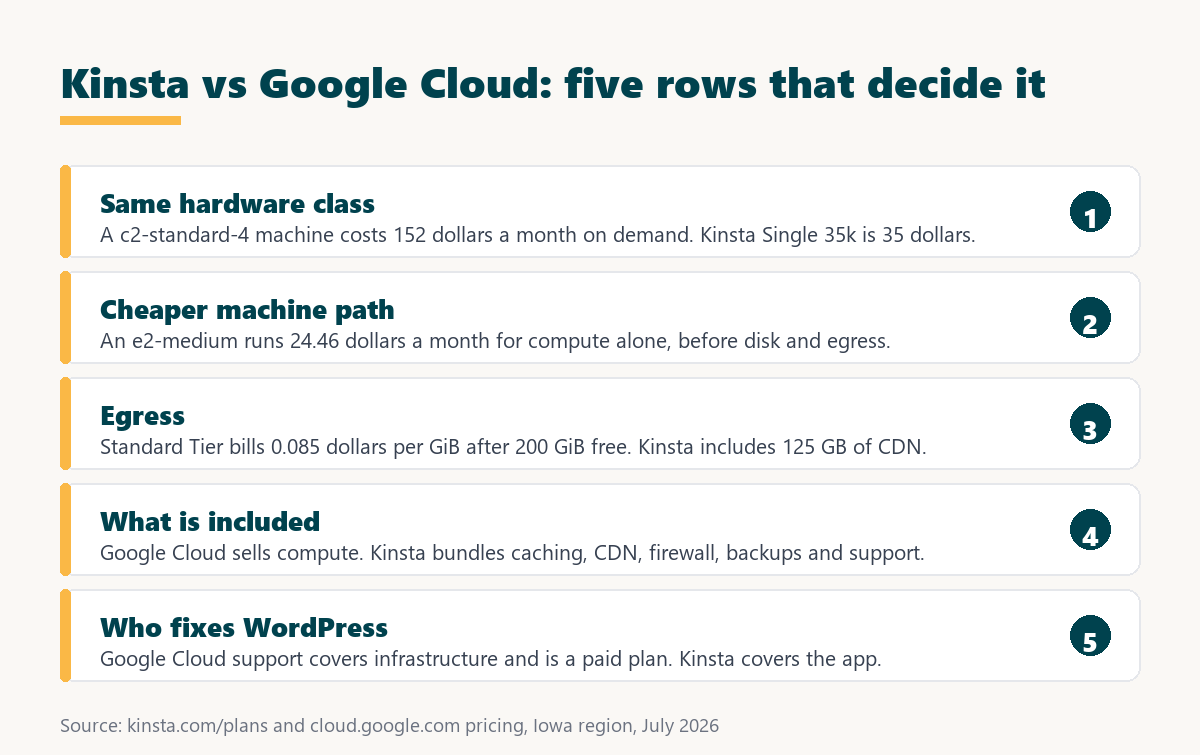
Kinsta is cheaper on equivalent hardware and Google Cloud is cheaper on lesser hardware. An e2-medium at 24.46 dollars leaves roughly ten dollars of headroom against a 35-dollar plan, which storage and egress consume quickly on any site with real traffic.
Source: kinsta.com/plans and cloud.google.com pricing, Iowa region, August 2026. Google Cloud figures are compute only at 730 hours; storage, egress and support are additional.
In plain terms, only one Google Cloud configuration undercuts Kinsta on price, and it does so by using a shared-core machine rather than the dedicated compute-optimised class. That is a different product, not a cheaper version of the same one.
Want compute-optimised hardware without the compute-optimised bill?
See Kinsta Plans →Free migration by Kinsta engineers, 30-day money-back guarantee.
Why Is the Reseller Cheaper Than the Source?
The answer is density and purchasing scale. A managed host buys compute-optimised capacity in volume, applies committed-use pricing, and divides each machine across many isolated site containers. A single WordPress site rarely saturates four dedicated vCPUs, so paying retail for all of them wastes most of what is bought.
This is the same economics that makes any shared platform cheaper than dedicated infrastructure. It stops applying the moment a site genuinely needs the whole machine, which is exactly when moving to raw cloud starts to make sense.
The Stack Google Cloud Leaves to the Customer
Google Cloud’s responsibility ends at the virtual machine and the services explicitly purchased. Everything that turns compute into a fast, secure WordPress site belongs to whoever owns the project.
- Web server and PHP: The instance ships with an operating system, so the web server, PHP version, process manager and their tuning must all be installed and maintained by the project owner.
- Database administration: MySQL has to be installed and secured on the instance, or moved onto Cloud SQL as a separate metered service with its own storage and backup charges.
- Caching architecture: Page caching, object caching and a purge strategy have to be designed and configured, since a bare machine serves every request uncached.
- Security posture: Firewall rules, identity policies, brute-force protection, malware scanning and certificate renewal are all configured through separate Google Cloud products.
- Cost governance: Budgets, alerts and quota limits must be set deliberately, because usage-based billing has no natural ceiling when traffic or a misconfiguration spikes.
An experienced cloud engineer handles all of that comfortably. It is a substantial project for anyone whose actual goal is publishing a website.
Which Is Better for Speed?
The hardware ceiling is identical, because Kinsta runs on the platform being compared. The difference is what arrives configured: server-level caching, object caching and edge delivery are already tuned on Kinsta, while a fresh Google Cloud instance serves every request uncached until that layer is built.
Google’s guidance on Largest Contentful Paint puts the target at 2.5 seconds or less, and a well-architected Google Cloud deployment can exceed anything a shared managed plan achieves. Doing so takes engineering time rather than a larger budget.
“a B2B site that loads in 1 second has a conversion rate 3x higher than a site that loads in 5 seconds”
: HubSpot, page load time and conversion rates
For most WordPress sites the tuned managed stack reaches that threshold immediately, while the raw platform reaches it only after the same work has been done by hand.
Who Fixes It When WordPress Breaks?
Google Cloud support covers the platform and is sold as a paid plan on top of usage. A plugin conflict, a white screen after an update or a slow database query falls entirely outside that scope. Kinsta’s 24/7 support covers the WordPress application itself, at no extra cost.
- Platform support on Google Cloud: Coverage extends to infrastructure, quotas and service behaviour, so anything inside the operating system remains the project owner’s responsibility.
- Paid support tiers: Technical support is a separate subscription, adding a recurring cost that a managed WordPress plan already includes in its flat price.
- Application support on Kinsta: Support staff debug WordPress itself, including plugin conflicts, slow queries and failed updates, rather than stopping at the infrastructure boundary.
- Malware handling: Kinsta includes free malware removal, while a compromised Google Cloud instance must be investigated and cleaned by whoever administers the project.
- Documentation depth: Google publishes extensive architecture guidance, which substitutes for support only where there is time and expertise to apply it.
For a cloud engineering team this gap is expected and manageable. For a business owner it is the entire reason managed hosting exists.
Committed Use and Spot Pricing Change the Maths
Google Cloud publishes substantial discounts for predictable workloads. A three-year commitment reduces c2-standard-4 to 60.97 dollars a month, and spot instances are discounted by up to 91 percent for workloads that tolerate interruption.
Neither suits a typical production website. A three-year commitment is a long lock-in for a small site, and spot capacity can be reclaimed at any time, which rules it out for anything serving customers.
Kinsta vs Google Cloud for Owners Without a Cloud Team
For a business owner with no cloud engineering resource, this comparison is unusually one-sided. The cheaper Google Cloud path requires accepting a shared-core machine and personally building the caching, security, backup and monitoring layers that arrive finished for 35 dollars.
“Tool spend is only defensible when the outcome it protects is measured, not assumed.”
: Growth Hack Suite, ROI on sales tools
Measured here, the outcome is a working site. Google Cloud protects it only after significant engineering effort, whereas the managed plan protects it on the day the migration completes.
When Is Google Cloud the Better Pick?
Google Cloud is the better pick when WordPress is one component of a larger system, or when the architecture genuinely needs the whole machine. Those situations are real, and in them no managed plan is an adequate substitute.
- A cloud team is already in place: Where infrastructure engineering is routine work, the platform offers control and integration that no managed WordPress plan can match.
- WordPress inside a larger system: Sites sharing identity, data pipelines, queues or machine learning services with other applications benefit from living in the same project.
- Enterprise compliance requirements: Direct control over regions, encryption keys, audit logging and identity policy is available in a way that resold capacity cannot expose.
- Genuinely large workloads: A site that saturates dedicated vCPUs stops benefiting from shared density, which is the point where retail compute pricing becomes rational.
- Interruptible workloads: Spot pricing discounted by up to 91 percent suits batch processing and rendering tasks that sit alongside a site but tolerate interruption.
Outside those cases, paying retail for compute-optimised capacity to host one WordPress site is the most expensive way to solve the problem.
When Is Kinsta the Better Pick?
Kinsta is the better pick for almost every standalone WordPress site, and this is the one comparison where the cost argument supports that conclusion rather than contradicting it.
- Compute-optimised hardware at shared prices: The same C2 machine class costs 152.43 dollars a month at retail and is included in a 35-dollar managed plan.
- A quotable monthly bill: One flat price replaces compute, storage, egress, load balancing and support charges that can only be estimated in advance.
- Application-level support: Plugin conflicts and failed updates are handled by WordPress engineers rather than becoming an internal engineering ticket.
- Security configured by default: A managed firewall, denial-of-service protection and free malware removal replace several separately configured cloud products.
- No cost governance required: A fixed plan removes the need for budgets, quota alerts and the risk of a traffic spike producing an unexpected invoice.
The premium usually charged for managed hosting simply does not exist here. On matched hardware the managed product is the cheaper one.
Skip the architecture work and the metered invoice
See Kinsta Plans →Engineers handle the migration, and the 30-day guarantee covers the test.
How Do You Move From Google Cloud to Kinsta?
Moving off a self-managed instance is straightforward because Kinsta’s engineers perform the migration and nothing has to be rebuilt. The Google Cloud project keeps serving traffic until the copy is verified, and the 30-day guarantee covers the exercise.
- Snapshot the instance first. Capture the disk image before anything changes, so the existing configuration can be restored exactly if the move is reversed.
- Record the baseline. Measure Largest Contentful Paint and server response on the busiest uncached page while the site is still on Google Cloud.
- Total last month’s bill properly. Add compute, persistent disk, egress, load balancing and any support subscription, since only the full figure is comparable with a flat plan.
- Request the migration. Kinsta includes unlimited engineer-handled migrations on every plan, so the copy is built without touching the live project.
- Verify on staging, then cut over. Test plugins, checkout, forms and cron jobs, lower the DNS time-to-live in advance, then switch at the lowest-traffic hour.
- Decommission deliberately. Delete the instance, its disks and its snapshots once the decision is final, because each continues billing independently.
That last step matters more on Google Cloud than anywhere else, since orphaned disks, static addresses and snapshots keep generating charges after the machine itself is gone.
Ready to compare a flat plan against your current cloud bill?
Start With Kinsta →Unlimited free migrations, staging included, 30-day money-back guarantee.
Kinsta vs Google Cloud: Frequently Asked Questions
The 12 most-asked questions about choosing between Kinsta and Google Cloud.
Does Kinsta run on Google Cloud?
Yes. Kinsta runs each site in an isolated container on Google Cloud’s compute-optimised machines, which is why this comparison is between a finished product and the raw materials from its supplier.
Is Kinsta cheaper than Google Cloud?
On matched hardware, yes and by a wide margin. A c2-standard-4 machine costs 152.43 dollars a month on demand for compute alone, against 35 dollars for a fully managed Kinsta plan on the same class of machine.
How much is a comparable Google Cloud VM?
An e2-medium with two shared vCPUs and 4 GiB of memory costs 24.46 dollars a month at 730 hours. A c2-standard-4 with four dedicated vCPUs and 16 GiB costs 152.43. Both figures exclude storage and egress.
Why is the managed host cheaper than the platform?
Density and purchasing scale. A managed host buys compute-optimised capacity in volume, applies committed-use pricing and divides each machine across many isolated containers, which no single site can replicate at retail.
What does Google Cloud charge for egress?
Standard Tier delivery from Iowa costs 0.085 dollars per gibibyte between 200 GiB and 10 TiB, dropping to 0.065 above that, with the first 200 GiB covered by a free allowance. Premium Tier networking costs more.
Do committed use discounts change the comparison?
They narrow it without closing it. A three-year commitment brings c2-standard-4 to 60.97 dollars a month for compute alone, still well above a 35-dollar managed plan that includes everything else.
Can spot instances make Google Cloud cheaper?
Spot pricing is discounted by up to 91 percent, but capacity can be reclaimed at any time. That rules it out for a production website while remaining useful for batch work running alongside one.
Does Google Cloud support WordPress problems?
No. Support covers the platform and is sold as a paid plan on top of usage. Plugin conflicts, failed updates and slow queries fall to whoever administers the project.
Is Kinsta faster than a Google Cloud VM?
The hardware ceiling is the same because Kinsta runs on that platform. Kinsta arrives with caching and edge delivery configured, while a fresh instance serves every request uncached until that layer is built.
Which is better for enterprise compliance?
Google Cloud, because direct control over regions, encryption keys, audit logging and identity policy is available at the platform level in a way that resold capacity cannot fully expose.
Can I run WordPress on Google Cloud without a cloud team?
It is possible with marketplace images, but caching, security, backups, monitoring and cost governance all remain manual. Usage-based billing also has no natural ceiling if traffic or a misconfiguration spikes.
Should I move from Google Cloud to Kinsta?
For a standalone WordPress site, usually yes, since matched hardware costs more at retail. For a site embedded in a larger cloud system, staying keeps identity, data and networking in one place.
About this comparison
Written by the Growth Hack Suite editorial team. Machine prices, discount rates and egress charges were read directly from kinsta.com/plans and Google Cloud’s published pricing pages for the Iowa region in August 2026, and monthly figures are the published hourly rate multiplied by 730 hours. This page contains affiliate links to Kinsta, which pay a commission at no extra cost to the reader.