Table of Contents
Expandi vs Closely is a comparison of two cloud LinkedIn tools that stress different strengths. Expandi costs $99 per LinkedIn account per month and documents a warm-up that starts at five actions a day and climbs to twenty-one. Closely starts at $65 per month for one account and promotes a Smart Inbox that syncs LinkedIn and email replies in one place.
Last checked: October 2026. Prices and features taken from the official Expandi pricing page, FAQ, and help center, and from the Closely pricing page, on the dates shown under each table.
Want to watch a documented warm-up run on a real profile? Test Expandi on one LinkedIn account for seven days.
Start Your 7-Day Expandi Trial →Seven-day trial on the first subscription · dedicated country-based IP per account · cancel anytime
Expandi vs Closely: Which Fits a Founder Running LinkedIn Outreach?
Expandi vs Closely is a choice between a tool that documents its account warm-up in detail and a cheaper tool that leads with a combined inbox. Expandi suits founders who want a published ramp-up schedule at $99 per account, while Closely suits founders who want one account for $65 and simple reply handling across LinkedIn and email.
Both products run in the cloud, so neither depends on a browser tab staying open. The real split is what each vendor chooses to publish. Expandi’s help center lays out the daily numbers behind its warm-up and the limits on campaigns, while Closely’s pricing page keeps the feature list short and puts the price ladder front and center.
The short answer depends on what worries the founder more, a restricted profile or a messy reply queue, so that priority should be set before comparing plans.
What Is the Core Difference Between Expandi and Closely?
The core difference is how each tool packages accounts and how much safety detail it publishes. Expandi bills every LinkedIn account at one rate and publishes its warm-up numbers, while Closely bundles one, three, or five accounts into plans and lists warm-up, a residential IP, and a Smart Inbox as included features.
- Billing unit: Expandi charges one flat rate for each connected LinkedIn account, while Closely sells plans that bundle one, three, or five accounts into a single monthly price.
- Warm-up detail: Expandi’s help center publishes a ramp from five to twenty-one daily actions, while the Closely pricing page lists account warm-up as a feature without a schedule.
- Inbox scope: Expandi mirrors LinkedIn and Sales Navigator conversations in a unified inbox, while Closely’s Smart Inbox syncs LinkedIn and email replies into one view.
- IP type: Expandi assigns a dedicated IP in a country the user selects, while Closely lists a dedicated residential IP for each LinkedIn account on every plan.
- Entry price: One Expandi account costs $99 per month on monthly billing, while the Closely Starter tier costs $65 per month for a single LinkedIn account.
Seat-based and bundle-based billing behave differently as a team grows, a distinction explained in the guide to the SaaS seat license.
Both tools run in the cloud and include warm-up, an IP per account, and a shared inbox, so the gap lies in documentation depth and plan structure rather than in missing features.
How Much Does Expandi Cost per LinkedIn Account?
Expandi costs $99 per LinkedIn account per month, or $79 per account per month when billed annually, which is a 20% saving. Every account receives the same Business feature set, including warm-up and a dedicated IP, and custom Agency pricing starts at ten accounts and is quoted by sales.
There is no permanently free tier. Expandi offers a seven-day trial that applies only to the first subscription on a user account; checkout asks for card details, and the FAQ says no charge is made until the seven days are up. The Terms state that subscription fees are nonrefundable unless the law requires otherwise, and a monthly subscription can be cancelled at any time before it renews. Taxes are added by billing country.
Expandi keeps one price per profile with every safety feature included, so a founder never upgrades a plan just to unlock warm-up or the inbox.
How Much Does Closely Cost on Each Plan?
Closely pricing is a ladder of plans sized by LinkedIn accounts. Starter costs $65 per month for one account, Growth costs $159 for three, and Essential costs $259 for five, while annual billing lowers each tier by about 40%. A Custom tier is quoted, and a white-label tier costs $1,499 per month.
- Starter tier: one LinkedIn account for $65 per month, or $39 per month on annual billing, which Closely shows as $468 billed for the year.
- Growth tier: three LinkedIn accounts for $159 per month, or $95 per month on annual billing, shown as $1,140 billed for the full year.
- Essential tier: five LinkedIn accounts for $259 per month, or $155 per month on annual billing, shown as $1,860 billed for the full year.
- Custom tier: a quoted package for teams that need a different account count, with no public price listed on the Closely pricing page.
- White-label Unlimited: a fixed $1,499 per month regardless of seat count, which Closely says can be cancelled with thirty days of notice.
Closely also defines its unit plainly on the pricing page: “1 sender = 1 LinkedIn account + 1 email inbox” (Closely pricing). Each plan includes a button to start a trial, but the page does not state how many days that trial lasts.
Closely gets cheaper per account as plans grow, at about $53 per account on Growth and $51.80 on Essential, which rewards founders who expect to add a second or third profile within the first year.
What Does Each Tool Cost at 1, 3, and 5 Accounts?
Expandi costs $99 times the number of accounts, so three accounts cost $297 a month and five cost $495. Closely bundles accounts into plans, so three accounts on Growth cost $159 a month and five accounts on Essential cost $259, a little over half of the Expandi list total at each size.
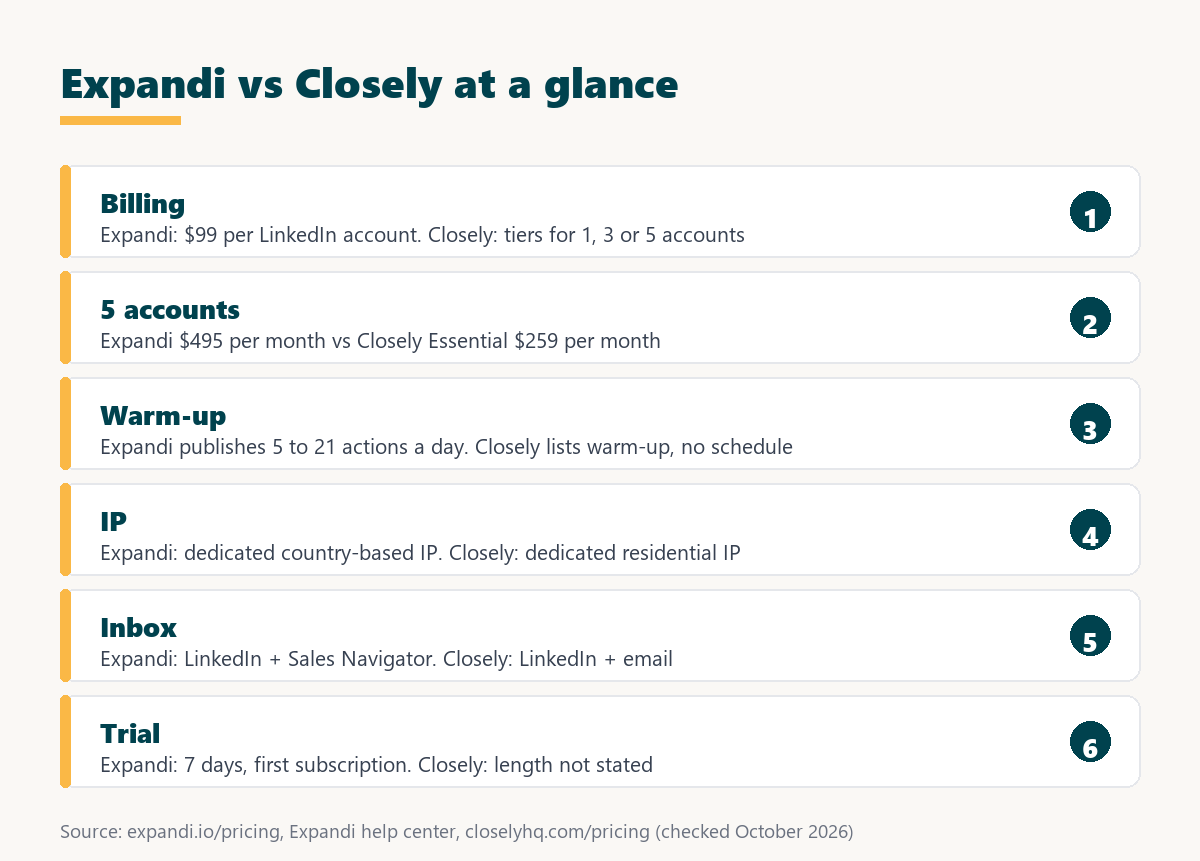
Source: expandi.io/pricing and expandi.io/faq, checked October 2026; closelyhq.com/pricing, checked October 2, 2026. Expandi columns are calculated from the listed per-account rates. Annual figures are monthly equivalents, not monthly prices. Taxes excluded.
Closely costs less than Expandi at every account count shown, and the gap is widest on annual billing, where five Closely accounts cost $155 a month against $395 for five Expandi accounts.
In percentage terms, the Growth tier costs about 54% of three Expandi accounts at monthly list rates ($159 against $297), and Essential costs about 52% of five ($259 against $495). Those ratios are simple division on published prices, not a measure of value.
Price clearly favors Closely, so the case for Expandi has to rest on the detail of its safety setup and campaign controls rather than on cost.
How Does Expandi Warm Up a LinkedIn Account?
Expandi warm-up is an automatic ramp that raises daily activity in small steps. The help center describes a start at five actions a day, an increase of three actions every two days, and a ceiling of twenty-one, with a gradual option that runs fourteen days and custom settings for each value.
- Starting volume: the warm-up begins at five actions per day once the account has an active campaign, so nothing ramps while the profile sits idle.
- Step increase: daily activity rises by three actions every two days, a pace slow enough to keep a newly connected profile close to its normal behavior.
- Daily ceiling: the ramp tops out at twenty-one actions per day, and the help center puts the post-warm-up range at twenty to twenty-one actions.
- Gradual option: a preset fourteen-day schedule handles the ramp automatically for operators who prefer not to tune each value by hand.
- Custom settings: four fields, Start at, Ramp up to, Increase by, and Every (days), let an operator slow the ramp further for a sensitive profile.
The same Expandi help center article on account warm-up also recommends staying within about 100 actions per week, which it ties to LinkedIn’s weekly cap on connection requests. That number comes from Expandi’s guidance, not from a LinkedIn policy page.
Published numbers let a founder predict exactly how many actions a new profile will send each day, which removes guesswork during the riskiest first weeks.
How Does Closely Describe Its Warm-Up?
Closely warm-up is an included feature listed on every plan as LinkedIn account warmup. The pricing page names the feature next to a dedicated residential IP for each account, but it does not publish a daily schedule, a starting volume, or a ceiling for the ramp.
That is a documentation gap, not evidence of a weaker feature. A founder cannot tell from the pricing page alone how many actions a new Closely profile sends on day one or day ten, so the only ways to find out are to ask support before buying or to watch the numbers during the trial.
Closely includes warm-up at no extra cost, though a founder who wants the exact ramp before connecting a profile would need to ask support or test it during the trial.
How Does the Inbox Work in Each Tool?
A unified inbox is a single view that collects replies from several accounts or channels. Expandi states that it has a unified inbox that mirrors LinkedIn and Sales Navigator conversations, while Closely promotes a Smart Inbox that syncs LinkedIn and email replies into one place.
“All your replies from LinkedIn and email are synced into a single inbox, making it easy to stay on top of conversations.”
Closely pricing FAQ
HubSpot, writing about shared inboxes for teams, describes the problem a single reply view is meant to solve:
“When multiple team members handle inquiries through individual inboxes, teams risk duplicate responses or missed messages, leaving customers frustrated.”
HubSpot, Shared inbox tools
Expandi’s help center describes the inbox in one line: “Expandi has a unified inbox” whose conversations contain messages sent and received through LinkedIn and Sales Navigator. A workspace with several LinkedIn accounts adds a Global Inbox that manages every account’s conversations from one screen, with filters by company, account, and status. Expandi does not mirror a full mailbox; the inbox shows email from a lead only when that email already belongs to the account. The general concept is covered in the unified inbox guide.
“all types of messages are stored in one system”
Wikipedia, Unified messaging
Both tools gather replies in one screen, and Expandi adds a Global Inbox across accounts, so the inbox difference is smaller than the headline suggests.
How Do Expandi and Closely Compare Feature by Feature?
Expandi and Closely share the same building blocks and differ in how each is specified. Both run in the cloud with warm-up, a dedicated IP, and a shared inbox, but Expandi publishes its warm-up numbers and trial length, while Closely publishes lower prices and a residential IP.
Source: expandi.io/pricing, expandi.io/faq, and the Expandi help center (warm-up, inbox), checked October 2026; closelyhq.com/pricing, checked October 2, 2026. The Closely annual discount is derived from its listed prices.
The two tools match on core features, with Expandi ahead on published warm-up and trial details and Closely ahead on price, annual discount, and a fixed-price white-label tier.
Since the feature rows nearly mirror each other, founders should let documentation depth and budget, rather than any missing capability, drive the decision.
How Does Each Tool Assign IP Addresses?
IP assignment is how a tool gives each LinkedIn account a stable network address. Expandi assigns every account a dedicated IP matched to a chosen country, and Closely lists a dedicated residential IP for each LinkedIn account on its pricing page.
Expandi’s help center states that “Everyone in Expandi gets their personal dedicated IP address” (Expandi help center, IP address and proxy). The country is selected when the account is connected and can be changed later, and a custom proxy is available for teams that want their own address. Closely names the residential type but publishes no further detail on country choice. Neither vendor publishes data showing one IP type is safer than the other, and this page makes no such claim. The underlying idea is explained in the dedicated IP guide.
Both vendors isolate accounts on their own addresses, so founders comparing IP models should focus on country choice and proxy options rather than on a winner.
Want to see the dedicated IP and warm-up on a real profile? Connect one LinkedIn account and run the seven-day trial.
Try Expandi for 7 Days →No charge until the seven days are up · taxes added by billing country
Which Founders Fit Expandi Best?
Expandi fits founders who treat their LinkedIn profile as an asset that cannot be risked. A documented warm-up, a seven-day trial with clear terms, and multichannel sequences in one flat plan suit buyers who read help articles before they automate anything.
- New or dormant profiles: accounts with little recent activity benefit from a ramp whose daily numbers are published in advance and can be slowed with custom settings.
- Documentation readers: the warm-up schedule and the campaign limits, such as 15 active campaigns and 5,000 leads per campaign, are written down in the help center.
- Sales Navigator users: the Expandi inbox mirrors Sales Navigator conversations as well as standard LinkedIn messages, which keeps both reply streams on one screen.
- Founders planning ten or more accounts: the Agency tier opens at ten accounts with custom pricing and a dedicated Customer Success Manager for growing teams.
- Buyers wanting clear trial terms: the seven-day trial, its first-subscription rule, and the nonrefundable fee policy are all stated in Expandi’s published terms.
For a founder weighing how LinkedIn fits beside email and calls, the guide to multichannel outreach covers the sequencing logic both tools rely on.
The common thread is caution, since these founders will pay more per account in exchange for knowing exactly how the tool treats a profile.
When Is Closely the Better Pick?
Closely is the better pick when price and simple reply handling matter most. One account costs $65 against $99, five accounts cost $259 against $495, every tier lists warm-up and a residential IP, and LinkedIn and email replies arrive in a single Smart Inbox.
- Price-led founders: the Starter tier costs about a third less than one Expandi account at monthly list prices, $65 against $99, with warm-up still included.
- Three-to-five account teams: Growth and Essential cost roughly half of the equivalent Expandi total, which matters once a co-founder or first rep adds a profile.
- Email plus LinkedIn senders: Closely counts one sender as one LinkedIn account plus one email inbox, so both channels sit under the same unit.
- Annual payers: annual billing on Closely cuts about 40% off the monthly price, double the 20% reduction Expandi offers for paying a year upfront.
- Agencies wanting fixed white-label pricing: the White-label Unlimited tier costs $1,499 per month regardless of how many seats an agency manages.
Saying plainly where Closely wins keeps the comparison honest, because a founder with a healthy profile and a tight budget may value savings over documentation.
What Hidden Costs Should a Founder Check?
Hidden costs are charges or gaps that sit outside the headline price. With Expandi they are per-account growth, paid personalization add-ons, and nonrefundable fees, while with Closely they are tier jumps between one, three, and five accounts and details the pricing page leaves unstated.
- Tier jumps: a second LinkedIn account moves a Closely customer from Starter to Growth, which raises the monthly bill from $65 to $159 at list prices.
- Unstated trial length: the Closely pricing page shows a trial button but no number of days, so the evaluation window should be confirmed before signing up.
- Per-account growth: every additional Expandi profile adds another $99 per month on monthly billing, with no bundle discount below the ten-account Agency threshold.
- Paid add-ons: Expandi lists image and GIF personalization and video personalization as paid add-ons and publishes no price for either one.
- Refund terms: Expandi’s Terms make subscription fees nonrefundable, while Closely links a refund policy from its footer that this comparison has not reviewed.
Neither price page answers every question, so founders should confirm trial length, refund terms, and the cost of the next account before subscribing.
How Should a Founder Test Both Tools?
A side-by-side test is a short trial run where the same audience and message go through both tools. Watching each warm-up and reply flow on a real profile shows how the tools behave before any fee is paid, which matters because Expandi fees are not refunded once billing starts.
- Pick the priority: writing down whether safety detail or reply handling matters more gives the test a clear pass mark before either trial begins.
- Open both trials: start the seven-day Expandi trial and the Closely trial on the same day, with the audience list and copy already prepared.
- Log daily actions: record how many actions each tool sends per day in the first week and compare the Expandi ramp with what Closely actually does.
- Answer ten replies in each inbox: handle real replies in both tools to judge speed, filters, and whether email and LinkedIn threads stay together.
- Cost the next twelve months: multiply the expected account count by each price for a year, using monthly and annual figures, before committing to either tool.
A logged first week turns two marketing claims into evidence, showing the real ramp speed and how quickly replies can be handled in each inbox. The SaaS free trial guide covers how to structure a short evaluation.
Verdict: Warm-Up Depth or Inbox Simplicity?
The verdict is that Expandi suits founders who want a documented warm-up and clear trial terms, and Closely suits founders who want lower prices with replies from LinkedIn and email in one inbox. Both include warm-up, a dedicated IP, and a shared inbox, so the choice is about priorities.
“React to signals: a reply on one channel pauses the others.”
Growth Hack Suite, What Is Multichannel Outreach?
Reply handling is where that principle becomes practical: whichever tool is chosen, a reply in its inbox should stop the rest of the sequence for that lead.
Most founders can decide by weighing budget against the comfort of published safety numbers, then confirming the choice on one profile during a trial.
Expandi vs Closely: Frequently Asked Questions
The 12 most-asked questions about Expandi vs Closely.
Is Expandi better than Closely?
Neither is better across the board. Expandi publishes more safety detail, including a warm-up schedule, while Closely costs less at one, three, and five accounts and syncs LinkedIn and email replies in its Smart Inbox.
How much does Expandi cost per account?
Expandi costs $99 per LinkedIn account per month on monthly billing, or $79 per account per month when billed annually. Taxes are added by billing country.
How much does Closely cost?
Closely Starter costs $65 per month for one LinkedIn account, Growth costs $159 for three, and Essential costs $259 for five, with lower monthly equivalents on annual billing.
Does Closely include warm-up?
Yes. Closely lists LinkedIn account warmup on every tier, but its pricing page does not publish a daily schedule or a ceiling for the ramp.
How does Expandi warm-up work?
Expandi starts at five actions a day once a campaign is active, adds three actions every two days, and caps at twenty-one, with a fourteen-day gradual option and custom settings.
Does Expandi have a unified inbox?
Yes. Expandi’s help center states that it has a unified inbox mirroring LinkedIn and Sales Navigator conversations, plus a Global Inbox for workspaces with several accounts.
What is the Closely Smart Inbox?
It is Closely’s shared reply view. The pricing FAQ says replies from LinkedIn and email are synced into a single inbox.
Do both tools give each account a dedicated IP?
Yes. Expandi assigns a dedicated IP in a chosen country, and Closely lists a dedicated residential IP for each LinkedIn account.
How long are the trials?
Expandi offers seven days on the first subscription. Closely shows a trial button but does not state the number of days on its pricing page.
Which is cheaper for five accounts?
Closely. Five accounts on Essential cost $259 per month, against $495 for five Expandi accounts on monthly billing.
Can Expandi fees be refunded?
No. Expandi’s Terms state that subscription fees are nonrefundable unless the law requires otherwise, so monthly billing is the safer first purchase.
Can a founder switch from Closely to Expandi?
Yes. Both tools connect the same LinkedIn profile, so switching means connecting the profile to Expandi and letting its warm-up run before raising volume.
Care more about a documented warm-up than the lowest price? Start the seven-day Expandi trial on one profile.
Start Your 7-Day Expandi Trial →Seven-day trial on the first subscription · cancel anytime · paid fees are nonrefundable
Growth Hack Suite Editorial, Outbound Sales Team
How we compared: Expandi figures come from expandi.io pricing, FAQ, and Terms, and from the Expandi help center articles on warm-up, inbox, and IP addresses. Closely figures come from closelyhq.com/pricing, read on October 2, 2026. Multi-account totals are calculated from list prices and exclude tax. No test campaigns were run for this page.
Last checked: October 2026. When either vendor changes its prices, this page is updated first.
Affiliate disclosure: this page contains affiliate links to Expandi. If a subscription is purchased through them, Growth Hack Suite may earn a commission at no extra cost to the buyer. Closely links are not affiliate links.