Table of Contents
Expandi vs PhantomBuster compares a finished outreach product against a toolkit for building automations. Expandi bills $99 per connected LinkedIn account and ships cloud sending, a dedicated country-based IP, and automatic warm-up in one plan. PhantomBuster bills a workspace by execution time, automation slots, and credits from $69 a month with unlimited users, covering data work alongside outreach.
Last compared: October 2026. Both tools were checked against their own pricing pages, FAQ, and documentation; PhantomBuster’s pricing page was read in both its Monthly and Annual views.
Want outreach that works out of the box rather than a toolkit to assemble? Start the seven-day Expandi trial.
Start Your 7-Day Expandi Trial →Dedicated country-based IP · automatic warm-up · cancel anytime
Expandi vs PhantomBuster: Which Should You Choose?
Expandi vs PhantomBuster comes down to the bottleneck. Expandi suits teams that want LinkedIn outreach running today with account protection included, while PhantomBuster suits teams that need to source lists, enrich them, and chain several data steps, and that accept doing more of the assembly themselves before any message goes out.
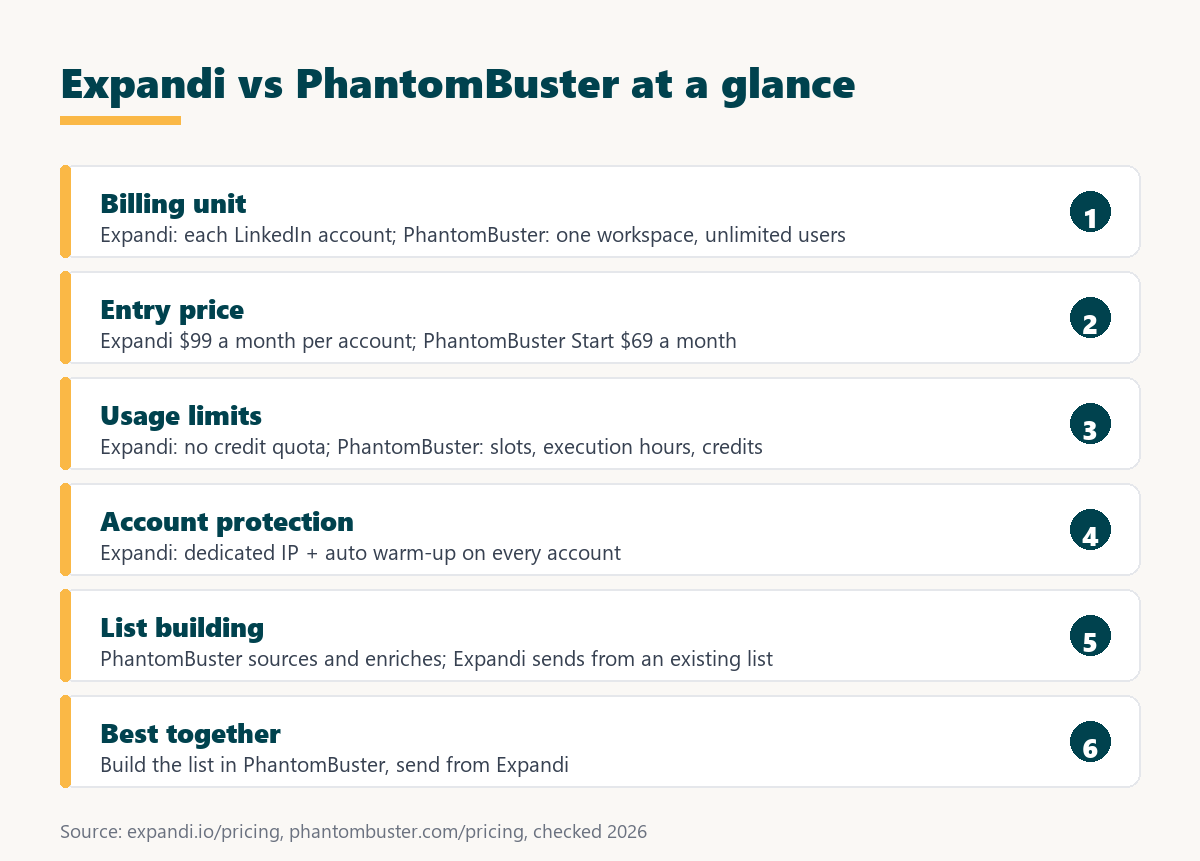
The two products rarely compete for the same job. One is a sending platform with safety infrastructure attached to each profile; the other is a set of building blocks metered by compute time and credits, which a team assembles into whatever workflow it needs. The two tools sit at different layers of the same workflow, so the real question is whether the bottleneck is sending safely or building the list in the first place.
What Does Each Tool Actually Do?
Expandi runs LinkedIn campaigns from the cloud on a dedicated country-based IP, with automatic warm-up and email steps in the same sequence. PhantomBuster runs configurable automations in the cloud, metered by execution time, and packages lead sourcing, email finding, and AI credits into the same workspace so data steps and outreach steps can be chained.
- Expandi: cloud LinkedIn outreach billed for each connected account, with a dedicated country-based IP, automatic warm-up, unlimited campaigns, and email steps inside one sequence.
- PhantomBuster: an automation platform billed by workspace with unlimited users, limited by automation slots, execution hours, and email, AI, and URL finder credits each month.
- Shared ground: both run in the cloud rather than in an open browser tab, so automations keep working when the operator’s laptop is closed or offline.
- Key difference: Expandi ships a complete outreach motion for each profile, while PhantomBuster ships building blocks that a team configures into its own workflow.
- Who operates it: Expandi is run by an SDR or agency operator inside campaign templates, while PhantomBuster usually needs someone comfortable configuring and maintaining automations.
Both belong to the broad category Wikipedia defines as:
“software platforms and technologies designed for marketing departments and organizations to automate repetitive tasks”
Wikipedia, Marketing automation
One product ships a complete outreach motion while the other ships building blocks the operator assembles, and that single difference explains almost every other gap in this comparison.
How Do Expandi and PhantomBuster Compare at a Glance?
Four axes separate them in practice: what the fee is attached to, whether account protection ships by default, how usage is limited, and how much assembly the workflow needs before the first message goes out. Trial structure differs as well, which matters for anyone planning a short evaluation before paying.
Source: expandi.io/pricing, Expandi help center, campaign limitations and phantombuster.com/pricing, checked August to October 2026.
Read the billing row first: one tool charges for each sending profile while the other charges for compute time and credits shared across an entire team.
The billing rows matter most here, because the cheaper option changes completely depending on whether a team adds profiles or adds activity.
How Does Each One Bill You?
Expandi charges $99 per connected LinkedIn account per month, or $79 when billed annually. PhantomBuster charges a workspace with unlimited users, from $69 a month on Start, and meters usage through automation slots, execution hours, and separate email, AI, and URL finder credits that reset each month.
The practical consequence shows up when limits run out. PhantomBuster’s pricing FAQ says: “Your automations will pause until your execution time resets or you upgrade your plan.” Expandi’s Business plan has no execution meter; the fee stays flat whatever the sending volume, within LinkedIn-side limits such as warm-up and daily allowances. The difference between these two models is the subject of this guide to the SaaS seat license.
Per-account billing scales with profiles and credit billing scales with activity, so the cheaper option depends entirely on whether the team adds profiles or adds volume.
How Much Does Each One Cost?
Expandi is $99 per account per month, or $79 billed annually. PhantomBuster lists Start at $69, Grow at $159, and Scale at $439 per month, with annual billing bringing those to $56, $128, and $352 a month, plus a Trial plan shown as Free and capped at two hours of execution time.
Source: expandi.io/pricing (checked October 2026) and phantombuster.com/pricing (checked August 2026, Monthly and Annual views). PhantomBuster does not state how long the Trial plan lasts.
The comparison only makes sense per outcome rather than per plan, because one fee buys a sending profile for a month and the other buys a pool of execution hours the whole team draws from.
Expandi’s own FAQ states its figure in one line:
“Expandi costs 99 USD per account per month.”
Expandi FAQ
Sticker prices sit close at entry level, and the gap widens with usage because credits are consumed while a flat account fee is not.
Which One Builds Better Prospect Lists?
PhantomBuster does. Its plans are built around sourcing and enriching leads, with email credits, AI credits, and URL finder credits included in every tier, while Expandi starts from a list the operator already has, imported from a CSV, a LinkedIn search, or a Sales Navigator search URL.
PhantomBuster’s Trial plan is described on its pricing page as a way to source first leads, and its quotas are counted in credits for finding emails and URLs rather than in messages sent. Expandi’s lead sources are documented in its help center: CSV uploads, LinkedIn and Sales Navigator search URLs, and Signals. HubSpot’s prospecting guide describes the layered job these tools split between them:
“AI prospecting tools automate lead sourcing, enrichment, qualification, and outreach.”
HubSpot, Best AI prospecting tools
Teams without a usable list need the sourcing layer before anything else, and that requirement decides this comparison for a large share of buyers before price enters the conversation. The legal and practical limits of pulling contact data are covered in this guide to LinkedIn email scraping.
Which One Protects the LinkedIn Account Better?
Expandi publishes two protection layers on every plan: a dedicated country-based IP for each connected account and automatic profile warm-up. PhantomBuster states that it runs in the cloud, and its pricing page does not publish an equivalent per-account IP or warm-up feature, so protection depends on how the team configures each automation.
Expandi’s help center says “Everyone in Expandi gets their personal dedicated IP address” (Expandi help center, IP address), and its gradual warm-up starts at 5 actions a day, adds 3 every two days, and stops at 21 once the account has an active campaign. Neither layer changes LinkedIn’s policy: LinkedIn’s help center warns that members using automation tools risk having accounts restricted or shut down. Comparing published protections rather than marketing language keeps this section defensible, and the per-account IP is the layer that has no published equivalent on the other side.
Which One Fits an Agency Running Client Accounts?
Expandi maps onto agency delivery because each client profile carries its own account, its own IP, and its own fee, with the Agency tier opening at ten accounts. PhantomBuster charges one workspace with unlimited users, which suits an agency doing shared data work across many clients at once.
- Client profile isolation: Expandi gives each client account its own dedicated IP, which is what keeps one client’s campaign from affecting another in the same workspace.
- Billing map: a fee for each connected account lines up with a retainer for each client, so the platform cost passes through without allocating shared overhead.
- Shared data team: PhantomBuster’s unlimited users on one workspace suit a research team that builds lists for every client from the same pool of execution hours.
- Ten-account threshold: Expandi’s Agency tier opens at ten accounts with custom pricing and a dedicated Customer Success Manager, so larger agencies negotiate rather than pay list.
- Combined stack: an agency can source and enrich lists in PhantomBuster, then send from client profiles in Expandi, keeping data and sending responsibilities separate.
Agencies often end up running both products together, using one to build and enrich the list and the other to send from client profiles on isolated addresses.
Which One Fits a Solo Founder or Single SDR?
A solo operator with a list already built gets more from Expandi, since sending starts as soon as the account is connected and warm-up begins. A solo operator who must find and enrich prospects first gets more from PhantomBuster, provided they are comfortable configuring automations and watching execution hours.
- List already built: a solo operator with a target list gets value from Expandi on day one, because sending is the only missing step in the workflow.
- No list yet: PhantomBuster solves the step before outreach, turning searches and URLs into contact data that a sending tool can then use.
- Setup tolerance: a toolkit takes time to configure and maintain, which only pays off for someone willing to assemble and debug the workflow.
- Budget: PhantomBuster Start costs $69 a month for a workspace, while Expandi costs $99 a month for one account, before annual discounts on either side.
- Account risk: a founder sending from a personal profile gains a dedicated IP and gradual warm-up in Expandi without configuring anything extra.
Setup tolerance is the deciding factor for solo users, because a toolkit only pays for itself in the hands of someone willing to assemble and maintain it.
What Do Reviewers Say About Each Tool?
Expandi holds a 4.3 out of 5 rating on G2 from 162 reviews and 4.4 out of 5 on Trustpilot from 236 reviews, both checked in October 2026. PhantomBuster’s pricing page shows review testimonials rather than a score, so no rating for it is quoted here without reading a review platform directly.
On Trustpilot, recurring praise for Expandi centers on responsive customer support and onboarding help, while recurring complaints mention a steep learning curve and an interface that can be hard to navigate without guidance (Trustpilot, Expandi reviews). Ratings across this category cluster closely enough to be unhelpful on their own, so the recurring themes inside reviews carry more signal than the averages.
How Do You Move From One to the Other?
Moving is less a migration than a hand-off: export the enriched list from PhantomBuster, connect the LinkedIn account in Expandi, let warm-up begin, then rebuild the sending sequence there. None of the data work needs to be redone, only the sending steps, and both tools can stay in the stack afterward.
- Export the enriched list: the finished PhantomBuster output is downloaded as a CSV with profile URLs and any enrichment fields that will feed message placeholders.
- Connect the LinkedIn account: the profile is added to Expandi and its country selected, so the dedicated IP is assigned before any campaign activity begins.
- Load the list into a campaign: the CSV becomes a lead list, extra columns become dynamic placeholders, and the list is assigned to one campaign only.
- Let warm-up run: the gradual warm-up starts with the first active campaign at 5 actions a day, so early volume stays deliberately low for two weeks.
- Measure replies before scaling: acceptance and reply rates from the first weeks decide whether the list source, the note, or the pace needs to change.
Have the list already? Sending is the only step left, and seven days is enough to test it.
Try Expandi for 7 Days →Seven-day trial on the first subscription · cancel anytime
Because the two products cover different layers of the same workflow, most teams end up keeping both rather than replacing one with the other after a trial.
When Is PhantomBuster the Better Pick?
PhantomBuster is the better pick when the bottleneck is data rather than sending: sourcing lists, enriching contacts, chaining automations across steps, or feeding a CRM. It also fits teams that want unlimited users on one subscription and are comfortable budgeting in execution hours and credits rather than per profile.
A growth or operations team that already has a sending tool, or that sends from email rather than LinkedIn, gets most of PhantomBuster’s value without needing Expandi’s per-account safety layer. Naming this plainly matters, because a team without a usable prospect list will not solve that problem by buying a sending platform, however good its account protection is.
Verdict: Which Tool Wins for Which Buyer?
Expandi wins for teams whose job is to send safely from one or more LinkedIn profiles. PhantomBuster wins for teams whose job is to build and enrich the list before anyone sends. Neither replaces the other cleanly, and the split follows the workflow rather than the price on either pricing page.
- Agency or lead-gen freelancer: Expandi for sending from client profiles on isolated IPs, PhantomBuster for building and enriching the lists behind those campaigns.
- Founder with a list: Expandi, because the list already exists and the remaining risk is the founder’s own LinkedIn profile, which the dedicated IP and warm-up address.
- Team that needs data first: PhantomBuster, because sourcing and enrichment come before any sending decision and its credits are built for that work.
- Technical growth team: PhantomBuster, for teams that want to automate several steps and platforms and can maintain the workflows themselves.
- SDR sending daily on LinkedIn: Expandi, because campaign templates, warm-up, and a flat fee per account suit a steady weekly pace from one profile.
Growth Hack Suite’s lead database guide explains why the list layer comes first:
“A B2B lead database is the foundation of any scalable outreach program.”
Growth Hack Suite, What Is a B2B Lead Database?
The verdict holds because it follows the product boundary, and that boundary is unlikely to move with the next feature release on either side.
What Else Should You Compare Before Deciding?
Two more comparisons help here: other sending tools for buyers weighing setup speed against safety architecture, and the wider choice of which layer of the workflow deserves the budget first. Teams still undecided should map their weekly process before reading another feature list from either vendor.
On the sending side, the main alternatives bill differently: Dripify charges for each user, from $59 a month on Basic with monthly billing, and HeyReach charges for each sender, from $79 a month on Growth. On the data side, the real question is how much enrichment a team needs before outreach. Deciding which layer of the workflow to solve first saves more money than comparing prices across layers, and that confusion is exactly the mistake this pairing invites.
Expandi vs PhantomBuster: Frequently Asked Questions
The 12 most-asked questions about Expandi vs PhantomBuster.
Is Expandi better than PhantomBuster?
For sending LinkedIn outreach safely from a profile, yes. For sourcing and enriching lists, PhantomBuster fits better.
What is the main difference between Expandi and PhantomBuster?
Expandi is a finished outreach product billed for each LinkedIn account. PhantomBuster is an automation toolkit billed by workspace, execution time, and credits.
How is each tool billed?
Expandi charges $99 per connected account per month. PhantomBuster charges a workspace with unlimited users from $69 a month on Start.
Does PhantomBuster send LinkedIn messages?
It can run outreach steps as automations, but its plans are built around execution hours and data credits rather than per-profile sending protection.
Does Expandi build prospect lists?
No. Expandi starts from a list imported from a CSV, a LinkedIn search, or a Sales Navigator search URL.
Which tool is safer for the LinkedIn account?
Expandi publishes a dedicated country-based IP and automatic warm-up for every account; PhantomBuster does not publish an equivalent per-account feature.
How much does each tool cost?
Expandi costs $99 per account monthly or $79 billed annually. PhantomBuster costs $69, $159, or $439 a month on Start, Grow, or Scale.
Does PhantomBuster have a free option?
Its Trial plan is shown as Free with 2 hours of execution time and exports limited to 10 rows. The page does not say how long it lasts.
Which tool suits agencies?
Expandi suits sending from client profiles with isolated IPs; PhantomBuster suits a shared data team building lists for many clients.
Can both tools be used together?
Yes. A common stack sources and enriches lists in PhantomBuster, then sends from LinkedIn profiles in Expandi.
Which tool needs more setup time?
PhantomBuster, because automations are configured and chained by the team, while Expandi offers ready campaign types.
How do execution hours work in PhantomBuster?
Each plan includes a monthly allowance of execution time. When it runs out, automations pause until the time resets or the plan is upgraded.
Ready to send from a dedicated IP instead of assembling automations? Start the seven-day Expandi trial.
Start Your 7-Day Expandi Trial →Seven-day trial on the first subscription · cancel anytime · paid fees are nonrefundable
Growth Hack Suite Editorial, Outbound Sales Team
How we compared these tools: Expandi figures come from expandi.io pricing, FAQ, Terms and Conditions, and help center articles; PhantomBuster figures from phantombuster.com pricing in both Monthly and Annual views. Ratings for Expandi were read directly on G2 and Trustpilot. No PhantomBuster rating is quoted because none was read from a review platform.
Last compared: October 2026.
Affiliate disclosure: this page contains affiliate links to Expandi only. Growth Hack Suite has no affiliate relationship with PhantomBuster. If an Expandi subscription is purchased through these links, Growth Hack Suite may earn a commission at no extra cost to the buyer.