Table of Contents
Expandi vs Meet Alfred is a depth against breadth decision for LinkedIn outreach. Expandi concentrates on campaign execution from a dedicated country-based IP at $99 per connected account, with automatic warm-up and email steps inside one plan. Meet Alfred sells a per-user suite that adds email, X, social posting, and team tools, so this comparison looks at billing, protection, depth, and stack fit.
Last compared: October 2026. Both tools were checked against their own pricing and feature pages on the same day: expandi.io pricing, FAQ, and help center, and meetalfred.com pricing and home page.
Need campaign depth on a protected LinkedIn account rather than a broad suite? Start the seven-day Expandi trial.
Start Your 7-Day Expandi Trial →Dedicated country-based IP · automatic warm-up · cancel anytime
Expandi vs Meet Alfred: Which Should You Choose?
Expandi fits teams whose priority is running deeper LinkedIn campaigns from a protected account, billed per connected profile. Meet Alfred fits teams that want LinkedIn, email, X, and team features under one per-user subscription, and that accept less published account infrastructure in exchange for that breadth. The choice follows the stack, not the feature count.
The two products overlap on the basics: both run connection requests, messages, and follow-ups from a LinkedIn profile, and both can add email to a sequence. They diverge on what the subscription is built around. Expandi spends its single plan on sending infrastructure and campaign control. Meet Alfred spreads its tiers across prospecting, social posting, CRM features, and team management.
Depth and breadth are both valid buys, and the decision usually comes down to whether LinkedIn is the main channel or one of several the team runs.
What Does Each Tool Actually Do?
Expandi is a cloud LinkedIn outreach platform that runs campaigns from a dedicated country-based IP per connected account, with automatic warm-up and email steps inside the same sequence. Meet Alfred is a multichannel sales suite that bundles LinkedIn outreach with email, X, social media scheduling, a LinkedIn CRM, and team collaboration on higher tiers.
- Expandi: a specialist LinkedIn platform billed per connected account, with a dedicated country-based IP, automatic profile warm-up, and email steps inside the same campaign.
- Meet Alfred: a suite billed per user that bundles LinkedIn automation, email automation, X outreach, social post scheduling, a lead finder, and team features across four tiers.
- Shared ground: both run LinkedIn connection requests, messages, and follow-ups as sequences, and both support Sales Navigator sources and email steps on the relevant plan.
- Key difference: Expandi publishes its account infrastructure as the core of the product, while Meet Alfred publishes breadth of channels and team tooling as the core.
- Who usually buys: outbound teams and agencies treating LinkedIn as the main channel lean specialist, while teams consolidating several small tools lean toward a suite.
Marketing automation as a category was built on the second idea, consolidation, which Wikipedia defines this way:
“software platforms and technologies designed for marketing departments and organizations to automate repetitive tasks”
Wikipedia, Marketing automation
One is a specialist sending platform, the other is a suite, and the difference shows up most clearly in how each handles account protection.
How Do Expandi and Meet Alfred Compare at a Glance?
Expandi and Meet Alfred differ along four axes: the billing unit, the published account protection, the depth of the campaign builder, and how much of the wider sales workflow each product covers. Trial terms also differ, with Expandi asking for card details at checkout and Meet Alfred advertising no credit card required.
Source: expandi.io/pricing, expandi.io/faq, meetalfred.com/pricing and meetalfred.com, all checked October 2026.
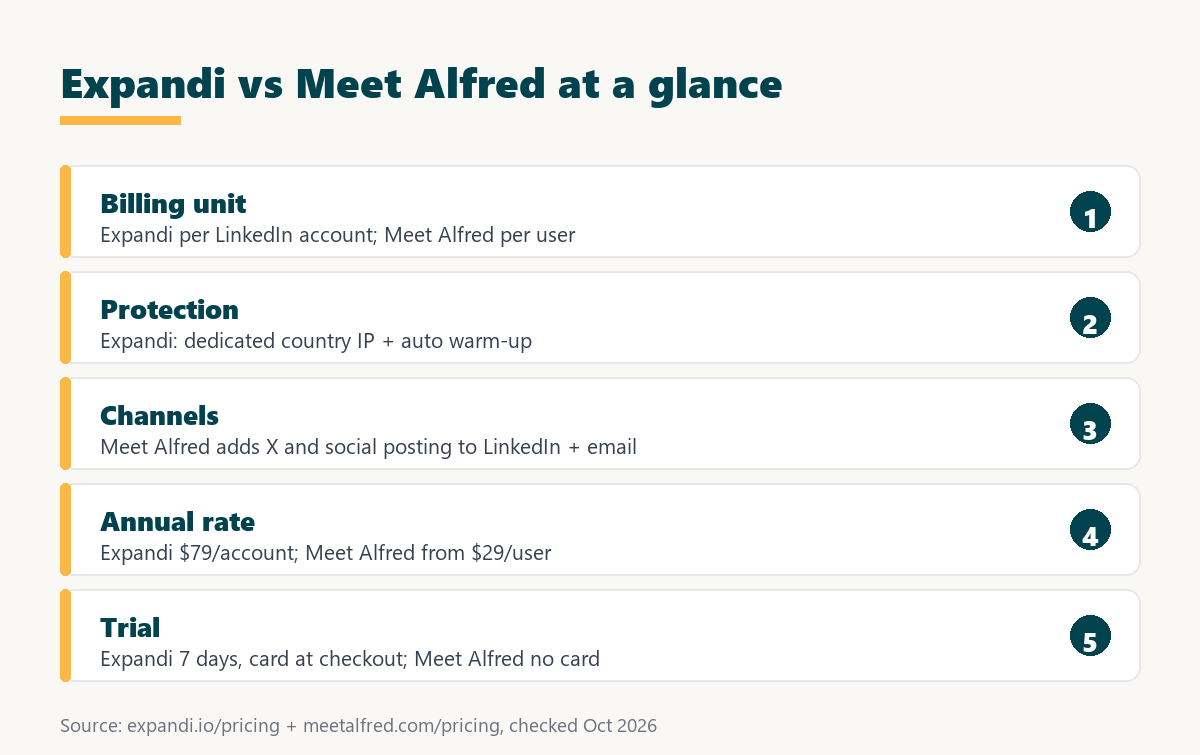
The table shows two products that publish different things: Expandi documents its protection layers per account, while Meet Alfred documents channel coverage and tier features, so each claim should be read against its own source.
Breadth is easy to advertise and hard to compare, which is why the published protection row is the most useful one in the table.
Which One Runs Deeper Campaigns?
Expandi runs deeper LinkedIn campaigns because its whole plan is spent on campaign execution: unlimited campaigns and templates, an if/action sequence builder, engaging actions between follow-ups, and campaign prioritization and recovery when a run is interrupted. Meet Alfred also offers unlimited steps, but splits its tiers across more surfaces than LinkedIn.
Depth in practice means control over what happens when a sequence meets real conditions. Expandi’s help center documents limits teams can plan around: up to 5,000 leads in one campaign, 15 active campaigns at a time, and 500 campaigns per account, plus a priority setting that decides which campaign uses the daily allowance first. Its campaign types cover connector, mobile connector, messenger, open InMail, group, event invite, company follow, and inbound runs.
Meet Alfred’s pricing page describes its builder as “No cap on steps – chain as many touches and conditions as a sequence needs” (Meet Alfred pricing). Its Business tier adds group, event, post, newsletter, company, and CSV campaign sources. The difference is less about step count and more about how much of the product is dedicated to the LinkedIn run itself.
Depth shows up in edge cases rather than in demos, which is why teams that send every week feel the difference more than teams evaluating on a feature grid.
How Much Does Each One Cost?
Expandi costs $99 per connected LinkedIn account per month, or $79 per account per month when billed annually, with an Agency tier from ten accounts quoted by sales. Meet Alfred publishes annual rates per user: $29 on Individual, $49 on Business, and $39 on Teams with a three-seat minimum, while monthly rates are shown only in its calculator.
Source: expandi.io/pricing and meetalfred.com/pricing, checked October 2026. Meet Alfred advertises savings of 20% on quarterly and 40% on annual billing; its monthly figures appear only in an interactive calculator and are not quoted here.
Until monthly rates are compared on the same day, the safe comparison is structural: a fee per sending profile against a fee per operator across bundled modules.
Expandi’s own FAQ states its figure in one line:
“Expandi costs 99 USD per account per month.”
Expandi FAQ
The two units only look comparable. One operator managing three client profiles pays for three Expandi accounts but one Meet Alfred user. The difference is explained in the guide to how a SaaS seat license is counted, and it matters more than the headline price.
A suite that bundles email and team features can look cheaper per user and cost more per sending profile, which is the comparison worth making.
Which One Handles Multichannel Outreach Better?
Meet Alfred covers more channels, with LinkedIn, email, and X inside one sequence on the Business tier and above, plus social post scheduling. Expandi treats email as a step inside the same LinkedIn campaign, so channel timing is handled in one builder, but it does not cover X or social publishing.
Meet Alfred describes its multichannel automation as “One sequence that moves a lead between LinkedIn, email and X based on what they do” and notes that “Multi-channel sequences need the Business tier or above” (Meet Alfred pricing). On the Individual tier, email automation is not included, so the cheapest Meet Alfred plan is a LinkedIn-only tool.
Expandi’s pricing page lists multichannel outreach across connections, messages, and email on its single plan. For teams that already run a dedicated email platform, that is often enough; the wider logic of coordinating channels is covered in the guide to multichannel outreach.
Multichannel inside a single sequence removes the timing collision that appears when two separate tools reach the same prospect on the same morning without knowing about each other.
Which One Protects the LinkedIn Account Better?
Expandi publishes more account protection: a dedicated country-based IP for every connected account, automatic profile warm-up, and smart limit ranges on its only self-serve plan. Meet Alfred publishes smart limits, randomized human-like behavior, and cloud-based sending, but the pages reviewed do not describe a dedicated IP per account or an automatic warm-up schedule.
Expandi’s help center gives the warm-up numbers: a gradual option starts at 5 actions per day and rises by 3 every two days to a cap of 21, and it begins once there is an active campaign. Its IP article states that “Everyone in Expandi gets their personal dedicated IP address.”
Meet Alfred’s home page states that “Smart limits, randomized human-like behavior, and cloud-based sending are built into every campaign” (Meet Alfred). That is a meaningful set of controls, but it is a different claim from a fixed IP per profile. Neither vendor can promise a LinkedIn account will never be restricted, because LinkedIn’s own policy prohibits third-party automation tools.
Account protection is the axis where suites and specialists diverge most, because a dedicated IP per account is expensive to provide and rarely bundled.
Which One Fits an Agency Running Client Accounts?
Expandi fits agencies that bill per client profile, because it charges per connected account, isolates each account on its own IP, and opens an Agency tier at ten accounts with a dedicated Customer Success Manager and white label. Meet Alfred fits agencies that want white label and client workspaces priced per operator, available from its Teams tier.
- Client profile isolation: a dedicated IP per connected account on Expandi keeps one client’s sending footprint separate from another client in the same workspace.
- Billing that maps to clients: per-account pricing turns each client profile into one line item, which is easy to pass through in a monthly retainer.
- Ten-account threshold: the Expandi Agency tier opens at ten accounts with custom pricing, white label, client reports, and a dedicated Customer Success Manager.
- Per-operator suites: Meet Alfred Teams starts at three seats and adds white label, team workspaces, and roles, so cost tracks operators rather than client profiles.
- Growth arithmetic: an agency adding clients faster than staff pays more under per-account billing, while one adding staff faster pays more under per-user billing.
Agencies buy the billing unit as much as the feature list, because the billing unit is the number that scales directly with the client list while features stay roughly constant.
Which One Fits an SDR Team?
An SDR team already running an email platform usually wants the specialist LinkedIn layer, which points to Expandi, while a team with no email tooling may prefer Meet Alfred’s Business or Teams tier that covers LinkedIn, email, and a shared inbox. Team size and the existing stack decide this more than individual campaign features.
- Existing email stack: a team already paying for a cold email platform usually needs only the LinkedIn layer, so a suite duplicates spend it already has.
- No email tooling yet: a team starting from zero can cover LinkedIn and email on one Meet Alfred Business seat instead of buying two separate products.
- Required sequence depth: teams running many parallel LinkedIn campaigns with priorities and recovery benefit from Expandi’s campaign controls more than from extra channels.
- Inbox ownership: Meet Alfred Teams adds a collaborative inbox with assignment, which suits teams where several reps share replies from the same pipeline.
- Profiles per rep: if each SDR sends from one profile, per-account and per-user billing converge, and the comparison returns to features and protection.
The SDR role itself is defined in the guide to what an SDR does, which helps frame which of these points carries weight for a given team.
Buying a suite to replace tools the team already has is the expensive path, and buying a specialist to fill one gap is the cheap one.
What Do Reviewers Say About Each Tool?
Expandi holds a 4.3 out of 5 rating on G2 from 162 reviews and 4.4 out of 5 on Trustpilot from 236 reviews, both checked in October 2026. A verified third-party rating for Meet Alfred was not collected for this comparison, so its reception should be read from its own G2 listing rather than estimated here.
Expandi’s Trustpilot reviews praise onboarding support and effective LinkedIn outreach, while complaints focus on a steep learning curve and an interface that can be hard to navigate without guidance (Trustpilot Expandi reviews). Meet Alfred’s home page displays its own review badges, which are not repeated here because they were not checked on the review platforms directly.
Review themes for suites often mention breadth as both the reason to buy and the reason to leave, which is worth reading before deciding.
How Do You Move From One to the Other?
Moving between Expandi and Meet Alfred is a rebuild rather than an import: export the audience and message copy, pause the old sequences, connect the LinkedIn account to the new tool, let warm-up run, then rebuild the best sequence and run both tools for one week before canceling the old subscription.
- Export the audience and copy: save lead lists as CSV and copy the connection notes and follow-ups that performed, since sequences do not transfer between vendors.
- Pause the old sequences: stop new sends in the old tool so the same prospect does not receive two connection requests from the same profile.
- Connect the account and warm up: link the LinkedIn profile in the new tool and let volume ramp gradually, which Expandi does automatically from 5 actions per day.
- Rebuild the winning sequence: recreate only the sequence that produced replies, using the new tool’s placeholders and conditions instead of copying every old campaign.
- Overlap for one week: keep both subscriptions for a week so active conversations finish in the old inbox before cancellation.
Depth on one channel or breadth across three? Test the depth side for seven days first.
Try Expandi for 7 Days →Card details at checkout · no charge until the 7 days are up
Running both tools for a week costs one extra subscription and removes almost all of the risk in a switch of this kind, particularly the risk of losing an active conversation.
When Is Meet Alfred the Better Pick?
Meet Alfred is the better pick for a team that wants LinkedIn, email, X, and social posting in one subscription, for a buyer replacing several small tools at once, or for a solo user who only needs LinkedIn sequences and wants the lowest annual entry price. Consolidation has real value when nobody wants to manage three vendors.
Its Individual tier at $29 per user, per month billed annually is far below Expandi’s per-account rate, and its trial advertises no credit card required. Teams that publish content on several networks also get a scheduling calendar that Expandi does not offer. Its pricing page lists native Salesforce and HubSpot integrations on Teams and above (Meet Alfred pricing).
A suite wins on procurement effort and on training time across a team, and neither of those savings ever appears on a feature comparison table like the one above.
Verdict: Which Tool Wins for Which Buyer?
Expandi wins for teams where LinkedIn is the primary channel and account safety carries real cost, because it publishes a dedicated IP and warm-up per account. Meet Alfred wins for teams consolidating tooling and wanting one vendor across LinkedIn, email, X, and social posting. The split follows stack strategy rather than campaign features.
- SDR team with an email platform: Expandi, for the specialist LinkedIn layer on a protected account without paying twice for email automation the team already owns.
- Agency with many client profiles: Expandi, because per-account billing and per-account IPs match how client work is delivered and invoiced.
- Team consolidating vendors: Meet Alfred, because one subscription covers LinkedIn, email, X, and social scheduling with shared inbox tools on Teams.
- Team with no email tool yet: Meet Alfred Business, which adds email and multichannel sequences to LinkedIn on a single per-user seat.
- Solo user on a tight budget: Meet Alfred Individual for basic LinkedIn sequences, or the Expandi trial first if account protection is the main concern.
Growth Hack Suite’s guide to the channel mix makes the same point about coordination:
“The deciding factor is that the channels are sequenced, not random.”
Growth Hack Suite, What Is Multichannel Outreach?
HubSpot’s guidance on automation applies to both tools equally:
“When implemented correctly (and complemented with human judgment), it becomes a structured engine for sales acceleration.”
HubSpot, Sales Automation
Deciding whether the team wants to specialise or to consolidate makes this comparison short, because each answer points straight at one of these tools without further analysis.
What Else Should You Compare Before Deciding?
Two more checks complete the picture before buying: a per-user specialist such as Dripify for teams that want a LinkedIn-focused tool at a lower entry price, and a wider category ranking for buyers who have not yet decided between a specialist tool and a full suite. Both are best judged on the same four axes used here.
Whichever tool wins, the budget case should be built on meetings rather than sends; the method is set out in the guide to cost per booked meeting.
Comparing across three tools on the same four axes is faster than reading three feature pages, and it usually settles the specialist question first.
Expandi vs Meet Alfred: Frequently Asked Questions
The 12 most-asked questions about Expandi vs Meet Alfred.
Is Expandi better than Meet Alfred?
Expandi is better for LinkedIn-first teams that want a dedicated IP and warm-up per account. Meet Alfred is better for teams that want LinkedIn, email, X, and social posting in one per-user suite.
What is the main difference between Expandi and Meet Alfred?
Expandi is billed per connected LinkedIn account and built around sending infrastructure. Meet Alfred is billed per user and built around channel breadth and team features.
How is each one billed?
Expandi bills per connected LinkedIn account. Meet Alfred bills per user, with Teams requiring at least three seats and Unlimited quoted on request.
Which runs deeper LinkedIn campaigns?
Expandi, which spends its single plan on campaign execution: unlimited campaigns and templates, an if/action builder, prioritization, and recovery.
Which protects the LinkedIn account better?
Expandi publishes a dedicated country-based IP and automatic warm-up per account. Meet Alfred publishes smart limits, human-like behavior, and cloud sending, without a per-account IP on the pages reviewed.
How much does Expandi cost?
$99 per connected LinkedIn account per month, or $79 per account per month billed annually. The Agency tier from ten accounts is quoted by sales.
How much does Meet Alfred cost?
Meet Alfred lists $29 (Individual), $49 (Business), and $39 (Teams, three seats minimum) per user, per month billed annually. Monthly rates appear in its pricing calculator.
Which suits agencies?
Expandi suits agencies billing per client profile, with an Agency tier from ten accounts. Meet Alfred Teams suits agencies that price by operator and want white label.
Which suits an SDR team?
Teams that already own an email platform usually prefer Expandi as the LinkedIn layer; teams without one may prefer Meet Alfred Business for LinkedIn plus email.
Does either include email outreach?
Both do. Expandi includes email steps in its single plan. Meet Alfred includes email automation from the Business tier up, not on Individual.
Can campaigns be moved between them?
Not directly. Lead lists can be exported as CSV and copy can be reused, but sequences have to be rebuilt in the new tool.
Which is better for one person?
A solo user who mainly wants low cost can start on Meet Alfred Individual. A solo user whose LinkedIn account is the business asset may prefer Expandi’s per-account protection.
Ready to run deeper LinkedIn campaigns from a dedicated IP? Start the seven-day Expandi trial.
Start Your 7-Day Expandi Trial →Seven-day trial on the first subscription · cancel anytime · paid fees are nonrefundable
Growth Hack Suite Editorial, Outbound Sales Team
How we compared these tools: Expandi figures come from expandi.io pricing, FAQ, Terms, and the Expandi help center; Meet Alfred figures come from meetalfred.com pricing (static plan table and published annual rates) and its home page, read on the same day. Monthly Meet Alfred rates are shown only in an interactive calculator and are not quoted. No hands-on benchmark was run for this page.
Last checked: October 2026. When the vendors change their pages, this line is updated first.
Affiliate disclosure: this page contains an affiliate link for Expandi only. If a subscription is purchased through it, Growth Hack Suite may earn a commission at no extra cost to the buyer. It does not change the assessment.