Table of Contents
Expandi vs Sales Navigator is a choice between automating LinkedIn outreach and searching LinkedIn for the right people. Sales Navigator is LinkedIn’s own search product from $119.99 per license a month, while Expandi is a third-party tool that automates requests and follow-ups at $99 per LinkedIn account a month. Many founders pay for one, some for both.
Last checked: October 2026. Prices and features taken from the official Expandi pricing page, FAQ, Terms, and help center (checked October 2026) and LinkedIn’s Sales Navigator compare-plans page (marked updated September 27, 2026, checked October 2, 2026). Confirm current prices before buying.
Already have a saved search and no time to message every lead by hand? Test Expandi on one account for seven days.
Start Your 7-Day Expandi Trial →Seven-day trial on the first subscription · dedicated country-based IP for each account · cancel anytime
Expandi vs Sales Navigator: Do Founders Need One or Both?
Expandi vs Sales Navigator is a choice between automating outreach and searching for the right people. Sales Navigator finds and filters leads inside LinkedIn from $119.99 a month, and Expandi sends the connection requests and follow-ups at $99 per account, so founders who use both do so for different jobs.
The products meet at one point: a list of LinkedIn members. Sales Navigator builds that list with filters LinkedIn controls; Expandi works through it with scheduled steps. A founder who already has a list may not need the search product, and a founder who only messages a handful of people a week may not need automation.
The short answer is that the two products rarely compete, since one answers who to contact and the other handles the repetitive work of contacting them.
What Is the Core Difference Between Expandi and Sales Navigator?
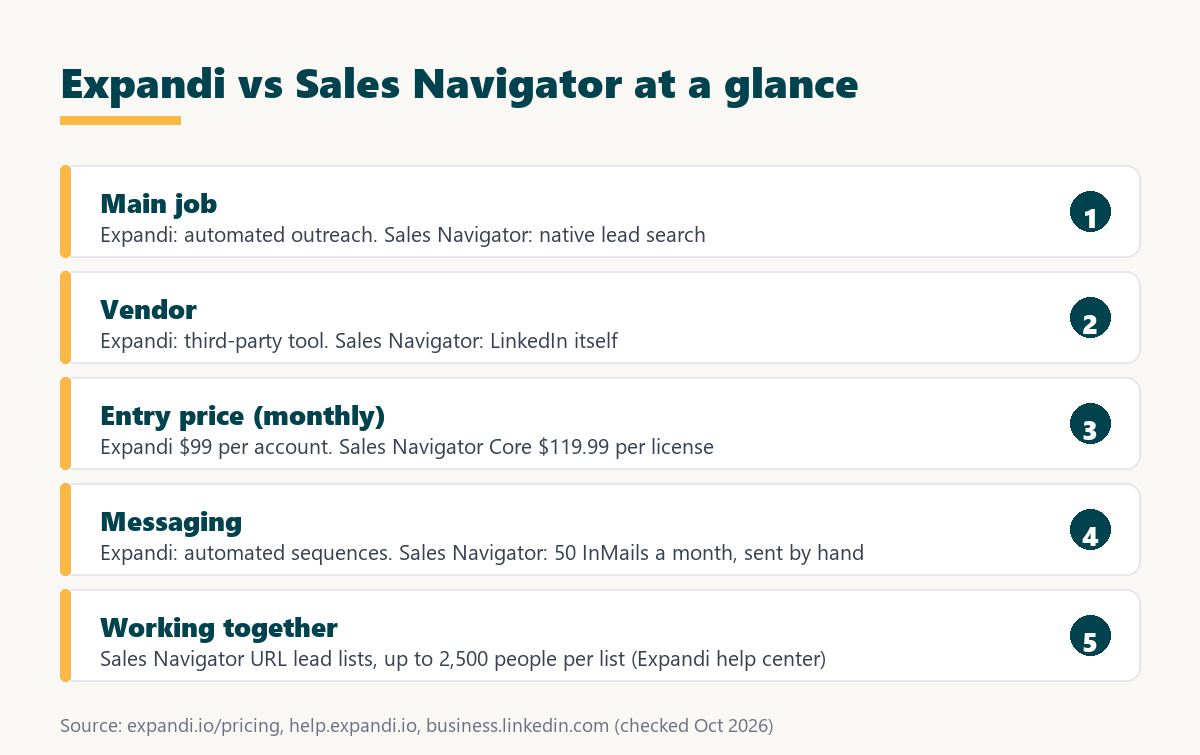
The core difference is function and ownership. Sales Navigator is LinkedIn’s own paid product for searching, saving, and messaging leads by hand, with InMail credits included. Expandi is a third-party cloud tool that automates connection requests, messages, and follow-up sequences for a connected LinkedIn account.
Ownership matters here more than in most comparisons. LinkedIn’s help center states that it does not permit third-party software that automates activity on its website, and that members who use such tools “risk having their accounts restricted or shut down” (LinkedIn Help). Expandi is that kind of tool; Sales Navigator is LinkedIn’s own product. Five differences follow.
- Primary job: Sales Navigator finds and organizes leads through search filters, while Expandi sends outreach steps to leads that have already been chosen.
- Vendor: Sales Navigator is built and sold by LinkedIn itself, while Expandi is an independent third-party tool that connects to a member’s LinkedIn account.
- Sending method: Sales Navigator messages are sent by hand, including InMail, while Expandi sends requests and follow-ups automatically on a schedule.
- Billing unit: Sales Navigator bills each license held by a seller, while Expandi bills each LinkedIn account connected to its workspace.
- Trial terms: the Sales Navigator trial requires a credit card and its length is not stated, while the Expandi trial runs seven days on the first subscription.
Both products sit inside a practice Wikipedia defines in one line:
“Social selling is the process of developing relationships as part of the sales process.”
Wikipedia, Social selling
Search and sending are separate jobs on LinkedIn, and each product does one of them well while leaving the other mostly untouched.
How Much Does Expandi Cost per LinkedIn Account?
Expandi costs $99 per LinkedIn account a month, or $79 per account a month when billed annually, which is a 20% saving. A solo founder pays for one account, gets every Business feature, and can test the tool on a seven-day trial that applies to the first subscription.
Expandi’s FAQ also answers the subscription question directly: “You do not need any premium subscription to begin your outreach with Expandi” (Expandi FAQ). Sales Navigator or Recruiter searches are only possible with those subscriptions. Image and GIF personalization and video personalization through Sendspark are paid add-ons with no published price, and the Terms state that paid fees are nonrefundable unless required by law.
For one founder the Expandi cost is a single fixed line, and it sits on top of any LinkedIn subscription the founder already pays for.
How Much Does Sales Navigator Cost per License?
Sales Navigator pricing is a per-license subscription sold by LinkedIn. Core starts at $119.99 a month or $1,079.88 a year, Advanced starts at $159.99 a month or $1,799.88 a year, and Advanced Plus is custom priced, with LinkedIn noting that listed prices are estimates that may exclude tax.
- Core plan: $119.99 per license a month, or $1,079.88 a year, is aimed at individual sellers and includes more than fifty advanced search filters.
- Advanced plan: $159.99 per license a month, or $1,799.88 a year, adds team features such as TeamLink and CSV upload, with up to five licenses sold online.
- Advanced Plus plan: custom pricing through a demo request adds advanced CRM integrations, lead and contact creation, and buyer intent for teams using a CRM.
- InMail allowance: every plan includes 50 InMails a month, which reach LinkedIn members outside the seller’s network without a connection request.
- Trial terms: Core and Advanced offer a trial that needs a credit card; LinkedIn’s page does not state its length and limits it to members without recent trials.
The LinkedIn Sales Navigator compare-plans page quotes the Core figure in its FAQ: “The Sales Navigator Core plan pricing starts at US$119.99 per month/license or US$1,079.88 per year/license (a 25% savings with annual billing).”
Sales Navigator costs more than Expandi at list price, and annual billing on Core lowers the yearly total by a quarter according to LinkedIn’s own pricing page.
How Do Expandi and Sales Navigator Prices Compare?
The two prices buy different things. Expandi charges $99 per LinkedIn account a month for automation, while Sales Navigator Core charges $119.99 per license a month for search and InMail, and a founder who runs both pays the two fees together.
Source: expandi.io/pricing, expandi.io/faq, and Expandi Terms (checked October 2026); LinkedIn Sales Navigator compare plans (checked October 2, 2026). LinkedIn notes its prices are estimates and may exclude VAT or GST.
Sales Navigator Core lists at $119.99 a month and Expandi at $99 per account, and because they do different jobs the realistic comparison is one fee versus both fees together.
Both are seat-style subscriptions in the sense of a SaaS seat license, but the seat is a person for LinkedIn and a connected profile for Expandi.
A founder should treat these as two budget lines with separate purposes, then decide whether search, sending, or both justify a monthly cost.
What Does Each Tool Do and Not Do?
A capability split is a list of which tool performs which task. Sales Navigator provides more than fifty advanced search filters, lead and account insights, and 50 InMails a month but does not send automated sequences, while Expandi automates requests and follow-ups but has no search filters of its own.
Source: expandi.io/pricing feature list and the Expandi help center article on Sales Navigator search (checked October 2026); LinkedIn compare plans (checked October 2, 2026).
Sales Navigator covers search, insights, and InMail without automated sending, while Expandi covers automated requests and sequences without search, so the two capability lists barely overlap.
The gap between the lists is the reason many sellers pair them, with one tool building the audience and the other working through it.
What Does Expandi Automate That Sales Navigator Does Not?
Expandi automation is the set of LinkedIn steps that run without a seller clicking each one. It sends connection requests, follow-up messages, and email steps on a schedule, branches on replies with an if and action builder, fills placeholders for each lead, and paces activity through automatic warm-up.
- Connection requests: Connector campaigns send invitations to a lead list on a schedule instead of one manual click per profile, inside the account’s warm-up pace.
- Follow-up sequences: the if and action builder sends the next message only when a condition is met, such as an accepted request or no reply.
- Dynamic placeholders: default fields like first name and company, plus imported values, personalize each message for every lead in the campaign.
- Flexible scheduling: sending windows follow a set schedule, so activity runs during working hours without the founder logging in to send it.
- Profile auto warm-up: the help center describes a ramp that starts at 5 actions a day and rises by 3 every two days up to 21.
Automation saves the hours a founder would spend sending the same invitation and follow-up by hand, which is time Sales Navigator alone does not give back.
What Does Native Search Mean in Sales Navigator?
Native search is lead finding built by LinkedIn inside its own platform. Sales Navigator gives every plan more than fifty advanced search filters, alerts, lead and account insights, and 50 InMails a month, which let a seller message people outside their network without a connection request.
LinkedIn positions InMail as the main reach advantage. The LinkedIn Sales Navigator compare-plans page describes it this way:
“Reach prospects, even if you’re not connected, with the most InMails of any LinkedIn product”
LinkedIn Sales Navigator compare plans
HubSpot’s guide to LinkedIn social selling adds a warning that applies whichever tool sends the message:
“Want to know the quickest way to get ghosted on LinkedIn? Hit someone with a sales pitch right after they accept your connection request.”
HubSpot, LinkedIn for Social Selling
Sales Navigator is the authoritative way to segment LinkedIn’s member base, and no third-party tool replaces the filters LinkedIn builds into its own product.
How Does Expandi Work With Sales Navigator Searches?
A Sales Navigator search import is a lead list built from a Sales Navigator URL. Expandi requires a premium LinkedIn account, two-factor authentication, and an active Sales Navigator subscription, imports up to 2,500 people per lead list according to its help center, and can refresh the list automatically.
- Subscription requirement: importing a Sales Navigator search needs an active Sales Navigator subscription and a premium LinkedIn account on the connected profile.
- Two-factor authentication: the Expandi help center lists two-factor authentication on LinkedIn as a requirement before a Sales Navigator URL can be imported.
- Import cap: the help center says only 2,500 people import at once per lead list, and it describes that cap as a LinkedIn limit.
- Auto-refresh list: an auto-refresh option keeps adding new matches from the saved search, and leads can be assigned to a campaign automatically.
- Supported campaigns: Sales Navigator lists work with Connector, Messenger, Mobile Connector, Open InMail, Group, Event Invite, and Company Follow Invite campaigns.
The Expandi help center article on Sales Navigator search puts the cap in one line: “Keep in mind that only 2500 people will be imported into your account at once, per lead list.” Inbound and Recovery campaigns cannot use these lists.
The import makes the pairing practical, because a saved search becomes a campaign audience without exporting or copying profiles by hand.
Want to turn one saved search into a running campaign? Connect a LinkedIn account and start the seven-day trial.
Try Expandi for 7 Days →Checkout asks for card details · no charge until the seven days are up · cancel anytime
Which Founders Can Run Expandi Without Sales Navigator?
Expandi without Sales Navigator suits founders who already have a lead list from another source. A CSV of target profiles, members of a shared LinkedIn group, or attendees of a LinkedIn event can all feed campaigns through the matching campaign type, without paying for LinkedIn’s search product.
- Founders with a CSV list: a prepared file of target profiles loads into a campaign as a lead list, with profile_link as the only required column.
- Group-based prospectors: the Group campaign type reaches members of a shared LinkedIn group, which suits founders active in niche professional communities.
- Event-led founders: the Event Invite campaign type invites connections to a LinkedIn event, turning webinars and launches into a source of conversations.
- Inbound-focused founders: the Inbound campaign type works with people who already engage with the founder’s profile rather than with a cold search list.
- Founders using a data tool: a list exported from a contact database arrives as a CSV, and extra columns become dynamic placeholders in the messages.
These founders already know their audience, so the search subscription would duplicate work a spreadsheet or a community has done for them.
When Is Sales Navigator Alone Enough?
Sales Navigator alone is enough when a founder contacts a small number of high-value leads by hand. Fifty InMails a month, saved searches, and alerts support careful one-to-one outreach, and staying inside LinkedIn’s own product avoids the account risk LinkedIn attaches to third-party automation.
- Low-volume sellers: founders who message a few dozen prospects a month can cover that workload manually with InMail, saved searches, and alerts.
- Risk-averse founders: using only LinkedIn’s own product keeps the account inside the platform’s rules, which matter most for a founder’s personal profile.
- Large-deal sellers: a handful of high-value accounts rewards deep research with Account IQ and Lead IQ more than automated sequences.
- Founders reaching non-connections: 50 InMails a month reach people outside the founder’s network without waiting for a connection request to be accepted.
- Teams needing CRM sync: Advanced Plus adds CRM integrations and buyer intent, which suits teams that live inside a CRM rather than a separate tool.
Saying this plainly keeps the comparison honest, because manual outreach through LinkedIn’s own product is the lowest-risk path and fits small, careful lists.
What Does the Combined Stack Cost?
The combined stack cost is the monthly total for running both products on one profile. One Expandi account at $99 plus one Sales Navigator Core license at $119.99 works out to $218.99 a month before tax, and annual billing on both lowers the effective monthly figure.
Annual billing changes both lines: Expandi drops to $79 per account a month, billed annually, and Core costs $1,079.88 a year per license. Advanced raises the LinkedIn side to $159.99 a month for teams that need TeamLink or CSV upload. Taxes and Expandi’s unpriced personalization add-ons sit outside these figures.
Knowing the combined figure up front lets a founder weigh it against the hours saved and the meetings a filtered, automated campaign is expected to produce.
How Should a Founder Set Up Both Tools Together?
A combined setup is a short sequence that moves a saved search into an automated campaign. A founder builds the search in Sales Navigator, enables two-factor authentication, connects the LinkedIn account to Expandi, adds the search URL as a lead list, and assigns it to a campaign after warm-up starts.
- Build the search: narrowing the Sales Navigator filters until the list matches the ideal customer profile keeps the campaign audience relevant and small enough.
- Turn on two-factor authentication: enabling 2FA on the LinkedIn account meets one of the requirements Expandi lists for importing Sales Navigator searches.
- Connect the account to Expandi: connecting the profile and choosing its country assigns the dedicated country-based IP that the account sends from.
- Add the search as a lead list: a Sales Navigator URL lead list imports up to 2,500 people per list, with auto-refresh available for new matches.
- Assign it to a campaign: assigning the list to a Connector campaign lets warm-up pace the first weeks; activation can take up to 45 minutes.
The setup takes one sitting, and the warm-up then raises activity gradually, so a founder should start it well before a planned launch date.
Which Related Tools Add Email to a Sales Navigator List?
Related tools are the products that add an email channel to a list built on LinkedIn. An email finder such as Hunter.io looks up verified work addresses for named prospects, which lets a founder follow up by email when a LinkedIn message goes unanswered.
- Hunter.io email finder: finding and verifying work emails for named prospects, covered in the Hunter.io email finder review.
- Hunter.io Chrome extension: looking up emails while browsing profiles and company sites, in the Hunter.io Chrome extension guide.
Adding email gives each prospect a second route to reply, and it keeps the outreach moving when a connection request sits pending.
Verdict: Automate, Search, or Both?
The verdict is that Sales Navigator and Expandi do different jobs. Sales Navigator suits founders who need precise search and contact a few leads by hand, Expandi suits founders who already have a list and want outreach automated, and founders with larger target lists often pay for both.
Growth Hack Suite’s guide to cold outreach names the reason founders do this work themselves:
“Buyers trust founders who reach out directly.”
Growth Hack Suite, What Is Cold Outreach?
Automation should protect that trust rather than spend it, which means a short list, careful pacing, and messages that read as personal. Sales Navigator sharpens the list; Expandi handles the repetition.
The size of the target list settles this comparison, and the seven-day trial shows whether automation saves enough hours to justify a second subscription.
Expandi vs Sales Navigator: Frequently Asked Questions
The 12 most-asked questions about Expandi vs Sales Navigator.
Can Expandi replace Sales Navigator?
No. Expandi has no search filters of its own, and Sales Navigator does not send automated sequences. The two products do different jobs on LinkedIn.
Does Expandi need Sales Navigator?
Only to import Sales Navigator searches. Expandi’s FAQ says no premium subscription is needed to begin outreach, and lead lists can also come from CSV files, groups, or events.
How much does Sales Navigator cost?
LinkedIn lists Core from $119.99 and Advanced from $159.99 per license a month, or $1,079.88 and $1,799.88 per license a year. Advanced Plus is custom priced.
How much does Expandi cost per account?
Expandi costs $99 per connected LinkedIn account a month, or $79 per account a month when billed annually, a 20% reduction.
Can Sales Navigator send outreach automatically?
No. Sales Navigator includes Message Assist, which drafts messages with AI, but each message is still sent by the seller. It does not run automated sequences.
How many InMails does Sales Navigator include?
LinkedIn lists 50 InMails a month on Sales Navigator plans, which can reach people outside a seller’s network.
How many leads can Expandi import from a Sales Navigator search?
Expandi’s help center says up to 2,500 people import per lead list at once, and it describes that cap as a LinkedIn limit.
Does Sales Navigator have a trial?
Yes, on Core or Advanced. LinkedIn’s FAQ explains that a credit card is needed for the trial, and the compare-plans page does not state the trial length.
Does Expandi have a trial?
Yes. Expandi offers a seven-day trial with all features on the first subscription. Checkout asks for card details, and no charge is made until the seven days are up.
What do both tools cost together?
One Expandi account at $99 plus one Sales Navigator Core license at $119.99 works out to $218.99 a month before tax. That total is calculated from the two list prices.
Does LinkedIn allow automation tools?
No. LinkedIn’s help center says it does not permit third-party software that automates activity on its website, and members who use such tools risk restriction.
Can Expandi fees be refunded?
No. Expandi’s Terms state that subscription fees are nonrefundable unless required by law, although a subscription can be cancelled at any time.
Have a saved search and too many leads to message by hand? Start the seven-day Expandi trial on one account.
Start Your 7-Day Expandi Trial →Seven-day trial on the first subscription · cancel anytime · paid fees are nonrefundable
Growth Hack Suite Editorial, Outbound Sales Team
How we compared: Expandi figures come from expandi.io pricing, FAQ, and Terms and Conditions plus the Expandi help center article on Sales Navigator search; Sales Navigator figures come from LinkedIn’s compare-plans page and its FAQ. The $218.99 combined figure is calculated, not listed. Taxes are excluded.
Last checked: October 2026. When either vendor changes its prices, this page is updated.
Affiliate disclosure: this page contains affiliate links to Expandi. If a subscription is purchased through them, Growth Hack Suite may earn a commission at no extra cost to the buyer. LinkedIn Sales Navigator links are not affiliate links. It does not change the assessment.