Table of Contents
Expandi vs Evaboot is a comparison between a LinkedIn campaign runner and a Sales Navigator export tool. Expandi costs $99 per LinkedIn account per month and sends connection requests, messages, and email steps from the cloud. Evaboot charges per exported lead, starting at $29 per month for 400 credits, and returns cleaned Sales Navigator results with verified emails.
Last checked: October 2026. Expandi pricing, FAQ, and help center articles, plus the Evaboot pricing page and FAQ, were read on the dates shown under each table. Confirm current prices on each vendor’s site before buying.
Sales Navigator search already saved? Import it into Expandi and run a campaign on one account for seven days.
Start Your 7-Day Expandi Trial →Seven-day trial on the first subscription · dedicated country-based IP per account · cancel anytime
Expandi vs Evaboot: Which One Does a Lead-Gen Agency Need?
Expandi vs Evaboot is a choice between running campaigns and exporting lists. Expandi fits agencies that want LinkedIn outreach sent automatically from a Sales Navigator search, while Evaboot fits agencies that need a cleaned spreadsheet of leads with verified emails for delivery to clients or for loading into email tools.
Both tools start from the same place, a saved Sales Navigator search, which is why agencies often confuse them. The difference shows up in the deliverable a client pays for. Some retainers pay for booked conversations, and others pay for a list the client’s own team will work.
The short answer depends on the deliverable: an agency paid for booked conversations needs the runner, and an agency paid for lead lists needs the exporter.
What Is the Core Difference Between Expandi and Evaboot?
The core difference is what happens to a Sales Navigator search: Expandi is a cloud tool that imports the search and runs an outreach sequence against it. Evaboot is an export tool that pulls the same results into a file, cleans the data, and adds verified email addresses to each exported lead.
Evaboot’s output looks much like a B2B lead database export, while Expandi’s output is activity: sent requests, messages, and replies. The five differences below follow from that.
- Primary job: Expandi sends LinkedIn and email outreach to a lead list, while Evaboot produces the lead list as a cleaned, exportable file with emails attached.
- Billing unit: Expandi charges for each connected LinkedIn account, while Evaboot charges one credit for each lead exported from a Sales Navigator search.
- Seats: one Expandi seat equals one LinkedIn account, while Evaboot lists unlimited seats and unlimited Sales Navigator accounts on its plans.
- Output: Expandi produces sent messages, replies, and step-by-step campaign statistics, while Evaboot produces a CSV file with verified email addresses.
- Sales Navigator requirement: both tools need an active Sales Navigator subscription to read a Sales Navigator search, so that seat is a shared prerequisite.
Evaboot performs what Wikipedia calls data extraction:
“the act or process of retrieving data out of data sources”
Wikipedia, Data extraction
Both tools begin with a Sales Navigator search, yet one keeps the leads inside a campaign and the other hands them back as data.
What Does Evaboot Export From Sales Navigator?
Evaboot exports the results of a Sales Navigator search into a structured file. Its pricing page lists Sales Navigator export, an email finder, an email verifier, data cleaning, and lead filtering, and each exported lead costs one credit with the verified email included, even when no email turns up.
- Sales Navigator export: a saved search is pulled into a file of up to 2,500 leads or 1,000 companies, the ceiling LinkedIn sets per search.
- Email Finder: one email found costs one credit, and Evaboot’s pricing page says nothing is charged when the finder returns no address.
- Email Verifier: each email checked costs one credit, which lets an agency verify addresses that came from other sources before sending.
- Data Cleaning: Evaboot lists data cleaning among its features, tidying fields such as names and company details before the file reaches a client.
- Lead Filtering: filtering removes leads that do not match the search criteria, so the exported file holds fewer irrelevant rows.
Evaboot’s FAQ states the prerequisite plainly:
“Evaboot exports the results of your own Sales Navigator searches, so you need an active Sales Navigator seat.”
Evaboot pricing FAQ
The verified email is the part of the export that protects a later email campaign. Hunter’s verification guide puts the purpose in one line:
“Email verification checks whether an address exists and can receive emails before you send.”
Hunter, Email Verification Guide
Evaboot stops at the data stage, which means an agency still needs a separate tool to contact the people in the exported file.
What Does Expandi Run After the List Is Built?
Expandi automates LinkedIn outreach from the cloud for each connected account. The Business plan includes multichannel campaigns across connection requests, messages, and email, an if and action sequence builder, dynamic placeholders, campaign statistics, and safety controls such as a dedicated country-based IP address and profile auto warm-up.
- Multichannel outreach: campaigns combine LinkedIn connection requests, LinkedIn messages, and email steps inside one sequence for every connected account on the plan.
- Sequence builder: the pricing page lists a convenient sequence builder with if and action logic, so follow-ups branch on whether a lead connected or replied.
- Dynamic placeholders: custom fields imported from a CSV file personalize each message, and a fallback message is sent when a lead lacks the value.
- Dedicated country-based IP: each connected account sends from its own fixed IP address in the chosen country instead of a pool shared by unrelated users.
- Profile auto warm-up: the help center describes a gradual ramp that starts at 5 actions a day and rises by 3 every two days to a cap of 21.
Expandi starts where an export ends, because the tool takes a finished list and turns it into scheduled LinkedIn touches with replies tracked per campaign.
How Does Expandi Import Sales Navigator Leads Directly?
A Sales Navigator URL lead list is the Expandi feature that pulls a search straight into a campaign. The help center states that each list imports up to 2,500 people, requires a Sales Navigator subscription and two-factor authentication, and can refresh automatically and assign new leads to a campaign.
The Expandi help center article on Sales Navigator search is explicit that the cap is not Expandi’s own: “only 2500 people will be imported into your account at once, per lead list. It’s a LinkedIn limit (not Expandi).” The list type works with Connector, Messenger, Mobile Connector, Open InMail, Group, Event Invite, and Company Follow Invite campaigns. An auto-refresh option adds new search results over time, and an auto-assign option drops them into the chosen campaign once the list is ready.
Direct import means an agency focused only on LinkedIn outreach can skip a separate export step, although the Expandi feature list mentions no email finder for those leads.
How Much Does Expandi Cost per LinkedIn Account?
Expandi costs $99 per LinkedIn account per month, or $79 per account per month when billed annually, which is a 20 percent saving. Every account receives the same Business feature set, and teams running ten or more accounts can request custom Agency pricing with a dedicated Customer Success Manager.
For an agency, one client profile is one seat, so the bill grows with the client roster rather than with lead volume. Annual billing works out to $948 per account for the year, calculated as 79 multiplied by 12. Taxes are added by billing country, and paid fees are nonrefundable under Expandi’s Terms.
Expandi pricing is simple enough to budget in one line: multiply the number of LinkedIn accounts by the monthly rate, then add tax where it applies.
How Does Evaboot Price Its Credits?
Evaboot pricing is a credit model in which one exported lead costs one credit. The pricing page lists monthly subscriptions of $29 for 400 credits, $49 for 1,000 credits, and $99 for 3,000 credits, with unlimited seats and an Enterprise option priced on request for larger agencies.
- 400 credits: the entry subscription costs $29 per month, which works out to about seven cents per exported lead at full use.
- 1,000 credits: the middle subscription costs $49 per month, roughly five cents per lead, which suits agencies exporting a few searches each month.
- 3,000 credits: the largest listed subscription costs $99 per month, about three cents per lead, for agencies exporting at volume.
- Credit rollover: the FAQ says unused credits roll over to the next billing period as long as the subscription stays active.
- No-email leads: the pricing page notes that a lead with no email found still costs one credit, and so does an exported company account.
The Evaboot pricing page sums up the model as “Pay per lead. Not per seat, not per feature.” Monthly subscriptions can be canceled at any time with credits usable until the period ends, and billing can be paused for one to three months.
Evaboot costs follow the number of leads exported rather than the number of users, so a large team pays the same as a freelancer for equal volume.
How Do the Two Pricing Models Compare Side by Side?
The two pricing models charge for different things. Expandi charges $99 per connected LinkedIn account each month regardless of lead volume, while Evaboot charges per exported lead from $29 per month for 400 credits and includes unlimited seats and unlimited Sales Navigator accounts on every plan.
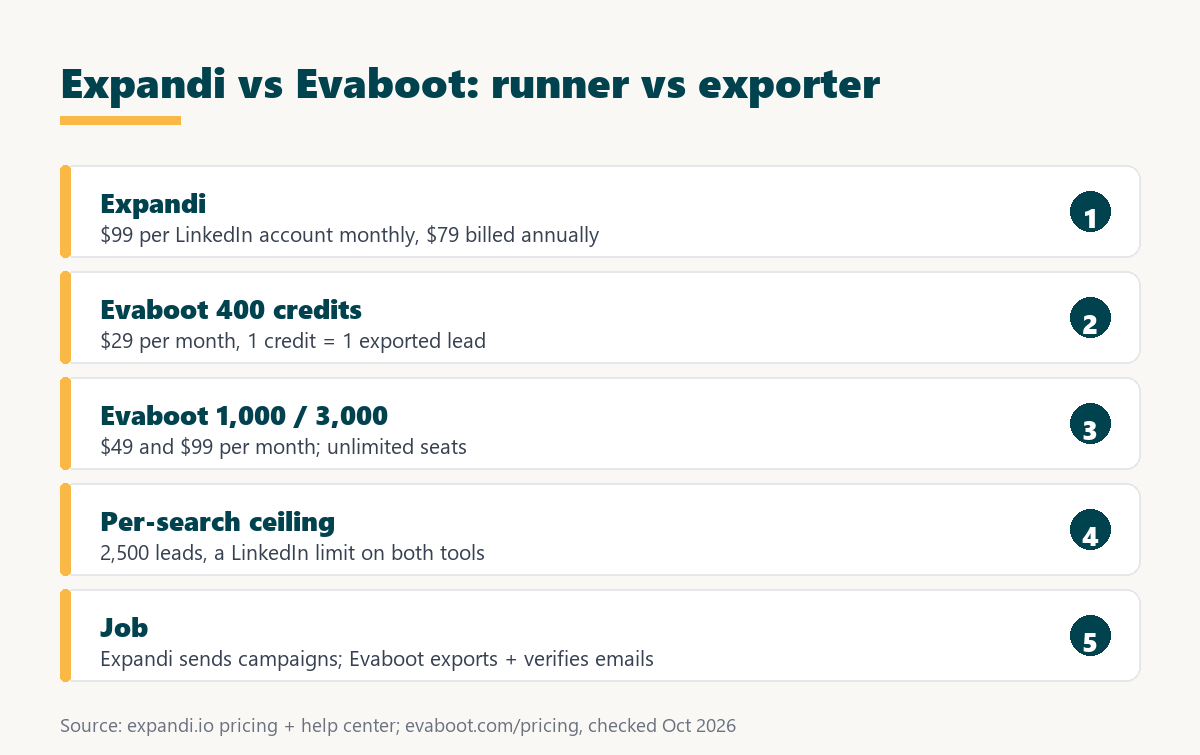
Source: expandi.io/pricing, expandi.io/terms-conditions, and evaboot.com/pricing, checked October 2026. Evaboot does not publish annual prices on its pricing cards.
Expandi bills a flat fee per LinkedIn account and Evaboot bills per exported lead, so one cost tracks the number of senders and the other tracks list size.
An agency can forecast both bills from two inputs, the number of client LinkedIn accounts and the number of leads exported each month.
How Do the Feature Sets Compare Across the Workflow?
The feature sets meet at the Sales Navigator search and then diverge. Evaboot cleans, filters, and enriches the results with verified emails for use anywhere, while Expandi imports the same search and runs LinkedIn connection requests, messages, and email steps with account safety controls around every connected profile.
Source: expandi.io/pricing, Expandi help center, Sales Navigator search, and evaboot.com/pricing, checked October 2026.
Both tools read a Sales Navigator search under the same 2,500 lead ceiling, but only Evaboot returns emails and files and only Expandi sends LinkedIn outreach.
The shared starting point makes the tools easy to chain, because one saved search can feed an export for email and a campaign for LinkedIn.
How Does Each Tool Handle LinkedIn Account Safety?
LinkedIn account safety is the set of controls that keep tool activity inside limits LinkedIn tolerates. Expandi documents a dedicated IP per account and a warm-up that starts at five actions a day, while the Evaboot pricing page describes a Chrome extension for exports and lists no sending activity to protect.
LinkedIn’s help center says it does not permit third-party software, including browser extensions, that scrapes, modifies the appearance of, or automates activity on its website, and that members using such tools risk having their accounts restricted. That statement applies to export extensions and automation platforms alike. Expandi’s warm-up guidance recommends staying within about 100 actions per week to keep under LinkedIn’s weekly connection request cap.
LinkedIn says it does not permit third-party software or browser extensions that scrape or automate activity, so agencies should treat both tools as carrying some account risk.
Want to see the dedicated IP and warm-up on a real profile? Connect one LinkedIn account and run the seven-day trial.
Try Expandi for 7 Days →No charge until the seven days are up · cancel anytime · paid fees are nonrefundable
How Do Agencies Use Evaboot and Expandi Together?
A combined workflow is a two-channel plan built from one Sales Navigator search. An agency exports and cleans the search with Evaboot to get verified emails, loads the cleaned list into Expandi as a CSV lead list, and runs LinkedIn steps while a separate tool sends the email sequence.
- Save the search: a tightly filtered Sales Navigator search under 2,500 results keeps both the Evaboot export and the Expandi import complete.
- Export and clean with Evaboot: the export returns cleaned names, companies, and verified emails, with one credit spent for each lead in the file.
- Remove leads that do not fit: lead filtering and a quick manual review drop rows outside the target profile before any message is written.
- Load the CSV into Expandi: the cleaned file becomes an Expandi lead list, and extra columns map to dynamic placeholders in the messages.
- Run LinkedIn and email in parallel: Expandi sends the LinkedIn steps while a cold email platform sends to the verified addresses from the same file.
Using both tools suits agencies that sell multichannel outreach, since the export supplies verified email addresses that the Expandi feature list does not mention.
Which Agencies Fit Expandi Best?
Expandi fits agencies that sell LinkedIn outreach as a managed service. Each client LinkedIn account becomes one seat at a published price, a Sales Navigator search can feed the campaign directly, and step-by-step statistics give the agency numbers to report back to the client every month.
- Managed outreach agencies: agencies paid to book meetings need campaigns running on client accounts more than exported spreadsheets sitting in a shared folder.
- Freelancers billing per client account: one LinkedIn account per client turns the $99 monthly fee into a clear line item inside each retainer.
- LinkedIn-only campaigns: a Sales Navigator search imports directly into Expandi, so no email address and no export step are needed to start.
- Agencies reporting to clients: step-by-step campaign statistics give acceptance and reply movement per sequence, which becomes the monthly client report.
- Teams under ten accounts: smaller agencies pay the published Business rate, while those reaching ten accounts can request a custom Agency quote.
These agencies are judged on replies and meetings, so the tool that performs the outreach matters more to them than the tool that formats a list.
When Is Evaboot the Better Pick?
Evaboot is the better pick when the deliverable is the list itself. Agencies that sell lead lists, feed cold email tools, or need clean data with verified emails for a CRM gain more from Evaboot, and its unlimited seats suit teams that share one credit pool across several researchers.
- List-building agencies: agencies that deliver prospect files to clients need accurate exports and verified emails, not a tool that sends messages.
- Cold email teams: teams whose main channel is email need verified addresses for every lead before a sequence can start without bounces.
- Teams sharing one credit pool: unlimited seats let several researchers export from their own Sales Navigator accounts against a single subscription.
- Low-volume freelancers: the $29 subscription covers 400 leads a month, enough for a freelancer building a few targeted lists for clients.
- Teams cleaning data before a CRM import: data cleaning and lead filtering tidy Sales Navigator results before they are loaded into a CRM for the sales team.
Naming where Evaboot wins keeps the comparison honest, because Expandi does not list email finding, data cleaning, or file export among its features.
Which Related Tools Complete the Stack?
Related tools are the products that cover the stages after a list is exported. A cold email platform such as Smartlead sends the email sequence to verified addresses, and an email finder such as Hunter.io fills gaps for contacts found outside Sales Navigator, such as names gathered from company websites.
The Smartlead review covers the cold email sending layer that pairs with an Evaboot export, and the Hunter.io email finder review covers domain-based lookup for contacts that never appear in a Sales Navigator search.
A typical agency stack chains one export tool, one LinkedIn campaign runner, and one cold email platform so every lead is reached on two channels.
Verdict: Campaign Runner or Sales Navigator Export?
The verdict is that Expandi suits agencies that need LinkedIn campaigns run and Evaboot suits agencies that need lists exported with emails. An agency selling LinkedIn outreach alone can start with Expandi, and an agency adding cold email should place Evaboot in front of its sending tools.
Growth Hack Suite’s multichannel outreach guide states the rule that makes a two-tool setup work:
“The deciding factor is that the channels are sequenced, not random.”
Growth Hack Suite, What Is Multichannel Outreach?
The deliverable decides this comparison, and the seven-day Expandi trial shows whether direct import from Sales Navigator already covers the agency workflow.
Expandi vs Evaboot: Frequently Asked Questions
The 12 most-asked questions about Expandi vs Evaboot.
Is Evaboot a LinkedIn automation tool?
No. Evaboot exports and cleans Sales Navigator search results with verified emails; its pricing page lists no sending features.
Does Expandi need Evaboot to use Sales Navigator?
No. Expandi imports a Sales Navigator search directly as a Sales Navigator URL lead list of up to 2,500 people per list.
How much does Evaboot cost?
Evaboot lists $29 per month for 400 credits, $49 for 1,000 credits, and $99 for 3,000 credits, with Enterprise on request.
How much does Expandi cost per account?
$99 per LinkedIn account per month, or $79 per account per month billed annually.
Does Evaboot need a Sales Navigator subscription?
Yes. Evaboot’s FAQ says it exports the results of the user’s own Sales Navigator searches, so an active Sales Navigator seat is required.
How many leads can each tool pull per search?
Up to 2,500. Evaboot cites LinkedIn’s ceiling of 2,500 leads or 1,000 companies, and Expandi imports up to 2,500 people per list.
Does Evaboot find phone numbers?
No. Evaboot’s FAQ answers that question with a no; it focuses on emails.
Does Expandi find email addresses?
Email finding is not on Expandi’s feature list. It sends LinkedIn steps and email steps to leads supplied by a list or search.
Do Evaboot credits roll over?
Yes, unused credits roll over to the next billing period as long as the subscription stays active.
Can an Evaboot yearly plan be canceled?
Not early. The FAQ says a yearly subscription cannot be cancelled or downgraded before the end of the contract.
Can an agency use Evaboot and Expandi together?
Yes. A common pattern is to export and clean a search with Evaboot, then load the CSV into an Expandi campaign.
Which tool should an agency buy first?
The one that matches the deliverable: booked conversations point to Expandi, and lead lists with emails point to Evaboot.
Selling LinkedIn outreach to clients? Start the seven-day Expandi trial and import one Sales Navigator search today.
Start Your 7-Day Expandi Trial →Seven-day trial on the first subscription · cancel anytime · paid fees are nonrefundable
Growth Hack Suite Editorial, Outbound Sales Team
How we compared: Expandi figures come from expandi.io pricing, FAQ, and Terms and Conditions plus the Expandi help center article on Sales Navigator search. Evaboot figures come from evaboot.com/pricing and its FAQ, and the platform policy from LinkedIn’s help center. Check dates sit under each table, and taxes are not included.
Last checked: October 2026. When either vendor changes its pricing page, this comparison is updated first.
Affiliate disclosure: this page contains affiliate links to Expandi. If a subscription is purchased through them, Growth Hack Suite may earn a commission at no extra cost to the buyer. Evaboot is not an affiliate partner, and the commission does not change the assessment.