Table of Contents
Expandi vs Wiza is a comparison between a LinkedIn outreach campaign tool and a list building tool that reveals emails and phone numbers. Expandi costs $99 per LinkedIn account per month and sends connection requests, messages, and email steps from the cloud. Wiza has a no-cost tier, costs $49 per user monthly on Starter, and charges for valid emails and phone numbers.
Last checked: October 2026. Expandi pricing, FAQ, and help center articles, plus the Wiza pricing page with both monthly and annual billing views, were read on the dates shown under each table. Confirm current prices on each vendor’s site before buying.
List ready and waiting? Put it into an Expandi campaign on one LinkedIn account for seven days.
Start Your 7-Day Expandi Trial →Seven-day trial on the first subscription · dedicated country-based IP per account · cancel anytime
Expandi vs Wiza: Which Step of the Workflow Comes First?
Expandi vs Wiza is a question of workflow order rather than a contest between rivals. Wiza covers the list building step by revealing emails and phone numbers for prospects, while Expandi covers the outreach step by sending LinkedIn connection requests, messages, and email steps to a finished list of leads.
Outbound runs in a fixed order: decide who to contact, gather the details needed to reach them, then send. A founder buying tools one at a time should fund the step that is missing today, because a perfect list with no outreach and a busy campaign aimed at the wrong people both produce the same result: no meetings.
The short answer is that list building comes first in most workflows, but a founder with a ready audience on LinkedIn can start with outreach.
What Is the Core Difference Between Expandi and Wiza?
The core difference is the workflow step each tool owns: Expandi is a cloud tool that runs outreach campaigns for each connected LinkedIn account. Wiza is a prospecting tool that returns valid email addresses and phone numbers and exports them for use in CRM, email, and calling software.
Wiza’s output resembles a B2B contact database export, while Expandi’s output is outreach activity. The five differences below follow from that.
- Workflow step: Wiza works before outreach by assembling contact details, while Expandi works after the list exists by contacting each lead in a sequence.
- Billing unit: Expandi charges for each connected LinkedIn account, while Wiza charges for each user and meters valid emails and phone numbers.
- No-cost tier: Expandi has none and offers a seven-day trial instead, while Wiza lists a Free tier with 20 valid emails and 5 phone numbers.
- Output: Expandi produces sent messages, replies, and campaign statistics, while Wiza produces valid emails, phone numbers, and contact exports.
- Channel served: Expandi covers LinkedIn steps plus email steps in one sequence, while Wiza supplies data that other sending and calling tools use.
The artifact Wiza helps build is, in Wikipedia’s words, a mailing list:
“a collection of names and addresses used by an individual or an organization”
Wikipedia, Mailing list
Both tools serve outbound founders, yet they sit at opposite ends of the same pipeline, so the useful comparison is about sequence and budget priority.
What Does Wiza Build for a Prospect List?
Wiza builds a prospect list with contact details attached. Its pricing page lists valid email reveals, phone number reveals, monthly exports, AI research, and CRM integrations, and the paid annual plans replace fixed monthly email credits with unlimited email reveals for each user on the plan.
- Valid emails: Wiza counts usage in valid email addresses, with 100 per month on Starter and 500 per month on the monthly Email plan.
- Phone numbers: Starter includes 100 phone numbers a month, Email plus Phone includes 500, and the Email plan charges $0.35 for each number.
- Exports: the annual Email and Email plus Phone plans list 2,500 exports per month for moving contacts into other sales tools.
- AI Research: Wiza lists AI Research on its annual plans, which adds researched context about a prospect beyond the contact fields.
- CRM integrations: CRM integrations appear across the paid plans, so revealed contacts can be pushed into the system of record directly.
Wiza’s pricing page frames the yearly plans this way:
“Receive unlimited credits when you pay yearly, and save on your plan.”
Wiza pricing page
Hunter, whose Email Finder page covers the same list building job, makes the sequencing point directly:
“Finding email addresses is just the first step.”
Hunter, Email Finder
For the category itself, see the guide to what an email finder is. Wiza ends its job when the list is exported, so a founder still needs a sending tool or manual effort to turn those contacts into conversations.
What Does Expandi Run Once the List Exists?
Expandi automates LinkedIn outreach from the cloud for each connected account. The Business plan includes multichannel campaigns across connection requests, messages, and email, an if and action sequence builder, dynamic placeholders, campaign statistics, and safety controls such as a dedicated country-based IP address and profile auto warm-up.
- Multichannel outreach: campaigns combine LinkedIn connection requests, LinkedIn messages, and email steps inside one sequence for every connected account on the plan.
- Sequence builder: the pricing page lists a convenient sequence builder with if and action logic, so follow-ups branch on whether a lead connected or replied.
- Dynamic placeholders: custom fields imported from a CSV file personalize each message, and a fallback message is sent when a lead lacks the value.
- Dedicated country-based IP: each connected account sends from its own fixed IP address in the chosen country instead of a pool shared by unrelated users.
- Profile auto warm-up: the help center describes a gradual ramp that starts at 5 actions a day and rises by 3 every two days to a cap of 21.
Expandi’s own platform data gives a sense of scale: according to Expandi, 28.5% of connection requests are accepted and 10.4% of outbound messages get a reply across its users. Those are vendor averages, not a LinkedIn standard or a forecast for one account.
Expandi picks up after list building, taking a set of LinkedIn profiles and working through scheduled touches until a prospect replies or the sequence ends.
How Much Does Expandi Cost per LinkedIn Account?
Expandi costs $99 per LinkedIn account per month, or $79 per account per month when billed annually, which is a 20 percent saving. Every account receives the same Business feature set, and teams running ten or more accounts can request custom Agency pricing with a dedicated Customer Success Manager.
For a solo founder that is one seat, whatever the number of leads contacted inside the platform limits. Annual billing works out to $948 for the year on one account, calculated as 79 multiplied by 12, against $1,188 if the monthly plan runs a full year. Taxes are added by billing country, and paid fees are nonrefundable under the Terms.
Expandi pricing is simple enough to budget in one line: multiply the number of LinkedIn accounts by the monthly rate, then add tax where it applies.
How Much Does Wiza Cost per User?
Wiza costs $49 per user each month on Starter, $99 on Email, and $199 on Email plus Phone when billed monthly. Annual billing changes the Email plan to $990 per year and Email plus Phone to $1,990 per year, and a Free tier includes 20 valid emails and 5 phone numbers.
- Free tier: Wiza lists 20 valid emails and 5 phone numbers at no cost, and its pricing page says no credit card is required to start.
- Starter: $49 per user monthly with 100 valid emails and 100 phone numbers each month, plus team analytics and CRM integrations.
- Email: $99 per user monthly for 500 valid emails, or $990 per year for unlimited email reveals with phone numbers at $0.35 each.
- Email plus Phone: $199 per user monthly for 500 emails and 500 phone numbers, or $1,990 per year for unlimited email and phone reveals.
- Team: custom pricing billed annually with a minimum of three users, adding API access, CSV import, Wiza Prospect, and a dedicated success manager.
Monthly plans charge $0.15 for each valid email beyond the allowance, which is why the Wiza pricing page steers heavy users toward yearly billing.
Wiza pricing rewards annual commitment, because yearly plans remove the monthly email cap while monthly plans charge extra for each email beyond the allowance.
How Do the Two Pricing Models Compare Side by Side?
The two pricing models bill different units. Expandi charges $99 per connected LinkedIn account each month with a seven-day trial and no permanent no-cost tier, while Wiza charges per user from $49 a month, meters valid emails and phone numbers, and keeps a Free tier for light use.
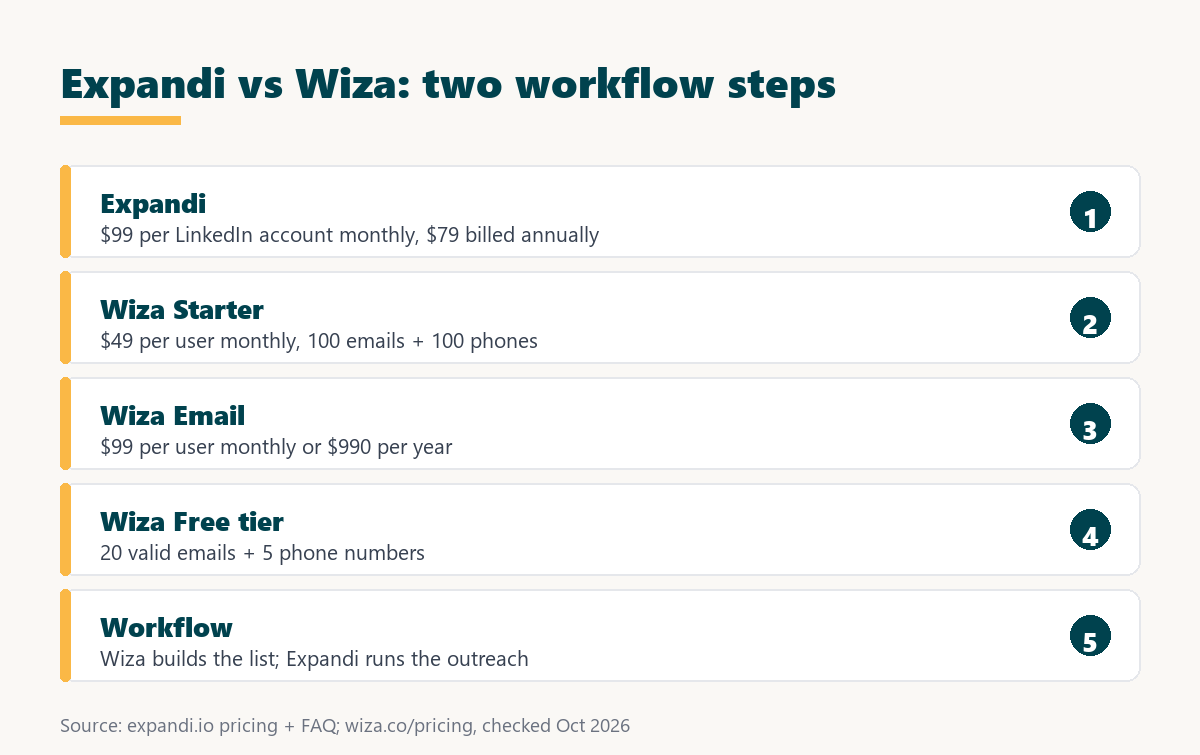
Source: expandi.io/pricing, expandi.io/faq, and wiza.co/pricing (monthly and annual views), checked October 2026.
Wiza has the lower entry price and a Free tier, while Expandi charges a flat rate per LinkedIn account that does not rise with the number of leads contacted.
The two bills behave differently as volume grows, since more leads raise Wiza usage on monthly plans but leave the Expandi fee per account unchanged.
How Do the Feature Sets Compare by Workflow Step?
The feature sets line up with separate workflow steps. Wiza covers email reveal, phone reveal, contact exports, and AI research during the list building step, while Expandi covers LinkedIn connection requests, messages, email steps, campaign statistics, and account safety controls during the outreach step that follows.
Source: expandi.io/pricing and wiza.co/pricing, checked October 2026.
Wiza fills every list building row and Expandi fills every outreach row, which confirms that the two tools are consecutive steps instead of substitutes.
A founder reading the table can spot the missing step in the current process, and that gap points to the tool worth paying for first.
Which Step Comes First: List Building or Outreach?
List building is the step that normally comes first, because outreach needs named people to contact. A founder defines the audience, collects profiles and contact details, checks the list for fit, loads it into a campaign, and only then starts sending messages and tracking which prospects reply.
- Define the audience: a written description of role, industry, and company size keeps list building and outreach aimed at the same buyers from the start.
- Build the list: contacts come from Wiza for emails and phone numbers, or from a saved Sales Navigator search when outreach stays on LinkedIn.
- Check fit and remove duplicates: a quick review drops prospects outside the target profile and removes people already contacted in earlier campaigns.
- Load the list into Expandi: a CSV file or a Sales Navigator search URL becomes an Expandi lead list, with extra columns mapped to placeholders.
- Activate and track replies: the campaign can take up to 45 minutes to begin sending, and replies are tracked per sequence from then on.
The order can shorten for LinkedIn-only outreach, since Expandi imports a Sales Navigator search directly and needs no email address to send a connection request.
How Does Each Tool Handle LinkedIn Account Safety?
LinkedIn account safety is the set of controls that keep tool activity inside limits LinkedIn tolerates. Expandi documents a dedicated IP per account and a warm-up that starts at five actions a day, while Wiza states on its pricing page that it is not affiliated with LinkedIn and lists no sending limits.
The Wiza disclaimer reads: “Wiza, Inc is not affiliated, associated, authorized, endorsed by, or in any way officially connected with Microsoft or LinkedIn.” LinkedIn’s help center, for its part, says it does not permit third-party software that scrapes or automates activity on its website, and that members using such tools risk having their accounts restricted. Expandi’s warm-up guidance recommends staying within about 100 actions per week to keep under LinkedIn’s weekly connection request cap.
LinkedIn says it does not permit third-party software that scrapes or automates activity, so founders should treat both tools as carrying some account risk.
Want to see the dedicated IP and warm-up on a real profile? Connect one LinkedIn account and run the seven-day trial.
Try Expandi for 7 Days →No charge until the seven days are up · cancel anytime · paid fees are nonrefundable
Which Founders Fit Expandi Best?
Expandi fits founders who already know who to contact and need the outreach done. A saved Sales Navigator search or an existing list becomes a campaign on one account, and scheduled connection requests and follow-ups keep prospecting moving while the founder handles sales calls and delivery work.
- Founders with a defined audience: sellers who can describe their buyers in a Sales Navigator search need sending capacity more than extra contact data.
- LinkedIn-first sellers: founders whose buyers reply to LinkedIn messages gain the most from automated connection and follow-up sequences every weekday.
- Time-poor solopreneurs: campaigns run on a schedule from the cloud, so prospecting continues during client work, travel, and product days.
- Founders running one account: one seat at $99 a month is bought through self-serve checkout, with no order form and no sales call required.
- Founders testing messaging: the seven-day trial on the first subscription gives a short window to test a connection note before a monthly fee.
These founders are limited by hours rather than data, so automating the outreach step frees more selling time than a larger contact list would.
When Is Wiza the Better Pick?
Wiza is the better pick when the missing piece is contact data. Founders who run cold email or phone outreach, need valid addresses before sending, or want to test list building on a Free tier gain more from Wiza than from a LinkedIn campaign tool that expects the list to exist.
- Cold email founders: sellers whose main channel is email need valid addresses first, because no email campaign can start without them.
- Phone-led sellers: founders who book meetings by calling need phone numbers, which Wiza reveals on Starter and Email plus Phone.
- Founders wanting a no-cost start: the Free tier with 20 valid emails and 5 phone numbers allows a real test of list quality before any spend.
- High-volume list builders: annual Email plans list unlimited email reveals, which suits founders building large lists every month.
- Small teams: the Team plan starts at three users on annual billing and adds API access, CSV import, and a dedicated success manager.
Naming where Wiza wins keeps the comparison honest, because Expandi lists no email or phone reveal and cannot build a contact file by itself.
What Hidden Costs Should a Founder Check?
Hidden costs are charges or limits that sit outside the headline price. With Expandi they are each extra LinkedIn account, paid personalization add-ons, and tax, while with Wiza they are per-email and per-phone overage on monthly plans, the yearly payment on annual plans, and per-user pricing.
- Email overage: monthly Wiza plans charge $0.15 for each valid email beyond the included allowance, which adds up quickly on large lists.
- Phone overage: phone numbers beyond the allowance cost $0.35 each, and the Email plan charges that rate for every number revealed.
- Annual prepayment: the annual Email and Email plus Phone plans are paid as $990 or $1,990 per year, upfront rather than monthly.
- Per-account growth: Expandi charges for each LinkedIn account, so a cofounder connecting a second profile adds a full seat to the bill.
- Paid add-ons: Expandi lists image and GIF personalization and video personalization as paid add-ons, and neither price is published.
A founder should estimate monthly list size and the number of LinkedIn accounts before subscribing, since those two figures explain most of the spend above list price.
Which Related Tools Complete the Stack?
Related tools are the products that cover steps outside list building and LinkedIn outreach. An email finder such as Hunter.io supplies verified addresses from a company domain, and a cold email platform such as Smartlead sends the email sequence that a Wiza export feeds once the list is ready.
The Hunter.io email finder review covers domain-based lookup as an alternative list building route, and the Smartlead review covers the cold email sending layer.
A lean founder stack usually holds one list building tool, one LinkedIn outreach tool, and one email platform, with each product assigned to a single step.
Verdict: Outreach Campaigns or List Building?
The verdict is that Wiza and Expandi cover consecutive steps, so the first purchase should fix the step that is missing. Founders without contact data should start with Wiza, and founders with a clear LinkedIn audience and no time to message it should start with Expandi.
Growth Hack Suite’s multichannel outreach guide states the principle behind assigning one job to each tool:
“The deciding factor is that each channel plays a distinct role.”
Growth Hack Suite, What Is Multichannel Outreach?
The missing step decides this comparison, and the seven-day Expandi trial shows quickly whether outreach, not list building, is the real constraint.
Expandi vs Wiza: Frequently Asked Questions
The 12 most-asked questions about Expandi vs Wiza.
Is Wiza a LinkedIn automation tool?
Wiza’s pricing page lists no LinkedIn sending features. It reveals valid emails and phone numbers and exports contacts for other tools.
Does Expandi find emails or phone numbers?
Contact lookup is not on Expandi’s feature list. It sends to leads supplied by a list, a CSV file, or a Sales Navigator search.
How much does Wiza cost?
Monthly: Starter $49, Email $99, and Email plus Phone $199 per user. Annual: Email $990 per year and Email plus Phone $1,990 per year.
How much does Expandi cost per account?
$99 per LinkedIn account per month, or $79 per account per month billed annually.
Does Wiza have a no-cost tier?
Yes. The Free tier includes 20 valid emails and 5 phone numbers.
Does Expandi have a no-cost tier?
No. Expandi offers a seven-day trial on the first subscription; checkout asks for card details and no charge is made until the seven days are up.
What does Wiza charge for extra emails?
On monthly plans, $0.15 for each valid email beyond the allowance and $0.35 for each extra phone number.
Is Wiza cheaper than Expandi?
Wiza’s Starter is cheaper at $49 per user monthly, but it buys contact data, while Expandi’s $99 per account buys automated outreach.
Which step comes first, list building or outreach?
List building, in most workflows. Outreach needs named people, so the contact list normally exists before a campaign starts.
Can Expandi run without a list building tool?
Yes, for LinkedIn-only outreach. Expandi imports a Sales Navigator search directly, up to 2,500 people per list.
Can a founder use Wiza and Expandi together?
Yes. Wiza can build and export the contact list, and Expandi can run the LinkedIn sequence against the same prospects.
Which tool should a founder buy first?
The one that fixes the missing step: no contact data points to Wiza, and no time to message a known audience points to Expandi.
Audience defined and no time to message it? Start the seven-day Expandi trial on one LinkedIn account.
Start Your 7-Day Expandi Trial →Seven-day trial on the first subscription · cancel anytime · paid fees are nonrefundable
Growth Hack Suite Editorial, Outbound Sales Team
How we compared: Expandi figures come from expandi.io pricing, FAQ, and Terms and Conditions plus the Expandi help center. Wiza figures come from wiza.co/pricing in both the monthly and annual billing views, and the platform policy from LinkedIn’s help center. Check dates sit under each table, and taxes are not included.
Last checked: October 2026. When either vendor changes its pricing page, this comparison is updated first.
Affiliate disclosure: this page contains affiliate links to Expandi. If a subscription is purchased through them, Growth Hack Suite may earn a commission at no extra cost to the buyer. Wiza is not an affiliate partner, and the commission does not change the assessment.