Table of Contents
Expandi vs Octopus CRM compares a cloud campaign engine with a lightweight Chrome extension that includes a personal CRM. Expandi costs $99 per LinkedIn account per month and runs multichannel sequences from a dedicated country-based IP. Octopus CRM works inside Chrome with four plans from $9.99 to $39.99 per month, so the real question is which role each tool plays.
Last checked: October 2026. Prices and features taken from the official Expandi pages (pricing, FAQ, Terms, help center) and the official Octopus CRM pages (home page pricing section and FAQ) on the dates shown under each table.
Need multichannel LinkedIn campaigns that run from the cloud? Test Expandi on one account for seven days.
Start Your 7-Day Expandi Trial →Dedicated country-based IP per account · automatic warm-up · cancel anytime
Expandi vs Octopus CRM: Which Role Does Each Tool Play?
Expandi vs Octopus CRM is a comparison of two different jobs in an outreach stack. Expandi is a cloud campaign engine that runs multichannel sequences for $99 per LinkedIn account, while Octopus CRM is a Chrome extension that automates basic LinkedIn actions and tracks contacts for $9.99 to $39.99 per month.
The overlap is real: both send connection requests and follow-up messages on LinkedIn, and both support Sales Navigator. Beyond that, one tool is built around conditional sequences, channel mix, and account infrastructure, and the other is built around a simple funnel and a contact list that lives next to the founder’s LinkedIn tab.
The tools overlap on LinkedIn automation but aim at different depths, so a founder should decide how complex the campaigns need to be before comparing prices.
What Is the Core Difference Between a Campaign Engine and a Lightweight CRM?
A campaign engine is software that runs conditional outreach sequences across channels, and a lightweight CRM is software that stores contacts and tracks simple pipeline stages. Expandi fits the first description with its if/action sequence builder, while Octopus CRM pairs LinkedIn automation with a personal CRM and funnel view inside Chrome.
- Runtime location: Expandi runs campaigns in the cloud, while Octopus CRM runs as an extension inside the Chrome browser on the founder’s own computer.
- Campaign depth: Expandi builds branching sequences with if/action conditions and email steps, while Octopus CRM offers auto invites, bulk messages, campaigns, and funnels.
- Contact tracking: Octopus CRM includes a personal CRM with stats, while Expandi provides an inbox with tags and notes and passes data on through integrations and webhooks.
- Billing unit: Expandi charges one rate per connected LinkedIn account, while Octopus CRM sells four plans that unlock more features as the price rises.
- Entry price: the lowest monthly list price is $99 per account at Expandi and $9.99 on the Octopus CRM Starter tier.
Wikipedia’s definition shows why the CRM label sets expectations about tracking rather than sending:
“organizations use to manage, analyze, and improve their interactions with customers”
Wikipedia, Customer relationship management
The full role of a CRM in an outbound stack is covered in the guide to what a CRM does for sales teams.
One tool goes deep on campaign logic and the other stays light on contact tracking, which explains why their prices sit so far apart despite the shared channel.
How Much Does Expandi Cost per LinkedIn Account?
Expandi costs $99 per LinkedIn account per month, or $79 per account per month when billed annually, which is a 20% saving. Every account receives the same Business feature set, so a founder does not choose between feature tiers before reaching the custom Agency plan at ten accounts.
Expandi’s FAQ states the figure directly: “Expandi costs 99 USD per account per month” (Expandi FAQ). Taxes are added by billing country, the two personalization add-ons carry no published price, and the Terms make paid fees nonrefundable unless required by law.
Expandi pricing is a single line on the budget, one rate per connected profile, with every campaign feature included from the first account.
How Much Does Octopus CRM Cost on Each Plan?
Octopus CRM pricing is a four-plan ladder billed monthly or annually. Starter costs $9.99 per month, Pro costs $14.99, Advanced costs $21.99, and Unlimited costs $39.99, while the annual toggle is labeled as a 35% saving. Agencies managing twenty or more accounts are asked to contact the team for special pricing.
- Starter tier: the entry tier at $9.99 per month, or $6.99 per month on annual billing, for founders who need only basic LinkedIn automation.
- Pro plan: the second tier at $14.99 per month, or $9.99 per month on annual billing, with more features unlocked than Starter.
- Advanced plan: the third tier at $21.99 per month, or $14.99 per month on annual billing, for heavier automation needs.
- Unlimited plan: the top tier at $39.99 per month, or $24.99 per month on annual billing, and the only plan that includes Activity Control.
- Agency pricing: marketing agencies managing twenty or more accounts are directed to contact Octopus CRM for special pricing rather than a listed rate.
Octopus CRM’s home page sets out its trial terms in one line:
“All plans come with a 7-day obligation-free trial. No credit card required, unsubscribe anytime.”
Octopus CRM
Octopus CRM spreads its features across four low-priced tiers, so the plan a founder actually needs depends on which automation features sit behind each step up.
How Do the Prices Compare Side by Side?
Expandi costs $99 per account per month, while the most expensive Octopus CRM plan, Unlimited, costs $39.99 per month. The Octopus CRM Starter tier costs $9.99, so the monthly gap runs from $59.01 to $89.01 at list rates, depending on the plan, calculated as $99 minus each Octopus price.
Source: expandi.io/pricing and the pricing section of octopuscrm.io, checked October 2026. Annual figures are the monthly equivalent when paying for a year.
Every Octopus CRM plan costs less than half of the Expandi monthly rate, and the gap widens on annual billing, which Octopus CRM labels as 35% off against Expandi’s 20%.
On price alone Octopus CRM wins clearly, so the real question for a founder is what the extra Expandi spend buys in campaign depth and account setup.
What Does Expandi Automate as a Campaign Engine?
Expandi automates multi-step LinkedIn and email outreach from the cloud for each connected account. The Business plan includes multichannel campaigns, an if/action sequence builder, dynamic placeholders, campaign prioritization, and step-by-step statistics, with a dedicated country-based IP and profile auto warm-up on every account.
- Multichannel outreach: campaigns combine LinkedIn connection requests, LinkedIn messages, and email steps inside one sequence for every connected account.
- Sequence builder: the if/action builder branches a campaign on what a prospect does, such as accepting a request or replying, rather than sending a fixed script.
- Dynamic placeholders: custom fields imported from a CSV personalize each message, with a fallback message sent when a value is missing for a lead.
- Campaign prioritization: operators decide which campaign uses the daily allowance first when several campaigns compete for the same account’s limits.
- Step-by-step statistics: each step of a campaign reports its own results, which shows exactly where a sequence loses prospects.
The help center adds operating limits to plan around: up to 5,000 leads per campaign and 15 active campaigns at a time on one account. Email personalization inside those steps follows the principles in the guide to email personalization.
Expandi earns its price through conditional logic and channel mix, which matter most to founders whose outreach has moved past a single connection message.
What Does Octopus CRM Offer as a Lightweight CRM?
Octopus CRM is a Chrome extension that combines basic LinkedIn automation with a personal CRM. Its feature list covers personalized auto invites, bulk messages, automatic profile views and skill endorsements, campaigns, funnels, data export and import, and integration with Zapier and HubSpot across its plans.
Octopus CRM describes the idea in its own words: “The software allows you to create your personal LinkedIn lead generation funnel” (Octopus CRM). It installs from the Chrome Web Store and works with free LinkedIn, LinkedIn Premium, Sales Navigator, and Recruiter. The per-plan feature grid is rendered as an image, so this comparison does not assign individual features to individual plans beyond Activity Control.
Octopus CRM covers the everyday LinkedIn actions a solo founder repeats by hand and adds a simple place to track who was contacted and what happened next.
How Do Expandi and Octopus CRM Compare Feature by Feature?
Expandi and Octopus CRM differ in runtime, channels, and how features are packaged. Expandi runs in the cloud with email steps and one feature set, while Octopus CRM runs in Chrome, focuses on LinkedIn actions with a personal CRM, and unlocks more features on higher plans.
Source: expandi.io/pricing, expandi.io/faq, the octopuscrm.io pricing section and Octopus CRM FAQ, checked October 2026.
Expandi offers more channels, deeper campaign logic, and a documented IP setup, while Octopus CRM offers built-in contact tracking, four price points, and a trial that needs no card.
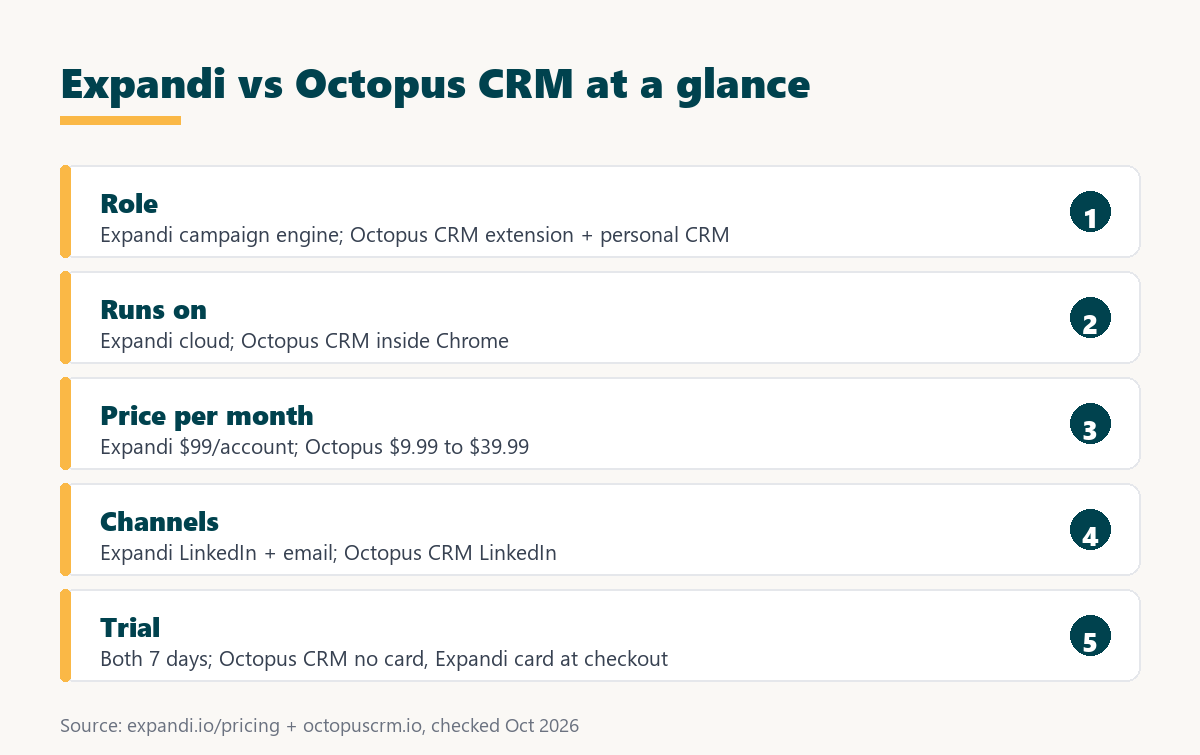
The rows show two tools built for different stages, since a founder sending a first hundred invites needs far less machinery than one running layered multichannel sequences.
How Does Each Tool Handle LinkedIn Account Safety?
LinkedIn account safety is the set of controls that keep automated activity inside limits LinkedIn tolerates. Expandi documents a dedicated IP per account and a warm-up that starts at five actions a day, while Octopus CRM offers Activity Control on its Unlimited plan and advises users to grow activity gradually.
Expandi’s gradual warm-up adds 3 actions every two days up to 21, starting with the first active campaign (Expandi help center, account warm-up). Octopus CRM’s FAQ gives this advice: “Make sure your performance on LinkedIn is not excessive and the activity growth is gradual” (Octopus CRM FAQ).
Neither vendor can remove the underlying risk. LinkedIn’s User Agreement prohibits third-party software that automates activity on its site, so any automation tool, extension or cloud, can lead to a restricted account if activity looks unnatural.
Safety features sit in every Expandi account, whereas the Octopus CRM limit control belongs to its top plan, a detail founders on cheaper tiers should weigh.
Want to see the dedicated IP and warm-up on a real profile? Connect one LinkedIn account and run the seven-day trial.
Try Expandi for 7 Days →Card details at checkout · no charge until the 7 days are up
How Do the Free Trials Compare?
A free trial is a time-limited test of a paid plan before the first charge. Both tools offer seven days, but Octopus CRM gives full access to its Unlimited plan without a credit card, while the Expandi trial applies only to the first subscription on an account and asks for card details at checkout.
Expandi’s FAQ says no charge is made “until the 7 days are up,” and its pricing page says the trial includes all features. The general mechanics of both models are explained in the guide to how SaaS free trials work.
Equal trial length makes a fair test simple, because a founder can run both tools during the same week with the same audience and compare the results directly.
Which Founders Fit Expandi Best?
Expandi fits founders whose outreach already depends on multi-step campaigns and more than one channel. A founder who wants sequences that branch on replies, email steps next to LinkedIn messages, and cloud runtime gets those from the first account at one published rate, with no feature tiers to climb.
- Multichannel senders: founders who follow a LinkedIn message with an email step need both channels inside one sequence with shared timing and conditions.
- Sequence builders: founders who want campaigns to branch on accepted requests and replies benefit from the if/action logic rather than a linear script.
- Travel-heavy founders: cloud runtime keeps campaigns sending without a browser tab open, which matters for anyone working across devices and time zones.
- Multi-account teams: workspaces with roles let a founder add a co-founder’s or a hire’s profile later without changing tools.
- Safety-first buyers: a documented dedicated IP and warm-up schedule give a buyer specific safeguards to verify before connecting a valuable profile.
The broader case for coordinating channels is set out in the guide to multichannel outreach.
The common thread is campaign complexity, since these founders have outgrown single-step automation and need a tool that manages timing, branching, and channels together.
When Is Octopus CRM the Better Pick?
Octopus CRM is the better pick when a solo founder wants basic LinkedIn automation and simple contact tracking at the lowest cost. Plans start at $9.99 per month, the seven-day trial needs no card, and the extension installs from the Chrome Web Store in a few minutes.
- Tight budgets: every Octopus CRM plan costs less than half of the Expandi monthly rate for one LinkedIn account, even before annual billing.
- First-time automators: founders new to LinkedIn automation can start with invites and follow-ups before deciding whether they need branching sequences at all.
- Founders wanting a built-in CRM: the personal CRM with stats and the funnel view keep contacts in one place without paying for a separate CRM.
- Card-free testers: the trial runs without a credit card and gives full Unlimited access, which lowers the barrier to a first test.
- Recruiter seat users: Octopus CRM states compatibility with free LinkedIn, Premium, Sales Navigator, and Recruiter, including Recruiter Lite.
Saying plainly where Octopus CRM wins keeps the comparison honest, because many solo founders need invites, follow-ups, and a contact list rather than a full campaign engine.
What Hidden Costs Should a Founder Check?
Hidden costs are charges or limits that sit outside the headline price. With Expandi they are per-account growth, paid personalization add-ons, and nonrefundable fees, while with Octopus CRM they are features locked to higher plans and the need to work from one Chrome browser.
- Plan-gated features: Octopus CRM reserves Activity Control for its Unlimited plan, so the cheapest tier does not include every control a cautious founder may want.
- Browser dependence: the extension runs inside the founder’s Chrome browser, so automation is tied to that browser and computer being in use.
- Per-account growth: every extra LinkedIn profile adds $99 a month at Expandi list price, so the bill grows with each sending account.
- Paid add-ons: Expandi’s image and GIF personalization and video personalization through Sendspark are paid add-ons with no published price.
- Refund terms: Expandi’s Terms make fees nonrefundable unless required by law, and a refund policy for Octopus CRM was not found on the pages reviewed.
A low sticker price can hide a higher real plan, so founders should confirm which Octopus CRM tier holds the features they need before comparing totals.
How Should a Founder Test Both Tools?
A side-by-side test is a one-week run where the same audience and message go through both tools. Both trials last seven days, so a founder can compare setup time, campaign options, and reply handling in parallel before paying for either subscription or committing to an annual plan.
- Write the sequence first: drafting the steps on paper shows whether the campaign needs branching and email or only invites and follow-ups.
- Pick one small audience: splitting one modest prospect list between the two tools keeps the test fair and limits the volume on each profile.
- Open both trials in the same week: starting the Expandi trial and the card-free Octopus CRM trial together keeps the two seven-day windows aligned.
- Run the same message: sending identical copy through both tools isolates the tool from the writing, so differences come from setup and delivery.
- Compare setup, replies, and plan fit: recording setup time, replies, and which Octopus CRM plan would actually be needed gives a clear answer before paying.
A parallel week answers the role question with evidence, showing whether the simpler tool already covers the workflow or the campaign engine earns its higher price.
Verdict: Campaign Engine or Lightweight CRM?
The verdict is that Expandi suits founders running layered multichannel campaigns who want cloud runtime and a dedicated IP, and Octopus CRM suits founders who want basic automation and contact tracking for a fraction of the price. Campaign complexity, not brand, should decide which role the stack needs filled.
Growth Hack Suite’s guide to CRMs explains why the tracking side matters even for small teams:
“It replaces scattered spreadsheets and inboxes with a single record per contact.”
Growth Hack Suite, What Is a CRM?
HubSpot’s guide to sales strategy puts the tool question in proportion:
“Successful sales teams and strategies require the right tools.”
HubSpot, Sales Strategy
Most founders can decide by sketching their ideal sequence, checking whether it needs conditions and email, and confirming the choice during the free week.
Expandi vs Octopus CRM: Frequently Asked Questions
The 12 most-asked questions about Expandi vs Octopus CRM.
Is Expandi better than Octopus CRM?
Expandi is better for layered multichannel campaigns run from the cloud with a dedicated IP. Octopus CRM is better for basic LinkedIn automation and contact tracking at a much lower price.
How much does Expandi cost per account?
$99 per LinkedIn account per month, or $79 per account per month billed annually.
How much does Octopus CRM cost?
Starter is $9.99, Pro $14.99, Advanced $21.99, and Unlimited $39.99 per month, with lower monthly equivalents on annual billing ($6.99 to $24.99).
Is Octopus CRM a Chrome extension?
Yes. Octopus CRM installs from the Chrome Web Store and runs inside the Chrome browser.
Is Octopus CRM a real CRM?
It includes a personal CRM with stats and a funnel view for LinkedIn contacts. It is lighter than a full sales CRM with deal pipelines and reporting.
Does Expandi have a CRM?
No. Expandi provides an inbox with tags and notes and passes data to other systems through integrations and webhooks.
Does Octopus CRM include email outreach?
Email outreach sequences are not described on the Octopus CRM pages reviewed; its features center on LinkedIn actions.
Does Expandi include a dedicated IP?
Yes. Each connected LinkedIn account gets a dedicated country-based IP on the Business plan.
Which Octopus CRM plan has Activity Control?
Only the Unlimited plan, according to the Octopus CRM FAQ.
How long are the free trials?
Both last seven days. Octopus CRM needs no card and opens the Unlimited plan; Expandi asks for card details and applies to the first subscription only.
Can Expandi fees be refunded?
No. Expandi’s Terms state that subscription fees are nonrefundable unless required by law.
Can a founder use both tools together?
Not on the same LinkedIn profile at the same time, since two automation tools would double the activity. Using them on different profiles is possible but rarely needed.
Outgrown single-step automation? Start the seven-day Expandi trial and build one multichannel sequence on a real account.
Start Your 7-Day Expandi Trial →Seven-day trial on the first subscription · cancel anytime · paid fees are nonrefundable
Growth Hack Suite Editorial, Outbound Sales Team
How we compared these tools: Expandi figures come from expandi.io pricing, FAQ, and Terms and from the Expandi help center; Octopus CRM figures come from the pricing section of octopuscrm.io and its FAQ. Price gaps are calculated from list prices before tax. The Octopus CRM per-plan feature grid could not be read as text, so features are not assigned to individual plans except Activity Control. No hands-on benchmark was run for this page.
Last checked: October 2026. When the vendors change their pages, this line is updated first.
Affiliate disclosure: this page contains an affiliate link for Expandi only. If a subscription is purchased through it, Growth Hack Suite may earn a commission at no extra cost to the buyer. It does not change the assessment.