Hunter.io Advanced Guide covers 7 features most users never touch beyond Email Finder and Email Verifier. Domain Search advanced filters narrow prospect lists by department and seniority. TechLookup builds lists by tech stack at zero credit cost. The Hunter API automates every dashboard operation. The new MCP server connects Hunter.io to Claude and ChatGPT for natural-language prospecting workflows. This guide covers each feature, when to use it, and the ROI lift for power users who go beyond the basics.
Table of Contents
Who This Advanced Guide Is For (And Where to Start If You Are New)
This guide is for users who already know Email Finder and Email Verifier and want to maximize the rest of the Hunter.io platform. The 7 features below assume you have an active Hunter account and basic familiarity with the dashboard. If you are new to Hunter, start with our Hunter.io features overview first : the advanced guide will make more sense with that foundation. The gap between basic and advanced Hunter use is wider than most teams realize: most teams on paid plans touch only 30% of the platform they pay for.
“An API is a way for two or more computer programs to communicate with each other.”
: Wikipedia, Application Programming Interface
This definition captures what unlocks Hunter beyond manual dashboard use. The API, MCP server, and automation features turn Hunter from a lookup tool into a data layer : one that integrates into every system your sales or marketing team already runs.
The gap between basic and advanced Hunter use is wide. Most teams that pay for Pro or Business plans touch only 30% of the platform. The 7 features below are where the ROI compounds on top of what you already use.
Power Feature 1: Domain Search Advanced Filters (Department + Seniority Targeting)
Domain Search in basic mode returns every email Hunter has indexed at a company : a raw list requiring manual filtering before any outreach. Advanced filters change this completely. Filter by department (Sales, Engineering, Marketing, HR, Finance, Operations) and by seniority level (Executive, Senior, Manager, Junior) to surface exactly the contacts you need in one query. Run “stripe.com + Sales + Senior” and Hunter returns a pre-filtered SDR-target list without manual sorting. Each Domain Search request returns up to 10 contacts per credit, and queries returning zero results are free.
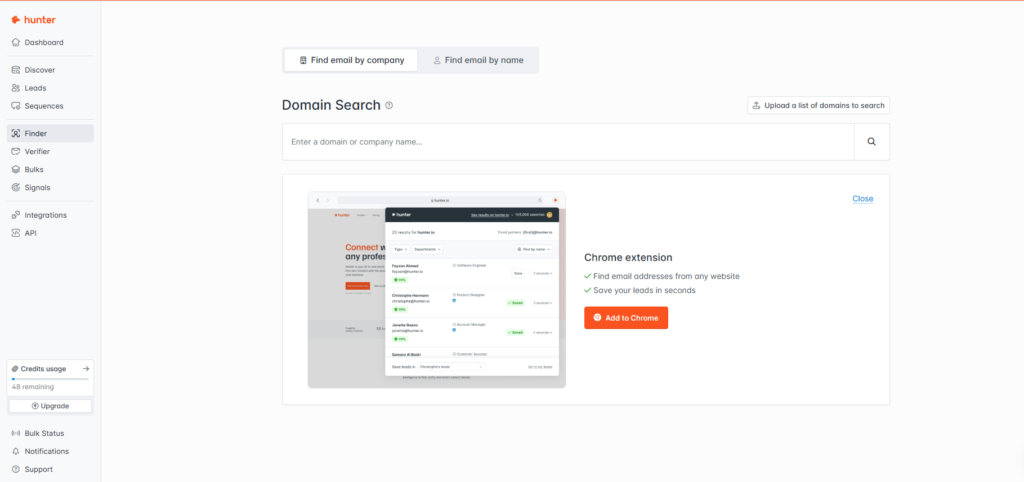
- Open Domain Search and enter the target company domain without www. Use the root domain (stripe.com, not www.stripe.com or app.stripe.com) for the broadest index coverage.
- Click “Refine search” to expand the filter panel. The filter panel appears below the domain input field. Select one or more Department filters : each department selection narrows results to contacts in that function.
- Add a Seniority filter to target decision-makers or individual contributors. Executive and Senior filter for VP+ and director-level contacts. Manager targets team leads. Junior filters for IC-level contacts. Combining Department + Seniority in one query cuts typical result sets by 60-80%.
- Export filtered results to CSV or push directly to your Hunter Leads list. CSV export preserves all metadata: email, confidence score, department, seniority, LinkedIn URL where available. Push to Leads for direct integration with Hunter Sequences without leaving the dashboard.
Most users dump every email at a company and filter manually in a spreadsheet : wasting both credits and research time. Filtering at search time cuts list size 60-80% before export and delivers only the seniority level that matches your outreach strategy.
Power Feature 2: TechLookup : Build Prospect Lists by Tech Stack (Free, No Credits)
TechLookup lets you pull every website using a specific technology : Shopify, HubSpot, Stripe, Salesforce, WordPress, Klaviyo, and hundreds more. Filter by industry, country, and website popularity to narrow the output to your ICP. Download is 100% free; no credits are consumed at any plan tier. Pipe the downloaded domain list directly into Bulk Domain Search to enrich with contact emails in a single batch operation. The killer use case: target every company that recently adopted a competitor technology and pitch the migration to your alternative. Tech-stack targeting consistently outperforms firmographic-only targeting for product-fit campaigns.
TechLookup is the most underused free tool in the Hunter ecosystem. Tech-stack targeting identifies product-fit before first contact : the same firmographic prospect with HubSpot in their stack is 30-50% more likely to reply than one without it.
Power Feature 3: Author Finder : Email Anyone Who Has Published Online
Paste any blog post, article, or op-ed URL into Author Finder and Hunter returns the author’s professional email, confidence score, company, photo, and links to other content they have published. The byline replaces the LinkedIn detective work. Best use cases: link-building outreach to bloggers and journalists, podcast guest invitations, PR pitches to trade press contacts, and partnership outreach to industry thought leaders. Author Finder works on any URL where the byline is present : Hunter’s crawler indexes the author metadata and cross-references it against the email index for the same domain. Result: one URL input, full verified contact profile, no manual research required.
Author Finder turns published bylines into targeted contacts. For PR, link-building, and thought-leader partnership outreach, it cuts contact research time from 20 minutes of LinkedIn cross-referencing to under 20 seconds per author.
Power Feature 4: Bulk Tasks : Process 1,000+ Emails or Domains in One Click
Bulk Tasks runs Email Finder, Email Verifier, or Domain Search across thousands of inputs in parallel. Upload a CSV with your domains or email addresses, select the operation, and Hunter processes the entire file asynchronously : returning a downloadable result file with status and confidence score per row. Bulk Email Verifier processes approximately 1,000 emails per 1-3 minutes and sends a notification email when the job completes, so you do not need to keep the browser open. Available on the free tier with monthly limits; paid plans remove caps entirely. Bulk Tasks is the operationalization layer that makes every other Hunter feature scalable.
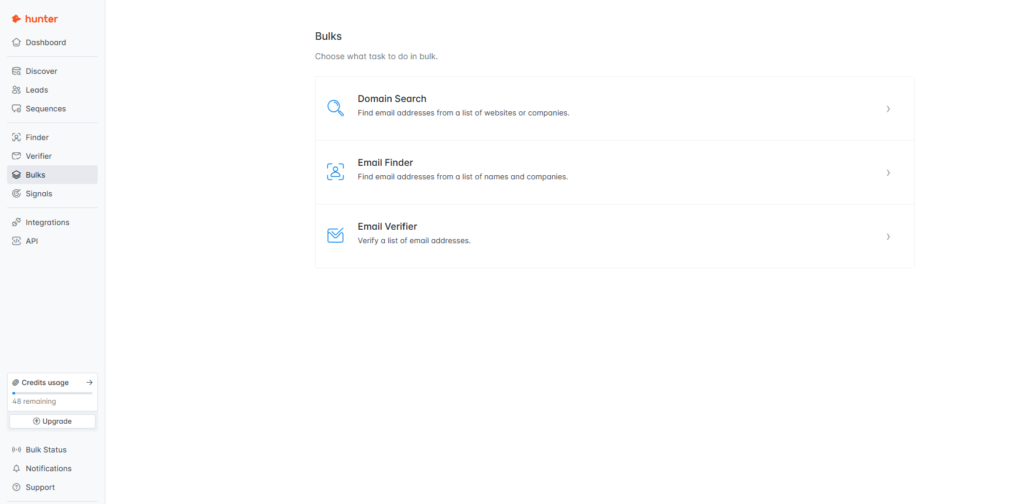
“As detailed in our Hunter.io Email Finder review, the Bulk Tasks engine combines parallel SMTP verification with the same 4-step accuracy logic, letting you clean a 10,000-email list in under 30 minutes.”
: Growth Hack Suite, Hunter.io Email Finder Review
Bulk Tasks is mandatory for any list of 100 or more addresses. Manually verifying or finding emails one-by-one wastes both the human in the loop and the per-credit budget. Upload a CSV and let the engine run while you build the next campaign.
Power Feature 5: Hunter API : Automate Every Operation Hunter Can Do
The Hunter API exposes every dashboard operation as a REST endpoint : Email Finder, Email Verifier, Domain Search, Leads management, Sequences, Discover, and Companies. Authenticate with your API key in the Authorization header and query JSON responses. Rate limits scale by plan tier. Most CRMs (HubSpot, Pipedrive, Salesforce) integrate via Zapier or native connectors, but the API enables custom workflows that pre-built integrations cannot replicate: enriching every new CRM contact on creation, triggering verification when a form is submitted, building internal tooling that combines Hunter data with your own database.
curl -H "Authorization: Bearer YOUR_API_KEY" \
  "https://api.hunter.io/v2/email-finder?domain=stripe.com&first_name=John&last_name=Smith"

# Response includes:
# "email": "john.smith@stripe.com"
# "confidence": 91
# "verification": {"status": "valid"}“More than 6,000,000 professionals use Hunter to build more connections and grow their business.”
: Hunter.io API Documentation
API access turns Hunter from a lookup tool into a data layer. The free tier API key lets you prototype and test all endpoints with sample data before committing to paid credits. Paid tiers unlock the rate limits required for production workflows at scale.
Power Feature 6: Hunter MCP Server : Connect Hunter to Claude or ChatGPT
Hunter shipped a remote MCP (Model Context Protocol) server that connects Hunter directly to any LLM supporting the MCP standard : Claude Desktop, Claude Code, OpenAI Responses API, and compatible AI assistants. Two endpoint formats: SSE at mcp.hunter.io/sse or Streamable HTTP at mcp.hunter.io/mcp. Authenticate with your Hunter API key in the X-API-KEY header. Once connected, you can instruct your AI assistant in natural language : “find the 10 most senior SDRs at Stripe and verify their emails” : and it calls Hunter natively without any UI interaction. This is the newest power feature in the Hunter platform, and the majority of users have not enabled it yet.
{
  "mcpServers": {
    "hunter": {
      "command": "npx",
      "args": ["-y", "mcp-remote", "https://mcp.hunter.io/sse"],
      "headers": {
        "X-API-KEY": "YOUR_HUNTER_API_KEY"
      }
    }
  }
}
Unlock the API + MCP: start free with Hunter.io and get your API key today
Get Your Free Hunter.io API Key →Free plan includes API access for prototyping. No credit card required.
MCP is the bridge between Hunter and AI assistants. Setup takes under 2 minutes using the config above, and natural-language prospecting : no curl commands, no dashboard navigation : is now in scope for any team already using Claude or ChatGPT.
Power Feature 7: Discover + Signals : Find Companies by ICP Criteria and Buying Intent
Discover lets you sift through millions of company profiles by industry, company size, location, tech stack, employee count, and revenue range : surfacing accounts that match your ICP without a LinkedIn Sales Navigator subscription. Signals layers buying intent on top: it highlights companies that are actively researching solutions in your category based on behavioral signals. The compound workflow: pull ICP-fit companies from Discover, filter by Signals score to prioritize accounts showing active intent, push the filtered list to Hunter Leads, then run Bulk Email Finder on the resulting domain list to enrich with contacts. End-to-end pipeline in under an hour. Discover replaces ZoomInfo-level company targeting at a fraction of the cost for teams already inside the Hunter ecosystem.
ICP-fit companies
Filter by intent score
Push to Leads list
Enrich with emails
End-to-end ICP-to-contact pipeline in under 1 hour
Discover replaces ZoomInfo for company-level ICP prospecting at a fraction of the cost. Signals adds the timing layer : knowing which companies to contact when intent is highest. Combined, they are the closest thing to account-based marketing built natively into a prospecting tool.
Score Yourself: Are You a Power User? (5-Question Self-Audit)
Score 1 point for each feature you have actively used in the last 30 days. (1) Used Domain Search department or seniority filters? (2) Downloaded a TechLookup list and enriched it with Bulk Domain Search? (3) Generated an API key and made a live API call? (4) Connected the Hunter MCP server to an AI assistant? (5) Run a Discover search filtered by Signals intent score? Most teams on Hunter Pro or Business plans score 1-2 on this audit despite paying for access to all 5 capabilities. Use the table below to map your score to the next action.
Move from Intermediate to Power User : 4 of the 7 features are available free
Unlock Hunter.io Power Features Free →TechLookup, Author Finder, MCP server, and basic filters: all free. No credit card required.
The fastest path from Intermediate to Power User is enabling two features per month: start with Bulk Tasks and the API, then layer MCP and Discover on top. Each feature compounds the others : Discover feeds Bulk, API automates Bulk, MCP orchestrates API from natural language.
Hunter.io Advanced Features: Frequently Asked Questions
Common questions on API rate limits, MCP setup, TechLookup data freshness, Bulk Tasks credit cost, Author Finder accuracy, free versus paid feature access, and how the 7 features connect into a complete prospecting workflow.
What are Hunter.io API rate limits?
API rate limits depend on your plan tier. Free tier allows 25 searches and 50 verifications per month across API and dashboard combined. Starter, Growth, and Business plans scale both the monthly credit cap and the concurrent request limits. Use the test API key (returns dummy data) for free prototyping and development : then switch to your production API key when ready to consume real credits. Rate limit headers are returned with every API response so you can track remaining quota programmatically.
Bottom line: Free tier: 25 searches, 50 verifications/month. Paid tiers scale both credit cap and concurrent requests. Use the test API key (dummy data, free) for all development before switching to production.
How do I connect Hunter.io to Claude Desktop via the MCP server?
Open your Claude Desktop configuration file (typically at ~/Library/Application Support/Claude/claude_desktop_config.json on Mac). Add the Hunter MCP server block shown in this guide under “mcpServers” : using “npx”, “mcp-remote”, and “https://mcp.hunter.io/sse” as the endpoint, with your Hunter API key in the X-API-KEY header. Save the config file and restart Claude Desktop. You should see Hunter tools available in the Claude interface. You can then ask Claude in natural language to search Hunter, find emails, or verify addresses directly in conversation.
Bottom line: Edit claude_desktop_config.json, add the Hunter mcpServers block with your API key in X-API-KEY header, restart Claude Desktop. Total setup time under 2 minutes. The SSE endpoint (mcp.hunter.io/sse) works with Claude Desktop.
How fresh is TechLookup data?
TechLookup is rebuilt continuously by Hunter’s web crawlers scanning millions of websites for technology signals. Major tech adoption changes : such as a company migrating from Mailchimp to HubSpot : typically reflect in TechLookup results within weeks of the migration becoming detectable at the domain level. The dataset covers hundreds of technologies across CRM, ESP, e-commerce, analytics, payment, and infrastructure categories. Download is always 100% free regardless of plan tier and does not consume any Hunter credits.
Bottom line: Continuously updated by Hunter crawlers. Major tech changes reflect within weeks. 100% free download, no credits consumed, no plan required. Covers hundreds of technology categories.
Does Bulk Email Verifier cost more credits than verifying one at a time?
No. Each email verification costs exactly 1 credit whether you verify singly via the dashboard, singly via API, or in bulk via Bulk Tasks. The advantage of Bulk Tasks is parallelism and output format: approximately 1,000 emails processed per 1-3 minutes, with a downloadable CSV containing email address, verification status (valid/risky/invalid/catch-all), and confidence score (0-100) per row. The CSV output eliminates manual column-building in spreadsheets. Hunter sends a notification email when bulk jobs complete so you do not need to keep the tab open.
Bottom line: Same 1 credit per email regardless of method. Bulk Tasks adds parallelism (1,000/1-3 min), CSV output with status + confidence per row, and email notification on completion. No credit premium for bulk volume.
How accurate is Author Finder?
Author Finder accuracy depends on two factors: whether the byline is present and crawlable on the target page, and whether Hunter’s email index includes that author’s professional domain. It works best on byline-attributed blog posts, trade publication articles, and op-eds from named authors. It returns a confidence score alongside the email result : filter out low-confidence matches before sending, just as you would with Domain Search results. For journalists and bloggers with active publication histories, Author Finder typically returns verified results with 70%+ confidence.
Bottom line: Best on byline-attributed content. Returns confidence score with every result : filter below 70 before outreach. Most effective for active bloggers, journalists, and thought leaders with published histories across multiple URLs.
Which Hunter.io advanced features require a paid plan?
The free plan includes: TechLookup (unlimited downloads), Author Finder, MCP server access, basic Domain Search filters, and the API test key (dummy data only). Paid plans (Starter and above) unlock: production API access with real credits, Bulk Tasks without monthly caps, full Domain Search filter combinations at scale, and higher monthly credit allowances. Discover and Signals are available on Growth and Business plans. The four features you can use free today: TechLookup, Author Finder, MCP server (with your API key from any paid plan), and basic filters.
Bottom line: Free: TechLookup, Author Finder, MCP server, basic filters. Starter+: production API, uncapped Bulk Tasks. Growth/Business: Discover + Signals. TechLookup and Author Finder require no credits on any plan.
Can I use Domain Search filters on the free plan?
Yes. Department and seniority filters in Domain Search are available on the free plan. The free plan is limited to 25 search requests per month total (shared across dashboard and API), but the filter functionality itself is not paywalled. The practical limit is credit volume : 25 searches covers testing and evaluation, but any team running prospecting at scale will need Starter or above. Filters apply to all results returned within a given credit query regardless of plan tier.
Bottom line: Yes, filters are available on the free plan. The constraint is monthly search volume (25/month free), not feature access. Paid plans unlock scale; the filter feature itself works identically across all tiers.
How does Hunter Discover differ from TechLookup?
TechLookup is a passive dataset lookup: you select a technology and download every domain in Hunter’s index using that tech : no ICP criteria, no size filter, just raw tech-stack targeting. Discover is an active company search engine: you define multi-criteria ICP parameters (industry, size, revenue, location, tech stack, employee count) and Hunter returns a curated, scored list of companies matching all criteria simultaneously. TechLookup is better for building large initial prospect pools by tech signal. Discover is better for building precise, multi-layer ICP lists where the company profile matters as much as the technology signal.
Bottom line: TechLookup = free, single-tech-signal, broad output. Discover = paid, multi-criteria ICP search, curated output with company scoring. Use TechLookup to build large tech-signal pools; use Discover when ICP precision matters more than volume.
What is Hunter Signals and how does it identify buying intent?
Hunter Signals identifies companies showing active research behavior in your product category by analyzing behavioral signals : job postings for specific roles, technology adoption patterns, and other publicly observable indicators that suggest in-market activity. When layered on top of Discover results, Signals scores each company by intent level so you can prioritize outreach to accounts actively evaluating solutions in your space. A high Signals score combined with strong Discover ICP fit means a prospect is both the right company type and actively looking : the highest-value combination for cold outreach timing.
Bottom line: Signals identifies in-market buying behavior through observable signals (job postings, tech adoption, behavioral patterns). Combine with Discover to surface ICP-fit companies that are actively evaluating : the highest-conversion targeting combination in the Hunter platform.
Can I use the Hunter API without coding knowledge?
Yes, with two no-code paths. First, Zapier has official Hunter.io integrations that expose Email Finder and Email Verifier as Zap actions : triggering on new CRM contacts, form submissions, or spreadsheet rows without any code. Second, the Hunter MCP server allows natural-language API calls through Claude or ChatGPT : ask the AI assistant to find emails for a list of names and domains, and it handles the API calls. For teams that want automation without a developer, MCP is the most accessible path to Hunter API power.
Bottom line: Yes. Use Zapier for no-code automation with existing tools (CRM, forms, spreadsheets). Use Hunter MCP with Claude or ChatGPT for natural-language API access without any code. No developer required for either path.
How many companies does Hunter Discover cover?
Hunter Discover indexes millions of company profiles across all major industries and geographies. The exact count updates continuously as Hunter’s crawlers index new domains and company data. Coverage is strongest for English-language markets : particularly US, UK, Canada, and Australia : where Hunter’s email index depth is highest. For non-English markets and smaller geographies, coverage exists but result volume may be lower depending on the specific industry and company size criteria you apply. Use TechLookup in combination with Discover for non-English markets to cross-reference company lists against verified technology signals.
Bottom line: Millions of company profiles, continuously updated. Strongest coverage in English-language B2B markets. Use TechLookup alongside Discover for non-English markets to improve ICP precision where Discover coverage may be thinner.
What is the fastest way to go from beginner to power user on Hunter.io?
Enable two features per month in this order: Month 1 : add Domain Search filters to every prospecting query (free, immediate impact) and run your first TechLookup download (free). Month 2 : generate your API key and run a Bulk Email Verifier job on your next list (replaces manual one-by-one verification). Month 3 : connect the Hunter MCP server to Claude Desktop for natural-language prospecting (15-minute setup). Month 4 : explore Discover and Signals for account-based targeting. Each feature builds on the previous, compounding ROI without requiring a wholesale workflow change.
Bottom line: Month 1: filters + TechLookup. Month 2: API key + Bulk Tasks. Month 3: MCP server. Month 4: Discover + Signals. Each feature compounds the previous. Full power user in 4 months at 2 hours of setup total.
The 7 power features compound. Master Bulk Tasks and the API first, then layer MCP and Discover on top. Most teams that pay for Hunter Pro touch only 30% of what they paid for : the ceiling for what Hunter enables is significantly higher for teams willing to spend 2 hours enabling the features above.
Unlock all 7 power features. Start free.
TechLookup, Author Finder, MCP server, and Domain Search filters are available on the free plan today. No credit card required.
Start with Hunter.io Free →Free plan: 25 searches, 50 verifications, API test key, TechLookup, Author Finder, MCP. No card required.