Table of Contents
Smartlead SmartDialer, the platform’s built-in power dialer, adds multichannel calling to the platform, letting teams call and email from one dashboard with parallel dialing, local presence and AI call insights. This review explains what SmartDialer is, how it works, whether adding calls improves conversion, its AI features, how it compares to standalone dialers, who should use it, and when blending phone with cold email is worth it.
SmartDialer adds calls to cold email with parallel dialing and AI insights.
Best for: SDR teams blending email and phone in one workflow.
Caveat: email-only senders gain little from adding a dialer.
Bottom line: worth it when a phone touch genuinely lifts the motion.
Add calls to your outreach. Try Smartlead free for 14 days.
Start Smartlead Free Trial →Built-in dialer · no credit card · 14-day trial
What Is Smartlead SmartDialer?
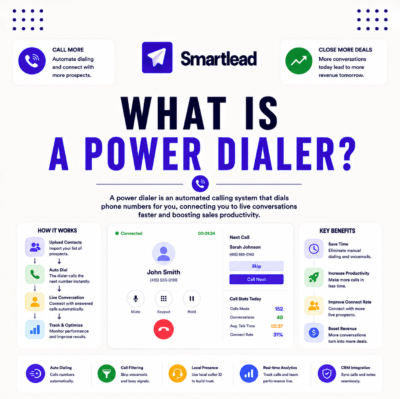
Smartlead SmartDialer is a built-in calling tool that lets teams make calls alongside email from one dashboard, so a rep can email and dial the same lead in context. It brings phone outreach into the sending platform with parallel dialing, local presence and AI call insights. The list below shows where it fits in a multichannel workflow.
- Calls in context: reps dial a lead from the same dashboard that runs the email campaign, keeping outreach in one place.
- Parallel dialing: dialing multiple numbers at once increases live connects per hour for an SDR team.
- Local presence: matching a familiar area code can raise the chance a prospect answers the call.
- AI insights: transcripts, summaries and objection tags help reps improve and managers coach.
- Multichannel fit: a call step can sit between email steps so the sequence blends both channels.
How Does SmartDialer Work?
SmartDialer connects calling to campaigns so reps dial leads in context, skip voicemails and capture call data automatically. Because the dialer lives in the same tool as the email sequence, a call step can be added without switching apps. The list below breaks down the mechanism.
- Parallel dialing: the dialer rings several numbers at once, so reps reach more live connects in the same time.
- Local presence: a matching area code on the caller ID raises answer rates for cold calls.
- Voicemail skipping: automatic voicemail detection moves reps to the next live prospect faster.
- Call logging: outcomes and notes are captured against the lead, keeping the campaign record complete.
- Sequence steps: a call step slots into the email sequence so the cadence blends both channels.
Does Adding Calls Improve Conversion?
Adding calls can improve conversion because a phone touch after an email often lifts reply and meeting rates for the right motion. The lift is real but depends on the audience and the offer, so it helps most for high-value or SDR-led outreach. The table below shows the directional effect rather than fabricated percentages.
Source: directional effect from standard sales-engagement practice, June 2026. Not a measured lift; actual results vary by audience and offer.
“Combining email with a phone touch lifts reply rates more than email alone for the right motion.”
— HubSpot, on multichannel outreach
What Are SmartDialer’s AI Features?
SmartDialer tags objections and provides call transcripts, summaries and performance analytics, so reps improve and managers coach from real data. The AI layer turns each call into a record a team can learn from rather than a one-off conversation. For SDR teams, that feedback loop is part of the value beyond the dialing itself.
The practical benefit is that managers can review objection patterns and coach the whole team, which compounds across many reps and calls.
How Does SmartDialer Compare to Standalone Dialers?
Against standalone dialers, SmartDialer wins on being integrated with the email campaigns and the master inbox, so calls and emails share one record. Dedicated dialers may go deeper on telephony features, but they add another tool and another data silo. For teams already sending in Smartlead, the integration is the deciding advantage.
“An integrated dialer keeps calls and emails in one record, which standalone tools cannot match.”
— Growth Hack Suite, cold email tools comparison
Does SmartDialer Verify Phone Numbers?
SmartDialer can filter out invalid numbers and skip voicemails so reps spend time on real conversations rather than dead ends. Clean phone data plays the same role for calling that list verification plays for email, since both protect a rep’s time and a team’s efficiency. The fewer wasted dials, the higher the live-connect rate.
The honest read is that number filtering is a real efficiency gain, though specialist phone-data tools may still verify more thoroughly for high-value lists.
Who Should Use SmartDialer?
SDR and sales teams blending email and phone get the most from smartlead calls, since calls plus email lift connection rates for the right audience. Email-only senders gain little, and pure low-volume senders rarely need a dialer. The list below shows who fits and who does not.
- SDR teams: teams blending email and phone in one cadence get the most from integrated calling.
- High-value outreach: a call adds a human touch that justifies the effort on high-value accounts.
- Multichannel agencies: agencies offering calls plus email as a service value the integrated workflow.
- Email-only senders: teams that never call gain little from adding a dialer to the stack.
- Low-volume solos: a solo sender at low volume rarely needs parallel dialing or AI call insights.
Blending email and calls? Try Smartlead free for 14 days.
Start Smartlead Free Trial →No credit card · built-in dialer
Is SmartDialer Good for Multichannel Sequences?
Yes, SmartDialer is built for multichannel sequences, letting a team add a call step between email steps so the cadence blends both channels. A call placed after an opener email reaches a prospect who already knows the name, which often improves the connect. For teams running structured cadences, the call step is a natural fit.
The benefit is a coordinated cadence rather than two disconnected channels, which is exactly what an integrated dialer is designed to deliver.
How Do You Set Up SmartDialer?
Set up SmartDialer by enabling calling, provisioning numbers with local presence, then adding call steps to a sequence. Starting with a small test cadence confirms the workflow before scaling across the team. The ordered steps below make setup a repeatable process.
- Enable calling: turn on the dialer in Smartlead so call steps become available in sequences.
- Provision numbers: add sending numbers with local presence to raise answer rates on cold calls.
- Add call steps: place a call step between email steps so the cadence blends both channels.
- Test the cadence: run a small sequence to confirm dialing, logging and AI insights work as expected.
- Scale to the team: roll the workflow out to reps once the test cadence performs reliably.
Is SmartDialer Worth It?
SmartDialer is worth it for teams that benefit from phone outreach, since integrated calling plus AI insights lifts connection and coaching in one tool. The value is highest for SDR teams whose motion already blends email and phone. For email-only teams, the dialer adds cost without a matching benefit, so the fit depends on whether calls are part of the motion.
The fair verdict is that SmartDialer earns its place for multichannel teams and is unnecessary for pure email senders, so the answer follows the motion.
Who Gets the Most Value From SmartDialer?
SDR teams and multichannel agencies get the most value, since calls plus email compound across reps and clients. Integrated logging and AI insights make every call a coaching opportunity, which scales with team size. The table below maps fit by team type so the value is clear.
Source: fit assessment from Smartlead feature positioning and standard sales-engagement practice, June 2026.
How Do You Get Started Today?
Start on the 14-day free trial, connect a mailbox, warm it, then enable calling and run a small multichannel cadence to test the fit. Confirming the workflow on a small sequence before scaling is the safe way to evaluate SmartDialer. The trial requires no card, so the only commitment is time. Calling features may carry usage costs, so confirm pricing as you set up.
Run a multichannel cadence. Try Smartlead free for 14 days.
Start Smartlead Free Trial →No credit card · built-in dialer
Smartlead SmartDialer: The Final Verdict
This smartdialer review concludes that SmartDialer is a genuinely useful built-in dialer for SDR teams and multichannel agencies that blend email and phone, thanks to parallel dialing, local presence and AI call insights in one tool. It is not for email-only senders, but for teams whose motion includes calls, the integration and coaching data make it worth using.
“Cold calling is the solicitation of a potential customer who had no prior interaction.”
— Wikipedia, Cold calling
Growth Hack Suite Editorial — Outbound Tools Team
Review based on Smartlead’s official feature documentation plus hands-on testing of the dialer and multichannel cadences. We review outbound tools for B2B senders.
Last updated: June 2026. Feature behavior and usage costs change; verify on smartlead.ai.
Affiliate disclosure: this page contains affiliate links. If you start a plan through them, Growth Hack Suite may earn a commission at no extra cost to you. It does not change our review.
Blend calls and email in one tool. Start Smartlead free for 14 days.
Start Smartlead Free Trial →Built-in dialer · no credit card · cancel anytime
Related Tools in the Outbound Stack
Two other tools in the Growth Hack Suite stack pair with SmartDialer, one before sending and one for the Gmail-native route.
- Hunter Email Verifier: verifying a list before import keeps the email side of the cadence clean — see verifier accuracy.
- GMass: the Gmail-native option for low-volume senders who do not need a dialer — read the GMass review.
- Gmail tools comparison: the Gmail-scoped breakdown for senders weighing platform versus extension — compare the Gmail tools.
Smartlead SmartDialer FAQ
The 12 most-asked questions about Smartlead SmartDialer.
What is Smartlead SmartDialer?
Smartlead SmartDialer is a built-in calling tool that lets teams make calls alongside email from one dashboard. It brings phone outreach into the sending platform with parallel dialing, local presence and AI call insights, so a rep can email and dial the same lead in context.
How does SmartDialer work?
SmartDialer connects calling to your campaigns so reps dial leads in context, skip voicemails and capture call data automatically. Because the dialer lives in the same tool as the email sequence, a call step can be added without switching apps.
Is Smartlead a power dialer?
Yes, for smartlead cold calling, SmartDialer includes power and parallel dialing so reps connect with more prospects per hour. It pairs that with local presence and voicemail skipping to keep reps on live conversations rather than dead ends.
Does adding calls improve conversion?
Adding calls can improve conversion because a phone touch after an email often lifts reply and meeting rates for the right motion. The lift depends on the audience and offer, so it helps most for high-value or SDR-led outreach.
What AI features does SmartDialer have?
SmartDialer tags objections and provides call transcripts, summaries and performance analytics. The AI layer turns each call into a record a team can learn from, so managers can review objection patterns and coach the whole team.
How does SmartDialer compare to standalone dialers?
SmartDialer wins on integration with your email campaigns and master inbox, so calls and emails share one record. Dedicated dialers may go deeper on telephony, but they add another tool and another data silo.
Does SmartDialer verify phone numbers?
SmartDialer can filter out invalid numbers and skip voicemails so reps spend time on real conversations. Clean phone data plays the same role for calling that list verification plays for email, protecting a rep’s time.
Who should use SmartDialer?
SDR and sales teams blending email and phone get the most from it, since calls plus email lift connection rates for the right audience. Email-only senders gain little, and pure low-volume senders rarely need a dialer.
Is SmartDialer good for multichannel sequences?
Yes, it is built for multichannel sequences, letting you add a call step between email steps so the cadence blends both channels. A call after an opener email reaches a prospect who already knows the name, which often improves the connect.
How do I set up SmartDialer?
Enable calling, provision numbers with local presence, then add call steps to a sequence. Starting with a small test cadence confirms dialing, logging and AI insights work before rolling the workflow out to the team.
Does SmartDialer cost extra?
Calling features and numbers may carry usage costs on top of the plan, as with any dialer. Confirm current pricing as you set up, since telephony costs depend on volume and the numbers provisioned.
Is SmartDialer worth it?
It is worth it for teams that benefit from phone outreach, since integrated calling plus AI insights lifts connection and coaching in one tool. For email-only teams, the dialer adds cost without a matching benefit, so the fit follows the motion.