Table of Contents
Kinsta for WooCommerce is a strong choice for a store that earns real revenue, with one cost every guide should state up front: the object caching a busy checkout needs most is a paid add-on, not part of the base plan. This guide covers what Kinsta genuinely does well for a store, what the complete cost looks like with that add-on, and when a cheaper host is the better call.
Last updated: August 2026. Features, plans and add-on prices were read from kinsta.com. This page carries affiliate links to Kinsta, and it counts the Redis add-on into the real store cost rather than hiding it.
Is Kinsta Good for WooCommerce Stores?
Yes for a store with genuine traffic, because isolated resources keep checkout responsive during a sale and Redis object caching handles the dynamic queries a store generates. The honest qualifier is that Redis is a 100-dollar per site monthly add-on, so the real store cost is the plan plus that.
Verdict: WooCommerce checkout cannot be cached like a blog post, so the feature that helps a store most is object caching. On Kinsta that is Redis, a 100-dollar per site monthly add-on rather than an included feature. Budget the plan plus 100 dollars for a serious store, and consider a cheaper host for a small or new one.
That single fact reframes the decision: Kinsta is excellent for a store that can justify the premium plus the add-on, and overkill for one that cannot yet.
“WordPress is a web content management system.”
: Wikipedia, WordPress
WooCommerce turns that system into a shop, and in doing so adds cart, account and checkout pages that behave completely differently from the rest of a site under load.
Why Does a Store Need Object Caching?
Because cart, account and checkout pages cannot be page-cached, so every request runs live database queries. Object caching stores the results of those queries in memory, which is the one optimisation that speeds up the pages a store depends on most.
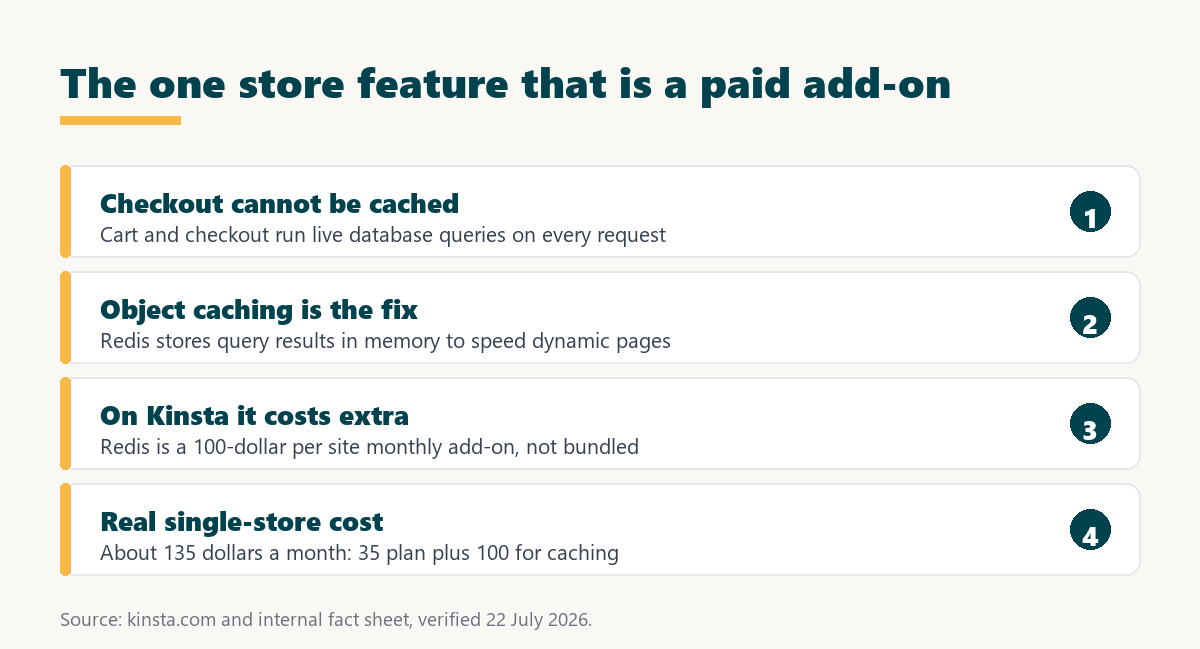
- Checkout bypasses page cache: Cart and checkout are unique per shopper, so they cannot be served from a cached file and run PHP and database queries on every request.
- Object caching stores query results: Redis keeps the results of repeated database queries in memory, so a store does not re-run the same lookups for every shopper.
- It is the store-specific optimisation: Page caching helps a blog, but only object caching meaningfully speeds the dynamic pages that make a store a store.
- On Kinsta it is an add-on: Redis costs 100 dollars per site each month, so a serious WooCommerce store should budget the plan plus that figure.
- Some hosts include it: A few competitors bundle object caching on the stack, which is a fair point of comparison when weighing the total cost.
The practical takeaway is that a WooCommerce store on Kinsta without Redis is missing its most useful optimisation, so the honest cost of the setup includes the add-on from day one.
What Does Kinsta Offer WooCommerce Stores?
Isolated resources, a fast infrastructure and the support a store needs during a sale, most of it included on every plan with object caching the notable exception. Together these keep a store stable when traffic arrives in bursts.
- Isolated resources: Each store runs in its own container on Google Cloud, so a neighbouring site cannot drain the capacity a checkout needs during a promotion.
- A bundled content delivery network: Cloudflare Enterprise and a network of more than 300 edge locations serve product images quickly worldwide at no extra cost.
- Free SSL and security: A wildcard SSL certificate and a managed firewall are included, which a store handling payment details needs by default.
- Staging for safe changes: One-click staging lets a store test a plugin or theme update before it reaches live checkout, where a break costs orders.
- Object caching, at a price: Redis is available as a 100-dollar per site monthly add-on, and it is the one store-critical feature that is not bundled.
The honest summary is that Kinsta bundles almost everything a store needs and charges separately for the single most store-specific optimisation, which is the figure to build into any comparison.
How Does Kinsta Handle Checkout Under Load?
Through isolated resources that a busy neighbour cannot touch, plus object caching when Redis is added, which together keep dynamic cart and account pages responsive during a flash sale. Isolation matters most here because a store’s worst moment is also its most valuable one.
Source: kinsta.com feature pages and kinsta.com/plans, verified August 2026. Redis object caching, the most store-relevant feature, is the one item on this list sold as a paid add-on rather than included.
In plain terms, isolation and the bundled security keep a store safe and stable, while the paid Redis add-on is what keeps its dynamic pages fast under real shopping traffic.
Why Do Stores Choose Kinsta?
Because faster checkout protects conversions and isolated resources protect the store during the exact peaks that make it money. For a store where a slow or crashed checkout means lost orders, that reliability is a revenue decision rather than a technical preference.
“a B2B site that loads in 1 second has a conversion rate 3x higher than a site that loads in 5 seconds”
: HubSpot, page load time and conversion rates
For a store that conversion relationship is direct: the seconds saved at checkout translate into completed orders, which is why the object caching that delivers them is worth its add-on cost on a store that earns.
Isolated resources that hold up during a sale
See Kinsta Plans →Each store in its own container, with Redis object caching available as a 100-dollar per site add-on.
How Does Kinsta Compare to Hosts That Bundle Caching?
On total cost the comparison changes once object caching is added, because some managed and cloud hosts include it on the stack. A store should compare Kinsta’s plan-plus-Redis figure against a host that bundles caching rather than the plan prices alone.
Kinsta still leads on isolation and support, so the question is whether those are worth the difference once the bundled-caching host’s lower total is on the table. For a high-value store the isolation usually justifies it; for a budget store the bundled option often wins on maths.
Compare the total cost, caching included
View Kinsta Pricing →Isolation and engineer support on every plan, with object caching added at 100 dollars per site.
Does Kinsta Support WooCommerce Plugins and Extensions?
Yes, Kinsta runs standard WordPress and WooCommerce with the plugins and extensions a store relies on, with one-click staging to test them safely. Because a store’s extensions touch checkout, testing an update before it reaches live customers is more important here than on a content site.
The staging environment lets a store trial a payment-gateway update or a new extension on a copy first, then push it live once verified. That workflow protects the exact path a shopper takes to pay, which is the part of a store least forgiving of a broken update.
How Does Kinsta Protect Store Data and Payments?
With a wildcard SSL certificate, a Cloudflare Enterprise firewall and DDoS protection, isolated containers and free malware removal, all included on every plan. For a store handling customer and payment data, that security baseline is part of the product rather than an upsell.
Backups protect against a bad update or a mistake, with retention that varies by tier, and isolation limits the blast radius of a problem to one store rather than a shared server. A store still handles its own PCI obligations through its payment gateway, but the hosting layer supports rather than complicates that.
How Fast and Reliable Is Kinsta for Stores?
Reliable enough for revenue-critical checkout, with isolated Google Cloud resources, edge caching and a published uptime commitment of up to 99.99 percent. For a store the value is that reliability holds during peaks rather than only on a quiet afternoon.
Raw speed on a cached product page is similar across quality hosts, so the store-specific reliability is really about the uncacheable pages under concurrency, which is where isolation and object caching earn their place. That is the honest measure for a store rather than a homepage load time.
What Are Kinsta’s Limits for Stores?
Real ones that a store owner should price in, because a store meets Kinsta’s metered and add-on costs faster than a content site does. None rules Kinsta out for a serious store, and together they can for a small one.
- Object caching is extra: Redis costs 100 dollars per site monthly, so the store-critical optimisation is a line item on top of the plan rather than a bundled feature.
- Visits are metered: Plans charge 50 cents per thousand visits over the allowance, and a store’s traffic spikes exactly when a promotion works, adding overage in the best month.
- An extreme overage rule: Published documentation allows immediate payment or access restriction once overage reaches the plan price or 500 dollars, which a store must understand before a large sale.
- No email hosting: Kinsta does not host email on any plan, so transactional and marketing email needs a separate provider, usually through a sending service.
- Premium entry price: At 35 dollars plus the Redis add-on, Kinsta is more than a small or new store on a tight budget needs to spend.
The pattern is that Kinsta rewards a store earning enough to value reliability and to absorb the add-on, and penalises one still finding its feet, which is the line to apply before committing.
What Does Kinsta Cost for a Store?
The plan price plus the Redis add-on, which is the number a store should compare rather than the headline plan alone. The table uses Kinsta’s real plan structure and adds the object-caching cost that a store actually needs.
Source: kinsta.com/plans, verified in August 2026. The with-Redis column adds one 100-dollar object-caching add-on per site; annual billing lowers the plan cost, and an earlier layout draft labelling these Starter, Pro and Business tiers with a 25,000-visit entry was inaccurate and is corrected here.
Put simply, a single-store owner budgeting honestly starts at about 135 dollars a month on Kinsta with object caching, which is the figure to weigh against a host that bundles it.
When Is Kinsta Not Right for a Store?
When the store is new, small, or on a tight margin, because the plan plus the Redis add-on is more than an early store needs. In that case a host that bundles object caching or a cheaper managed plan is the more sensible starting point.
- A brand-new store with little traffic: Before real orders arrive, the premium plus add-on is capacity the store is not using yet.
- A tight-margin store: When hosting cost matters against thin product margins, a host that includes object caching lowers the total meaningfully.
- Unpredictable seasonal spikes: Frequent overage on metered plans can favour an unmetered host that removes the per-visit charge during peak season.
- A single simple store: A store without heavy dynamic complexity may run well on a cheaper managed plan long before it needs Kinsta’s tier.
- Testing a concept: While validating whether a store works at all, a lower-cost host preserves budget for marketing and stock.
Naming these keeps the recommendation honest: Kinsta is genuinely strong for a store that earns, and premature for one that has not started earning yet.
Best for a store where checkout downtime costs orders
Compare Kinsta Tiers →Free store migration and a 30-day money-back guarantee, so you can test the fit.
How Do You Get Started With Kinsta for a Store?
Size a plan to the store’s traffic, add Redis object caching from the start, and use free migration to move the store including its products and orders. The migration is low-risk because Kinsta copies the store into a tested staging environment before switching, so nothing is rebuilt.
A 30-day money-back guarantee lets a store owner test real checkout performance with the add-on enabled before committing. Because a store’s orders and customer data are involved, verifying the migration on staging before the switch is worth the extra care.
“Tool spend is only defensible when the outcome it protects is measured, not assumed.”
: Growth Hack Suite, ROI on sales tools
For a store the outcome is a checkout that stays fast when a promotion lands, which is directly measurable in completed orders. Where that revenue justifies the plan plus the add-on, Kinsta earns its cost, and where it does not yet, a cheaper host is the honest choice.
Kinsta for WooCommerce: Frequently Asked Questions
The 12 most-asked questions about running a WooCommerce store on Kinsta.
Is Kinsta good for WooCommerce?
Yes for a store with real traffic, because isolated resources keep checkout stable during sales and Redis object caching speeds its dynamic pages. The honest caveat is that Redis is a 100-dollar per site monthly add-on, so budget the plan plus that.
Is object caching included on Kinsta?
No. Redis object caching is a 100-dollar per site monthly add-on rather than a bundled feature. For a WooCommerce store it is the most useful optimisation, so a serious store should treat it as part of the plan cost.
Why can checkout not be cached?
Because cart, account and checkout pages are unique to each shopper, so they cannot be served from a page cache and run live database queries. Object caching stores those query results in memory, which is why it is the optimisation that helps a store.
What does a Kinsta store really cost?
The plan plus the Redis add-on, so a single store starts around 135 dollars a month: 35 for the entry plan and 100 for object caching. That is the honest figure to compare against a host that bundles caching.
How does Kinsta keep checkout fast during a sale?
Through isolated resources that a neighbouring site cannot drain, plus object caching when Redis is enabled, which together keep dynamic pages responsive under a spike. Isolation matters most because a sale is a store’s highest-value, highest-load moment.
Does a store risk overage on Kinsta?
Yes. Visits are metered at 50 cents per thousand over the allowance, and a published rule allows access restriction once overage reaches the plan price or 500 dollars. A store should calculate expected sale traffic before a promotion.
Does Kinsta handle order emails?
Kinsta does not host email on any plan, so order and marketing emails should be sent through a dedicated transactional email service connected to the store. That is standard practice for reliable delivery regardless of host.
Can Kinsta migrate my store with orders?
Yes, with free migration that copies the store including products and orders into a tested staging copy before switching. Because customer data is involved, verifying the migration on staging before going live is worth the care.
Is Kinsta overkill for a small store?
Often, yes. For a new or low-traffic store, the plan plus the Redis add-on is more capacity than the store uses, and a host that bundles caching or a cheaper managed plan is a more sensible start until orders grow.
Which hosts include object caching for stores?
Some managed and cloud hosts include object caching on the stack rather than as an add-on, which lowers the total for a store. Comparing Kinsta’s plan-plus-Redis figure against a host that bundles it is the fair way to judge value.
Is Kinsta faster than a cheaper store host?
On a quiet store the difference is small, since every quality host caches product pages well. Under sale load, isolated resources and object caching hold up better than a crowded shared plan, which is where the value appears.
Should I add Redis from the start?
For a store with real traffic, yes, because object caching is the optimisation that keeps checkout fast, and adding it later leaves the store slower in the meantime. Factor the 100-dollar cost into the plan decision from day one.
About this guide
Written by the Growth Hack Suite editorial team. Kinsta’s features, plans and add-on prices were read from kinsta.com. This page carries affiliate links to Kinsta, so the honesty owed to a store owner is stated throughout: the object caching a WooCommerce store benefits from most, Redis, is a 100-dollar per site monthly add-on rather than an included feature, which makes the real single-store cost about 135 dollars a month; visits are metered with an extreme-overage rule that matters during a sale; and Kinsta does not host email, so transactional email needs a separate service.
It is genuinely strong for a store that earns, with isolated resources, a bundled content delivery network, free SSL and staging. No speed benchmark is used, because a store’s performance question is checkout under concurrency rather than a homepage load time, and the plan-tier table corrects an earlier draft that used inaccurate tier names and a 25,000-visit entry figure.