Table of Contents
To speed up WordPress on Kinsta, you enable full-page and edge caching, lean on the included Cloudflare CDN, optimise images, and add Redis object caching for dynamic sites. Kinsta already runs WordPress fast on premium Google Cloud servers, so these steps mostly polish the content and configuration side. This guide walks through each lever in order of impact and shows how to verify the gains.
Last updated: August 2026. Feature details were read from kinsta.com. This page carries affiliate links to Kinsta, and it is honest about one thing: Redis object caching is a paid add-on, not a default, and no fixed load-time number is quoted because none is independently verified here.
Can You Make WordPress Faster on Kinsta?
Yes, you can make WordPress faster on Kinsta, because it already runs on premium Google Cloud servers with caching and a CDN, and a few settings push speed further. Most sites are fast out of the box, and these steps optimise the rest for strong Core Web Vitals scores.
Verdict: Kinsta handles server-level speed on Google Cloud, so speeding up WordPress there is mostly enabling full-page and edge caching, using the included CDN, optimising images, and adding Redis for dynamic sites. Two honest points: caching and the CDN deliver most of the gain, and Redis object caching is a paid add-on rather than a default feature.
The clearest way to work through it is to see what actually affects speed, then apply the levers in order of impact, which the sections below set out.
“WordPress is a web content management system.”
— Wikipedia, WordPress
These steps apply to a standard WordPress site, and because Kinsta manages the server, most of the tuning happens in the content and settings rather than the infrastructure.
What Affects WordPress Speed on Kinsta?
WordPress speed on Kinsta depends on caching, image sizes, plugin count, theme quality and object caching for dynamic sites. Kinsta handles server-level speed, so the remaining gains come from optimising content and configuration, which these levers address in order of impact.
- Caching: Full-page and edge caching serve ready-made pages, which is the single biggest speed factor once the server is fast.
- Image weight: Large, unoptimised images are the most common content-side cause of slow pages and poor loading scores.
- Plugin count: Heavy or excessive plugins add processing to every request, so the number and quality of plugins matter.
- Theme quality: A bloated theme or page builder adds markup and scripts that slow rendering regardless of the host.
- Object caching: For dynamic sites, caching database queries with Redis speeds up pages that full-page caching cannot cover.
The honest point is that Kinsta removes the server bottleneck, so the ranked list above is where a site owner’s own speed work actually lands.
How to Speed Up WordPress on Kinsta Step by Step
To speed up WordPress on Kinsta, enable full-page and edge caching in MyKinsta, add Redis object caching for dynamic sites, optimise and lazy-load images, and remove unused plugins. Then test with a speed tool and confirm Core Web Vitals improved. Each step targets a specific bottleneck.
- Enable caching: Turn on full-page and edge caching in MyKinsta so most visitors get a cached page.
- Use the CDN: Confirm the included Cloudflare CDN is serving static assets from locations near visitors.
- Add object caching if dynamic: For a store or membership site, add Redis object caching, a paid add-on, to cache database queries.
- Optimise images: Compress images, serve modern formats and enable lazy loading to cut page weight.
- Clean up plugins: Remove or replace heavy plugins, using Kinsta APM to find the slowest ones.
The honest summary is that the first two steps deliver most of the gain, and the rest polish the result, so the order matters as much as the list.
How to Use Kinsta Caching and the CDN
Enable Kinsta’s full-page cache and edge caching in MyKinsta so pages serve from cache and from the Cloudflare CDN’s hundreds of edge locations. This alone delivers most of the speed gain, since a cached page loads without hitting PHP or the database.
The practical effect is that anonymous visitors receive a ready-made page from a nearby edge location, so the origin server does little work, which is why caching is the highest-impact lever on an already fast host.
How to Optimise Images and Assets
Optimise images by compressing them, serving modern formats like WebP, and enabling lazy loading so off-screen images load only when needed. Combined with the CDN, this cuts page weight and improves loading, which is often the biggest content-side speed factor.
- Compress images: Reducing file size before upload, or with optimisation, cuts the heaviest part of most pages.
- Serve modern formats: Delivering WebP or similar formats shrinks images further than older JPEG or PNG files.
- Enable lazy loading: Loading off-screen images only when scrolled into view speeds the initial render.
- Right-size images: Uploading images at the dimensions they display avoids sending oversized files the browser must scale.
- Lean on the CDN: The Cloudflare CDN serves optimised assets from the edge, so a nearby visitor waits less for images.
The honest qualifier is that image work pays back most on media-heavy pages, and less on a light, text-first site where images are few.
How to Add Redis Object Caching
For dynamic sites like WooCommerce or membership sites, add Redis object caching on Kinsta to cache database queries that page caching cannot. It keeps cart, account and search pages fast, which matters for stores where dynamic pages dominate. One honest note: Redis is a paid add-on, at 100 dollars per site a month, not a default feature.
The practical guidance is to add Redis only when a site is genuinely dynamic, since a mostly cached, content site sees little benefit from it and does not need the extra cost.
WordPress Speed Levers on Kinsta
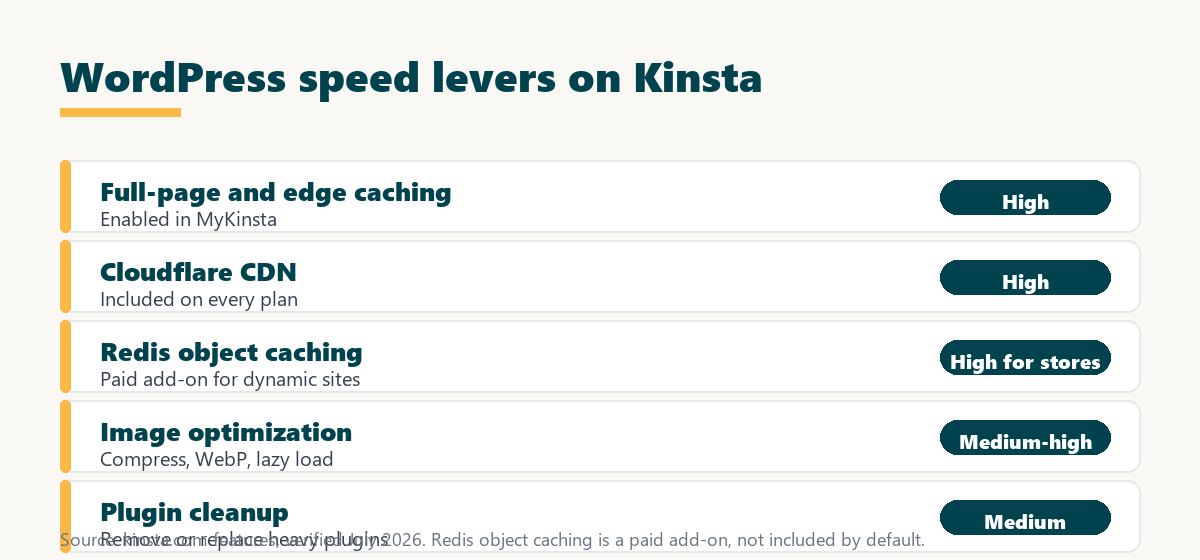
The speed levers group into a short list, ranked by how much each typically moves load time on an already fast host. The table shows what to do and the impact of each.
Source: kinsta.com features and kinsta.com/plans, verified August 2026. Impact is a general ranking; actual gains vary by site. Redis object caching is a paid add-on.
In plain terms, caching and the CDN deliver most of the speed, image optimisation and object caching handle the rest, so enable those first for the biggest gains.
How to Verify Your Speed Improved
Verify improvements by running before-and-after tests in a tool like PageSpeed Insights or GTmetrix, checking that load time dropped and Core Web Vitals moved into the good range. Kinsta’s built-in APM also helps confirm no slow plugin or query remains after the changes.
“The first five seconds of page-load time have the highest impact on conversion rates.”
— HubSpot, page load time and conversion rates
Because those first seconds drive conversions, the most meaningful test is a real page-load comparison before and after, which shows whether the speed work actually improved the experience visitors get.
A fast WordPress base to optimise from
See Kinsta Plans →Premium servers, caching and a CDN, with a 30-day money-back guarantee.
How Fast Can an Optimised Kinsta Site Be?
On Kinsta, a properly optimised WordPress site serves cached pages quickly with strong Core Web Vitals, a clear gain over shared hosting. The premium servers and caching do most of the work, so the optimisation mainly polishes the result at no extra cost beyond any add-ons.
Source: general performance stages on Kinsta, August 2026. No fixed load-time figure is quoted because none is independently verified here; results vary by site.
Put simply, moving to Kinsta gives an immediate jump, and enabling caching, images and object caching pushes a site toward strong Core Web Vitals scores.
What Slows WordPress Down Even on Fast Hosting?
Even on fast hosting, heavy page builders, too many plugins, unoptimised images and external scripts slow WordPress. Kinsta removes server-level bottlenecks, so addressing these content and configuration issues is where the remaining speed gains come from.
- Heavy page builders: Some builders add large amounts of markup and scripts that slow rendering regardless of the host.
- Too many plugins: Each active plugin can add work per request, so a long plugin list compounds into slower pages.
- Unoptimised images: Large images remain the most common single cause of slow loading on an otherwise fast site.
- External scripts: Third-party analytics, ads and embeds load from other servers and can delay a page beyond the host’s control.
- Database bloat: Old revisions, transients and spam grow the database, so cleanup and object caching keep queries fast.
The honest takeaway is that once Kinsta handles the server, the biggest remaining wins are trimming the page builder, the plugin list and the images.
Does a Faster Site Help SEO?
Yes, a faster WordPress site can help SEO, because page speed and Core Web Vitals are ranking signals, so improving them supports search visibility. Faster pages also lower bounce rates and lift conversions, so the speed work pays back beyond rankings.
The honest framing is that speed is one ranking input among many, so the levers here improve the performance side while content and relevance still drive most of the ranking outcome.
Speed that supports Core Web Vitals and SEO
View Kinsta Pricing →Caching, a CDN and premium servers included from the entry tier upward.
Is Kinsta Worth It for a Fast WordPress Site?
Kinsta is worth it for a fast WordPress site when speed protects revenue, SEO or user experience, since its premium servers and caching deliver strong performance with little effort. For a tiny hobby site, a cheaper host may suffice until speed starts to matter to results.
“A tool is only worth its premium when the hours or revenue it protects exceed the invoice.”
— Growth Hack Suite, on tool ROI
For speed the premium is worth it once faster pages protect enough revenue or search traffic to exceed the plan cost, which is where a revenue site benefits most. Teams weighing platform dependence can read our note on SaaS vendor lock-in before committing.
How Do You Get Started Optimising on Kinsta?
To start, enable caching and the CDN in MyKinsta, add object caching if the site is dynamic, and optimise the images. Run a speed test to confirm the gains, and use the 30-day money-back guarantee to benchmark against the old host before committing.
The honest summary is that the highest-impact moves take minutes in MyKinsta, so most of the speed gain comes quickly, with image and plugin work as the ongoing polish.
Try a fast WordPress host risk-free
Try Kinsta Risk-Free →Free migration and a 30-day money-back guarantee.
Speed Up WordPress on Kinsta: Frequently Asked Questions
The 12 most-asked questions about speeding up WordPress on Kinsta.
How can I speed up my WordPress site?
Speed up WordPress by using fast hosting, enabling caching and a CDN, optimising images, limiting heavy plugins and keeping the database clean, all of which reduce how long pages take to load.
Does hosting affect WordPress speed the most?
Hosting is often the biggest factor, because a slow or oversold server delays every request; moving to fast infrastructure like Kinsta’s Google Cloud machines improves speed before any plugin does.
How does caching speed up WordPress?
Caching stores rendered pages so the server does not rebuild them on every visit, and Kinsta’s server-level and edge caching serve most visitors a ready-made page almost instantly.
Do images slow down WordPress?
Yes, large unoptimised images are a common cause of slow pages, so compressing them and serving modern formats like WebP, which the CDN can help deliver, speeds up loading.
Can too many plugins slow WordPress down?
Yes, poorly coded or excessive plugins add processing to every request, so auditing and removing heavy plugins, and using Kinsta APM to find the slow ones, improves speed.
Does a CDN make WordPress faster?
Yes, a CDN serves static files from locations near each visitor, cutting distance and load time, which is why Kinsta includes a Cloudflare-powered CDN on every plan.
How does PHP version affect WordPress speed?
Newer PHP versions run code faster, so keeping WordPress on a current PHP release, which Kinsta lets you switch with one click, can noticeably improve page generation time.
Should I optimise the WordPress database for speed?
Yes, clearing post revisions, transients and spam that bloat the database slows queries, so regular cleanup, plus object caching like Kinsta supports, keeps data retrieval fast.
How do I measure my WordPress site speed?
Use tools like PageSpeed Insights or GTmetrix to measure load time and Core Web Vitals, and use Kinsta APM to see which plugins or queries consume the most time.
Does edge caching help WordPress speed globally?
Yes, edge caching stores whole pages at global locations, so distant visitors get a nearby cached copy, which Kinsta provides to speed up worldwide audiences.
Will faster WordPress improve my SEO?
Yes, because page speed and Core Web Vitals are ranking signals, a faster WordPress site can improve search visibility while also lowering bounce rates and lifting conversions.
What is the fastest way to make WordPress faster?
The highest-impact move is switching to fast managed hosting with built-in caching and a CDN, like Kinsta, since that improves every page before you touch plugins or images.
About this guide
Written by the Growth Hack Suite editorial team. Feature details were read from kinsta.com. This page carries affiliate links to Kinsta, so the honesty owed to a reader is stated plainly: Kinsta runs WordPress on premium Google Cloud servers with server-level and edge caching and a Cloudflare CDN across hundreds of edge locations, so the biggest speed levers, caching and the CDN, are enabled in MyKinsta. Redis object caching, useful for dynamic and store sites, is a paid add-on at 100 dollars per site a month rather than a default. No fixed load-time figure is quoted, because none is independently verified here, and real results vary by site, theme and plugins.