Table of Contents
Kinsta Edge Caching serves your cached WordPress pages from Cloudflare’s edge network worldwide, so a visitor loads a page from a nearby location instead of your origin server. The important thing to understand is what it caches and what it does not, because edge caching speeds up your cacheable pages and leaves dynamic ones to the origin.
Last updated: August 2026. Feature details were read from kinsta.com. This page carries affiliate links to Kinsta, and it is precise about which pages edge caching accelerates and which it cannot.
What Is Kinsta Edge Caching?
It is a feature that stores your cached full HTML pages at Cloudflare’s edge locations, close to each visitor, rather than only serving them from your origin server. Because Kinsta includes Cloudflare Enterprise integration across more than 300 edge locations, a cached page can be delivered from the edge nearest the visitor.
Verdict: Edge caching serves cached pages from Cloudflare’s edge across more than 300 edge locations, which speeds up static and cacheable content for a global audience. It is included on every plan. The honest limit is that dynamic pages, cart, checkout and anything personalised, cannot be edge-cached and still come from the origin, so a store gains less from it than a content site.
The distinction that matters is between a full-page edge cache and a basic content delivery network, because they are not the same thing and the difference is where the real speed comes from.
“WordPress is a web content management system.”
: Wikipedia, WordPress
Most of a content site is exactly that, cacheable pages, which is why edge caching helps a blog or brochure site so much and a dynamic application rather less.
How Is Edge Caching Different From a Basic CDN?
A basic content delivery network caches only static assets like images and stylesheets at the edge, while edge caching caches the full HTML page there too. That difference means the whole page can come from the edge, not just the pictures on it.
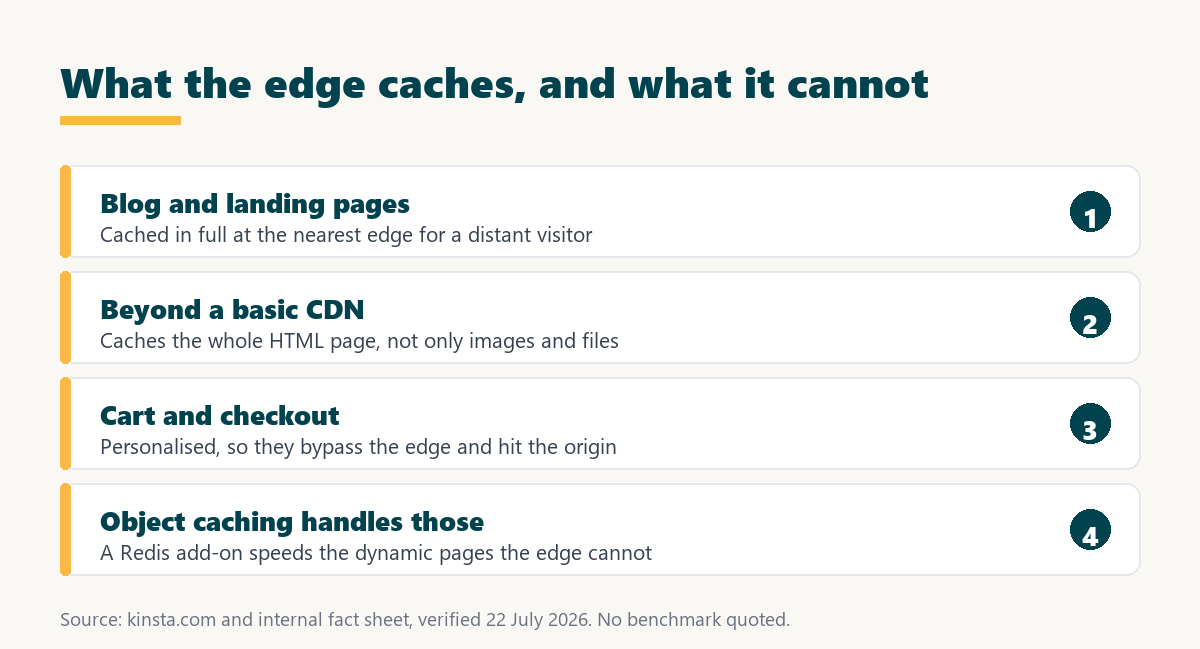
- Basic CDN caches assets: Images, CSS and JavaScript are served from the edge, but the HTML page itself still comes from the origin server.
- Edge caching caches the page: The full HTML of a cacheable page is stored at the edge, so the whole response comes from a nearby location.
- Time to first byte improves: When the page comes from the edge rather than the origin, the first byte arrives sooner for a distant visitor.
- The origin does less work: A page served from the edge does not run PHP or query the database at the origin, which reduces load there.
- Both work together: Edge caching handles the page and the content delivery network handles the assets, so a cacheable page benefits from both.
The practical upshot is that edge caching is a step beyond a plain content delivery network, and it is the full-page part that makes a distant visitor’s whole experience faster rather than just their images.
How Does Kinsta’s Edge Caching Work?
By storing a cached copy of each cacheable page at Cloudflare’s edge locations, so a visitor’s request is answered by the nearest edge rather than travelling to the origin. When the page changes, Kinsta clears the edge cache so visitors see the update.
The process is automatic: a customer does not configure the edge, and cache clearing on an update is handled by the platform. There can be a brief moment while a change propagates across the network, which is normal for any distributed cache and rarely noticeable for a content site.
What Are the Benefits of Edge Caching?
Faster load times for a global audience, a lower time to first byte, and reduced load on the origin server. These are genuine for cacheable content, and they are strongest for a site with visitors far from its origin region.
- Global speed: A visitor anywhere loads a cached page from a nearby edge, so distance to the origin stops being the bottleneck.
- Lower time to first byte: The first byte arrives sooner when the page comes from the edge, which improves a measurable part of page speed.
- Less origin load: Serving pages from the edge means the origin runs less PHP and fewer queries, freeing capacity for the pages that must come from it.
- Better under traffic spikes: The edge absorbs demand for cacheable pages, so a surge to a popular article does not overwhelm the origin.
- Included, not extra: Edge caching comes with the plan through Cloudflare Enterprise integration, rather than being a paid add-on.
The honest qualifier is that every benefit applies to cacheable pages, so a content site captures most of it and a dynamic site captures the part that its cacheable pages represent.
What Can Edge Caching Not Speed Up?
Dynamic and personalised pages, because they are unique to each visitor and cannot be served from a shared cache. Cart, checkout, account and logged-in pages bypass the edge cache and come from the origin, which is the single most important limit to understand.
Source: kinsta.com and kinsta.com/plans, verified August 2026. Personalised and transactional pages are unique per visitor, so they cannot be served from a shared edge cache and come from the origin instead.
This is why a content-heavy blog gains the most from edge caching and a store gains it only on its cacheable pages, with the checkout still depending on the origin and object caching.
Who Benefits Most From Edge Caching?
Content sites with a global audience, because most of their pages are cacheable and their visitors are far from the origin. A blog, news site or documentation site sees a distant reader’s whole page come from a nearby edge, which is exactly what edge caching is for.
“a B2B site that loads in 1 second has a conversion rate 3x higher than a site that loads in 5 seconds”
: HubSpot, page load time and conversion rates
For a content site serving a worldwide audience, that speed gain reaches every distant reader on every cacheable page, which is the broadest possible application of the conversion relationship above.
Full-page edge caching, included on every plan
See Kinsta Plans →Cloudflare Enterprise edge caching across more than 300 edge locations, at no extra cost.
How Does Edge Caching Affect Time to First Byte?
It lowers time to first byte on cacheable pages for distant visitors, because the first byte comes from a nearby edge rather than a faraway origin. Time to first byte is a measurable part of page speed, and reducing the distance the first byte travels is exactly what edge caching does.
The honest scope is that this improvement applies to cacheable pages served from the edge, not to dynamic pages that still originate at the server. So a content site sees a lower time to first byte broadly, while a dynamic page keeps the origin’s time to first byte regardless of edge caching.
Does Edge Caching Help SEO?
Indirectly, because faster pages and a lower time to first byte support Core Web Vitals, which are a Google ranking signal. Edge caching improves the server-side speed of cacheable pages, which is one input to those scores rather than the whole picture.
The honest framing is the same as for any speed feature: edge caching helps the part of Core Web Vitals that hosting controls, and a heavy theme, large images or render-blocking scripts still affect the rest. It is a genuine contributor to SEO speed signals, not a complete SEO solution on its own.
Faster cacheable pages for a global audience
View Kinsta Plans →Full-page edge caching included, so distant visitors load cacheable pages from a nearby location.
How Does It Compare to a Typical Host?
A typical budget host serves pages from the origin and may offer a basic content delivery network for assets, while Kinsta caches the full page at the edge and includes it. The difference is full-page edge caching being bundled rather than a page cache the customer configures.
Source: kinsta.com and kinsta.com/plans, verified August 2026. No speed benchmark is quoted because none is in the verified fact sheet; the comparison is on what is cached and where, not on a measured time.
Read across, the advantage is full-page edge caching included and managed, while dynamic pages behave the same on any host because no host can cache a page that is unique per visitor.
Are There Limits to Kinsta Edge Caching?
Yes, beyond the dynamic-page limit, a few practical ones worth knowing. None reduces its value for a content site, and together they define what edge caching realistically does.
- Dynamic pages excluded: Cart, checkout, account and personalised pages cannot be edge-cached, which is the main boundary of the feature.
- Cache clears on update: When a page changes, the edge cache clears and rebuilds, so the very first visitor after a change may hit the origin briefly.
- Platform-tied: The edge caching setup is part of Kinsta’s managed platform rather than a portable configuration that transfers elsewhere.
- Not a fix for a heavy origin: A slow, unoptimised origin still shows on uncacheable pages, so edge caching complements rather than replaces origin performance.
- Some control is abstracted: Fine-grained cache rules are managed by Kinsta, so a customer wanting deep custom caching control has less of it than on a self-run setup.
The pattern is that edge caching is excellent at what it does, serving cacheable pages from the edge, and is honestly limited to that, with dynamic pages and origin performance still mattering.
How Does Edge Caching Work With Object Caching?
They cover opposite halves of the problem: edge caching speeds the pages that can be cached, and object caching speeds the dynamic pages that cannot. A site with both gets fast cacheable pages from the edge and faster dynamic pages from the origin.
For a store this pairing matters, because edge caching handles the product and content pages while object caching, a Redis add-on at 100 dollars per site, speeds the cart and checkout that edge caching cannot touch. A content site rarely needs object caching, so edge caching alone does most of the work there.
Edge caching for pages, object caching for the rest
Compare Kinsta Tiers →Edge caching is included; object caching for dynamic pages is a Redis add-on at 100 dollars per site.
Does Edge Caching Reach a Worldwide Audience?
Yes, across more than 300 edge locations, so a cacheable page can be served from a location near almost any visitor. That global spread is the reason edge caching matters most for a site whose audience is distributed rather than local to the origin region.
The honest nuance is that a site with a purely local audience close to its origin region sees a smaller edge benefit, because the page already has a short distance to travel. The wider and more distant the audience, the more the edge network does, which is why a global content site is the ideal case.
How Do You Use Kinsta Edge Caching?
You do not have to set it up, because it is enabled and managed by Kinsta, so a site benefits from it automatically. The useful things a customer can do are keep cacheable pages actually cacheable and understand which pages come from the origin.
- Leave it on: Edge caching is active by default, so the main step is not disabling it or interfering with it through conflicting plugins.
- Avoid cache-busting plugins: Plugins that mark pages as uncacheable stop those pages benefiting, so use them only where genuinely needed.
- Keep personalised elements minimal: Adding per-visitor content to an otherwise cacheable page can push it to the origin, so reserve that for pages that need it.
- Understand the exclusions: Expect cart, checkout and account pages to come from the origin, and judge store performance on those with object caching in mind.
- Test from a distance: Checking a page from a location far from the origin region reveals the edge benefit that a nearby test would hide.
The honest summary is that edge caching is a set-and-forget benefit for a content site, and the only real user job is not accidentally making cacheable pages uncacheable.
“Tool spend is only defensible when the outcome it protects is measured, not assumed.”
: Growth Hack Suite, ROI on sales tools
For edge caching the measurable outcome is a faster page for a distant visitor, which a test from far away confirms. Where a site serves cacheable content to a global audience, that benefit is broad and included, and where a site is mostly dynamic, the gain is real but narrower.
Kinsta Edge Caching: Frequently Asked Questions
The 12 most-asked questions about Kinsta’s edge caching.
What is Kinsta edge caching?
A feature that stores your cached full HTML pages at Cloudflare’s edge across more than 300 edge locations, so a visitor loads a page from a nearby location instead of your origin. It is included on every plan.
How is edge caching different from a CDN?
A basic content delivery network caches only assets like images at the edge, while edge caching caches the full HTML page there. That means the whole page comes from the edge, not just the pictures, which is the bigger speed gain.
Does edge caching speed up my checkout?
No. Cart, checkout and account pages are unique to each visitor, so they cannot be edge-cached and come from the origin. A store speeds those with object caching instead, while edge caching handles its product and content pages.
Is edge caching included or an add-on?
Included on every plan through Kinsta’s Cloudflare Enterprise integration, at no extra cost. Object caching for dynamic pages is the separate paid add-on, but edge caching for cacheable pages is part of the plan.
Who benefits most from edge caching?
Content sites with a global audience, since most of their pages are cacheable and their visitors are far from the origin. A blog, news or documentation site gains the most, and a dynamic site gains on its cacheable pages.
Do I need to set up edge caching?
No. It is enabled and managed by Kinsta, so a site benefits automatically. The main thing to avoid is plugins that mark pages as uncacheable, which would stop those pages using the edge cache.
What happens when I update a page?
Kinsta clears the edge cache for that page so visitors see the change, and the first visitor after the update may briefly hit the origin while the edge rebuilds. This is normal for any distributed cache and rarely noticeable.
Does edge caching replace object caching?
No, they cover opposite halves. Edge caching speeds cacheable pages, and object caching speeds the dynamic pages edge caching cannot, so a store benefits from both while a content site rarely needs object caching.
Will edge caching fix a slow site?
Only the part caused by distance to the origin on cacheable pages. A heavy theme, large images or a slow origin still show on uncacheable pages, so edge caching complements rather than replaces good origin optimisation.
Can I control the edge cache rules myself?
The fine-grained rules are managed by Kinsta, so a customer has less deep control than on a self-run setup. For most sites the managed defaults are the point, and a team needing custom caching logic would weigh that limit.
How do I confirm edge caching is working?
Test a cacheable page from a location far from your origin region, since a nearby test hides the benefit. Response headers can indicate a cache hit, and a distant test shows the faster first byte that edge caching delivers.
Is edge caching portable to another host?
The site is portable, but the edge caching setup is part of Kinsta’s managed platform, not a configuration you take with you. Another host would have its own caching, so moving means adopting that host’s approach rather than transferring Kinsta’s.
About this guide
Written by the Growth Hack Suite editorial team. Feature details were read from kinsta.com. This page carries affiliate links to Kinsta, so the honesty owed to a reader is stated throughout: edge caching serves cached full HTML pages from Cloudflare’s edge across more than 300 edge locations and is included on every plan, but it cannot cache dynamic or personalised pages, so cart, checkout and account pages still come from the origin and a store gains from it only on its cacheable pages.
Object caching, a Redis add-on at 100 dollars per site, is the separate feature that speeds those dynamic pages. No speed benchmark is quoted, because none is in the verified fact sheet and the layout’s test figures could not be confirmed; the comparison is on what is cached and where, not on a measured time.