Table of Contents
The Kinsta free trial does not exist in the traditional sense, but you can still try Kinsta risk-free three ways: a 30-day money-back guarantee, a first-month-free promotion on select plans, and the free DevKinsta local tool. This guide explains what each covers, the conditions to know, and how to benchmark Kinsta on a real site before committing.
Last updated: August 2026. Trial and guarantee details were read from kinsta.com. This page carries affiliate links to Kinsta, and it is candid that there is no free trial, only a refund guarantee and a limited promotion.
Does Kinsta Have a Free Trial?
Kinsta does not offer a traditional free trial. Instead it provides a 30-day money-back guarantee that works similarly: you sign up, use the service fully, and can request a full refund of hosting fees within 30 days if it is not right, so the platform can be tested risk-free.
Verdict: There is no Kinsta free trial, but three routes let you try it with little or no risk: a 30-day money-back guarantee on hosting fees, a first-month-free promotion on a few plans, and the free DevKinsta local tool. Two honest points: the homepage “Try for Free” button is the first-month-free promo, not a trial, and the refund excludes dedicated-server, one-time and overage fees.
The clearest way to understand the options is to see the three routes side by side, which the sections below set out with their exact conditions.
“WordPress is a web content management system.”
— Wikipedia, WordPress
Testing that content management system on Kinsta means running a real site on real infrastructure, which is exactly why Kinsta uses a refund guarantee rather than a limited trial account.
What Is the “Try for Free” Offer, Really?
The “Try for Free” button on Kinsta’s homepage is a first-month-free promotion on select plans, not a free trial. It applies to the Single 20GB, Single 35k and WP 2 plans, so a new customer on one of those gets the first month at no cost rather than an open-ended trial.
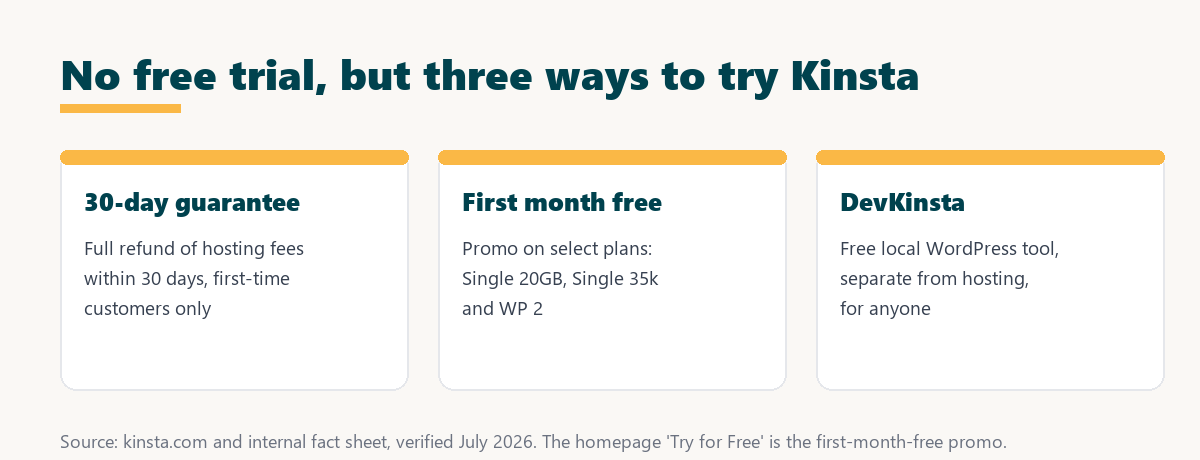
The honest clarification matters because “Try for Free” reads like a trial: it is a promotion limited to those three plans, and for a plan with the first month free the 30-day refund window counts from the renewal date rather than signup.
How Does the 30-Day Money-Back Guarantee Work?
Kinsta’s 30-day money-back guarantee lets a first-time customer use any hosting plan fully and request a complete refund of hosting fees within the first 30 days if unsatisfied. It effectively serves as a risk-free trial period for testing the platform on a real site.
Because you migrate a real site and run it on genuine Google Cloud infrastructure, the guarantee gives a more accurate picture than a demo would, and switching plans within the window does not reset the 30 days.
What Are the Guarantee’s Conditions and Exclusions?
The guarantee has clear conditions worth knowing before signing up: it applies to first-time customers and refunds hosting fees, but it excludes certain charges. Knowing these keeps expectations accurate.
- First-time customers only: The 30-day refund applies to a first-time Kinsta customer, not to returning accounts.
- Hosting fees, not extras: The refund covers hosting plan fees but excludes dedicated-server fees, one-time fees and overage charges.
- Plan changes do not reset it: Switching plans within the first 30 days does not restart the guarantee window.
- Counts from renewal on promos: For a plan with the first month free, the 30-day window is measured from the renewal date, not signup.
- No long-term contract: There is no minimum commitment, so leaving after the window is standard cancellation, not a penalty.
The honest takeaway is that the guarantee is genuinely useful for testing, provided you note that it is first-time-only and does not refund dedicated-server, one-time or overage costs.
Free Trial vs Money-Back Guarantee
A money-back guarantee and a free trial reach the same goal differently: the guarantee tests the full paid service and refunds it, while a trial gives limited access without paying. For evaluating real performance, testing the full service is often more useful.
Source: kinsta.com and kinsta.com/plans, verified August 2026. The guarantee tests the real service; the main difference from a trial is paying upfront and being refunded.
In plain terms, Kinsta’s guarantee lets you test the real service on a live site and get refunded, which is often more useful than a limited free trial.
How Do You Test Kinsta Without a Free Trial?
To test Kinsta without a free trial, sign up for a plan, use the free expert migration to move a real site, and benchmark its speed and reliability for up to 30 days. If it does not deliver, request a refund within the window, so the test costs nothing.
- Sign up for a plan: Choose a tier that fits the site, ideally one of the first-month-free plans to lower the initial cost.
- Migrate a real site: Use the free expert migration so the evaluation reflects an actual site, not a demo.
- Benchmark speed and uptime: Run before-and-after speed tests and watch uptime to compare against the current host.
- Test the support: Raise a real question in chat to judge the engineer support reviews praise.
- Decide within 30 days: Keep the site or request a refund before the window closes, so the test stays risk-free.
The honest summary is that this routine gives a full, real-world evaluation, which is exactly what the guarantee is designed to enable.
How Do You Benchmark Kinsta During the Window?
To benchmark Kinsta during the 30 days, migrate a real site, run speed tests before and after, monitor uptime, and try support with a question. Comparing these results against the current host shows clearly whether Kinsta’s performance justifies keeping it.
“The first five seconds of page-load time have the highest impact on conversion rates.”
— HubSpot, page load time and conversion rates
Because those first seconds drive conversions, the most useful benchmark is a real page-load comparison, which the guarantee lets you run on an actual site before deciding whether to keep Kinsta.
Test Kinsta on a real site, refunded if it is not right
See Kinsta Plans →30-day money-back guarantee, plus free migration.
What Does the Guarantee Cover?
The guarantee refunds hosting plan fees within 30 days, while a few charges sit outside it. The table lists what is and is not covered so there are no surprises at refund time.
Source: kinsta.com money-back-guarantee docs and kinsta.com/plans, verified August 2026. The refund is and covers hosting fees only.
Put simply, the guarantee refunds hosting fees within 30 days, so testing Kinsta on a real site costs nothing if you cancel in time, aside from any excluded add-on charges.
Hosting fees refunded within 30 days
View Kinsta Pricing →First-time customers can test the full service and get a refund if it is not the fit.
Can You Keep Your Old Host During the Test?
Yes, you keep the current host active while testing Kinsta, because migration copies the site to Kinsta first and the domain only switches when ready. This means the live site stays online throughout, and reverting is easy if a refund is requested.
The practical benefit is that there is no gap in service during the evaluation: the site runs on both until DNS points to Kinsta, so the test carries no downtime risk on top of the refund safety net.
Can You See Kinsta Plans With DevKinsta?
Yes, DevKinsta is a free local WordPress development tool anyone can download to build sites on their own computer, without paying for hosting. It is separate from the hosting platform, so it does not replace testing a live site on Kinsta, but it is a genuinely free way to explore the workflow.
The honest distinction is that DevKinsta lets you build and test locally for free, while evaluating real hosting performance still needs a live site under the 30-day guarantee, since the two serve different parts of the decision.
Is the Guarantee as Good as a Free Trial?
For most purposes the 30-day guarantee is as good as or better than a free trial, because it tests the full paid service on a real site and refunds it if unsatisfied. The only difference is paying upfront and being refunded rather than not paying at all.
“A tool is only worth its premium when the hours or revenue it protects exceed the invoice.”
— Growth Hack Suite, on tool ROI
The guarantee lets you confirm that value on a real site before the money is committed for good, since the refund removes the risk of the upfront payment. Teams weighing platform dependence can read our note on SaaS vendor lock-in before migrating.
How Do You Request a Kinsta Refund?
You request a Kinsta refund by contacting support within 30 days of the initial purchase and asking to cancel the hosting plan under the money-back guarantee. As a first-time customer, the hosting fees are returned, so acting before the window closes is the key step.
The honest reminder is to note the exact date the window ends, since the 30 days do not reset if a plan is changed, and for a first-month-free plan the clock runs from the renewal date rather than signup.
Should You Try Kinsta With the Guarantee?
You should try Kinsta with the guarantee if you are curious whether its speed and support fit a site, because the 30-day refund makes testing risk-free for a first-time customer. Benchmarking a real site is the surest way to decide, and you lose nothing on hosting fees if it is not the right fit.
The way to proceed is to sign up, migrate a real site, benchmark speed and support, and decide within the window, noting that the refund covers hosting fees and not dedicated-server, one-time or overage charges.
Try Kinsta risk-free for 30 days
Try Kinsta Risk-Free →Free migration and a 30-day money-back guarantee.
Kinsta Free Trial: Frequently Asked Questions
The 12 most-asked questions about a Kinsta free trial.
Does Kinsta offer a free trial?
Kinsta does not offer a traditional free trial, but it provides a 30-day money-back guarantee, so a first-time customer can sign up, use the service fully, and get a full refund of hosting fees if it is not right.
What is the homepage “Try for Free” button?
It is a first-month-free promotion on select plans, the Single 20GB, Single 35k and WP 2, rather than a free trial, so the first month is free on those plans for a new customer.
How is the money-back guarantee like a trial?
It works like a risk-free trial because you run a real site on Kinsta and, if unsatisfied within 30 days, receive a full refund of the hosting payment, so the test carries no lasting cost.
Who qualifies for the 30-day guarantee?
The guarantee applies to first-time Kinsta customers and refunds hosting fees, while excluding dedicated-server, one-time and overage charges, so it is aimed at those evaluating Kinsta for the first time.
Can I test Kinsta without paying at all?
You pay to start, but the 30-day refund window makes the test effectively free if you cancel in time, and one of the first-month-free plans lowers the initial cost further.
Why doesn’t Kinsta have a free trial?
Because every Kinsta site provisions real Google Cloud resources and expert migration, Kinsta uses a money-back guarantee instead of a trial to let a customer test with genuine infrastructure rather than a limited account.
How do I try Kinsta risk-free?
Sign up, use the free migration to move a real site, evaluate the speed and support, and request a refund within 30 days if it does not meet your needs, so the test costs nothing on hosting fees.
Does the free migration help me trial Kinsta?
Yes, the free expert migration lets you evaluate your actual site on Kinsta rather than a demo, which makes the 30-day guarantee a realistic trial of real-world performance.
What happens if I cancel during the guarantee period?
If you cancel within 30 days as a first-time customer, Kinsta refunds the hosting payment in full, so the trial period carries no hosting cost if you decide to leave.
Does the guarantee cover add-ons?
The guarantee covers the hosting plan payment, but dedicated-server fees, one-time fees and usage-based overages are excluded, so review the terms before enabling paid extras.
Can I use DevKinsta to try Kinsta for free?
Yes, DevKinsta is a free local development tool anyone can download to build WordPress sites, though it is separate from hosting and does not replace testing on Kinsta’s live platform.
Is 30 days enough to evaluate Kinsta?
Thirty days is generally enough to migrate a site, measure speed and uptime, and test support, so an informed decision can be made before the money-back window closes.
About this guide
Written by the Growth Hack Suite editorial team. Trial and guarantee details were read from kinsta.com. This page carries affiliate links to Kinsta, so the honesty owed to a reader is stated plainly: Kinsta has no traditional free trial. It offers a 30-day money-back guarantee on hosting fees, which excludes dedicated-server, one-time and overage charges and does not reset when a plan is changed, a first-month-free promotion on the Single 20GB, Single 35k and WP 2 plans, and the free DevKinsta local tool. The homepage “Try for Free” button is the first-month-free promo, not a trial.