Table of Contents
Kinsta pricing starts at 35 dollars per month for one WordPress install with 35,000 monthly visits and rises to 450 dollars for WP 40, with Agency plans reaching 675 dollars. Every tier runs the same Google Cloud compute, bundled CDN, staging and free migrations, so higher plans buy capacity rather than speed. This breakdown covers each plan, the overage rates, the add-ons, and which tier fits a given site.
Last updated: August 2026. Every price on this page was checked against kinsta.com/pricing and Kinsta’s billing documentation on the date above. Hosting prices change, so confirm the current figures before buying.
Compare every Kinsta plan and what each tier actually includes.
See Kinsta Plans →30-day money-back guarantee · no long-term contract · free migrations
How Much Does Kinsta Cost?
Kinsta costs from 35 dollars per month at the entry tier to 450 dollars for WP 40, with Agency plans priced at 340, 450 and 675 dollars depending on how many installs an account needs. Annual billing charges ten months for twelve. There is no setup fee and no long-term contract, so the monthly rate is the whole commitment.
The entry point for one serious site is 35 dollars a month, and that is the number most buyers weigh against a cheaper shared host before switching.
How Does Kinsta Price Its Plans?
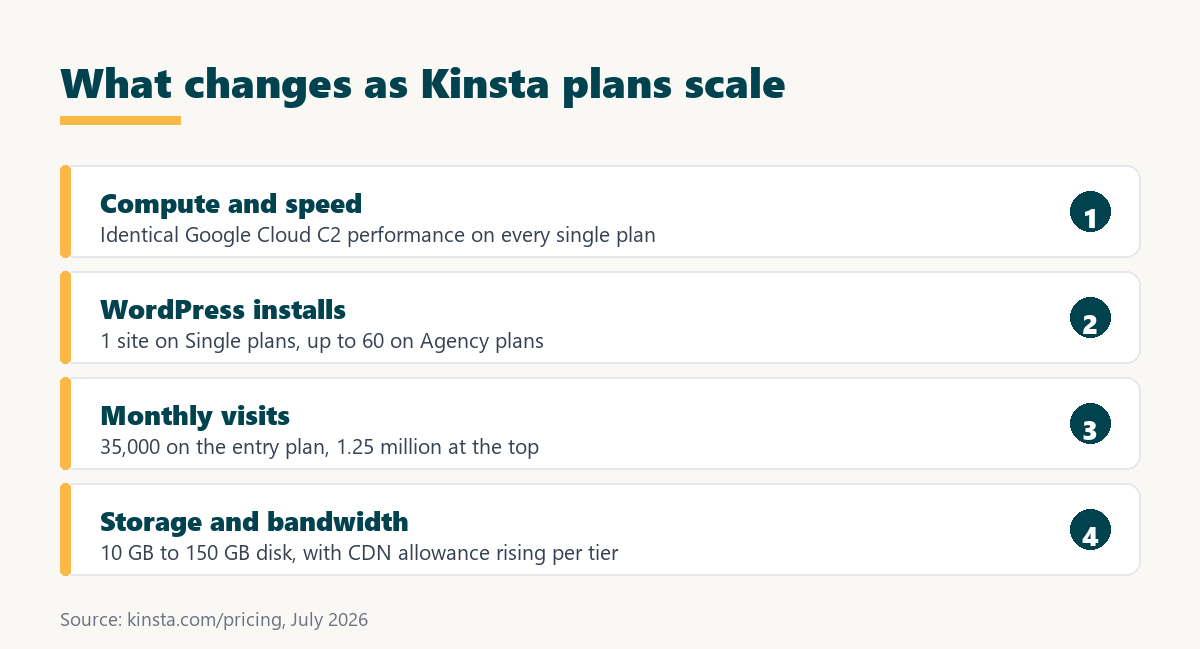
Kinsta prices plans on two variables: how many WordPress installs an account needs, and how many monthly visits those sites receive. Storage, server bandwidth and CDN allowance scale alongside each tier, while the underlying compute quality is identical from the cheapest plan to the most expensive. The list below shows what each pricing variable controls.
- WordPress installs: the number of separate sites an account can host, from one on Single plans to 60 on Agency 60.
- Monthly visits: the traffic allowance across all installs, starting at 35,000 and reaching 1,250,000 at the top tier.
- Disk storage: 10 GB on entry plans, rising through 20, 30, 40, 50 and 60 GB, with 150 GB on Agency 60.
- Server bandwidth: the data served directly from the origin, which scales from 20 GB to 750 GB across the range.
- CDN bandwidth: the edge-delivered allowance, starting at 125 GB and reaching 2.5 TB on the largest plan.
Because every plan runs on the same Google Cloud compute, the money buys capacity rather than performance, which is unusual among managed hosts that reserve their fastest hardware for top tiers.
What Do Kinsta’s Single-Site Plans Cost?
Kinsta’s Single plans host one WordPress install and start at 35 dollars for 35,000 monthly visits, stepping up through 50, 90, 170, 290 and 375 dollars as the visit allowance grows. Storage stays at 10 GB until the two largest Single tiers, which move to 15 GB. The table below lists the full single-site range.
Source: kinsta.com/pricing, checked July 2026. Kinsta also sells bandwidth-based variants of these single-site plans at the same price points.
Reading down the table, the 35 to 90 dollar band covers most small-business sites, and anything above Single 315k is publisher or store territory rather than a normal brochure site.
What Do Kinsta’s Multi-Site WP Plans Cost?
Kinsta’s WP plans host several installs on one account: WP 2 at 70 dollars, WP 5 at 115, WP 10 at 225, WP 20 at 340 and WP 40 at 450 dollars per month. Visits, storage and bandwidth all rise with the install count, and every site keeps its own isolated container. The table below sets out the multi-site range.
Source: kinsta.com/pricing, checked July 2026. Cost per site is calculated from the listed monthly price divided by the included installs.
The cost-per-site column is the useful one for agencies: the effective rate falls from 35 dollars on WP 2 to about 11 dollars on WP 40, which is where multi-site plans start to pay for themselves.
How Much Do Kinsta Agency Plans Cost?
Kinsta Agency plans start at 340 dollars per month for 20 installs, move to 450 dollars for 40 installs with 100 GB of storage, and reach 675 dollars for 60 installs with 150 GB and 1.25 million visits. They match the equivalent WP plans on price while adding storage headroom for a client portfolio.
Agency accounts also lean on the free unlimited migrations, since onboarding a portfolio is otherwise the largest hidden cost of switching hosts. Beyond 60 installs, pricing moves to a custom Enterprise quote.
For a shop running client sites, the deciding number is cost per site rather than the headline monthly figure, and that falls steadily as install count rises.
What Is Included in Every Kinsta Plan?
Every Kinsta plan includes the same Google Cloud compute, the bundled Cloudflare-powered CDN and firewall, daily automatic backups, one-click staging, free unlimited migrations, free SSL certificates and free malware removal. Nothing on that list is reserved for higher tiers. The list below breaks down what the base price covers.
- Google Cloud compute: compute-optimised C2 and C3D machines with the same performance on the cheapest plan as the most expensive.
- CDN and firewall: edge delivery across 300+ locations plus enterprise DDoS protection, bundled rather than sold separately.
- Daily backups: automatic snapshots with 14-day retention on entry plans and one-click restore to live or staging.
- One-click staging: a free staging environment per install for testing plugin and core updates before release.
- Free migrations: unlimited engineer-handled moves from another host, with no per-site migration charge.
- SSL and malware removal: free certificates on every domain and free clean-up by Kinsta engineers if a site is compromised.
The cheapest plan gets the same speed, security and support as the most expensive one, which makes the tier choice purely about capacity.
Are There Hidden Costs or Overage Fees?
Kinsta charges no setup fee, but it does bill overages when a site passes the visit, bandwidth or disk allowance on its plan. The rates are published rather than discretionary, so a traffic spike produces a predictable line item instead of a surprise. The list below sets out each published rate.
- Visit overage: 0.50 dollars per additional 1,000 visits beyond the plan allowance, billed at the end of the cycle.
- Server bandwidth overage: 0.50 dollars per extra gigabyte served directly from the origin container rather than through the edge network.
- CDN bandwidth overage: 0.05 dollars per extra gigabyte delivered from the edge, which is ten times cheaper than origin bandwidth.
- Disk space add-on: 20 dollars per month for each additional 20 GB block, which is cheaper than repeated disk overage.
- Optional add-ons: premium staging at 20 dollars per site, six-hour backups at 20 dollars and hourly backups at 100 dollars per site per month.
Source: Kinsta overage documentation and Kinsta add-on documentation, checked July 2026.
Overage is predictable rather than punitive, so the practical fix is sizing the plan to real traffic instead of defaulting to the cheapest tier. The same logic that governs overage billing in any SaaS contract applies here.
Is Kinsta Cheaper on Annual or Monthly Billing?
Annual billing is cheaper: Kinsta charges ten months for twelve, so the 35-dollar Single plan costs 350 dollars a year instead of 420, an effective saving of about 17 percent. Monthly billing suits short campaigns and client sites with an uncertain lifespan, while annual suits anything the owner intends to keep.
The saving scales with the plan. On WP 10 the annual rate is 2,250 dollars against 2,700 dollars paid monthly, which is 450 dollars kept for a decision that takes one click at checkout. Weighing that trade-off is the standard annual versus monthly billing calculation.
For any site that is staying put, annual billing is the simplest genuine discount Kinsta offers, and it needs no code or negotiation.
Does Kinsta Offer a Discount or Coupon?
Kinsta does not publish a general coupon code. The real reductions are annual billing, which removes two months of cost, and a documented 15 percent discount for registered nonprofit organisations that submit proof of 501(c)(3) status or the equivalent in their country.
Kinsta has also run a first-month-free promotion on standard plans; because promotions change, the offer should be confirmed on the pricing page at the moment of purchase rather than assumed. Sites claiming an exclusive Kinsta coupon are usually pointing at the same annual discount everyone already gets, which is worth knowing before hunting for codes. The mechanics match any annual SaaS discount.
The honest summary is that Kinsta discounts by billing term and by organisation type, not by promo code.
Is There a Free Trial or Money-Back Guarantee?
Kinsta has no permanently free plan and no open-ended free trial, but it backs WordPress hosting with a 30-day money-back guarantee that applies when an account cancels within 30 days of activation. Combined with the free migration, that window functions as a full trial on a real site rather than a sandbox.
The practical route is to request the free migration, run the live site on Kinsta for a few weeks, then decide before the window closes. This is the same risk-reversal structure as any SaaS money-back guarantee, with the difference that the test uses production traffic.
“Managed hosting is a model where a provider leases dedicated resources and administers them.”
— Wikipedia, Dedicated hosting service
Between the refund window and the free migration, testing Kinsta on a real site carries very little financial downside.
How Does Kinsta Pricing Compare to WP Engine and SiteGround?
Kinsta and WP Engine occupy similar premium territory, while SiteGround and Cloudways start far cheaper and shift more work or risk onto the customer. The comparison that matters is what each entry price includes, not the headline number. The table below lines up the four on the same criteria.
Source: vendor pricing pages, checked July 2026. Intro rates renew higher at several hosts, so compare renewal pricing rather than first-term promotions.
On a like-for-like basis, Kinsta’s entry price buys container isolation and a bundled enterprise CDN that the cheaper tiers elsewhere either meter, throttle or leave to the customer to assemble.
Check the current price of the plan that matches your traffic.
See Kinsta Plans →No setup fee · no long-term contract · upgrade or downgrade anytime
Which Kinsta Plan Should You Choose?
Choose by real monthly visits and install count rather than by ambition: Single 35k for one small-business site, Single 125k or higher for a busy publisher, WP 10 for a small agency, and Agency plans for a large client portfolio. The ordered list below maps common situations to a tier.
- One small business site: Single 35k at 35 dollars covers a brochure or lead-generation site comfortably.
- One busy site or store: Single 125k at 90 dollars gives headroom for campaign spikes and seasonal traffic.
- Two to five projects: WP 2 or WP 5 keeps separate installs isolated without paying for unused capacity.
- Small agency: WP 10 at 225 dollars brings the effective rate to roughly 22 dollars per client site.
- Large portfolio: Agency 40 or Agency 60 adds storage headroom and drops cost per site to about 11 dollars.
Sizing to current traffic rather than to the cheapest tier is what keeps the bill predictable, since plans can be changed at any time from the dashboard.
How Do You Lower a Kinsta Bill?
A Kinsta bill drops through four levers: annual billing, right-sizing the tier, cutting the traffic that does not convert, and skipping add-ons that duplicate something already included. None require negotiation. The list below covers each lever in order of impact.
- Switch to annual: paying yearly removes two months of cost on every tier, the single largest saving available.
- Right-size the tier: check actual visits in the dashboard and downgrade when a plan sits half empty for several months.
- Filter bot traffic: blocking abusive crawlers at the firewall reduces counted visits and postpones the next tier upgrade.
- Buy disk instead of overage: a 20 GB block at 20 dollars costs less than repeatedly exceeding the storage allowance.
- Apply nonprofit pricing: registered nonprofits receive 15 percent off all future payments after submitting documentation.
Most accounts overpay for capacity they never touch, so the dashboard visit count is the first place to look before renewing.
Is Kinsta Worth the Price?
Kinsta is worth its price for any site that earns money, because the speed, uptime and support protect revenue that a slow or offline site would lose. For a hobby blog with light traffic, a cheaper managed host is the smarter spend, since the extra capacity would sit unused.
“A tool is only worth its premium when the hours or revenue it protects exceed the invoice.”
— Growth Hack Suite, on tool ROI
The arithmetic is quick. A store turning over 20,000 dollars a month loses roughly 27 dollars for every hour it is unreachable, which is most of a month of Single 35k. That framing is why hosting is usually judged on downtime cost rather than sticker price.
“Site speed shapes both search visibility and the share of visitors who stay to convert.”
— HubSpot, on page load time and conversion
Value comes down to revenue protected against price paid, and Kinsta clears that bar comfortably for business sites while overshooting it for personal ones.
See every Kinsta plan and pick the tier that matches your traffic.
See Kinsta Plans →30-day money-back guarantee · free migrations · cancel anytime
Growth Hack Suite Editorial — Web Infrastructure Team
How we compiled this pricing breakdown: every plan figure was read from Kinsta’s live pricing page, and the overage and add-on rates from Kinsta’s billing documentation, on the date shown. Competitor entry prices come from each vendor’s own pricing page. No figure on this page is estimated.
Last updated: August 2026. Hosting prices and promotions change frequently; confirm the current figure before purchase.
Affiliate disclosure: this page contains affiliate links. If a plan is purchased through them, Growth Hack Suite may earn a commission at no extra cost to the buyer. It does not change the assessment.
Kinsta Pricing FAQ
The 12 most-asked questions about Kinsta pricing.
How much does Kinsta cost per month?
Kinsta pricing starts at 35 dollars per month for the Single 35k plan, which covers one WordPress install with 35,000 monthly visits and 10 GB of storage. Higher tiers add installs, visits, storage and bandwidth, reaching 450 dollars for WP 40 and 675 dollars for Agency 60.
What is included in Kinsta’s base price?
Every plan includes Google Cloud compute, the bundled CDN and firewall, daily backups, free SSL, one-click staging, unlimited free migrations, free malware removal and 24/7 support. The headline price covers the full managed stack rather than a stripped-back base tier.
Does Kinsta charge based on visits?
Yes. Kinsta plans are tiered by monthly visits and install count rather than raw CPU, so a plan is chosen to match traffic and upgraded as an audience grows. Kinsta also offers bandwidth-based variants of its single-site plans at the same price points.
What happens if I exceed my plan’s visits?
Kinsta keeps the site online and charges an overage of 0.50 dollars per additional 1,000 visits. Server bandwidth overage is 0.50 dollars per gigabyte and CDN bandwidth overage is 0.05 dollars per gigabyte, so a spike produces a defined bill rather than an outage.
Is Kinsta cheaper billed annually?
Yes. Annual billing charges ten months for twelve, so the 35-dollar plan costs 350 dollars a year rather than 420. That works out at roughly 17 percent off and is the most reliable way to lower the effective price.
Does Kinsta charge extra for SSL or a CDN?
No. Free SSL certificates and the Cloudflare-powered CDN are bundled into every plan, along with the enterprise firewall and DDoS protection. Unlike some hosts, Kinsta does not sell these essentials as separate line items.
How does Kinsta pricing scale for multiple sites?
Higher tiers raise the number of installs plus combined visits and storage, so an agency buys one plan sized to the whole portfolio. Effective cost per site falls from 35 dollars on WP 2 to about 11 dollars on WP 40 and Agency 60.
Which add-ons change the Kinsta bill?
Optional add-ons include extra disk at 20 dollars per 20 GB, premium staging at 20 dollars per site, six-hour backups at 20 dollars per site and hourly backups at 100 dollars per site. They only appear on the bill when enabled, so the base plan stays predictable.
Does Kinsta require a long-term contract?
No. Kinsta states plainly that it does not use long-term hosting contracts. Plans run month to month or annually, and the 30-day money-back guarantee covers a cancellation made within 30 days of activation.
Does Kinsta have a coupon code?
Kinsta does not publish a general coupon code. The documented reductions are annual billing, which removes two months of cost, and a 15 percent discount for registered nonprofits that provide proof of 501(c)(3) status or a national equivalent.
Can I change my Kinsta plan later?
Yes. Plans can be upgraded or downgraded at any time from the MyKinsta dashboard and billing adjusts accordingly, so an account is not locked in when traffic grows or drops after a seasonal peak.
Is Kinsta pricing worth it for a business site?
For a site producing revenue or leads, yes: faster load times, an uptime guarantee and engineer-level support protect income that a slow or offline site would lose. For a low-traffic personal blog, the same money buys more capacity than the site will ever use.