Table of Contents
Cloud hosting is web hosting that runs your website on a network of connected servers rather than a single physical machine. This design improves reliability, scalability and performance, since resources can be drawn from the network on demand, making cloud hosting well suited to sites that need to handle variable or growing traffic. This guide explains how it works.
Last updated: August 2026. Written by the Growth Hack Suite editorial team, with details cross-checked against provider documentation. This page carries affiliate links to Kinsta.
What Is Cloud Hosting?
Cloud hosting is web hosting that runs your website on a network of connected virtual and physical servers rather than a single machine. Resources like computing power and storage can be drawn from the pool on demand, which gives it its reliability and scalability.
“Cloud computing is the on-demand availability of computer system resources.”
— Wikipedia, Cloud computing
The cloud applies that on-demand model to websites, so a site can call on more capacity when it needs it instead of being capped by one fixed server.
How Does Cloud Hosting Work?
Cloud hosting works by distributing your site across a cluster of servers managed as one system. If one server fails or traffic spikes, the network reallocates resources, keeping the site online and responsive without depending on any single physical machine to stay up.
Verdict: A cloud setup spreads a site across a network of servers instead of one machine, so it fails over when hardware breaks and scales when traffic surges. It usually costs more than basic shared hosting, but bundles reliability and performance a cheap shared server cannot match. The honest rule is that managed cloud hosting delivers these benefits without you administering servers, which is what most site owners actually want.
In short, the network design is what separates the cloud from a single server, and a managed plan hides that complexity.
Why the Cloud Improves Website Reliability
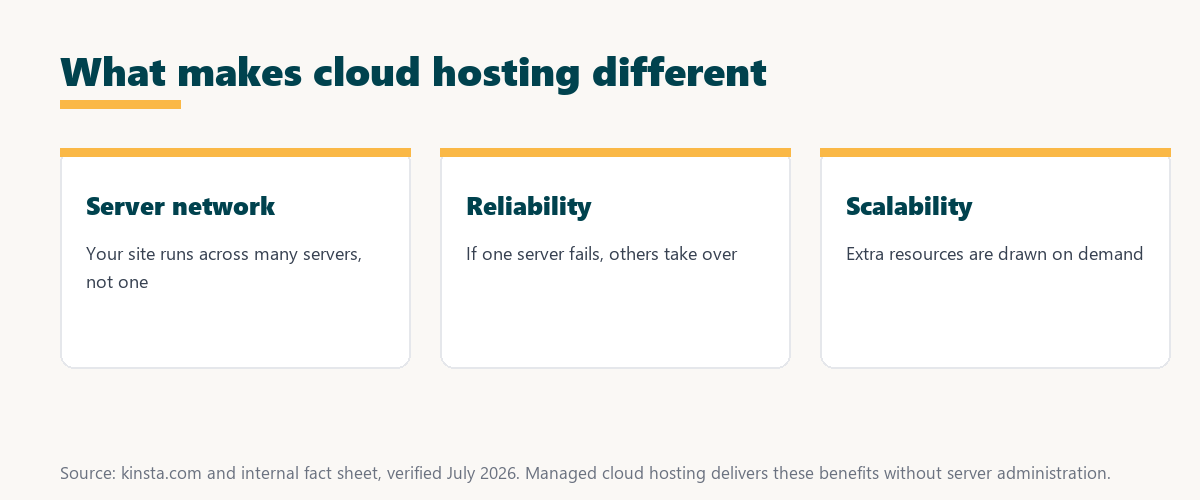
The cloud improves reliability because your site does not depend on one server. If hardware fails, the workload shifts to other servers in the network, reducing downtime compared with traditional single-server hosting where one failure can take a site offline entirely.
The honest point is that redundancy is the core advantage, since it removes the single point of failure that a one-server setup always carries.
Cloud Hosting vs Shared Hosting
Cloud hosting differs from shared hosting by drawing resources from a scalable network rather than confining many sites to one server. It typically offers better performance and reliability and the ability to scale during traffic spikes, which shared hosting cannot match.
Source: provider documentation, verified August 2026. Cloud suits growth; shared suits small, steady sites.
Comparing reliability, scalability, performance and control across cloud, shared and VPS hosting shows cloud’s edge is resilience and scaling, at a higher price than basic shared plans.
See managed cloud plans on Google Cloud
Try Kinsta →Enterprise cloud without server administration, with a 30-day money-back guarantee.
Cloud vs VPS and Dedicated Servers
The cloud differs from a single VPS or dedicated server by spreading your site across a resilient network. It can scale and absorb hardware failures more gracefully than a fixed single-machine setup, though a managed plan hides this complexity so it feels as simple as any plan.
The honest point is that a VPS or dedicated server gives fixed, isolated resources, while cloud trades that fixedness for elasticity and redundancy.
Main Benefits for Growing Websites
The main benefits of the cloud include high reliability through redundancy, the ability to scale resources with demand, consistent performance and suitability for growing or variable-traffic sites. Together these make the cloud a strong foundation for business websites and stores.
- Redundancy: Spreading a site across servers removes the single point of failure a one-server setup carries.
- Scalability: Resources are drawn on demand, so a site handles traffic spikes without a manual upgrade.
- Consistent performance: A capable network keeps pages fast even as load rises during busy periods.
- Growth-friendly: The cloud suits sites expecting growth, since capacity expands with the traffic.
- Managed option: A managed plan delivers these gains without the owner administering servers.
“The first five seconds of page-load time have the highest impact on conversion rates.”
— HubSpot, page load time and conversion rates
Because consistent speed under load protects those early seconds, the cloud’s ability to scale directly supports the conversions a growing site depends on.
Is Cloud Hosting More Expensive?
Cloud hosting can cost more than basic shared hosting because of its infrastructure and scalability. Managed cloud plans bundle performance and reliability that a cheap shared server cannot match, so the value often justifies the higher price for a site that earns or grows.
The honest point is that the cloud is not the cheapest option, but its reliability and scaling can cost less than the downtime and slowdowns of cheaper hosting.
How to Choose Cloud Hosting
Choose cloud hosting by weighing whether it is managed or unmanaged, the quality of the underlying network, caching, support and scalability. The goal is the reliability and performance of the cloud without having to administer servers yourself, which a managed plan provides
Source: provider documentation, verified August 2026. These benefits matter most for growing sites.
Listing redundancy, scalability, performance and reliability with what each means for a site clarifies why the cloud suits growth. Site owners weighing platform commitment can also read our note on SaaS vendor lock-in.
How Kinsta Delivers Managed Cloud Infrastructure
Kinsta delivers managed cloud hosting on Google Cloud Platform, running each WordPress site in an isolated container with caching and a CDN, with data centers in Google Cloud regions worldwide. Owners get enterprise cloud performance without managing any infrastructure.
“A tool is only worth its premium when the hours or revenue it protects exceed the invoice.”
— Growth Hack Suite, on tool ROI
Applied to hosting, a managed cloud plan earns its premium when the reliability and scaling it provides protect more revenue than the difference over cheap shared hosting.
Get managed cloud handled on Kinsta
Start With Kinsta →Managed Google Cloud plans and free migration, with a 30-day money-back guarantee.
How the Cloud Scales a Website
The cloud supports scalability because resources come from a network rather than one fixed machine. A site can handle growth and traffic spikes by drawing more capacity on demand instead of being capped by a single server, which is where fixed hosting struggles.
The honest point is that scalability is most valuable for sites with uneven or rising traffic, since steady small sites rarely test a server’s limits.
Is Cloud Hosting Good for WordPress?
Yes, cloud hosting suits WordPress well, and managed WordPress hosts often run on cloud platforms like Google Cloud. This combines the cloud’s reliability and scaling with WordPress-specific optimization such as caching, so the site gets both a resilient network and a tuned environment.
The honest qualifier is that the benefit comes from managed cloud WordPress hosting specifically, since raw cloud infrastructure still needs WordPress tuning to perform well.
Is the Cloud Right for Your Site?
The cloud is right for your site when you need reliability, scalability and consistent speed, especially for a business site, store or growing blog. Managed plans like Kinsta’s deliver those benefits without server administration, so the cloud’s advantages come without its complexity.
The honest summary is that a small, steady hobby site may not need the cloud, but any site where downtime or slow pages cost money usually does.
Try managed cloud risk-free on Kinsta
Try Kinsta Risk-Free →Google Cloud infrastructure and free migration, with a 30-day money-back guarantee.
Frequently Asked Questions Before You Switch
The 12 most-asked questions about the cloud.
What is cloud hosting in simple terms?
Cloud hosting runs your website on a network of connected servers instead of a single machine, so resources can be drawn on demand for better reliability, scalability and performance.
How does cloud hosting work?
Cloud hosting works by spreading your site across a cluster of servers managed as one system, so if a server fails or traffic spikes, the network reallocates resources to keep the site online.
What is the difference between cloud and shared hosting?
Cloud hosting draws resources from a scalable network for better performance and reliability, while shared hosting confines many sites to one server, so cloud handles spikes and failures more gracefully.
Is cloud hosting more reliable?
Yes, cloud hosting is more reliable because your site does not depend on one server, so if hardware fails, the workload shifts to other servers, reducing downtime.
Is cloud hosting more expensive than shared hosting?
Cloud hosting can cost more than basic shared hosting due to its infrastructure and scalability, but it bundles performance and reliability that cheap shared servers cannot match.
Can cloud hosting handle traffic spikes?
Yes, cloud hosting handles traffic spikes well, because it can draw additional resources from the network on demand rather than being limited to one server’s fixed capacity.
Is cloud hosting good for WordPress?
Yes, cloud hosting suits WordPress well, and managed WordPress hosts often run on cloud platforms like Google Cloud, combining the cloud’s reliability with WordPress-specific optimization.
What is the difference between cloud hosting and a VPS?
A VPS is a single virtual server with fixed resources, while cloud hosting spreads your site across a resilient network, so cloud scales and absorbs failures more gracefully.
Do I need technical skills for cloud hosting?
Unmanaged cloud hosting requires technical skills, but managed cloud hosting like Kinsta’s hides the complexity, so you get cloud benefits without administering servers yourself.
Is cloud hosting secure?
Cloud hosting can be very secure, especially on major platforms with firewalls, isolation and patching, though overall security also depends on your site’s configuration and the host’s practices.
Who should use cloud hosting?
Cloud hosting suits business sites, stores and growing blogs that need reliability, scalability and consistent speed, particularly where downtime or slow pages would cost revenue.
How does Kinsta provide cloud hosting?
Kinsta provides managed cloud hosting on the Google Cloud Premium Tier, running each site in an isolated container with caching and a CDN, without you managing infrastructure.
About this guide
Written by the Growth Hack Suite editorial team, drawing on hands-on experience running sites on cloud infrastructure. Details were cross-checked against provider documentation. This page carries affiliate links to Kinsta, so the position is stated plainly: cloud hosting spreads a site across a network of servers for reliability and scaling, it costs more than basic shared hosting but bundles performance a cheap server cannot match, and managed cloud hosting delivers those benefits without server administration. Kinsta provides managed cloud hosting on Google Cloud Platform.