SSH, or Secure Shell, is a protocol that lets you securely connect to and control a remote server over an encrypted connection. Developers use SSH to run commands, manage files, and deploy code on servers safely, and it relies on encryption and key-based authentication, making it a fundamental tool for server access and automation. This guide explains how SSH works, how to use it, and why developers need SSH access.
Last updated: August 2026. Written by the Growth Hack Suite editorial team, with details cross-checked against provider documentation. This is general technical education, not formal security advice; consult a qualified professional for your setup. This page carries affiliate links to Kinsta.
See how Kinsta provides SSH access on Google Cloud
Try Kinsta →SSH access with WP-CLI and Git, and a 30-day money-back guarantee.
What Is SSH?
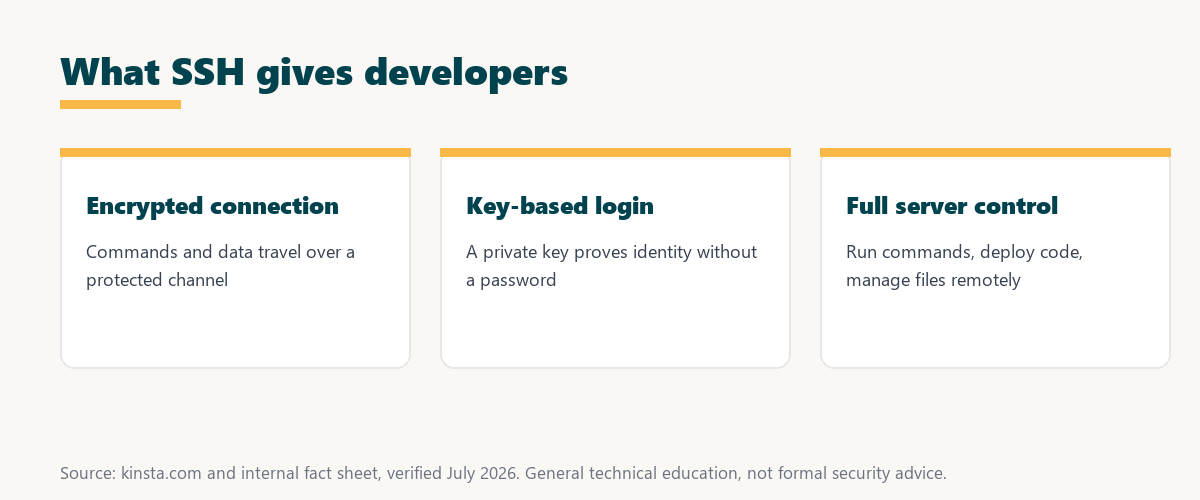
SSH, or Secure Shell, is a protocol that lets you securely connect to and control a remote server over an encrypted connection, so developers can run commands, manage files, and administer a server from their own computer safely. It is the standard way to reach a server’s command line remotely.
“Secure Shell is a cryptographic network protocol for operating network services securely.”
— Wikipedia, Secure Shell
In short, SSH is the encrypted door to a server: it gives full command-line control while keeping the connection private.
How Does SSH Work?
SSH works by establishing an encrypted connection between your computer and a remote server, then authenticating you with a password or, more securely, a key pair, so all commands and data exchanged are protected from eavesdropping. The encryption is set up before any login details are sent.
The key point is order: SSH encrypts the channel first, then authenticates, so credentials and commands never travel in the clear.
What Is SSH Key Authentication?
SSH key authentication uses a pair of cryptographic keys, a private key you keep and a public key on the server, so you log in without a password by proving you hold the private key. This is more secure than password login, because there is no password for an attacker to guess.
The practical takeaway is that key authentication removes the weakest link, a guessable password, and replaces it with a key that stays on your machine.
SSH vs FTP
SSH differs from basic FTP by encrypting the connection and offering full command-line control, while plain FTP transfers files unencrypted. SSH and its secure file transfer companion, SFTP, are safer ways to manage server files, so the two approaches differ sharply in both security and capability.
Source: general overview cross-checked with public protocol documentation, verified August 2026. General technical education, not formal advice.
Reading down the table, the contrast is clear: SSH encrypts, gives full control and supports keys, while plain FTP only moves files and does so without encryption.
What Can You Do With SSH?
With SSH you can run server commands, manage and edit files, run tools like WP-CLI and Git, view logs, and deploy code, so it gives developers complete, secure control over a server from the command line. It turns a remote server into something you operate as directly as your own machine.
Five common tasks show what an SSH connection makes possible on a server:
- Run server commands: A direct command line lets a developer inspect, configure and operate the server without a graphical dashboard in the way.
- Manage files: Files can be moved, edited and organized on the server itself, so changes happen in place rather than through slow uploads.
- Run WP-CLI: The WordPress command-line tool handles updates, database tasks and bulk changes far faster than the admin screens allow.
- Use Git: Repositories can be pulled and deployed straight on the server, so code ships from version control in a controlled, repeatable way.
- View logs and deploy: Live logs reveal errors as they happen, and deployment commands push tested changes into production cleanly.
Together these tasks explain why command-line access matters: SSH covers everything from a quick config change to a full deployment.
Why Developers Need SSH Access
Developers need SSH access because it allows efficient, scriptable control of a server for tasks like deployment, debugging, and running command-line tools, so it is essential for advanced development and automation beyond a graphical dashboard. Many workflows simply are not possible without it.
“The first five seconds of page-load time have the highest impact on conversion rates.”
— HubSpot, page load time and conversion rates
Speed of operation matters here too: SSH lets developers debug and deploy quickly, which keeps a site fast and reliable for the visitors those early seconds depend on.
Is SSH Secure?
SSH is secure because it encrypts the entire connection and supports key-based authentication, so as long as you protect your private key and use strong settings, it is a safe way to access servers remotely. Its security depends on good key handling as much as on the protocol itself.
The honest point is that SSH is secure by design, but the private key is the thing to guard: keep it safe and the connection stays trustworthy.
“A tool is only worth its premium when the hours or revenue it protects exceed the invoice.”
— Growth Hack Suite, on tool ROI
Applied to server access, SSH earns its place easily: it costs nothing to enable yet prevents the insecure logins and lost time that a weaker setup invites.
How to Use SSH
You use SSH by opening a terminal and connecting with the ssh command to a server’s address using your username and key, so once connected you can run commands directly. Setting up key authentication first makes every future login fast and secure, replacing repeated password entry with a single trusted key.
Source: general overview cross-checked with public tool documentation, verified August 2026. General technical education, not formal advice.
Reading the table together, SSH is the gateway to real server work: running commands, using WP-CLI and Git, and handling logs and deployment all flow through one secure connection.
How Kinsta Provides SSH Access
Kinsta provides SSH access on its plans so developers can connect to their environment, run commands, and use tools like WP-CLI and Git, giving command-line control alongside the MyKinsta dashboard. The access runs on Google Cloud infrastructure, so the server-side tools sit right where the site is hosted.
Get SSH access handled on Kinsta’s Google Cloud platform
Start Free Migration →SSH with WP-CLI and Git, and free migration.
Using SSH in Your Development Workflow
You use SSH in your workflow to deploy code, run WP-CLI commands, and manage files on the server, so combined with Git and a local tool like DevKinsta, SSH lets you develop and deploy efficiently. It ties the local build to the live server through one secure, scriptable connection.
The takeaway is that SSH is the connective step: it links local development, version control and the live server into one smooth pipeline. For anyone weighing a long hosting commitment, our note on SaaS vendor lock-in is worth a read.
SSH, SFTP, and Secure File Transfer
SSH underpins SFTP, the secure file transfer protocol, so you can move files to and from a server over the same encrypted channel. This is why hosts that offer SSH also provide SFTP for safe file management, giving a secure alternative to plain FTP for everyday transfers.
The practical point is that SFTP is SSH for files: the same encryption that protects your commands also protects the files you upload and download.
SSH Security Best Practices
SSH security best practices include using key authentication instead of passwords, protecting the private key with a passphrase, disabling root login, and keeping software updated, so these habits keep remote access safe. They reduce the small risks that remain once the encrypted connection is in place.
The honest summary is that SSH is safe when used carefully: guard the private key, prefer keys over passwords, and keep the server updated. This is general guidance, and a security professional can tailor it to a specific setup.
Try Kinsta risk-free with SSH, WP-CLI and Git
Try Kinsta Risk-Free →SSH access, free migration and a 30-day money-back guarantee.
SSH: Frequently Asked Questions
The 12 most-asked questions about SSH and Secure Shell.
What is SSH in simple terms?
SSH, or Secure Shell, is a protocol that lets you securely connect to and control a remote server over an encrypted connection, so you can run commands and manage files safely.
How does SSH work?
SSH works by establishing an encrypted connection between your computer and a server, then authenticating you with a password or a key pair, so commands and data are protected.
What is SSH key authentication?
SSH key authentication uses a private key you keep and a public key on the server, so you log in by proving you hold the private key, which is more secure than a password.
What is the difference between SSH and FTP?
SSH encrypts the connection and offers full command-line control, while plain FTP transfers files unencrypted, so SSH and its secure transfer SFTP are safer for managing files.
What can I do with SSH?
With SSH you can run server commands, manage files, use tools like WP-CLI and Git, view logs, and deploy code, giving complete secure control from the command line.
Why do developers need SSH access?
Developers need SSH for efficient, scriptable control of a server for deployment, debugging, and command-line tools, so it is essential for advanced work beyond a dashboard.
Is SSH secure?
Yes, SSH is secure because it encrypts the entire connection and supports key-based authentication, so protecting your private key keeps remote access safe.
How do I use SSH?
You open a terminal and connect with the ssh command to a server using your username and key, then run commands, and setting up key authentication makes future logins fast and secure.
What is SFTP?
SFTP is secure file transfer over SSH, so it moves files to and from a server through the same encrypted channel, making it safer than plain FTP.
Do I need SSH for WordPress?
SSH is not required for basic WordPress use, but it is valuable for developers who want command-line control, deployment, and tools like WP-CLI on their site.
Is SSH hard to learn?
SSH has a small learning curve around the command line and keys, but the basics of connecting and running commands are straightforward, and setup guides make it approachable.
Does Kinsta offer SSH access?
Yes, Kinsta provides SSH access so developers can connect to their environment, run commands, and use tools like WP-CLI and Git alongside the MyKinsta dashboard.
About this guide
Written by the Growth Hack Suite editorial team, drawing on hands-on experience running WordPress sites. Details were cross-checked against public protocol documentation. This is general technical education, not formal security advice; consult a qualified professional for your setup. This page carries affiliate links to Kinsta. The position is stated plainly: SSH is an encrypted protocol for controlling servers remotely, secured by key-based authentication. Kinsta provides SSH access with WP-CLI and Git support alongside the MyKinsta dashboard.