Table of Contents
The best hosting for SaaS websites solves a problem no other buyer has: WordPress here is not the product at all. It is the marketing site, the documentation, the changelog and the careers page, sitting alongside an application hosted somewhere else entirely. That changes which features matter, and one requirement in particular is almost never given a public price by anybody.
Last updated: August 2026. Every figure was read from the vendor’s own pricing pages in the same week, with Kinsta data taken from Kinsta’s official documentation. This page carries affiliate links to Kinsta, which is ranked first here, and the reasoning is shown rather than asserted.
What Is the Best Hosting for SaaS Websites?
Kinsta, on published capability rather than price. It publishes a reverse proxy add-on that lets WordPress load from a subdirectory, SAML single sign-on with just-in-time provisioning on every plan, both SOC 2 Type II and ISO 27001, and a public API.
Verdict: The requirement that separates SaaS from every other buyer is putting the blog at yourdomain.com/blog rather than blog.yourdomain.com, while the application owns the root domain. That needs a reverse proxy, and Kinsta is the only host here publishing a price for one, at 50 dollars per site each month.
Every other host in this comparison can probably do it. None of them says so on a pricing page, which means the conversation happens with a salesperson rather than a calculator.
“WordPress is a web content management system.”
: Wikipedia, WordPress
Which is exactly the point for a SaaS company. It manages content, and the application it sits beside is a different system with different hosting entirely.
Why Is SaaS Hosting a Different Question?
Because the site being hosted is a marketing asset attached to a product that lives elsewhere. Nobody is choosing where to run the application here. The decision is about how the content layer coexists with it, on the same domain, under the same security posture, without needing anybody’s attention.
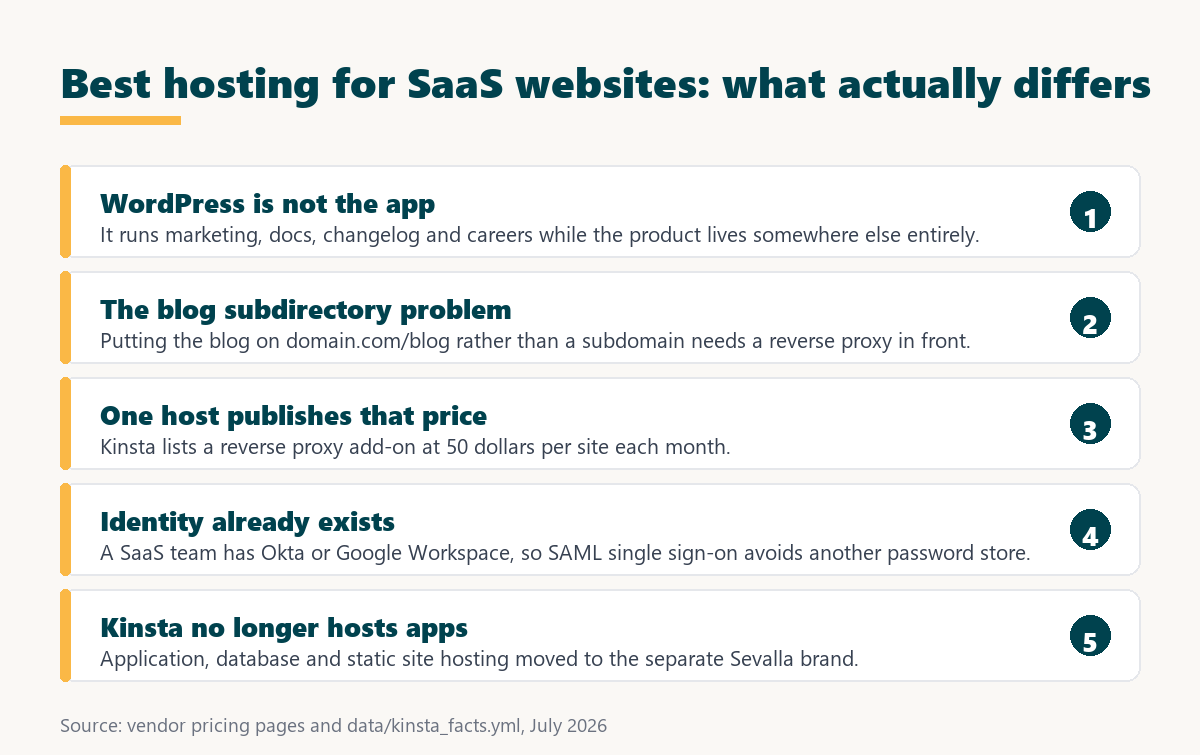
- The domain is already taken: The application owns the root, so the content layer needs a subdirectory or a subdomain, and those two choices have different search consequences.
- Several properties, one team: Marketing, documentation, changelog, status and careers pages are commonly separate WordPress installs sharing one account and one invoice.
- Identity already exists: A SaaS company runs Okta or Google Workspace, so hosting that supports SAML avoids creating another credential store for the same staff.
- Compliance is inherited, not chosen: Once the company holds SOC 2, every vendor in the stack appears in the audit, including whatever runs the marketing site.
- Nobody wants to own it: Engineering time belongs to the product, so a platform that needs no attention is worth more than one with better raw specifications.
Weighted that way, the shortlist looks nothing like a general hosting comparison, and the deciding features are ones most reviews never mention.
Why Does the Blog Subdirectory Matter?
Because search engines treat a subdirectory as part of the same site and a subdomain as something closer to a separate one. Putting content at yourdomain.com/blog keeps it attached to the domain the product already ranks on, while blog.yourdomain.com starts further away from that.
The technical problem is that the application already answers on the root domain. Serving WordPress from a path underneath it means putting a reverse proxy in front, routing one path to WordPress and everything else to the app. It is a standard piece of infrastructure and it is not something most hosting plans mention, because most hosting customers never need it.
- A subdirectory inherits domain authority: Content at a path sits within the same site in a way a separate hostname does not, which is why SaaS marketing teams push for it.
- The application owns the root: A reverse proxy sits in front of both and decides which requests go to WordPress and which continue to the product.
- Kinsta publishes a price for it: Fifty dollars per site each month, described as enabling its support team to configure WordPress to load from a subdirectory.
- Nobody else states one: The other six hosts here do not mention reverse proxy configuration on their plan pages, which does not mean they refuse it.
- The alternative costs nothing technically: A subdomain works immediately on any host, so the fifty dollars buys a search outcome rather than a capability.
Whether that is worth 600 dollars a year depends entirely on how much organic search matters to the company, which for most SaaS businesses is a question with a well-understood answer.
How Was This Ranking Built?
On published capability for the specific things a SaaS company needs: subdirectory hosting, single sign-on, certifications, multiple properties on one account, an API, and a platform that requires no ongoing attention. Price is a tiebreaker rather than a criterion.
Speed carries no weight. Every host here caches a marketing site adequately, and a SaaS company’s performance concerns are about its application rather than its blog.
1. Kinsta: The Only Published Subdirectory Answer
Kinsta publishes the four things a SaaS company checks first: a reverse proxy add-on for subdirectory hosting at fifty dollars per site monthly, SAML single sign-on with just-in-time provisioning on every plan, SOC 2 Type II with ISO 27001, and a public API with unlimited user accounts.
- Subdirectory hosting has a stated price: The reverse proxy add-on is listed rather than negotiated, which turns an architecture decision into a budget line.
- Single sign-on needs no upgrade: SAML with just-in-time provisioning appears across the range, so existing identity infrastructure connects without an enterprise contract.
- Two certifications cover the audit: SOC 2 Type II with ISO 27001 answers the vendor section of the company’s own compliance review without a separate request.
- Several properties fit one account: Multi-install plans cover marketing, documentation, changelog and careers together, with additional installs at 30 dollars each monthly.
- The platform is programmable: A public API allows provisioning and reporting to be scripted alongside whatever else the engineering team automates.
One correction matters for SaaS readers specifically. Kinsta no longer hosts applications, databases or static sites under its own brand; those products moved to Sevalla. Anyone evaluating Kinsta to run part of the product itself should know the WordPress plans do not cover that.
Run the blog on your own domain, not a subdomain
See Kinsta Plans →Reverse proxy add-on published at 50 dollars per site monthly, with SAML SSO on every plan.
2. Pantheon: Release Process and Compliance Together
Pantheon ships development, staging and production environments with built-in version control on every plan, which fits a company that already runs a release process for its product and would rather not run a different one for its website.
SOC 2, GDPR and FERPA are stated across the range, and its Gold workspace adds Multidev so each marketing change can have its own environment for review. Single sign-on integration arrives at the Platinum and Diamond tiers. The complication is billing, which splits across a workspace tier and a per-site plan, so a company running four properties needs four site plans on top of the workspace fee.
3. Cloudways: Every Property on One Server
Cloudways sells servers rather than installs, so a marketing site, a documentation site, a status page and a changelog run on one machine and one invoice from fourteen dollars a month, with unlimited websites and unlimited visits.
It is also framework agnostic, listing Laravel, Symfony and more than a dozen other PHP applications, which suits a SaaS team that wants a docs tool or an internal utility on the same platform. Infrastructure can be automated through its API, and servers resize without a stack migration. The trade-off is shared memory across every site on the server, so the marketing site and the documentation compete for the same resources.
“a B2B site that loads in 1 second has a conversion rate 3x higher than a site that loads in 5 seconds”
: HubSpot, page load time and conversion rates
For a SaaS company that relationship applies to the signup page more than the blog, and the signup page usually belongs to the application rather than to WordPress at all.
4. WP Engine: Audit Trail and Deployment
WP Engine lists an activity log with advanced user permissions, automated deployments with GitHub Actions, one-click staging and development environments on every plan from thirty dollars, plus a transferable site for handing a property to another team.
The activity log is the item worth noting for SaaS. When marketing, design and engineering all touch the site, a record of who changed what is an operational control the company will eventually be asked about. Its limitations for this buyer are the 25,000 visit allowance with overage at two dollars per thousand, and isolated resources beginning at Core from 400 dollars a month.
5. Nexcess: Cheapest Way to Run Four Properties
Nexcess prices by site count, so five properties cost 49 dollars a month on its Thrive tier and ten cost 67.50, all with unlimited visits, published PHP worker counts and free staging on every plan.
Unlimited visits removes the launch-announcement problem, where a product update circulates and the marketing site briefly sees traffic unlike anything in its normal month. What it does not publish is any certification, single sign-on capability or reverse proxy option, which are exactly the three things a SaaS company checks, so it ranks on price and capacity rather than on fit.
6. Rocket.net: Predictable and Unmetered
Rocket.net publishes unmetered visitors and unlimited PHP workers on every plan from thirty dollars, with a 99.99 percent uptime guarantee across the range and a public commitment to not raising renewal prices.
Ten installs cost 100 dollars and twenty-five cost 200, which suits a company with several properties and a preference for a fixed number in the budget. As with Nexcess, no certification, single sign-on or reverse proxy option appears on the plan pages, so the SaaS-specific requirements would need a support conversation.
7. Hostinger: Adequate and Very Cheap
Hostinger Premium renews at 10.99 dollars a month with three websites, staging, LiteSpeed object caching, a content delivery network, mailboxes and a free first-year domain, which covers a marketing site and a documentation site for less than a lunch.
It ranks last for SaaS rather than in general. None of the requirements that define this category appear on its plan pages, backups are weekly on the entry tier, and the published uptime commitment is 99.9 percent. For a pre-revenue company it is entirely reasonable, and for one with a compliance programme it will not survive the first vendor review.
How Many Properties Does a SaaS Company Run?
Usually four or five, and rarely all at once from the start. Marketing site, documentation, changelog, status page and careers accumulate over time, which makes the cost of the fourth property more relevant than the cost of the first.
Source: vendor pricing pages read July 2026, plus kinsta.com/plans. Hostinger is excluded from this table because its entry plan covers three websites rather than five. Cells reading “not named” mean a vendor does not publish that capability on the pages read, not that it is unavailable.
The single-sign-on column is the one that reorders this table. Two hosts publish it, one of them only at custom-priced tiers, and for a company with an identity provider that is not a minor feature.
Does Hosting Appear in Your Own SOC 2 Audit?
Yes, as a vendor. Once a SaaS company holds SOC 2, its auditors review the subprocessors and vendors in the stack, and the host running the marketing site is one of them even though no customer data touches it.
A host that publishes SOC 2 Type II makes that a document request rather than a project. Kinsta publishes SOC 2 Type II with ISO 27001, and Pantheon publishes SOC 2 with GDPR and FERPA. The other five describe security in general terms on their plan pages, which does not mean they lack certification, only that establishing it requires asking. For a company mid-audit, that difference is measured in days.
Source: vendor pricing and plan pages read July 2026, plus kinsta.com/plans. Cells reading “not named” mean the vendor does not publish that capability on the pages read, not that it is unavailable or would be refused on request.
One row is filled and six are mostly empty, which reflects how rarely these requirements appear on a hosting page rather than how rarely they are met.
Four properties, one account, one audit answer
Try Kinsta →Additional installs at 30 dollars each monthly, with SOC 2 Type II and ISO 27001 published.
Which Should Your SaaS Company Choose?
Choose Kinsta when the blog belongs on the main domain and single sign-on and certifications are already requirements. Choose Pantheon when the website should follow the same release process as the product. Choose Cloudways or Nexcess when several properties need to be cheap and nothing else is binding.
- Decide subdirectory or subdomain first: That single architecture choice eliminates most of the list, because only one host publishes a price for the reverse proxy it requires.
- Check whether single sign-on is required: An existing identity provider makes SAML support a hard requirement rather than a preference, and two hosts publish it.
- Count the properties, not the sites: Documentation, changelog, status and careers arrive over time, so price the fourth and fifth rather than the first.
- Confirm certification before the audit: Two hosts publish SOC 2 by name, and the rest turn a document request into a vendor conversation.
- Do not plan to host the product here: Kinsta’s application, database and static site hosting moved to Sevalla, so its WordPress plans cover the content layer only.
Four of those five are answerable from published pages, and the first one usually decides the whole thing before the others are reached.
“Tool spend is only defensible when the outcome it protects is measured, not assumed.”
: Growth Hack Suite, ROI on sales tools
For a SaaS company the outcome is organic signups attributable to content and days not lost to a vendor security review. Both are measurable, and both are affected more by the subdirectory decision than by anything else on this page.
SAML single sign-on without an enterprise contract
Compare Kinsta Plans →Just-in-time provisioning and unlimited user accounts are listed on every plan.
Best Hosting for SaaS Websites: Frequently Asked Questions
The 12 most-asked questions about hosting a SaaS marketing site on WordPress.
What is the best hosting for SaaS websites?
Kinsta, on published capability. It is the only host here listing a reverse proxy add-on for subdirectory hosting, at 50 dollars per site monthly, alongside SAML single sign-on on every plan and both SOC 2 Type II and ISO 27001.
Should the blog be on a subdirectory or a subdomain?
A subdirectory keeps content attached to the domain the product already ranks on, while a subdomain starts further away. The trade-off is that a subdirectory needs a reverse proxy when the application owns the root domain.
What does a reverse proxy cost?
Kinsta publishes 50 dollars per site each month for its reverse proxy add-on, described as enabling its support team to configure WordPress to load from a subdirectory. No other host here publishes a price.
Can Kinsta host my application too?
No. Application hosting, database hosting and static site hosting moved to Sevalla, a separate brand. Kinsta’s WordPress plans cover the content layer only, which matters if the evaluation assumed otherwise.
Which hosts support single sign-on?
Kinsta lists SAML with just-in-time provisioning on every plan alongside unlimited user accounts. Pantheon places SSO integration at its Platinum and Diamond tiers. The rest do not publish it on their plan pages.
Does the marketing site appear in a SOC 2 audit?
Yes, as a vendor in the stack, even though no customer data touches it. A host publishing SOC 2 Type II turns that into a document request rather than a project requiring a vendor conversation.
How much does running five properties cost?
From 14 dollars on Cloudways with unlimited sites per server, 49 on Nexcess Maker Thrive, 110 on WP Engine with four add-on sites, or 115 monthly on Kinsta WP 5, falling to 96 on annual billing.
Which properties usually run on WordPress?
Marketing site, documentation, changelog, status page and careers, accumulating over time rather than arriving together. The application itself is hosted separately and is not part of this decision.
Does a product launch break the marketing site?
It can on a metered plan. A launch announcement produces a month unlike any other, and Kinsta charges 50 cents per thousand visits above its allowance while Nexcess, Cloudways and Rocket.net do not meter visits at all.
Is an activity log worth having?
Once marketing, design and engineering all touch the site, yes. WP Engine lists an activity log with advanced user permissions on every plan, and it is an operational control a compliance programme will eventually ask about.
Can the website follow the product release process?
On Pantheon, closely. Development, staging and production environments with built-in version control appear on every plan, and Multidev at Gold gives each change its own environment for review before merging.
Is cheap hosting acceptable for a SaaS marketing site?
Before revenue and before a compliance programme, entirely. Hostinger at 10.99 covers a marketing site and documentation. It stops being acceptable at the first vendor security review, which arrives sooner than most teams expect.
About this ranking
Written by the Growth Hack Suite editorial team. Prices, add-on costs, certifications and access controls were read from each vendor’s own pricing pages in August 2026 and are reported as published, with Kinsta figures taken from Kinsta’s official documentation. The ranking weights subdirectory hosting, single sign-on, published certification and multi-property cost, because those are the requirements specific to a SaaS company whose product is hosted elsewhere. Kinsta ranks first on those published capabilities, and one correction is stated in its section: application, database and static site hosting moved to the separate Sevalla brand, so Kinsta’s WordPress plans no longer cover any part of a product.
Cells reading “not named” mean a vendor does not publish a capability on the pages read, not that it is unavailable or refused. No speed benchmark is used, because every host here caches a marketing site adequately. This page contains affiliate links to Kinsta, which pay a commission at no extra cost to the reader.