Table of Contents
The best multisite hosting is the hardest thing in this category to research, because almost no vendor publishes whether its plans support a WordPress network at all. Most comparison articles quietly answer a different question, listing hosts that allow many separate sites, which is not the same product and does not solve the same problem.
Last updated: August 2026. Every figure was read from the vendor’s own plan pages in the same week, with Kinsta data taken from Kinsta’s official documentation. This page carries affiliate links to Kinsta, and the plan tiers where its Multisite support stops are stated plainly.
What Is the Best Multisite Hosting?
Kinsta, for one reason that has nothing to do with performance: it is the only host here that publishes Multisite support plan by plan, so a buyer can check before purchasing rather than discovering the answer afterwards.
Verdict: Kinsta’s two 35-dollar entry plans do not support Multisite. Support begins at the 50-dollar tier, 42 on annual billing, and applies to every multi-install plan above it. That is a genuine restriction on the cheapest option and it is published, which is more than any other host in this comparison offers.
Being told a limitation before purchase is worth more than an unpublished capability, because the second one becomes a support ticket on the day a network is being built.
“WordPress is a web content management system.”
: Wikipedia, WordPress
Multisite turns one copy of that system into a network of sites sharing a single installation, which is an architectural change rather than a hosting one, and that distinction drives everything below.
Is Multisite the Same as Hosting Multiple Sites?
No, and the confusion is the reason most articles on this topic are unhelpful. Multisite is a WordPress feature where one installation serves many sites from a shared database, shared plugin directory and shared core files. Hosting several separate sites means several independent installations that happen to share an invoice.
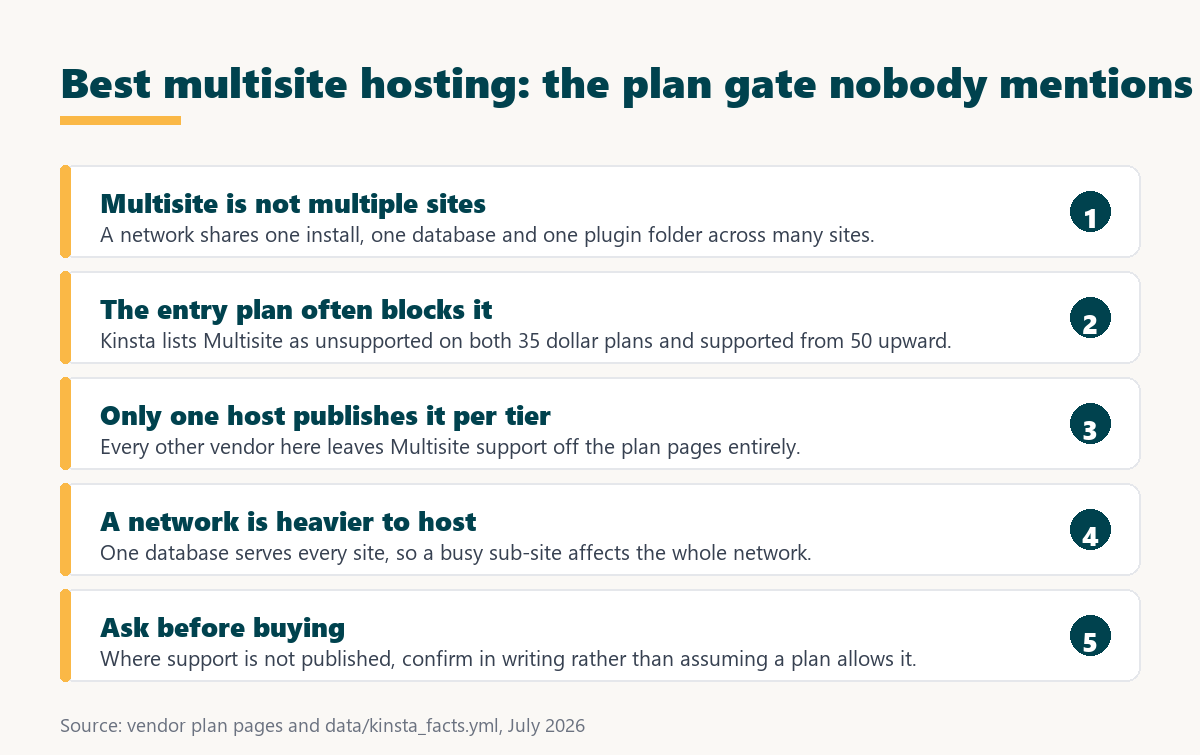
- One database serves every site: A network stores all sites in one database with prefixed tables, so a query problem on one sub-site can affect the whole network.
- Plugins are installed once, network wide: Updating a plugin updates it everywhere simultaneously, which is efficient and removes the option of updating one site first.
- A single point of failure appears: Separate installations fail separately, whereas a network that goes down takes every site with it at the same moment.
- Backups and restores cover everything: Restoring one sub-site from a network backup is considerably harder than restoring one of several independent installs.
- Billing models rarely fit: Hosts price by install, and a network of forty sites is one install, which is either a bargain or a support conversation depending on the vendor.
That last point is why hosts publish so little. A network genuinely is one installation, so a plan sold per install has an awkward relationship with a customer running eighty sites inside one.
Which Plan Tiers Actually Allow a Network?
Kinsta publishes the answer per plan, and the answer at the bottom of its range is no. Both 35-dollar single-site plans list Multisite as unsupported, and support begins one tier up.
Source: kinsta.com/plans, verified in August 2026. Multisite support is recorded per plan in that fact sheet; both 35-dollar single-site plans are listed as not supporting it, and every plan above them is listed as supporting it.
The practical consequence is a fifteen-dollar difference between a plan that can run a network and one that cannot, which is worth knowing before rather than after a purchase.
How Was This Ranking Built?
On whether Multisite support is published at all, then on how the platform’s billing model fits a network, then on the capabilities a network specifically needs: database capacity, shell access for network administration, staging that can handle a whole network, and restore granularity.
Disclosure carries unusual weight here, and deliberately so. In a category where one host publishes a clear answer and six do not, the published answer is worth more than a speculative comparison of unpublished capabilities.
1. Kinsta: The Only Published Answer
Kinsta records Multisite support against each plan, which no other host in this comparison does. Support begins at the 50-dollar single-site tier, 42 on annual billing, and continues through every multi-install and agency plan above it.
- Support is stated per plan: A buyer can confirm before purchase rather than opening a ticket after building the network, which is the entire value here.
- Every install runs in its own container: A network gets dedicated resources rather than sharing capacity with unrelated customers, which matters because a network concentrates load.
- Shell and command line access are standard: SSH and WP-CLI appear on every plan, and network administration in WordPress is considerably easier from the command line.
- Additional PHP memory is purchasable: Ten dollars per 500 megabytes monthly addresses the memory pressure a large network places on the application.
- Staging exists on every plan: Testing a plugin update before it reaches every site in a network simultaneously is more important here than anywhere else.
Two things this page does not claim, because they are not published. Whether a network of forty sites counts as one install for billing, and whether a single sub-site can be restored from a network backup, both require confirming with support.
Check Multisite support before you buy, not after
See Kinsta Plans →Multisite starts at the 50 dollar tier, 42 on annual billing, not on the 35 dollar plans.
2. Cloudways: A Network Is Just an Application
Cloudways sells servers rather than installs, which sidesteps the billing awkwardness entirely. A Multisite network is one application on a server that also has room for others, and the server can be resized as the network grows without a stack migration.
For network administration it provides SSH access, and its staging can merge selected files and database tables, which is unusually relevant here because a network’s tables are exactly what makes a full push dangerous. Multisite support is not stated on its plan pages, so it needs confirming, but nothing in the pricing model works against it.
3. Pagely: Database Architecture Suited to a Network
Pagely gives every plan a private database instance running MySQL, MariaDB or Amazon Aurora, separated from the web tier. For a Multisite network, where one database serves every site, that separation addresses the exact bottleneck a network creates.
It also publishes no cap on PHP workers, SSH with direct database access and both Git and Subversion, which suits the command-line work network administration involves. Multisite support is not named on its pricing page, and the entry point is 499 dollars a month covering 35 sites, so it is a platform for a large network rather than a first one.
“a B2B site that loads in 1 second has a conversion rate 3x higher than a site that loads in 5 seconds”
: HubSpot, page load time and conversion rates
On a network that outcome is shared. Every site draws on the same database, so the slowest sub-site and the busiest one are both everybody’s problem rather than their owner’s alone.
4. Pantheon: Environments for the Whole Network
Pantheon provides development, staging and production environments with built-in version control on every plan. Applied to a network, that means the entire network can be cloned and tested as a unit, which is the only safe way to test a change that will reach every site at once.
Multidev at the Gold workspace extends that to an environment per branch. The consideration for network operators is billing: site plans are priced per live site, so how a network of many sites is counted needs establishing before committing, and its pricing pages do not address Multisite directly.
5. WP Engine: Staging and an Audit Trail
WP Engine includes one-click staging and development environments, an activity log with advanced user permissions and SSH access on every plan. For a network where several administrators manage different sub-sites, a record of who changed what is genuinely useful.
Its published constraint applies awkwardly to networks. Traffic is metered at 25,000 visits on the entry plan with overage at two dollars per thousand, and a network’s traffic is the sum of every site in it, so allowances are consumed faster than a single-site buyer would expect. Multisite support is not stated on the plan pages.
6. Nexcess: Unlimited Visits Suit a Network
Nexcess publishes unlimited visits on every plan from six dollars, which fits a network well for the same reason metering fits it badly: the traffic figure being counted would be the combined total of every site in the network.
It also publishes PHP worker counts, which is the closest published proxy for how a network will behave when several sub-sites are active at once, and includes staging with visual comparison. Multisite support is not stated on its plan pages, and its billing is by site count, which raises the same counting question as every install-priced platform.
7. SiteGround: Unlimited Websites, Unstated Networks
SiteGround allows unlimited websites from GrowBig at a 29.99 dollar renewal, with staging from that tier and Git at GoGeek. Unlimited websites is exactly the feature people mistake for Multisite support, which is why it appears here.
Allowing many separate installations says nothing about running one network, and its plan pages do not address Multisite. Plans are also shared throughout, which matters more for a network than for a single site because a network concentrates database load rather than spreading it. Where a network is the actual requirement, this needs confirming rather than assuming.
What Should You Ask Before Buying?
Five questions, because in this category the published pages will not answer them. Getting the responses in writing before purchase is the practical advice this comparison exists to give.
- Is Multisite supported on this specific plan: Not on the platform generally, on the tier being purchased, since one host here publishes different answers for different tiers.
- How is a network counted for billing: A network of forty sites is one WordPress installation, and whether it is billed as one install or forty changes the price by an order of magnitude.
- Can one sub-site be restored alone: Network backups cover everything, and restoring a single site from one is a materially different operation from restoring the network.
- Is subdomain or subdirectory mapping supported: Networks run in one of two modes and mapping custom domains onto sub-sites has different requirements in each.
- What happens to traffic accounting: On a metered plan the allowance covers the combined traffic of every site in the network, which is easy to underestimate.
A vendor that answers all five clearly is a better choice than one with better specifications and vague answers, because a network is difficult to move once it exists. The published facts that bear on those answers are below.
Source: each vendor’s own plan and pricing pages, read July 2026, with Kinsta figures from kinsta.com/plans verified in August 2026. A Multisite column is deliberately absent: only Kinsta publishes the answer, so six of seven cells would read “not named”.
The billing column is the one that decides the price of a network, because a metered install plan and a per-server plan produce very different invoices once forty sub-sites share one allowance.
Why Is a Network Harder to Host?
Because it concentrates rather than distributes. Separate installations spread load across separate databases and fail independently. A network puts every site’s data in one database, every plugin in one directory, and every risk in one place.
That has three practical consequences. Database capacity matters more than for an equivalent number of separate sites, a plugin update reaches every site simultaneously with no opportunity to test on one first, and an outage is total rather than partial. Five capabilities address those consequences directly.
- Dedicated database resources: Pagely provides a private database instance separated from the web tier on every plan, which addresses the single database every sub-site shares.
- Full-network staging: Pantheon clones development, staging and production as environments, so a change reaching every site at once can be tested as a unit first.
- Selective staging merges: Cloudways pushes chosen files and database tables rather than everything, which matters because a network’s tables are exactly what a full push endangers.
- Purchasable PHP memory: Kinsta sells additional memory at 10 dollars per 500 megabytes monthly, addressing the pressure a large network places on the application layer.
- Command line access: SSH and WP-CLI appear on most plans here and turn network administration tasks that are tedious in the browser into single commands.
Those five weigh more heavily in this category than raw price, because none of them can be added later without moving the network.
A network concentrates load, so isolation matters more here
View Kinsta Tiers →Every install runs in its own container, and PHP memory is purchasable at 10 dollars per 500 megabytes.
Which Should You Choose?
Choose Kinsta from the 50-dollar tier when a published answer matters more than the cheapest price. Choose Cloudways when a server-based model suits a growing network. Choose Pagely for a large network where database separation is the binding constraint, and confirm support in writing wherever it is not published.
Test a network update before it reaches every site
Compare Kinsta Plans →Staging on every plan, SSH and WP-CLI included, and PHP memory purchasable when a network grows.
“Tool spend is only defensible when the outcome it protects is measured, not assumed.”
: Growth Hack Suite, ROI on sales tools
For a network the outcome is every site staying up together, since they now share that fate. Fifteen dollars a month to move from a plan that cannot run a network to one that can is not really a spending decision at all.
Best Multisite Hosting: Frequently Asked Questions
The 12 most-asked questions about hosting a WordPress Multisite network.
What is the best multisite hosting?
Kinsta, because it is the only host here publishing Multisite support plan by plan. That lets a buyer confirm before purchase, which matters more than specifications in a category where six of seven vendors say nothing.
Does Kinsta support Multisite on every plan?
No. Both 35-dollar single-site plans list Multisite as unsupported. Support begins at the 50-dollar tier, 42 on annual billing, and applies to every plan above it including the multi-install and agency ranges.
Is Multisite the same as hosting several sites?
No. Multisite is one WordPress installation serving many sites from a shared database, plugin directory and core files. Hosting several sites means several independent installations that share only an invoice.
How is a network billed?
That is the question to ask in writing before purchase. A network of forty sites is technically one installation, and whether a host bills it as one install or forty changes the price by an order of magnitude.
Why is a network harder to host?
Because it concentrates load and risk. One database serves every site, one plugin update reaches every site simultaneously, and an outage takes the whole network down rather than a single site.
Can one sub-site be restored on its own?
It depends entirely on the host, and none of them publish the answer. A network backup covers everything, so extracting a single site from one is a materially different operation from restoring the network.
Does traffic metering work differently for a network?
The allowance covers the combined traffic of every site in the network, which is easy to underestimate. That makes unmetered plans such as Nexcess, Cloudways and Rocket.net a better structural fit for a network.
Which host has the best database setup for a network?
Pagely on published architecture, since every plan includes a private database instance running MySQL, MariaDB or Amazon Aurora separated from the web tier, which addresses the exact bottleneck a network creates.
Does staging work for a whole network?
Pantheon clones development, staging and production as environments on every plan, which suits testing a change that will reach every site at once. Testing before a network-wide plugin update matters more than for a single site.
Does unlimited websites mean Multisite is supported?
No, and this is the most common mistake in the category. SiteGround allows unlimited separate websites from GrowBig, which says nothing about whether one WordPress network is permitted or supported.
Should a network run on shared hosting?
It is a worse fit than for a single site, because a network concentrates database load rather than spreading it, and shared plans pool capacity across customers. Dedicated resources matter more here than elsewhere.
What should I ask before buying?
Whether Multisite works on that specific plan, how a network is counted for billing, whether one sub-site can be restored alone, whether subdomain and subdirectory mapping are supported, and how traffic is counted.
About this ranking
Written by the Growth Hack Suite editorial team. Plan capabilities and prices were read from each vendor’s own pages in August 2026 and are reported as published, with Kinsta figures including its per-plan Multisite support taken from Kinsta’s official documentation. This is a category where disclosure is unusually poor: only one of the seven hosts publishes Multisite support at all, and none publishes how a network is counted for billing or whether a single sub-site can be restored from a network backup. Where support is not stated, this page says so rather than assuming either answer, and recommends confirming in writing before purchase. Kinsta ranks first on that published clarity, and its own restriction is stated prominently: both 35-dollar plans do not support Multisite. No speed benchmark is used, because network performance depends on the number and activity of sub-sites rather than on the host alone. This page contains affiliate links to Kinsta, which pay a commission at no extra cost to the reader.