Table of Contents
Kinsta vs Hostinger is the widest price gap in managed WordPress hosting. Kinsta runs every site in an isolated Google Cloud container at a flat 35 dollars a month, while Hostinger starts at 2.99 dollars on shared LiteSpeed servers and renews between 10.99 and 25.99. This guide compares the resource models, the real renewal cost, the uptime commitments, and who each host genuinely fits.
Quick verdict: Kinsta wins on guaranteed capacity, Hostinger wins on price and sheer allowance.
Pick Kinsta if: the site earns money, traffic spikes, or a checkout must stay fast when load arrives.
Pick Hostinger if: the budget is tight, several sites need hosting, or mailboxes and a free domain must be included.
Watch: Hostinger guarantees 99.9 percent uptime against Kinsta’s up-to 99.99 percent, and promotional pricing lasts one term.
Last updated: August 2026. Plan prices, renewal rates, uptime commitments and platform details were read from kinsta.com and hostinger.com on that date. Confirm current rates before buying.
Kinsta vs Hostinger: What Is the Quick Verdict?
Kinsta wins for performance-critical and revenue sites because every plan runs compute-optimised Google Cloud machines with a private container per site. Hostinger wins on raw value, offering unlimited websites, unlimited mailboxes and a free first-year domain for less than a fifth of the price.
The gap is not a quality judgement so much as a category difference: one sells guaranteed capacity, the other sells generous allowances on shared infrastructure.
What Are Kinsta and Hostinger?
Kinsta is a premium managed WordPress host running exclusively on Google Cloud’s premium tier network, aimed at businesses and agencies. Hostinger is a value-focused host built on LiteSpeed servers, selling shared and cloud plans to a price-sensitive mass market with unusually generous site and mailbox allowances.
“WordPress is a web content management system.”
— Wikipedia, WordPress
Both tune their stacks for that workload, so the meaningful differences sit in how resources are allocated and what each guarantees rather than in WordPress support itself.
How Do the Resource Models Differ?
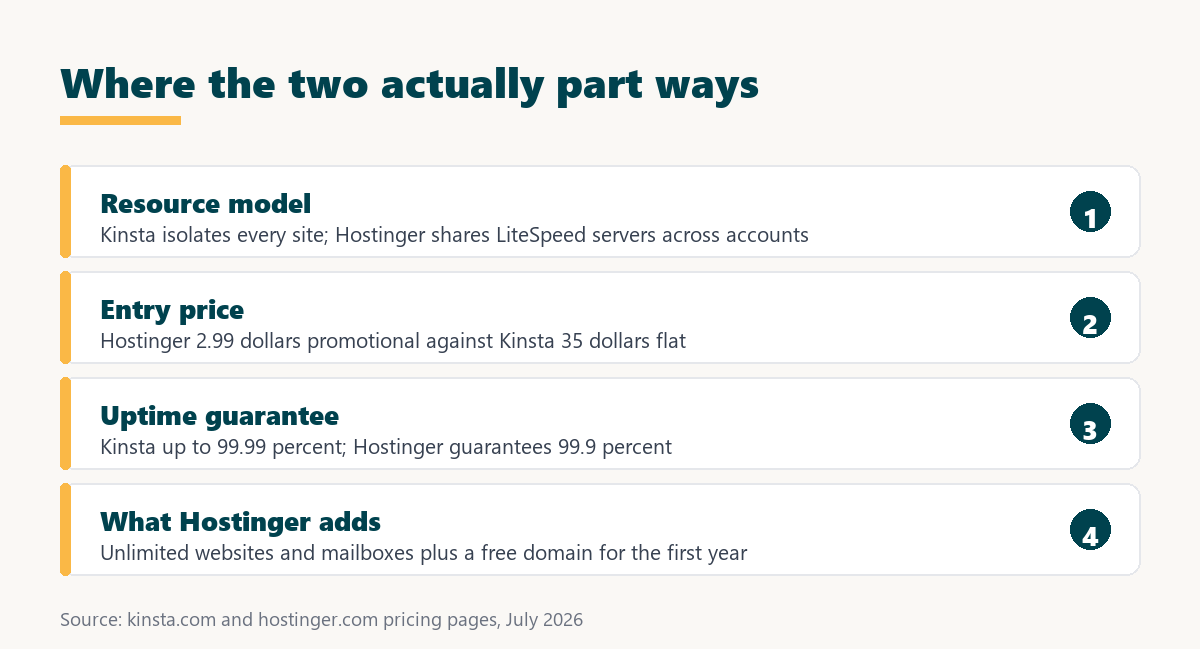
The structural difference decides everything downstream. Kinsta gives each site a private container with its own Linux, NGINX, PHP and MySQL on compute-optimised C2 and C3D machines. Hostinger places accounts on shared LiteSpeed servers with object cache available. The list below covers what follows.
- Resource privacy: Kinsta states that software resources are not shared even between two sites on the same account, so no neighbour can consume them.
- Web server software: Hostinger runs LiteSpeed, which is genuinely fast for cached WordPress pages and is a real technical strength at this price.
- Machine class: compute-optimised C2 and C3D virtual machines apply across all Kinsta plans rather than being reserved for expensive tiers.
- Storage headroom: Hostinger offers 20 GB on Premium and 50 GB on Unlimited, against 10 GB on Kinsta’s entry plan.
- Caching layer: both provide server-side caching, with Hostinger adding object cache support and Kinsta running page caching at platform level.
On specification alone Hostinger looks generous, and it is. What it cannot offer at that price is a guarantee that the capacity is yours alone.
Which Is Faster, Kinsta or Hostinger?
For cached pages Hostinger is competitive, because LiteSpeed with object cache serves static HTML very efficiently. For uncached pages the advantage moves decisively to Kinsta, where dedicated compute and per-site isolation remove the effect of neighbouring accounts.
Published benchmarks between the two vary widely with test location, page weight and cache state, so no timing figures are quoted here. The reproducible statement is narrower: on Kinsta the resource ceiling is the plan, while on shared hosting it is the plan and the server population combined.
That distinction is invisible on a brochure site and decisive on a store during a sale.
Which Is Better for Beginners and Budget?
Hostinger is the obvious starting point on a tight budget. Premium advertises 2.99 dollars a month for three websites with 20 GB of storage, a free domain for the first year, free SSL, a CDN, one-click staging and two mailboxes per site.
Kinsta is beginner-friendly in a different sense: nothing needs configuring because caching, backups and scaling are handled by the platform, and engineers perform the migration. What it lacks is a low entry price, bundled email and a free domain.
For a first site with no revenue attached, Hostinger is the sensible choice, and moving to Kinsta later costs nothing.
Which Is Better for Business and High-Traffic Sites?
Kinsta is better once a site earns money, because cart, checkout and logged-in pages bypass caching entirely and therefore depend on compute the platform has already guaranteed. Staging on every install and engineer-level support cover the operational side.
The uptime commitments differ too. Kinsta advertises an SLA-backed guarantee of up to 99.99 percent, while Hostinger guarantees 99.9 percent. Over a month that is roughly four and a half minutes of allowed downtime against about forty-three.
For a lead-generation site or a store, that difference in allowed downtime is the clearest argument in the whole comparison.
How Do the Features Compare?
Feature by feature Hostinger bundles more, while Kinsta guarantees more. Both include a CDN, SSL and staging, and the differences sit in allowances, uptime commitment and what each sells that the other does not. The table below lines them up.
Sources: kinsta.com and hostinger.com, checked July 2026.
Read the allowance rows honestly and Hostinger wins most of them. Read the guarantee row and Kinsta wins the one that matters when something breaks.
Which Has Better Support?
Both offer 24/7 support, so the difference is depth rather than availability. Kinsta staffs WordPress and Linux engineers and includes free malware removal; Hostinger provides priority expert support plus an AI assistant for routine site management. The list below covers what shows up in practice.
- Escalation depth: Kinsta tickets reach engineers who read server logs rather than agents who escalate server-level problems onward.
- Automated assistance: Hostinger includes an AI agent that detects and fixes common site errors, which suits owners without technical help.
- Malware response: Kinsta cleans a compromised site free of charge, which many hosts sell as a paid security service instead.
- Migration help: Kinsta engineers perform the move themselves, while Hostinger provides self-service migration tooling.
- Scope of responsibility: on a managed plan a slow site is the host’s problem, whereas shared plans leave tuning with the owner.
“Site speed shapes both search visibility and the share of visitors who stay to convert.”
— HubSpot, on page load time and conversion
Support only becomes decisive during an incident, which is why the depth of the person answering matters more than the response time on a quiet day.
Kinsta vs Hostinger on Price: Which Costs Less?
Hostinger is dramatically cheaper at every tier, both promotionally and at renewal. Even its most expensive listed plan renews below Kinsta’s entry price. Kinsta charges one flat rate with no promotional period. The table below compares them across the first two years.
Sources: kinsta.com/pricing and hostinger.com, checked July 2026. Promotional rates require multi-year prepayment.
Unlike several budget hosts, Hostinger stays genuinely cheaper after renewal, so this is not a comparison where the gap closes over time. It is a straightforward price-versus-guarantee decision.
What Does Hostinger Cost After the First Term?
Hostinger publishes its renewal rates plainly, and they rise about three to four times from the promotional price. Because introductory offers apply to the initial term only, the second year is the number that should drive the decision. The list below sets out the published rates.
- Premium renewal: 10.99 dollars a month for three websites with 20 GB of storage and two mailboxes per site.
- Unlimited renewal: 16.99 dollars a month for unlimited websites, 50 GB of NVMe storage and unlimited mailboxes.
- Cloud Startup renewal: 25.99 dollars a month with 100 GB of NVMe storage, still below Kinsta’s flat entry price.
- Backup cadence: Premium runs weekly backups while higher tiers move to daily, which is worth checking against recovery needs.
- Kinsta by contrast: the quoted 35 dollars is the ongoing rate, and annual billing charges ten months for twelve.
Even at full renewal price Hostinger undercuts Kinsta, which makes this a rare comparison where the budget option stays the budget option.
Decide what guaranteed capacity is worth before comparing the two invoices.
See Kinsta Pricing →Isolated containers · up to 99.99 percent SLA · 30-day money-back guarantee
When Is Hostinger the Better Pick?
Hostinger wins outright in several genuine situations, and it wins them on merit rather than only on price. The list below covers the clearest cases.
- Many small sites: unlimited websites at 16.99 dollars renewal is an allowance no fixed managed plan can match on cost per site.
- Email must be bundled: unlimited mailboxes come with the higher tiers, while Kinsta sells no email service at any price.
- A first project: a free domain for the first year plus a low entry price removes almost every barrier to launching.
- Storage-heavy sites: 50 GB on Unlimited and 100 GB on Cloud Startup dwarf the 10 GB included with Kinsta’s entry plan.
- Mostly cacheable content: LiteSpeed with object cache serves static pages efficiently, so a blog gains little from paying for isolation.
Where none of these apply and the site takes payments, the comparison tilts back toward guaranteed capacity and the higher uptime commitment.
What Do You Give Up Moving to Kinsta?
Four things are lost in the move, and none of them are performance related. Email hosting disappears entirely, the free first-year domain has no Kinsta equivalent, storage drops from 20 or 50 GB to 10 GB at entry level, and the monthly price rises sharply.
The email and storage gaps are the practical ones. Mailboxes need rehoming to Google Workspace or Zoho before the domain moves, and a media-heavy site may need the 20-dollar disk add-on to match what Hostinger included.
Counting mail and storage properly is worth doing before the decision rather than discovering it afterwards.
How Do You Switch From Hostinger to Kinsta?
The move runs without downtime because the site is copied first and DNS changes last, with Kinsta engineers performing the transfer under the unlimited free migration policy. The steps below cover the standard path.
- Rehome email first: move mailboxes to Google Workspace or Zoho and confirm mail is flowing before the domain is touched.
- Check storage needs: compare current disk usage against Kinsta’s 10 GB entry allowance and budget for a disk block if required.
- Request the migration: submit the Hostinger details through the migration form inside the MyKinsta dashboard.
- Review the copy: test pages, forms and checkout on the temporary Kinsta URL while the Hostinger site stays live.
- Point the DNS: update the records once site and mail routing are verified, then let the old plan lapse after an overlap.
Steps one and two are the ones people skip, and both are cheaper to solve before the move than after. Keeping the old plan alive briefly also limits vendor lock-in risk during the handover.
Should You Choose Kinsta or Hostinger?
Choose Kinsta when guaranteed capacity, the higher uptime commitment and engineer-level support protect revenue. Choose Hostinger when the budget leads, several sites need hosting cheaply, or the plan must include mailboxes, a domain and generous storage.
“A tool is only worth its premium when the hours or revenue it protects exceed the invoice.”
— Growth Hack Suite, on tool ROI
Both offer a 30-day money-back window, so the comparison can be settled by running the same site on each rather than by arguing over specifications.
Move off shared resources and measure the difference for 30 days.
See Kinsta Plans →Free migration from Hostinger · 30-day money-back guarantee
Growth Hack Suite Editorial — Web Infrastructure Team
How we compared these hosts: plan prices, renewal rates, uptime guarantees, storage allowances and migration policies were read from kinsta.com and hostinger.com, linked beneath the tables. Where published speed benchmarks conflict, this page explains the structural difference rather than quoting a figure that cannot be reproduced on another site.
Last updated: August 2026. Hostinger remains cheaper than Kinsta even at full renewal price, and it includes email, a free first-year domain and more storage. Those advantages are stated in the comparison rather than omitted.
Affiliate disclosure: this page contains affiliate links to Kinsta. If a plan is purchased through them, Growth Hack Suite may earn a commission at no extra cost to the buyer.
Kinsta vs Hostinger FAQ
The 12 most-asked questions about Kinsta versus Hostinger.
Is Kinsta better than Hostinger?
Kinsta is better where guaranteed capacity matters, since every site runs in a private container with an up-to 99.99 percent SLA. Hostinger is better on value, offering unlimited websites, unlimited mailboxes and far more storage for a fraction of the price.
Is Hostinger cheaper than Kinsta?
Yes, at every tier and even after renewal. Premium renews at 10.99 dollars, Unlimited at 16.99 and Cloud Startup at 25.99, all below Kinsta’s flat 35 dollars. This is a genuine price gap rather than a promotional one.
What does Hostinger cost at renewal?
Premium renews at 10.99 dollars a month, Unlimited at 16.99 and Cloud Startup at 25.99. Promotional pricing of 2.99 to 7.99 dollars applies to the initial prepaid term only.
Which is faster, Kinsta or Hostinger?
Hostinger is competitive on cached pages thanks to LiteSpeed and object cache. Kinsta leads on uncached pages such as carts and logins, where dedicated compute and isolation remove the effect of neighbouring accounts.
What uptime does each guarantee?
Kinsta advertises an SLA-backed guarantee of up to 99.99 percent, while Hostinger guarantees 99.9 percent. Across a month that is roughly four and a half minutes of allowed downtime against about forty-three.
Does Hostinger include email hosting?
Yes, with two mailboxes per site on Premium and unlimited mailboxes on higher tiers, plus a free domain for the first year. Kinsta sells no email service at any tier.
How many websites can each host?
Hostinger Premium allows three websites and higher tiers allow unlimited, while Kinsta’s Single 35k plan covers one install with 35,000 monthly visits. Multi-site Kinsta plans start at 70 dollars for two installs.
Which has more storage?
Hostinger by a wide margin: 20 GB on Premium, 50 GB on Unlimited and 100 GB on Cloud Startup, against 10 GB on Kinsta’s entry plan. Extra Kinsta storage costs 20 dollars per 20 GB block.
Which is better for WooCommerce?
Kinsta, because cart and checkout pages are excluded from full-page caching and therefore depend on raw compute. Isolated resources keep those pages responsive during a sale, which shared hosting cannot guarantee.
What server technology does Hostinger use?
LiteSpeed servers with object cache support, which is genuinely efficient for cached WordPress pages. Kinsta runs NGINX inside per-site containers on compute-optimised Google Cloud machines.
Can I migrate from Hostinger to Kinsta?
Yes. Kinsta engineers copy the site to a temporary URL under the unlimited free migration policy, it is checked while Hostinger stays live, and DNS changes last. Email must be rehomed separately first.
Should I switch from Hostinger to Kinsta?
Only when guaranteed capacity and the higher uptime commitment start to matter more than the price difference. For a light or mostly cached site, Hostinger remains the better spend.