
Table of Contents
MyKinsta is Kinsta’s custom control panel, where sites, staging, backups, CDN, analytics, users and billing are managed from one clean interface instead of cPanel. This guide explains what MyKinsta is, how the dashboard works, its real benefits, how it compares to a traditional panel, the honest trade-off it makes, and what it costs, so the picture is complete before you switch.
Last updated: August 2026. Dashboard details were read from kinsta.com. This page carries affiliate links to Kinsta, and it corrects the dead plan names and the retired visit figure that still circulate about Kinsta’s pricing.
What Is MyKinsta?
MyKinsta is the custom dashboard Kinsta built to manage WordPress sites, replacing traditional panels like cPanel. From it an owner controls staging, backups, CDN, analytics, user access and billing in a single modern interface, designed to make managing sites simple for both technical and non-technical users.
Verdict: MyKinsta is a genuinely clean, WordPress-focused control panel included on every plan, with one-click staging, backups, cache control, an APM performance tool and central multi-site management. The honest trade-off is that it abstracts raw server control, so it replaces cPanel and WHM rather than exposing them, which most owners will prefer but a power user wanting low-level access should weigh.
The takeaway is that MyKinsta trades deep server administration for simplicity and focus, which is the right trade for most WordPress sites and a deliberate one to understand.
“WordPress is a web content management system.”
: Wikipedia, WordPress
Because managing that system means juggling files, a database, caching and backups, a panel built specifically for WordPress removes much of the clutter a generic server panel carries.
How Does the MyKinsta Dashboard Work?
It works as a web-based control center where each site’s tools, staging, backups, cache, logs, analytics and access, are organized in a clean layout. Actions like creating a staging site, restoring a backup or clearing cache are one click, so a site is managed without command lines or cPanel clutter.
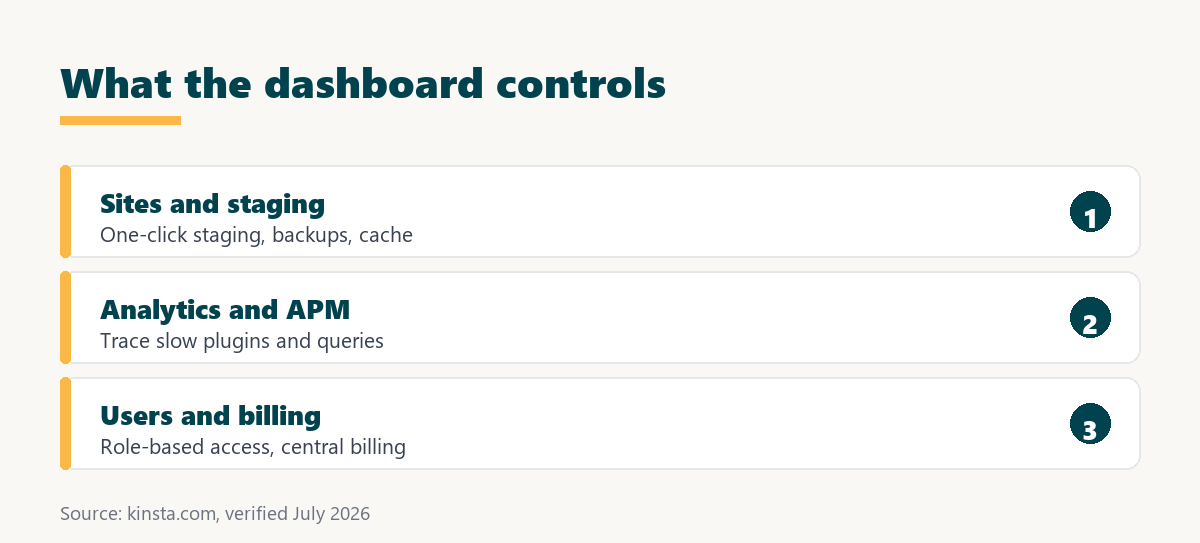
- Site management: Each site has its own area for environments, domains and tools, so switching context is a click rather than a separate login.
- Staging and backups: A staging copy or a backup restore runs from a button, turning multi-step cPanel tasks into single actions.
- Cache and PHP control: Clearing the cache, restarting PHP or switching the PHP version are one-click controls that would otherwise need a support ticket.
- Analytics and logs: Resource usage, traffic trends and error logs are surfaced in the panel, so a slow page or a spike is visible without external tools.
- Users and billing: Team access with roles and all billing sit in the same place, centralizing the administrative side of hosting.
The pattern is a purpose-built panel where the common WordPress tasks are one click, which is the practical reason MyKinsta feels faster to work in than a generic host panel.
What Are the Benefits of MyKinsta?
The benefits are simpler site management, faster access to key tools, clear analytics, easy user and billing control, and a gentler learning curve than cPanel. For agencies it centralizes many sites, and for beginners it makes premium hosting approachable without deep technical knowledge.
- Simpler management: Common tasks are grouped and labelled plainly, so a site is administered without server expertise.
- Faster tool access: Staging, backups and cache controls are one click, cutting the steps a generic panel requires.
- Clear analytics: Performance and traffic data are surfaced in the panel, helping an owner spot issues early.
- Central multi-site control: Many sites live under one login, which is the feature agencies value most.
- Gentler learning curve: A WordPress-focused layout is easier to learn than cPanel’s general-purpose server tools.
Taken together, these make premium hosting feel approachable, which is a real part of why MyKinsta is cited as a reason to choose Kinsta.
Who Benefits Most From MyKinsta?
The owners who benefit most are agencies and businesses managing several sites, where central control and clear analytics save real time, and non-technical owners who want premium hosting without a steep panel. Smaller hobby sites still gain from the simplicity, but the impact is largest where managing sites is a recurring job.
The owner who benefits least is the power user who wants raw server access, custom server-level configuration or a familiar cPanel workflow, since MyKinsta deliberately abstracts those. For that specific case the trade-off cuts the other way, which the limits section covers.
How Does MyKinsta Compare to a Typical Panel?
Compared to a typical cPanel host, MyKinsta is a custom, WordPress-focused panel with one-click tools, whereas cPanel is a general server panel with tasks spread across more steps. The difference is a purpose-built interface versus a generic one, at the cost of the raw server access cPanel exposes.
Source: kinsta.com and kinsta.com/plans, verified August 2026. In plain terms, MyKinsta is simpler and WordPress-focused, while cPanel exposes more raw server control at the cost of ease.
Read across, MyKinsta wins on ease and focus for WordPress, and cPanel wins where raw server control matters, which is the honest split rather than a clean sweep.
What Analytics and Monitoring Does MyKinsta Provide?
MyKinsta surfaces resource usage, visitor and bandwidth trends, top requests, cache performance and error breakdowns, and it includes the Kinsta APM tool for tracing slow transactions, plugins and database queries. That means many performance questions are answered inside the panel without a separate monitoring service.
The APM tool is the standout, because tracing a slow page to a specific plugin or query is exactly the diagnosis that usually requires a paid add-on elsewhere. For an owner chasing performance, having it built in is a concrete, verifiable benefit.
Does MyKinsta Replace cPanel?
Yes, Kinsta built MyKinsta from scratch instead of using cPanel, giving a cleaner interface focused on WordPress tasks like caching, staging and performance rather than generic server administration. The upside is simplicity, and the honest downside is that a cPanel-based workflow or script must be adapted.
For most owners that is a clear gain, since cPanel’s breadth is mostly unused on a managed WordPress site. For a team with cPanel automation or a preference for raw file and server tools, the switch is a genuine adjustment worth planning for rather than a drop-in replacement.
See the dashboard on a real site
See Kinsta Plans →MyKinsta is included on every plan, from $35 a month.
Are There Any Limits to MyKinsta?
Yes, and they follow from its design choices. MyKinsta is excellent for managed WordPress, and it is deliberately not a full server panel, so its limits are the flip side of its simplicity.
- Tied to Kinsta: The panel is Kinsta-specific, so the workflow learned in it does not transfer to another host.
- Abstracts raw control: Low-level server configuration and full file-system access are simplified away, which a power user may find restrictive.
- Not cPanel-compatible: Scripts or habits built around cPanel need adapting, since MyKinsta is a different panel entirely.
- Premium price attached: The dashboard is included, but the hosting it manages starts at 35 dollars a month, above budget hosts.
- Email is separate: Kinsta does not host email, so mailbox management is not part of the panel.
The pattern is that MyKinsta’s limits are intentional simplifications rather than gaps, so they suit most WordPress owners and constrain the power user who wants raw control.
Does MyKinsta Help SEO and Performance?
Indirectly, because the dashboard makes it easier to keep a site fast, and speed feeds the Core Web Vitals that Google uses as ranking signals. One-click cache control, staging for safe updates and the APM tool all help an owner maintain the performance that supports rankings and conversions.
“a B2B site that loads in 1 second has a conversion rate 3x higher than a site that loads in 5 seconds”
: HubSpot, page load time and conversion rates
A panel that makes it simple to diagnose and fix slow pages is what helps an owner capture that speed advantage, so MyKinsta supports performance rather than causing it directly.
Is MyKinsta Included in Kinsta Plans?
Yes, MyKinsta is included on every Kinsta plan, starting at 35 dollars a month, with no separate add-on fee. Higher tiers add more sites and resources, so the plan is chosen by traffic and site count, not by whether the dashboard is available.
Source: kinsta.com and kinsta.com/plans, verified August 2026. Agency and Enterprise tiers are purchased through Kinsta’s sales team; every tier includes MyKinsta.
Put simply, MyKinsta comes with every plan, so the only decision is which tier matches the site’s traffic and count.
The same dashboard on every tier
Compare Kinsta Plans →MyKinsta is included from $35 a month; pick the tier that fits your traffic.
Can I Manage Multiple Sites and Teams in MyKinsta?
Yes, MyKinsta lists all sites under one login, and role-based user management lets an owner invite team members and clients with only the access each needs. For an agency this central control across a portfolio is one of the panel’s strongest points.
Roles mean a developer, an editor and a billing contact can each be given a scoped level of access, which keeps a client account tidy and reduces the risk of an accidental change. That access control is a practical benefit for any team larger than one person.
Is Kinsta Worth It for MyKinsta?
Kinsta is worth it for MyKinsta when managing sites is a recurring job or when a non-technical owner wants premium hosting made approachable, because the panel saves real time and lowers the learning curve. For a single low-traffic hobby site the premium price is harder to justify on the dashboard alone.
“Tool spend is only defensible when the outcome it protects is measured, not assumed.”
: Growth Hack Suite, ROI on sales tools
For MyKinsta the measurable outcome is time saved managing sites and problems caught early through analytics, so the panel earns its keep most clearly for agencies and busy owners.
How Do You Use MyKinsta?
By signing up for a plan, after which MyKinsta is the dashboard used to add a site, request the free migration, and manage everything with sensible defaults already applied. The 30-day money-back guarantee lets the panel be tried on a real site before committing.
- Sign up and log in: Choose a plan, and MyKinsta becomes the single place to manage the account and its sites.
- Add or migrate a site: Create a site or request the free migration from within the dashboard to get the first site in place.
- Set up staging and backups: Use the one-click staging and backup controls so testing and recovery are ready from the start.
- Invite the team: Add users with roles so each person has the access they need and nothing more.
- Watch the analytics: Check the usage and APM data to catch slow pages or approaching plan limits early.
The honest summary is that MyKinsta is quick to get into, and the 30-day money-back guarantee means the dashboard can be judged on a real site rather than a demo.
Manage every site from one clean panel
Get Started With Kinsta →30-day money-back guarantee, with free migration included.
MyKinsta: Frequently Asked Questions
The 12 most-asked questions about MyKinsta.
What is the MyKinsta dashboard?
MyKinsta is Kinsta’s custom control panel for managing every site, viewing analytics, running backups, launching staging, and handling billing, replacing the traditional cPanel most hosts use. It is included on every plan.
Does MyKinsta replace cPanel?
Yes, Kinsta built MyKinsta from scratch instead of cPanel, giving a cleaner interface focused on WordPress tasks like caching and staging. The trade-off is that a cPanel-based workflow or script must be adapted to the new panel.
What analytics does MyKinsta provide?
MyKinsta shows resource usage, visitor and bandwidth trends, top requests, cache performance and error breakdowns, plus the APM tool for tracing slow transactions, so slow pages or traffic spikes are visible without external tools.
Can I manage multiple sites in MyKinsta?
Yes, MyKinsta lists all sites in one place, so an agency or multi-site owner can switch between environments, run backups, and monitor performance across a portfolio from a single login. Central control is one of its strongest points.
Does MyKinsta let me manage DNS?
Kinsta offers a premium DNS service that is managed inside MyKinsta, which Kinsta documents as built on Amazon Route 53 infrastructure, so records can be handled from the dashboard rather than a separate provider. Confirm the current DNS options in Kinsta’s docs for a specific setup.
Can I add team members in MyKinsta?
Yes, MyKinsta user management invites team members and clients with role-based permissions, so developers, editors and billing contacts each get only the access they need. This keeps a shared account tidy and reduces accidental changes.
Does MyKinsta include performance monitoring?
Yes, the built-in Kinsta APM tool traces slow transactions, plugins and database queries, so a performance problem can be diagnosed without buying a separate monitoring service. It is one of the more valuable tools inside the panel.
Can I open support tickets from MyKinsta?
Yes, MyKinsta includes integrated 24/7 chat support in multiple languages, staffed by engineers, so help is available without leaving the dashboard where sites are managed. Support is a click away from the tools themselves.
Is MyKinsta available on mobile?
MyKinsta is a responsive web application that works in a mobile browser, so site status, analytics and basic actions can be handled from a phone when away from a desk. It is not a native app, but the web panel adapts to a small screen.
Can I clear cache and switch PHP versions in MyKinsta?
Yes, MyKinsta has one-click controls to clear the site cache, restart PHP and switch the PHP version, so common maintenance actions take seconds rather than a support ticket. These are among the tasks the custom panel simplifies most.
Does MyKinsta show billing and plan usage?
Yes, MyKinsta centralizes billing, invoices and resource usage against plan limits, so an owner can see when they are approaching visit or bandwidth thresholds and upgrade before overage occurs. Billing and usage sit alongside the site tools.
Is MyKinsta easy to use for non-developers?
MyKinsta is designed to be approachable, using plain labels and one-click actions for staging, backups and cache, so a non-technical owner can manage a site without server expertise. The trade-off is less raw control for those who want it.
About this guide
Written by the Growth Hack Suite editorial team. Dashboard details were read from kinsta.com. This page carries affiliate links to Kinsta, so the honesty owed to a reader is stated plainly: MyKinsta is a genuinely clean, WordPress-focused control panel included on every plan, with verified one-click staging, backups, cache and PHP controls, the built-in APM performance tool, 24/7 chat support and central multi-site management, and its deliberate trade-off, abstracting raw server control in place of cPanel and WHM, is presented as a trade-off rather than hidden.
The DNS detail is described as a premium service Kinsta documents on Amazon Route 53 rather than asserted independently, and PHP version switching is distinct from the retired PHP-worker figures that should not be quoted. The dead plan names and the retired 25,000-visit figure are corrected to the real Single, WP, Agency and Enterprise structure, and offers are described as a 30-day money-back guarantee, not a free trial.