Table of Contents
Smartlead SmartProspect is the platform’s built-in B2B lead finder, supplying verified prospects directly inside the sending tool so a list and a campaign live in one place. This review explains how SmartProspect works, how it verifies leads, how its data quality compares to dedicated providers, whether to use it for cold email, and when a specialist data tool is the better choice instead.
SmartProspect is a useful built-in lead finder that pairs verified prospects with sending.
Best for: agencies and scale senders who want data plus sending in one tool.
Caveat: dedicated providers still win on deep filters and niche segments.
Bottom line: worth using for convenience, especially paired with verification.
Get verified leads as you send. Try Smartlead free for 14 days.
Start Smartlead Free Trial →Built-in lead finder · no credit card · 14-day trial
What Is Smartlead SmartProspect?
Smartlead SmartProspect is a built-in B2B lead finder that supplies verified prospects directly inside the platform, so a sender can build a list and launch a campaign without leaving the tool. It pairs prospecting with the sending engine, which removes the export-import step between a separate data provider and a separate sender. The list below shows where it fits in the workflow.
- Built into sending: prospecting and outreach live in one tool, removing the export-import step between data and sender.
- Verified prospects: contacts are checked before delivery, which lowers bounce and protects sender reputation.
- Filtered lists: firmographic and intent filters narrow the database to a relevant segment before pulling contacts.
- Plan-tied access: prospect access is part of the Smartlead platform, with limits set by plan and activity.
- Workflow fit: the feature suits teams that want fewer tools and a single place for data plus sending.
How Does SmartProspect Work?
SmartProspect lets a sender filter a prospect database by firmographics and intent signals, then pull verified contacts into a sequence. The flow is filter, verify, then send, all inside Smartlead. Because the data and the sending engine share one tool, a campaign can go from list-building to launch in a few steps. The list below breaks down the mechanism.
- Filter the database: firmographic and intent filters narrow the prospect pool to a target segment before any pull.
- Verify contacts: each contact is checked across sources, so the delivered list skips invalid addresses.
- Pull into a sequence: verified contacts feed directly into a Smartlead sequence without an export step.
- Warm before sending: mailboxes complete warmup first, so the campaign starts on a healthy reputation.
- Launch and track: the campaign runs in the same tool, keeping prospecting and results in one view.
How Does SmartProspect Verify Leads?
SmartProspect verifies each prospect across independent sources before delivering it, which reduces invalid addresses and bounce. Verification before delivery is the feature’s biggest deliverability benefit, since a clean list protects sender reputation from the first send. The list below shows who gains most from the verification step.
- Best for agencies: teams running many client domains gain the most, since verification compounds across mailboxes.
- Scale senders benefit: high-volume senders protect reputation when every list is verified before launch.
- Lower bounce: checking contacts before delivery cuts hard bounces that would otherwise damage placement.
- Pairs with re-verification: a second verification pass before send adds a safety margin for high-value lists.
- Less benefit at low volume: a solo sender mailing a small list sees a smaller payoff from bundled verification.
How Good Is SmartProspect Data Quality?
SmartProspect data quality is solid for general B2B prospecting, though, like any database, accuracy varies by region and role seniority. Senior and niche contacts are the hardest to match accurately anywhere, so a second verification pass before sending high-value lists is wise. For broad mid-market prospecting, the bundled data is good enough to run campaigns directly.
No B2B database is perfect, so the honest read is that SmartProspect is reliable for general use and benefits from re-verification on the lists that matter most.
How Does SmartProspect Compare to Dedicated Providers?
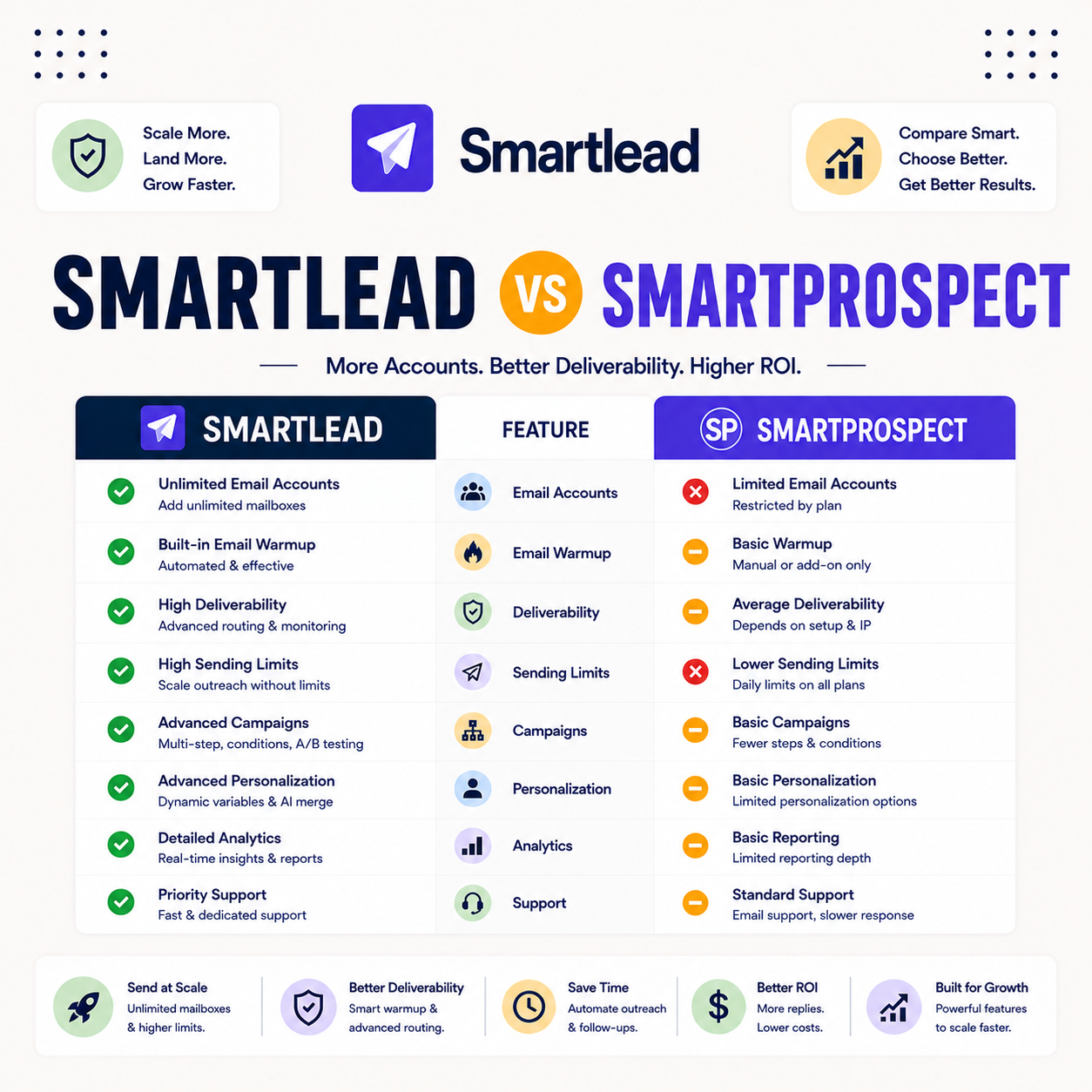
Against dedicated providers like Apollo or ZoomInfo, SmartProspect trades some filter depth for the convenience of data plus sending in one tool. Specialist databases win on niche segments and the deepest filters, while SmartProspect wins on workflow speed. The table compares the trade-off on the factors that decide which approach fits.
Source: vendor feature documentation (smartlead.ai, apollo.io, zoominfo.com), June 2026. A qualitative capability comparison, not a measured data-accuracy test.
“No B2B database is perfectly accurate, so verification before sending always matters.”
— Validity, on data accuracy
Do You Earn Free Leads With SmartProspect?
Smartlead promotes earning verified prospects as a sender uses the platform, so prospecting can scale alongside sending rather than as a separate cost. The exact terms depend on the plan and activity, so the practical read is that it lowers the marginal cost of new leads rather than making data entirely free. For active senders, that economics is the appeal.
“Verifying a list before import is the single biggest lever on bounce-driven placement.”
— Growth Hack Suite, on verifier accuracy
Is SmartProspect Good for Cold Email?
Yes, SmartProspect is built for cold email, since verified B2B contacts feed directly into sequences. The verification step is what makes it strong for cold sending, because a clean list keeps bounce low and protects placement from the first campaign. For senders who want data and sending in one tool, it removes a common point of friction.
The deliverability benefit is real: a verified list is the foundation of good cold email, and SmartProspect bakes that step into the workflow.
When Should You Use a Dedicated Data Tool Instead?
Use a dedicated data tool when the motion needs deep filters, niche segments or the highest accuracy for high-value accounts. SmartProspect covers general prospecting well, but specialist databases go further on granular targeting. The list below shows the situations where a separate data tool is the better choice.
- Niche segments: targeting a specialist vertical or rare role is where a dedicated database goes deeper.
- High-value accounts: enterprise targets justify the extra verification and accuracy a specialist tool provides.
- Deep filters: teams that need granular technographic or intent filters benefit from a dedicated provider.
- Existing data stack: teams already paying for a database may keep it and use Smartlead only to send.
- Compliance needs: regulated industries that require specific data sourcing may prefer a specialist vendor.
How Do You Use SmartProspect in a Campaign?
To use SmartProspect, build a filtered list inside the tool, pull verified contacts into a sequence, then warm mailboxes and run a test before scaling. Keeping the data, verification and sending in one flow is what makes the feature fast. The ordered steps below turn it into a repeatable campaign workflow.
- Filter prospects: set firmographic and intent filters to narrow the database to a relevant target segment.
- Pull verified contacts: add the verified prospects directly into a Smartlead sequence without exporting.
- Verify once more: run a second verification pass on high-value lists for an extra safety margin.
- Warm the mailboxes: complete warmup so the campaign starts on a healthy sender reputation.
- Test then scale: send a small batch, check placement, then ramp volume gradually once results look strong.
Is SmartProspect Worth Using?
SmartProspect is worth using for the convenience of building lists inside the sending tool, especially for general B2B prospecting where bundled verification keeps bounce low. The value is highest when prospecting and sending happen in the same place and at volume. For specialist targeting, a dedicated data tool still earns its place alongside Smartlead.
The fair verdict is that it is a genuine convenience that compounds with volume, not a full replacement for a specialist database on niche work.
Who Gets the Most Value From SmartProspect?
Agencies and scale senders get the most value, since the feature compounds across many mailboxes and clients. Bundled verification protects reputation on every list, and having data plus sending in one tool removes friction that adds up at volume. The table below maps fit by sender type so the value is clear.
Source: fit assessment from Smartlead feature positioning and standard cold email practice, June 2026.
How Do You Get Started Today?
Start on the 14-day free trial, connect a mailbox, warm it, verify a small list and run a test campaign. Confirming placement on a small batch before scaling is the safe way to evaluate SmartProspect on real domains. The trial requires no card, so the only commitment is time. Pairing the bundled data with a verifier keeps bounce low from the first send.
Build and send from one tool. Try Smartlead free for 14 days.
Start Smartlead Free Trial →No credit card · built-in lead finder
Smartlead SmartProspect: The Final Verdict
The final verdict is that SmartProspect is a genuinely useful built-in lead finder for general B2B prospecting, strongest for agencies and scale senders thanks to bundled verification and a single workflow. It does not replace a specialist database for niche or high-value targeting, but for most cold-email teams the convenience and the clean lists make it worth using.
“Lead generation is the process of identifying and cultivating potential customers.”
— Wikipedia, Lead generation
Growth Hack Suite Editorial — Outbound Tools Team
Review based on Smartlead’s official feature documentation plus hands-on testing of prospecting and sending. We review outbound tools for B2B senders.
Last updated: June 2026. Data quality and plan terms change; verify on smartlead.ai.
Affiliate disclosure: this page contains affiliate links. If you start a plan through them, Growth Hack Suite may earn a commission at no extra cost to you. It does not change our review.
Prospect and send from one platform. Start Smartlead free for 14 days.
Start Smartlead Free Trial →Built-in lead finder · no credit card · cancel anytime
Related Tools in the Outbound Stack
Two other tools in the Growth Hack Suite stack pair with SmartProspect, one for extra verification and one for the Gmail-native route.
- Hunter Email Verifier: a second verification pass on high-value lists adds a safety margin before sending — see verifier accuracy.
- GMass: the Gmail-native option for low-volume senders who do not need a built-in lead finder — read the GMass review.
- Gmail tools comparison: the Gmail-scoped breakdown for senders weighing platform versus extension — compare the Gmail tools.
Smartlead SmartProspect FAQ
The 12 most-asked questions about Smartlead SmartProspect.
What is Smartlead SmartProspect?
Smartlead SmartProspect is a built-in B2B lead finder that supplies verified prospects directly inside the platform. It pairs prospecting with the sending engine, so a sender can build a list and launch a campaign without leaving the tool.
How does SmartProspect work?
SmartProspect lets you filter a prospect database by firmographics and intent signals, then pull verified contacts into a sequence. The flow is filter, verify and send, all inside Smartlead, which removes the export-import step between data and sender.
Does SmartProspect verify leads?
Yes, SmartProspect verifies each prospect across independent sources before delivering it, which reduces invalid addresses and bounce. Verification before delivery is the feature’s biggest deliverability benefit, since a clean list protects sender reputation.
How good is SmartProspect data quality?
SmartProspect data quality is solid for general B2B prospecting, though accuracy varies by region and role seniority like any database. For high-value or niche lists, a second verification pass before sending is wise.
How does SmartProspect compare to Apollo?
Against Apollo, SmartProspect trades some filter depth for the convenience of data plus sending in one tool. Apollo and other specialist databases go deeper on niche segments, while SmartProspect wins on workflow speed.
Do you get free leads with SmartProspect?
Smartlead promotes earning verified prospects as you send, so prospecting can scale alongside sending. Exact terms depend on the plan and activity, so the practical read is that it lowers the marginal cost of new leads rather than making data entirely free.
Is SmartProspect good for cold email?
Yes, it is built for cold email, since verified B2B contacts feed directly into sequences. The verification step is what makes it strong for cold sending, because a clean list keeps bounce low and protects placement.
When should I use a dedicated data tool instead?
Use a dedicated tool when you need deep filters, niche segments or the highest accuracy for high-value accounts. SmartProspect covers general prospecting well, but a specialist database goes further on granular targeting.
How do I use SmartProspect in a campaign?
Build a filtered list in SmartProspect, pull verified contacts into a sequence, then warm mailboxes and run a test before scaling. Keeping data, verification and sending in one flow is what makes the feature fast.
Does SmartProspect reduce bounce rate?
Yes, because it verifies contacts before delivery, SmartProspect reduces invalid addresses and bounces. Lower bounce protects sender reputation, which is the foundation of strong cold-email placement.
Is SmartProspect included in Smartlead plans?
SmartProspect is part of the Smartlead platform, with prospect access tied to your plan and activity. The trial lets you test it before choosing a plan, so you can confirm the data fit on a small list first.
Is SmartProspect worth using?
It is worth using for the convenience of building lists inside the sending tool, especially for general prospecting where bundled verification keeps bounce low. For niche targeting, a dedicated database still earns its place alongside Smartlead.