Multi-inbox sending is the practice of running one cold email campaign across several connected inboxes so total daily volume exceeds any single account’s sending limit. By distributing sends, it bypasses the per-inbox Gmail cap while keeping each account safe. It is how high-volume cold senders scale past 500 or 2000 a day. GMass supports multi-inbox sending across connected Gmail accounts, pacing each one within Google’s limits.
What Is Multi-Inbox Sending?
Multi-inbox sending uses multiple email accounts to send a single campaign, splitting the volume so no one inbox exceeds its daily limit. Also called multi-send or inbox distribution, it turns several capped accounts into one large sending capacity. The campaign appears as individual sends from each inbox, preserving the personal feel of one-to-one email.
“The Simple Mail Transfer Protocol is an internet standard communication protocol for electronic mail transmission between servers and clients.”
: Wikipedia: Simple Mail Transfer Protocol
Multi-inbox sending splits one campaign across several accounts so none exceeds its cap. It turns multiple limited inboxes into one large, safe sending capacity.
How Does Multi-Inbox Sending Bypass Gmail Limits?
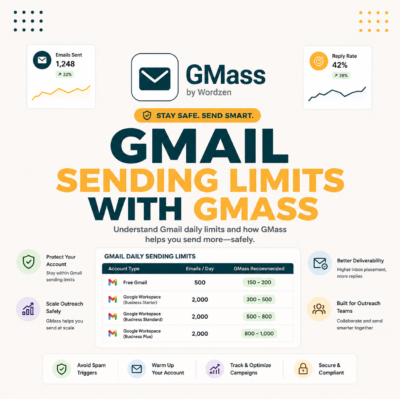
Each Gmail or Workspace account has its own daily cap, about 500 or 2000. Multi-inbox sending respects each cap individually while the campaign as a whole reaches a much larger total. Five Workspace inboxes at 2000 each give 10,000 a day without any single account breaking its limit. It bypasses the limit by spreading, not by breaking, the rules.
Source: Google Workspace sending limits documentation, 2026-06.
“Spreading volume across multiple sending accounts keeps each one within safe limits, which protects deliverability far better than pushing everything through a single inbox.”
: HubSpot: Email Deliverability
It respects each inbox’s cap while the campaign total grows. Five Workspace inboxes reach 10,000 a day with no single account breaking its limit.
How Is It Different from Inbox Rotation?
Multi-inbox sending is the broad concept of using several inboxes; inbox rotation is the specific method of cycling sends across them in turn. Rotation is how multi-inbox sending distributes the load evenly. In practice the terms overlap, but multi-inbox describes the goal of bypassing limits, and rotation describes the mechanism that does it safely.
- Multi-inbox is the goal: Using several accounts to exceed one inbox’s limit and reach a larger total sending capacity for a campaign.
- Rotation is the method: Cycling each outgoing email to the next inbox in turn so the load spreads evenly across all connected accounts.
- They work together: Multi-inbox sending needs rotation to distribute volume, and rotation exists to make multi-inbox sending safe and even.
Multi-inbox sending is the goal of bypassing limits; rotation is the method that distributes load. They overlap in practice and work together.
What Do You Need to Set Up Multi-Inbox Sending?
You need several email accounts, each authenticated with SPF, DKIM, and DMARC, each warmed, and a tool that distributes a campaign across them and routes replies back. Skipping authentication or warm-up on any inbox undermines the whole setup. The tool is what ties the inboxes into one managed campaign rather than several manual sends.
- Multiple accounts: Several Gmail or Workspace inboxes, ideally on the same or related domains, ready to share campaign volume.
- Authentication on each: SPF, DKIM, and DMARC configured per inbox so every account’s mail is trusted from the first send.
- A distribution tool: Software that splits the campaign across inboxes, paces each one, and routes replies back to the correct account.
You need several authenticated, warmed inboxes and a tool that distributes the campaign and routes replies. Skipping authentication or warm-up undermines it all.
How Does GMass Support Multi-Inbox Sending?
GMass can distribute a campaign across multiple connected Gmail or Workspace accounts, sending from each within Google’s limits and pacing every inbox. Because it runs inside Gmail, each sending account uses Google’s trusted infrastructure. For senders who already operate several Gmail accounts, GMass turns them into one multi-inbox sending engine without leaving Gmail.
“GMass can distribute a campaign across multiple connected Gmail accounts, so a sender scales total volume while each inbox stays within Google’s sending limits.”
: Growth Hack Suite: GMass Cold Email Review
Send one campaign across all your Gmail accounts
Try GMass Free →Distribute volume across inboxes. Free 50/day to start.
GMass distributes a campaign across connected Gmail accounts, pacing each within Google’s limits. It turns several inboxes into one multi-inbox engine inside Gmail.
How Many Inboxes Should You Use?
Divide your target daily volume by a conservative per-inbox rate. For Workspace at a safe 1800 a day, reaching 9000 needs five inboxes. Starting with fewer and adding as each warms keeps reputation healthy. More inboxes mean more capacity but also more accounts to authenticate, warm, and maintain, so grow the count to match real volume needs.
Divide target volume by a safe per-inbox rate to set the count. Add inboxes as each warms rather than provisioning a fleet you cannot maintain.
How Do You Keep Reputation Consistent Across Inboxes?
Warm each inbox to the same level, authenticate every domain, send similar paced volume from each, and monitor per-inbox metrics. Inconsistent reputation, where one inbox is hot and another cold, drags down the campaign average. Treating every sending account to the same standard keeps the whole multi-inbox setup delivering evenly.
- Equal warm-up: Bring every inbox to the same reputation level before adding it to the rotation, so no weak account drags the average down.
- Uniform authentication: Configure SPF, DKIM, and DMARC identically across inboxes so all sending is trusted to the same degree.
- Balanced volume: Send similar paced volume from each account so reputation builds and holds evenly rather than concentrating on a few inboxes.
Warm, authenticate, and load every inbox equally, then monitor each. One hot and one cold inbox drags the average; uniform standards keep delivery even.
How Do Replies Work with Multi-Inbox Sending?
Each prospect receives mail from one specific inbox, so replies return to that account. A unified inbox or the sending tool aggregates responses across all accounts into one view, so you never miss a reply scattered in an inbox you rarely check. Replies route back through the original sender to keep the conversation authentic.
Manage replies across every sending inbox in one place
See GMass Pricing →Replies stay in Gmail across accounts. Free 50/day to start.
Replies return to the inbox that sent the original, aggregated into one view so none is missed. Routing back through the sender keeps threads authentic.
What Are the Risks of Multi-Inbox Sending?
The risks are managing more inboxes than you can warm and authenticate, spreading bad reputation if an unwarmed inbox joins the campaign, and reply fragmentation without a unified view. Done carelessly, multi-inbox sending multiplies problems instead of capacity. The fix is treating every inbox to the same warm-up, authentication, and monitoring discipline.
Risks are unwarmed inboxes, missing authentication, and scattered replies. Uniform warm-up, authentication, and a unified view turn risk back into capacity.
How Do You Warm Up Multiple Inboxes?
Warm all inboxes in parallel over two to four weeks, ramping each one’s volume gradually with normal two-way activity and authentication in place. Warming them together means the whole fleet reaches sending readiness at once. Adding inboxes one at a time later works too, but each new account must complete its own warm-up before joining the campaign.
- Authenticate each: Configure SPF, DKIM, and DMARC on every inbox’s domain before any warm-up sending begins.
- Ramp in parallel: Increase each inbox’s daily volume in small steps over two to four weeks so the fleet warms together.
- Use two-way activity: Send and receive normal email on each account so the warm-up builds genuine engagement, not just outbound volume.
- Monitor placement: Track each inbox’s open and spam rates, slowing any that dips rather than pushing all to full speed at once.
- Join when ready: Add each inbox to the campaign only once it reaches target volume with healthy placement.
Warm all inboxes in parallel over weeks with authentication and two-way activity. Each new account must finish its own warm-up before joining the campaign.
How Do You Manage Multi-Inbox Sending at Scale?
At scale, use a tool that centralizes campaign setup, per-inbox pacing, reply aggregation, and health monitoring across all accounts. Manual management breaks down past a few inboxes. The tool handles distribution and replies while you watch per-inbox metrics, pausing and re-warming any account that slips before it affects the campaign.
- Centralized setup: Build the campaign once and let the tool distribute it across all inboxes, rather than configuring each account separately.
- Per-inbox monitoring: Watch each account’s metrics individually so a single failing inbox is caught and rested before it drags the campaign down.
- Unified replies: Aggregate responses from every inbox into one view so no reply is missed across a large sending fleet.
At scale, a tool centralizes setup, pacing, replies, and monitoring. Manual management breaks down past a few inboxes; software keeps the fleet coordinated.
Does GMass Make Multi-Inbox Sending Easy?
For Gmail-based senders, GMass makes multi-inbox sending straightforward: connect your accounts, build one campaign, and GMass distributes and paces it within each inbox’s limit while keeping replies in Gmail. It suits senders who already run several Gmail or Workspace accounts and want to scale without leaving the Gmail environment or managing dedicated domains.
To set realistic volume and pacing targets, the cold email benchmarks guide defines healthy rates, and the cold email list building guide keeps each inbox sending to a quality list.
Scale cold email across multiple Gmail inboxes with GMass
Try GMass Free →One campaign, many inboxes, paced within limits. Free 50/day.
GMass makes multi-inbox sending straightforward for Gmail users: connect accounts, build one campaign, and it distributes and paces while keeping replies in Gmail.
Frequently Asked Questions
The 12 most-asked questions about multi-inbox sending for cold email.
What is multi-inbox sending?
Running one cold email campaign across several connected inboxes so total daily volume exceeds any single account’s limit. It splits sends so no inbox breaks its cap.
How does it bypass Gmail limits?
Each account respects its own cap while the campaign total grows. Five Workspace inboxes at 2000 each give 10,000 a day, bypassing the limit by spreading, not breaking, the rules.
How is it different from inbox rotation?
Multi-inbox sending is the goal of using several inboxes; rotation is the method of cycling sends across them in turn. Rotation distributes the load that multi-inbox sending creates.
What do I need to set it up?
Several email accounts, each authenticated with SPF, DKIM, and DMARC and warmed, plus a tool that distributes a campaign across them and routes replies back to the correct account.
How does GMass support multi-inbox sending?
GMass distributes a campaign across multiple connected Gmail or Workspace accounts, sending from each within Google’s limits and pacing every inbox, all inside Gmail.
How many inboxes should I use?
Divide target daily volume by a safe per-inbox rate, about 1800 for Workspace. Reaching 9000 needs five inboxes. Add inboxes as each warms rather than all at once.
How do I keep reputation consistent across inboxes?
Warm each inbox to the same level, authenticate every domain identically, send similar paced volume from each, and monitor per-inbox metrics so no account drags the average.
How do replies work?
Each prospect gets mail from one inbox, so replies return there. A unified view aggregates responses across all accounts, and replies route back through the original sender.
What are the risks of multi-inbox sending?
Managing more inboxes than you can warm, spreading bad reputation from an unwarmed account, and reply fragmentation. Uniform warm-up, authentication, and monitoring prevent them.
How do I warm up multiple inboxes?
Authenticate each, then ramp all in parallel over two to four weeks with normal two-way activity. Each new account must complete its own warm-up before joining the campaign.
How do I manage multi-inbox sending at scale?
Use a tool that centralizes setup, per-inbox pacing, reply aggregation, and health monitoring. Manual management breaks down past a few inboxes; software keeps the fleet coordinated.
Does GMass make multi-inbox sending easy?
For Gmail-based senders, yes: connect accounts, build one campaign, and GMass distributes and paces it within each inbox’s limit while keeping replies in Gmail.