A suspended Gmail account is one Google has disabled for violating its policies, often after spam-like sending behavior, locking you out of email and connected services. Cold email triggers suspension when an account sends too fast, to bad lists, or without authentication. Suspension can be permanent, so prevention beats recovery. Sending from an aged account at a safe pace, with a clean verified list through GMass, keeps you well clear of a ban.
What Is a Suspended Gmail Account?
A suspended Gmail account is one Google has disabled for breaching its terms, blocking access to Gmail and linked Google services. Suspension differs from a temporary block: it is a serious enforcement action that can be permanent. For cold senders, an account suspension means losing the inbox, the conversations, and sometimes the connected data with it.
“Email spam, also referred to as junk email, is unsolicited messages sent in bulk by email, and sending it can violate the terms of email providers.”
: Wikipedia: Email spam
A suspended account is disabled by Google for policy violations and can be permanent. For cold senders, it means losing the inbox and everything tied to it.
Why Does Google Suspend Gmail Accounts?
Google suspends accounts that violate its program policies, most commonly for sending spam, bulk unsolicited mail, or behavior that looks like a compromised account. The system is automated and pattern-based, so it acts on signals like sudden volume spikes and high complaint rates. Intent does not matter; the sending pattern does.
- Spam and bulk mail: Sending unsolicited bulk email is a direct policy violation, and the more it resembles spam, the faster the automated enforcement responds.
- Compromised-account signals: Sudden behavior changes look like a hacked account, so a quiet inbox that suddenly blasts mail can trip the same defenses as a real compromise.
- High complaint rates: Recipients marking mail as spam feed directly into the suspension decision, so poor targeting accelerates the path to a ban.
Google suspends on spam patterns, compromised-account signals, and complaints, all judged automatically. The sending behavior, not the intent, decides the outcome.
What Triggers a Suspension from Cold Email?
Cold email triggers suspension through volume spikes, fast burst sending, high bounce rates from bad lists, spam complaints, and missing authentication. Any one can flag an account; combined, they make suspension likely. The common thread is sending that looks automated and unwanted rather than personal and expected.
Volume spikes, bad lists, complaints, and missing authentication each trigger suspension. The fix for all of them is sending that looks personal and expected.
What Is the Difference Between a Block and a Suspension?
A block is temporary: Google pauses sending for a period or asks you to re-authenticate, then restores access. A suspension is severe: the account is disabled and may be permanent. A block is a warning to slow down; a suspension is the consequence of ignoring those warnings. Treat any block as a signal to change behavior immediately.
- Temporary block: A short pause or re-authentication prompt that lifts once you slow down, serving as an early warning rather than a final penalty.
- Full suspension: The account is disabled, access is lost, and recovery is uncertain, making it the outcome to avoid at all costs.
- Warning-to-ban path: Blocks usually precede suspensions, so ignoring a block and pushing the same behavior is the fastest route to a permanent ban.
A block is a temporary warning; a suspension is a severe, possibly permanent ban. Treat every block as the cue to change behavior before it escalates.
How Do You Know If Your Account Is Suspended?
You will be locked out of Gmail with a message stating the account is disabled, often citing a policy violation. Connected Google services may also become inaccessible. Unlike a block, you cannot simply slow down and resume; suspension requires an appeal. The clear sign is being unable to log in at all rather than just being unable to send.
Avoid the lockout: send cold email the safe way
Try GMass Free →Paced, verified sending from your trusted inbox. Free 50/day.
Suspension means a full lockout with a policy-violation message, not just a send pause. If you cannot log in at all, the account has been disabled.
Can You Recover a Suspended Gmail Account?
Sometimes. Google offers an appeal process, and accounts suspended in error or for a first minor violation are occasionally restored. But recovery is never guaranteed, and a clear spam pattern often makes a ban permanent. Because the outcome is uncertain and slow, prevention is always the better strategy than relying on an appeal.
“Repeated or severe violations of a provider’s bulk sending and spam policies can lead to permanent account termination with no guaranteed path to recovery.”
: HubSpot: Email Deliverability
Recovery is possible through appeal but never guaranteed, and clear spam patterns often make bans permanent. Prevention beats relying on an uncertain appeal.
How Does GMass Help You Avoid Suspension?
GMass paces sends across the day, includes list verification, and runs inside your established Gmail account, all of which keep your sending pattern within Google’s expectations. It sends through Google’s own infrastructure rather than bypassing it, so behavior stays legitimate. Used on an aged account with a clean list, GMass makes suspension unlikely.
“GMass sends through Gmail’s own infrastructure with paced sending and built-in verification, helping keep an account’s behavior within Google’s accepted limits.”
: Growth Hack Suite: GMass Cold Email Review
Send cold email that stays within Google’s limits
See GMass Pricing →Paced, verified, Gmail-native sending. Free 50/day to start.
GMass paces sends, verifies lists, and runs inside Gmail’s own infrastructure, keeping behavior legitimate. On an aged account with a clean list, suspension is unlikely.
What Sending Habits Prevent Suspension?
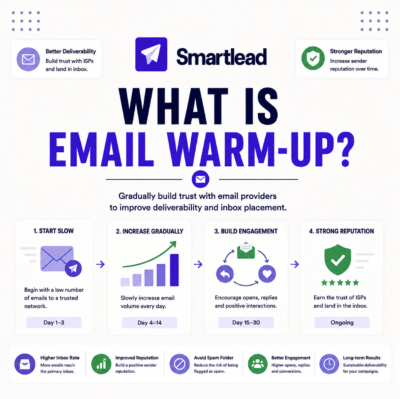
Ramp volume gradually, validate every list, pace sends across the day, personalize messages, honor unsubscribes, and keep complaint rates low. These habits make your sending look personal and wanted, which is the opposite of the spam pattern that triggers bans. Consistency matters more than any single setting.
- Gradual volume ramp: Increase sending slowly so the account never shows the sudden spike that reads as automated or compromised behavior.
- List validation: Clean every list before sending so bounces stay under 3 percent, removing a major suspension signal at the source.
- Easy unsubscribe: Honor opt-outs immediately, since recipients who can leave easily complain less, keeping the complaint rate that feeds enforcement low.
Gradual ramp, validated lists, paced personalized sends, and easy unsubscribes prevent suspension. Consistent good habits beat any single safety setting.
How Does Authentication Reduce Suspension Risk?
SPF, DKIM, and DMARC prove your mail genuinely comes from your domain, so Google and recipients trust it more and flag it less. Unauthenticated bulk mail looks like spoofing or spam, a fast track to suspension. Setting up all three is a one-time foundation that lowers risk on every future send.
Authentication proves your mail is genuine, so providers trust it and flag it less. SPF, DKIM, and DMARC are a one-time foundation that lowers risk everywhere.
What Should You Do If You Get a Warning?
Stop cold sending immediately, return to normal personal email use, review what triggered the warning, and resume only at a much lower volume once trust rebuilds. A warning is a chance to correct course before a suspension. Pushing the same behavior after a warning is the most common path to a permanent ban.
- Pause cold sending: Stop all campaigns at once so the account is not compounding whatever behavior triggered the warning.
- Return to normal use: Send and receive ordinary personal email for a period to rebuild the human activity pattern Google trusts.
- Diagnose the trigger: Identify whether volume, list quality, or authentication caused the warning, and fix that specific issue before resuming.
- Resume slowly: Restart cold sending at a fraction of the previous volume, ramping back up only as the account regains standing.
- Monitor closely: Watch for any further warnings and slow down again immediately rather than risking the next step toward suspension.
A warning is a chance to correct course: pause, normalize, diagnose, then resume slowly. Pushing the same behavior afterward is the fast path to a ban.
How Do You Protect Your Primary Account?
Never send high-volume cold email from your critical business inbox. Use a separate aged account or domain for outreach, so a suspension there cannot take down the email you depend on for customers and operations. Isolating cold sending is the single most important protection for an account you cannot afford to lose.
Keep your critical inbox safe while running cold email
Try GMass Free →Send from a dedicated aged account. Free 50/day to start.
Never risk a critical inbox: send cold from a separate aged account so a suspension there cannot take down the email your business depends on.
How Do You Send Cold Email Without Risking a Ban?
Use an aged, authenticated account, validate every list, pace sends across the day, personalize messages, honor unsubscribes, and isolate cold sending from your primary inbox. Done together through a tool like GMass, these practices keep your sending pattern human and your account safe. The whole approach is about looking like a real person, not a spam machine.
To set realistic safe-sending targets, the cold email benchmarks guide defines healthy bounce and reply rates, and the cold email list building guide keeps each send targeted to a clean list.
Run cold email safely without risking a Gmail ban
Try GMass Free →Aged account, paced sends, clean lists. Free 50/day to start.
Aged authenticated account, validated lists, paced personalized sends, and isolation from your primary inbox keep you ban-free. The goal is looking human, not automated.
Frequently Asked Questions
The 12 most-asked questions about suspended Gmail accounts and cold email.
What is a suspended Gmail account?
A Gmail account Google has disabled for violating its policies, locking you out of email and connected services. It often follows spam-like sending and can be permanent.
Why does Google suspend Gmail accounts?
For violating program policies, most often sending spam or bulk unsolicited mail, or behavior that looks like a compromised account. The system is automated and acts on sending patterns.
What triggers a suspension from cold email?
Volume spikes, fast burst sending, high bounce rates from bad lists, spam complaints, and missing authentication. Any one can flag an account; combined, they make suspension likely.
What is the difference between a block and a suspension?
A block is temporary: sending pauses or you re-authenticate, then access returns. A suspension disables the account and may be permanent. A block is a warning to slow down.
How do I know if my account is suspended?
You are locked out of Gmail with a message stating the account is disabled, often citing a policy violation. Unlike a block, you cannot just slow down and resume.
Can I recover a suspended Gmail account?
Sometimes, through Google’s appeal process. Accounts suspended in error or for a first minor issue are occasionally restored, but a clear spam pattern often makes the ban permanent.
How does GMass help avoid suspension?
GMass paces sends, includes list verification, and runs inside your established Gmail through Google’s own infrastructure, keeping behavior within Google’s expectations on an aged account.
What sending habits prevent suspension?
Ramp volume gradually, validate every list, pace sends, personalize, honor unsubscribes, and keep complaint rates low. These make sending look personal and wanted rather than automated.
How does authentication reduce suspension risk?
SPF, DKIM, and DMARC prove your mail genuinely comes from your domain, so it is trusted and flagged less. Unauthenticated bulk mail looks like spoofing, a fast track to suspension.
What should I do if I get a warning?
Stop cold sending, return to normal email use, diagnose the trigger, then resume at a much lower volume. A warning is a chance to correct course before suspension.
How do I protect my primary account?
Never send high-volume cold email from your critical business inbox. Use a separate aged account or domain so a suspension there cannot take down the email you depend on.
How do I send cold email without risking a ban?
Use an aged authenticated account, validate lists, pace sends, personalize, honor unsubscribes, and isolate cold sending from your primary inbox. Tools like GMass automate the safe pattern.