Table of Contents
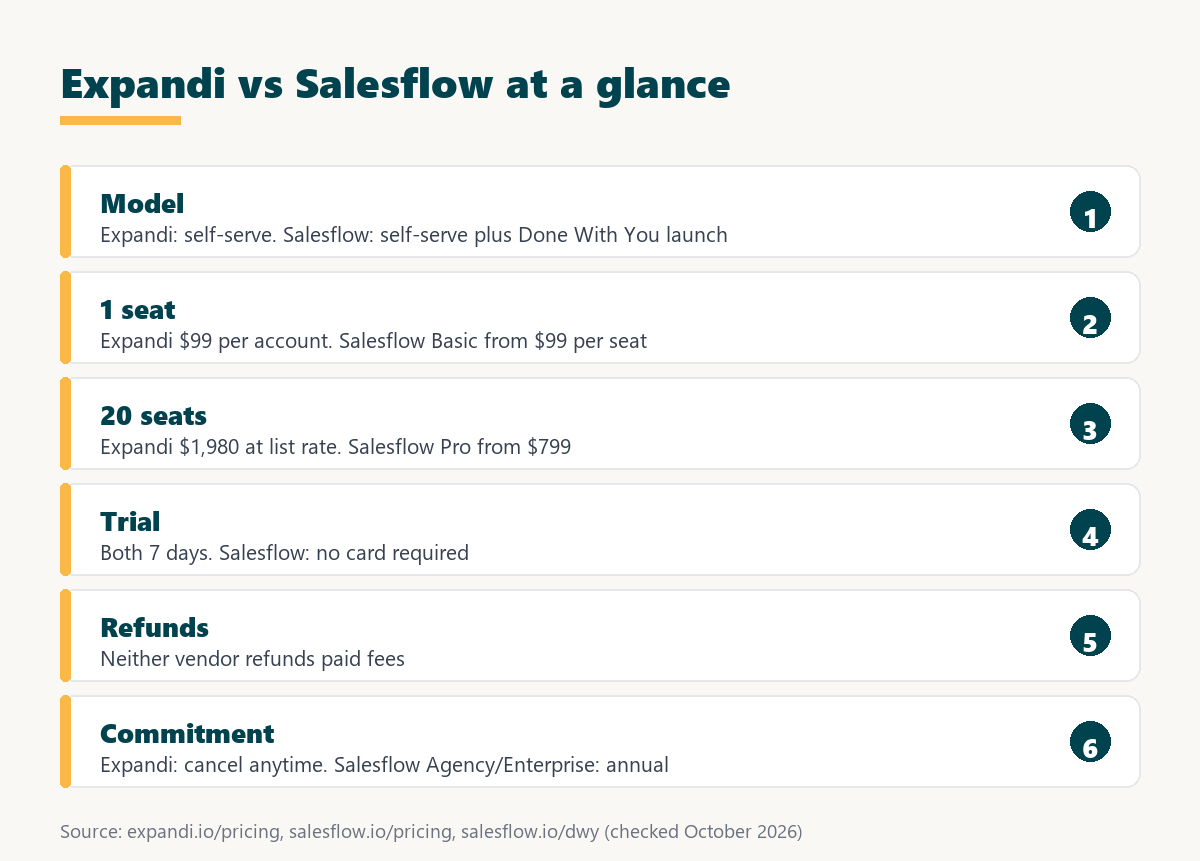
Expandi vs Salesflow is a comparison between a self-serve LinkedIn automation tool and a tool that adds a guided launch service. Expandi costs $99 per LinkedIn account per month and leaves every campaign to the buyer. Salesflow starts from $99 per seat, drops to $70 at five seats, and sells a Done With You package that builds the first campaign.
Last checked: October 2026. Prices and features taken from the official Expandi pricing page, FAQ, and help center, and from the Salesflow pricing, Done With You, agency, and terms pages, on the dates shown under each table.
Prefer to build and control every campaign in house? Test Expandi on one LinkedIn account for seven days.
Start Your 7-Day Expandi Trial →Seven-day trial on the first subscription · dedicated country-based IP per account · cancel anytime
Expandi vs Salesflow: Who Runs the Campaigns in Each Model?
Expandi vs Salesflow is a comparison of who does the campaign work. Expandi is a self-serve tool where the agency builds and runs everything for $99 per account, while Salesflow sells seats that fall in price with volume and a Done With You package in which its team builds the first campaign.
For an agency or a lead-generation freelancer, the question behind the comparison is practical: does the team already know how to write and run LinkedIn sequences, or would a guided first campaign save weeks of trial and error? The answer changes which commercial terms are worth accepting.
The short answer depends on in-house skill and seat count, because confident operators need only software while newer teams may value a guided first campaign.
What Is the Difference Between Self-Serve and Done-For-You Outreach?
Self-serve outreach is a model where the buyer sets up, writes, and runs every campaign inside the software. Done-for-you outreach is a model where a provider does that work on the buyer’s behalf, and guided models sit between the two by building a first campaign and then training the buyer to continue.
- Campaign builder: in a self-serve model the buyer builds each sequence, while a service model assigns that task to the provider for an agreed scope.
- Copywriting: self-serve teams write their own connection notes and follow-ups, while a service provider drafts copy and the buyer approves or requests edits.
- Daily monitoring: someone has to watch replies, limits, and failed actions every day, and in a self-serve model that work stays with the buyer.
- Learning curve: self-serve buyers learn the tool from documentation and support, while a guided service shortens that curve with sessions and a worked example.
- Cost shape: self-serve spending is the software fee alone, while service models add a separate service charge on top of the seat price.
“a system whereby customers acquire themselves goods or services”
Wikipedia, Self-service
The handover from vendor to customer is a classic onboarding question, covered in the guide to SaaS user onboarding.
The two models trade money for effort, so the right pick depends on whether an agency has people who already know how to run LinkedIn campaigns.
Is Salesflow Really a Done-For-You Service?
Salesflow is a LinkedIn automation tool that offers a package named Done With You rather than a full done-for-you service. Its page describes one campaign created by Salesflow, an onboarding session, and a training session with an account manager, after which the customer runs campaigns alone inside the tool.
“Get the ball rolling with confidence by having one campaign created by us and the training you need to run it yourself after”
Salesflow, Done With You
The wording matters for agencies comparing offers. A done-for-you provider keeps running outreach every month, while the Salesflow package covers the launch and then hands the controls back. Agencies that want a managed program from start to finish should treat Salesflow as software with launch help, not as an outsourced team.
Salesflow helps with the launch and then hands over the controls, so buyers expecting a permanently managed program should read the package description carefully.
How Much Does Expandi Cost per LinkedIn Account?
Expandi costs $99 per LinkedIn account per month, or $79 per account per month when billed annually, which is a 20% saving. Every account includes the same Business feature set, and agencies running ten or more accounts move to an Agency tier priced through a custom quote from sales.
The Agency tier adds a dedicated Customer Success Manager, flexible roles and permissions, transparent reports for clients, and the option to use Expandi under the agency’s own brand, according to the Expandi pricing page. There is no permanently free tier: the seven-day trial applies to the first subscription, checkout asks for card details, and no charge is made until the seven days are up. Subscription fees are nonrefundable under the Terms, and monthly subscriptions can be cancelled at any time.
Expandi publishes one flat rate below ten accounts, which makes small books easy to budget but offers no automatic discount as the account count climbs.
How Does Salesflow Price Its Seats?
Salesflow pricing is a per-seat model in which the rate falls as seats increase. Basic starts from $99 per seat for one seat, Starter from $70 at five seats, and Pro from $39.95 at twenty seats, while Agency and Enterprise start lower but require an annual commitment, billed monthly.
- Basic tier: the entry level for a single seat, starting from $99 per seat per month with multichannel outreach, the unified inbox, and API access.
- Starter tier: starts from $70 per seat per month and applies from five seats, which is the first point where the volume discount takes effect.
- Pro tier: starts from $39.95 per seat from twenty seats and adds a dedicated customer success manager, priority support, and a white-label URL.
- Agency tier: starts from $29.98 per seat from fifty seats, requires an annual commitment billed monthly, and adds seats in batches of five.
- Enterprise tier: starts from $24.99 per seat from one hundred seats, again with an annual commitment, and adds seats in batches of ten.
The Salesflow pricing page sums up the model in one line, “The bigger your team, the less you pay per seat,” and adds toggles for six-month and twelve-month terms at 15% and 30% off. The exact prices after those toggles are not readable on the page, so they are not quoted here. The logic behind falling seat prices is explained in the guide to the SaaS volume discount.
Salesflow rewards scale openly on its pricing page, which is the opposite of the Expandi approach of one list rate and a private quote for large books.
What Does Each Tool Cost at 1, 5, 20, and 50 Accounts?
Expandi costs $99 times the number of accounts at list price, so five accounts cost $495 a month. Salesflow lowers its rate as seats grow, from $99 for one seat to $70 at five and $39.95 at twenty, so five Salesflow seats start from $350 a month and twenty start from $799.
Source: expandi.io/pricing and expandi.io/faq, checked October 2026; salesflow.io/pricing, checked October 2, 2026. Calculated from published starting rates at each tier’s minimum seat count. Expandi columns use list rates; from ten accounts Expandi quotes its Agency tier privately. Taxes excluded.
The two tools cost the same for a single seat, and from five seats upward Salesflow starting rates fall well below Expandi list pricing, with the gap widening at every tier shown in the table.
On published numbers Salesflow wins at volume, although Expandi quotes its Agency tier privately, so large agencies should request that quote before deciding.
What Does Self-Serve Setup Look Like in Expandi?
Self-serve setup in Expandi is a sequence the buyer completes alone inside the app. The buyer connects a LinkedIn account, selects a country for the dedicated IP, lets the warm-up begin, builds a campaign in the sequence builder, adds leads, and activates it, with no vendor step required along the way.
- Account connection: the buyer links a LinkedIn profile through the Chrome extension or with login details and waits a few minutes for the account to sync.
- Country selection: choosing a country assigns the account a dedicated IP in that location, and the country can be changed later in the LinkedIn settings.
- Warm-up start: the automatic warm-up begins at five actions per day once a campaign is active and rises by three actions every two days.
- Campaign build: the operator picks a campaign type such as Connector, then adds steps and conditions in the builder, with up to 5,000 leads per campaign.
- Activation: after leads are added and the campaign is set to Active, the help center says sending may take up to 45 minutes to begin.
Expandi’s help center also caps an account at 15 active campaigns at a time, which matters for agencies running several client offers from one profile.
Nothing in the Expandi flow requires a vendor to step in, though the help center also offers one-to-one onboarding calls for buyers who want guidance.
What Does the Salesflow Done With You Package Include?
The Salesflow Done With You package is a guided launch in which Salesflow builds one campaign and trains the customer. The page lists one onboarding session, one training session with a dedicated account manager, one piece of copy with a round of edits, and help with Sales Navigator searches.
- First campaign build: the Salesflow team creates one campaign so the customer starts from a working example rather than an empty sequence builder.
- Onboarding session: one session walks the customer through the account and the settings that matter before any outreach starts to send.
- Training session: one session with a dedicated account manager covers how to run and adjust the campaign after the launch is complete.
- Copy and edits: Salesflow provides one piece of message copy and one round of edits, which gives a starting template for later campaigns.
- Targeting help: the package includes help with Sales Navigator searches and the ideal customer profile, so the first audience is defined properly.
Expandi does not sell an equivalent build-it-for-you package as a separate product; its help is onboarding calls and documentation, plus a Customer Success Manager on the Agency tier.
The package shortens the learning curve for a first campaign, and its price is not published, so it should be requested alongside the seat quote.
How Do Expandi and Salesflow Compare Feature by Feature?
Expandi and Salesflow overlap on multichannel outreach and a unified inbox and differ on pricing shape, commitment, and launch help. Expandi documents a dedicated IP and lets buyers cancel at any time, while Salesflow publishes volume tiers, a trial with no card required, and annual commitments on its largest tiers.
Source: expandi.io/pricing, Expandi Terms, and the Expandi help center, checked October 2026; salesflow.io/pricing, salesflow.io/dwy, and salesflow.io/terms, checked October 2, 2026.
Both tools refuse refunds and offer a seven-day trial, while Expandi stays flexible on cancellation and Salesflow trades a commitment on large tiers for much lower seat prices.
The comparison shows similar software wrapped in different commercial terms, so contract comfort matters as much as any feature when choosing between them.
How Does Each Tool Handle LinkedIn Account Safety?
LinkedIn account safety is the set of controls that keep automated activity inside limits LinkedIn tolerates. Expandi documents a dedicated country-based IP per account and a warm-up that starts at five actions a day, while the Salesflow pricing page does not describe how an IP is assigned to each account.
The Salesflow agency page mentions a Sessions Browser that lets users log in “with the same IP as Salesflow” (Salesflow agency page), but that line does not say whether each account gets its own address. This comparison does not claim Salesflow has or lacks a dedicated IP per account. On the Expandi side, the help center states that every user gets a personal dedicated IP, a custom proxy is available, and the warm-up ramps to twenty-one actions a day.
Agencies handling client profiles should ask Salesflow how IP addresses are assigned, since Expandi publishes that detail and the Salesflow pricing page leaves it out.
Want to see per-account isolation on a real client profile? Connect one LinkedIn account and run the seven-day trial.
Try Expandi for 7 Days →No charge until the seven days are up · taxes added by billing country
Which Agencies Fit Expandi Best?
Expandi fits agencies with fewer than about ten client accounts that already run outreach confidently. These teams want full control of every sequence, a documented IP and warm-up on each profile, and the freedom to cancel a seat when a client leaves without an annual commitment.
- Experienced operators: teams with proven sequences need software and control rather than a provider building campaigns for them, so a launch package adds little.
- Small client books: agencies under ten accounts pay one list rate per profile with no seat minimums and no annual commitment attached to the price.
- Safety-led agencies: a dedicated IP in a chosen country and a published warm-up on each client profile give a documented answer when clients ask about risk.
- Flexible rosters: monthly seats can be cancelled at any time, so a seat for a departing client does not lock the agency into another year.
- Freelancers billing per client: one flat price per account maps cleanly onto client invoices, which keeps the platform cost easy to pass through.
The common thread is independence, since these agencies value control and flexible terms more than the lowest possible price per seat.
When Is Salesflow the Better Pick?
Salesflow is the better pick when an agency runs many seats or wants help launching. Rates start from $70 at five seats and $39.95 at twenty, the trial needs no card, the Pro tier adds a white-label URL, and Done With You builds the first campaign for teams new to LinkedIn outreach.
- High seat counts: agencies with twenty or more seats pay a starting rate that is less than half of the Expandi list price for the same count.
- First-time outbound teams: the Salesflow guided launch package builds the first campaign and trains the team, which shortens the path to a working sequence.
- White-label needs: the Pro tier and higher add a white-label URL and access customization for agencies that present the tool under their own name.
- Card-free testers: the Salesflow trial lasts seven days with no card required, which suits teams that cannot put a card on file during evaluation.
- API users: every Salesflow tier lists API access and native integrations, which helps agencies that pipe outreach data into their own reporting.
Saying plainly where Salesflow wins keeps the comparison honest, because large agencies would overpay on a flat per-account rate without a negotiated quote.
What Hidden Costs Should an Agency Check?
Hidden costs are charges or commitments that sit outside the headline price. With Expandi they are per-account growth, paid add-ons, and nonrefundable fees, while with Salesflow they are minimum seat counts, annual commitments on Agency and Enterprise, and an unpublished price for Done With You.
- Minimum seats: each lower Salesflow rate applies only from a set seat count, such as five for Starter or twenty for Pro, so a small book pays more.
- Annual commitment: Salesflow’s Agency and Enterprise tiers require an annual commitment billed monthly, which locks the agency in for twelve months.
- Unpublished service price: the guided launch package has no listed price on the Salesflow site, so its cost has to be quoted before it enters a budget.
- Per-account growth: each new Expandi profile adds $99 per month at list price, with no discount until the ten-account Agency tier is negotiated.
- Nonrefundable fees: Expandi’s Terms make subscription fees nonrefundable, and Salesflow’s Terms describe its fees as non-cancellable and non-refundable.
HubSpot’s guide to outsourcing sales development names the trade-off agencies weigh when handing campaign work to someone else:
“Understandably, when it comes to sales, control is a top reason for not outsourcing.”
HubSpot, on sales outsourcing
Low starting rates come with conditions, so agencies should map seat counts and commitment length over twelve months before comparing either tool on price. The general rules are covered in the guide to SaaS cancellation policies.
How Should an Agency Test Both Tools?
A side-by-side test is a one-week run where the same client profile type and message go through both tools. Both trials last seven days, so an agency can compare setup effort, inbox handling, and support in parallel before either nonrefundable subscription begins.
- Count the seats: listing current and planned client accounts for twelve months shows which Salesflow tier applies and what Expandi would cost at list price.
- Decide on launch help: deciding whether the team needs a campaign built for it settles whether a quote for the guided launch package is worth requesting.
- Open both trials in one week: start the seven-day Expandi trial and the seven-day Salesflow trial together so the results cover the same market conditions.
- Run the same sequence: send one sequence to the same ideal customer profile in both tools, so differences come from the software rather than the copy.
- Compare terms before paying: weigh setup time, inbox handling, and commitment rules side by side before the first nonrefundable charge arrives.
A parallel week shows how much help a team really needs, which is the fact that decides whether a guided launch is worth paying for. The SaaS free trial guide covers how to structure a short evaluation.
Verdict: Self-Serve Tool or Guided Service?
The verdict is that Expandi suits agencies that want to run everything themselves on flexible terms with a dedicated IP per account, and Salesflow suits agencies that need many seats at falling rates or a guided first campaign. Neither vendor refunds fees, so the trial week carries the decision.
“The deciding factor is that coordination, not just more touches, is what makes it work.”
Growth Hack Suite, What Is Multichannel Outreach?
That principle favors whichever model keeps the agency in charge of its own sequences, which is why in-house skill matters more than the package on offer.
Most agencies can decide by counting seats and judging their own outreach skill, then confirming the choice during the two seven-day trials.
Expandi vs Salesflow: Frequently Asked Questions
The 12 most-asked questions about Expandi vs Salesflow.
Is Expandi better than Salesflow?
It depends on the agency. Expandi suits self-serve teams that want a documented dedicated IP and flexible cancellation, while Salesflow suits agencies with many seats or a need for a guided first campaign.
Is Salesflow a done-for-you service?
No. Salesflow sells a package called Done With You, in which its team builds one campaign and trains the customer, who then runs campaigns alone.
What does Done With You include?
One campaign created by Salesflow, one onboarding session, one training session with an account manager, one piece of copy with a round of edits, and help with Sales Navigator searches.
How much does Expandi cost per account?
Expandi costs $99 per LinkedIn account per month on monthly billing, or $79 per account per month when billed annually, plus tax by billing country.
How much does Salesflow cost per seat?
Salesflow starts from $99 per seat for one seat, $70 from five seats, $39.95 from twenty, $29.98 from fifty, and $24.99 from one hundred.
At how many seats is Salesflow cheaper?
From five seats. Five Salesflow seats start from $350 a month against $495 for five Expandi accounts at list price.
Does Salesflow require an annual commitment?
Only on its largest tiers. Agency and Enterprise require an annual commitment billed monthly; the smaller tiers do not state one.
How long are the trials?
Both last seven days. Expandi’s trial applies to the first subscription and checkout asks for card details, while Salesflow states no card is required.
Can fees be refunded on either tool?
No. Expandi’s Terms make subscription fees nonrefundable, and Salesflow’s Terms describe its fees as non-cancellable and non-refundable.
Does Expandi include a dedicated IP?
Yes. Expandi assigns each account a dedicated IP in a chosen country and offers a custom proxy option.
Does Salesflow offer white-label?
Yes, from the Pro tier upward, which adds a white-label URL and access customization.
Can an agency switch from Salesflow to Expandi?
Yes. Switching means connecting each client profile to Expandi, choosing a country for its IP, and letting the warm-up run before raising volume.
Confident running campaigns in house? Start the seven-day Expandi trial on one client profile and keep full control.
Start Your 7-Day Expandi Trial →Seven-day trial on the first subscription · cancel anytime · paid fees are nonrefundable
Growth Hack Suite Editorial, Outbound Sales Team
How we compared: Expandi figures come from expandi.io pricing, FAQ, and Terms, and from the Expandi help center articles on setup, warm-up, and campaign limits. Salesflow figures come from the salesflow.io pricing, Done With You, agency, and terms pages, read on October 2, 2026. Multi-seat totals are calculated from published starting rates and exclude tax. No test campaigns were run for this page.
Last checked: October 2026. When either vendor changes its prices, this page is updated first.
Affiliate disclosure: this page contains affiliate links to Expandi. If a subscription is purchased through them, Growth Hack Suite may earn a commission at no extra cost to the buyer. Salesflow links are not affiliate links.