Table of Contents
Expandi vs Kaspr is a comparison between a LinkedIn sending engine and a Chrome extension that extracts contact data. Expandi costs $99 per LinkedIn account per month and sends connection requests, messages, and email steps from the cloud. Kaspr has a no-cost tier, costs $65 per user monthly on Starter, and reveals phone numbers and emails from LinkedIn profiles.
Last checked: October 2026. Expandi pricing, FAQ, and help center articles, plus the Kaspr pricing page in US dollars, were read on the dates shown under each table. Kaspr also displays euro and sterling prices, which differ from the dollar figures used here.
Want LinkedIn conversations started without sending each request by hand? Test Expandi on one account for seven days.
Start Your 7-Day Expandi Trial →Seven-day trial on the first subscription · dedicated country-based IP per account · cancel anytime
Expandi vs Kaspr: Which One Does a Founder Need First?
Expandi vs Kaspr is a choice between sending outreach and collecting contact data. Expandi fits founders who want LinkedIn connection requests and follow-ups sent automatically, while Kaspr fits founders who need phone numbers and email addresses to reach prospects by call or by email outside LinkedIn.
A solo founder rarely has the budget or the hours to run every channel at once, so the first purchase should match how deals actually close today. Founders whose buyers reply on LinkedIn need volume on that platform, and founders who close by phone need direct numbers they can dial this week.
The short answer follows the channel: founders who sell through LinkedIn conversations need the sending engine, and founders who call or email need the contact data.
What Is the Core Difference Between Expandi and Kaspr?
The core difference is the output each tool produces: Expandi is a cloud tool that sends outreach sequences for each connected LinkedIn account. Kaspr is a Chrome extension and web app that returns phone numbers and email addresses for LinkedIn profiles and exports them to CRM, calling, and email tools.
Kaspr belongs to the email finder Chrome extension category, while Expandi belongs to cloud LinkedIn automation. The five differences below follow from that.
- Primary output: Expandi produces sent messages and replies inside LinkedIn, while Kaspr produces phone numbers and email addresses for use in other sales tools.
- Where it runs: Expandi runs campaigns from the cloud on a schedule, while Kaspr works as a Chrome extension on the profile or search being viewed.
- Billing unit: Expandi charges for each connected LinkedIn account, while Kaspr charges for each user and meters phone and direct email lookups as credits.
- No-cost tier: Expandi has none and offers a seven-day trial instead, while Kaspr lists a Free tier with a small monthly credit allowance.
- Channel served: Expandi covers LinkedIn steps plus email steps inside a sequence, while Kaspr supplies data for calls and emails sent through other tools.
Kaspr’s delivery format is the browser extension, which Wikipedia defines as:
“a software module for customizing a web browser”
Wikipedia, Browser extension
Both tools start from a LinkedIn profile, yet one ends in a conversation on the platform and the other ends in a contact record off the platform.
What Does Expandi Send on LinkedIn?
Expandi automates LinkedIn outreach from the cloud for each connected account. The Business plan includes multichannel campaigns across connection requests, messages, and email, an if and action sequence builder, dynamic placeholders, campaign statistics, and safety controls such as a dedicated country-based IP address and profile auto warm-up.
- Multichannel outreach: campaigns combine LinkedIn connection requests, LinkedIn messages, and email steps inside one sequence for every connected account on the plan.
- Sequence builder: the pricing page lists a convenient sequence builder with if and action logic, so follow-ups branch on whether a lead connected or replied.
- Dynamic placeholders: custom fields imported from a CSV file personalize each message, and a fallback message is sent when a lead lacks the value.
- Dedicated country-based IP: each connected account sends from its own fixed IP address in the chosen country instead of a pool shared by unrelated users.
- Profile auto warm-up: the help center describes a gradual ramp that starts at 5 actions a day and rises by 3 every two days to a cap of 21.
Expandi publishes platform benchmarks too: according to Expandi’s platform data, 28.5% of connection requests are accepted and 10.4% of outbound messages get a reply. Those are one vendor’s averages across its own users, not a LinkedIn standard or a promise for any single account.
Expandi handles the sending side in depth, which is the repeated daily work a solo founder rarely has time to do by hand every morning.
What Contact Data Does Kaspr Extract?
Kaspr extracts phone numbers and email addresses tied to LinkedIn profiles. Its pricing page lists B2B email credits, phone credits, and direct email credits, and the extension supports single profiles, people searches, groups, events, and Sales Navigator searches on its paid tiers, with export to CRM and dialer tools.
- Phone credits: each paid Kaspr tier includes a monthly allowance of phone numbers, from 100 on Starter to 200 on Business, with top-ups available.
- B2B email credits: work emails are listed as unlimited from the Starter tier, subject to Kaspr’s fair use policy rather than a hard monthly count.
- Direct email credits: personal or direct email lookups are metered separately, from 5 per month on Starter to 200 per month on Business.
- Bulk sources: the extension works on LinkedIn people searches, groups, events, and CSV files of LinkedIn URLs, not only one profile at a time.
- Sales Navigator support: Kaspr on Sales Navigator is listed from the Starter tier, and the Business tier adds support for LinkedIn Recruiter Lite.
Kaspr’s pricing page describes the core action in one sentence:
“Access verified phone numbers and emails directly from LinkedIn profiles, groups, and events with our Chrome extension.”
Kaspr pricing page
For the method behind tools like this, see the guide to LinkedIn email scraping.
Kaspr turns a LinkedIn profile into a callable, emailable contact, which matters most to founders whose buyers respond better to a phone call.
How Much Does Expandi Cost per LinkedIn Account?
Expandi costs $99 per LinkedIn account per month, or $79 per account per month when billed annually, which is a 20 percent saving. Every account receives the same Business feature set, and teams running ten or more accounts can request custom Agency pricing with a dedicated Customer Success Manager.
For a solo founder, that is one seat and one line on the budget. Annual billing works out to $948 for the year on one account, calculated as 79 multiplied by 12, against $1,188 if the monthly plan runs a full year. Taxes are added by billing country, the trial applies only to the first subscription, and paid fees are nonrefundable under the Terms.
Expandi pricing is simple enough to budget in one line: multiply the number of LinkedIn accounts by the monthly rate, then add tax where it applies.
How Much Does Kaspr Cost per User?
Kaspr costs $65 per user each month on Starter and $99 per user each month on Business, with effective rates of $49 and $79 on annual billing. A Free tier includes 15 B2B email credits and 5 phone credits each month, and the Organization package for larger teams is priced on request.
- Free tier: Kaspr lists 15 B2B email credits, 5 phone credits, and 5 direct email credits per month at no cost, with an export limit of 100.
- Starter: $65 per user monthly, or $49 on annual billing, with B2B email under fair use, 100 phone credits, and Sales Navigator support.
- Business: $99 per user monthly, or $79 on annual billing, with 200 phone credits, 200 direct email credits, and LinkedIn Recruiter Lite support.
- Organization package: custom pricing with unlimited credits, available only on an annual subscription with a minimum of five users, according to the pricing page.
- Extra credits: the pricing page says subscribers can add extra credits to a subscription at any time, which raises the bill during heavy months.
Kaspr pricing scales with phone and direct email credits, so founders who mostly need work emails can stay on a lower tier for longer.
How Do the Two Pricing Models Compare Side by Side?
The two pricing models bill different units at similar price points. Expandi charges $99 per connected LinkedIn account each month with a seven-day trial and no permanent no-cost tier, while Kaspr charges per user from $65 a month with credit allowances and keeps a Free tier for light use.
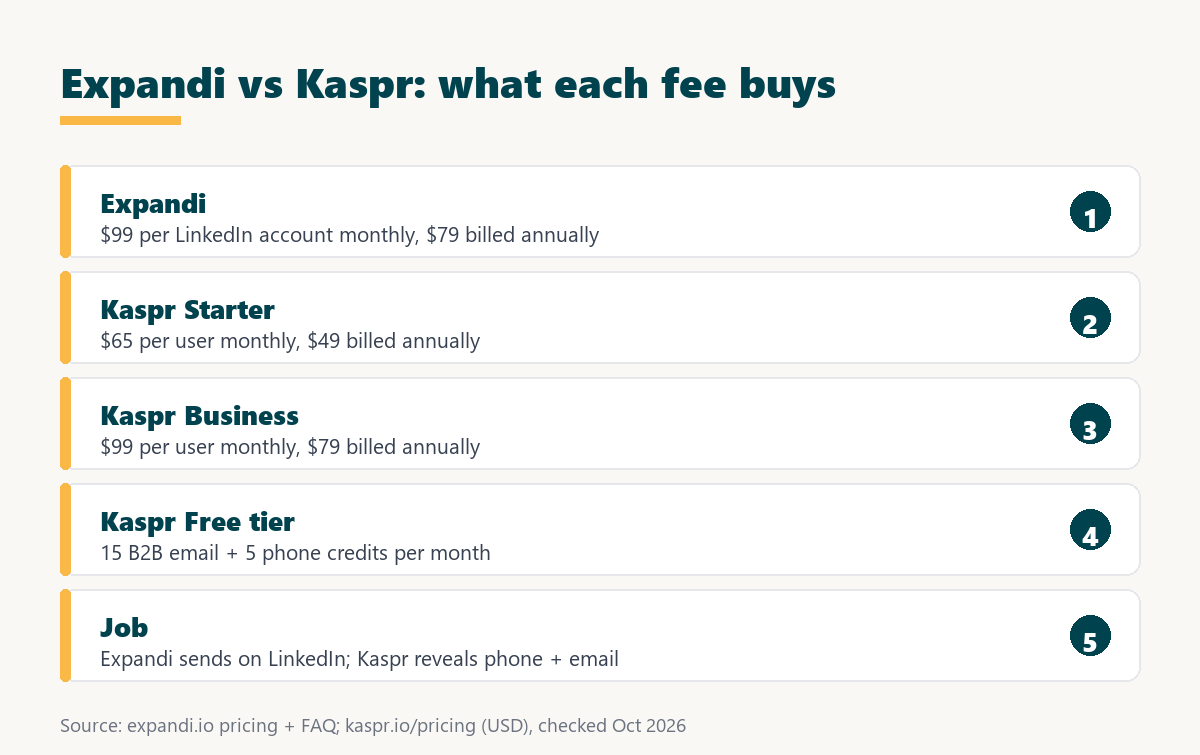
Source: expandi.io/pricing, expandi.io/faq, and kaspr.io/pricing (Dollar view), checked October 2026.
Kaspr Business and Expandi share a $99 monthly list price, yet one fee buys contact credits for a user and the other buys automated sending for a LinkedIn account.
Matching prices can mislead a founder, because the two subscriptions buy unrelated things and a business may reasonably need one, both, or neither.
How Do the Feature Sets Compare for a Solo Founder?
The feature sets barely overlap for a solo founder. Expandi covers automated LinkedIn connection requests, messages, email steps, and safety controls, while Kaspr covers phone and email reveal, bulk export from searches, groups, and events, and integrations with CRM and calling tools that a founder may already use.
Source: expandi.io/pricing, Expandi help center, webhooks and integrations, and kaspr.io/pricing, checked October 2026. Kaspr lists Zapier on paid tiers.
Expandi fills the sending and safety rows and Kaspr fills the phone, email, and export rows, so the tools complement each other more than they compete.
A founder can read the table as a channel map: LinkedIn-first selling leans on the left column, and phone or email selling leans on the right.
How Does Each Tool Handle LinkedIn Account Safety?
LinkedIn account safety is the set of controls that keep tool activity inside limits LinkedIn tolerates. Expandi documents a dedicated IP per account and a warm-up that starts at five actions a day, while the Kaspr pricing page describes a Chrome extension and lists no sending limits or warm-up schedule.
LinkedIn’s help center says it does not permit third-party software, including browser extensions, that scrapes, modifies the appearance of, or automates activity on its website, and that members using such tools risk having their accounts restricted. That covers sending tools and data extensions alike. Expandi’s warm-up guidance recommends staying within about 100 actions per week to stay under LinkedIn’s weekly connection request cap, which reduces exposure without removing it.
LinkedIn says it does not permit third-party software or browser extensions that scrape or automate activity, so founders should treat both tools as carrying some account risk.
Want to see the dedicated IP and warm-up on a real profile? Connect one LinkedIn account and run the seven-day trial.
Try Expandi for 7 Days →No charge until the seven days are up · cancel anytime · paid fees are nonrefundable
How Do Founders Use Kaspr and Expandi Together?
A combined workflow is a two-channel motion in which Expandi opens the conversation on LinkedIn and Kaspr supplies contact details for follow-up. A founder runs a connection campaign first, then reveals phone numbers or emails only for prospects who engage, which keeps Kaspr credits for warm leads.
- Define the audience: a saved LinkedIn or Sales Navigator search fixes who the campaign targets before either tool is switched on or any credit is spent.
- Run a connector campaign in Expandi: connection requests and one follow-up go out on a schedule, inside the account’s warm-up range and daily limits.
- Filter engaged prospects: prospects who accepted or replied form a short list, which is far smaller than the original search and worth a direct call.
- Reveal contact details with Kaspr: phone and email credits are spent only on that engaged list, which stretches a monthly allowance across more real conversations.
- Call or email and log the result: the founder follows up by phone or email and records the outcome in the CRM so the next touch has context.
HubSpot’s cold calling glossary explains why the phone step still earns its place after a LinkedIn touch:
“Phone conversations create immediate human connection and allow real-time objection handling, while email outreach offers scalability and the ability to reach hundreds of prospects simultaneously.”
HubSpot, Cold Calling glossary
Sequencing the tools this way keeps Kaspr credits for warm prospects and lets Expandi carry the cold first touch at no extra cost per lead.
Which Founders Fit Expandi Best?
Expandi fits founders whose buyers are active on LinkedIn and who lack time for manual outreach. A single account on the Business plan runs connection requests and follow-ups on a schedule, which lets a solo seller keep prospecting while handling delivery, product work, and the calls that close deals.
- LinkedIn-first sellers: founders whose prospects reply to LinkedIn messages gain the most from automated connection and follow-up sequences running every weekday.
- Time-poor solopreneurs: campaigns run on a schedule from the cloud, so outreach continues during client work, travel, and days spent on product.
- Founders running one account: one seat at $99 a month is bought through self-serve checkout, with no sales call and no order form to negotiate.
- Sellers wanting multichannel: an email step can sit inside the same sequence as the LinkedIn steps, which keeps both touches in one tool.
- Founders testing a new niche: the seven-day trial on the first subscription gives a short window to test a new audience before paying a monthly fee.
These founders need more conversations, not more data, so a sending engine produces results sooner than a larger pile of phone numbers would.
When Is Kaspr the Better Pick?
Kaspr is the better pick when the sales motion runs on calls and email rather than LinkedIn messages. Founders who cold call, need direct dials for a short list of target accounts, or want to try a tool on a Free tier before paying gain more from Kaspr than from automation.
- Cold callers: founders who book meetings by phone need direct numbers more than they need automated LinkedIn messages sent on their behalf.
- Account-based sellers with short lists: a founder targeting a few dozen accounts can reveal contacts one by one instead of running large sequences.
- Founders wanting a no-cost start: the Free tier with 15 B2B email credits and 5 phone credits a month allows a real test before any spend.
- Recruiters on LinkedIn Recruiter Lite: Kaspr’s Business tier lists Recruiter Lite support, which suits founders who also hire through LinkedIn.
- Teams already using calling and email tools: Kaspr lists integrations with Lemlist, Brevo, Aircall, and Ringover, so revealed contacts flow into existing tools.
Naming where Kaspr wins keeps the comparison honest, because automated LinkedIn sequences add little for a founder who closes deals mainly by phone.
What Hidden Costs Should a Founder Check?
Hidden costs are charges or limits that sit outside the headline price. With Expandi they are each extra LinkedIn account, paid personalization add-ons, and tax, while with Kaspr they are credit top-ups, the fair use policy on unlimited B2B emails, and per-user pricing as a team grows past one founder.
- Credit top-ups: Kaspr lets subscribers add extra credits at any time, which raises the monthly bill when phone lookups exceed the plan allowance.
- Fair use policy: unlimited B2B email on paid Kaspr tiers is governed by a fair use policy, so very heavy use may still meet a limit.
- Per-user growth: Kaspr charges for each user, so adding a second seller doubles the subscription even if both share one target list.
- Per-account growth: Expandi charges for each LinkedIn account, so a cofounder connecting a second profile adds another full seat to the bill.
- Paid add-ons: Expandi lists image and GIF personalization and video personalization as paid add-ons, and neither price is published on the pricing page.
A founder should estimate monthly phone lookups and LinkedIn accounts before subscribing, since those two numbers drive nearly all of the cost beyond list price.
Which Related Tools Complete the Stack?
Related tools are the products that cover stages outside LinkedIn sending and profile-based contact data. An email finder such as Hunter.io supplies verified addresses from a company domain, and a cold email platform such as Smartlead handles high-volume email sending beside LinkedIn outreach for founders running two channels.
The Hunter.io email finder review covers domain-based lookup for founders who start from company websites, and the Smartlead review covers the cold email sending layer.
A lean founder stack often pairs one contact data source, one LinkedIn sending tool, and one email platform, each chosen for a single job.
Verdict: Sending Engine or Contact Data Extraction?
The verdict is that Expandi suits founders who win deals through LinkedIn conversations and Kaspr suits founders who win them by phone and email. A founder short on time for outreach should start with Expandi, and one short on direct contact details should start with Kaspr and add sending later.
Growth Hack Suite’s multichannel outreach guide offers a useful limit for founders tempted to buy everything at once:
“a tight two-to-three-channel motion beats a sprawling one nobody runs consistently.”
Growth Hack Suite, What Is Multichannel Outreach?
The deciding question is which channel closes deals today, and the seven-day Expandi trial tests the LinkedIn channel without any long commitment.
Expandi vs Kaspr: Frequently Asked Questions
The 12 most-asked questions about Expandi vs Kaspr.
Is Kaspr a LinkedIn automation tool?
Kaspr’s pricing page lists no automated sending. It is a Chrome extension and web app that reveals phone numbers and emails and exports them.
Does Expandi find phone numbers or emails?
Phone or email lookup is not on Expandi’s feature list. It sends to leads supplied by a list, a CSV file, or a Sales Navigator search.
How much does Kaspr cost?
In US dollars, Kaspr has a Free tier, Starter at $65 per user monthly, Business at $99 per user monthly, and a custom Organization package.
How much does Expandi cost per account?
$99 per LinkedIn account per month, or $79 per account per month billed annually.
Does Kaspr have a no-cost tier?
Yes. The Free tier includes 15 B2B email credits, 5 phone credits, and 5 direct email credits per month.
Does Expandi have a no-cost tier?
No. Expandi offers a seven-day trial on the first subscription; checkout asks for card details and no charge is made until the seven days are up.
Are Kaspr B2B emails really unlimited?
On paid tiers Kaspr lists B2B email as unlimited under a fair use policy, so extreme volume may still be limited.
Does Kaspr work with Sales Navigator?
Yes. Kaspr on Sales Navigator is listed from the Starter tier upward.
Is Kaspr cheaper than Expandi?
Kaspr Starter is cheaper at $65 per user monthly, and Kaspr Business matches Expandi at $99, but the fees buy different things.
Does LinkedIn allow these tools?
LinkedIn’s help center says it does not permit third-party software or browser extensions that scrape or automate activity on its website.
Can a founder use Kaspr and Expandi together?
Yes. A common pattern is to open conversations with an Expandi campaign, then reveal phone or email with Kaspr only for engaged prospects.
Which tool should a founder buy first?
The one that matches the closing channel: LinkedIn conversations point to Expandi, and phone or email selling points to Kaspr.
Selling through LinkedIn conversations? Start the seven-day Expandi trial on one account and let the first campaign run.
Start Your 7-Day Expandi Trial →Seven-day trial on the first subscription · cancel anytime · paid fees are nonrefundable
Growth Hack Suite Editorial, Outbound Sales Team
How we compared: Expandi figures come from expandi.io pricing, FAQ, and Terms and Conditions plus the Expandi help center. Kaspr figures come from kaspr.io/pricing with the Dollar currency selected, and the platform policy from LinkedIn’s help center. Check dates sit under each table, and taxes are not included.
Last checked: October 2026. When either vendor changes its pricing page, this comparison is updated first.
Affiliate disclosure: this page contains affiliate links to Expandi. If a subscription is purchased through them, Growth Hack Suite may earn a commission at no extra cost to the buyer. Kaspr is not an affiliate partner, and the commission does not change the assessment.