Table of Contents
Expandi vs Apollo is a choice between an execution layer and a data layer. Expandi runs LinkedIn outreach for each connected account at $99 per account a month, while Apollo sells a contact database with credits, a no-cost tier, and paid seats from $49 a month. The missing step in a team’s prospecting process points to the right purchase.
Last checked: October 2026. Prices and features taken from the official Expandi pricing page, FAQ, Terms, and help center (checked October 2026) and the Apollo pricing page and FAQ (checked October 2, 2026). Confirm current prices on each vendor site before buying.
Already have a lead list and need LinkedIn outreach to run it? Test Expandi on one account for seven days.
Start Your 7-Day Expandi Trial →Seven-day trial on the first subscription · dedicated country-based IP for each account · cancel anytime
Expandi vs Apollo: Which Layer of the Funnel Does Each Cover?
Expandi vs Apollo is a choice between an execution layer and a data layer. Expandi suits sales teams that already know who to contact and need LinkedIn outreach to run safely at $99 per account, while Apollo suits teams that first need a contact database and email sequences from $49 per seat.
The comparison comes up because both products appear in the same prospecting workflow. Apollo answers the question of who to contact and how to reach them by email or phone. Expandi answers the question of how to work those people on LinkedIn, step by step, without exposing the profile to careless volume.
The short answer is that the two tools solve different steps of prospecting, so the missing step in a team’s process points to the right purchase.
What Is the Core Difference Between Expandi and Apollo?
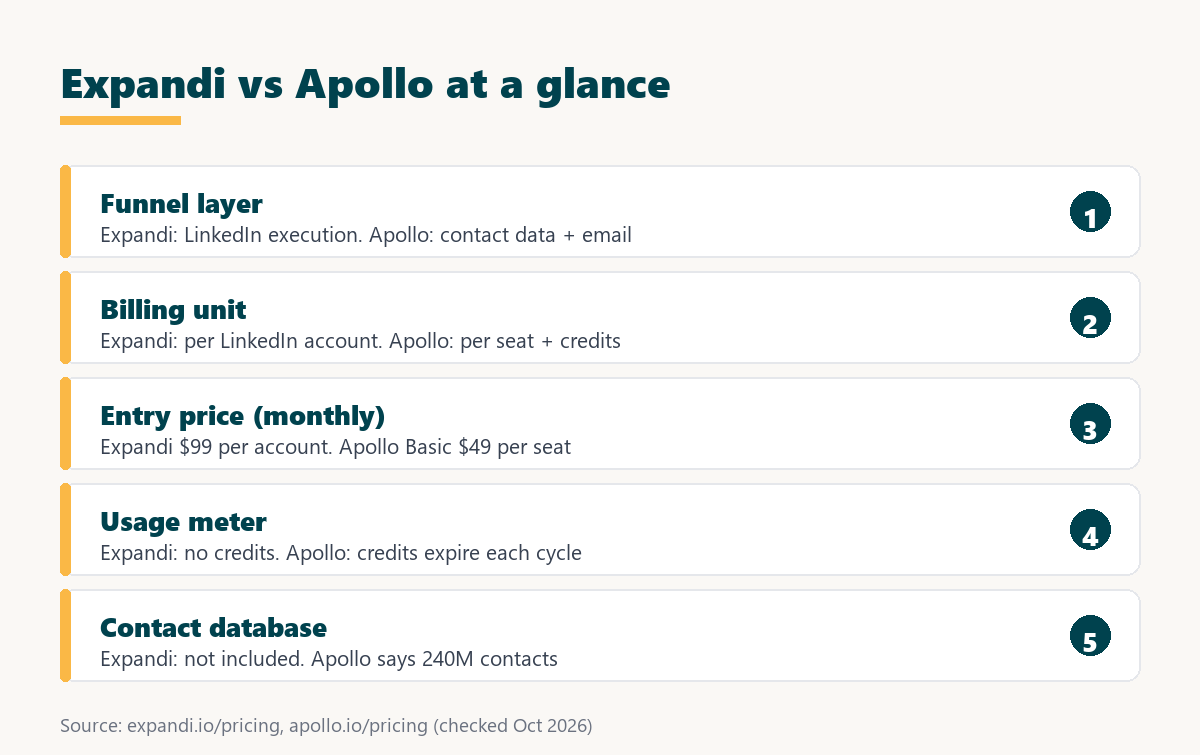
The core difference is where each product starts. Expandi is a cloud tool that executes LinkedIn campaigns for each connected account and does not include a contact database. Apollo is a prospecting platform built on a database it says holds 240M contacts, with credits that unlock emails and phone numbers.
Apollo is, in effect, a B2B contact database with outreach attached; Expandi is outreach without a database. Five differences follow.
- Starting point: Expandi begins with a lead list a seller brings, while Apollo begins with a searchable database of contacts and companies to filter.
- Billing unit: Expandi bills each connected LinkedIn account, while Apollo bills each seat and meters data access through credits granted every billing cycle.
- Entry tier: Expandi offers only a seven-day trial before billing, while Apollo describes a no-cost tier that stays available with no time limit.
- Core output: Expandi produces LinkedIn conversations from sequenced steps, while Apollo produces contact data plus email sequences sent from connected mailboxes.
- Usage meter: Expandi has no credits to track inside its plan, while Apollo credits are pooled across the team and expire at each cycle end.
Both serve the same broad function, which Wikipedia describes as:
“the process of attracting and capturing consumer interest in a product or service”
Wikipedia, Lead generation
One product answers who to contact and the other answers how to reach them on LinkedIn, which is why many sales teams end up comparing them as partners.
How Much Does Expandi Cost per LinkedIn Account?
Expandi costs $99 per LinkedIn account a month, or $79 per account a month when billed annually, which is a 20% saving. The price covers every Business feature with no credits to track, and a seven-day trial applies to the first subscription before any fee is charged.
Expandi’s FAQ states it plainly: “Expandi costs 99 USD per account per month” (Expandi FAQ). The Agency tier for ten or more accounts is quoted by sales. Image and GIF personalization and video personalization through Sendspark are paid add-ons without a published price, taxes depend on the billing country, and the Terms state that paid fees are nonrefundable unless the law requires otherwise.
Expandi has no usage meter, so a sales manager pays the same amount each month however many campaigns or messages an account runs inside its limits.
How Does Apollo Price Seats and Credits?
Apollo pricing is a per-seat plan combined with credits. The plans are a no-cost entry tier, Basic at $49 per seat a month, Professional at $99 per seat a month, and Custom, on monthly billing, and credits act as the currency for unlocking emails, phone numbers, and other data.
- No-cost entry tier: Apollo describes an entry tier that stays free with no time limit, with email campaigns limited to connected Gmail accounts on that tier.
- Basic plan: $49 per seat a month on monthly billing, aimed at individual sellers doing regular outbound, with email sequencing and core integrations included.
- Professional plan: $99 per seat a month on monthly billing, with higher credit limits, AI features, call recording, and advanced CRM integrations listed.
- Custom plan: a negotiated plan for larger teams that lists custom volumes, single sign-on, and API access, with pricing quoted directly by Apollo.
- Credit rules: credits are pooled across the whole team, granted at the start of each billing cycle, and expire at its end without carrying over.
The Apollo pricing FAQ defines the meter in one sentence:
“Apollo uses credits as the currency to perform activities throughout the platform.”
Apollo pricing FAQ
That makes Apollo an example of credit-based pricing. Annual prices and the number of credits in each plan render through scripts on the pricing page and could not be verified, so they are left out here.
Apollo’s seat price is only part of the cost, because the number of contacts a team can unlock each cycle depends on the credits attached to the plan.
How Do Expandi and Apollo Prices Compare Side by Side?
The two price lists overlap at the top and diverge at the bottom. Expandi charges $99 per LinkedIn account a month with no ongoing no-cost tier, while Apollo offers a no-cost tier, Basic at $49 per seat, and Professional at $99 per seat, with credits governing data use.
Source: expandi.io/pricing, expandi.io/faq, and Expandi Terms (checked October 2026); apollo.io/pricing offer data and FAQ (checked October 2, 2026).
Apollo is cheaper to start, with a no-cost tier and a $49 Basic seat, while Expandi and Apollo Professional both list $99 a month for different units, a LinkedIn account versus a seat with credits.
The seat in Apollo is a classic SaaS seat license for a named user; the seat in Expandi is a connected LinkedIn profile, which is why the same $99 figure buys different things.
A fair cost comparison adds what each tool lacks, since Expandi buyers still need a data source and Apollo buyers may still need dedicated LinkedIn execution.
Which Funnel Layer Does Each Tool Own?
A funnel layer is one step in turning a target market into booked meetings. Apollo owns the data layer, finding contacts and unlocking emails with credits, and includes email campaigns on every account, while Expandi owns the LinkedIn execution layer with campaign types, sequences, a dedicated country-based IP, and warm-up.
Source: expandi.io/pricing feature list and Expandi help center (checked October 2026); apollo.io/pricing (checked October 2, 2026). The 240M figure is Apollo’s own claim.
Apollo covers finding and unlocking contacts plus email sequences, while Expandi covers LinkedIn execution and account safety, so each tool is strong on a layer the other leaves open.
Seen as parts of a sales tech stack, the two products sit next to each other rather than on top of each other.
Seen as layers, the tools overlap only on email steps, and that small overlap explains why sales teams often run them in sequence.
What Does Outreach Execution Mean in Expandi?
Outreach execution is the work of sending the right LinkedIn step to each lead at the right time. Expandi runs it from the cloud with eight campaign types, an if and action sequence builder, dynamic placeholders filled from a CSV, campaign statistics, and a dedicated country-based IP address for every account.
- Sequence builder: if and action logic sends a different next step depending on whether a lead accepted, replied, or stayed silent after the request.
- Campaign types: the help center lists eight formats, including Connector, Messenger, Open InMail, Group, and Event Invite, for different ways to open a conversation.
- Dynamic placeholders: columns imported from a CSV personalize each message, with each value limited to 300 characters on a single line per lead.
- Dedicated country-based IP: each connected account sends from a fixed IP address in its own country, which the help center says every user receives.
- Campaign statistics: step-by-step statistics show where a sequence loses leads, so the weak step can be rewritten without rebuilding the campaign.
Execution is where a clean list turns into conversations, and Expandi keeps that step on LinkedIn with controls built for the limits of the network.
What Does Database-Led Prospecting Mean in Apollo?
Database-led prospecting is a workflow that starts by filtering a contact database for buyers who match a profile. Apollo says its database gives access to 240M contacts and 30M companies, pools credits across a team, and lists integrations with major CRMs, email providers, and LinkedIn.
The Apollo pricing FAQ adds that “email campaigns are included on every Apollo account,” so the data and the first email can live in one tool. Hunter’s guest guide on cold email explains why the quality of that data matters more than its size:
“Keep your mailing lists clean. Bad lists increase bounces, decrease relevancy, decrease replies, and increase your spam complaint rates.”
Ricky Pearl, on the Hunter blog
Apollo solves the blank-page problem for a new SDR, who can build a target list in minutes instead of assembling one by hand.
How Does Each Tool Handle LinkedIn Outreach?
LinkedIn outreach handling is how a tool sends requests and messages on the network and protects the profile doing it. Expandi documents cloud execution, a dedicated country-based IP per account, and a warm-up that starts at five actions a day, while Apollo’s pricing page lists LinkedIn only as an integration.
Expandi’s help center describes a gradual warm-up that rises by three actions every two days up to 21, and it advises staying within 100 actions a week because LinkedIn caps weekly connection requests. Neither vendor can rule out enforcement: LinkedIn’s help page warns that members using third-party automation “risk having their accounts restricted or shut down” (LinkedIn Help).
A team that depends on LinkedIn replies should check how each tool performs those steps, because the pricing pages describe them at very different depths.
Want to see the dedicated country-based IP and warm-up on a real profile? Connect one LinkedIn account and run the seven-day trial.
Try Expandi for 7 Days →Checkout asks for card details · no charge until the seven days are up · cancel anytime
Which Teams Fit Expandi Best?
Expandi fits teams that already have a reliable lead source and lose time on manual LinkedIn work. SDRs who export lists from a database or from Sales Navigator get automated sequences and safety controls, and managers get a flat per-account cost with no credits to monitor.
- Teams with a data source: sellers who already hold a list from a database or a CRM need execution more than another place to search for contacts.
- LinkedIn-reply teams: buyers who answer on LinkedIn rather than email reward a tool that runs connection requests, messages, and follow-ups as one sequence.
- Managers avoiding usage meters: a flat fee per account with no credits keeps the monthly cost identical regardless of how many leads move through campaigns.
- Safety-conscious teams: a dedicated country-based IP and a documented warm-up ramp give owners of valuable profiles clear rules for how volume grows.
- Agencies running client profiles: one connected account equals one cost line, so the platform fee maps directly onto each client retainer without shared pools.
These teams have solved targeting and now need consistent LinkedIn follow-through, which is the single job the product is built around.
When Is Apollo the Better Pick?
Apollo is the better pick when a team has no dependable contact source or no budget yet. Its no-cost tier has no time limit, the Basic seat costs $49 a month, and one platform covers searching, unlocking contact details with credits, and sending email campaigns.
- Teams without a list: sellers who need to find buyers first get a searchable database and credits to unlock contact details before any outreach begins.
- Budget-limited starters: a tier that stays free with no time limit lets a new seller test prospecting before paying for any seat at all.
- Email-first SDRs: email campaigns are included on every Apollo account, so an email-led motion can start inside the same tool that holds the data.
- Teams needing phone numbers: credits unlock phone numbers as well as emails, which supports call-heavy outbound that a LinkedIn tool does not cover.
- Managers wanting one platform: search, data, and email sequencing in one product reduce the number of tools a small team has to learn and pay for.
Saying this plainly keeps the comparison fair, since a LinkedIn execution tool cannot help a team that still has nobody to contact.
How Do Teams Use Apollo Data in Expandi Campaigns?
Using Apollo data in Expandi is a handoff from the data layer to the execution layer. A team builds and exports a filtered list, checks that each row has a LinkedIn profile link, uploads the file as a lead list, maps extra columns to placeholders, and starts the campaign.
- Build the list: filtering the database by title, industry, and company size produces a focused audience before credits are spent; Apollo allows exports of up to 10,000 leads at once.
- Check the profile link column: Expandi’s help center says the only required CSV column is profile_link, holding each lead’s LinkedIn profile URL, so rows without it are skipped.
- Upload the CSV as a lead list: the file goes in under Lead lists with Upload CSV, where columns are mapped and the review shows valid, fixed, and skipped rows.
- Map extra columns to placeholders: company, role, or trigger columns become dynamic placeholders, each value limited to 300 characters on a single line per lead.
- Create and activate the campaign: assigning the list to a sequence and activating it starts warm-up pacing, and sending can take up to 45 minutes to begin.
This handoff runs through a file rather than a documented native connection between the two products, so the CSV is the contract between the layers.
The CSV handoff keeps each tool on its own layer, and the main care point is a clean profile link column so every lead matches a LinkedIn member.
What Costs Should a Sales Manager Check?
Total cost is everything a team pays to get from a target market to a LinkedIn conversation. With Expandi it is the per-account fee plus a data source, and with Apollo it is the seat fee plus the credits a team burns, which expire at the end of each billing cycle.
- Expiring credits: unused Apollo credits end with the billing cycle and do not carry over, so unspent data allowance is lost each period.
- Same-plan rule: all seats on an Apollo account sit on the same plan, so upgrading one seller to Professional upgrades the whole team.
- Data source for Expandi: Expandi needs a list from somewhere else, such as a database export, LinkedIn search, or Sales Navigator, which adds its own cost.
- Per-account growth: every additional LinkedIn profile adds $99 a month on Expandi, so the bill grows with profiles rather than with data use.
- Refund terms: neither vendor refunds paid time: Expandi fees are nonrefundable under its Terms, and Apollo issues no refunds for unused time in a cycle.
Budgeting both layers together avoids the common mistake of buying execution without data, or data without a safe way to act on it.
Which Related Tools and Guides Cover Apollo in Depth?
Related tools are the pages that explain Apollo and its neighbors in more detail than this comparison. Separate guides define what Apollo is and how its credits work, and direct comparisons set Apollo against Hunter.io for contact data and against Smartlead for email sending.
- What Apollo is: the platform and its database explained in What Is Apollo.io?.
- Apollo credits: how credits are granted and spent, in What Are Apollo Credits?.
- Apollo vs Hunter.io: two contact data sources compared in the Apollo.io vs Hunter.io comparison.
- Smartlead vs Apollo: a dedicated email sender against Apollo’s sequences in the Smartlead vs Apollo comparison.
Those pages answer the data-layer questions this article leaves out on purpose, so a team can study the database decision separately.
Verdict: Outreach Execution or Database-Led Prospecting?
The verdict is that Expandi suits teams that have their targets and need LinkedIn outreach executed safely, and Apollo suits teams that need to find contacts and start with email at a lower price. Teams that rely on LinkedIn replies often use Apollo for data and Expandi for execution.
Growth Hack Suite’s guide to building a sales tech stack describes the principle behind that split:
“The stack is layered, each tool handling one job and feeding the next.”
Growth Hack Suite, What Is a Sales Tech Stack?
Applied here, Apollo feeds the list and Expandi handles the LinkedIn follow-through. A team missing only one of those jobs should buy only that tool.
The missing layer decides this comparison, and a week on the Expandi trial shows whether execution on LinkedIn was the real gap.
Expandi vs Apollo: Frequently Asked Questions
The 12 most-asked questions about Expandi vs Apollo.
Is Expandi cheaper than Apollo?
No. Apollo offers a no-cost tier and a Basic seat at $49 a month, while Expandi costs $99 per LinkedIn account a month. Apollo Professional and Expandi both list $99, but for different units.
Does Expandi have a contact database?
No. Expandi does not include a contact database or email finder. It runs campaigns on lead lists that come from LinkedIn searches, Sales Navigator, or an uploaded CSV.
Does Apollo have a no-cost tier?
Yes. Apollo’s pricing FAQ describes an entry tier that stays free with no time limit, although email campaigns on it can connect Gmail accounts only.
How much does Apollo cost?
Apollo lists Basic at $49 and Professional at $99 per seat a month on monthly billing, plus a Custom plan. Annual prices and per-plan credit amounts were not readable on the pricing page.
How much does Expandi cost per account?
Expandi costs $99 per connected LinkedIn account a month, or $79 per account a month when billed annually, a 20% reduction.
What are Apollo credits?
Apollo says it uses credits as the currency to perform activities throughout the platform, such as unlocking emails and phone numbers. Credits are pooled across the team.
Do Apollo credits roll over?
No. Apollo’s pricing FAQ states that unused credits expire at the end of each billing cycle and do not carry over.
Does Apollo send LinkedIn connection requests?
The Apollo pricing page lists LinkedIn only as an integration and does not describe automated LinkedIn steps, so LinkedIn touches in Apollo are documented outside the pricing page.
Can Apollo leads be imported into Expandi?
Yes, through a CSV file. Expandi’s help center says the only required column is profile_link, holding each lead’s LinkedIn profile URL.
Does Expandi have a trial?
Yes. Expandi offers a seven-day trial with all features on the first subscription. Checkout asks for card details, and no charge is made until the seven days are up.
Can a team use Expandi and Apollo together?
Yes. A common setup uses Apollo to find and export contacts and Expandi to run the LinkedIn sequence on that list, with each tool staying on its own layer.
Can Expandi fees be refunded?
No. Expandi’s Terms state that subscription fees are nonrefundable unless required by law, although a subscription can be cancelled at any time.
Have the list and need the LinkedIn follow-through? Start the seven-day Expandi trial on one account.
Start Your 7-Day Expandi Trial →Seven-day trial on the first subscription · cancel anytime · paid fees are nonrefundable
Growth Hack Suite Editorial, Outbound Sales Team
How we compared: Expandi figures come from expandi.io pricing, FAQ, and Terms and Conditions plus the Expandi help center articles on CSV upload, placeholders, and warm-up; Apollo figures come from the monthly offer data and FAQ on apollo.io/pricing, read on the same basis. Annual prices and per-plan credits for Apollo could not be read and are not quoted. Taxes are excluded.
Last checked: October 2026. When either vendor changes its prices, this page is updated.
Affiliate disclosure: this page contains affiliate links to Expandi. If a subscription is purchased through them, Growth Hack Suite may earn a commission at no extra cost to the buyer. Apollo links are not affiliate links. It does not change the assessment.