Table of Contents
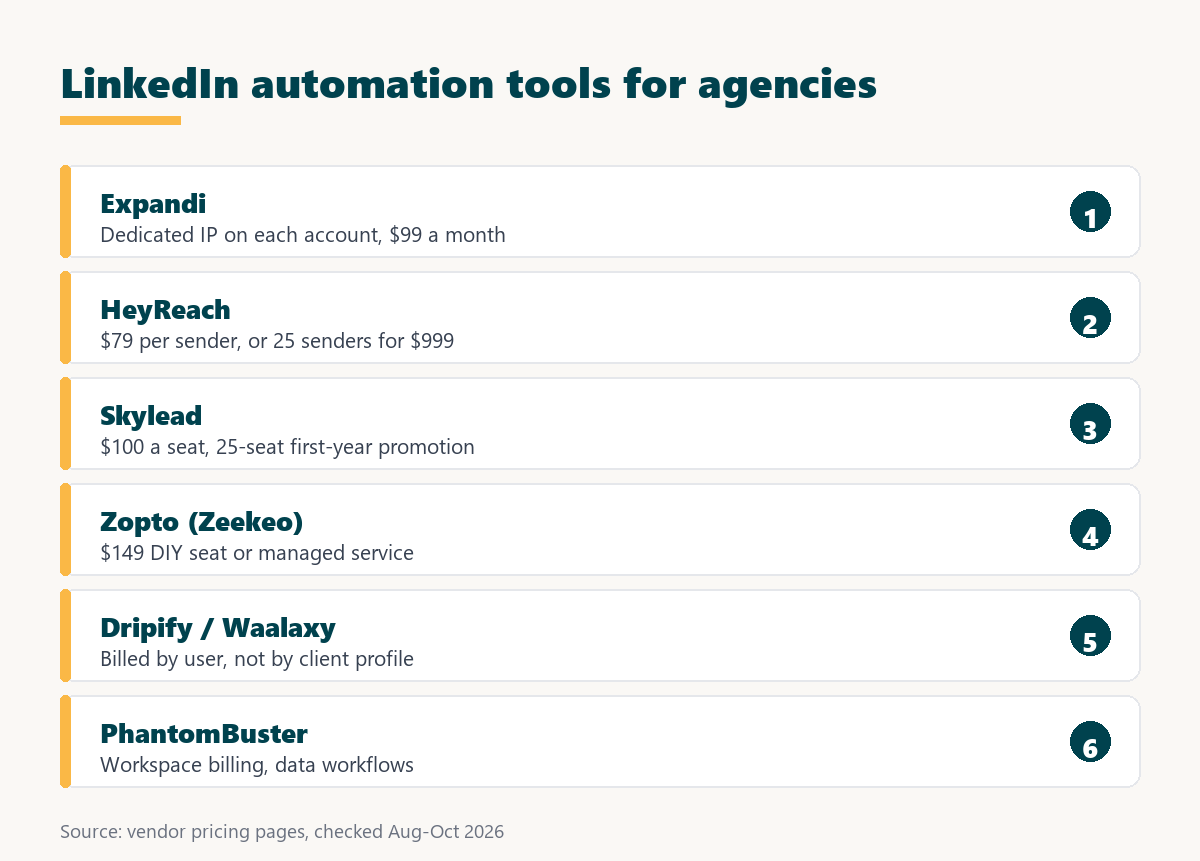
LinkedIn automation tools for agencies are outreach platforms built to run many client LinkedIn accounts from one place without mixing sessions, limits, or invoices. The seven tools below differ in how each client account is isolated, what the fee is attached to, and whether a bundle exists. Expandi leads because every connected account gets its own dedicated country-based IP and warm-up.
Last checked: October 2026. Each tool was checked against its own pricing page and terms on the dates shown under the tables, and prices appear only where the vendor publishes them.
Running several client profiles? See what Expandi costs for each connected LinkedIn account, with a dedicated IP on every one.
See Expandi Pricing →$99 a month for each account · dedicated country-based IP · Agency plan from 10 seats, priced by sales
What Are LinkedIn Automation Tools for Agencies?
LinkedIn automation tools for agencies are platforms that send connection requests, messages, and follow-ups for several client LinkedIn accounts under one login. They add what a solo tool lacks: separate sessions for each client, team roles, and billing that scales with the number of managed profiles rather than with agency staff.
A solo seller can live with one browser session and one daily limit. An agency cannot, because each client profile carries its own history, country, and tolerance for risk. Many agencies also want the client to see results under the agency’s brand, which is where white-label software enters the shortlist.
An agency tool is judged less by its message features and more by how cleanly it keeps one client’s account, limits, and invoice apart from the next client’s.
How Should Agencies Judge a LinkedIn Automation Tool?
Five criteria matter for agency use: how each client account is isolated, what unit the vendor bills, whether a bundle plan exists, how team and client access is controlled, and who supplies the proxy. This ranking weighs isolation and billing unit first, because both multiply with every new client an agency signs.
- Client account isolation: a separate session and IP address for every client profile stops one client’s activity pattern from touching another client’s account during busy campaign weeks.
- Billing unit: pricing by LinkedIn account, sender, seat, user, or workspace decides how the monthly invoice grows each time the agency signs another client.
- Bundle plan: a fixed price for a block of 25 profiles turns a growing roster into a predictable cost once the agency passes a certain number of clients.
- Team and client access: workspaces, roles, and permissions decide which account manager can touch which client profile, and whether clients can review their own results.
- Proxy responsibility: some vendors supply a dedicated IP or proxy for each account, while others ask the agency to bring and maintain its own proxies.
A SaaS seat license can mean a person, a LinkedIn profile, or a slot in a bundle, and the same word hides very different invoices. All of these tools belong to one broad category, which Wikipedia defines this way:
“software platforms and technologies designed for marketing departments and organizations to automate repetitive tasks”
Wikipedia, Marketing automation
Ranking on isolation and billing unit keeps this list specific to agencies, because a feature that helps one seller matters less than a cost or risk that repeats across every client.
How Do the 7 Tools Compare for Agency Work?
The comparison table sets all seven tools against the same agency criteria, so the billing unit, account isolation, and bundle option are visible before the individual entries. Figures come from each vendor’s own pricing page, and tools that hide prices behind a currency view are described without a number rather than with a guess.
Source: each vendor’s own pricing page: expandi.io (checked October 2026), heyreach.io and skylead.io (checked October 2026), zeekeo.com, which zopto.com now redirects to (checked October 2026), dripify.com, phantombuster.com, and waalaxy.com (checked August 2026). Monthly list prices before tax. Waalaxy shows different figures by currency view, so no price is quoted.
Three tools bill for each managed LinkedIn profile, two bill for each user, one bills for each workspace, and one sells seats beside a managed service, so the same ten-client roster produces very different invoices depending on the unit behind the price.
The table shows the first split an agency should make, between tools priced for each client profile and tools priced for each staff member, before any feature comparison begins.
1. Expandi: Why Does Its Account Isolation Suit Agencies?
Expandi is a cloud LinkedIn automation platform that gives every connected LinkedIn account its own dedicated country-based IP and its own warm-up schedule. It bills $99 a month for each account, works out cheaper on annual billing, and offers a custom Agency plan from ten seats with a dedicated Customer Success Manager.
- Dedicated country-based IP: each client account connects through its own IP address in the country chosen at setup, which keeps client sessions apart from one another.
- Warm-up for each account: Expandi’s help center describes a gradual option that starts at five actions a day and rises to twenty-one over fourteen days.
- Workspace roles: the workspace assigns roles and permissions to other Expandi users, so each account manager reaches only the client profiles assigned to them.
- Company-level blacklist: a blacklist can cover every LinkedIn account under one Expandi company, holding up to 20,000 leads that no client campaign should contact.
- Agency tier details: the Agency plan lists transparent reports for clients and use under the agency’s own brand, but its price and white-label terms come from sales.
The workspace is the piece that makes Expandi workable for an agency, and Expandi’s help center describes it plainly:
“The Workspace in Expandi is designed to help you manage one or multiple LinkedIn accounts by assigning roles and permissions to other Expandi users”
Expandi Help Center, What Is a Workspace
On annual billing the rate drops to $79 a month for each account, about 20% less than paying monthly. The trade-off is that the Agency plan has no published price, so an agency planning past ten clients has to request a quote before it can model margins.
Expandi ranks first for agencies that treat each client account as a separate risk, and it loses ground on price once a roster grows large enough for a fixed bundle.
2. HeyReach: How Do Sender Bundles Work for Agencies?
HeyReach is a LinkedIn automation platform that bills for each sender, meaning each LinkedIn account, and lets teammates and clients join at no extra charge. Growth costs $79 a month for each sender, while the Agency plan bundles 25 senders for $999 a month and requires the agency to bring its own proxies.
- Fixed sender bundle: the Agency plan covers 25 LinkedIn senders for one monthly price instead of charging for each client profile separately.
- Free teammates and clients: HeyReach’s pricing FAQ says the company charges only for LinkedIn senders, not for users, so client logins add nothing to the invoice.
- Whitelabel included: the Agency plan lists a whitelabel option as part of the bundle, which suits agencies that present outreach under their own brand.
- Proxy responsibility: Growth includes a dedicated residential proxy for each sender, while the Agency and Unlimited bundles ask the agency to supply proxies.
- Fair-use ceiling: the Unlimited plan, at $2,999 a month, is capped at 300 senders under a fair-use policy described on the pricing page.
HeyReach’s FAQ states that “the ‘Agency’ and ‘Unlimited’ plans require you to bring your own proxies,” so the bundle saving has to cover proxy costs and the work of maintaining them. The Growth trial runs fourteen days with up to three LinkedIn accounts and no card, and the Terms state that fees are non-refundable.
HeyReach suits agencies past roughly a dozen client profiles that are comfortable sourcing proxies, since the bundle price only beats paying for each sender from the thirteenth sender onward.
3. Skylead: What Does Its Agency Plan Add?
Skylead is a LinkedIn and email outreach platform billed at $100 a month for each seat, where one seat covers one LinkedIn account. Its Agency plan lists a first-year promotion of $999 a month for 25 seats and adds an agency dashboard, one inbox for client conversations, and a white-label option.
The All-in-one seat includes unlimited email accounts and up to 100 000 emails a month. Skylead’s Smart Sequences page describes a builder with 8 actions and 7 if/else conditions. The Agency tier adds granular client roles and risk alerts. The trial runs seven days and, under Skylead’s Terms, applies only to the first account added to a subscription, so adding a second client during the trial ends it. The rate after the first year is not published.
Skylead fits agencies that sell LinkedIn and email together, with the caution that the bundle price shown is a first-year promotion and the later rate is not published.
4. Zopto: Where Does It Fit for Agency Teams?
Zopto is a cloud LinkedIn and email outreach platform whose zopto.com domain now redirects to Zeekeo. Zeekeo sells a do-it-yourself platform at $149 a month for each seat and a done-for-you managed service starting at $600 a month, which positions it for agencies that want help running outbound as well as software.
The Zeekeo pricing FAQ states that “Zeekeo Launchpad is built for social and email outreach.” The pricing page notes that more seats bring a larger discount through a sales call. No free trial is listed, and the page does not describe a dedicated IP or proxy for each account, so the isolation question has to be asked directly before any client profile is connected.
Zopto belongs on an agency shortlist as a cloud option with a managed tier, and the decision should rest on a same-day check of its seat discount and proxy setup.
5. Dripify: Can User-Based Billing Work for an Agency?
Dripify is a cloud LinkedIn automation tool billed for each user, at $59, $79, or $99 a month across Basic, Pro, and Advanced on monthly billing. Multi-team management appears on the Advanced tier, so an agency pays the top monthly rate for each user who needs to coordinate several operators in one place.
Dripify’s pricing FAQ includes the question of whether one seat can run several LinkedIn accounts, but its answer could not be confirmed for this comparison, so no assumption is made about how many client profiles one user covers. A seven-day trial is available with no credit card,.
Dripify works for a small agency with a few operators and simple drip campaigns, though its user-based unit needs checking against how many client profiles each user actually runs.
6. PhantomBuster: When Does an Agency Need Data Workflows Instead?
PhantomBuster is a cloud automation platform billed for each workspace rather than each LinkedIn account, with unlimited users on every plan. Plans run from $69 to $439 a month and are metered by automation slots and execution hours, which suits agencies building lead lists more than agencies running daily client messaging.
Start includes 5 automation slots and 20 execution hours a month. The FAQ is direct about the ceiling: “Your automations will pause until your execution time resets or you upgrade your plan.” For agencies that sell research, the useful work is LinkedIn email scraping and enrichment that feeds another outreach tool.
Need each client account on its own IP and warm-up schedule? See Expandi pricing for each connected LinkedIn account.
See Expandi Pricing →Seven-day trial on the first subscription · cancel anytime
PhantomBuster earns a place when client work starts with list building and enrichment, and it usually sits beside an outreach tool instead of replacing one.
7. Waalaxy: Is a Quota Tool Enough for Client Work?
Waalaxy is a LinkedIn prospecting tool billed for each user and metered by monthly invitation quotas of 300 on Pro and 800 on Advanced and Business. Its plans list team collaboration tools, yet the quota model fits occasional senders better than agencies that owe clients a steady weekly volume of outreach.
Every Waalaxy tier carries a fourteen-day trial,. Prices change with the currency view, so they are not quoted here. The pricing page does not describe a dedicated IP for each account, and a client campaign that hits the monthly quota pauses until the quota resets.
Waalaxy closes the list as an entry option for a freelancer with one or two light clients, before steady volume makes a tool built around each account the safer fit.
What Does Each Tool Cost at 10 Client Accounts?
Cost at ten client accounts is the list price multiplied by ten for tools that bill each profile, or one fixed fee for bundle plans. At published monthly rates that is $990 on Expandi, $790 on HeyReach Growth, and $1,000 on Skylead, before taxes and before any custom agency quote is negotiated.
Source: calculated from each vendor’s monthly list price on its own pricing page (checked August to October 2026): list price multiplied by ten, before tax and before any negotiated discount. Annual billing lowers the figure on most tools. See the guide to annual vs monthly billing for how that changes the comparison.
At ten client accounts the tools that bill each profile land between $790 and $1,000 a month at list price, and the 25-profile bundles from HeyReach and Skylead cost about the same as ten to thirteen individually billed profiles.
HeyReach’s $999 bundle divided by the $79 Growth rate gives 12.6, so from the thirteenth sender the bundle is cheaper, provided the agency supplies the proxies. Expandi’s Agency break-even needs a sales quote first.
Running the ten-account math before a demo shows whether paying for each account or a fixed bundle fits the current roster, and when the answer will flip as clients are added.
How Should an Agency Onboard a New Client Account?
Onboarding a client account is a short sequence: connect the profile, match its country, let it warm up, protect existing contacts, and only then launch campaigns. Expandi documents a gradual warm-up that starts at five actions a day and reaches twenty-one over fourteen days, which sets client expectations early in the relationship.
- Connect the client profile: the account is added with the client’s usual country selected, so the dedicated IP matches the place where that profile normally logs in.
- Assign workspace roles: the account manager responsible for the client receives a role in the workspace, and nobody else on the team can launch campaigns on that profile.
- Turn on warm-up: the gradual option ramps activity from five to twenty-one actions a day over fourteen days, starting once the account has an active campaign.
- Upload the blacklist first: existing customers and open deals go into the blacklist before any search is built, because leads added to a campaign earlier are not blocked.
- Build campaigns within limits: each profile can run 15 active campaigns with up to 5,000 leads each, and a new campaign may take up to 45 minutes to start sending.
HubSpot’s guide to client kickoff meetings puts the priority simply:
“You need a clear understanding of the results the client wants to see and when he wants to see them.”
HubSpot, New Client Kickoff Meeting
A written onboarding sequence protects the agency relationship, because the client hears about the two-week warm-up before the contract starts rather than after results look slow.
Which Tool Fits Which Agency Model?
The right tool follows the agency model: a boutique agency protecting a few high-value client profiles fits Expandi, a volume agency with 25 or more profiles fits a HeyReach or Skylead bundle, and a data-led agency fits PhantomBuster beside a dedicated outreach platform that handles the messaging.
- Boutique agency: a team managing under ten client profiles benefits most from a dedicated IP and a separate warm-up schedule on every account it runs.
- Volume agency: a roster of 25 or more profiles gets the lowest cost for each account from a fixed bundle, such as HeyReach Agency or Skylead’s first-year promotion.
- LinkedIn plus email agency: Skylead bundles unlimited email accounts with each seat, which suits agencies that sell one combined outbound service to every client.
- Data-led agency: PhantomBuster handles list building and enrichment for unlimited users, while a separate outreach tool runs the actual client conversations.
- Solo freelancer: one or two light clients can start on Dripify or Waalaxy, then move to a tool built around each account once volume becomes steady.
For the boutique model the logic comes from how dedicated addresses work, as Growth Hack Suite explains in its guide to dedicated IPs:
“The deciding factor is that isolation gives full control over the IP’s reputation.”
Growth Hack Suite, What Is a Dedicated IP?
Most agencies also run multichannel outreach, so the LinkedIn tool must fit beside the email stack.
Matching the tool to the agency model narrows seven options to one or two, which a trial on a single client account can then confirm with real acceptance data.
What Should an Agency Check Before Signing Up?
Five contract points deserve a check before an agency commits: trial scope, refund terms, proxy responsibility, white-label availability, and minimum seats. Expandi, HeyReach, and Skylead all state that paid fees are not returned, so the trial period is the only low-cost window to test a tool on real client accounts.
- Trial scope: Expandi limits its seven-day trial to the first subscription, and HeyReach lets a team test up to three LinkedIn accounts for fourteen days without a card.
- Payment terms: Expandi’s Terms call subscription fees nonrefundable, HeyReach states that all fees are non-refundable, and Skylead states that all payments are final.
- Proxy responsibility: HeyReach’s Agency and Unlimited bundles require the agency’s own proxies, while Expandi assigns a dedicated IP to each connected account.
- White-label availability: HeyReach Agency includes it and Skylead lists it as an option, while Expandi’s Agency plan lists use under the agency’s own brand.
- Minimum seats: Expandi’s Agency plan starts from ten seats, and the Skylead and HeyReach bundles are sold in blocks of 25 profiles.
The trial is the only real test, which makes a clear view of how SaaS free trials work worth having before the first client account is connected.
Reading these five terms before the first invoice prevents the common agency mistake of adding ten client seats during a trial that only covered the first one.
LinkedIn Automation Tools for Agencies: Frequently Asked Questions
The 12 most-asked questions about LinkedIn automation tools for agencies.
What is the best LinkedIn automation tool for agencies?
It depends on the roster. Expandi suits agencies protecting a few high-value client profiles, while HeyReach and Skylead bundles suit agencies with 25 or more profiles.
How many client accounts can one agency manage?
Expandi’s workspace manages one or many LinkedIn accounts under one company, HeyReach’s Agency plan covers 25 senders, and its Unlimited plan is capped at 300 senders.
Is agency billing by account or by user?
It varies. Expandi, HeyReach, and Skylead bill for each LinkedIn profile, Dripify and Waalaxy bill for each user, and PhantomBuster bills for each workspace.
What do ten client accounts cost?
At monthly list prices, ten accounts cost $990 on Expandi, $790 on HeyReach Growth, and $1,000 on Skylead, before tax and any negotiated discount.
Which tools offer a 25-profile bundle?
HeyReach’s Agency plan covers 25 senders for $999 a month, and Skylead’s Agency plan lists a first-year promotion of $999 a month for 25 seats.
Which tools offer white-label?
HeyReach includes a whitelabel option on its Agency plan, Skylead lists one on its Agency plan, and Expandi’s Agency plan lists use under the agency’s own brand, with terms from sales.
Who provides the proxy for each client account?
Expandi assigns a dedicated country-based IP to each account, HeyReach Growth includes a dedicated residential proxy for each sender, and HeyReach’s bundles require the agency’s own proxies.
Does each client account need its own IP?
Separate IPs keep one client’s activity pattern from touching another client’s account, which is why agencies weigh IP isolation heavily.
How long does a new client account take to warm up?
Expandi’s gradual warm-up option takes fourteen days, starting at five actions a day and reaching twenty-one.
Can clients log in to see results?
Expandi’s workspace assigns roles and permissions to other users, and its Agency plan lists transparent reports for clients. HeyReach adds clients at no charge.
Are fees refundable if a tool does not work out?
Expandi, HeyReach, and Skylead all state in their terms that paid fees are not returned, so the trial is the safest test window.
How is this different from a general best-tools list?
This list ranks tools on agency criteria, mainly client account isolation and how the bill grows with each new client, rather than on general features.
Want every client account on its own IP and warm-up schedule? Start the seven-day Expandi trial on one LinkedIn account.
Start Your 7-Day Expandi Trial →Seven-day trial on the first subscription · cancel anytime · paid fees are nonrefundable
Growth Hack Suite Editorial, Outbound Sales Team
How we ranked these tools: each tool was scored against the five agency criteria in the section on how agencies should judge a tool, using its own pricing, FAQ, and Terms pages. The ten-account costs are public list prices multiplied by ten, before tax. Tools that hide prices behind a currency view are described without a figure.
Last checked: October 2026. When a vendor changes its pricing page, this page is updated.
Affiliate disclosure: this page contains affiliate links to Expandi only. If a subscription is purchased through them, Growth Hack Suite may earn a commission at no extra cost to the buyer. It does not change the assessment.