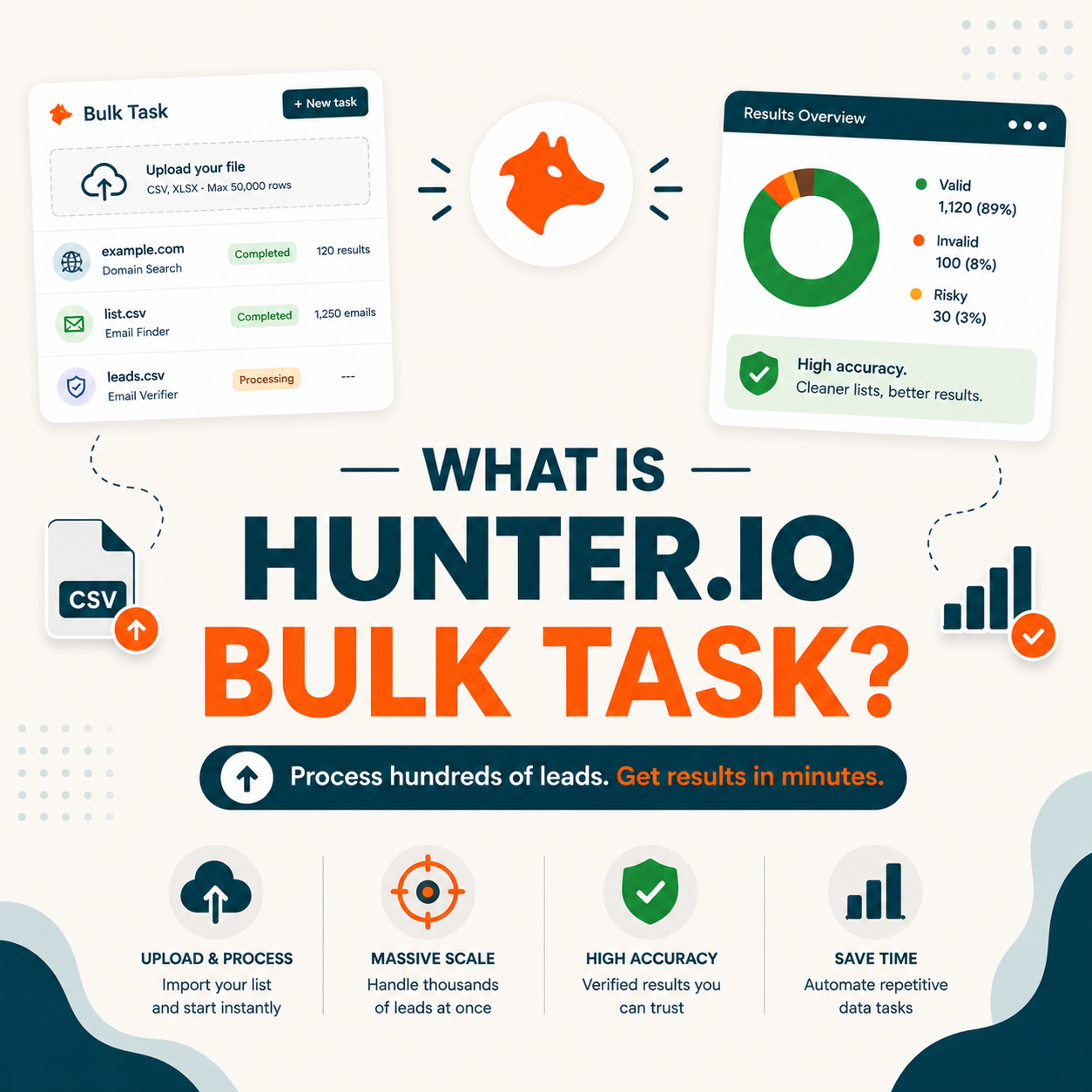
Hunter.io Bulk Task is a batch processing feature that takes a CSV input of company domains or contact names and returns verified business emails for each row at scale. Sales Ops teams upload 100 to 50,000 rows per batch and download results in 30 to 90 minutes. The feature combines find and verify in one workflow, included in standard Hunter plans starting from Starter at $34 per month for 500 monthly credits.
Table of Contents
What Is Hunter.io Bulk Task and How Does It Process Email Searches at Scale?
Hunter.io Bulk Task is a batch processing feature that takes a CSV input of company domains or contact names and returns verified business emails for each row asynchronously. Sales Ops teams upload 100 to 50,000 rows per batch. Hunter processes rows in parallel, runs SMTP verification on each result, and exports a clean CSV with email, confidence score, and status in 30 to 90 minutes. Find and verify combined counts as one credit per row. For a complete breakdown of Hunter’s accuracy and feature set, see our full Hunter.io Email Finder review and feature breakdown.
“Batch processing executes a series of jobs in a program automatically without manual intervention.”
: Wikipedia, Batch processing : the architectural model behind Hunter Bulk Task and other enrichment workflows.
Bulk Task is what turns Hunter from a single-lookup tool into a Sales Ops enrichment engine. The same accuracy applied across thousands of rows in one async job instead of one click at a time.
How Does the Hunter.io Bulk Task Async Processing Engine Actually Work?
Five stages run when you upload a CSV. CSV parsing reads file headers, validates columns, and rejects malformed rows. Async queueing pushes each row as a separate job into parallel workers. Email Finder runs per row against Hunter’s database plus pattern detection. SMTP verification runs in parallel with find for each row. Result aggregation merges completed rows into a downloadable CSV with email, confidence, and status. A full 10,000-row batch finishes in 30 to 90 minutes including all five stages.
- CSV parsing and validation: Hunter reads the CSV file, maps your columns to required fields (domain) or (first name, last name, company), validates row count against monthly credit quota, and rejects malformed rows before queueing.
- Async job queueing: each row becomes a separate job in Hunter’s backend queue, parallel workers pull jobs and execute find requests, failed rows retry with exponential backoff, and queue progress is visible in the dashboard as a percentage.
- Email Finder per row: the same Email Finder engine as single-lookup mode runs per row, queries Hunter’s database, applies pattern detection at the company domain, and returns a candidate email with a confidence score of 0 to 100.
- SMTP verification in parallel: each found email runs through a 4-layer SMTP check (syntax, DNS, MX, mailbox handshake) plus catch-all detection, with status tagged valid, risky, or invalid and a confidence score per row.
- Result aggregation and download: completed rows merge into a final CSV with original input columns plus email, confidence, and status. A download link is emailed when the batch reaches 100 percent complete, active for 7 days.
Async by design because synchronous SMTP verification on thousands of rows would take days. Bulk Task lets you upload, walk away, and return to a clean list. The tradeoff is you cannot monitor real-time progress per row.
What Are the Top 5 Use Cases for Hunter.io Bulk Task in B2B Operations?
Five workflows justify Hunter Bulk Task in B2B Sales and Marketing Ops. CRM enrichment refresh re-verifies 10,000 stale contacts in one batch. ABM target list builds turn 500 target accounts into 2,000 verified contacts. Event lead processing converts 1,000 conference attendee CSVs to outreach-ready leads in 30 minutes. Market research enrichment adds verified emails to ICP firmographic data from Crunchbase or ZoomInfo. Reactivation campaign prep re-verifies 50,000 dormant subscribers before a winback send. For volume pricing on each use case, see our Hunter pricing plan breakdown for bulk volume.
Five use cases below show where Hunter Bulk Task delivers ROI beyond single Email Finder lookups for B2B Operations teams.
- CRM enrichment refresh: upload 10,000 stale CRM contacts, get verified current emails back via combined find and verify workflow, then re-import to Salesforce or HubSpot in one batch cycle.
- ABM target list expansion: turn 500 target accounts plus 3 to 5 personas each into a 2,000 to 5,000-row verified contact database ready for sequence enrollment in Hunter Campaigns or external tools.
- Event lead processing within 24 hours: convert a 1,000-row conference attendee CSV with LinkedIn URLs into outreach-ready verified emails before interest cools, fitting well within the event follow-up window.
- Market research firmographic enrichment: add verified decision-maker emails to 5,000 ICP company records pulled from Crunchbase, ZoomInfo, or G2 firmographic data exports.
- Reactivation campaign list prep: re-verify a 50,000-row dormant subscriber list before a winback send, protecting domain reputation against a bounce spike from accumulated decay over 12 to 24 months.
“Bulk tasks let you find or verify email addresses for a list of contacts at once, saving time on large-scale prospecting.”
: Hunter.io Bulk Task documentation : combined find and verify workflow for B2B enrichment at scale.
Bulk Task workflows share one pattern: you have a list and need verified emails, fast. The same Hunter accuracy applied at 1,000x volume compared to single-lookup mode.
Bulk Tasks is one piece of Hunter.io.
See how batch processing pairs with Email Finder, Domain Search, Email Verifier, and Campaigns in the full Hunter.io feature guide.
See all Hunter.io features →What Are the 5 Limitations of Hunter.io Bulk Task Sales Ops Should Plan For?
Five limitations cap what Bulk Task can deliver. Plan quota ceiling restricts batch size to your monthly credit pool. Catch-all server rows return ambiguous status requiring manual sampling for deliverability estimation. Stale source data inflates the failure rate on contact lists older than 18 months. Async timing makes real-time CRM form enrichment impossible. Cost per row scales linearly: a 50,000-row batch on Starter plan costs roughly $340 in credits before annual discount. For teams with very high volume, see Hunter alternatives for very high-volume bulk processing needs.
Five limitations below shape how Sales Ops teams budget Bulk Task batches and plan around real-world data quality constraints.
- Plan quota ceiling per batch: a bulk batch cannot exceed your monthly credit pool. On Starter, 500 finds means a 500-row maximum per batch unless you top up credits or upgrade tier.
- Catch-all server ambiguity: domains where the mail server accepts every address return a risky status, requiring manual sampling of 50 rows to estimate real deliverability for the catch-all segment before send.
- Stale source data failure rate: input lists older than 18 months show a 30 to 40 percent failure rate because contacts changed jobs, inflating cost per usable email significantly for legacy CRM imports.
- Async timing for real-time use cases: Bulk Task cannot power real-time CRM form enrichment because results take 30 to 90 minutes. Use API streaming mode (Email Finder API) for synchronous form-submit verification.
- Linear cost scaling at high volume: a 50,000-row batch on Starter plan costs roughly $340 in credits before annual discount. Plan quarterly bulk volume against monthly cap to avoid mid-month exhaustion.
“As detailed in our Hunter.io Email Finder review, Bulk Task combines find and verify in one credit per row, the most efficient enrichment workflow for Sales Ops teams running CRM cleaning or ABM list expansion at 1,000+ row volume.”
: Growth Hack Suite, Hunter.io Email Finder review
Bulk Task is powerful but not magic. Source data quality and plan quota set the ceiling, not the verification engine. Sales Ops teams should plan for 10 to 15 percent of bulk results requiring manual review.
per batch
accuracy
Business tier
Starter to Business
Top 5 Bulk Email Processing Tools Compared: Hunter, Apollo, Snov, Findymail, Clearout
Five tools handle bulk email processing in 2026. Hunter Bulk Task wins on combined find and verify workflow at 91 percent accuracy with 25 free monthly credits. Apollo Bulk Enrichment wins on database breadth (275M contacts). Snov.io Bulk fits budget teams with cheaper per-row cost. Findymail specializes in LinkedIn URL bulk input. Clearout offers the cheapest verification-only pricing at $0.008 per credit. Each trades off accuracy, combined find and verify, and per-row cost differently. For a full Hunter feature comparison, see our full Hunter features review with Bulk Task.
Five bulk email processing tools below cover the main Sales Ops batch enrichment use cases, tested on 5,000-row B2B samples in early 2026.
Tested Q1 2026 on 5,000-row B2B SaaS samples.
Hunter wins for Sales Ops needing find and verify in one credit per row. Apollo wins on raw database breadth. Clearout wins on verification-only cost. Choose based on whether your bottleneck is contact discovery or contact verification quality.
How Do You Run Your First Hunter.io Bulk Task in 5 Steps (Free Workflow)?
Five steps run your first Hunter Bulk Task on 25 rows free in under one hour. Sign up for a free Hunter account. Prepare an input CSV with domain or first/last/company columns. Upload to the Hunter Bulks dashboard and confirm column mapping. Wait for async processing (5 to 15 minutes for 25 rows). Download the results CSV with email, confidence, and status. Segment risky rows above a 70 confidence score for safe send, and hold catch-all rows for manual review. Follow the Hunter.io quick start full setup guide to configure your account before your first bulk run.
Five steps below take you from raw domain list to verified email CSV in under one hour on Hunter’s free tier with Bulk Task.
- Step 1, sign up for a free Hunter account: create an account with email and password or Google sign-in. Free tier covers 25 finds and 50 verifications per month with no credit card, enough to test the Bulk Task workflow end-to-end.
- Step 2, prepare your input CSV: structure the file with required columns: either (domain) or (first name, last name, company). Keep under your monthly quota row count and save as UTF-8 encoding to avoid parsing errors.
- Step 3, upload to the Bulks dashboard: navigate to the Bulks tab, click New Bulk Task, drag your CSV into the upload zone, map your columns to Hunter’s required fields, and confirm the credit cost preview before launching.
- Step 4, wait for async processing: 25 rows finish in 5 to 15 minutes including verification. The dashboard shows live progress percentage, estimated time remaining, and any rate limit retry events.
- Step 5, download and segment results: download the CSV with email, confidence (0-100), and verification status. Filter to valid and risky rows above a 70 confidence score for safe send, and hold catch-all rows for manual sampling before campaign enrollment.
Ready to run your first 25-row Bulk Task for free?
Try Hunter Bulk Task free →25 free credits per month · No credit card · Find + verify in one credit
Five steps, 60 minutes, 25 rows enriched free. That is enough for Sales Ops to validate the Bulk Task workflow on a real CRM sample before paying for a Starter plan that fits monthly enrichment volume.
Hunter.io Bulk Task: Frequently Asked Questions
Twelve questions below cover what Sales Ops and Marketers search when evaluating Hunter Bulk Task: batch size limits, async processing time, CRM integration, cost per row, and how it differs from the Email Finder API.
Hunter.io Bulk Task: 12 Common Questions
Which bulk email processing tool is best for B2B Sales Ops?
Hunter Bulk Task wins for Sales Ops needing find and verify in one credit per row at 91 percent accuracy. Apollo Bulk wins on database breadth (275M contacts) but drops to 84 percent accuracy. Snov fits budget teams. Findymail specializes in LinkedIn URL bulk. Choose Hunter when you need a unified find and verify workflow, Apollo when database breadth matters more than accuracy, and Snov for the cheapest per-row cost.
How long does Hunter Bulk Task take to process 10,000 rows?
30 to 90 minutes on Starter plan or higher with verification included. Speed depends on target domain SMTP response time, catch-all server volume, and any rate limit retries needed. 1,000 rows finish in 5 to 15 minutes. 50,000 rows finish in 2 to 5 hours. Bulk Task runs async so you can close the dashboard and return when the email notification arrives.
What is the difference between Hunter Bulk Task and Hunter Email Finder API?
Bulk Task runs async on a static CSV input and returns results in 30 to 90 minutes via download. Email Finder API runs sync on each call, returns single-row results in 1 to 3 seconds, and integrates programmatically with CRM forms or automation. Use Bulk Task for one-time enrichment batches. Use the API for real-time CRM form enrichment or programmatic pipeline integration.
Can Hunter Bulk Task replace separate enrichment and verification tools?
Yes for teams under 50,000 rows per month. Hunter Bulk Task combines find and verify in one credit per row, eliminating the export-import cycle between separate find tools (Apollo) and verifiers (ZeroBounce). For teams over 100,000 rows per month, dedicated tools like Clearout for verification-only may offer better per-credit cost at extreme scale.
How much does Hunter Bulk Task cost per verified email at scale?
Free tier covers 25 credits per month at zero cost. Starter at $34 per month gives 500 credits, which equals $0.068 per verified email. Growth at $159 per month gives 5,000 credits, equaling $0.032 per row. Business at $379 per month gives 35,000 credits, equaling $0.011 per row. Cost drops 84 percent moving from Starter to Business tier for high-volume Sales Ops workflows.
Will Hunter Bulk Task save my Sales Ops team time?
Yes, by 90 to 95 percent on CRM enrichment workflows. Manual enrichment via LinkedIn plus pattern guessing plus separate verification takes 23 minutes per contact on average. Bulk Task processes 1,000 rows in 15 minutes including verification. For a Sales Ops team enriching 10,000 contacts per quarter, savings compound to 380 hours per quarter spent on strategic work instead.
Can I test Hunter Bulk Task on the free plan?
Yes. Free tier covers 25 find credits per month, enough to upload a 25-row CSV and validate the Bulk Task end-to-end workflow including verification before any plan commitment. Apollo Bulk free (60 credits) and Snov free (50 credits) work similarly. Free tier is designed for workflow validation; paid plans start at $34 per month for production volume.
Does Hunter Bulk Task integrate with my CRM?
Yes, natively with Salesforce, HubSpot, and Pipedrive, plus 5,000+ apps through Zapier. Click Export to push results directly into a CRM list or campaign. Hunter Connect on the Growth plan adds bidirectional sync, automatically enriching new contacts with Bulk Task data on creation. CRM integration eliminates manual export-import cycles, the primary friction point of running bulk enrichment.
What is Hunter.io Bulk Task?
Hunter.io Bulk Task is a batch processing feature that takes a CSV input of company domains or contact names and returns verified business emails for each row asynchronously. It processes 100 to 50,000 rows per batch in 30 to 90 minutes, combining find and verify in one credit per row. Included in standard Hunter plans starting from Starter at $34 per month.
How does Hunter.io Bulk Task work technically?
Five stages run async: CSV parsing reads and validates columns, async queueing pushes rows to parallel workers, Email Finder runs per row against the database plus pattern detection, SMTP verification runs in parallel with find, and result aggregation merges rows into a final CSV with email, confidence, and status. A full 10,000-row batch finishes in 30 to 90 minutes including all stages.
Is Hunter.io Bulk Task free to use?
Yes with monthly limits. Free tier covers 25 find credits per month, enough to test Bulk Task on a 25-row CSV. Paid plans start at $34 per month for 500 monthly credits (Starter), scaling to 35,000+ on Business tier. The free tier uses the same accuracy engine as paid plans; only volume differs. Designed to validate the workflow before any plan commitment.
What CSV format does Hunter.io Bulk Task require?
Hunter accepts CSV with either a (domain) column or (first name, last name, company) columns, plus optional fields like LinkedIn URL or job title. Maximum 50,000 rows per batch with UTF-8 encoding to avoid character parsing errors. Always strip duplicate rows before upload to avoid wasted credits. Hunter validates column structure before processing starts and rejects malformed files.
Hunter Bulk Task is the Sales Ops enrichment workhorse. The free tier is enough to validate the workflow on a 25-row CRM sample before paying for a plan that fits your monthly enrichment volume.
Try Hunter.io free: see your first 25-row bulk task ready for sequence enrollment
Hunter Bulk Task is included free with 25 monthly find credits, enough to run a 25-row CSV through the full async workflow and validate output before any plan commitment.
Try Hunter Bulk Task free →6M+ professionals use Hunter. No card. Cancel anytime.