Table of Contents
Choosing a free vs paid email verifier comes down to volume and features, not accuracy. A free email verifier handles low volume and occasional checks with full deliverability status and confidence scoring; paid plans add bulk CSV processing, an API and far higher monthly limits. This guide shows exactly when the free tier is enough and the precise point where upgrading starts to pay for itself.
Start free — see if the free tier covers your list before you pay.
Start Free →Free plan included · No credit card · Full status and score on free
What Is the Difference Between a Free and Paid Email Verifier?
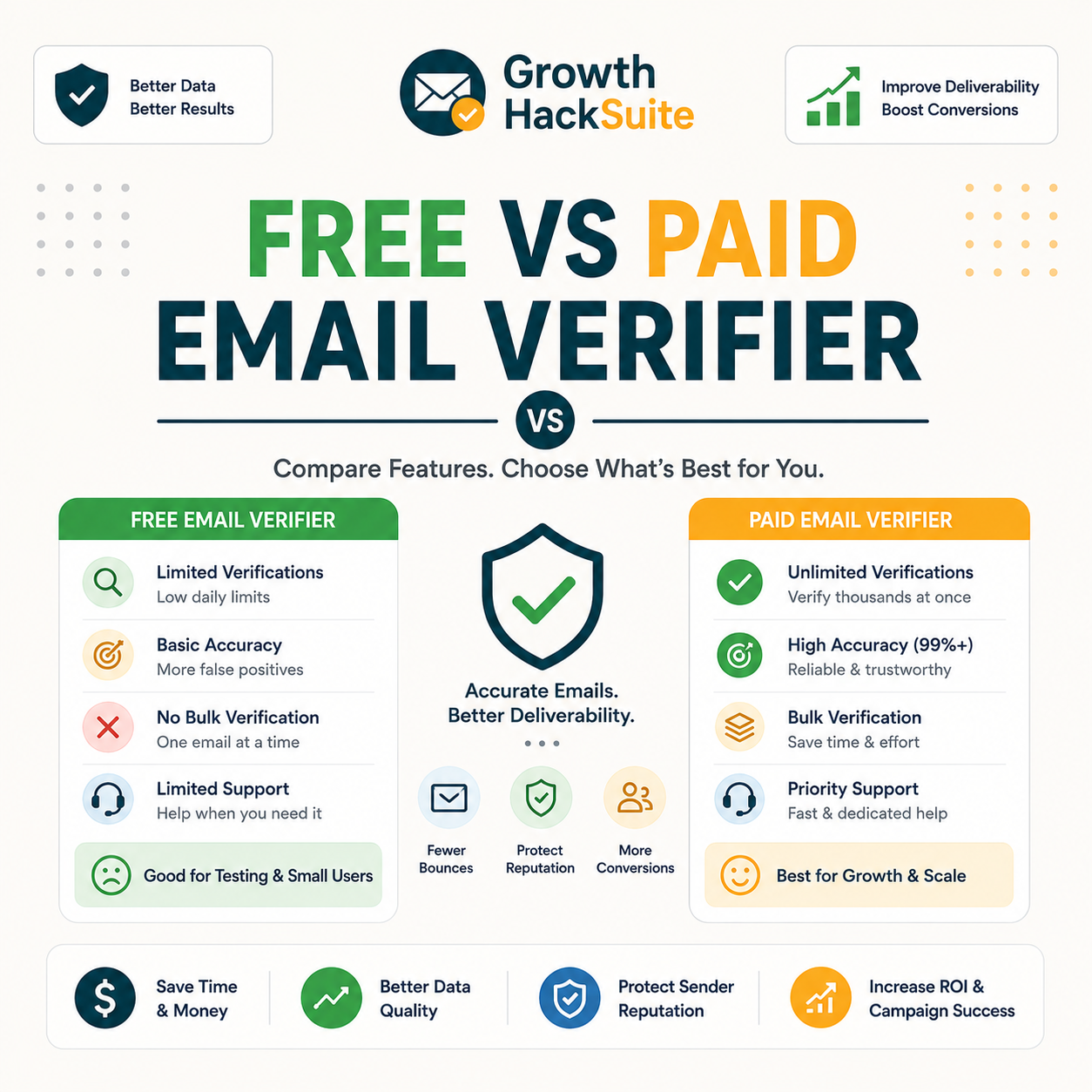
The core checks are identical. A free vs paid email verifier runs the same syntax, domain, MX and SMTP tests and returns the same status labels with the same accuracy. The difference is capacity: free tiers cap monthly verifications and often limit bulk or API access, while paid plans unlock volume, automation and integrations. Accuracy is not what the paid tier buys.
- Same accuracy: Free and paid run the identical verification engine, so a valid, invalid, risky or catch-all result on the free tier is exactly the result a paid plan returns for the same address.
- Different limits: Free tiers cap monthly verifications and frequently restrict bulk uploads or API calls, while paid plans raise the ceiling into the thousands and remove most throughput restrictions entirely.
- Paid-only features: Bulk CSV processing, real-time API verification at signup, priority queue speed and team seats appear only on paid plans, since these features serve scale rather than the occasional single check.
- Pricing model: Free tiers cost nothing and skip the card entirely, while paid plans charge a monthly or annual fee that lowers the effective cost per verified email as the volume tier rises.
- Intended user: Free tiers target solo senders, testers and small lists, whereas paid plans target marketing teams, agencies and apps that verify continuously or at the point of data capture.
Paying buys capacity and automation, not better results — the single most important point when deciding whether free is enough.
What Do You Get With a Free Email Verifier?
A free email verifier gives a set number of monthly verifications with full deliverability status and confidence scoring. Most include single-address checks, and some add a limited bulk allowance. For solo senders and small lists, this covers the job without spending anything, since the result quality matches what any paid plan would return on the same address.
- Free verifications a month: Most reputable verifiers grant a recurring monthly allowance at no cost, ranging from a few dozen to a few hundred checks that reset each billing cycle without a card on file.
- Full status and score: The free tier returns the complete result set — valid, invalid, risky, catch-all or unknown — plus a confidence score, identical to the data a paid plan delivers.
- Single plus limited bulk: Single-address lookups come standard on every free tier, and several tools also allow a small bulk upload, enough to clean a short list before an occasional send.
- No card required: Reputable free tiers ask for no payment details at signup, so the allowance can be tried risk-free and used indefinitely without any commitment or surprise charge later.
- Web dashboard access: Free accounts include the same web interface as paid, letting a sender paste an address, read the status and confidence score, and export results within the monthly cap.
Check how many free verifications you get this month.
Start Free →No credit card · Upgrade only when volume grows
Free tiers are genuinely usable for low volume — full results, just capped each month.
What Does Upgrading to a Paid Email Verifier Add?
Paid plans add higher monthly limits, full bulk CSV processing, an API for real-time checks, and priority queue speed. For teams cleaning large lists, automating verification or verifying at the point of capture, these features are the actual reason to upgrade. None of them improve accuracy — the free result was already correct — they remove the volume and automation ceiling.
- Higher volume: Paid tiers scale the monthly allowance from a free handful into the thousands or tens of thousands, so large list cleans finish in one pass instead of stalling against a free cap.
- Bulk plus API: Full CSV bulk processing and a verification API arrive on paid plans, letting teams clean entire databases and verify addresses programmatically inside their own apps and workflows.
- Real-time at signup: API access enables verification at the moment an address is captured on a form, blocking typos and invalids before they ever enter the list, a capability free tiers rarely include.
- Priority speed: Paid plans run verifications in a higher-priority queue, so large batches clear in seconds rather than waiting behind free-tier traffic during busy periods on the verifier.
- Team and integrations: Paid tiers add seats for multiple users and connectors into CRMs and outreach tools, turning verification from a manual single-user task into a shared, automated step in the pipeline.
Upgrade for volume and automation, not accuracy — the free result is already correct.
How Many Free Verifications Is Enough?
A useful rule: if monthly verification volume fits inside the free allowance, free is enough. Solo senders and small newsletters usually stay under it; growing lists, agencies and real-time signup checks quickly exceed it. The threshold is volume, not value — the table below maps typical monthly volume to the tier that fits it without waste.
Source: free-tier allowances across Hunter, ZeroBounce and NeverBounce, verified 2026-06-27. Free caps vary by provider; check the current allowance on each tool before deciding.
The threshold is volume, not value: stay free until monthly verifications outgrow the allowance.
When to Upgrade: the Volume Threshold
Is a Free Email Verifier Accurate Enough?
Yes. A free verifier uses the same checks as paid, so accuracy on standard domains matches exactly. It catches invalids, typos and disposable addresses reliably, with the same catch-all uncertainty every verifier shares regardless of price. Free does not mean less accurate; it means lower volume. The engine, the data sources and the confidence scoring are identical across the two tiers.
“No email verification tool can guarantee one hundred percent accuracy on catch-all domains.”
— Validity, on email verification limits
Free and paid share the same engine, so accuracy is identical — the decision is purely about capacity.
Free vs Paid Email Verifier: How Do They Compare Side by Side?
The table below compares free and paid on volume, bulk, API, speed and price. The pattern is consistent across every tool: identical accuracy and status detail, with paid unlocking scale and automation. Use it to match the tier to actual monthly needs rather than to a vague sense that paying is safer.
Source: Hunter pricing (hunter.io/pricing) plus ZeroBounce and NeverBounce plan pages, verified 2026-06-27. Entry paid pricing reflects Hunter Starter at $49 a month; other tools vary.
Side by side, the only real differences are scale and automation — accuracy and status detail carry over to both.
When Should You Stay on the Free Tier?
Stay free when verifying occasionally, when monthly volume fits the allowance, and when single-address or small bulk checks are all that is needed. For most solo founders and small newsletters, the free tier covers the job indefinitely, since the allowance resets every month and the result quality never changes between free and paid.
- Occasional checks: Verifying a handful of addresses now and then — a new contact, a reply-to address, a short signup batch — sits comfortably inside any free allowance with no need to pay.
- Volume under the cap: When the typical month stays below the free verification limit, the paid tier adds only cost, since every needed check already completes within the recurring free pool.
- No automation need: Manual single or small-batch verification covers the workflow when there is no form to guard in real time and no database to clean, removing the main reason to buy API access.
- Single-user workflow: One person handling verification needs no extra seats or shared dashboards, so the free tier’s single-account access matches the team size without any paid upgrade for collaboration.
- Clean source lists: Lists built from opt-ins and double opt-in forms carry few invalids, so the small free allowance comfortably handles the occasional check such a tidy source actually requires.
If the free allowance covers monthly volume, paying adds nothing but cost.
When Should You Upgrade to a Paid Plan?
Upgrade when monthly volume exceeds the free cap, when bulk CSV or API access is required, or when verifying at signup in real time. At that point the cost per verified email on a paid plan becomes the deciding number, not whether to pay at all. The trigger is always a concrete need, never a hunch that paid is somehow more reliable.
- Volume past the cap: Once a typical month outgrows the free allowance, an entry paid plan is cheaper than rationing checks or splitting a list across several free accounts, which breaks reporting.
- Need bulk or API: Cleaning a full database in one pass or verifying programmatically inside an app requires the bulk and API features that arrive only on paid tiers, making the upgrade functional rather than optional.
- Real-time at signup: Blocking invalid and typo addresses at the form, before they enter the list, depends on API verification, a paid-only capability that protects deliverability from the first contact.
- Team collaboration: Several people sharing one verification workflow need the multiple seats and shared reporting that paid plans provide, since splitting work across separate free accounts fragments the data.
- Speed at deadline: A large list that must be clean before a scheduled send benefits from the priority queue on paid plans, which clears the batch far faster than a free-tier slot under load.
Upgrade on a concrete trigger — volume or automation — not on a vague sense that paid is safer.
What Are the Hidden Limits of Free Email Verifiers?
Free tiers carry quiet limits: monthly caps that reset, no bulk on some tools, slower processing, and occasionally fewer status details. None of them affect accuracy, but they can stall a workflow at the wrong moment. Naming them up front is the honest part of the free vs paid decision and prevents an unwelcome surprise mid-clean.
- Monthly reset cap: Free allowances reset rather than roll over, so a large list spread across a single month can hit the ceiling and force a wait until the next cycle to finish verifying.
- No or limited bulk: Several free tiers restrict or omit CSV bulk upload, meaning a list must be checked address by address, which is impractical past a few dozen entries.
- Slower speed: Free verifications often sit in a lower-priority queue, so a batch that a paid plan clears in seconds can take noticeably longer on the free tier during busy periods.
Free limits are about throughput, not correctness — plan around the cap and free stays viable.
Which Free Email Verifiers Are Best?
The best free verifiers offer a recurring monthly allowance, full status detail and some bulk access. Hunter includes confidence scoring and a workable free volume that resets monthly; others cap lower, run one-time only, or limit features. Compare allowance, whether bulk is available on free, and status detail to pick the most genuinely usable free option.
Source: hunter.io/pricing, zerobounce.net, neverbounce.com and emailable.com/pricing, verified 2026-06-27. Hunter and ZeroBounce free allowances reset monthly; NeverBounce and Emailable free credits are one-time on signup. Confirm current allowances before choosing.
The free Hunter Email Verifier returns the same valid, risky and invalid statuses as paid, only with a lower monthly cap.
— Growth Hack Suite, Hunter Email Verifier accuracy
For a free check with full results and a monthly reset, Hunter’s free tier is among the most usable.
How Do You Test a Free Verifier Before Paying?
Test free in three steps: run a representative sample through the free tier, check whether the monthly allowance covers real volume, and confirm the results match a recent campaign’s actual bounces. If free covers the volume and matches reality, there is no reason to pay yet. The free tier is a built-in trial of the exact engine the paid plan runs.
- Run a free sample: Push a representative slice of the list through the free tier and read the status mix, since a realistic sample reveals how the verifier handles the kinds of addresses the full list contains.
- Check the allowance against volume: Compare the free monthly cap to the real number of addresses needing verification each month, which shows immediately whether free can sustain the workflow or runs out.
- Confirm against real bounces: Match the verifier’s invalid flags to the bounces from a recent send, since agreement between the two proves the free results are trustworthy before any spend.
“Freemium offers basic features at no cost while charging for advanced features.”
— Wikipedia, Freemium
Testing free first answers the whole question — pay only when the free tier visibly runs out.
Verdict: Free or Paid Email Verifier?
Start free. For low volume and occasional checks, a free email verifier is genuinely enough — same accuracy, capped throughput. Upgrade only when monthly volume, bulk processing or real-time API access outgrows the free tier. The free plan is a starting point and a built-in test, not a downgrade, and most small senders never need to leave it.
Verdict: Stay free under roughly 50 to 100 verifications a month — accuracy is identical to paid. Upgrade only on a concrete trigger: volume past the free cap, bulk CSV, or a real-time API at signup. Solo senders and small lists rarely outgrow free.
Start free and upgrade only when you outgrow it.
Start Free →Free plan · No credit card · Full status and score
Related Tools in the Hunter Stack
Free or paid, verifying pairs with finding to build and clean lists in one place. The verifier guides below cover how the checks work and how accurate the engine is, and the finder review shows the other half of the same credit pool.
- How verification works: New to the process? Start with how email verification works before weighing free against paid.
- Hunter Email Verifier: See the validation depth and status labels in the Hunter Email Verifier overview and the accuracy breakdown.
- Hunter Email Finder: The other half of the bundle shares the same credit pool — read the Hunter.io email finder review for find-side detail.
Free vs Paid Email Verifier: Frequently Asked Questions
The 12 most-asked questions about free vs paid email verifiers.
Is a free email verifier enough?
For low volume and occasional checks, yes. A free email verifier returns the same accuracy and status detail as paid, capped only on monthly volume. Solo senders and small newsletters whose volume fits the free allowance rarely need to pay at all.
Free vs paid email verifier — what’s the real difference?
The difference is capacity, not accuracy. Both run the same checks and return the same statuses; paid plans add higher monthly limits, full bulk CSV, an API and priority speed. A free vs paid email verifier decision is really a volume-and-automation decision.
Is free email verification accurate?
Yes. A free email verifier uses the identical engine and data as the paid tier, so a valid, invalid or risky result is exactly what paid would return. The only shared limit is catch-all uncertainty, which affects every verifier regardless of price.
How many free verifications do I get?
It varies by tool. Hunter grants 50 verifications a month on its free plan, ZeroBounce offers 100 a month, while NeverBounce and Emailable give one-time signup credits rather than a recurring monthly pool. Always check the current allowance before choosing.
When should I upgrade to a paid email verifier?
Upgrade on a concrete trigger: monthly volume that exceeds the free cap, a need for bulk CSV or API access, or real-time verification at signup. Until one of those applies, the paid tier adds cost without adding accuracy or any feature the workflow actually uses.
What does a paid email verifier add?
Paid plans add higher monthly limits, full bulk CSV processing, a real-time verification API, priority queue speed and team seats. These features serve scale and automation; none of them change the accuracy of an individual result, which is already identical on the free tier.
What is the best free email verifier?
The best free tier combines a recurring monthly allowance, full status detail and some bulk access. Hunter resets 50 verifications monthly with full scoring, and ZeroBounce offers 100 a month, making both more usable than one-time signup credits for ongoing low-volume work.
Does the free tier include bulk verification?
Sometimes, but limited. Some free tiers allow a small CSV bulk upload, while others restrict verification to single-address checks. Full bulk processing of large lists is a paid feature on most tools, so a big one-time clean usually means upgrading.
Are there hidden limits in free email verifiers?
Yes, but they concern throughput rather than correctness. Free tiers reset monthly rather than rolling over, may restrict bulk, and can run slower in a lower-priority queue. None of these affect accuracy; they affect how much can be verified and how fast.
Can I test a verifier free before paying?
Yes, and the free tier is the test. Run a representative sample through it, compare the results to a recent campaign’s bounces, and check whether the monthly allowance covers real volume. If free passes all three, there is no reason to pay yet.
Is free email verification safe to use on cold lists?
Yes, as far as accuracy goes — free results are identical to paid. The practical issue is volume: cold lists are usually large enough to exceed a free cap, so a free tier suits a sample or a small list, while a full cold-list clean needs a paid bulk plan.
Should a small business pay for email verification?
Only when volume or automation demands it. A small business with occasional sends and a list that fits the free allowance can verify for free indefinitely. Paying makes sense once monthly volume climbs past the cap or bulk and API features become part of the workflow.