Table of Contents
Spam traps are addresses mailbox providers and blocklists use to catch careless senders, and disposable emails are throwaway inboxes that fake engagement. Both hide in unverified lists and a single trap hit can blocklist a sending domain. Email verification flags disposable domains and removes invalid addresses before a send. This guide explains the trap types, disposable emails, and how verification keeps them off your list.
Scrub traps and disposables free before they blocklist your domain.
Scrub Your List Free →Free plan included · No credit card · Flags disposables and invalid addresses
What Are Spam Traps and Disposable Emails?
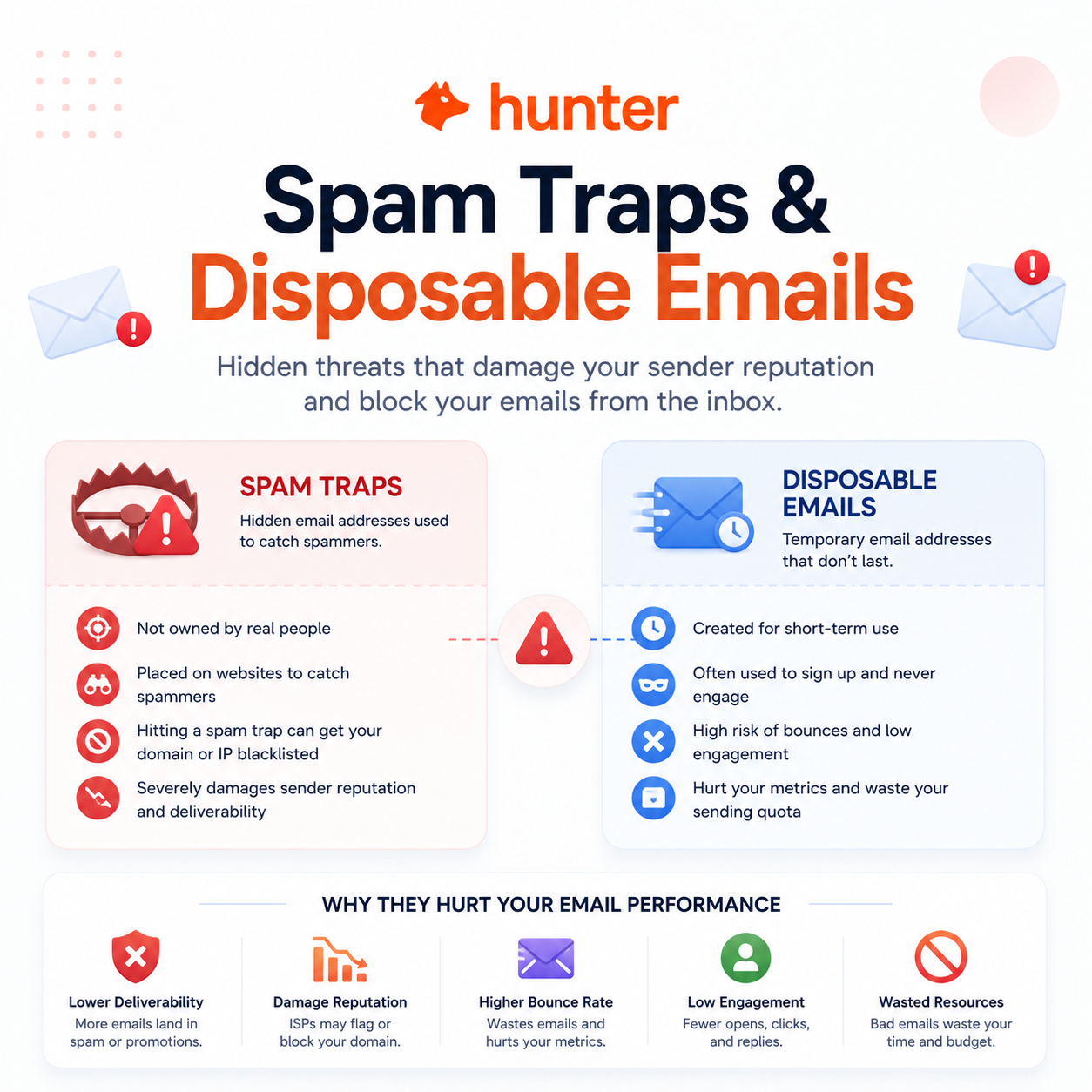
Spam traps are addresses mailbox providers and blocklists plant to catch senders who do not maintain their lists. Disposable emails are temporary, throwaway inboxes used to bypass signups and grab a freebie. Both look deliverable but signal poor list hygiene, making them dangerous to email without verification first.
- Spam trap: An email address planted or reactivated by a provider or blocklist purely to identify senders who mail without permission. Reaching one marks the sending domain as a probable spammer and damages deliverability immediately.
- Disposable email: A temporary inbox from a throwaway-mail service, created to pass a signup gate and abandoned minutes later. Messages to it bounce or go unread, dragging engagement metrics down across the whole list.
- Role-based email: A shared address such as info@ or sales@ that routes to a department rather than a person. These accounts complain more and convert less, weakening the engagement signals that govern inbox placement.
- Sender reputation: The score mailbox providers assign a domain based on bounces, complaints and trap hits. A single trap contact can collapse it for weeks, halting legitimate mail alongside marketing campaigns.
- Why both matter: Each address looks valid at a glance yet quietly harms sender reputation, so removing them before a send is the entire reason address-level verification exists for serious marketers.
Both look deliverable but are landmines, and the reason verification exists is to find what the eye cannot.
What Are the Types of Spam Traps?
There are three recognised forms. Pristine traps are addresses never used by a real person, planted purely to catch spammers. Recycled traps are abandoned real addresses reactivated as traps. Typo traps catch misspelled domains. Hitting any of them signals careless list hygiene and can blocklist a sending domain fast.
Source: Spamhaus and Validity spam-trap documentation, verified 2026-06-27. Trap categories are qualitative; providers do not publish counts. Confirm current guidance on each provider’s site.
Pristine traps reveal bought data and recycled traps reveal poor hygiene, but both blocklist a domain on contact.
What Are Disposable and Role-Based Emails?
Disposable emails are temporary inboxes from throwaway-mail services, often used to grab a freebie and vanish. Role-based emails such as info@ or sales@ route to teams, not individuals. Neither is a spam trap, but both lower engagement and signal a list that was never vetted at signup, hurting reputation over time.
- Disposable: A self-destructing inbox from a throwaway service that exists only long enough to clear a signup wall. Mail sent to it bounces or is never opened, so these addresses inflate the list without ever producing a real reader or buyer.
- Role-based: A shared address routed to a department rather than one person, such as support@ or admin@. These accounts complain or ignore cold mail more often, raising spam reports and pulling down the engagement signals inbox providers reward.
Disposables and role accounts are not traps, but they drag engagement down, and verification flags them too.
How Do Spam Traps End Up on Your List?
Traps arrive through purchased lists, scraped data, old un-maintained addresses, and signup forms without verification. Each path adds addresses no one confirmed, so a trap can sit unnoticed until a send triggers it. The common thread is unverified data entering the list, which is precisely what verification closes off.
- Purchased or scraped data: Bought and scraped lists carry pristine traps deliberately seeded by providers, so importing third-party data is the fastest way to plant a domain-killing address inside an otherwise healthy list.
- Aged addresses: Subscribers who went dark years ago may have their abandoned mailboxes reclaimed and turned into recycled traps, so long-inactive segments quietly become the most dangerous part of an aging database.
- Unverified signups: Forms without real-time checks accept typos and throwaway addresses freely, letting typo traps and disposables enter at the front door before a single campaign ever sends.
- List rentals and co-registration: Shared or rented lists mix in addresses no one on the sending side ever confirmed, so trap exposure travels with the data the moment it is imported into a sending platform.
- Misconfigured opt-in: Single opt-in forms with no confirmation step let bots and mistyped addresses register instantly, seeding the list with entries that can mature into recycled or typo traps over time.
Every trap entry path shares one cause, unverified data, which is exactly what verification is built to close.
How Much Damage Can a Spam Trap Cause?
A single pristine-trap hit can blocklist a domain for weeks, halting marketing and transactional mail alike. Recovery is slow and requires delisting requests plus proof of cleanup. Because the cost is catastrophic rather than incremental, removing traps before sending is non-negotiable for any list holding external or aging data.
Spam traps exist specifically to identify and block senders who mail without permission.
— Spamhaus, on spam-trap purpose
One trap hit is a domain-level catastrophe, not a minor metric dip, so prevention is the only sane option.
How Does Verification Remove Spam Traps and Disposables?
Verification flags disposable domains by matching known throwaway services, detects role accounts by pattern, and identifies many trap signatures through risk analysis and reputation data. It cannot guarantee catching every pristine trap, but it removes the bulk of trap and disposable risk before a send, lowering blocklist exposure sharply.
- Disposable matching: A verifier checks each domain against a maintained database of throwaway-mail providers and flags any match, stripping temporary inboxes out before they ever inflate the list or skew engagement.
- Role detection: Pattern rules identify shared addresses like info@ and sales@, letting senders segment or drop role accounts that complain more and convert less than addresses tied to a named individual.
- Syntax and typo checks: Validation catches malformed addresses and common domain misspellings, removing the typo traps and dead entries that careless capture forms feed into a list without any signup-side guardrail.
- Mailbox and MX checks: A verifier confirms the domain accepts mail and the mailbox responds, flagging dead and unreachable addresses that often signal abandoned accounts ripe for recycling into traps.
- Trap risk flags: Reputation and risk scoring catch many recycled traps by spotting dead domains, syntax errors and low-confidence mailboxes, reducing the share of dangerous addresses that survive into a campaign.
Verification removes most trap and disposable risk, making it the single most effective defense available before a send.
Can Verification Catch Every Spam Trap?
No, and honest tools admit it. Pristine traps with no sending history can evade detection because they look exactly like a valid mailbox, so verification reduces but does not eliminate trap risk. Pairing it with permission-based list building and a sunset policy gives the strongest defense, since verification is necessary but not a silver bullet.
- What it catches: Verification reliably removes disposable domains, role accounts, typo addresses, dead mailboxes and many recycled traps, clearing the majority of the dangerous addresses that cause blocklisting in practice.
- What can slip: A pristine trap presents as a clean, deliverable mailbox with no bounce history, so even a strong verifier cannot positively identify every one, leaving a small residual risk on lists built from bought data.
- Pair with: Permission-based collection and a sunset policy suppress the addresses verification cannot flag, closing the gap that no detection engine can fully cover on its own.
Verification is the strongest single defense but not absolute, so combine it with permission and sunset policies.
How Do You Scrub Spam Traps From Your List?
Scrub in three steps: bulk-verify the whole list, remove flagged disposables and high-risk addresses, and exclude low-confidence catch-alls that may hide traps. Doing this before every send keeps the most dangerous addresses off the list and the sending domain off provider blocklists, protecting both marketing and transactional mail.
- Bulk verify: Upload the full list to a verifier and run every address through deliverability, disposable and role checks, producing a clear status and confidence score for each entry before any campaign is queued.
- Remove disposables and risky addresses: Delete every address flagged disposable, invalid or high-risk, since these contribute bounces, fake engagement and trap exposure without any chance of becoming a genuine reader.
- Exclude low-confidence catch-alls: Hold back accept-all addresses that score low confidence, because catch-all domains can conceal recycled traps that no verifier can positively clear without actually sending mail.
Run your list through verification and remove traps and disposables now.
Scrub Your List Free →Free plan · No credit card · Status and confidence on every address
Scrub before every send, because traps accumulate continuously and one clean is never permanent.
What Tools Detect Spam Traps and Disposables?
A verifier with disposable-domain databases, role detection and reputation-based risk scoring is the practical tool. Hunter includes these with a recurring free tier; dedicated verifiers vary in trap-detection depth. The table below compares how leading tools handle traps, disposables and role accounts so the right fit is clear.
Source: Hunter, ZeroBounce, NeverBounce and Kickbox official feature pages, verified 2026-06-27. Capabilities are vendor-stated; trap detection is risk-based, not a guaranteed catch. Confirm current features on each provider’s site.
Hunter’s verification API returns deliverability status plus disposable and role flags for each address checked.
— Hunter API documentation
Verifying a list before the first send is the cheapest way to keep traps and disposables from blocklisting a domain.
— Growth Hack Suite, pre-send verification workflow
Pick a verifier with disposable databases and trap risk scoring, because depth here directly lowers blocklist risk.
How Do You Keep Spam Traps Off Your List Going Forward?
Prevent traps by verifying at signup with real-time API checks, using double opt-in, and applying a sunset policy that suppresses long-inactive addresses before they become recycled traps. Prevention plus periodic verification keeps trap risk near zero, since most traps enter through unverified capture or aging neglect rather than active subscribers.
- Verify at signup: A real-time API check on the signup form rejects typos, disposables and invalid addresses at entry, stopping the most common trap and throwaway problems before they ever reach the stored list.
- Double opt-in: A confirmation click proves a real person controls the inbox, filtering out planted addresses and bots that cannot complete the loop and locking permission into every new subscriber record.
- Re-verify before sends: A periodic bulk verification pass catches addresses that decayed since capture, removing newly dead mailboxes before they age into recycled traps on the next campaign.
- Sunset inactives: A policy that suppresses addresses dormant past a set window removes the abandoned mailboxes most likely to be reclaimed as recycled traps, shrinking the riskiest segment automatically.
- Avoid bought lists: Skipping purchased and scraped data removes the single largest source of pristine traps, since permission-based collection never imports the seeded addresses blocklists plant to catch spammers.
Prevention at entry plus a sunset policy stops recycled traps before they ever form on the list.
Are Spam Traps and Disposables Worth Worrying About?
For any sender with external, purchased or aging data, absolutely, because the blocklist risk is severe and the fix is cheap. A tiny, fully opt-in, recently verified list carries little trap risk. For everyone else, scrubbing traps is essential rather than optional, and the cost of ignoring it is far higher than verification.
- High risk: Lists built from bought data, scraped sources, long-dormant subscribers or unverified signup forms carry real exposure to pristine and recycled traps, so these senders gain the most from verification and disciplined hygiene before every campaign.
- Low risk: A small list collected entirely through double opt-in and verified recently holds almost no trap exposure, so the priority shifts to maintaining that hygiene rather than emergency cleanup of imported addresses.
Trap risk scales with external data, high for bought or aging lists and low for fresh opt-in ones.
Verdict: How to Keep Spam Traps Off Your List
Spam traps and disposable emails are list-killers, but verification removes most of the risk before a send. Scrub every list, verify at signup, and add a sunset policy. No method catches every pristine trap, so layer verification with permission-based hygiene for the strongest defense against blocklisting.
Verdict: One spam-trap hit can blocklist a domain for weeks. Verification removes disposables, role accounts and most recycled and typo traps before send, but cannot catch every pristine trap. Layer verification with double opt-in, signup checks and a sunset policy for near-zero trap risk.
A spamtrap is an email address used to catch unsolicited senders.
— Wikipedia, Spamtrap
Scrub traps and disposables free before you send your next campaign.
Scrub Your List Free →Free plan · No credit card · Removes disposables and high-risk addresses
Related Tools in the Hunter Stack
Removing traps is one part of full list hygiene. The Hunter verifier review covers detection depth, and the finder review covers building the lists worth cleaning, both on one connected credit pool.
- Hunter Email Verifier: The validation layer that flags disposables, role accounts and risky addresses — start with what the Hunter Email Verifier is.
- Hunter Email Finder: The other half of the bundle that sources prospects on the same credit pool — read the Hunter.io email finder review for list-building costs.
Spam Traps and Disposable Emails: Frequently Asked Questions
The 12 most-asked questions about spam traps and disposable emails.
What are spam traps?
Spam traps are email addresses that mailbox providers and blocklists use to identify senders who mail without proper permission or list hygiene. They look like normal deliverable addresses but exist only to catch careless senders, and reaching one signals to providers that a domain is sending unwanted mail.
What is a disposable email address?
A disposable email address is a temporary, throwaway inbox from a self-destructing mail service, usually created to clear a signup gate and then abandoned. Mail sent to it bounces or goes unread, so these addresses inflate a list with entries that never convert and quietly drag engagement metrics down.
What are the types of spam traps?
There are three main types. Pristine traps are addresses never used by a real person, planted purely to catch spammers. Recycled traps are abandoned real addresses reactivated as traps. Typo traps catch misspelled-domain addresses such as gmial or hotnail entered by sloppy capture.
How do spam traps get on my list?
Traps arrive through purchased and scraped lists, long-dormant addresses that get reclaimed, and signup forms that accept entries without verification. The common cause is unverified data entering the list, so any imported or aging segment carries the highest chance of holding a hidden trap.
How much damage can a spam trap cause?
A single pristine-trap hit can land a sending domain on a blocklist for weeks, halting both marketing and transactional mail until delisting is granted. Recovery is slow and requires proof of cleanup, so the cost is catastrophic rather than a small incremental dip in deliverability.
Does email verification remove spam traps?
Verification removes most trap risk by flagging disposable domains, role accounts, typo addresses, dead mailboxes and many recycled traps through risk and reputation scoring. It strips out the bulk of dangerous addresses before a send, which is the single most effective defense available pre-send.
Can verification catch every spam trap?
No. A pristine trap looks exactly like a valid, deliverable mailbox with no bounce history, so even a strong verifier cannot positively identify every one. Verification reduces trap risk substantially but should be paired with permission-based collection and a sunset policy for the strongest defense.
How do I scrub traps from my list?
Scrub in three steps: bulk-verify the entire list, remove every address flagged disposable or high-risk, and exclude low-confidence catch-alls that may hide recycled traps. Repeating this before each send keeps the most dangerous addresses off the list and the domain off provider blocklists.
What tools detect spam traps and disposables?
A verifier with disposable-domain databases, role detection and reputation-based risk scoring is the practical tool. Hunter, ZeroBounce, NeverBounce and Kickbox all flag disposables and role accounts and score risk, though trap detection depth varies between them and none guarantees catching every pristine trap.
How do I keep spam traps off my list?
Verify at signup with a real-time API check, require double opt-in so a real person confirms each address, and apply a sunset policy that suppresses long-inactive subscribers before they become recycled traps. Prevention at entry plus periodic verification keeps ongoing trap risk close to zero.
Are role-based emails dangerous?
Role-based addresses such as info@ or sales@ are not spam traps, but they route to teams rather than individuals and complain or ignore cold mail more often. That raises spam reports and lowers engagement, so verification flags them so senders can segment or remove them from outreach.
How do I avoid spam traps for good?
Avoid spam traps by never buying or scraping lists, verifying every address at signup and before each send, requiring double opt-in, and sunsetting inactive subscribers. Combining permission-based collection with continuous verification closes every common entry path traps use to reach a list.