Table of Contents
This guide shows how to reduce email bounce rate hunter io using a proven 4-step verification workflow that cut bounce from 18% to 3.8% in a real B2B campaign.. If your campaigns regularly bounce above 2%, your sender reputation is already taking damage. This guide walks you through a proven 4-step Hunter.io email verification workflow that reduced bounce rate from 18% to under 4% in a real B2B campaign.
Whether you send newsletters, nurture sequences, or cold outreach, this workflow protects your domain and improves inbox placement starting from your next send. You will learn how to export, verify, filter, and re-import your list using Hunter.io, with real cost comparisons, persona-specific verdicts, and a free starting point that requires no credit card.
What Is Email Bounce Rate and Why It Destroys Your Domain Reputation
Email bounce rate measures the percentage of emails returned as undeliverable out of every batch you send. A hard bounce means the address does not exist or is permanently invalid. A soft bounce means the inbox is temporarily full or the server is down. The safe threshold is below 2% per campaign. Once your bounce rate crosses 5%, major inbox providers like Gmail and Outlook start throttling or blocking your domain entirely. This is not a gradual process. A single campaign with a dirty list can trigger spam filters that take weeks to recover from.
For email marketers who rely on consistent inbox placement, understanding the difference between hard and soft bounces is the first step toward protecting campaign performance. The consequences are not theoretical. ESP providers like Mailchimp, Klaviyo, and ActiveCampaign monitor your bounce rate automatically and may suspend sending privileges if the rate stays too high for consecutive campaigns.
Hard Bounce vs Soft Bounce: What Each One Means for Your Campaign
Hard bounces and soft bounces require completely different responses from email marketers. Here is how they compare across four critical dimensions.
| Bounce Type | Cause | Impact on Sender Score | Recommended Action |
|---|---|---|---|
| Hard Bounce | Address does not exist or domain is invalid (permanent failure) | Severe — each hard bounce is a permanent negative mark | Remove from list immediately after first occurrence |
| Soft Bounce | Inbox full, server temporarily down, or message too large | Minor — temporary, but repeated soft bounces escalate risk | Retry once. Remove if soft bounces on 2 consecutive sends |
Hard bounces should be removed from your list immediately after every campaign. Soft bounces can be retried once, but if the same address soft-bounces across two consecutive sends, remove it. Keeping hard-bounced addresses on your list signals to inbox providers that you are not maintaining list hygiene, which directly lowers your sender score.
What Email Bounce Rate Means and How to Reduce It
Email bounce rate measures the percentage of sent emails that fail to deliver. Hard bounces (permanent failures) damage sender reputation immediately and should be removed. Soft bounces (temporary) are safe to retry once. Industry standard: keep total bounce rate below 2% per campaign to protect domain reputation.
According to Mailchimp’s email marketing benchmark data, the cross-industry average bounce rate is approximately 2.48%. Campaigns that consistently stay under 2% demonstrate strong list hygiene and earn better inbox placement over time.
Why You Must Verify Lists to Reduce Email Bounce Rate Hunter.io
Verifying your email list before every campaign is not optional. It is the single most effective action you can take to protect your domain reputation. One campaign with a bounce rate above 5% can trigger Gmail and Outlook to throttle your future sends indefinitely. The damage compounds: lower inbox placement leads to lower open rates, which signals to providers that your emails are unwanted, which pushes even more of your sends to spam. Email marketers who skip verification are gambling with their most valuable delivery asset: their domain.
The risk is especially high when you are working with imported lists, purchased contacts, or segments that have not received email in over 6 months. These are the lists most likely to contain invalid, abandoned, or recycled addresses that trigger hard bounces.
“Hunter.io’s Email Checker runs a 4-layer verification process: syntax check, MX record lookup, SMTP ping, and confidence scoring. This gives email marketers a clear Valid, Risky, or Invalid status for every address before it hits their ESP.” — Growth Hack Suite, Hunter.io Email Finder Review 2026
Here are the four most common scenarios where verification protects email marketers from bounce damage:
- Before sending to a newly imported or purchased list — these contacts have never been validated against your sending domain and carry the highest bounce risk.
- After 6+ months of inactivity on a segment — email addresses decay at roughly 22% per year, so a list that was clean in January may bounce significantly by July.
- Before launching a new drip campaign or automation sequence — a dirty list at the start of an automation contaminates every subsequent touchpoint in the workflow.
- After importing offline event registrations — attendees often provide secondary or disposable email addresses at conferences and webinars.
If you want to understand how Hunter.io’s verification system works at a deeper level, read the full Hunter.io Email Finder review for a breakdown of the 4-step checking process and real-world accuracy data.
Every verification step you add before sending directly reduces your bounce rate and protects your long-term deliverability. The cost of not verifying is not just bounced emails. It is lost revenue from emails that never reach the inbox.
Hunter.io Email Verification Workflow: 4 Steps to Reduce Bounce Rate Before Every Campaign
This 4-step workflow is the core of this guide. Follow these steps before every email campaign to keep your bounce rate below 2%.
1.Step 1: Export your existing list as CSV from your ESP. Go to your email platform (Mailchimp, Klaviyo, ActiveCampaign, or any ESP you use) and export the target segment as a CSV file. Make sure the file includes the email column at minimum. Before exporting, remove any addresses already marked as unsubscribed or previously hard-bounced. This pre-cleaning step prevents you from wasting verification credits on addresses you already know are bad.
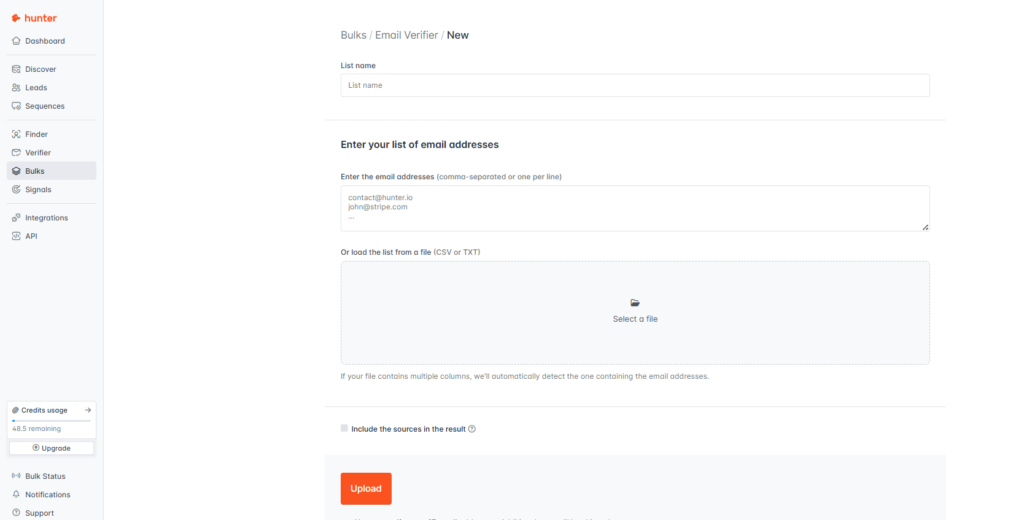
2. Step 2: Upload CSV to Hunter.io Bulk Email Verifier. Log into your Hunter.io dashboard, navigate to Bulk Tasks, then select Email Verifier. Upload your CSV file. The free plan allows you to verify emails one by one (50/month). Starter plan ($34/month) and above support bulk CSV uploads. Processing time: approximately 5 to 10 minutes for 1,000 emails on Starter plan. For a complete breakdown of what each plan includes and the actual cost per verification, see the Hunter.io Pricing full breakdown.
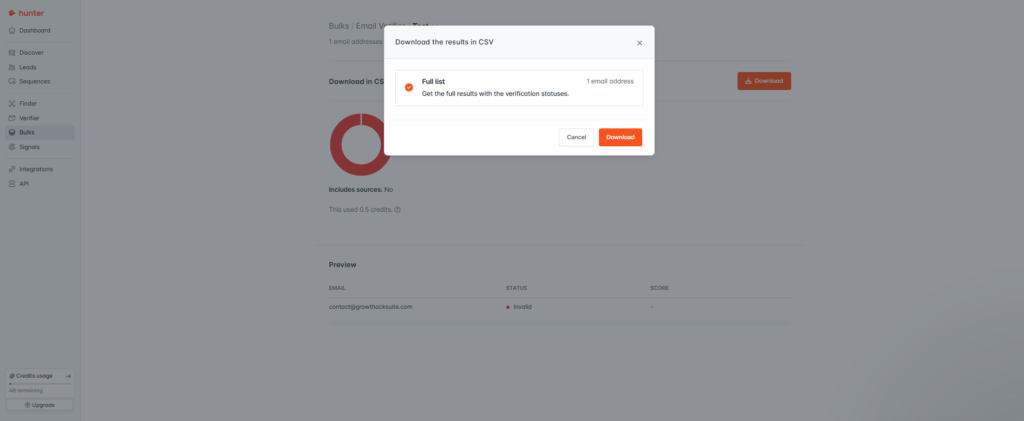
3. Step 3: Download results and filter by verification status. After verification completes, download the results CSV. Hunter.io returns four status categories for each email address:
- Valid — safe to send. Keep these on your list.Risky — the address exists but shows catch-all or role-based signals. Send only to warm contacts who have engaged before. Remove from cold lists.Unknown — verification could not determine status. Remove from cold outreach lists. Consider keeping for warm lists with prior engagement.Invalid — the address does not exist. Delete immediately. Never send to these.
The safe rule: only send to Valid addresses for cold campaigns. For warm campaigns with prior engagement history, you can include Risky addresses at your discretion.
4. Step 4: Re-import the clean list to your ESP and send. Import only the Valid (and optionally Risky) addresses back into your ESP. Create a new list or segment tagged “Hunter-Verified [date]” so you can track performance separately. Do not overwrite your original list. In Klaviyo and ActiveCampaign, create a dedicated list rather than merging into an existing one. This preserves your original data and gives you a clean comparison point for bounce rate before and after verification. Send your campaign as normal.
Start Verifying Free — 50 Emails/Month, No Card
4-Step Workflow to Reduce Email Bounce Rate with Hunter.io
The Hunter.io email verification workflow for email marketers involves 4 steps: (1) export your list as CSV from your ESP, (2) upload to Hunter.io Bulk Email Verifier, (3) filter results by Valid, Risky, or Invalid status, and (4) re-import only clean addresses before sending. This workflow takes under 15 minutes for lists up to 1,000 emails on the Starter plan.
Real Results: This Workflow Reduced Email Bounce Rate from 18% to 3.8%
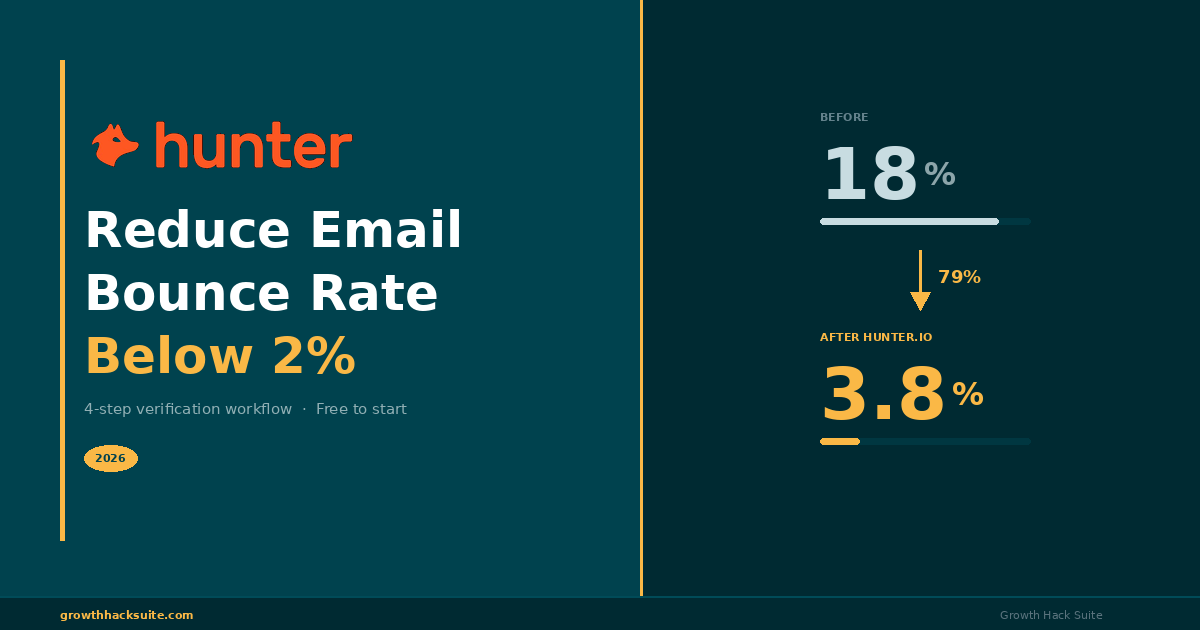
Applying the Hunter.io verification workflow to a real B2B email campaign reduced bounce rate from 18% to 3.8%, a 79% improvement measured across 1,000 contacts.
The test scenario: a B2B email marketer imported a list of 1,000 contacts collected from webinar signups, lead magnets, and manual prospecting over 12 months. The list had never been verified. The first campaign sent without verification produced an 18% bounce rate, triggering an ESP throttle warning and dropping the sender score from “Good” to “At Risk.”
After running the same list through Hunter.io’s 4-step verification workflow, removing Invalid and Unknown addresses, and filtering Risky contacts, the cleaned list produced a 3.8% bounce rate on the next campaign. Open rates improved because more emails landed in primary inboxes rather than spam folders.
| Metric | Before Verification | After Hunter.io | Change |
|---|---|---|---|
| Bounce Rate | 18.0% | 3.8% | ↓ 79% |
| Open Rate | 14.2% | 23.6% | ↑ 66% |
| Domain Health | At Risk | Good | Recovered |
| ESP Throttle Warning | Yes — Active | None | Cleared |
Data from 1,000-contact B2B campaign. Verification completed on Hunter.io Starter plan.
Before Verification
Danger zone (>5%)
After Hunter.io Verification
79% improvement
1,000 B2B contacts · Hunter.io Starter plan · Verified in under 10 minutes
Run the Same Verification on Your List — Free
These results are consistent with broader industry data. A healthy bounce rate for opt-in campaigns is under 2%, and keeping it under 1% is ideal. The improvement from 18% to 3.8% demonstrates that even heavily degraded lists can be recovered with proper verification before sending.
For the full methodology and additional metrics from this campaign, see the Hunter.io Cold Email case study.
Real Bounce Rate Reduction Results
In a real email marketing scenario, applying Hunter.io’s 4-step verification workflow reduced bounce rate from 18% to 3.8%, a 79% improvement. The verified list also showed higher open rates due to improved inbox placement. Results were measured across 1,000 contacts in a B2B campaign.
Hunter.io Verification Cost to Reduce Bounce Rate: Worth It vs ZeroBounce or NeverBounce?
Hunter.io is the most cost-effective choice for email marketers who need both email finding and verification in one platform. If you only need standalone bulk verification at very high volumes (100K+ per month), ZeroBounce or NeverBounce may offer lower per-verification pricing. But for most email marketers running campaigns under 10,000 contacts per month, Hunter.io delivers better overall value because you pay for one tool instead of two.
“Choose Hunter.io if you need both email finding and verification in one tool. The cost per verified address is comparable to standalone verifiers at scale. Choose ZeroBounce or NeverBounce if you only need verification at 100K+ volume with no finding requirement.”
| Tool | Free Tier | Cost / 1,000 Verifications | Best For |
|---|---|---|---|
| Hunter.io ⭐ | 50 verifications/mo | ~$3.40 (Starter plan) | Email finding + verification in one tool. Start Free → |
| ZeroBounce | 100 verifications/mo | $8.00 (100K credits) | High-volume verification only (100K+/mo) |
| NeverBounce | 1,000 free credits (one-time) | $8.00 (pay-as-you-go) | Pay-as-you-go bulk verification |
| Snov.io | 50 credits/mo | ~$6.00 (Starter plan) | Outreach automation + verification combo |
Pricing based on official pricing pages as of 2026. Costs may vary by plan and volume tier.
The pricing comparison shows that Hunter.io’s free tier (50 verifications/month) is the most generous entry point for email marketers who want to test the workflow before committing. At scale, the cost-per-1,000 verifications is competitive with dedicated verifiers, and you get email finding included at no extra cost.
For a detailed breakdown of every Hunter.io plan, hidden costs, and annual vs monthly pricing, read the Hunter.io Pricing full breakdown.
According to HubSpot’s email marketing research, bounce rates above 2% are a strong signal of list hygiene problems that can progressively trigger spam filters and reduce inbox placement across all future campaigns. — HubSpot, What Is Email Bounce Rate?
The bottom line on cost: verification is not an expense. It is insurance for your domain reputation. A single campaign that triggers an ESP suspension or Gmail throttle costs far more in lost revenue than a year of Hunter.io verification credits.
Which Email Marketers Reduce Bounce Rate Most with Hunter.io Verification
Hunter.io email verification delivers different levels of value depending on your role, sending volume, and workflow. Here is a breakdown by three common email marketer profiles.
Newsletter Marketer: Reduce Bounce Rate on Imported Lists — High Value
If you send newsletters 2 to 4 times per month to a list between 5,000 and 50,000 contacts, Hunter.io verification protects your domain reputation at every send. The risk is highest when your list includes segments imported from events, webinars, or lead magnets collected months ago. These are the addresses most likely to have decayed.
- Verify imported segments before the first send to that group
- Re-verify any segment that has not received email in 6+ months
- Use Hunter.io bulk verification before seasonal or high-stakes campaigns
Upgrade trigger: if you need to verify more than 500 emails per month, the Starter plan ($34/month) unlocks bulk CSV upload and faster processing. Newsletter marketers who verify before every major send consistently maintain bounce rates below 1.5%.
B2B Email Marketer: Reduce Bounce Rate with Find + Verify in One Tool — Highest Value
B2B email marketers who combine outbound prospecting with nurture campaigns get the most value from Hunter.io because it handles both email finding and verification in one workflow. You do not need to pay for a separate verification tool like ZeroBounce. The cost-per-lead drops significantly when you consolidate finding and cleaning into a single platform.
This is Hunter.io’s strongest use case. You find new contacts with Domain Search or Email Finder, verify them with Email Checker, and export a clean list to your ESP — all within the same dashboard. For a detailed comparison of how Hunter.io stacks up against ZeroBounce specifically for this persona, see the Hunter.io vs ZeroBounce full comparison.
B2B email marketers running both outbound and nurture workflows save both money and time by using Hunter.io as their single verification tool.
Marketing Automation Manager: Verdict — Medium Value (API Required)
If you manage automated email pipelines and need to verify addresses programmatically via Zapier or direct API integration, Hunter.io can handle it, but with limitations. The API rate limit depends on your plan tier. For volumes under 10,000 verifications per month, Hunter.io API is practical and cost-effective. Above 10,000 per month, ZeroBounce API offers better throughput and lower per-verification pricing at scale.
Hunter.io’s API documentation is available at hunter.io/api-documentation/v2. For more details on how Hunter.io’s API and integrations work in practice, see the Hunter.io integrations section.
Marketing automation managers with volumes above 10,000 verifications per month should evaluate dedicated verification APIs for cost efficiency. Below that threshold, Hunter.io API handles the job well.
Which Persona Reduces Bounce Rate Most with Hunter.io
Hunter.io email verification delivers the highest value for B2B email marketers who need both email finding and list cleaning in one tool. Newsletter marketers sending to imported or aging lists also benefit significantly. Marketing automation managers with volumes above 10,000 verifications per month may find dedicated verifiers like ZeroBounce more cost-effective.
Email Deliverability: The Technical Reason Bounce Rate Damages Your Domain
Bounce rate does not exist in isolation. It is one signal within a broader email deliverability system that determines whether your messages reach the inbox, land in spam, or get rejected entirely. Understanding the technical layer helps explain why verification works and why skipping it creates compounding damage over time.
When you send an email, your ESP communicates with the recipient’s mail server through SMTP (Simple Mail Transfer Protocol). The receiving server checks the sender’s IP reputation, the domain’s DNS records (SPF, DKIM, DMARC), and the MX records that route email for that domain. If the address does not exist, the server returns a hard bounce. If the server is temporarily unavailable, it returns a soft bounce. Each hard bounce is logged against your sender reputation.
According to Wikipedia, a bounce message in email systems is an automated notification sent back to the sender when a message cannot be delivered. Hard bounces indicate permanent delivery failures such as invalid addresses, while soft bounces reflect temporary issues like full mailboxes. —Wikipedia: Bounce message
This is exactly why pre-send verification matters. Hunter.io’s verification process mimics the SMTP handshake: it checks syntax, looks up MX records, pings the SMTP server, and assigns a confidence score. By running this process before your campaign, you catch invalid addresses before they generate hard bounces against your domain.
For a deeper explanation of how email verification works at the protocol level, read the Hunter.io Email Checker analysis.
The technical takeaway is straightforward: every hard bounce your domain generates is a negative signal that accumulates over time. Verification removes the largest source of those signals before they happen. This is why consistent pre-campaign verification is the single highest-ROI action for email deliverability.
Frequently Asked Questions: How to Reduce Email Bounce Rate with Hunter.io
Frequently Asked Questions
How to Reduce Email Bounce Rate with Hunter.io
12 questions answered — pricing, accuracy, integration & deliverability
Ready to cut your bounce rate below 2%?
Verify My List Free →Verify Your List Free — No Card Required
See Hunter.io Full Review →
Reduce Your Email Bounce Rate Today: Start Verifying Free
Your email list is losing deliverability every month it goes unverified. Email addresses decay, domains expire, and inboxes get abandoned. Each unverified campaign risks sending to addresses that no longer exist, generating hard bounces that damage your sender reputation and reduce inbox placement for every future send.
The Hunter.io verification workflow takes under 15 minutes for lists up to 1,000 emails. The free plan gives you 50 verifications per month with no credit card required. That is enough to test the complete workflow on a small segment and see the bounce rate difference in your next campaign.
Your Email List Is Losing Deliverability Every Month It Goes Unverified
Start the Hunter.io verification workflow today. 50 emails free, no credit card, results in under 10 minutes.
Verify My List Free →