Table of Contents
Email verification for signup forms checks each address the moment it is entered, blocking fake, mistyped and disposable emails before they pollute a database. Done right, it improves data quality and deliverability without adding friction to the form. This guide shows where to add a real-time check, what to block versus warn on, and how to handle errors gracefully so genuine subscribers still get through.
Add real-time verification to your form free — catch bad emails at the source.
Verify at Signup Free →Free plan included · No credit card · Real-time API check
What Is Email Verification for Signup Forms?
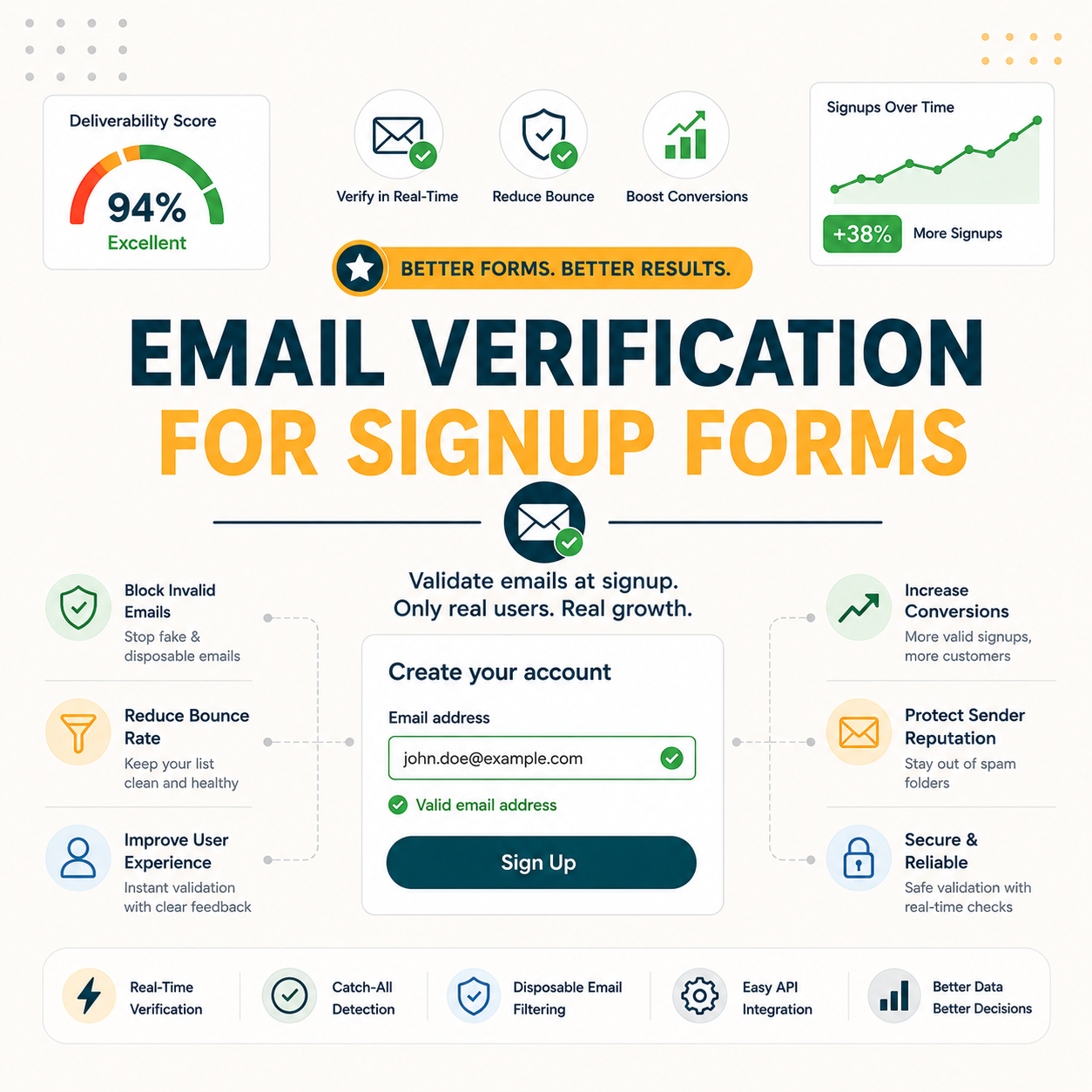
Email verification for signup forms is a real-time check that validates each address the moment it is submitted. It confirms the address can receive mail and flags fakes, typos and disposable domains before the record is saved, keeping the database clean at the source instead of cleaning it later. The check runs inline at the form rather than in a batch days afterward.
Verifying at the form is prevention; cleaning later is cure, and the form is the cheapest place to catch bad data before it spreads.
Why Do Fake and Mistyped Signups Hurt You?
Fake and mistyped signups inflate list size with addresses that bounce, lower engagement metrics, and can introduce spam traps that damage sender reputation. They waste send budget and skew analytics, while a single typo silently loses a real subscriber who wanted in. Catching these inputs at entry protects both data quality and inbox deliverability over time.
- Bounces from typos: Mistyped domains like gmial.com or hotnail.com create hard bounces that raise the bounce rate, signal poor list hygiene to mailbox providers, and erode the sender reputation that decides whether future campaigns reach the inbox.
- Fake and disposable signups: Throwaway addresses from disposable-domain services and bot submissions add records that never engage, inflating list counts, distorting open rates, and occasionally hiding spam traps that trigger blocklist placement for the sending domain.
- Skewed analytics and cost: Junk records dilute every metric from open rate to conversion, mislead reporting decisions, and consume paid sending credits on addresses that deliver no value, charging real budget against contacts that cannot convert.
- Lost real subscribers: A single character typo turns a genuine signup into a dead address, silently dropping a subscriber who wanted in and who will rarely return to correct the mistake on a second attempt.
- Damaged deliverability: Repeated bounces and trap hits accumulate into a poor sending reputation, pushing legitimate campaigns toward spam folders and reducing inbox placement for the entire list, not just the bad records that caused it.
Bad signups cost twice over: wasted send budget plus the lost real subscribers hidden behind a single mistyped character.
How Do You Add Email Verification to a Signup Form?
Add email verification to a signup form in four steps: get a verification API key, call the verify endpoint on email input or submit, read the returned status, and allow, warn or block accordingly. Most forms integrate it with a few lines of code or a plugin, leaving the rest of the signup flow untouched and fast.
- Get an API key: Sign up for a verifier account and generate an API key, which authenticates each request. The free tier covers initial testing, so integration can be validated before any plan upgrade becomes necessary.
- Call on input or submit: Trigger the verify request when the email field loses focus or when the form submits, sending the address to the endpoint and receiving a deliverability status back in well under a second.
- Read the status: Parse the returned deliverability result and confidence score, which classify the address as valid, invalid, risky or unknown, giving the form a clear signal to act on before saving the record.
- Allow, warn or block: Map each status to an action, accepting valid addresses, suggesting corrections for likely typos, and blocking clear invalids or disposable domains, so the decision logic stays explicit and tunable.
- Test and monitor: Verify the integration against a sample of known-good and known-bad addresses before launch, then watch real submissions for false rejections, adjusting the block-versus-warn thresholds as live data reveals how the form behaves.
Get an API key free and verify every address at signup.
Verify at Signup Free →Free API key · No credit card · Real-time deliverability status
Four steps and a few lines of code add verification to almost any form, with no rebuild of the signup flow required.
Real-Time vs On-Submit Verification: Which Should You Use?
Real-time, on-blur verification checks the address as the user leaves the email field, catching typos instantly while they can still be fixed; on-submit verification checks once at submission. Real-time gives the best experience for typo correction, while on-submit is simpler to wire up. Many forms use both: instant inline hints plus a final submit check.
- Real-time (on-blur): The check fires the instant the email field loses focus, surfacing a typo suggestion or warning while the user is still on the form. This approach recovers mistyped addresses immediately, delivers the smoothest correction experience, and prevents most bad records from ever reaching submission.
- On-submit: The verify request runs once when the form is submitted, validating the final address before the record saves. This method is simpler to implement and adds a single dependable gate, though it catches typos a moment later than an inline on-blur check.
On-blur catches typos best while the user can act; on-submit is the safety net, and combining both yields the cleanest result.
What Does Signup Verification Block?
At the form, verification blocks invalid addresses, obvious typos, disposable-domain signups, and optionally role accounts. The table below shows what each check catches and the recommended action, so the harmful inputs are stopped while genuine subscribers pass through. The goal is precision: keep real people in, keep junk out.
Source: Hunter Email Verifier behaviour per hunter.io/api-documentation/v2, verified 2026-06-27. Block-versus-warn actions are recommended defaults; tune them to the risk tolerance of the form.
Verification blocks the harmful inputs precisely: invalids and disposables out, real subscribers in, with typos offered a fix rather than a wall.
How Do You Handle Invalid Input Gracefully?
For typos, suggest a correction such as “did you mean gmail.com?” rather than throwing a hard error; for clear invalids, show a friendly message; for disposable domains, decide whether to block or merely flag. Graceful handling fixes honest mistakes without frustrating genuine users who simply mistyped a character on a phone keyboard.
- Typo suggestion: Offering an inline domain-correction prompt that proposes gmail.com for a mistyped gmial.com lets the user accept the fix with one tap, recovering an address that a blunt rejection would have lost and turning a near-miss into a clean signup.
- Invalid message: Displaying a short, friendly note such as “that address could not be verified, please check it” guides the user to correct a genuine error without blaming them or stalling the rest of the form.
- Disposable policy: Deciding in advance whether disposable domains are blocked outright or simply flagged for review keeps the rule consistent, prevents arbitrary rejections, and documents the trade-off between strict hygiene and maximum reach.
- Inline field feedback: Showing the validation result beside the email field rather than after a full page reload keeps the user oriented, surfaces the issue at the exact moment of entry, and avoids forcing a re-scan of the whole form.
- Unknown-result fallback: Treating an uncertain or timed-out verification as a pass rather than a block prevents a slow API response from rejecting a genuine subscriber, preserving the signup while still catching the clearly invalid inputs.
Suggest, do not scold: a typo hint recovers a real subscriber that a hard error would have turned away for good.
Does Signup Verification Hurt Conversion?
Done well, no, and it often helps by catching typos that would otherwise have lost the subscriber entirely. Done badly, with slow checks or hard blocks on borderline addresses, it does add friction. The honest answer: verification protects conversion when it suggests fixes, stays fast, and never blocks a genuine user on an uncertain result.
The Email Verifier endpoint returns a deliverability status and confidence score in real time per address.
— Hunter API documentation, Email Verifier
Fast, suggestion-based verification helps conversion; slow, hard blocks hurt it, so the implementation decides the outcome more than the feature does.
How Do You Verify Without Hurting Conversion?
Keep it fast and forgiving: verify asynchronously so the form never stalls, suggest corrections for likely typos, hard-block only clear invalids, and treat unknown results as a pass to avoid blocking real users on a slow or uncertain check. Speed plus forgiveness keeps conversion intact while still filtering the genuinely bad inputs.
- Verify asynchronously: Running the check in the background so the form never freezes while waiting on a response keeps the experience instant, since the submit button stays responsive even if the verification call takes a moment to return.
- Suggest typos, do not reject: Offering a one-tap correction for likely misspellings recovers addresses that a hard rejection would lose, turning the most common form error into a quick fix instead of an abandoned signup.
- Block only clear invalids: Reserving a hard block for addresses confirmed invalid or disposable, while letting uncertain results through, prevents false rejections of genuine subscribers and limits friction to the inputs that truly warrant stopping.
- Pass on unknown results: Letting addresses that return an unknown or timed-out status proceed avoids penalising a real user for a slow check or a cautious verifier, trading a small amount of risk for a frustration-free signup experience.
- Keep the check invisible: Surfacing only a gentle correction prompt and never a spinner that blocks the button keeps the verification step out of the user’s way, so the form feels as fast as one with no validation at all.
Hunter’s own verifier review found accuracy holds strong on standard domains, with valid-status addresses bouncing under 2% across a 2,000-email benchmark, the same engine behind the sub-1-second check used at signup here.
— Growth Hack Suite, Hunter Email Verifier Review
Async, forgiving verification protects both data quality and conversion at once, which is the best of both outcomes rather than a trade-off.
How Does It Compare to CAPTCHA and Double Opt-In?
CAPTCHA stops bots but not typos or disposable addresses; double opt-in confirms intent but adds an email step and loses some genuine users to unconfirmed clicks. Verification catches address quality at entry, complementing both rather than replacing them. The strongest setup layers real-time verification with double opt-in so quality and intent are both covered.
- Verification: The check validates whether an address is real and deliverable at the moment of entry, catching typos, invalids and disposables that no human-versus-bot test inspects, and keeping the saved record clean from the start.
- CAPTCHA: The challenge separates humans from bots and curbs automated spam submissions, yet it inspects nothing about the email itself, so a human entering a mistyped or disposable address still passes straight through unflagged.
- Double opt-in: The confirmation email proves the subscriber controls the inbox and genuinely wants in, adding strong intent signal, though it costs a deliverable confirmation step and forgoes contacts who never click the link.
- Honeypot fields: The hidden form field traps naive bots that fill every input, adding a cheap spam filter, yet it inspects neither address quality nor human intent and misses sophisticated bots that ignore unseen fields.
- Layered defence: The strongest signup stacks verification, a bot check and double opt-in together, since each layer covers a gap the others leave open and the combination filters quality, automation and intent in one pass.
Verification, CAPTCHA and double opt-in each solve a different problem: layer them together rather than substituting one for another.
What Tools and Integrations Add Form Verification?
Form verification works through a verifier API plus form plugins or no-code integration tools. Hunter provides the verification API with a free tier, and form builders or automation platforms connect to it. The table below lists common integration paths, from raw API calls to a drop-in plugin, ordered by the setup effort each one requires.
Source: integration methods per hunter.io/api-documentation/v2, verified 2026-06-27. Plugin and no-code availability varies by form platform; confirm the connector for the specific stack in use.
From a raw API call to a no-code plugin, there is an integration path for every form stack and skill level.
Is Signup Verification Worth the Effort?
For any product collecting emails at scale, yes: blocking bad data at entry is far cheaper than cleaning it in bulk later and protects deliverability continuously. Low-traffic sites with rare, occasional signups may not need it, and that is an honest exception worth naming rather than pretending every form requires the same level of defence.
- Worth it for: Products and sites collecting emails steadily through forms gain ongoing protection, because catching invalids and disposables at the point of entry prevents the slow accumulation of junk that quietly degrades deliverability and inflates sending costs month after month.
- Skip if: A very low-traffic site with only a handful of signups a month sees little return on the setup, since periodic bulk verification can clean such a small list just as effectively without wiring a real-time check into the form.
High-signup products gain the most from real-time verification; rare-signup sites can lean on periodic bulk cleaning instead.
Hunter’s own verifier review found accuracy holds strong on standard domains, with valid-status addresses bouncing under 2% across a 2,000-email benchmark, the same engine behind the sub-1-second check used at signup here.
— Growth Hack Suite, Hunter Email Verifier Review
Verdict: Should You Verify Email at Signup?
For products collecting emails through forms, signup verification is worth it: a fast, forgiving real-time check keeps the database clean at the source, protects deliverability, and even rescues typo subscribers who would otherwise be lost. Implement it asynchronously with typo suggestions, and it improves both data quality and conversion at the same time.
Verdict: Real-time email verification at signup blocks fakes, typos and disposables at the cheapest point of entry, at roughly 0.5 credit per check in under a second. Run it async with typo suggestions, pair it with double opt-in for intent, and it protects data quality and conversion together. Free to start.
Data validation ensures input data is clean, correct and useful before processing.
— Wikipedia, Data validation
Verify email at signup free — start protecting your list now.
Verify at Signup Free →Free plan · No credit card · Real-time API at the form
Related Tools in the Hunter Stack
Signup verification runs on the same verifier engine that cleans existing lists in bulk. The verifier review covers how the product works and what it flags, and the finder review covers building the lists worth verifying, all inside one connected stack on a single credit pool.
- Hunter Email Verifier: The validation layer behind form verification, covered in depth including how it works and what it flags — start with what the Hunter Email Verifier is.
- Hunter Email Finder: The list-building half of the bundle that shares the same credit pool — read the Hunter.io email finder review for sourcing costs.
Email Verification for Signup Forms: Frequently Asked Questions
The 12 most-asked questions about email verification for signup forms.
What is email verification for signup forms?
It is a real-time check that validates each address as it is entered on a form, confirming the mailbox can receive mail and flagging fakes, typos and disposable domains before the record saves. The check runs inline at the point of entry rather than in a later batch clean.
Why do fake signups hurt my list?
Fake and disposable signups inflate list size with addresses that never engage, drag down open and click rates, waste sending credits, and can hide spam traps that damage sender reputation. They also skew analytics, making campaign decisions rest on numbers polluted by records that cannot convert.
How do I add email verification to a signup form?
Get a verification API key, call the verify endpoint when the email field blurs or the form submits, read the returned deliverability status, then allow, warn or block accordingly. Most forms integrate this with a few lines of code or a plugin, without changing the rest of the signup flow.
Real-time vs on-submit verification — which is better?
Real-time on-blur verification catches typos instantly while the user can still fix them, giving the smoothest experience. On-submit verification is simpler and adds a single final gate. Many forms combine both: inline typo hints during entry plus a dependable check at submission.
What does signup verification block?
At submit it blocks invalid syntax and nonexistent mailboxes, flags obvious typos for correction, and blocks or flags disposable domains. Role accounts such as info@ can be warned or allowed by policy. The aim is to stop harmful inputs while letting genuine subscribers through unimpeded.
How do I handle typos gracefully?
Offer an inline suggestion such as “did you mean gmail.com?” that the user can accept with one tap, instead of a hard rejection. Show friendly messages for genuine invalids and keep a clear disposable policy. Graceful handling recovers honest mistakes without frustrating real users.
Does signup verification hurt conversion?
Done well it does not, and it often helps by rescuing typo addresses that would otherwise be lost. Done badly, with slow checks or hard blocks on borderline addresses, it adds friction. The implementation, not the feature itself, decides whether conversion is protected or harmed.
How do I verify without hurting conversion?
Verify asynchronously so the form never stalls, suggest corrections for likely typos, hard-block only clear invalids, and treat unknown results as a pass so no genuine user is stopped on an uncertain check. Speed plus forgiveness keeps conversion intact while still filtering bad inputs.
Is verification better than CAPTCHA?
They solve different problems. CAPTCHA stops bots but inspects nothing about the email, so a human entering a typo or disposable address passes through. Verification checks address quality at entry. The strongest forms use both, plus double opt-in for confirmed intent.
What tools add form verification?
A verifier API such as Hunter’s powers the check, connected through a direct API call, a form-builder plugin, or a no-code automation tool like Zapier. The right path depends on the form stack and developer resources, from full-control API to point-and-click wiring.
Is signup verification worth it?
For products collecting emails steadily, yes: blocking bad data at entry costs far less than cleaning it in bulk and protects deliverability continuously. Very low-traffic sites with rare signups can rely on periodic bulk verification instead, an honest exception worth naming.
Does verifying at signup stop fake emails?
Real-time verification blocks invalid syntax, nonexistent mailboxes and disposable domains at submit, stopping most fake and throwaway signups at the source. It cannot read intent, so pairing it with double opt-in confirms the subscriber genuinely wants in and closes the remaining gap.