Table of Contents
A secondary domain is a separate sending domain you use for cold email instead of your main company domain, so cold outreach can never damage the reputation of the domain that runs the business. This guide explains what it is, why senders use one, how it protects the main domain, how to set one up, what it should look like, and how many to run.
A secondary domain is a separate sending domain for cold email that protects the main company domain.
Best for: keeping the business’s primary email safe from outreach risk.
Caveat: a new one still needs authentication and warmup.
Bottom line: if the cold domain is flagged, the main domain stays safe.
Put this into practice. Try Smartlead free for 14 days.
Start Smartlead Free Trial →Unlimited mailboxes · no credit card · 14-day trial
What Is a Secondary Domain?
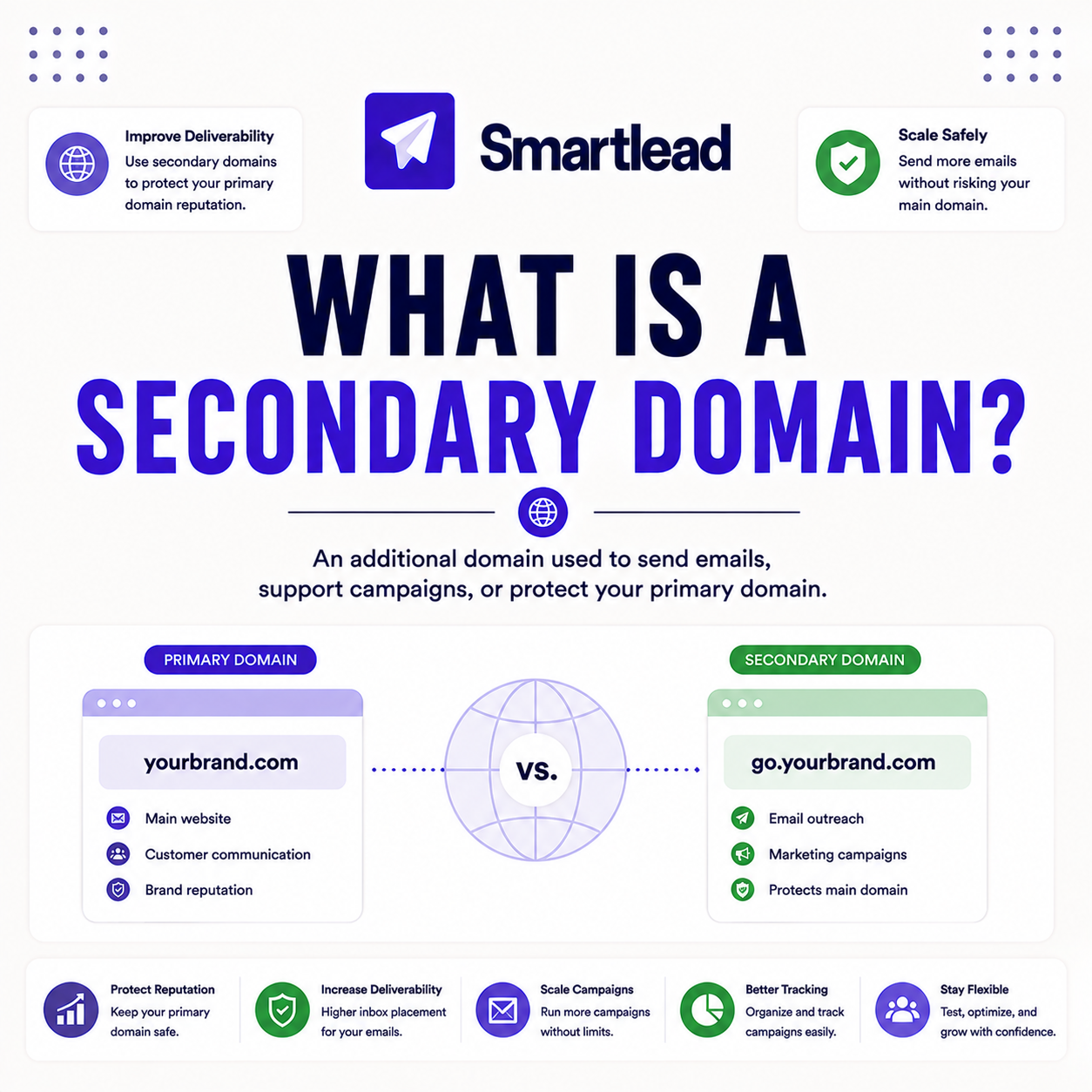
A secondary domain is a separate domain registered and used only for cold email, kept apart from the main company domain. It carries the outreach so the primary domain never does. The deciding factor is that isolation protects the domain the business depends on. The list below covers the concept.
- Separate domain: registered and used only for cold email, never for business mail.
- Isolates risk: any reputation damage stays on the secondary, not the main domain.
- Brand variant: usually a recognizable version of the brand so recipients still trust it.
- Needs setup: it still requires authentication and warmup before real sending.
- Standard practice: a dedicated sending domain is the norm for serious cold email.
“A secondary domain takes the risk of cold email, so the main domain the business runs on stays safe.”
— Growth Hack Suite, on sending domains
Why Use a Secondary Domain for Cold Email?
You use one because cold email carries reputation risk, and a flagged domain can land in spam or on a blocklist. If that domain is the main one, the whole business loses email. The deciding factor is that a secondary domain contains the risk. The list below covers why senders use one.
- Cold email is risky: outreach to non-opted-in recipients can trigger filters or blocklists.
- Protect business email: a flagged main domain would break invoices, sales and support.
- Contain the damage: any reputation hit stays on it, not the primary.
- Enable higher volume: dedicated domains can carry outreach the main domain never should.
- Recoverable: a damaged one can be replaced without touching the business.
“Use a separate domain for cold email to keep the main domain’s reputation safe.”
— HubSpot, on domain safety
How Does a Secondary Domain Protect Your Main Domain?
It protects the main domain by absorbing any reputation damage from cold sending. If the cold domain is flagged, the business’s primary domain keeps its clean reputation and its email keeps flowing. The deciding factor is that the two reputations are separate. The list below covers how the protection works.
- Absorbs the risk: any filtering or blocklisting hits the secondary, not the main domain.
- Separate reputations: the two domains carry independent trust scores.
- Business keeps sending: invoices and support mail from the main domain stay unaffected.
- Swappable: a burned one can be retired and replaced cleanly.
- Peace of mind: the setup means an aggressive campaign never risks core operations.
Should You Use Multiple Secondary Domains?
Yes, high-volume senders use several to spread sending and reputation risk, so no single domain carries too much. More domains mean a lower load on each. The deciding factor is total volume: the higher it is, the more domains are worth running. The list below covers the multi-domain approach.
- Spread volume: distributing sends across domains keeps each one’s load safe.
- Lower per-domain load: more domains mean a smaller, safer share for each.
- Isolate failures: a problem on one domain does not affect the others.
- Scale headroom: extra domains give room to grow volume without overloading any.
- Volume-driven: the number of domains should track real sending volume, not vanity.
How Do You Set Up a Secondary Domain?
Set it up by registering, often a close variant of the brand, then authenticating, adding mailboxes and warming them before real sends. The setup mirrors any sending domain. The ordered steps below make setup repeatable.
- Register the domain: buy a brand-related domain from any registrar for cold email use.
- Authenticate: publish SPF, DKIM and DMARC so the domain passes the trust check.
- Add mailboxes: create the sending mailboxes on it.
- Warm each mailbox: run warmup for one to two weeks before any real send.
- Launch gradually: ramp volume slowly once the mailboxes are warmed and verified.
What Should a Secondary Domain Look Like?
It is usually a recognizable variant of the brand, such as adding a word or a different top-level domain, so recipients still trust it. It should look related, not random. The deciding factor is that recognizability keeps reply rates healthy. The honest read is that a random, brand-less domain looks suspicious and hurts trust.
The practical point is to pick a domain that clearly ties back to the brand, so prospects see a familiar name rather than an anonymous sender.
Do Secondary Domains Need Warmup?
Yes, a new one starts with no reputation, so its mailboxes need warming for one to two weeks before real sends. A fresh domain is the least trusted kind, so warmup is essential. The deciding factor is that a new domain has zero history to lean on. The table below positions the setup against a typical rival.
Source: multi-domain feature positioning, mid-2026. Verify current features and plan inclusion on smartlead.ai.
Protecting your main domain? Test Smartlead free for 14 days.
Start Smartlead Free Trial →No credit card · unlimited mailboxes
Does Smartlead Support Secondary Domains?
Yes, Smartlead is built to send across multiple domains and their mailboxes, with warmup, rotation and authentication support on each. Its unlimited-mailbox model makes running several domains affordable. The deciding factor is that multi-domain sending with unlimited mailboxes is exactly what high-volume cold email needs. The honest read is that a platform built for many domains makes this strategy practical.
The practical point is that running several warmed domains through one platform is what lets outreach scale while every domain stays protected.
Who Gets the Most Value From a Secondary Domain?
Agencies and scale senders get the most value, since they run the highest volume and have the most to lose if a main domain is flagged. Every serious cold email sender benefits, but the stakes rise with volume. The deciding factor is how much business depends on the main domain staying clean. The honest read is that anyone doing real cold email should send from one.
The practical point is that even a solo sender should use one, while agencies run several to spread volume and risk.
How Do You Get Started Today?
Start on the 14-day free trial, register a brand-variant domain, connect a mailbox on it, authenticate and warm it, and verify a small list. Doing the setup on a dedicated domain from day one protects the main domain from the start. The trial needs no card, so the only cost is setup time. By launch, cold email sends from a safe, separate domain.
Can You Use a Subdomain Instead of a Secondary Domain?
Subdomains share some reputation with the root domain, so a subdomain does not fully isolate cold email risk the way a separate domain does. A problem on a subdomain can still affect the main domain. The deciding factor is that only a fully separate domain gives complete isolation. The table below compares the options.
Source: domain-isolation comparison from standard cold email practice, mid-2026. Directional, not a measured benchmark.
Where Do You Buy a Secondary Domain?
Buy one from any domain registrar, choosing a brand-related name so recipients recognize it. After purchase, point it at the sending setup, authenticate it and warm the mailboxes. The deciding factor is picking a recognizable brand variant, not the registrar. The honest read is that any reputable registrar works, so the name matters more than where it is bought.
“A domain name is a string that identifies a network domain on the Internet.”
— Wikipedia, Domain name
Secondary Domain: The Final Verdict
The final verdict is that a secondary domain is essential for serious cold email: a separate, brand-recognizable sending domain that absorbs the risk so the main company domain stays clean. It still needs authentication and warmup, and high-volume senders run several. Send cold email from a dedicated domain, and an aggressive campaign never threatens the business’s core email.
Growth Hack Suite Editorial — Outbound Tools Team
This guide explains the concept based on standard cold email deliverability practice plus hands-on testing of Smartlead’s multi-domain sending. Behavior varies; verify current features on smartlead.ai. We review outbound tools for B2B senders.
Last updated: June 2026. Confirm current multi-domain features on smartlead.ai.
Affiliate disclosure: this page contains affiliate links. If you start a plan through them, Growth Hack Suite may earn a commission at no extra cost to you. It does not change our guidance.
Protect your main domain. Start Smartlead free for 14 days.
Start Smartlead Free Trial →Unlimited mailboxes · no credit card · cancel anytime
Related Tools in the Outbound Stack
Two other tools in the Growth Hack Suite stack pair with it.
- Hunter Email Verifier: verifying lists keeps bounce low on a fresh one — see verifier accuracy.
- GMass: the Gmail-native option for a sender on a single Gmail sending domain — read the GMass review.
- Gmail tools comparison: the Gmail-scoped breakdown for senders weighing platform versus extension — compare the Gmail tools.
Secondary Domain FAQ
The 12 most-asked questions about secondary domains.
What is a secondary domain?
A secondary domain is a separate domain you register and use only for cold email, kept apart from the main company domain so outreach never risks the business’s primary email reputation.
Why use a secondary domain for cold email?
Cold email carries reputation risk, and a flagged domain can land in spam or on a blocklist. If that domain were the main one, the whole business would lose email, so this contains the risk.
How does a secondary domain protect my main domain?
It absorbs any reputation damage from cold sending. If the cold domain is flagged, the business’s primary domain keeps its clean reputation and its email keeps flowing.
Should I use multiple secondary domains?
Yes, high-volume senders use several to spread sending and reputation risk, so no single domain carries too much. The number should track real volume rather than being arbitrary.
How do I set up a secondary domain?
Register it, often a close brand variant, configure SPF, DKIM and DMARC, add mailboxes and warm them for one to two weeks before real sends. Then ramp volume gradually.
What should a secondary domain look like?
Usually a recognizable variant of your brand, so recipients still trust it. A random, brand-less domain looks suspicious and hurts reply rates, so keep the name clearly tied to the brand.
Do secondary domains need warmup?
Yes, a new one starts with no reputation, so its mailboxes need warming for one to two weeks before real sends. A fresh domain is the least trusted kind, so warmup is essential.
Does Smartlead support secondary domains?
Yes, Smartlead sends across multiple domains and mailboxes, with warmup, rotation and authentication support on each. Its unlimited-mailbox model makes running several domains affordable.
Can I use a subdomain instead of a secondary domain?
Subdomains share some reputation with the root domain, so they do not fully isolate cold email risk. For real protection of the main domain, a fully separate domain is better.
How many secondary domains do I need?
It depends on volume: enough that each domain and its mailboxes stay under safe limits. A small sender may need one, while a high-volume agency runs several to spread the load.
Does a secondary domain hurt brand trust?
Not if it is a clear brand variant. Recipients recognize a related name, so a well-chosen one keeps trust while protecting the main domain. A random domain, however, can look off.
Where do I buy a secondary domain?
From any domain registrar, choosing a brand-related name. After purchase, point it at the sending setup, authenticate it and warm the mailboxes before real sends. The name matters more than the registrar.