Table of Contents
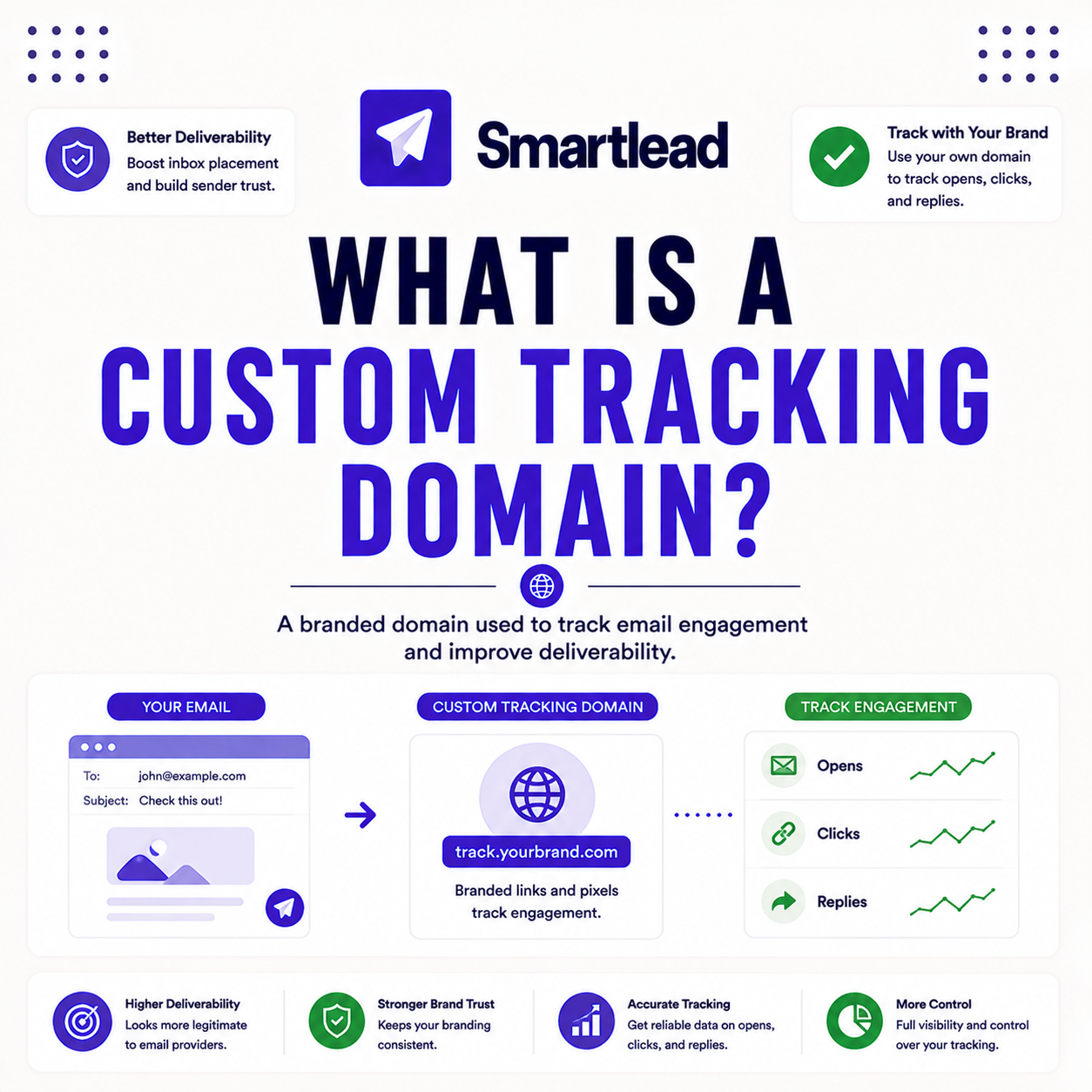
A custom tracking domain is a branded domain, set up with a CNAME record, that handles the open and click tracking links in your cold email instead of a shared tracking domain. This guide explains what a custom tracking domain is, how it works, why it affects deliverability, when it is needed, how to set one up, and what a CNAME record actually is.
A custom tracking domain is a branded CNAME that handles your tracking links, isolating their reputation from shared ones.
Best for: anyone using open or click tracking in cold email.
Caveat: it is not needed if tracking is turned off entirely.
Bottom line: a branded tracking domain protects link reputation.
Put this into practice. Try Smartlead free for 14 days.
Start Smartlead Free Trial →Unlimited mailboxes · no credit card · 14-day trial
What Is a Custom Tracking Domain?
A custom tracking domain is a branded domain configured with a CNAME record that handles the tracking links in cold email, rather than routing them through a shared tracking domain. It keeps link reputation under your control. The deciding factor is that a branded tracking domain isolates the reputation of tracking links. The list below covers the concept.
- Branded CNAME: a tracking domain the sender controls rather than a shared one.
- Handles tracking links: open and click links route through the custom domain.
- Isolated reputation: the link domain’s reputation is separate from other senders’.
- Only for tracking: it matters only when open or click tracking is enabled.
- Quick to add: a single CNAME record plus propagation sets it up.
“A branded tracking domain keeps link reputation your own, so a shared domain’s problems never touch your mail.”
— Growth Hack Suite, on tracking domains
How Does a Custom Tracking Domain Work?
It works by pointing a subdomain you control, via a CNAME record, to your sending platform’s tracking servers, so tracking links show your branded domain instead of a shared one. The redirect happens behind the scenes. The deciding factor is that the CNAME reroutes tracking through the sender’s own domain. The list below covers the mechanism.
- Point a subdomain: a subdomain the sender controls is used for tracking links.
- Add a CNAME: the CNAME points that subdomain at the platform’s tracking servers.
- Rewrite links: the platform then wraps tracking links with the branded domain.
- Track behind the scenes: opens and clicks still register, now under the custom domain.
- Isolate the reputation: the link domain’s standing is no longer shared with strangers.
“Spam filters scan the domains behind links, so a shared tracking domain can hurt placement.”
— HubSpot, on link reputation
Why Does a Tracking Domain Affect Deliverability?
A tracking domain affects deliverability because spam filters scan the domains behind links, and a shared tracking domain used by many senders can carry a poor reputation that drags down your mail. A branded domain isolates that risk. The deciding factor is that link domains are a filter signal too. The list below covers why it matters.
- Filters scan links: the domains behind tracking links are checked like any other domain.
- Shared domains carry risk: a tracking domain used by many senders can be poorly rated.
- Isolation protects placement: a branded domain keeps link reputation clean and controlled.
- One more signal: the tracking domain adds to the overall trust score of the mail.
- Control the variable: a custom domain removes a risk the sender otherwise cannot manage.
Do You Always Need a Custom Tracking Domain?
You need one if you use open or click tracking and want to protect deliverability, but not if tracking is turned off entirely, since there are no links to route. The need follows the tracking. The deciding factor is whether tracking is enabled at all. The list below covers when it is required.
- Using tracking: a custom domain is strongly recommended whenever tracking is on.
- No tracking: if opens and clicks are not tracked, a tracking domain is not needed.
- Protects placement: with tracking on, a branded domain keeps links from hurting the mail.
- Cheap insurance: the setup is quick, so it is worth doing whenever tracking is used.
- Follows the feature: the need for a tracking domain tracks whether tracking is enabled.
How Do You Set Up a Custom Tracking Domain?
Set it up by creating a subdomain, adding a CNAME record pointing to the platform, then enabling it in the sending tool once DNS propagates. The whole process is a few minutes plus propagation time. The ordered steps below make setup repeatable.
- Create a subdomain: choose a branded subdomain to use for tracking links.
- Add the CNAME: point the subdomain at the platform’s tracking servers via CNAME.
- Wait for propagation: allow DNS time to spread before enabling the domain.
- Enable in the tool: set the custom tracking domain in the platform’s settings.
- Verify tracking: send a test to confirm links use the branded domain and register.
Using tracking links? Test Smartlead free for 14 days.
Start Smartlead Free Trial →No credit card · unlimited mailboxes
What Is a CNAME Record?
A CNAME record is a DNS entry that points one domain name to another, used here to route a branded tracking subdomain to the platform’s tracking servers. It is an alias, not a copy. The deciding factor is that the CNAME is what connects the branded domain to the platform. The honest read is that setting the CNAME is the one technical step in creating a tracking domain.
The practical point is that adding a single CNAME record in the domain’s DNS is all it takes to point the tracking subdomain at the platform.
Does a Custom Tracking Domain Improve Open Rates?
It does not directly improve open rates, but by protecting deliverability it helps more mail reach the inbox, which indirectly lifts opens. The benefit is placement, not tracking accuracy. The deciding factor is that the gain is deliverability, not a magic open-rate boost. The table below positions it against a typical rival.
Source: tracking-domain feature positioning, mid-2026. Verify current support on smartlead.ai.
Does Smartlead Support Custom Tracking Domains?
Yes, Smartlead supports custom tracking domains so tracking links can run through a branded domain rather than a shared one. Setup is a single CNAME record. The deciding factor is that a custom tracking domain is a standard, quick step that protects link reputation. The honest read is that anyone using tracking on the platform should set a custom tracking domain.
The practical point is to add the custom tracking domain during setup whenever tracking is enabled, since it takes minutes and protects deliverability.
Who Gets the Most Value From a Tracking Domain?
Agencies and scale senders get the most value, since protecting link reputation compounds across many campaigns and clients. Any sender using tracking benefits, but the stakes rise with volume. The deciding factor is how much sending relies on tracked links. The honest read is that the more a sender scales tracked campaigns, the more a custom tracking domain pays back.
The practical point is that even a solo sender using tracking should set a custom domain, while agencies benefit most across their client volume.
How Do You Get Started Today?
Start on the 14-day free trial, connect a mailbox, add a custom tracking domain via CNAME and warm the mailbox before sending. Setting the tracking domain during setup protects link reputation from the first campaign. The trial needs no card, so the only cost is setup time. By launch, tracked links run through a branded, controlled domain.
Is a Tracking Domain the Same as a Sending Domain?
No, the sending domain is where emails come from, while the tracking domain handles the links inside them. They serve different roles and usually differ. The deciding factor is that one governs the From address and the other governs link reputation. The table below draws the distinction.
Source: domain-role comparison from standard cold email practice, mid-2026. Directional, not a measured benchmark.
What Happens Without a Custom Tracking Domain?
Without a custom tracking domain, tracking links use a shared domain whose reputation is outside your control, so another sender’s abuse can drag down your placement. The risk is inherited, not caused by you. The deciding factor is that a shared link domain is a variable you cannot manage. The honest read is that skipping a custom tracking domain leaves link reputation to chance.
“A CNAME record maps one domain name, an alias, to another canonical domain name.”
— Wikipedia, CNAME record
Custom Tracking Domain: The Final Verdict
The final verdict is that a custom tracking domain is a quick, worthwhile step for any cold email using tracking: a branded CNAME that isolates link reputation from shared domains and protects deliverability. It does not boost open rates directly, but by keeping mail out of spam it lifts them indirectly. Set one whenever tracking is on, and link reputation stays under your control.
Growth Hack Suite Editorial — Outbound Tools Team
This guide explains custom tracking domains based on standard cold email deliverability practice plus hands-on testing of Smartlead. Behavior varies; verify current features on smartlead.ai. We review outbound tools for B2B senders.
Last updated: June 2026. Confirm current tracking-domain support on smartlead.ai.
Affiliate disclosure: this page contains affiliate links. If you start a plan through them, Growth Hack Suite may earn a commission at no extra cost to you. It does not change our guidance.
Protect your link reputation. Start Smartlead free for 14 days.
Start Smartlead Free Trial →Unlimited mailboxes · no credit card · cancel anytime
Related Tools in the Outbound Stack
Two other tools in the Growth Hack Suite stack pair with a custom tracking domain.
- Hunter Email Verifier: verifying lists keeps deliverability strong alongside a clean tracking domain — see verifier accuracy.
- GMass: the Gmail-native option for a sender managing tracking from Gmail — read the GMass review.
- Gmail tools comparison: the Gmail-scoped breakdown for senders weighing platform versus extension — compare the Gmail tools.
Custom Tracking Domain FAQ
The 12 most-asked questions about custom tracking domains.
What is a custom tracking domain?
A custom tracking domain is a branded domain you configure with a CNAME record that handles the tracking links in cold email, rather than routing them through a shared tracking domain.
How does a custom tracking domain work?
It points a subdomain you control, via CNAME, to your platform’s tracking servers, so tracking links show your branded domain. Opens and clicks still register, now under the custom domain.
Why does a tracking domain affect deliverability?
Spam filters scan the domains behind links. A shared tracking domain used by many senders can carry a poor reputation that drags down your mail, so a branded domain isolates that risk.
Do I always need a custom tracking domain?
If you use open or click tracking and want to protect deliverability, yes. If tracking is turned off entirely, there are no links to route, so a tracking domain is not needed.
How do I set up a custom tracking domain?
Create a subdomain, add a CNAME record pointing to your platform, wait for DNS propagation, then enable it in the tool. Send a test to confirm links use the branded domain and register.
What is a CNAME record?
A CNAME record is a DNS entry that points one domain name to another, used here to route a branded tracking subdomain to the platform’s tracking servers. It is an alias, not a copy.
Does a custom tracking domain improve open rates?
Not directly, but by protecting deliverability it helps more mail reach the inbox, which indirectly lifts opens. The benefit is placement, not a magic open-rate boost.
Does Smartlead support custom tracking domains?
Yes, Smartlead supports them so your tracking links can run through a branded domain rather than a shared one. Setup is a single CNAME record, so it is a quick, standard step.
Is a custom tracking domain the same as a sending domain?
No, the sending domain is where your emails come from, while the tracking domain handles the links inside them. One governs the From address and reputation, the other governs link reputation.
How long does a tracking domain take to set up?
A few minutes to add the CNAME, plus DNS propagation time, which usually completes within a few hours. Once propagated, enable the domain in the tool and verify it with a test send.
Can I use a subdomain of my main domain for tracking?
Yes, a subdomain is the standard approach, and it keeps the tracking domain clearly tied to your brand. The CNAME on that subdomain points to the platform’s tracking servers.
What happens if I do not use a custom tracking domain?
Your tracking links use a shared domain whose reputation is outside your control, so another sender’s abuse can drag down your placement. Skipping it leaves link reputation to chance.